
RCS for Business 代理通过发送和接收消息与用户进行通信。要向用户发送消息,您的代理会向 RCS Business Messaging API 发送消息请求。单个请求可以包含文本、富媒体卡片、媒体和 PDF 文件、建议回复以及建议操作。
RCS for Business 平台在某些情况下会返回错误信息,以帮助您管理消息传递:
- 如果您向设备不支持 RCS 或未启用 RCS 的用户发送消息,RCS for Business 平台将返回 404 NOT_FOUND 错误。在这种情况下,您可以尝试通过基础架构中定义的备用方法联系该用户。
- 如果您向尚未启动代理的网络上的 RCS 用户发送消息,或者向尚未启用 RCS 流量的网络上的 RCS 用户发送消息,则 RCS for Business 平台将返回 404 NOT_FOUND 错误。
- 如果您发送的消息包含用户设备不支持的功能,RCS for Business 平台将返回 400 INVALID_ARGUMENT 错误,并且不会发送您的消息。
作为多渠道消息传递策略的一部分,最好撤回在合理时间内未送达的消息,并通过其他渠道重新发送。要设置消息过期时间并自动撤回消息,请设置消息过期时间。
收件人已离线
即使收件人离线,RCS for Business 平台仍会接收消息并进行投递。您会收到 200 OK 响应,RCS for Business 平台会将该消息保留 30 天并尝试重新投递。您无需请求 RCS for Business 再次发送消息。
RCS for Business 会在邮件提交 30 天后删除所有未送达的邮件。
根据您代理的使用场景,您可能需要在 30 天超时期限之前撤回未送达的消息。撤回消息可以防止离线用户在重新上线时收到过期的消息。撤回消息有多种方法:
设置消息过期时间
您的客服人员发送的消息是否有时效性?例如,一次性密码 (OTP) 的有效期很短,限时优惠也会过期,预约提醒在预约日期过后就失去了意义。为了确保消息的及时性和相关性,请设置消息过期时间。这样可以防止离线用户在重新上线后收到过时的内容。此外,消息过期也是一个触发备用消息策略的好时机,确保用户能够及时获取所需信息。
要设置消息过期时间,请在代理消息中指定以下字段之一:
-
expireTime:消息过期的确切 UTC 时间。 -
ttl(生存时间):邮件过期前的时间。
有关格式和值选项,请参阅AgentMessage 。
ttl和expireTime的最大值为消息提交后15 天。
虽然ttl和expireTime没有最小值,但建议在消息提交后至少等待10 秒,以显著降低收到撤销和送达通知的几率。
消息的生存时间 (TTL)
设置 RCS for Business 消息的 TTL(生存时间)时,您可以指定消息的有效送达时长。如果消息在 TTL 期限内未能成功送达用户设备,RCS for Business 平台会自动尝试撤销该消息。
发起消息撤销操作时,您请求 RCS for Business 平台停止尝试发送该特定消息。但是,此操作仅影响未来的发送尝试。如果用户的设备已成功接收该消息,则该消息正在处理中,RCS for Business 平台无法从用户的设备上撤销该消息。
以下是关于通知的预期内容:
消息在 TTL 到期前送达:如果用户设备上线并在 TTL 到期前收到消息,您将收到
DELIVERED通知。由于消息已成功送达,因此不会发送撤销通知。这是最常见且符合预期的情况。消息未在 TTL 过期前送达:如果消息在 TTL 过期前未能送达用户设备(例如,设备离线),RCS for Business 平台会尝试撤销该消息。您会收到
TTL_EXPIRATION_REVOKED通知,表明该消息已成功从投递队列中移除。在这种情况下,用户将无法收到该消息。
处理极端情况的建议
我们的系统并行处理 RCS for Business 消息的送达和 TTL 过期通知。因此,极少数情况下,您可能会遇到通知时间与预期不符的情况。例如,您可能同时收到送达通知和 TTL 过期通知,也可能两者都没有收到。
以下是我们处理 RCS for Business 消息通知的建议:
DELIVERED通知:如果您收到邮件的DELIVERED通知,则表示该邮件已送达用户。您可以忽略该邮件后续收到的任何 TTL(生存时间)通知。TTL_EXPIRATION_REVOKED通知:如果您收到状态为TTL_EXPIRATION_REVOKEDTTL 通知,则表示 RCS for Business 系统已停止尝试投递该特定消息。您应将此消息视为未投递,并在必要时执行备用策略。TTL 通知状态为其他任何状态:如果您收到 TTL 通知状态为其他任何状态,则表示撤销尝试未取得结果。
- 对于关键信息,例如一次性密码 (OTP),请启动备用方法。
- 对于非关键消息,决定是否启动回退机制。
- 无通知:在极少数情况下,系统可能无法发送 TTL 通知,客户端也可能无法生成送达通知。这种情况极其罕见。
设置消息流量类型
RBM API 包含一个messageTrafficType字段,用于对消息进行分类。虽然代理用例仍然定义了代理行为以及适用的业务规则,但messageTrafficType允许对消息内容进行更详细的分类。最终,这使得单个代理可以处理多个用例。目前,这不会对现有的代理用例或业务规则产生任何影响。
此字段为选填项,但建议您现在就设置,以免该字段变为必填项时出现错误。
要设置消息流量类型,请根据每条消息的内容为其分配相应的messageTrafficType for Business 支持以下流量类型。
| 交通类型 | 消息内容 | 代理用例 |
|---|---|---|
AUTHENTICATION | 用于身份验证消息。 | OTP |
TRANSACTION | 用于发送与用户现有服务或产品相关的消息。例如:确认信息、付款收据或预订详情。 | 交易型或多用途 |
PROMOTION | 用于发布促销信息,例如优惠、折扣、公告或其他促销内容。 | 促销或多用途 |
SERVICEREQUEST | 用于发送用户明确请求的服务相关的消息。 | 一次性密码、交易密码、促销密码或多用途密码 |
ACKNOWLEDGEMENT | 用于确认用户操作(特别是取消订阅请求)的消息。这表示已收到用户的请求并正在处理中。 | 一次性密码、交易密码、促销密码或多用途密码 |
如果没有设置流量类型,系统会为代理的用例分配默认类型。
| 代理用例 | 默认流量类型 |
|---|---|
| OTP | AUTHENTICATION |
| 交易型 | TRANSACTION |
| 促销 | PROMOTION |
| 多用途 | MESSAGE_TRAFFIC_TYPE_UNSPECIFIED |
多用途代理没有默认流量类型。您必须根据每条消息的内容显式设置流量类型。如果您不替换MESSAGE_TRAFFIC_TYPE_UNSPECIFIED值,则会发生错误。
消息大小限制
整个字符串化的AgentMessage的最大大小为 250 KB。消息的文本部分本身也有长度限制,为 3072 个字符。
为防止用户数据流量意外消耗,通过 RCS for Business 发送的文件最大大小为 100 MiB,且单个 RCS for Business 消息中所有媒体和 PDF 附件的总大小不得超过 100 MiB(1 MiB = 1,048,576 字节)。更多信息,请参阅媒体和 PDF 文件相关说明。
文本
最简单的信息就是文字信息。文字信息最适合用来传递信息,而无需视觉元素、复杂的交互或回复。
例子
以下代码发送纯文本消息。有关格式和值选项,请参阅phones.agentMessages.create 。
卷曲
curl -X POST "https://REGION-rcsbusinessmessaging.googleapis.com/v1/phones/PHONE_NUMBER/agentMessages?messageId=MESSAGE_ID&agentId=AGENT_ID" \
-H "Content-Type: application/json" \
-H "User-Agent: curl/rcs-business-messaging" \
-H "`oauth2l header --json PATH_TO_SERVICE_ACCOUNT_KEY rcsbusinessmessaging`" \
-d '{
  "contentMessage": {
    "text": "Hello, world!"
  },
  "messageTrafficType": "PROMOTION"
}'
Node.js
// Reference to RBM API helper
const rbmApiHelper = require('@google/rcsbusinessmessaging');

let params = {
   messageText: 'Hello, world!',
   msisdn: '+12223334444',
};

// Send a simple message to the device
rbmApiHelper.sendMessage(params, function(response) {
   console.log(response);
});
Java
import com.google.rbm.RbmApiHelper;
…

try {
   // Create an instance of the RBM API helper
   RbmApiHelper rbmApiHelper = new RbmApiHelper();

   // Send simple text message to user
   rbmApiHelper.sendTextMessage(
      "Hello, world!",
      "+12223334444"
   );
} catch(Exception e) {
   e.printStackTrace();
}
Python
# Reference to RBM Python client helper and messaging object structure
from rcs_business_messaging import rbm_service
from rcs_business_messaging import messages

# Create a simple RBM text message
message_text = messages.TextMessage('Hello, world!')

# Send text message to the device
messages.MessageCluster().append_message(message_text).send_to_msisdn('+12223334444')
C#
using RCSBusinessMessaging;
…

// Create an instance of the RBM API helper
RbmApiHelper rbmApiHelper = new RbmApiHelper(credentialsFileLocation,
                                             projectId);

rbmApiHelper.SendTextMessage(
    "Hello, world!",
    "+12223334444",
);
基本消息内容 - 短信转换
运营商已推出计费模式,以支持短信向 RCS for Business 的迁移。包含最多 160 个 UTF-8 字符的 RCS for Business 消息称为基本消息。
构建发送基本消息的请求时,请记住字符按 1 个字节(UTF-8)计算。如果您发送的消息包含特殊字符(例如表情符号或多字节字符集),则每个字符将计为 2-4 个或更多 UTF-8 字符。
在框中输入一些文本以检查其长度:
短信内容和链接预览
RCS 客户端可以实现链接预览。如果纯文本 RCS 企业版消息包含指向带有OpenGraph 标签的网站的 URL,客户端可以生成预览(图像、标题等),从而提供更丰富的用户体验。例如,请参阅带有 URL 预览的基本消息。
请注意,RCS 客户端可能允许用户禁用链接预览。
用于用户验证的一次性密码
您可以使用 RCS for Business 通过 SMS Retriever API 发送一次性密码 (OTP) 以进行自动用户验证。但目前没有专门用于读取通过 RCS for Business 收到的 OTP 的 API。
它在安卓系统上的工作原理
对于已注册短信检索 API 的Android 应用,该 API 会监听格式正确的 RCS for Business 消息。此消息必须包含一次性密码 (OTP) 和用于标识您应用的唯一哈希值。
当收到格式正确的 RCS for Business 消息时,短信检索 API 会像处理短信验证码一样处理它。哈希值与您的应用匹配后,系统会提取验证码并将其转发到您的应用以进行自动用户验证。
- RCS for Business 用户验证短信示例:
Your code is <OTP><app hash>. - 例如:
Your code is 123456 M8tue43FGT.
要了解有关短信检索器及其相关 API 的更多信息,请参阅短信检索器文档。有关已注册短信检索器 API 的应用的自动用户验证的详细信息,请参阅此流程图。
iOS 的工作原理
对于 iOS 系统,其内置的 OTP 处理功能会自动检测并建议使用 RCS for Business OTP 进行自动填充,就像短信 OTP 一样。iOS 应用无需任何特定的 API 集成即可读取 OTP。
媒体和PDF文件
当您发送包含图片、视频、音频或 PDF 文件的消息时,您的代理人必须提供内容的公开 URL 或直接上传文件。
可发送的文件最大大小为 100 MiB,单个消息中所有媒体和 PDF 附件的总大小不得超过 100 MiB。
媒体压缩和转码
RCS for Business 平台会在发送媒体文件(例如图像和视频)之前自动对其进行转码和压缩,以确保它们能够快速加载并在不同的网络和设备上良好运行。
压缩取决于输入媒体的质量,而非严格限制文件大小。这意味着即使文件大小远低于 100 MiB 的最大限制,也可以进行压缩。转码标准不断变化,因此没有固定的文件大小限制来决定何时跳过转码。尝试不同的媒体格式、尺寸和压缩率,找到最适合您有效载荷的平衡点。
缩略图规格
对于媒体文件,您还可以指定缩略图,以便用户在点击之前预览内容。对于音频文件,默认音频控件用作占位符。
- 缩略图文件的最大大小为 100 kB。为了获得最佳用户体验,我们建议缩略图文件大小不超过 50 kB。
- 缩略图的宽高比应与原文件的宽高比一致。
缓存和URL管理
RCS for Business 平台会将文件缓存 60 天,API 会返回一个文件 ID,您的代理可以将该 ID 添加到发送给用户的消息中。60 天后,RCS for Business 会从缓存中删除文件。
通过 URL 指定文件时,最佳实践是将contentMessage.forceRefresh设置为false 。如果将contentMessage.forceRefresh设置为true ,即使 URL 内容已缓存,RCS for Business 也会强制从指定的 URL 获取新内容,这会增加用户的消息传递时间。
文件 URL 示例
以下代码发送图像。有关格式和值选项,请参阅AgentContentMessage 。
卷曲
curl -X POST "https://REGION-rcsbusinessmessaging.googleapis.com/v1/phones/PHONE_NUMBER/agentMessages?messageId=MESSAGE_ID&agentId=AGENT_ID" \
-H "Content-Type: application/json" \
-H "User-Agent: curl/rcs-business-messaging" \
-H "`oauth2l header --json PATH_TO_SERVICE_ACCOUNT_KEY rcsbusinessmessaging`" \
-d '{
  "contentMessage": {
    "contentInfo": {
      "fileUrl": "http://www.google.com/logos/doodles/2015/googles-new-logo-5078286822539264.3-hp2x.gif",
      "forceRefresh": false
    }
  }
}'
Node.js
// Reference to RBM API helper
const rbmApiHelper = require('@google/rcsbusinessmessaging');

let params = {
   fileUrl: 'http://www.google.com/logos/doodles/2015/googles-new-logo-5078286822539264.3-hp2x.gif',
   msisdn: '+12223334444',
};

// Send an image/video to a device
rbmApiHelper.sendMessage(params, function(response) {
   console.log(response);
});
Java
import com.google.api.services.rcsbusinessmessaging.v1.model.AgentContentMessage;
import com.google.api.services.rcsbusinessmessaging.v1.model.AgentMessage;
import com.google.rbm.RbmApiHelper;
…

try {
   // Create an instance of the RBM API helper
   RbmApiHelper rbmApiHelper = new RbmApiHelper();

   String fileUrl = "http://www.google.com/logos/doodles/2015/googles-new-logo-5078286822539264.3-hp2x.gif";

   // create media only message
   AgentContentMessage agentContentMessage = new AgentContentMessage();
   agentContentMessage.setContentInfo(new ContentInfo().setFileUrl(fileUrl));

   // attach content to message
   AgentMessage agentMessage = new AgentMessage();
   agentMessage.setContentMessage(agentContentMessage);

   rbmApiHelper.sendAgentMessage(agentMessage, "+12223334444");
} catch(Exception e) {
   e.printStackTrace();
}
Python
# Reference to RBM Python client helper and messaging object structure
from rcs_business_messaging import rbm_service
from rcs_business_messaging import messages

# Create media file attachment
file_message = messages.FileMessage('http://www.google.com/logos/doodles/2015/googles-new-logo-5078286822539264.3-hp2x.gif')

messages.MessageCluster().append_message(file_message).send_to_msisdn('+12223334444')
C#
using Google.Apis.RCSBusinessMessaging.v1.Data;
using RCSBusinessMessaging;
…

// Create an instance of the RBM API helper
RbmApiHelper rbmApiHelper = new RbmApiHelper(credentialsFileLocation,
                                                 projectId);

string fileUrl = "http://www.google.com/logos/doodles/2015/googles-new-logo-5078286822539264.3-hp2x.gif";

// Create content info with the file url
ContentInfo contentInfo = new ContentInfo
{
    FileUrl = fileUrl
};

// Attach content info to a message
AgentContentMessage agentContentMessage = new AgentContentMessage
{
    ContentInfo = contentInfo,
};

// Attach content to message
AgentMessage agentMessage = new AgentMessage
{
    ContentMessage = agentContentMessage
};

rbmApiHelper.SendAgentMessage(agentMessage, "+12223334444");
或者,您可以使用files.create在消息中发送媒体之前将其上传。
文件上传示例
以下代码上传一个视频文件和一个缩略图文件,然后将这两个文件放在一条消息中发送。有关格式和值选项,请参阅files.create和AgentContentMessage 。
卷曲
curl -X POST "https://REGION-rcsbusinessmessaging.googleapis.com/upload/v1/files?agentId=AGENT_ID" \ -H "Content-Type: video/mp4" \ -H "User-Agent: curl/rcs-business-messaging" \ -H "`oauth2l header --json PATH_TO_SERVICE_ACCOUNT_KEY rcsbusinessmessaging`" \ --upload-file "FULL_PATH_TO_VIDEO_MEDIA_FILE"# Capture server-specified video file name from response body JSONcurl -X POST "https://REGION-rcsbusinessmessaging.googleapis.com/upload/v1/files?agentId=AGENT_ID" \ -H "Content-Type: image/jpeg" \ -H "User-Agent: curl/rcs-business-messaging" \ -H "`oauth2l header --json PATH_TO_SERVICE_ACCOUNT_KEY rcsbusinessmessaging`" \ --upload-file "FULL_PATH_TO_THUMBNAIL_MEDIA_FILE"# Capture server-specified image file name from response body JSONcurl -X POST "https://REGION-rcsbusinessmessaging.googleapis.com/v1/phones/PHONE_NUMBER/agentMessages?messageId=MESSAGE_ID&agentId=AGENT_ID" \ -H "Content-Type: application/json" \ -H "User-Agent: curl/rcs-business-messaging" \ -H "`oauth2l header --json PATH_TO_SERVICE_ACCOUNT_KEY rcsbusinessmessaging`" \ -d '{ "contentMessage": { "uploadedRbmFile": { "fileName": "SERVER-SPECIFIED_VIDEO_FILE_NAME", "thumbnailName": "SERVER-SPECIFIED_THUMBNAIL_FILE_NAME" } } }'
支持的媒体类型
RCS for Business 支持以下媒体类型。对于缩略图,仅支持 image/jpeg、image/jpg、image/gif 和 image/png 格式。
| 媒体类型 | 文档类型 | 扩大 | 适用于富媒体卡片 |
|---|---|---|---|
| 应用程序/ogg | OGG音频 | .ogx | 不 |
| 应用程序/pdf | 是的(仅限印度地区的 Google Messages) | ||
| 音频/AAC | AAC音频 | .aac | 不 |
| 音频/mp3 | MP3音频 | .mp3 | 不 |
| 音频/mpeg | MPEG音频 | .mpeg | 不 |
| 音频/mpg | MPG音频 | .mp3 | 不 |
| 音频/mp4 | MP4音频 | .mp4 | 不 |
| 音频/mp4-latm | MP4-latm 音频 | .mp4 | 不 |
| 音频/3gpp | 3GPP音频 | 0.3克 | 不 |
| 图像/jpeg | JPEG | .jpeg,.jpg | 是的 |
| 图片/gif | GIF | .gif | 是的 |
| image/png | PNG | .png | 是的 |
| 视频/h263 | H263视频 | .h263 | 是的 |
| 视频/m4v | M4V视频 | .m4v | 是的 |
| 视频/mp4 | MP4视频 | .mp4 | 是的 |
| 视频/mpeg4 | MPEG-4视频 | .mp4、.m4p | 是的 |
| 视频/mpeg | MPEG视频 | .mpeg | 是的 |
| 视频/webm | WEBM视频 | .webm | 是的 |
建议
您的代理会在建议卡片列表或富媒体卡片中发送建议(建议回复和建议操作)。
建议回复
建议回复会提供您的代理知道如何回应的回复,从而引导用户完成对话。
当用户点击建议的回复时,您的代理会收到一个包含回复文本和回传数据的事件。有效负载最多可包含 2048 个字符。
例子
以下代码发送包含两条建议回复的文本。有关格式和值选项,请参阅SuggestedReply 。
卷曲
curl -X POST "https://REGION-rcsbusinessmessaging.googleapis.com/v1/phones/PHONE_NUMBER/agentMessages?messageId=MESSAGE_ID&agentId=AGENT_ID" \
-H "Content-Type: application/json" \
-H "User-Agent: curl/rcs-business-messaging" \
-H "`oauth2l header --json PATH_TO_SERVICE_ACCOUNT_KEY rcsbusinessmessaging`" \
-d '{
  "contentMessage": {
    "text": "Hello, world!",
    "suggestions": [
      {
        "reply": {
          "text": "Suggestion #1",
          "postbackData": "suggestion_1"
        }
      },
      {
        "reply": {
          "text": "Suggestion #2",
          "postbackData": "suggestion_2"
        }
      }
    ]
  }
}'
Node.js
// Reference to RBM API helper
const rbmApiHelper = require('@google/rcsbusinessmessaging');

let suggestions = [
   {
      reply: {
         'text': 'Suggestion #1',
         'postbackData': 'suggestion_1',
      },
   },
   {
      reply: {
         'text': 'Suggestion #2',
         'postbackData': 'suggestion_2',
      },
   },
];

let params = {
   messageText: 'Hello, world!',
   msisdn: '+12223334444',
   suggestions: suggestions,
};

// Send a simple message with suggestion chips to the device
rbmApiHelper.sendMessage(params, function(response) {
   console.log(response);
});
Java
import com.google.api.services.rcsbusinessmessaging.v1.model.Suggestion;
import com.google.rbm.RbmApiHelper;
import com.google.rbm.SuggestionHelper;
…

try {
   // Create an instance of the RBM API helper
   RbmApiHelper rbmApiHelper = new RbmApiHelper();

   // Create suggestions for chip list
   List<Suggestion> suggestions = new ArrayList<Suggestion>();
   suggestions.add(
      new SuggestionHelper("Suggestion #1", "suggestion_1").getSuggestedReply());

   suggestions.add(
      new SuggestionHelper("Suggestion #2", "suggestion_2").getSuggestedReply());

   // Send simple text message to user
   rbmApiHelper.sendTextMessage(
      "Hello, world!",
      "+12223334444",
      suggestions
   );
} catch(Exception e) {
   e.printStackTrace();
}
Python
# Reference to RBM Python client helper and messaging object structure
from rcs_business_messaging import rbm_service
from rcs_business_messaging import messages

# Create text message to send to user
text_msg = messages.TextMessage('Hello, world!')
cluster = messages.MessageCluster().append_message(text_msg)

# Append suggested replies for the message to send to the user
cluster.append_suggestion_chip(messages.SuggestedReply('Suggestion #1', 'reply:suggestion_1'))
cluster.append_suggestion_chip(messages.SuggestedReply('Suggestion #2', 'reply:suggestion_2'))

# Send a simple message with suggestion chips to the device
cluster.send_to_msisdn('+12223334444')
C#
using Google.Apis.RCSBusinessMessaging.v1.Data;
using RCSBusinessMessaging;
…

// Create an instance of the RBM API helper
RbmApiHelper rbmApiHelper = new RbmApiHelper(credentialsFileLocation,
                                             projectId);

List<Suggestion> suggestions = new List<Suggestion>
{
   // Create suggestion chips
   new SuggestionHelper("Suggestion #1", "suggestion_1").SuggestedReply(),
   new SuggestionHelper("Suggestion #2", "suggestion_2").SuggestedReply()
};

// Send simple text message with suggestions to user
rbmApiHelper.SendTextMessage(
    "Hello, world!",
    "+12223334444",
   suggestions
);
建议的行动
建议操作会利用用户设备的内置功能引导用户完成对话。您的客服人员可以建议用户拨打电话、在地图上打开位置、分享位置、打开网址或创建日历事件。
对于每个建议的操作,您可以选择提供一个备用 URL(最多 2048 个字符)。如果用户的设备不支持建议的操作,此 URL 将在新的浏览器窗口中打开。
当用户点击建议的操作时,您的代理会收到一个包含该操作回传数据的事件。
有关格式和值选项,请参阅SuggestedAction 。
建议显示
有两种方式可以显示建议:
- 持久性:显示在消息气泡内并在整个对话过程中保持不变的建议操作或回复。
- 瞬时建议:显示在消息气泡之外,并在对话继续时消失的建议。
支持的消息格式
- 持续建议:使用独立文本消息和富媒体卡片。
- 临时建议:支持独立文本消息、媒体消息和富媒体卡片。
合并建议
您可以在同一条消息或富媒体卡片中混合使用持久性建议和临时性建议。
- 文本消息:默认情况下,建议是临时的。要让建议一直显示在气泡中,您必须将其设置为持久显示。
- 富媒体卡片:默认支持最多四个持久性建议。您还可以在卡片下方的“芯片列表”中添加临时性建议。
建议限制
一条短信最多支持 11 条建议。任何永久建议都计入此总数限制。例如,如果您添加了 4 条永久建议,则最多可以添加 7 条临时建议。
| 建议类型 | 限制 | 它们出现 |
|---|---|---|
| 执着的 | 最多 4 | 消息气泡内部 |
| 瞬态 | 最多 11 | 泡沫之外(如筹码) |
字符数限制
每条建议最多可包含 25 个字符。
建议操作中的 URL 透明度
为了建立用户信任,在“打开网址”建议操作的按钮内,底层网址会以第二行文本的形式显示。这种统一的做法适用于独立文本消息、富媒体卡片和轮播图。
支持客户端持续建议
- 支持: Google Messages(版本
20260225.00或更高版本)。 - 不支持: Google Messages 版本早于
20260225.00、iOS 和 Samsung Messages。
拨打一个号码
“拨号”操作引导用户拨打您的代理指定的电话号码。电话号码只能包含数字( 0-9 )、加号( + )、星号( * )和井号( # )。支持 E.164 国际格式(例如+14155555555 ),但并非必需。也就是说, +14155555555和1011都是有效输入。
例子
以下代码发送拨号操作。有关格式和值选项,请参阅DialAction 。
卷曲
curl -X POST "https://REGION-rcsbusinessmessaging.googleapis.com/v1/phones/PHONE_NUMBER/agentMessages?messageId=MESSAGE_ID&agentId=AGENT_ID" \
-H "Content-Type: application/json" \
-H "User-Agent: curl/rcs-business-messaging" \
-H "`oauth2l header --json PATH_TO_SERVICE_ACCOUNT_KEY rcsbusinessmessaging`" \
-d '{
  "contentMessage": {
    "text": "Hello, world!",
    "suggestions": [
      {
        "action": {
          "text": "Call",
          "postbackData": "postback_data_1234",
          "fallbackUrl": "https://www.google.com/contact/",
          "dialAction": {
            "phoneNumber": "+15556667777"
          }
        }
      }
    ]
  }
}'
Node.js
// Reference to RBM API helper
const rbmApiHelper = require('@google/rcsbusinessmessaging');

// Define a dial suggested action
let suggestions = [
   {
      action: {
         text: 'Call',
         postbackData: 'postback_data_1234',
         dialAction: {
            phoneNumber: '+15556667777'
         }
      }
   },
];

let params = {
   messageText: 'Hello, world!',
   msisdn: '+12223334444',
   suggestions: suggestions,
};

// Send a simple message with a dial suggested action
rbmApiHelper.sendMessage(params, function(response) {
   console.log(response);
});
Java
import com.google.api.services.rcsbusinessmessaging.v1.model.DialAction;
import com.google.api.services.rcsbusinessmessaging.v1.model.SuggestedAction;
import com.google.api.services.rcsbusinessmessaging.v1.model.Suggestion;
import com.google.rbm.RbmApiHelper;
…

try {
   // Create an instance of the RBM API helper
   RbmApiHelper rbmApiHelper = new RbmApiHelper();

   // Create suggestions for chip list
   List<Suggestion> suggestions = new ArrayList<Suggestion>();

   // creating a dial suggested action
   DialAction dialAction = new DialAction();
   dialAction.setPhoneNumber("+15556667777");

   // creating a suggested action based on a dial action
   SuggestedAction suggestedAction = new SuggestedAction();
   suggestedAction.setText("Call");
   suggestedAction.setPostbackData("postback_data_1234");
   suggestedAction.setDialAction(dialAction);

   // attaching action to a suggestion
   Suggestion suggestion = new Suggestion();
   suggestion.setAction(suggestedAction);

   suggestions.add(suggestion);

   // Send simple text message with the suggestion action
   rbmApiHelper.sendTextMessage(
      "Hello, world!",
      "+12223334444",
      suggestions
   );
} catch(Exception e) {
   e.printStackTrace();
}
Python
# Reference to RBM Python client helper and messaging object structure
from rcs_business_messaging import rbm_service
from rcs_business_messaging import messages

# Create a dial suggested action
suggestions = [
      messages.DialAction('Call', 'reply:postback_data_1234', '+15556667777')
]

# Create text message to send to user
text_msg = messages.TextMessage('Hello, world!')
cluster = messages.MessageCluster().append_message(text_msg)

# Append suggestions for the message to send to the user
for suggestion in suggestions:
    cluster.append_suggestion_chip(suggestion)

# Send a simple message with suggested action to the device
cluster.send_to_msisdn('+12223334444')
C#
using Google.Apis.RCSBusinessMessaging.v1.Data;
using RCSBusinessMessaging;
…

// Create an instance of the RBM API helper
RbmApiHelper rbmApiHelper = new RbmApiHelper(credentialsFileLocation,
                                                 projectId);

// Create a dial an agent suggested action
DialAction dialAction = new DialAction
{
    PhoneNumber = "+15556667777"
};

// Creating a suggested action based on a dial action
SuggestedAction suggestedAction = new SuggestedAction
{
    Text = "Call",
    PostbackData = "postback_data_1234",
    DialAction = dialAction
};

// Attach action to a suggestion
Suggestion suggestion = new Suggestion
{
    Action = suggestedAction
};

List<Suggestion> suggestions = new List<Suggestion>
{
    suggestion
};

rbmApiHelper.SendTextMessage(
    "Hello, world!",
    "+12223334444",
    suggestions
);
查看位置
“查看位置”操作会在用户的默认地图应用中显示位置。您可以按经纬度指定位置,也可以根据用户的当前位置进行查询。您还可以为地图应用中显示的图钉设置自定义标签。
例子
以下代码发送视图位置操作。有关格式和值选项,请参阅ViewLocationAction 。
卷曲
curl -X POST "https://REGION-rcsbusinessmessaging.googleapis.com/v1/phones/PHONE_NUMBER/agentMessages?messageId=MESSAGE_ID&agentId=AGENT_ID" \
-H "Content-Type: application/json" \
-H "User-Agent: curl/rcs-business-messaging" \
-H "`oauth2l header --json PATH_TO_SERVICE_ACCOUNT_KEY rcsbusinessmessaging`" \
-d '{
  "contentMessage": {
    "text": "Hello, world!",
    "suggestions": [
      {
        "action": {
          "text": "View map",
          "postbackData": "postback_data_1234",
          "fallbackUrl": "https://www.google.com/maps/@37.4220188,-122.0844786,15z",
          "viewLocationAction": {
            "latLong": {
              "latitude": "37.4220188",
              "longitude": "-122.0844786"
            },
            "label": "Googleplex"
          }
        }
      }
    ]
  }
}'
Node.js
// Reference to RBM API helper
const rbmApiHelper = require('@google/rcsbusinessmessaging');

// Define a view location suggested action
let suggestions = [
   {
      action: {
         text: 'View map',
         postbackData: 'postback_data_1234',
         viewLocationAction: {
            latLong: {
               latitude: 37.4220188,
               longitude: -122.0844786
            },
            label: 'Googleplex'
         }
      }
   },
];

let params = {
   messageText: 'Hello, world!',
   msisdn: '+12223334444',
   suggestions: suggestions,
};

// Send a simple message with a view location suggested action
rbmApiHelper.sendMessage(params, function(response) {
   console.log(response);
});
Java
import com.google.api.services.rcsbusinessmessaging.v1.model.ViewLocationAction;
import com.google.api.services.rcsbusinessmessaging.v1.model.SuggestedAction;
import com.google.api.services.rcsbusinessmessaging.v1.model.Suggestion;
import com.google.rbm.RbmApiHelper;
…

try {
   // Create an instance of the RBM API helper
   RbmApiHelper rbmApiHelper = new RbmApiHelper();

   // Create suggestions for chip list
   List<Suggestion> suggestions = new ArrayList<Suggestion>();

   // creating a view location suggested action
   ViewLocationAction viewLocationAction = new ViewLocationAction();
   viewLocationAction.setQuery("Googleplex, Mountain View, CA");

   // creating a suggested action based on a view location action
   SuggestedAction suggestedAction = new SuggestedAction();
   suggestedAction.setText("View map");
   suggestedAction.setPostbackData("postback_data_1234");
   suggestedAction.setViewLocationAction(viewLocationAction);

   // attaching action to a suggestion
   Suggestion suggestion = new Suggestion();
   suggestion.setAction(suggestedAction);

   suggestions.add(suggestion);

   // Send simple text message with the suggestion action
   rbmApiHelper.sendTextMessage(
      "Hello, world!",
      "+12223334444",
      suggestions
   );
} catch(Exception e) {
   e.printStackTrace();
}
Python
# Reference to RBM Python client helper and messaging object structure
from rcs_business_messaging import rbm_service
from rcs_business_messaging import messages

# Create a view location suggested action
suggestions = [
      messages.ViewLocationAction('View map',
            'reply:postback_data_1234',
            query='Googleplex, Mountain View, CA')
]

# Create text message to send to user
text_msg = messages.TextMessage('Hello, world!')
cluster = messages.MessageCluster().append_message(text_msg)

# Append suggestions for the message to send to the user
for suggestion in suggestions:
    cluster.append_suggestion_chip(suggestion)

# Send a simple message with suggested action to the device
cluster.send_to_msisdn('+12223334444')
C#
using Google.Apis.RCSBusinessMessaging.v1.Data;
using RCSBusinessMessaging;
…

// Create an instance of the RBM API helper
RbmApiHelper rbmApiHelper = new RbmApiHelper(credentialsFileLocation,
                                                 projectId);

// create an view location action
ViewLocationAction viewLocationAction = new ViewLocationAction
{
    Query = "Googleplex Mountain View, CA"
};

// Attach the view location action to a suggested action
SuggestedAction suggestedAction = new SuggestedAction
{
    ViewLocationAction = viewLocationAction,
    Text = "View map",
    PostbackData = "postback_data_1234"
};

// Attach the action to a suggestion object
Suggestion suggestion = new Suggestion
{
    Action = suggestedAction
};

List<Suggestion> suggestions = new List<Suggestion>
{
    suggestion
};

rbmApiHelper.SendTextMessage(
    "Hello, world!",
    "+12223334444",
    suggestions
);
分享位置
“共享位置”功能允许用户与您的代理共享位置。用户可以共享当前位置,也可以共享从地图应用中手动选择的位置。
例子
以下代码发送共享位置操作。有关格式和值选项,请参阅ShareLocationAction 。
卷曲
curl -X POST "https://REGION-rcsbusinessmessaging.googleapis.com/v1/phones/PHONE_NUMBER/agentMessages?messageId=MESSAGE_ID&agentId=AGENT_ID" \
-H "Content-Type: application/json" \
-H "User-Agent: curl/rcs-business-messaging" \
-H "`oauth2l header --json PATH_TO_SERVICE_ACCOUNT_KEY rcsbusinessmessaging`" \
-d '{
  "contentMessage": {
    "text": "Hello, world!",
    "suggestions": [
      {
        "action": {
          "text": "Share your location",
          "postbackData": "postback_data_1234",
          "shareLocationAction": {}
        }
      }
    ]
  }
}'
Node.js
// Reference to RBM API helper
const rbmApiHelper = require('@google/rcsbusinessmessaging');

// Define a share location suggested action
let suggestions = [
   {
      action: {
         text: 'Share your location',
         postbackData: 'postback_data_1234',
         shareLocationAction: {
         }
      }
   },
];

let params = {
   messageText: 'Hello, world!',
   msisdn: '+12223334444',
   suggestions: suggestions,
};

// Send a simple message with a share location suggested action
rbmApiHelper.sendMessage(params, function(response) {
   console.log(response);
});
Java
import com.google.api.services.rcsbusinessmessaging.v1.model.ShareLocationAction;
import com.google.api.services.rcsbusinessmessaging.v1.model.SuggestedAction;
import com.google.api.services.rcsbusinessmessaging.v1.model.Suggestion;
import com.google.rbm.RbmApiHelper;
…

try {
   // Create an instance of the RBM API helper
   RbmApiHelper rbmApiHelper = new RbmApiHelper();

   // Create suggestions for chip list
   List<Suggestion> suggestions = new ArrayList<Suggestion>();

   // creating a share location suggested action
   ShareLocationAction shareLocationAction = new ShareLocationAction();

   // creating a suggested action based on a share location action
   SuggestedAction suggestedAction = new SuggestedAction();
   suggestedAction.setText("Share location");
   suggestedAction.setPostbackData("postback_data_1234");
   suggestedAction.setShareLocationAction(shareLocationAction);

   // attaching action to a suggestion
   Suggestion suggestion = new Suggestion();
   suggestion.setAction(suggestedAction);

   suggestions.add(suggestion);

   // Send simple text message with the suggestion action
   rbmApiHelper.sendTextMessage(
      "Hello, world!",
      "+12223334444",
      suggestions
   );
} catch(Exception e) {
   e.printStackTrace();
}
Python
# Reference to RBM Python client helper and messaging object structure
from rcs_business_messaging import rbm_service
from rcs_business_messaging import messages

# Create a share location suggested action
suggestions = [
      messages.ShareLocationAction('Share location',
            'reply:postback_data_1234')
]

# Create text message to send to user
text_msg = messages.TextMessage('Hello, world!')
cluster = messages.MessageCluster().append_message(text_msg)

# Append suggestions for the message to send to the user
for suggestion in suggestions:
    cluster.append_suggestion_chip(suggestion)

# Send a simple message with suggested action to the device
cluster.send_to_msisdn('+12223334444')
C#
using Google.Apis.RCSBusinessMessaging.v1.Data;
using RCSBusinessMessaging;
…

// Create an instance of the RBM API helper
RbmApiHelper rbmApiHelper = new RbmApiHelper(credentialsFileLocation,
                                                 projectId);

// Create a share location action
ShareLocationAction shareLocationAction = new ShareLocationAction();

// Attach the share location action to a suggested action
SuggestedAction suggestedAction = new SuggestedAction
{
    ShareLocationAction = shareLocationAction,
    Text = "Share location",
    PostbackData = "postback_data_1234"
};

// Attach the action to a suggestion object
Suggestion suggestion = new Suggestion
{
    Action = suggestedAction
};

List<Suggestion> suggestions = new List<Suggestion>
{
    suggestion
};

rbmApiHelper.SendTextMessage(
    "Hello, world!",
    "+12223334444",
    suggestions
);
打开网址
“打开 URL”操作允许您引导用户访问代理指定的网页。默认情况下,网页会在用户的浏览器中打开。您也可以设置网页在 WebView 中打开。有关详细信息,请参阅“使用 WebView 打开 URL” 。
仅在 Google Messages 中
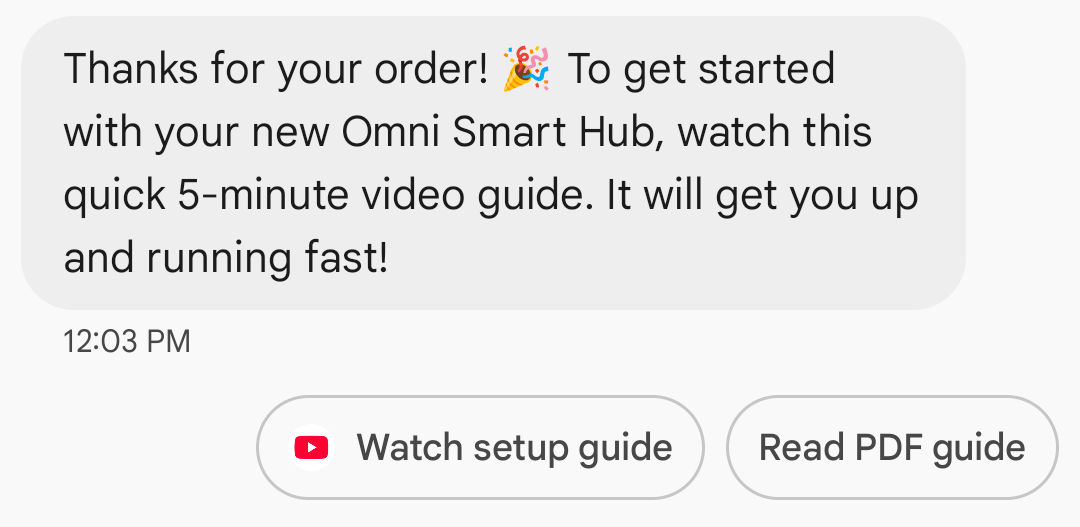
显示底层网址:为了提高 A2P 消息传递的透明度,Google Messages 会在“打开网址”建议操作中显示底层网址。此更改会影响标准富媒体卡片和富媒体卡片轮播中的建议操作。

网页链接的应用图标显示:如果用户已为该网页配置了默认应用,则会打开该应用而不是浏览器或网页视图,并且建议按钮会显示该应用的图标。要在 Google Messages 中显示应用图标,您需要提供完整的直接网址。如果您使用短链接,则会显示默认的“打开网址”图标。
例子
以下代码发送一个打开 URL 的操作。有关格式和值选项,请参阅OpenUrlAction 。
卷曲
curl -X POST "https://REGION-rcsbusinessmessaging.googleapis.com/v1/phones/PHONE_NUMBER/agentMessages?messageId=MESSAGE_ID&agentId=AGENT_ID" \
-H "Content-Type: application/json" \
-H "User-Agent: curl/rcs-business-messaging" \
-H "`oauth2l header --json PATH_TO_SERVICE_ACCOUNT_KEY rcsbusinessmessaging`" \
-d '{
  "contentMessage": {
    "text": "Hello, world!",
    "suggestions": [
      {
        "action": {
          "text": "Open Google",
          "postbackData": "postback_data_1234",
          "openUrlAction": {
            "url": "https://www.google.com"
          }
        }
      }
    ]
  }
}'
Node.js
// Reference to RBM API helper
const rbmApiHelper = require('@google/rcsbusinessmessaging');

// Define an open URL suggested action
let suggestions = [
   {
      action: {
         text: 'Open Google',
         postbackData: 'postback_data_1234',
         openUrlAction: {
            url: 'https://www.google.com'
         }
      }
   },
];

let params = {
   messageText: 'Hello, world!',
   msisdn: '+12223334444',
   suggestions: suggestions,
};

// Send a simple message with an open URL suggested action
rbmApiHelper.sendMessage(params, function(response) {
   console.log(response);
});
Java
import com.google.api.services.rcsbusinessmessaging.v1.model.OpenUrlAction;
import com.google.api.services.rcsbusinessmessaging.v1.model.SuggestedAction;
import com.google.api.services.rcsbusinessmessaging.v1.model.Suggestion;
import com.google.rbm.RbmApiHelper;
…

try {
   // Create an instance of the RBM API helper
   RbmApiHelper rbmApiHelper = new RbmApiHelper();

   // Create suggestions for chip list
   List<Suggestion> suggestions = new ArrayList<Suggestion>();

   // creating an open url suggested action
   OpenUrlAction openUrlAction = new OpenUrlAction();
   openUrlAction.setUrl("https://www.google.com");

   // creating a suggested action based on an open url action
   SuggestedAction suggestedAction = new SuggestedAction();
   suggestedAction.setText("Open Google");
   suggestedAction.setPostbackData("postback_data_1234");
   suggestedAction.setOpenUrlAction(openUrlAction);

   // attaching action to a suggestion
   Suggestion suggestion = new Suggestion();
   suggestion.setAction(suggestedAction);

   suggestions.add(suggestion);

   // Send simple text message with the suggestion action
   rbmApiHelper.sendTextMessage(
      "Hello, world!",
      "+12223334444",
      suggestions
   );
} catch(Exception e) {
   e.printStackTrace();
}
Python
# Reference to RBM Python client helper and messaging object structure
from rcs_business_messaging import rbm_service
from rcs_business_messaging import messages

# Create an open url suggested action
suggestions = [
      messages.OpenUrlAction('Open Google',
            'reply:postback_data_1234',
            'https://www.google.com')
]

# Create text message to send to user
text_msg = messages.TextMessage('Hello, world!')
cluster = messages.MessageCluster().append_message(text_msg)

# Append suggestions for the message to send to the user
for suggestion in suggestions:
    cluster.append_suggestion_chip(suggestion)

# Send a simple message with suggested action to the device
cluster.send_to_msisdn('+12223334444')
C#
using Google.Apis.RCSBusinessMessaging.v1.Data;
using RCSBusinessMessaging;
…

// Create an instance of the RBM API helper
RbmApiHelper rbmApiHelper = new RbmApiHelper(credentialsFileLocation,
                                                 projectId);

// Create an open url action
OpenUrlAction openUrlAction = new OpenUrlAction
{
    Url = "https://www.google.com"
};

// Attach the open url action to a suggested action
SuggestedAction suggestedAction = new SuggestedAction
{
    OpenUrlAction = openUrlAction,
    Text = "Open Google",
    PostbackData = "postback_data_1234"
};

// Attach the action to a suggestion object
Suggestion suggestion = new Suggestion
{
    Action = suggestedAction
};

List<Suggestion> suggestions = new List<Suggestion>
{
    suggestion
};

rbmApiHelper.SendTextMessage(
    "Hello, world!",
    "+12223334444",
    suggestions
);
使用 WebView 打开 URL
“使用 WebView 打开 URL”操作会将指定的网页加载到消息应用中,并使用默认浏览器的渲染引擎进行渲染。这样,用户无需离开 RCS for Business 对话即可与网页进行交互。如果用户的设备不支持 WebView,则网页会在用户的浏览器中打开。要启用 WebView,请参阅OpenURLApplication 。
Webview 有三种显示模式。有关格式和值选项,请参阅WebviewViewMode 。
- 全屏显示:网页占据整个屏幕。
- 一半:网页占据屏幕的一半。
- 高大:网页占据了屏幕的四分之三。
例子
以下代码发送一个带有 webview 操作的 Open URL。有关格式和值选项,请参阅OpenURLAction 。
卷曲
curl -X POST "https://REGION-rcsbusinessmessaging.googleapis.com/v1/phones/PHONE_NUMBER/agentMessages?messageId=MESSAGE_ID&agentId=AGENT_ID" \
-H "Content-Type: application/json" \
-H "User-Agent: curl/rcs-business-messaging" \
-H "`oauth2l header --json PATH_TO_SERVICE_ACCOUNT_KEY rcsbusinessmessaging`" \
-d '{
 "contentMessage": {
   "text": "Hello, world!",
   "suggestions": [
     {
       "action": {
         "text": "Open Google",
         "postbackData": "postback_data_1234",
         "openUrlAction": {
           "url": "https://www.google.com",
           "application": "WEBVIEW",
           "webviewViewMode": "FULL",
           "description": "Accessibility description"
         }
       }
     }
   ]
 }
}'
Java
import com.google.api.services.rcsbusinessmessaging.v1.model.OpenUrlAction;
import com.google.api.services.rcsbusinessmessaging.v1.model.SuggestedAction;
import com.google.api.services.rcsbusinessmessaging.v1.model.Suggestion;
import com.google.rbm.RbmApiHelper;
…

try {

   String URL = "https://www.google.com";

   // Create an instance of the RBM API helper
   RbmApiHelper rbmApiHelper = new RbmApiHelper();

   // Create suggestions for chip list
   List<Suggestion> suggestions = new ArrayList<Suggestion>();

   // Create suggestion to view webpage in full mode
   Suggestion viewInFullMode =  getUrlActionInWebview(URL, "FULL")
   suggestions.add(viewInFullMode);

   // create suggestion to view webpage in half mode
   Suggestion viewInHalfMode =  getUrlActionInWebview(URL, "HALF")
   suggestions.add(viewInHalfMode);

   // create suggestion to view webpage in tall mode
   Suggestion viewInTallMode =  getUrlActionInWebview(URL, "TALL")
   suggestions.add(viewInTallMode);

   // Send simple text message with the suggested action
   rbmApiHelper.sendTextMessage(
      "Hello, world!",
      "+12223334444",
      suggestions
   );
} catch(Exception e) {
   e.printStackTrace();
}

  /**
    * Creates a suggested action to open URL in webview.
    *
    * @return a suggestion object for an open URL in webview action .
    */
    private Suggestion getUrlActionInWebview(String url,
                                             String viewMode) {
      // create an open url action
      OpenUrlAction openUrlAction = new OpenUrlAction();
      openUrlAction.setUrl(url);
      openUrlAction.setApplication("WEBVIEW");
      openUrlAction.setWebviewViewMode(viewMode);
      openUrlAction.setDescription("Accessibility description");

      // attach the open url action to a suggested action
      SuggestedAction suggestedAction = new SuggestedAction();
      suggestedAction.setOpenUrlAction(openUrlAction);
      suggestedAction.setText('display_text');
      suggestedAction.setPostbackData('postback_data_123');

      // attach the action to a suggestion object
      Suggestion suggestion = new Suggestion();
      suggestion.setAction(suggestedAction);

      return suggestion;
    }
创建日历事件
“创建日历事件”操作会打开用户的日历应用,并开始使用指定信息创建新事件。
日历事件标题为必填项,最多 100 个字符。日历事件描述为选填项,最多 500 个字符。
例子
以下代码发送一个创建日历事件的操作。有关格式和值选项,请参阅CreateCalendarEventAction 。
卷曲
curl -X POST "https://REGION-rcsbusinessmessaging.googleapis.com/v1/phones/PHONE_NUMBER/agentMessages?messageId=MESSAGE_ID&agentId=AGENT_ID" \
-H "Content-Type: application/json" \
-H "User-Agent: curl/rcs-business-messaging" \
-H "`oauth2l header --json PATH_TO_SERVICE_ACCOUNT_KEY rcsbusinessmessaging`" \
-d '{
  "contentMessage": {
    "text": "Hello, world!",
    "suggestions": [
      {
        "action": {
          "text": "Save to calendar",
          "postbackData": "postback_data_1234",
          "fallbackUrl": "https://www.google.com/calendar",
          "createCalendarEventAction": {
            "startTime": "2020-06-30T19:00:00Z",
            "endTime": "2020-06-30T20:00:00Z",
            "title": "My calendar event",
            "description": "Description of the calendar event"
          }
        }
      }
    ]
  }
}'
Node.js
// Reference to RBM API helper
const rbmApiHelper = require('@google/rcsbusinessmessaging');

// Define a create calendar event suggested action
let suggestions = [
   {
      action: {
         text: 'Save to calendar',
         postbackData: 'postback_data_1234',
         createCalendarEventAction: {
            startTime: '2020-06-30T19:00:00Z',
            endTime: '2020-06-30T20:00:00Z',
            title: 'My calendar event',
            description: 'Description of the calendar event',
         },
      }
   },
];

let params = {
   messageText: 'Hello, world!',
   msisdn: '+12223334444',
   suggestions: suggestions,
};

// Send a simple message with a create calendar event suggested action
rbmApiHelper.sendMessage(params, function(response) {
   console.log(response);
});
Java
import com.google.api.services.rcsbusinessmessaging.v1.model.CreateCalendarEventAction;
import com.google.api.services.rcsbusinessmessaging.v1.model.SuggestedAction;
import com.google.api.services.rcsbusinessmessaging.v1.model.Suggestion;
import com.google.rbm.RbmApiHelper;
…

try {
   // Create an instance of the RBM API helper
   RbmApiHelper rbmApiHelper = new RbmApiHelper();

   // Create suggestions for chip list
   List<Suggestion> suggestions = new ArrayList<Suggestion>();

   // creating a create calendar event suggested action
   CreateCalendarEventAction createCalendarEventAction = new CreateCalendarEventAction();
   calendarEventAction.setTitle("My calendar event");
   calendarEventAction.setDescription("Description of the calendar event");
   calendarEventAction.setStartTime("2020-06-30T19:00:00Z");
   calendarEventAction.setEndTime("2020-06-30T20:00:00Z");

   // creating a suggested action based on a create calendar event action
   SuggestedAction suggestedAction = new SuggestedAction();
   suggestedAction.setText("Save to calendar");
   suggestedAction.setPostbackData("postback_data_1234");
   suggestedAction.setCreateCalendarEventAction(createCalendarEventAction);

   // attaching action to a suggestion
   Suggestion suggestion = new Suggestion();
   suggestion.setAction(suggestedAction);

   suggestions.add(suggestion);

   // Send simple text message with the suggestion action
   rbmApiHelper.sendTextMessage(
      "Hello, world!",
      "+12223334444",
      suggestions
   );
} catch(Exception e) {
   e.printStackTrace();
}
Python
# Reference to RBM Python client helper and messaging object structure
from rcs_business_messaging import rbm_service
from rcs_business_messaging import messages

# Create a calendar event suggested action
suggestions = [
      messages.CreateCalendarEventAction('Save to Calendar',
                             'reply:postback_data_1234',
                             '2020-06-30T19:00:00Z',
                             '2020-06-30T20:00:00Z',
                             'My calendar event',
                             'Description of the calendar event')

]

# Create text message to send to user
text_msg = messages.TextMessage('Hello, world!')
cluster = messages.MessageCluster().append_message(text_msg)

# Append suggestions for the message to send to the user
for suggestion in suggestions:
    cluster.append_suggestion_chip(suggestion)

# Send a simple message with suggested action to the device
cluster.send_to_msisdn('+12223334444')
C#
using Google.Apis.RCSBusinessMessaging.v1.Data;
using RCSBusinessMessaging;
…

// Create an instance of the RBM API helper
RbmApiHelper rbmApiHelper = new RbmApiHelper(credentialsFileLocation,
                                                 projectId);

// Create a calendar event action
CreateCalendarEventAction calendarEventAction = new CreateCalendarEventAction
{
    Title = "My calendar event",
    Description = "Description of the calendar event",
    StartTime = "2020-06-30T19:00:00Z",
    EndTime = "2020-06-30T20:00:00Z"
};

// Attach the calendar event action to a suggested action
SuggestedAction suggestedAction = new SuggestedAction
{
    CreateCalendarEventAction = calendarEventAction,
    Text = "Save to calendar",
    PostbackData = "postback_data_1234"
};

// Attach the action to a suggestion object
Suggestion suggestion = new Suggestion
{
    Action = suggestedAction
};

List<Suggestion> suggestions = new List<Suggestion>
{
    suggestion
};

rbmApiHelper.SendTextMessage(
    "Hello, world!",
    "+12223334444",
    suggestions
);
建议芯片列表
您的客服人员会发送建议提示列表,并附带消息,以指导用户后续操作。提示列表仅在相关消息位于对话底部时显示。对话中任何后续消息(无论是用户发送的还是客服人员发送的)都会覆盖提示列表。
芯片列表最多包含 11 个建议芯片,每个芯片标签最多可包含 25 个字符。
有关格式和值选项,请参阅AgentContentMessage 。
富卡
富媒体卡片将媒体、文本和交互式建议整合到一条信息中。它们非常适合展示相关信息(例如,产品及其图片、名称和价格),并通过清晰的下一步操作(例如“查看详情”建议)引导用户。
一张信息丰富的卡片可以包含以下内容:
这些字段都是可选的,但富媒体卡片中必须包含字段 1-3 中的至少一个。
可以以水平滚动轮播的方式同时发送多张卡片。
请注意,一张富卡的总有效载荷为 250 KB。
有关完整的技术细节,请参阅Rich 卡片文档。
卡片高度
富媒体卡片会根据内容垂直扩展。它们的最小高度为 112 DP,最大高度为 344 DP。如果卡片内容不足以填满最小高度,卡片会自动扩展,并将多余的高度填充为空白区域。
富媒体卡片中的媒体必须符合以下三种高度之一:
- 短:112 DP
- 中等:168 DP
- 身高:264 DP
如果媒体文件不适合卡片在选定高度下的尺寸,则会通过缩放和裁剪媒体文件来选择媒体预览。
例子
以下代码会发送一张包含图片和建议回复的富媒体卡片。有关格式和值选项,请参阅RichCard 。
卷曲
curl -X POST "https://REGION-rcsbusinessmessaging.googleapis.com/v1/phones/PHONE_NUMBER/agentMessages?messageId=MESSAGE_ID&agentId=AGENT_ID" \
-H "Content-Type: application/json" \
-H "User-Agent: curl/rcs-business-messaging" \
-H "`oauth2l header --json PATH_TO_SERVICE_ACCOUNT_KEY rcsbusinessmessaging`" \
-d '{
  "contentMessage": {
    "richCard": {
      "standaloneCard": {
        "thumbnailImageAlignment": "RIGHT",
        "cardOrientation": "VERTICAL",
        "cardContent": {
          "title": "Hello, world!",
          "description": "RBM is awesome!",
          "media": {
            "height": "TALL",
            "contentInfo":{
              "fileUrl": "http://www.google.com/logos/doodles/2015/googles-new-logo-5078286822539264.3-hp2x.gif",
              "forceRefresh": false
            }
          },
          "suggestions": [
            {
              "reply": {
                "text": "Suggestion #1",
                "postbackData": "suggestion_1"
              }
            },
            {
              "reply": {
                "text": "Suggestion #2",
                "postbackData": "suggestion_2"
              }
            }
          ]
        }
      }
    }
  }
}'
Node.js
// Reference to RBM API helper
const rbmApiHelper = require('@google/rcsbusinessmessaging');

// Suggested replies to be used in the card
let suggestions = [
   {
      reply: {
         'text': 'Suggestion #1',
         'postbackData': 'suggestion_1',
      },
   },
   {
      reply: {
         'text': 'Suggestion #2',
         'postbackData': 'suggestion_2',
      },
   },
];

// Image to be displayed by the card
let imageUrl = 'http://www.google.com/logos/doodles/2015/googles-new-logo-5078286822539264.3-hp2x.gif';

// Definition of the card parameters
let params = {
   messageText: 'Hello, world!',
   messageDescription: 'RBM is awesome!',
   msisdn: '+12223334444',
   suggestions: suggestions,
   imageUrl: imageUrl,
   height: 'TALL',
};

// Send rich card to device
rbmApiHelper.sendRichCard(params, function(response) {
   console.log(response);
});
Java
import com.google.api.services.rcsbusinessmessaging.v1.model.StandaloneCard;
import com.google.api.services.rcsbusinessmessaging.v1.model.Suggestion;
import com.google.rbm.cards.CardOrientation;
import com.google.rbm.cards.MediaHeight;
import com.google.rbm.RbmApiHelper;
import com.google.rbm.SuggestionHelper;
…

try {
   // Create an instance of the RBM API helper
   RbmApiHelper rbmApiHelper = new RbmApiHelper();

   // Create suggestions for chip list
   List<Suggestion> suggestions = new ArrayList<Suggestion>();
   suggestions.add(
      new SuggestionHelper("Suggestion #1", "suggestion_1").getSuggestedReply());

   suggestions.add(
      new SuggestionHelper("Suggestion #2", "suggestion_2").getSuggestedReply());

   String imageUrl = "http://www.google.com/logos/doodles/2015/googles-new-logo-5078286822539264.3-hp2x.gif";

   // Create a standalone rich card to send to the user
   StandaloneCard standaloneCard = rbmApiHelper.createStandaloneCard(
       "Hello, world!",
       "RBM is awesome!",
       imageUrl,
       MediaHeight.MEDIUM,
       CardOrientation.VERTICAL,
       suggestions
   );

   rbmApiHelper.sendStandaloneCard(standaloneCard, "+12223334444");
} catch(Exception e) {
   e.printStackTrace();
}
Python
# Reference to RBM Python client helper and messaging object structure
from rcs_business_messaging import rbm_service
from rcs_business_messaging import messages

# Suggested replies to be used in the card
suggestions = [
      messages.SuggestedReply('Suggestion #1', 'reply:suggestion_1'),
      messages.SuggestedReply('Suggestion #2', 'reply:suggestion_2')
]

# Image to be displayed by the card
image_url = 'http://www.google.com/logos/doodles/2015/googles-new-logo-5078286822539264.3-hp2x.gif';

# Define rich card structure
rich_card = messages.StandaloneCard('VERTICAL',
                                    'Hello, world!',
                                    'RBM is awesome!',
                                    suggestions,
                                    image_url,
                                    None,
                                    None,
                                    'MEDIUM')

# Append rich card and send to the user
cluster = messages.MessageCluster().append_message(rich_card)
cluster.send_to_msisdn('+12223334444')
C#
using Google.Apis.RCSBusinessMessaging.v1.Data;
using RCSBusinessMessaging;
using RCSBusinessMessaging.Cards;
…

// Create an instance of the RBM API helper
RbmApiHelper rbmApiHelper = new RbmApiHelper(credentialsFileLocation,
                                             projectId);

List<Suggestion> suggestions = new List<Suggestion>
{
   // Create suggestion chips
   new SuggestionHelper("Suggestion #1", "suggestion_1").SuggestedReply(),
   new SuggestionHelper("Suggestion #2", "suggestion_2").SuggestedReply()
};

string imageUrl = "http://www.google.com/logos/doodles/2015/googles-new-logo-5078286822539264.3-hp2x.gif";

// Create rich card with suggestions
StandaloneCard standaloneCard = rbmApiHelper.CreateStandaloneCard(
   "Hello, world!",
   "RBM is awesome",
   imageUrl,
   MediaHeight.TALL,
   CardOrientation.VERTICAL,
   suggestions
);

// Send rich card to user
rbmApiHelper.SendStandaloneCard(standaloneCard, "+12223334444");
富卡轮播
轮播图将多个富媒体卡片串联起来,使用户能够比较项目并对每个项目单独做出反应。
轮播图最少可以包含两张富媒体卡片,最多可以包含十张。轮播图中的富媒体卡片必须符合富媒体卡片的通用内容和高度要求,具体要求请参阅富媒体卡片文档。有关轮播图布局和规范的更多信息,请参阅轮播图文档。
例子
以下代码会发送一个富媒体卡片轮播图。有关格式和值选项,请参阅RichCard 。
卷曲
curl -X POST "https://REGION-rcsbusinessmessaging.googleapis.com/v1/phones/PHONE_NUMBER/agentMessages?messageId=MESSAGE_ID&agentId=AGENT_ID" \
-H "Content-Type: application/json" \
-H "User-Agent: curl/rcs-business-messaging" \
-H "`oauth2l header --json PATH_TO_SERVICE_ACCOUNT_KEY rcsbusinessmessaging`" \
-d '{
  "contentMessage": {
    "richCard": {
      "carouselCard": {
        "cardWidth": "MEDIUM",
        "cardContents": [
          {
            "title": "Card #1",
            "description": "The description for card #1",
            "suggestions": [
              {
                "reply": {
                  "text": "Card #1",
                  "postbackData": "card_1"
                }
              }
            ],
            "media": {
              "height": "MEDIUM",
              "contentInfo": {
                "fileUrl": "https://storage.googleapis.com/welcome-bot-sample-images/200.jpg",
                "forceRefresh": false
              }
            }
          },
          {
            "title": "Card #2",
            "description": "The description for card #2",
            "suggestions": [
              {
                "reply": {
                  "text": "Card #2",
                  "postbackData": "card_2"
                }
              }
            ],
            "media": {
              "height": "MEDIUM",
              "contentInfo": {
                "fileUrl": "https://storage.googleapis.com/welcome-bot-sample-images/201.jpg",
                "forceRefresh": false
              }
            }
          }
        ]
      }
    }
  }
}'
Node.js
// Reference to RBM API helper
const rbmApiHelper = require('@google/rcsbusinessmessaging');

// Images for the carousel cards
let card1Image = 'https://storage.googleapis.com/welcome-bot-sample-images/200.jpg';
let card2Image = 'https://storage.googleapis.com/welcome-bot-sample-images/201.jpg';

// Define the card contents for a carousel with two cards, each with one suggested reply
let cardContents = [
   {
      title: 'Card #1',
      description: 'The description for card #1',
      suggestions: [
         {
            reply: {
               text: 'Card #1',
               postbackData: 'card_1',
            }
         }
      ],
      media: {
         height: 'MEDIUM',
         contentInfo: {
            fileUrl: card1Image,
            forceRefresh: false,
         },
      },
   },
   {
      title: 'Card #2',
      description: 'The description for card #2',
      suggestions: [
         {
            reply: {
               text: 'Card #2',
               postbackData: 'card_2',
            }
         }
      ],
      media: {
         height: 'MEDIUM',
         contentInfo: {
            fileUrl: card2Image,
            forceRefresh: false,
         },
      },
   },
];

// Definition of carousel card
let params = {
   msisdn: '+12223334444',
   cardContents: cardContents,
};

// Send the device the carousel card defined above
rbmApiHelper.sendCarouselCard(params, function(response) {
   console.log(response);
});
Java
import com.google.api.services.rcsbusinessmessaging.v1.model.CardContent;
import com.google.api.services.rcsbusinessmessaging.v1.model.Suggestion;
import com.google.rbm.cards.CardOrientation;
import com.google.rbm.cards.CardWidth;
import com.google.rbm.cards.MediaHeight;
import com.google.rbm.RbmApiHelper;
import com.google.rbm.SuggestionHelper;
…

try {
            // Create an instance of the RBM API helper
            RbmApiHelper rbmApiHelper = new RbmApiHelper();

            List cardContents = new ArrayList();

            // Images for the carousel cards
            String card1Image = "https://storage.googleapis.com/welcome-bot-sample-images/200.jpg";

            // Create suggestions for first carousel card
            List card1Suggestions = new ArrayList();
            card1Suggestions.add(
                new SuggestionHelper("Card #1", "card_1"));

            cardContents.add(
                new StandaloneCardHelper(
                    "Card #1",
                    "The description for card #1",
                    card1Image,
                    card1Suggestions)
                    .getCardContent(MediaHeight.SHORT)
            );

            // Images for the carousel cards
            String card2Image = "https://storage.googleapis.com/welcome-bot-sample-images/201.jpg";

            // Create suggestions for second carousel card
            List card2Suggestions = new ArrayList();
            card2Suggestions.add(
                new SuggestionHelper("Card #2", "card_2"));

            cardContents.add(
                new StandaloneCardHelper(
                    "Card #2",
                    "The description for card #2",
                    card2Image,
                    card2Suggestions)
                    .getCardContent(MediaHeight.SHORT)
            );

            // Send the carousel to the user
            rbmApiHelper.sendCarouselCards(cardContents, CardWidth.MEDIUM, "+12223334444");
        } catch(Exception e) {
            e.printStackTrace();
        }
Python
# Reference to RBM Python client helper and messaging object structure
from rcs_business_messaging import rbm_service
from rcs_business_messaging import messages

# Images for the carousel cards
card_image_1 = 'https://storage.googleapis.com/welcome-bot-sample-images/200.jpg';
card_image_2 = 'https://storage.googleapis.com/welcome-bot-sample-images/201.jpg';

# Suggested replies to be used in the cards
suggestions1 = [
      messages.SuggestedReply('Card #1', 'reply:card_1')
]

suggestions2 = [
      messages.SuggestedReply('Card #2', 'reply:card_2')
]

# Define the card contents for a carousel with two cards,
# each with one suggested reply
card_contents = []
card_contents.append(messages.CardContent('Card #1',
                                          'The description for card #1',
                                          card_image_1,
                                          'MEDIUM',
                                          suggestions1))

card_contents.append(messages.CardContent('Card #2',
                                          'The description for card #2',
                                          card_image_2,
                                          'MEDIUM',
                                          suggestions2))

# Send the device the carousel card defined above
carousel_card = messages.CarouselCard('MEDIUM', card_contents)
cluster = messages.MessageCluster().append_message(carousel_card)
cluster.send_to_msisdn('+12223334444')
C#
using Google.Apis.RCSBusinessMessaging.v1.Data;
using RCSBusinessMessaging;
using RCSBusinessMessaging.Cards;
…

// Create an instance of the RBM API helper
RbmApiHelper rbmApiHelper = new RbmApiHelper(credentialsFileLocation,
                                             projectId);

// Image references to be used in the carousel cards
string card1Image = "https://storage.googleapis.com/welcome-bot-sample-images/200.jpg";
string card2Image = "https://storage.googleapis.com/welcome-bot-sample-images/201.jpg";

// Suggestion chip lists to be used in carousel cards
List<Suggestion> suggestions1 = new List<Suggestion>
{
   new SuggestionHelper("Card #1", "card_1").SuggestedReply()
};

List<Suggestion> suggestions2 = new List<Suggestion>
{
   new SuggestionHelper("Card #2", "card_2").SuggestedReply()
};

// Create the card content for the carousel
List<CardContent> cardContents = new List<CardContent>
{
   // Add items as card content
   new StandaloneCardHelper(
                    "Card #1",
                    "The description for card #1",
                    card1Image,
                    suggestions1).GetCardContent(),
   new StandaloneCardHelper(
                    "Card #2",
                    "The description for card #2",
                    card2Image,
                    suggestions2).GetCardContent()
};

// Send the carousel to the user
rbmApiHelper.SendCarouselCards(cardContents, CardWidth.MEDIUM, msisdn);