

Фон
Функция автоматической привязки пропусков позволяет отправлять дополнительные пропуска пользователю, у которого уже есть ваш пропуск в Google Wallet. Вы также можете предварительно привязать пропуски к основному пропуску, когда пользователь сохраняет основной (главный) пропуск. Автоматически привязанный пропуск группируется с основным пропуском, и над ним появляется всплывающее сообщение, информирующее пользователя о том, что новый пропуск был привязан. В качестве основных или связанных пропусков поддерживаются следующие типы пропусков:
- Билет на мероприятие
- Посадочный талон
- Проездной билет
- Предложение
- Подарочная карта
- абонемент лояльности
- Обычный пропуск
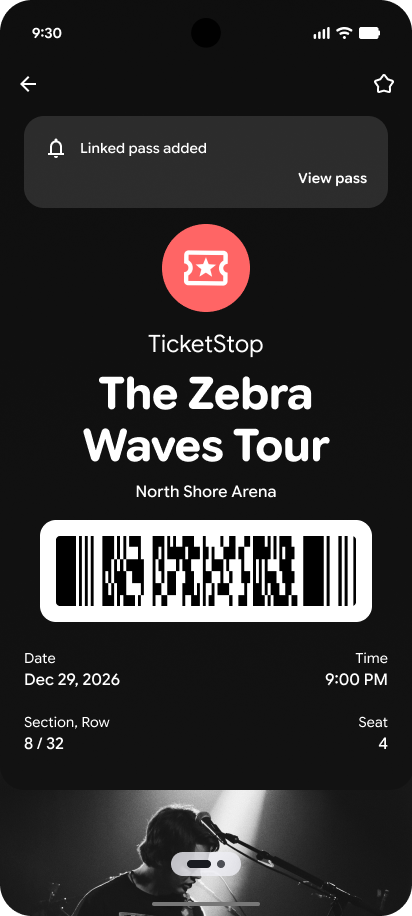 |  |
| Primary pass with the callout that a new pass has been added | Новый пропуск, связанный с основным пропуском. |
Варианты использования
You may have different use cases for linking passes to an existing pass. Some examples include:
- Привяжите предложение к существующей карте лояльности.
- Link a meal voucher to a boarding pass or event ticket.
- Привяжите парковочный пропуск к билету на мероприятие.
Some considerations when using Auto Linked Passes
- The primary object and linked object must use the same issuerId.
- There is a limit of 50 linked objects per primary object.
- Автоматическая отправка связанных пропусков не гарантируется и считается «максимально возможной». Пользователи могут отказаться от получения автоматически связанных пропусков. Если сценарий использования критически важен и пользователю необходимо получить связанный пропуск, мы рекомендуем связаться с ним по другому каналу, чтобы убедиться, что он добавит пропуск.
- Updates to the Google Wallet AUP include guidance on the use of Auto Linked Passes which must be adhered to.
Этапы интеграции
If you have already created a primary object you can skip step 1.
- Create an object of any pass type listed with the required parameters. This is the primary object.
- Create another object of any pass type listed. This is going to be the linked object.
- Either before or after the primary object is saved, update the primary object with the ID of the linked object in the linkedObjectIds parameter.
There is a minimum payload required to set the linkedObjectIds on a primary pass. The 3 required parameters include;
- ISSUERID.PRIMARY_OBJECT_ID
- ISSUERID.PRIMARY_CLASS_ID
- ISSUERID.LINKED_OBJECT_ID
Example JSON Request to add a linked object to a pass object
  …
  {
    "id": "ISSUERID.PASS_OBJECTID",
    "classId": "ISSUERID.PASS_CLASSID",
    "barcode": {
      "type": "qrCode",
      "value": "QR code"
    },
    "linkedObjectIds": ["ISSUERID.LINKED_PASS_OBJECTID"]
  }
  …
Example JSON Response after linking an object to a pass object
  …
  "state": "active",
  "linkedObjectIds": {
    "ISSUERID.LINKED_PASS_OBJECTID"
  }
  …
Ожидаемое поведение
После получения успешного ответа устройства с обновленным вами пропуском должны получить связанный пропуск. Этот связанный пропуск будет сгруппирован вместе с основным пропуском. Пользователи могут увидеть связанный пропуск, проведя пальцем вправо.
Обработка исключений
Potential errors may happen with incorrect use of the API which can include;
| Сообщение | Причина |
|---|---|
| Primary object and linked object don't share the same issuer ID. | You cannot attach a linked object to another issuer's object. |
| Primary object and linked object refer to the same object. | You cannot attach the same object as the linkedObject. |
| Связанный объект не существует. | The linked object should already be inserted into the Wallet API. |
| Linked object already has another linked object. Cannot add nested linked objects. | Linked objects cannot have another linked object. |
| Object is already linked to another object. Cannot add nested linked objects. | Primary object cannot be a linked object by itself. |
| Cannot add any more linked objects, limit exceeded. | The limit of 50 linked passes has been reached for the primary pass. |