
Fact check (ClaimReview) structured data
If you have a web page that reviews a claim made by others, you can include
ClaimReview structured data on your web page. ClaimReview structured
data can enable a summarized version of your fact check to display in Google Search results
when your page appears in search results for that claim.
This guide describes the details on how to implement ClaimReview structured data.
If you don't want to add structured data manually, you can check out the
Fact Check
Markup Tool. To learn more, visit
About the Fact Check
Markup Tool.
How to add structured data
Structured data is a standardized format for providing information about a page and classifying the page content. If you're new to structured data, you can learn more about how structured data works.
Here's an overview of how to build, test, and release structured data.
- Add the required properties. Based on the format you're using, learn where to insert structured data on the page.
- Follow the guidelines.
- Validate your code using the Rich Results Test and fix any critical errors. Consider also fixing any non-critical issues that may be flagged in the tool, as they can help improve the quality of your structured data (however, this isn't necessary to be eligible for rich results).
- Deploy a few pages that include your structured data and use the URL Inspection tool to test how Google sees the page. Be sure that your page is
accessible to Google and not blocked by a robots.txt file, the
noindextag, or login requirements. If the page looks okay, you can ask Google to recrawl your URLs. - To keep Google informed of future changes, we recommend that you submit a sitemap. You can automate this with the Search Console Sitemap API.
Example
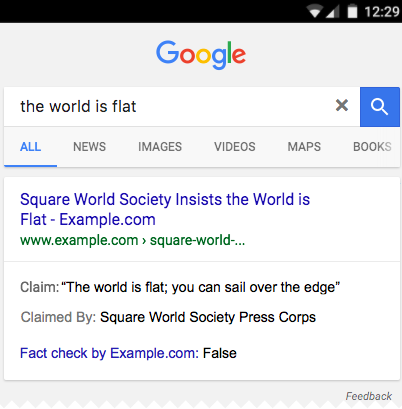
Imagine a page that evaluates the claim that the earth is flat. Here is what a
search for "the world is flat" might look like in Google Search results if the page
provides a ClaimReview element (note that the actual visual design may change):
Here's an example of structured data on the page that hosts this fact check:
<html>
  <head>
    <title>The world is flat</title>
    <script type="application/ld+json">
    {
      "@context": "https://schema.org",
      "@type": "ClaimReview",
      "url": "https://example.com/news/science/worldisflat.html",
      "claimReviewed": "The world is flat",
      "itemReviewed": {
        "@type": "Claim",
        "author": {
          "@type": "Organization",
          "name": "Square World Society",
          "sameAs": "https://example.flatworlders.com/we-know-that-the-world-is-flat"
        },
        "datePublished": "2024-06-20",
        "appearance": {
          "@type": "OpinionNewsArticle",
          "url": "https://example.com/news/a122121",
          "headline": "Square Earth - Flat earthers for the Internet age",
          "datePublished": "2024-06-22",
          "author": {
            "@type": "Person",
            "name": "T. Tellar"
          },
          "image": "https://example.com/photos/1x1/photo.jpg",
          "publisher": {
            "@type": "Organization",
            "name": "Skeptical News",
            "logo": {
              "@type": "ImageObject",
              "url": "https://example.com/logo.jpg"
            }
          }
        }
      },
      "author": {
        "@type": "Organization",
        "name": "Example.com science watch"
      },
      "reviewRating": {
        "@type": "Rating",
        "ratingValue": 1,
        "bestRating": 5,
        "worstRating": 1,
        "alternateName": "False"
      }
    }
    </script>
  </head>
  <body>
  </body>
</html>
Eligibility guidelines
Google doesn't guarantee that fact checks will be shown in search results, even if your page is marked up correctly according to the Rich Result Test. Using structured data enables a feature to be present, it does not guarantee that it will be present. The Google algorithm programmatically determines the eligibility for fact check rich results, depending on many variables, including the following guidelines.
For your fact check content to be eligible to display as a fact check rich result on Google Search, you must meet the following guidelines:
- Your site must have several pages marked with
ClaimReviewstructured data. - You must follow all the structured data guidelines and Search Essentials.
- There must not be any mismatch between the structured data and page content (for example, if the structured data indicated that the claim is true, but the content on the page said the claim was false). Instead, make sure that both the content and structured data match (for example, both indicate that the claim is true).
- You must meet the standards for accountability, transparency, readability, and site misrepresentation, as articulated in our Google News General Guidelines.
- You must have a corrections policy or have a mechanism for users to report errors.
- Websites for political entities (such as campaigns, parties, or elected officials) aren't eligible for this feature.
- Your readers can easily identify the claims and checks in the body of the article. Your readers are able to understand what was checked and what conclusions were reached.
- You must clearly attribute the specific claim that you're assessing to a distinct origin (separate from your website), whether it's another website, public statement, social media, or other traceable source.
- Your fact check analysis must be traceable and transparent about sources and methods, with citations and references to primary sources.
Technical guidelines
- To be eligible for the single fact check rich result, a page must only have one
ClaimReviewelement. If you add multipleClaimReviewelements per page, the page won't be eligible for the single fact check rich result. - The page hosting the
ClaimReviewelement must have at least a brief summary of the fact check and the evaluation, if not the full text. - A specific
ClaimReviewmust only be on one page on your site. Do not repeat the same fact check on multiple pages, unless they are variations of the same page (for example, you can post the sameClaimReviewon the mobile and desktop versions of a page). - If your website aggregates fact-check articles, ensure that all articles match the criteria and that you provide an open and publicly available list of all fact-check websites you aggregate.
Structured data type definitions
The following structured data types are required to implement fact checks:
You must include the required properties for your content to be eligible for display as a rich result. You can also include the recommended properties to add more information about your content, which could provide a better user experience.
ClaimReview
The full definition of ClaimReview is available at
schema.org/ClaimReview.
The Google-supported properties are the following:
| Required properties | |
|---|---|
claimReviewed |
A short summary of the claim being evaluated. Try to keep this less than 75 characters to minimize wrapping when displayed on a mobile device. |
reviewRating |
The assessment of the claim. This object supports both a numeric and a textual assessment. The textual value is currently the only value shown in search results. Different fact-checking projects have a variety of rating schemes which can have subtle differences, particularly for intermediate values. It is important to document such rating schemes to clarify the meaning of the numeric ratings. Minimally, there must be a number to text rating system for all your fact checks that carry numeric scores.
For more information, see Rating. |
url |
Link to the page hosting the full article of the fact check. The domain of this URL value must be the same domain as, or a subdomain of, the
page hosting this |
| Recommended properties | |||||
|---|---|---|---|---|---|
author |
The publisher of the fact check article, not the publisher of the
claim. The
To help Google best understand authors across various features, consider following the author markup best practices. |
||||
itemReviewed |
An object describing the claim being made. For more information, see
|
||||
Claim
The full definition of Claim is available at
schema.org/Claim.
| Recommended properties | |||||
|---|---|---|---|---|---|
appearance |
A link to, or inline description of, a We recommend that you add either |
||||
author |
The author of the claim, not the author of the fact check. Don't include
the
|
||||
datePublished |
The date when the claim was made or entered public discourse (for example, when it became popular in social networks). |
||||
firstAppearance |
A link to, or inline description of, a We recommend that you add either |
||||
Rating
The full definition of Rating is available at schema.org/Rating.
| Required properties | |
|---|---|
alternateName |
The truthfulness rating assigned to If using a longer sentence, be sure that the beginning of the sentence expresses the meaning, in case the sentence is truncated to fit the display. For example: "Mostly true in the specifics, although the overall claim is somewhat misleading" |
| Recommended properties | |
|---|---|
bestRating |
For numeric ratings, the best value possible in the scale from worst to best. Must be greater than
|
name |
Same as |
ratingValue |
A numeric rating of this claim, in the range |
worstRating |
For numeric ratings, the worst value possible in a scale from worst to best. Must be less than
|
Monitor rich results with Search Console
Search Console is a tool that helps you monitor how your pages perform in Google Search. You don't have to sign up for Search Console to be included in Google Search results, but it can help you understand and improve how Google sees your site. We recommend checking Search Console in the following cases:
- After deploying structured data for the first time
- After releasing new templates or updating your code
- Analyzing traffic periodically
After deploying structured data for the first time
After Google has indexed your pages, look for issues using the relevant Rich result status report. Ideally, there will be an increase of valid items, and no increase in invalid items. If you find issues in your structured data:
- Fix the invalid items.
- Inspect a live URL to check if the issue persists.
- Request validation using the status report.
After releasing new templates or updating your code
When you make significant changes to your website, monitor for increases in structured data invalid items.- If you see an increase in invalid items, perhaps you rolled out a new template that doesn't work, or your site interacts with the existing template in a new and bad way.
- If you see a decrease in valid items (not matched by an increase in invalid items), perhaps you are no longer embedding structured data in your pages. Use the URL Inspection tool to learn what is causing the issue.
Analyzing traffic periodically
Analyze your Google Search traffic using the Performance Report. The data will show you how often your page appears as a rich result in Search, how often users click on it and what is the average position you appear on search results. You can also automatically pull these results with the Search Console API.Troubleshooting
If you're having trouble implementing or debugging structured data, here are some resources that may help you.
- If you're using a content management system (CMS) or someone else is taking care of your site, ask them to help you. Make sure to forward any Search Console message that details the issue to them.
- Google does not guarantee that features that consume structured data will show up in search results. For a list of common reasons why Google may not show your content in a rich result, see the General Structured Data Guidelines.
- You might have an error in your structured data. Check the list of structured data errors and the Unparsable structured data report.
- If you received a structured data manual action against your page, the structured data on the page will be ignored (although the page can still appear in Google Search results). To fix structured data issues, use the Manual Actions report.
- Review the guidelines again to identify if your content isn't compliant with the guidelines. The problem can be caused by either spammy content or spammy markup usage. However, the issue may not be a syntax issue, and so the Rich Results Test won't be able to identify these issues.
- Structured data issues can affect how your site's content appears in search results. Use this Troubleshoot missing rich results / drop in total rich results guide to review a step-by-step approach to identify, fix, and validate these issues in Search Console.
- Allow time for re-crawling and re-indexing. Remember that it may take several days after publishing a page for Google to find and crawl it. For general questions about crawling and indexing, check the Google Search crawling and indexing FAQ.
- Post a question in the Google Search Central forum.