

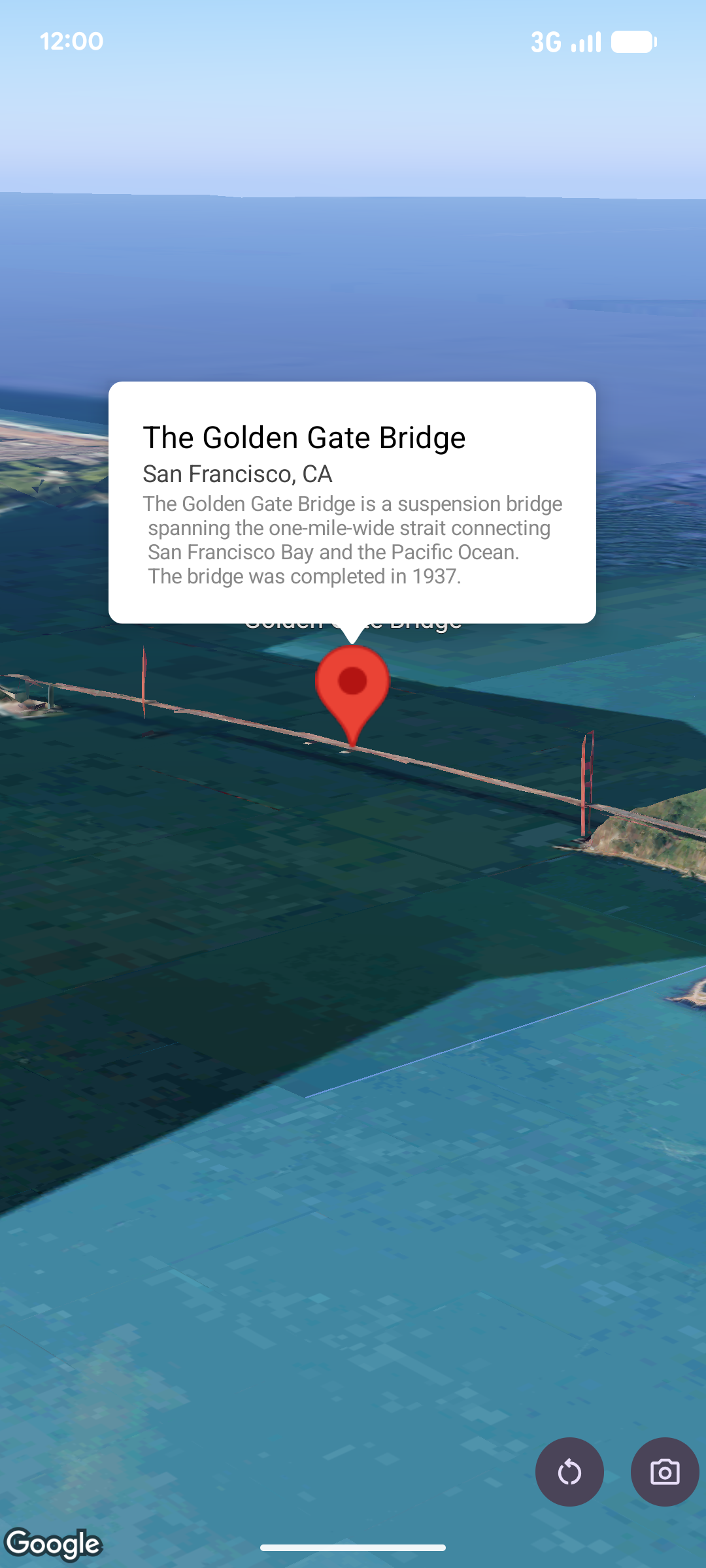
ป๊อปโอเวอร์จะแสดงเนื้อหา (โดยปกติจะเป็นข้อความหรือรูปภาพ) ในหน้าต่างลูกโป่งข้อมูลเหนือแผนที่ ณ ตำแหน่งที่ระบุ ป๊อปโอเวอร์มีพื้นที่เนื้อหาและก้านเรียว ปลายก้านจะติดอยู่กับตำแหน่งที่ระบุบนแผนที่
โดยปกติแล้ว คุณจะแนบป๊อปโอเวอร์กับเครื่องหมาย แต่ก็สามารถแนบป๊อปโอเวอร์กับพิกัด LatLng ที่เฉพาะเจาะจงได้เช่นกัน
เพิ่มป๊อปอัป
หากต้องการเพิ่มป๊อปโอเวอร์ ให้สร้างออบเจ็กต์ Popover และตั้งค่าตัวเลือกต่างๆ รวมถึงตำแหน่งและโหมดระดับความสูง ตำแหน่งคือออบเจ็กต์ LatLng ซึ่งรวมถึงละติจูด ลองจิจูด และระดับความสูงที่กำหนดตำแหน่งที่จะแสดงป๊อปโอเวอร์ หากยึดกับเครื่องหมาย ระบบจะใช้ตำแหน่งของเครื่องหมายแทน นอกจากนี้ คุณยังควบคุมวิธีตีความระดับความสูงได้โดยการตั้งค่าโหมดระดับความสูง
เนื้อหาของป๊อปโอเวอร์ต้องอยู่ภายใน AndroidView ป๊อปโอเวอร์จะเลื่อนได้โดยค่าเริ่มต้น และมีความสูงสูงสุดที่กำหนดไว้ล่วงหน้า
ตรึงป๊อปอัปไว้กับเครื่องหมาย
คุณสามารถตรึงป๊อปโอเวอร์ไว้กับเครื่องหมายได้ เมื่อเพิ่มป๊อปโอเวอร์ที่ยึดกับเครื่องหมาย คุณต้องเชื่อมโยงป๊อปโอเวอร์กับออบเจ็กต์ Marker
class MapManager(private val map: MapView) {

    /**
     * Adds a popover anchored to a marker.
     * @param context The Context required to instantiate UI views.
     */
    fun addPopoverToMarker(context: Context) {
        // 1. Create a marker
        val markerOptions = markerOptions {
            position = latLngAltitude {
                latitude = 37.422
                longitude = -122.084
                altitude = 0.0
            }
        }

        val marker = map.addMarker(markerOptions) ?: return

        // 2. Create the custom view using the passed-in context
        val textView = TextView(context).apply {
            text = context.getString(R.string.popover_hello)
            setPadding(16, 16, 16, 16)
            setBackgroundColor(Color.WHITE)
            setTextColor(Color.BLACK)
        }

        // 3. Configure and display the popover
        val options = popoverOptions {
            content = textView
            positionAnchor = marker
            altitudeMode = AltitudeMode.RELATIVE_TO_GROUND
        }

        val popover = map.addPopover(options)
        popover.show()
    }
}
เพิ่มป๊อปโอเวอร์ที่กำหนดค่าไว้
ตัวอย่างต่อไปนี้จะเพิ่มป๊อปโอเวอร์ที่ปิดโดยอัตโนมัติเมื่อผู้ใช้แตะนอกป๊อปโอเวอร์ และไม่เลื่อนไปยังป๊อปโอเวอร์ที่เปิดใหม่โดยอัตโนมัติ
/**
 * Adds a configured popover (auto-close enabled, auto-pan disabled).
 * @param context The Context used to inflate the UI and retrieve string resources.
 */
fun addConfiguredPopover(context: Context) {
    // 1. Initialize the view with the explicit context
    val textView = TextView(context).apply {
        text = context.getString(com.example.snippets.common.R.string.popover_info)
        setPadding(12, 12, 12, 12)
        setBackgroundColor(Color.WHITE)
        setTextColor(Color.BLACK)
    }

    // 2. Configure popover behavior
    val options = popoverOptions {
        content = textView
        // Setting a fixed coordinate anchor
        positionAnchor = latLngAltitude {
            latitude = 0.0
            longitude = 0.0
            altitude = 0.0
        }
        autoCloseEnabled = true // Closes automatically when the map is tapped elsewhere
        autoPanEnabled = false  // Map camera remains stationary when popover appears
    }

    // 3. Add to the map instance
    map.addPopover(options)
}