

本页介绍了 Maps SDK for iOS 实用程序库中提供的标记聚类实用程序。
通过对标记进行聚类,您可以在地图上放置大量标记 ,而不会使地图难以阅读。标记聚类实用程序可帮助您 管理多个标记在不同的缩放级别。
当用户以较高的缩放级别查看地图时,地图上会显示每一个具体标记。当用户缩小地图时,标记会聚集 在一起形成聚类,以便更轻松地查看地图。
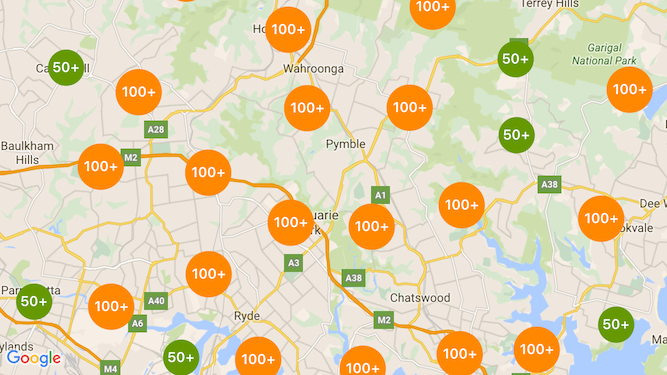
下面的屏幕截图显示了标记聚类的默认样式:
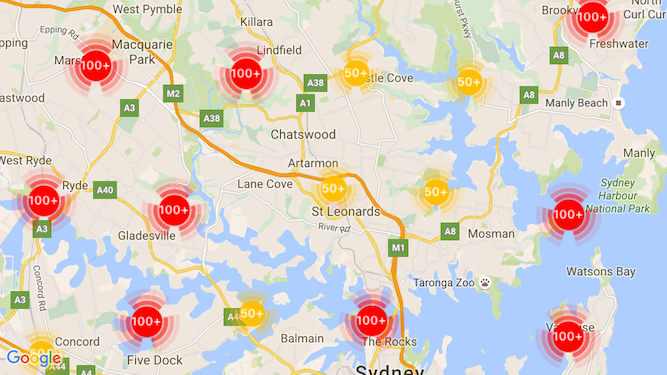
下面是一个自定义标记工具聚类的示例:
前提条件和说明
Maps SDK for iOS 实用程序库
标记聚类实用程序包含在 Maps SDK for iOS 实用程序库中。如果您尚未设置该库, 请先按照设置指南 操作,然后再阅读本页面的其余内容。
为获得最佳性能,建议的最大标记数量为 10,000。
位置信息权限
此示例使用设备的 GPS 来定位用户,并在地图上显示用户的坐标。如需启用
此功能,您必须在项目的 Info.plist 文件中为 NSLocationWhenInUseUsageDescription 权限
添加说明。
如需添加此说明,请执行以下操作:
- 在 Xcode 的项目导航器中点击
Info.plist文件,以打开 属性列表编辑器。 - 点击“Information Property List”旁边的“+”图标,以添加新属性。
- 在“key”字段中,输入“NSLocationWhenInUseUsageDescription”。Xcode 会自动 将其转换为长名称“Privacy - Location When In Use Usage Description”。如需查看可能的位置信息权限属性的完整列表,请参阅 Apple 开发者文档中的 请求授权以使用位置服务。
- 将“Type”字段保留设置为“String”。
- 在“Value”字段中,输入说明您的应用需要使用 用户位置信息的原因。例如,“定位用户以提供附近的商家信息。”
实现标记聚类
实现标记聚类需要三个步骤:
如需查看如何实现标记聚类的完整示例,请查看 GitHub 上的 Objective-C 和 Swift 示例应用。创建聚类管理器
如需使用聚类管理器,请执行以下操作:
- 将地图渲染到的
ViewController设置为遵循GMSMapViewDelegate协议。 - 创建
GMUClusterManager的实例。 - 将要在其中实现标记聚类的
GMSMapView实例以及以下协议的实现传递给GMUClusterManager实例:GMUClusterIconGenerator:提供应用逻辑,用于提取要在不同缩放级别使用的聚类图标。GMUClusterAlgorithm:指定一种算法,用于确定标记的聚类方式 ,例如要包含在同一聚类中的标记之间的距离。GMUClusterRenderer:提供应用逻辑,用于处理地图上聚类图标的实际 渲染。
- 在
GMUClusterManager实例上设置地图委托。
实用程序库包含图标生成器 (GMUDefaultClusterIconGenerator)、算法 (GMUNonHierarchicalDistanceBasedAlgorithm) 和渲染程序 (GMUDefaultClusterRenderer) 的默认实现。您可以选择创建自己的自定义聚类图标生成器、算法和渲染程序。
以下代码在 viewDidLoad
回调中使用这些默认值创建聚类管理器:ViewController
Swift
import GoogleMaps
import GoogleMapsUtils

class MarkerClustering: UIViewController, GMSMapViewDelegate {
  private var mapView: GMSMapView!
  private var clusterManager: GMUClusterManager!

  override func viewDidLoad() {
    super.viewDidLoad()

    // Set up the cluster manager with the supplied icon generator and
    // renderer.
    let iconGenerator = GMUDefaultClusterIconGenerator()
    let algorithm = GMUNonHierarchicalDistanceBasedAlgorithm()
    let renderer = GMUDefaultClusterRenderer(mapView: mapView,
                                clusterIconGenerator: iconGenerator)
    clusterManager = GMUClusterManager(map: mapView, algorithm: algorithm,
                                                      renderer: renderer)

    // Register self to listen to GMSMapViewDelegate events.
    clusterManager.setMapDelegate(self)
    // ...
  }
  // ...
}
Objective-C
@import GoogleMaps;
@import GoogleMapsUtils;

@interface MarkerClustering () <GMSMapViewDelegate>

@end

@implementation MarkerClustering {
  GMSMapView *_mapView;
  GMUClusterManager *_clusterManager;
}

- (void)viewDidLoad {
  [super viewDidLoad];

  // Set up the cluster manager with a supplied icon generator and renderer.
  id<GMUClusterAlgorithm> algorithm =
      [[GMUNonHierarchicalDistanceBasedAlgorithm alloc] init];
  id<GMUClusterIconGenerator> iconGenerator =
      [[GMUDefaultClusterIconGenerator alloc] init];
  id<GMUClusterRenderer> renderer =
      [[GMUDefaultClusterRenderer alloc] initWithMapView:_mapView
                                    clusterIconGenerator:iconGenerator];
  _clusterManager =
      [[GMUClusterManager alloc] initWithMap:_mapView
                                   algorithm:algorithm
                                    renderer:renderer];

  // Register self to listen to GMSMapViewDelegate events.
  [_clusterManager setMapDelegate:self];
  // ...
}
// ...
@end
添加标记
您可以通过两种方式将标记添加到标记聚类器:单独添加或以数组形式添加。
单个标记
Swift
let position = CLLocationCoordinate2D(latitude: 47.60, longitude: -122.33)
let marker = GMSMarker(position: position)
clusterManager.add(marker)
Objective-C
CLLocationCoordinate2D position = CLLocationCoordinate2DMake(47.60, -122.33);
GMSMarker *marker = [GMSMarker markerWithPosition:position];
[_clusterManager addItem:marker];
标记数组
Swift
let position1 = CLLocationCoordinate2D(latitude: 47.60, longitude: -122.33)
let marker1 = GMSMarker(position: position1)

let position2 = CLLocationCoordinate2D(latitude: 47.60, longitude: -122.46)
let marker2 = GMSMarker(position: position2)

let position3 = CLLocationCoordinate2D(latitude: 47.30, longitude: -122.46)
let marker3 = GMSMarker(position: position3)

let position4 = CLLocationCoordinate2D(latitude: 47.20, longitude: -122.23)
let marker4 = GMSMarker(position: position4)

let markerArray = [marker1, marker2, marker3, marker4]
clusterManager.add(markerArray)
Objective-C
CLLocationCoordinate2D position1 = CLLocationCoordinate2DMake(47.60, -122.33);
GMSMarker *marker1 = [GMSMarker markerWithPosition:position1];

CLLocationCoordinate2D position2 = CLLocationCoordinate2DMake(47.60, -122.46);
GMSMarker *marker2 = [GMSMarker markerWithPosition:position2];

CLLocationCoordinate2D position3 = CLLocationCoordinate2DMake(47.30, -122.46);
GMSMarker *marker3 = [GMSMarker markerWithPosition:position3];

CLLocationCoordinate2D position4 = CLLocationCoordinate2DMake(47.20, -122.23);
GMSMarker *marker4 = [GMSMarker markerWithPosition:position4];

NSArray<GMSMarker *> *markerArray = @[marker1, marker2, marker3, marker4];
[_clusterManager addItems:markerArray];
调用标记聚类器
创建标记聚类器并向其传递要聚类的标记后,您只需对标记聚类器实例调用 cluster 方法即可。
Swift
clusterManager.cluster()
Objective-C
[_clusterManager cluster];
处理标记和聚类上的事件
通常,在使用 Maps SDK for iOS 时,如需监听地图上的事件,您必须实现
GMSMapViewDelegate
协议。您可以监听
地图事件,但无法
监听类型安全的聚类管理器事件。当用户点按标记、单个聚类项或聚类时,API 会触发 mapView:didTapMarker: 并将额外的聚类数据附加到 marker.userData 属性。然后,您可以检查 userData 是否符合
GMUCluster 协议,以确定点按的是聚类图标还是标记。
Swift
func mapView(_ mapView: GMSMapView, didTap marker: GMSMarker) -> Bool {
  // center the map on tapped marker
  mapView.animate(toLocation: marker.position)
  // check if a cluster icon was tapped
  if marker.userData is GMUCluster {
    // zoom in on tapped cluster
    mapView.animate(toZoom: mapView.camera.zoom + 1)
    NSLog("Did tap cluster")
    return true
  }

  NSLog("Did tap a normal marker")
  return false
}
Objective-C
- (BOOL)mapView:(GMSMapView *)mapView didTapMarker:(GMSMarker *)marker {
  // center the map on tapped marker
    [_mapView animateToLocation:marker.position];
    // check if a cluster icon was tapped
    if ([marker.userData conformsToProtocol:@protocol(GMUCluster)]) {
      // zoom in on tapped cluster
      [_mapView animateToZoom:_mapView.camera.zoom + 1];
      NSLog(@"Did tap cluster");
      return YES;
    }

    NSLog(@"Did tap marker in cluster");
    return NO;
}
聚类管理器现在会拦截您在
clusterManager 上实现的任何事件。它会将所有剩余事件转发给地图
委托(如果已提供)。请注意,标准标记的事件
(即并非由聚类渲染程序生成的标记)始终会转发
给地图委托。
自定义标记聚类
您可以为
GMUClusterRenderer、GMUClusterIconGenerator 或
GMUClusterAlgorithm 提供自定义实现。您可以根据实用程序
库中包含的这些协议的示例实现来创建自定义实现
,也可以通过实现这些协议来编写完全自定义的实现
。