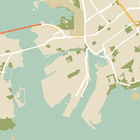
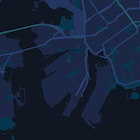
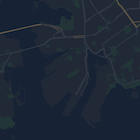
تقدّم هذه الصفحة دليلاً سريعًا حول تصميم الخريطة، باستخدام الوضع الداكن كمثال.
نظرة عامة
باستخدام خيارات الأنماط، يمكنك تخصيص طريقة عرض أنماط "خرائط Google" العادية، وتغيير العرض المرئي للميزات، مثل الطرق والحدائق والأنشطة التجارية وغيرها من الأماكن المهمة. وهذا يعني أنّه يمكنك التركيز على
عناصر معيّنة في الخريطة أو جعل الخريطة تتوافق مع نمط
تطبيقك.
لا تعمل ميزة "تحديد الأسلوب" إلا على نوع الخريطة kGMSTypeNormal.
تطبيق أنماط على خريطتك
لتطبيق أنماط خرائط مخصّصة على خريطة، استدعِ الدالة GMSMapStyle(...) لإنشاء مثيل GMSMapStyle، مع تمرير عنوان URL لملف JSON محلي أو سلسلة JSON تحتوي على تعريفات الأنماط. عيِّن مثيل GMSMapStyle للسمة mapStyle الخاصة بالخريطة.
استخدام ملف JSON
تعرض الأمثلة التالية كيفية استدعاء GMSMapStyle(...) وتمرير عنوان URL لملف محلي:
Swift
importGoogleMapsclassMapStyling:UIViewController{// Set the status bar style to complement night-mode.overridevarpreferredStatusBarStyle:UIStatusBarStyle{return.lightContent}overridefuncloadView(){letcamera=GMSCameraPosition.camera(withLatitude:-33.86,longitude:151.20,zoom:14.0)letoptions=GMSMapViewOptions()options.camera=cameraletmapView=GMSMapView(options:options)do{// Set the map style by passing the URL of the local file.ifletstyleURL=Bundle.main.url(forResource:"style",withExtension:"json"){mapView.mapStyle=tryGMSMapStyle(contentsOfFileURL:styleURL)}else{NSLog("Unable to find style.json")}}catch{NSLog("One or more of the map styles failed to load. \(error)")}self.view=mapView}}
Objective-C
#import "MapStyling.h"@importGoogleMaps;@interfaceMapStyling()@end@implementationMapStyling// Set the status bar style to complement night-mode.-(UIStatusBarStyle)preferredStatusBarStyle{returnUIStatusBarStyleLightContent;}-(void)loadView{GMSCameraPosition*camera=[GMSCameraPositioncameraWithLatitude:-33.86longitude:151.20zoom:12];GMSMapViewOptions*options=[[GMSMapViewOptionsalloc]init];options.camera=camera;GMSMapView*mapView=[[GMSMapViewalloc]initWithOptions:options];mapView.myLocationEnabled=YES;NSBundle*mainBundle=[NSBundlemainBundle];NSURL*styleUrl=[mainBundleURLForResource:@"style"withExtension:@"json"];NSError*error;// Set the map style by passing the URL for style.json.GMSMapStyle*style=[GMSMapStylestyleWithContentsOfFileURL:styleUrlerror:&error];if(!style){NSLog(@"The style definition could not be loaded: %@",error);}mapView.mapStyle=style;self.view=mapView;}@end
لتحديد خيارات النمط، أضِف ملفًا جديدًا إلى مشروعك باسم style.json،
والصِق بيان نمط JSON التالي لتطبيق النمط على الوضع الداكن:
تعرض الأمثلة التالية كيفية طلب GMSMapStyle(...) وتمرير مورد سلسلة:
Swift
classMapStylingStringResource:UIViewController{letMapStyle="JSON_STYLE_GOES_HERE"// Set the status bar style to complement night-mode.overridevarpreferredStatusBarStyle:UIStatusBarStyle{return.lightContent}overridefuncloadView(){letcamera=GMSCameraPosition.camera(withLatitude:-33.86,longitude:151.20,zoom:14.0)letoptions=GMSMapViewOptions()options.camera=cameraletmapView=GMSMapView(options:options)do{// Set the map style by passing a valid JSON string.mapView.mapStyle=tryGMSMapStyle(jsonString:MapStyle)}catch{NSLog("One or more of the map styles failed to load. \(error)")}self.view=mapView}}
Objective-C
@implementationMapStylingStringResource// Paste the JSON string to use.staticNSString*constkMapStyle=@"JSON_STYLE_GOES_HERE";// Set the status bar style to complement night-mode.-(UIStatusBarStyle)preferredStatusBarStyle{returnUIStatusBarStyleLightContent;}-(void)loadView{GMSCameraPosition*camera=[GMSCameraPositioncameraWithLatitude:-33.86longitude:151.20zoom:12];GMSMapViewOptions*options=[[GMSMapViewOptionsalloc]init];options.camera=camera;GMSMapView*mapView=[[GMSMapViewalloc]initWithOptions:options];mapView.myLocationEnabled=YES;NSError*error;// Set the map style by passing a valid JSON string.GMSMapStyle*style=[GMSMapStylestyleWithJSONString:kMapStyleerror:&error];if(!style){NSLog(@"The style definition could not be loaded: %@",error);}mapView.mapStyle=style;self.view=mapView;}@end
لتحديد خيارات النمط، الصِق سلسلة النمط التالية كقيمة للمتغيّر kMapStyle:
تستخدم الخرائط ذات التصميم الخاص مفهومَين لتطبيق الألوان والتغييرات الأخرى على الأنماط في الخريطة:
تحدّد أدوات الاختيار المكوّنات الجغرافية التي يمكنك تصميمها على الخريطة. وتشمل هذه العناصر الطرق والمنتزهات والمسطحات المائية وغيرها، بالإضافة إلى تصنيفاتها. تتضمّن أدوات الاختيار ميزات وعناصر، ويتم تحديدها كسمتَي featureType وelementType.
أدوات التنسيق هي خصائص اللون والرؤية التي يمكنك تطبيقها على عناصر الخريطة. وتحدّد هذه السمة اللون المعروض من خلال مزيج من قيم تدرج اللون واللون والسطوع ومعامل غاما.
راجِع مرجع الأنماط للحصول على وصف تفصيلي لخيارات تصميم JSON.
استخدِم
معالج الأنماط في "منصة خرائط Google"
كطريقة سريعة لإنشاء عنصر JSON للأنماط. تتيح حزمة تطوير البرامج بالاستناد إلى بيانات "خرائط Google" للتطبيقات المتوافقة مع iOS استخدام تعريفات الأنماط نفسها التي تتيحها Maps JavaScript API.
عيّنات التعليمات البرمجية الكاملة
يتضمّن مستودع ApiDemos على GitHub عيّنات توضّح كيفية استخدام الأنماط.
تاريخ التعديل الأخير: 2026-10-01 (حسب التوقيت العالمي المتفَّق عليه)
[[["يسهُل فهم المحتوى.","easyToUnderstand","thumb-up"],["ساعَدني المحتوى في حلّ مشكلتي.","solvedMyProblem","thumb-up"],["غير ذلك","otherUp","thumb-up"]],[["لا يحتوي على المعلومات التي أحتاج إليها.","missingTheInformationINeed","thumb-down"],["الخطوات معقدة للغاية / كثيرة جدًا.","tooComplicatedTooManySteps","thumb-down"],["المحتوى قديم.","outOfDate","thumb-down"],["ثمة مشكلة في الترجمة.","translationIssue","thumb-down"],["مشكلة في العيّنات / التعليمات البرمجية","samplesCodeIssue","thumb-down"],["غير ذلك","otherDown","thumb-down"]],["تاريخ التعديل الأخير: 2026-10-01 (حسب التوقيت العالمي المتفَّق عليه)"],[],["To customize map appearance, apply styles to the `kGMSTypeNormal` map type. Utilize `GMSMapStyle` by passing a URL for a local JSON file or a JSON string to the `mapStyle` property. Define styles with selectors (features and elements) and stylers (color, visibility). Create a `style.json` file for night-mode styling with the provided JSON or use a JSON string directly. Consider cloud customization for uniform styling across multiple apps. The Maps Platform Styling Wizard can help generate JSON style objects. Avoid mixing cloud and hardcoded styles.\n"]]