

این صفحه نحوه دسترسی برنامهنویسی به مجموعه داده و سبکدهی به ویژگیهای آن را نشان میدهد، و نمونههای سبکدهی برای ویژگیهای داده را براساس هندسههای نقطه، چندضلعی، و چندخطی مرور میکند.
سبکبندی دادهمحور برای مجموعهدادهها ویژگیهای داده را براساس مختصات طول و عرض جغرافیایی ارائهشده از فایل دادههای زمینمکانی که برای ایجاد مجموعهداده استفاده شده است، ارائه میدهد.
نمونه سبکبندی دادههای نقطهای
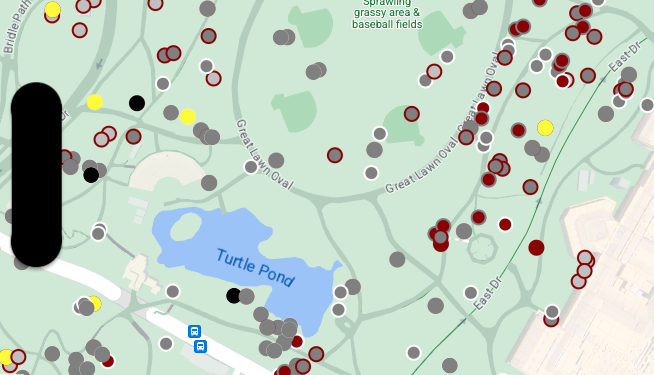
این مثال رویکردی را برای سبکدهی به ویژگیهای دادهای مبتنی بر هندسه نقطهای نشان میدهد.
درباره مجموعهداده
مجموعه داده استفادهشده در این مثال نتیجه
نظرسنجی سال ۲۰۱۸ درباره سنجابها
در سنترال پارک نیویورک است.
در گزیده زیر از فایل داده CSV، میبینیم که ستونهای x و y
برای جغرافیا استفاده میشوند؛ ستون LatLng اضافه شده است، اما در این
مثال استفاده نمیشود زیرا مجموعهدادهها فقط از
قالب WKT پشتیبانی میکنند
اگر نام ستون WKT باشد. برای اطلاعات بیشتر درباره قالبهای پشتیبانیشده
برای مکان،
الزامات CSV را ببینید.
مجموعه داده سرشماری سنجابها شامل تنوع خوبی از نقاط داده مختلف مربوط به رنگ خز و رفتار مشاهدهشده سنجابها است (حتماً بهصورت افقی پیمایش کنید تا همه آن را ببینید).
| X | س | UniqueSquirrelID | هکتار | تبدیل | تاریخ | Hectare SquirrelNumber | سن | PrimaryFurColor | HighlightFurColor | CombinationofPrimaryandHighlightColor | Colornotes | مکان | اندازهگیری AboveGroundSighter | SpecificLocation | دویدن | تعقیب کردن | صخرهنوردی | غذا خوردن | علوفهجویی | فعالیتهای دیگر | کوکس | Quaas | ناله | Tailflags | Tailtwitches | رویکردها | بیتفاوت | Runsfrom | OtherInteractions | LatLng |
|---|---|---|---|---|---|---|---|---|---|---|---|---|---|---|---|---|---|---|---|---|---|---|---|---|---|---|---|---|---|---|
| -73.9561344937861 | 40.7940823884086 | 37F-PM-1014-03 | ۳۷ درجه فارنهایت | ب.ظ. | 10142018 | 3 | + | نادرست | نادرست | نادرست | نادرست | نادرست | نادرست | نادرست | نادرست | نادرست | نادرست | نادرست | نادرست | نادرست | POINT (-73.9561344937861 40.7940823884086) | |||||||||
| -73.9688574691102 | 40.7837825208444 | 21B-AM-1019-04 | 21B | ق.ظ. | 10192018 | 4 | + | نادرست | نادرست | نادرست | نادرست | نادرست | نادرست | نادرست | نادرست | نادرست | نادرست | نادرست | نادرست | نادرست | POINT (-73.9688574691102 40.7837825208444) | |||||||||
| -۷۳٫۹۷۴۲۸۱۱۴۸۴۸۵۲ | 40.775533619083 | 11B-PM-1014-08 | 11B | ب.ظ. | 10142018 | 8 | خاکستری | خاکستری+ | بالای زمین | 10 | نادرست | درست | نادرست | نادرست | نادرست | نادرست | نادرست | نادرست | نادرست | نادرست | نادرست | نادرست | نادرست | POINT (-73.97428114848522 40.775533619083) | ||||||
| -73.9596413903948 | 40.7903128889029 | 32E-PM-1017-14 | 32E | ب.ظ. | 10172018 | 14 | بزرگسال | خاکستری | خاکستری+ | هیچچیز بهعنوان «اصلی» انتخاب نشده است. خاکستری بهعنوان رنگ برجستهسازی انتخاب شد. اصلاحات اجرایی انجام شد. | نادرست | نادرست | نادرست | درست | درست | نادرست | نادرست | نادرست | نادرست | نادرست | نادرست | نادرست | درست | POINT (-73.9596413903948 40.7903128889029) | ||||||
| -73.9702676472613 | 40.7762126854894 | 13E-AM-1017-05 | 13E | ق.ظ. | 10172018 | 5 | بزرگسال | خاکستری | دارچینی | خاکستری+دارچینی | بالای زمین | روی کنده درخت | نادرست | نادرست | نادرست | نادرست | درست | نادرست | نادرست | نادرست | نادرست | نادرست | نادرست | نادرست | نادرست | POINT (-73.9702676472613 40.7762126854894) | ||||
| -73.9683613516225 | 40.7725908847499 | 11H-AM-1010-03 | ۱۱ ساعت | ق.ظ. | 10102018 | 3 | بزرگسال | دارچینی | سفید | دارچینی+سفید | نادرست | نادرست | نادرست | نادرست | درست | نادرست | نادرست | نادرست | نادرست | درست | نادرست | درست | نادرست | POINT (-73.9683613516225 40.7725908847499) | ||||||
| -73.9541201789795 | 40.7931811701082 | 36H-AM-1010-02 | ۳۶ ساعت | ق.ظ. | 10102018 | 2 | بزرگسال | خاکستری | خاکستری+ | درست خارج از هکتار | صفحه زمین | نادرست | نادرست | نادرست | نادرست | نادرست | درست | نادرست | نادرست | نادرست | نادرست | نادرست | نادرست | نادرست | نادرست | POINT (-73.9541201789795 40.7931811701082) |
ویژگیهای دادههای نقطه سبک
کد موجود در این مثال رویکردی را برای سبکدهی به رنگ پرکننده و
رنگ خط برای هر نقطه براساس مشخصه CombinationofPrimaryandHighlightColor اتخاذ میکند،
که رنگهای خز اصلی و فرعی را برای هر سنجاب ترکیب میکند.
Swift
let options = GMSMapViewOptions()
options.mapID = GMSMapID(identifier: "YOUR_MAP_ID")
options.camera = GMSCameraPosition(latitude: 40.7, longitude: -74.0, zoom: 12)
let mapView = GMSMapView(options: options)

let layer = mapView.datasetFeatureLayer(of: "YOUR_DATASET_ID")

// Define a point style with fill and radius.
// Apply the style to the datasets features.
layer.style = { feature in
    switch(feature.datasetAttributes["CombinationofPrimaryandHighlightColor"]){
      case "Black+"  :
        let style = MutableFeatureStyle()
        style.fillColor = .black;
        style.pointRadius = 8;
        return style
      case "Cinnamon+"  :
        let style = MutableFeatureStyle()
        style.fillColor = UIColor(red: 139/255, green: 0, blue: 0, alpha: 1);
        style.pointRadius = 8;
        return style
      ...
      default :
        let style = MutableFeatureStyle()
        style.fillColor = .yellow;
        style.pointRadius = 8;
        return style
    }
}
آبجکتیو-سی
GMSMapViewOptions *options = [[GMSMapViewOptions alloc] init];
options.camera = [GMSCameraPosition cameraWithLatitude:40.7 longitude:-74.0 zoom:12];
options.mapID = [GMSMapID mapIDWithIdentifier:@"MAP_ID"];
GMSMapView *mapView = [[GMSMapView alloc] initWithOptions:options];

GMSDatasetFeatureLayer *layer = [mapView datasetFeatureLayerOfDatasetID:@"YOUR_DATASET_ID"];

// Define a point style with fill and radius.
// Apply the style to the datasets features.
layer.style = ^(GMSDatasetFeature *feature) {
  NSString *attrib = feature.datasetAttributes[@"CombinationofPrimaryandHighlightColor"];
  if ([attrib isEqualToString:@"Black+"])  {
    GMSMutableFeatureStyle *style = [GMSMutableFeatureStyle style];
    style.fillColor = [UIColor blackColor];
    style.pointRadius = 8;
    return style;
  } else if([attrib isEqualToString:@"Cinnamon+"]) {
    GMSMutableFeatureStyle *style = [GMSMutableFeatureStyle style];
    style.fillColor = [UIColor colorWithRed:139.0f/255.0f
                                      green:0.0f
                                        blue:0.0f
                                      alpha:1.0f];
    style.pointRadius = 8;
    return style;
  }
  ...
  else {
    GMSMutableFeatureStyle *style = [GMSMutableFeatureStyle style];
    style.fillColor = [UIColor yellowColor];
    style.pointRadius = 8;
    return style;
  }
};
نمونه سبکبندی دادههای چندضلعی
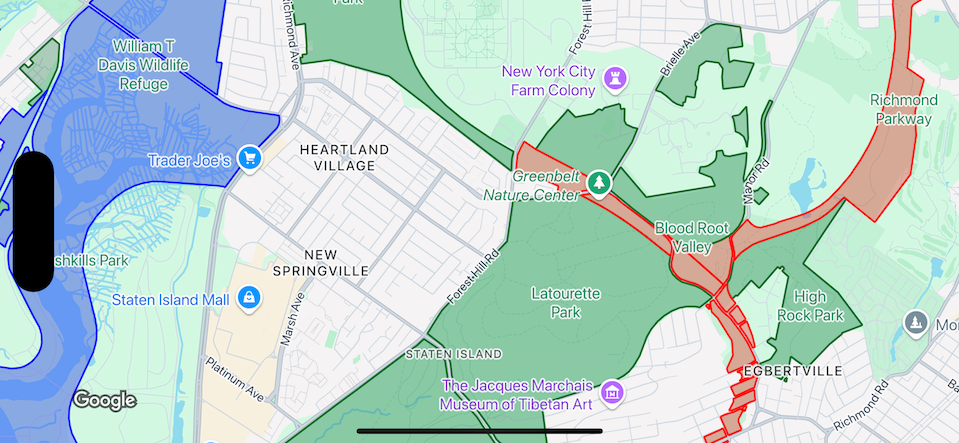
این مثال رویکردی را برای سبکدهی به عارضههای دادهای مبتنی بر هندسه چندضلعی نشان میدهد.
درباره مجموعهداده
مجموعهداده استفادهشده در این مثال پارکهای شهر نیویورک را نشان میدهد. گزیده زیر از فایل GeoJSON مجموعه داده، ورودی عارضه نماینده را نشان میدهد.
{
  "type": "Feature",
  "properties": {
    "jurisdiction": "DPR",
    "mapped": "False",
    "zipcode": "11356",
    "acres": "0.05",
    "location": "College Pl., College Pt. Blvd., bet. 11 Ave. and 12 Ave.",
    "nys_assembly": "27",
    "councildistrict": "19",
    "url": "http://www.nycgovparks.org/parks/Q042/",
    "typecategory": "Triangle/Plaza",
    "us_congress": "14",
    "eapply": "Poppenhusen Park",
    "parentid": "Q-07",
    "gispropnum": "Q042",
    "retired": "false",
    "communityboard": "407",
    "objectid": "6248",
    "globalid": "F4810079-CBB9-4BE7-BBFA-B3C0C35D5DE5",
    "name311": "Poppenhusen Park",
    "department": "Q-07",
    "pip_ratable": "true",
    "subcategory": "Sitting Area/Triangle/Mall",
    "precinct": "109",
    "permit": "true",
    "acquisitiondate": null,
    "omppropid": "Q042",
    "gisobjid": "100000301",
    "signname": "Poppenhusen Park",
    "address": null,
    "permitparent": "Q-07",
    "class": "PARK",
    "nys_senate": "11",
    "permitdistrict": "Q-07",
    "borough": "Q",
    "waterfront": "false"
  },
  "geometry": {
    "type": "MultiPolygon",
    "coordinates": [
      [
        [
          [
            -73.84575702371716,
            40.78796240884273
          ],
          [
            -73.84593393292693,
            40.78796857347548
          ],
          [
            -73.84577256469657,
            40.787651355629556
          ],
          [
            -73.84575702371716,
            40.78796240884273
          ]
        ]
      ]
    ]
  }
},
سبکدهی به ویژگیهای دادههای چندضلعی
کد موجود در این مثال رنگآمیزی ویژهای را برای ویژگیهای داده مرتبط با typecategory «توسعهنیافته» یا «پارکوی» اعمال میکند و همه ویژگیهای دیگر را به رنگ سبز درمیآورد.
Swift
let options = GMSMapViewOptions()
options.mapID = GMSMapID(identifier: "YOUR_MAP_ID")
options.camera = GMSCameraPosition(latitude: 40.7, longitude: -74.0, zoom: 12)
let mapView = GMSMapView(options: options)

let layer = mapView.datasetFeatureLayer(of: "YOUR_DATASET_ID")

// Define a polygon style with fill and stroke.
// Apply the style to the datasets features.
layer.style = { feature in
  switch(feature.datasetAttributes["typecategory"]){
    case "Undeveloped"  :
      let style = MutableFeatureStyle()
      style.fillColor = .blue.withAlphaComponent(0.3);
      style.strokeColor = .blue;
      style.strokeWidth = 2.0;
      return style
    case "Parkway"  :
      let style = MutableFeatureStyle()
      style.fillColor = .red.withAlphaComponent(0.3);
      style.strokeColor = .red;
      style.strokeWidth = 2.0;
      return style
    default :
      let style = MutableFeatureStyle()
      style.fillColor = .green.withAlphaComponent(0.3);
      style.strokeColor = .green;
      style.strokeWidth = 2.0;
      return style
  }
}
آبجکتیو-سی
GMSMapViewOptions *options = [[GMSMapViewOptions alloc] init];
options.camera = [GMSCameraPosition cameraWithLatitude:40.7 longitude:-74.0 zoom:12];
options.mapID = [GMSMapID mapIDWithIdentifier:@"MAP_ID"];
GMSMapView *mapView = [[GMSMapView alloc] initWithOptions:options];

GMSDatasetFeatureLayer *layer = [mapView datasetFeatureLayerOfDatasetID:@"YOUR_DATASET_ID"];

// Define a polygon style with fill and stroke.
// Apply the style to the datasets features.
layer.style = ^(GMSDatasetFeature *feature) {
  NSString *attrib = feature.datasetAttributes[@"typecategory"];
  if ([attrib isEqualToString:@"Undeveloped"]) {
        GMSMutableFeatureStyle *style = [GMSMutableFeatureStyle style];
        style.fillColor = [[UIColor blueColor] colorWithAlphaComponent:0.3];
        style.strokeColor = [UIColor blueColor];
        style.strokeWidth = 2.0;
        return style;
  } else if([attrib isEqualToString:@"Parkway"]) {
        GMSMutableFeatureStyle *style = [GMSMutableFeatureStyle style];
        style.fillColor = [[UIColor redColor] colorWithAlphaComponent:0.3];
        style.strokeColor = [UIColor redColor];
        style.strokeWidth = 2.0;
        return style;
  } else {
        GMSMutableFeatureStyle *style = [GMSMutableFeatureStyle style];
        style.fillColor = [[UIColor greenColor] colorWithAlphaComponent:0.3];
        style.strokeColor = [UIColor greenColor];
        style.strokeWidth = 2.0;
        return style;
    }
  };
نمونه سبکبندی دادههای چندخطی
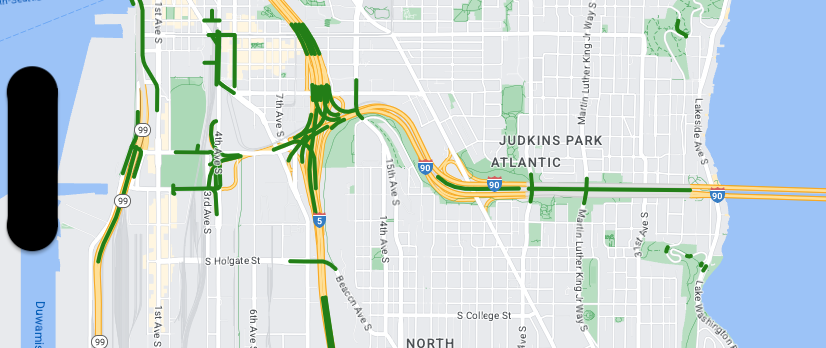
این مثال رویکردی را برای سبکدهی به ویژگیهای دادههای مبتنی بر هندسه چندخطی نشان میدهد.
درباره مجموعهداده
مجموعهداده استفادهشده در این مثال پلهای منطقه سیاتل را نشان میدهد. گزیده زیر از فایل GeoJSON مجموعه داده، ورودی عارضه نماینده را نشان میدهد.
{
  "type": "Feature",
  "properties": {
      "OBJECTID": 1,
      "COMPTYPE": 66,
      "COMPKEY": 515774,
      "HANSEGKEY": 489781,
      "UNITID": "BRG-935",
      "UNITTYPE": " ",
      "BRGUNITID": "BRG-935",
      "UNITDESC_BRG": "YALE AVE BR REV LANE OC                                                                                                                                                                                                                                        ",
      "UNITDESC_SEG": "HOWELL ST ON RP BETWEEN HOWELL ST AND I5 SB                                                                                                                                                                                                                    ",
      "INSTDATE": null,
      "EXPDATE": null,
      "STATUS": " ",
      "STATUSDT": null,
      "CONDITION": " ",
      "CONDDT": null,
      "OWN": " ",
      "LSTVERIFY": null,
      "MAINTBY": " ",
      "ADDBY": "GARCIAA",
      "ADDDTTM": "2010-01-21T00:00:00Z",
      "MODBY": null,
      "MODDTTM": null,
      "BR_NBR": 935,
      "BR_CODE": " 935",
      "BR_TYPE": "ST",
      "BR_NAME": "YALE AVE BR REV LANE OC",
      "BR_FACILITIES": "YALE AVE-SR 5 ON RAMP",
      "BR_FEATURES": "SR 5 REV LANE",
      "BR_RATING": 0,
      "BR_INSET": 1,
      "BR_GEO": "DT",
      "BR_OWNER": "DOT",
      "BR_OWNER_NAME": "State of Washington",
      "GEOBASID": 0,
      "XGEOBASID": 0,
      "GISSEGKEY": 489781,
      "EARTHQUAKE_RESPONSE_TEAM": " ",
      "SHAPE_Length": 220.11891836147655
  },
  "geometry": {
      "type": "LineString",
      "coordinates": [
          [
              -122.329201929090928,
              47.616910448708538
          ],
          [
              -122.329206483407461,
              47.616976719821004
          ],
          [
              -122.32921802149356,
              47.617042137515213
          ],
          [
              -122.329236413912909,
              47.617105967923777
          ],
          [
              -122.329261454336034,
              47.617167494985758
          ],
          [
              -122.329292861855023,
              47.617226028479571
          ],
          [
              -122.329330284134699,
              47.617280911766009
          ],
          [
              -122.329373301365223,
              47.617331529154569
          ],
          [
              -122.329421430971635,
              47.617377312810319
          ],
          [
              -122.329474133027375,
              47.617417749124023
          ],
          [
              -122.32953081631139,
              47.617452384473893
          ]
      ]
  }
},
سبکدهی به ویژگیهای دادههای چندخطی
قطعه کد زیر همان سبک را مستقیماً برای همه عارضههای داده اعمال میکند.
Swift
// Define a style with green fill and stroke.
// Apply the style to the datasets features.
layer.style = { feature in
  let style = MutableFeatureStyle()
  style.fillColor = .green.withAlphaComponent(0.5);
  style.strokeColor = [UIColor greenColor];
  style.strokeWidth = 2.0;
  return style
}
آبجکتیو-سی
// Define a style with green fill and stroke.
// Apply the style to the datasets features.
layer.style = ^(GMSDatasetFeature *feature) {
  GMSMutableFeatureStyle *style = [GMSMutableFeatureStyle style];
  style.fillColor = [[UIColor greenColor] colorWithAlphaComponent:0.5];
  style.strokeColor = [UIColor greenColor];
  style.strokeWidth = 2.0;
  return style;
};