

本页面介绍了如何将数据集添加到地图以及如何应用样式设置。
前提条件
在继续操作之前,您应备好地图 ID、地图样式和数据集 ID。
将数据集 ID 与地图样式相关联
如需为数据集的地图项设置样式,您可以将样式函数应用于地图的数据集地图项图层。当您将数据集与地图样式相关联时,系统会创建数据集地图项图层。
如要将您的数据集与您使用的地图样式相关联,请按以下步骤操作:
- 在 Google Cloud 控制台中,前往数据集页面。
- 点击相应数据集的名称。系统随即会显示数据集详细信息页面。
- 点击预览标签页。
- 在关联的地图样式部分中,点击添加地图样式。

- 勾选要关联的地图样式对应的复选框,然后点击保存。
将样式应用于数据集
如需为数据集图层的地图项设置样式,请使用接受 GMSDatasetFeature 并返回 GMSFeatureStyle 的样式设置闭包来定义样式属性。然后将样式属性设置为包含样式设置逻辑的样式设置闭包。
样式闭包必须是确定性的,并且在应用时返回一致的结果。如果任何地图项的任何样式规范发生更改,则必须重新应用样式。
设置描边、填充和点半径
在样式工厂函数中设置地图项的样式时,您可以设置:
边框的描边颜色和不透明度,由
UIColor类定义。默认值为透明 (UIColor.clearColor)。边框的描边宽度(以屏幕像素为单位)。默认值为 2。
由
UIColor类定义的填充颜色和不透明度。默认值为透明 (UIColor.clearColor)。点状要素的点半径,介于 0 到 128 像素之间。
使用简单的样式规则
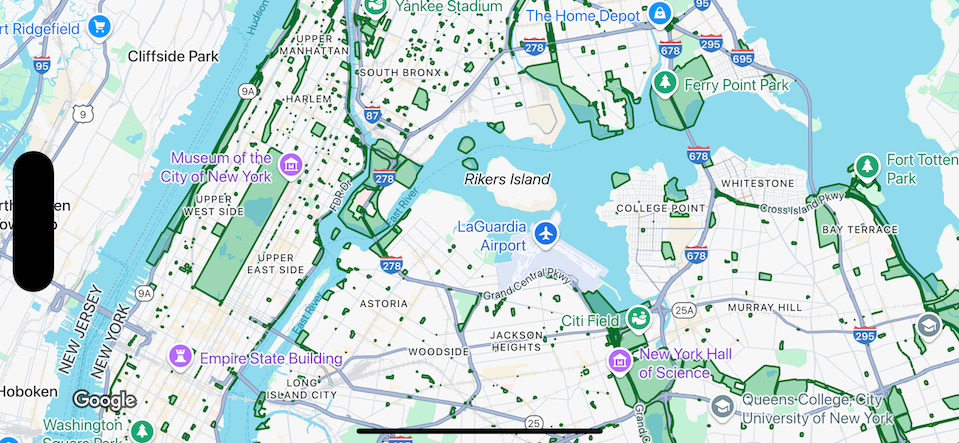
设置地图项样式时,最简单的方式是定义颜色、不透明度和线宽等常量样式属性。您可以直接将地图项样式选项应用于数据集地图项图层,也可以将这些选项与自定义样式搭配使用。
Swift
let mapView = GMSMapView(frame: .zero, mapID: GMSMapID(identifier: "YOUR_MAP_ID"), camera: GMSCameraPosition(latitude: 40.7, longitude: -74.0, zoom: 12))

let layer = mapView.datasetFeatureLayer(of: "YOUR_DATASET_ID")

// Define a style with green fill and stroke.
// Apply the style to all features in the dataset.
layer.style = { feature in
    let style = MutableFeatureStyle()
    style.fillColor = .green.withAlphaComponent(0.1)
    style.strokeColor = .green
    style.strokeWidth = 2.0
    return style
}
Objective-C
GMSMapView *mapView = [GMSMapView mapWithFrame:CGRectZero mapID:[GMSMapID mapIDWithIdentifier:@"MAP_ID"] camera:[GMSCameraPosition cameraWithLatitude: 40.7 longitude: -74.0 zoom:12]];

GMSDatasetFeatureLayer *layer = [mapView datasetFeatureLayerOfDatasetID:@"YOUR_DATASET_ID"];

// Define a style with green fill and stroke.
// Apply the style to all features in the dataset.
layer.style = ^(GMSDatasetFeature *feature) {
    GMSMutableFeatureStyle *style = [GMSMutableFeatureStyle style];
    style.fillColor = [[UIColor greenColor] colorWithAlphaComponent:0.1];
    style.strokeColor = [UIColor greenColor];
    style.strokeWidth = 2.0;
    return style;
};
使用声明式样式规则
您可以根据地图项的属性以声明方式设置样式规则,并将其应用于整个数据集。您可以从地图项样式函数返回 nil(例如,需要让部分地图项保持不可见状态时)。
例如,使用 GMSDatasetFeature.datasetAttributes 可返回特征的数据集属性值。然后,您可以根据地图项的属性自定义其样式。
此示例通过确定数据集的每个功能的“highlightColor”属性的值来控制样式:
Swift
layer.style = { feature in
    var attributeColor: String = feature.datasetAttributes["highlightColor"]
    // Conditionalize styling based on the value of the "highlightColor" attribute.
    ...
}
Objective-C
// Apply the style to a single dataset feature.
layer.style = ^(GMSDatasetFeature *feature) {
    NSString *attributeColor = feature.datasetAttributes[@"highlightColor"];
    // Conditionalize styling based on the value of the "highlightColor" attribute.
    ...
};
移除图层的样式
如需移除图层的样式,请将 style 设置为 null:
Swift
layer.style = nil
Objective-C
layer.style = nil;
您还可以从地图项样式函数返回 nil(例如,需要让部分地图项保持不可见状态时)。