

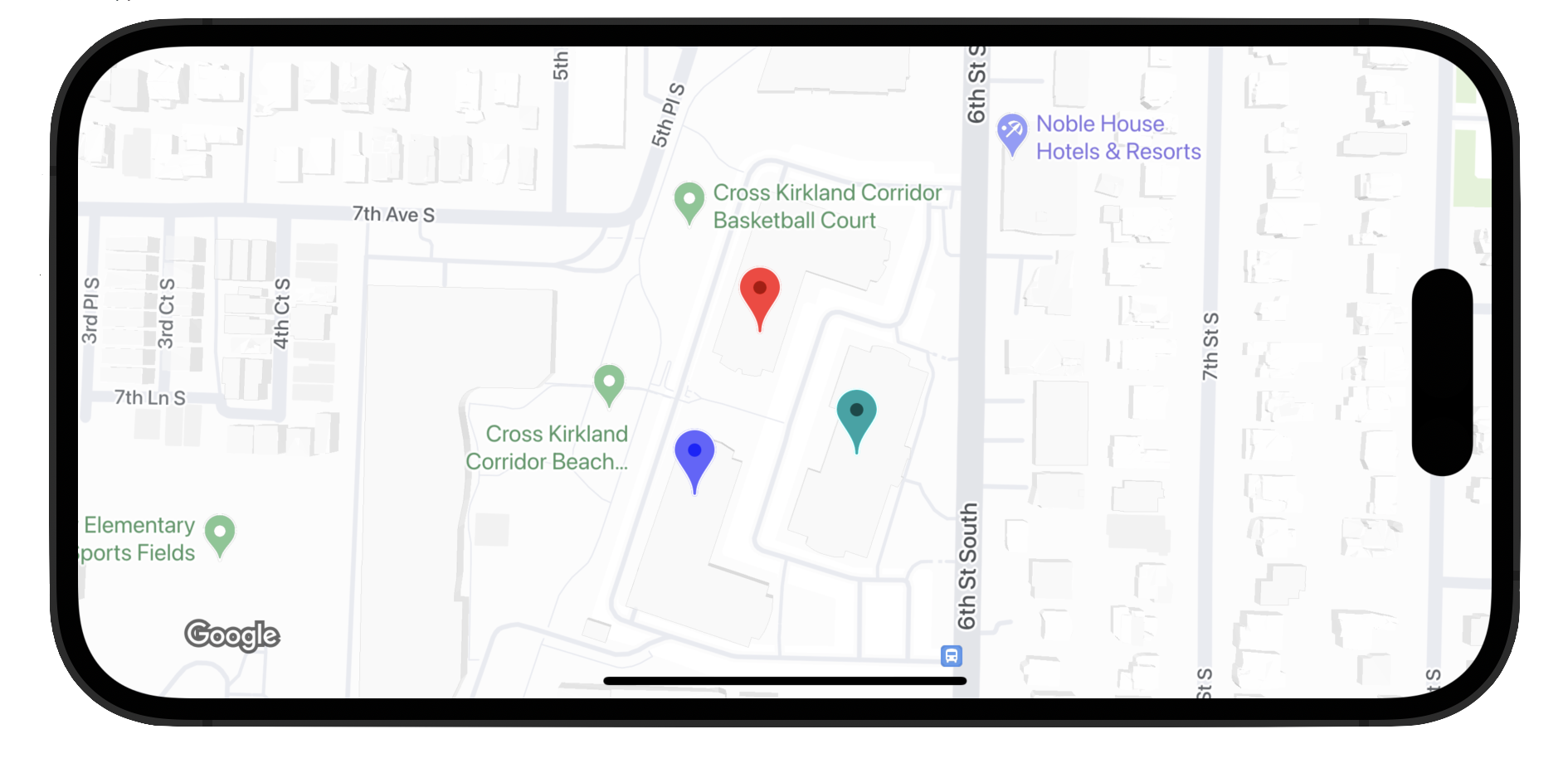
Điểm đánh dấu nâng cao sử dụng hai lớp để xác định điểm đánh dấu: lớp GMSAdvancedMarker cung cấp các tính năng điểm đánh dấu mặc định và GMSPinImageOptions chứa các tuỳ chọn để tuỳ chỉnh thêm. Trang này cho bạn biết cách tuỳ chỉnh điểm đánh dấu theo các cách sau:
- Thay đổi màu nền
- Thay đổi màu đường viền
- Thay đổi màu ký tự
- Thay đổi văn bản ký tự
- Hỗ trợ chế độ xem và ảnh động tuỳ chỉnh bằng thuộc tính iconView
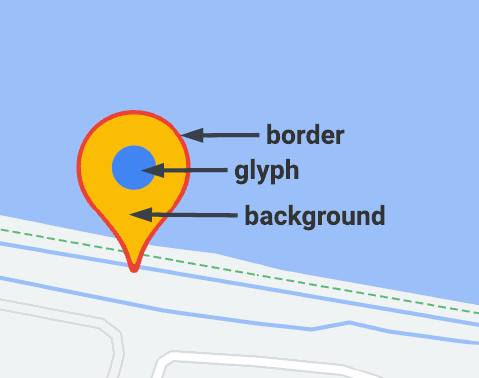
Thay đổi màu nền
Sử dụng tuỳ chọn GMSPinImageOptions.backgroundColor để thay đổi màu nền của điểm đánh dấu.
Swift
//...

let options = GMSPinImageOptions()
options.backgroundColor = .blue

let pinImage = GMSPinImage(options: options)
advancedMarker.icon = pinImage

advancedMarker.map = mapView
Objective-C
//...

GMSPinImageOptions *options = [[GMSPinImageOptions alloc] init];
options.backgroundColor = [UIColor blueColor];

GMSPinImage *pin = [GMSPinImage pinImageWithOptions:options];
customTextMarker.icon = pin;

customTextMarker.map = mapView;
Thay đổi màu đường viền
Sử dụng tuỳ chọn GMSPinImageOptions.borderColor để thay đổi màu nền của điểm đánh dấu.
Swift
//...

let options = GMSPinImageOptions()
options.borderColor = .blue

let pinImage = GMSPinImage(options: options)
advancedMarker.icon = pinImage

advancedMarker.map = mapView
Objective-C
//...

GMSPinImageOptions *options = [[GMSPinImageOptions alloc] init];
options.backgroundColor = [UIColor blueColor];

GMSPinImage *pin = [GMSPinImage pinImageWithOptions:options];
advancedMarker.icon = pin;

advancedMarker.map = mapView;
Thay đổi màu ký tự
Sử dụng GMSPinImageGlyph.glyphColor để thay đổi màu nền của điểm đánh dấu.
Swift
//...

let options = GMSPinImageOptions()

let glyph = GMSPinImageGlyph(glyphColor: .yellow)
options.glyph = glyph

let glyphColor = GMSPinImage(options: options)

advancedMarker.icon = glyphColor
advancedMarker.map = mapView
Objective-C
//...

GMSPinImageOptions *options = [[GMSPinImageOptions alloc] init];

options.glyph = [[GMSPinImageGlyph alloc] initWithGlyphColor:[UIColor yellowColor]];
GMSPinImage *glyphColor = [GMSPinImage pinImageWithOptions:options];

advancedMarker.icon = glyphColor;
advancedMarker.map = mapView;
Thay đổi văn bản ký tự
Sử dụng GMSPinImageGlyph để thay đổi văn bản ký tự của điểm đánh dấu.
Swift
//...

let options = GMSPinImageOptions()

let glyph = GMSPinImageGlyph(text: "ABC", textColor: .white)
options.glyph = glyph

let pinImage = GMSPinImage(options: options)

advancedMarker.icon = pinImage
advancedMarker.map = mapView
Objective-C
//...

GMSPinImageOptions *options = [[GMSPinImageOptions alloc] init];

options.glyph = [[GMSPinImageGlyph alloc] initWithText:@"ABC" textColor:[UIColor whiteColor]];
GMSPinImage *pin = [GMSPinImage pinImageWithOptions:options];

customTextMarker.icon = pin;
customTextMarker.map = mapView;
Hỗ trợ thành phần hiển thị và ảnh động tuỳ chỉnh bằng thuộc tính iconView
Tương tự như GMSMarker, GMSAdvancedMarker cũng hỗ trợ các điểm đánh dấu bằng iconView.
Thuộc tính iconView hỗ trợ ảnh động của tất cả các thuộc tính có thể tạo ảnh động của UIView, ngoại trừ khung và tâm. Lớp này không hỗ trợ các điểm đánh dấu có iconViews và icons hiển thị trên cùng một bản đồ.
Swift
//...

let advancedMarker = GMSAdvancedMarker(position: coordinate)
advancedMarker.iconView = customView()
advancedMarker.map = mapView

func customView() -> UIView {
// return your custom UIView.
}
Objective-C
//...

GMSAdvancedMarker *advancedMarker = [GMSAdvancedMarker markerWithPosition:kCoordinate];
advancedMarker.iconView = [self customView];
advancedMarker.map = self.mapView;

-   (UIView *)customView {
  // return custom view
}
Quy tắc ràng buộc bố cục
GMSAdvancedMarker không trực tiếp hỗ trợ các quy tắc ràng buộc bố cục cho iconView. Tuy nhiên, bạn có thể đặt các quy tắc ràng buộc bố cục cho các thành phần giao diện người dùng trong iconView. Khi tạo thành phần hiển thị, đối tượng frame hoặc size sẽ được truyền đến điểm đánh dấu.
Swift
//do not set advancedMarker.iconView.translatesAutoresizingMaskIntoConstraints = false

let advancedMarker = GMSAdvancedMarker(position: coordinate)
let customView = customView()

//set frame
customView.frame = CGRect(0, 0, width, height)

advancedMarker.iconView = customView
Objective-C
//do not set advancedMarker.iconView.translatesAutoresizingMaskIntoConstraints = NO;

GMSAdvancedMarker *advancedMarker = [GMSAdvancedMarker markerWithPosition:kCoordinate];

CustomView *customView = [self customView];

//set frame
customView.frame = CGRectMake(0, 0, width, height);

advancedMarker.iconView = customView;