
Like other Google APIs, the Google Ads API uses the OAuth 2.0 protocol for authentication and authorization. OAuth 2.0 enables your Google Ads API client app to access a user's Google Ads account without having to handle or store the user's login info.
Understand the Google Ads access model
To work effectively with the Google Ads API, understand how the Google Ads access model works. Refer to the Google Ads access model guide.
OAuth workflows
There are three common workflows used when working with the Google Ads API.
Service account flow
This is the recommended workflow if your workflow doesn't require any human interaction. This workflow requires a configuration step, where the user adds a service account to their Google Ads account. The app can then use the service account's credentials to manage the user's Google Ads account.
Here's how to set up OAuth2 for API access using your own credentials with a service account in the Perl client library:
Create OAuth2 credentials:
Follow the instructions to generate a service account and a JSON key file.
Set up the client library:
Set the private key JSON path (and optional
impersonatedEmailif using Google Workspace domain-wide delegation) in your configuration. If you're using agoogleads.propertiesfile, add the following:jsonKeyFilePath=PRIVATE_KEY_FILE_PATH # Optional unless using Google Workspace domain-wide delegation: impersonatedEmail=IMPERSONATED_EMAIL loginCustomerId=LOGIN_CUSTOMER_IDIf you're using environment variables, add the following to your Bash configuration or environment:
export GOOGLE_ADS_JSON_KEY_FILE_PATH=KEY_FILE_PATH export GOOGLE_ADS_IMPERSONATED_EMAIL=\ IMPERSONATED_EMAIL export GOOGLE_ADS_LOGIN_CUSTOMER_ID=LOGIN_CUSTOMER_IDRefer to the service account workflow guide to learn more.
Single-user authentication flow
This workflow may be used if you cannot use service accounts. This workflow requires two configuration steps:
- Give a single user access to all the accounts to be managed using the Google Ads API. A common approach is to give the user access to a Google Ads API manager account, and link all the Google Ads accounts under that manager account.
- The user runs the
generate_user_credentials.plcode example to authorize your app to manage all their Google Ads accounts on their behalf.
The following steps run an interactive code example, which then requires you to provide input.
In a terminal, run the
generate_user_credentials.plexample in theexamplesdirectory. You can either modify theINSERT_XXX_HEREvalues in the example before running or use the command-line arguments-client_idfor client ID and-client_secretfor client secret.perl generate_user_credentials.pl \ -client_id OAUTH_CLIENT_ID \ -client_secret OAUTH_CLIENT_SECRETThis code example prompts you to visit a URL where you must authorize the app to access your Google Ads account on your behalf.
Paste this url in your browser:
https://accounts.google.com/o/oauth2/v2/auth?response_type=code&access_type=offline...
Navigate to the URL in a private browser session or an incognito window. Sign in with the Google Account you use to access Google Ads. Usually, this is an email account that has access to a Google Ads manager account that contains all the accounts you need to manage within its account hierarchy. Click Continue on the OAuth 2.0 consent screen.
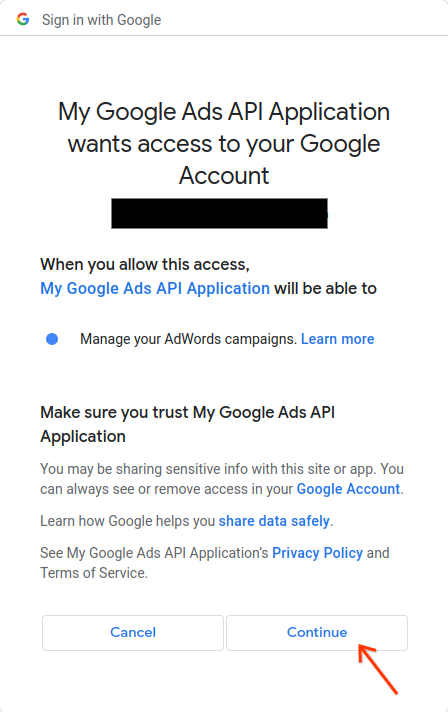
You'll be redirected to a page with a message indicating that the authorization succeeded.
Authorization code was successfully retrieved.Return to the console where you're running the code example. You'll see that the code example has completed and is displaying your refresh token and some instructions, followed by the instructions you'll need to follow to configure the client library:
Replace the following keys and values in your googleads.properties
configuration file:

clientId=***********************apps.googleusercontent.com
clientSecret=****
refreshToken=****
Press
Ctrl + Cto terminate the process. Then copy the generated refresh token along with the client ID and client secret into yourgoogleads.propertiesfile or save it somewhere else to use if instantiating the library at runtime.
The library can be initialized using the user's OAuth 2.0 credentials by
setting the following in googleads.properties:
clientId=OAUTH_CLIENT_ID
clientSecret=OAUTH_CLIENT_SECRET
refreshToken=REFRESH_TOKEN
loginCustomerId=LOGIN_CUSTOMER_ID
Alternatively, use environment variables:
export GOOGLE_ADS_CLIENT_ID=OAUTH_CLIENT_ID
export GOOGLE_ADS_CLIENT_SECRET=OAUTH_CLIENT_SECRET
export GOOGLE_ADS_REFRESH_TOKEN=REFRESH_TOKEN
export GOOGLE_ADS_LOGIN_CUSTOMER_ID=LOGIN_CUSTOMER_ID
Refer to the single-user authentication workflow guide to learn more.
Multi-user authentication flow
This is the recommended workflow if your app allows users to sign in and authorize your app to manage their Google Ads accounts on their behalf. Your app builds and manages the OAuth 2.0 user credentials.
For Perl, you would typically implement a web application flow where your application handles the OAuth 2.0 redirection and token management. The user authenticates through your application, and your application stores and uses the user's refresh token to make API calls on their behalf.
The configuration for using the obtained credentials is the same as for the single-user authentication flow:
clientId=OAUTH_CLIENT_ID
clientSecret=OAUTH_CLIENT_SECRET
refreshToken=REFRESH_TOKEN
loginCustomerId=LOGIN_CUSTOMER_ID
Alternatively, use environment variables:
export GOOGLE_ADS_CLIENT_ID=OAUTH_CLIENT_ID
export GOOGLE_ADS_CLIENT_SECRET=OAUTH_CLIENT_SECRET
export GOOGLE_ADS_REFRESH_TOKEN=REFRESH_TOKEN
export GOOGLE_ADS_LOGIN_CUSTOMER_ID=LOGIN_CUSTOMER_ID
Refer to the multi-user authentication workflow guide to learn more.
What if my user manages multiple accounts?
It is common for a user to manage more than one Google Ads account, either through direct access to accounts, or through a Google Ads manager account. The Perl client library provides examples that illustrate how to handle such cases:
- The
get_account_hierarchy.plexample shows how to retrieve the list of all accounts under a Google Ads manager account. - The
list_accessible_customers.plexample shows how to retrieve the list of all accounts that a user has direct access to. These accounts can then be used as valid values for theloginCustomerIdsetting in thegoogleads.propertiesfile or theGOOGLE_ADS_LOGIN_CUSTOMER_IDenvironment variable.