
Agen RCS for Business berkomunikasi dengan pengguna dengan mengirim dan menerima pesan. Untuk mengirim pesan kepada pengguna, agen Anda mengirimkan permintaan pesan ke API Pesan Bisnis RCS. Satu permintaan dapat mencakup teks , rich card , file media dan PDF , balasan yang disarankan , dan tindakan yang disarankan .
Platform RCS for Business menampilkan pesan kesalahan dalam situasi tertentu untuk membantu Anda mengelola pengiriman pesan:
- Jika Anda mengirim pesan ke pengguna yang perangkatnya tidak mendukung RCS atau tidak mengaktifkan RCS, platform RCS for Business akan mengembalikan kesalahan 404 NOT_FOUND. Dalam hal ini, Anda dapat mencoba menghubungi pengguna melalui metode cadangan yang telah ditentukan dalam infrastruktur Anda.
- Jika Anda mengirim pesan ke pengguna RCS di jaringan tempat agen Anda belum diluncurkan, atau di jaringan yang belum mengaktifkan lalu lintas RCS, platform RCS for Business akan mengembalikan kesalahan 404 NOT_FOUND.
- Jika Anda mengirim pesan dengan fitur yang tidak didukung oleh perangkat pengguna, platform RCS for Business akan mengembalikan kesalahan 400 INVALID_ARGUMENT dan tidak mengirimkan pesan Anda.
Sebagai bagian dari strategi pengiriman pesan multi-saluran Anda, sebaiknya batalkan pesan yang tidak terkirim setelah waktu yang wajar dan kirimkan melalui saluran yang berbeda. Untuk membatalkan pesan secara otomatis pada waktu yang telah ditentukan, atur masa berlaku pesan .
Penerima sedang offline
Platform RCS for Business tetap menerima pesan untuk dikirim meskipun penerima sedang offline. Anda akan menerima respons 200 OK, dan platform RCS for Business akan menyimpan pesan tersebut dan mencoba mengirim ulang selama 30 hari. Anda tidak perlu meminta RCS for Business untuk mengirim pesan lagi.
RCS for Business menghapus pesan yang tidak terkirim 30 hari setelah pesan tersebut dikirim.
Tergantung pada kasus penggunaan agen Anda, Anda mungkin ingin mencabut pesan yang belum terkirim sebelum batas waktu 30 hari ini. Pencabutan dapat mencegah pengguna yang sedang offline menerima pesan yang sudah usang ketika mereka kembali online. Ada beberapa cara untuk mencabut pesan:
- Kirim permintaan pencabutan untuk memicu pencabutan.
- Tetapkan masa berlaku pesan untuk secara otomatis mencabut pesan pada waktu yang tepat.
Tetapkan masa berlaku pesan.
Apakah pesan agen Anda sensitif terhadap waktu? Misalnya, OTP hanya berlaku untuk jangka waktu singkat. Penawaran terbatas waktu akan kedaluwarsa. Dan pengingat janji temu tidak relevan setelah tanggal janji temu. Untuk menjaga agar pesan tetap tepat waktu dan relevan, tetapkan masa berlaku pesan. Ini dapat mencegah pengguna offline menerima konten yang sudah usang ketika mereka kembali online. Masa berlaku juga merupakan isyarat yang baik untuk mengaktifkan strategi pesan cadangan Anda sehingga pengguna mendapatkan informasi yang mereka butuhkan tepat waktu.
Untuk mengatur masa berlaku pesan, tentukan salah satu bidang berikut dalam pesan agen:
-
expireTime: waktu tepat dalam UTC saat pesan kedaluwarsa. -
ttl(time to live): jangka waktu sebelum pesan kedaluwarsa.
Untuk opsi pemformatan dan nilai, lihat AgentMessage .
Nilai maksimum untuk ttl dan expireTime adalah 15 hari setelah pengiriman pesan.
Meskipun tidak ada nilai minimum ttl dan expireTime , setidaknya 10 detik setelah pengiriman pesan disarankan untuk secara signifikan mengurangi kemungkinan menerima pemberitahuan pembatalan dan pengiriman.
Waktu hidup (TTL) untuk sebuah pesan
Saat Anda menetapkan TTL untuk pesan RCS for Business, Anda menentukan berapa lama pesan tersebut dianggap valid dan dapat dikirim. Jika pesan tidak berhasil dikirim ke perangkat pengguna dalam periode TTL ini, platform RCS for Business secara otomatis mencoba untuk mencabutnya.
Saat Anda memulai pembatalan pesan, Anda meminta platform RCS for Business untuk berhenti mencoba mengirimkan pesan tertentu tersebut. Namun, tindakan ini hanya memengaruhi upaya pengiriman di masa mendatang. Jika perangkat pengguna telah berhasil mengambil pesan tersebut, pesan sedang diproses, dan platform RCS for Business tidak dapat membatalkan pesan tersebut dari perangkat pengguna.
Berikut hal-hal yang dapat Anda harapkan terkait notifikasi:
Pesan terkirim dalam TTL: Jika perangkat pengguna terhubung ke internet dan menerima pesan sebelum TTL berakhir, Anda akan menerima pemberitahuan
DELIVERED. Tidak ada pemberitahuan pembatalan yang akan dikirim, karena pesan telah berhasil terkirim. Ini adalah skenario yang paling umum dan diharapkan.Pesan tidak terkirim sebelum TTL kedaluwarsa: Jika TTL kedaluwarsa sebelum pesan mencapai perangkat pengguna (misalnya, perangkat sedang offline), platform RCS for Business akan mencoba mencabut pesan tersebut. Anda akan menerima notifikasi
TTL_EXPIRATION_REVOKED, yang menunjukkan bahwa pesan telah berhasil dihapus dari antrean pengiriman. Dalam hal ini, pengguna tidak akan menerima pesan tersebut.
Rekomendasi untuk menangani kasus-kasus khusus
Sistem kami memproses pengiriman pesan RCS for Business dan kedaluwarsa TTL secara paralel. Karena itu, sangat jarang Anda mungkin melihat kasus-kasus khusus di mana waktu notifikasi tidak sesuai harapan. Misalnya, Anda mungkin mendapatkan notifikasi pengiriman dan TTL sekaligus, atau Anda mungkin tidak mendapatkan keduanya.
Berikut adalah rekomendasi kami untuk menangani notifikasi pesan RCS for Business:
Notifikasi
DELIVERED: Jika Anda menerima notifikasiDELIVEREDuntuk sebuah pesan, itu mengkonfirmasi bahwa pesan tersebut telah sampai ke pengguna. Anda dapat mengabaikan notifikasi TTL selanjutnya untuk pesan tersebut.Notifikasi
TTL_EXPIRATION_REVOKED: Jika Anda menerima notifikasi TTL dengan statusTTL_EXPIRATION_REVOKED, itu berarti sistem RCS for Business berhenti mencoba mengirimkan pesan tertentu tersebut. Anda harus memperlakukan pesan ini sebagai pesan yang tidak terkirim dan melanjutkan dengan strategi cadangan Anda jika diperlukan.Notifikasi TTL dengan status lain: Jika Anda menerima notifikasi TTL dengan status lain, ini menunjukkan upaya pencabutan yang tidak berhasil.
- Untuk pesan-pesan penting, seperti kata sandi sekali pakai (OTP), aktifkan metode cadangan Anda.
- Untuk pesan yang tidak kritis, putuskan apakah akan mengaktifkan mekanisme cadangan atau tidak.
- Tidak ada notifikasi: Dalam kasus-kasus langka, sistem mungkin gagal mengirimkan notifikasi TTL dan klien juga mungkin gagal menghasilkan notifikasi pengiriman. Ini adalah kasus yang sangat jarang terjadi.
Tetapkan jenis lalu lintas pesan
API RBM menyertakan bidang messageTrafficType untuk mengkategorikan pesan. Meskipun kasus penggunaan agen masih menentukan perilaku agen dan aturan bisnis mana yang berlaku, messageTrafficType memungkinkan kategorisasi konten pesan yang lebih detail. Pada akhirnya, ini memungkinkan satu agen untuk menangani banyak kasus penggunaan. Saat ini tidak ada dampak pada kasus penggunaan agen atau aturan bisnis yang ada.
Kolom ini bersifat opsional, tetapi disarankan untuk diisi sekarang agar Anda tidak menerima kesalahan saat kolom ini menjadi wajib diisi.
Untuk mengatur tipe lalu lintas pesan, tetapkan messageTrafficType yang sesuai untuk setiap pesan berdasarkan isinya. RCS for Business mendukung tipe lalu lintas berikut.
| Jenis lalu lintas | Isi pesan | Kasus penggunaan agen |
|---|---|---|
AUTHENTICATION | Untuk pesan otentikasi. | OTP |
TRANSACTION | Untuk pesan-pesan terkait layanan atau produk yang sudah dimiliki pengguna. Misalnya: konfirmasi, tanda terima pembayaran, atau detail pemesanan. | Transaksional atau Multiguna |
PROMOTION | Untuk pesan promosi seperti penawaran, diskon, pengumuman, atau konten promosi lainnya. | Promosi atau Serbaguna |
SERVICEREQUEST | Untuk pesan tentang layanan yang secara eksplisit diminta oleh pengguna. | OTP, Transaksional, Promosional, atau Multiguna |
ACKNOWLEDGEMENT | Untuk pesan yang digunakan untuk mengkonfirmasi tindakan pengguna – khususnya permintaan berhenti berlangganan. Ini mengkonfirmasi bahwa permintaan pengguna telah diterima dan sedang diproses. | OTP, Transaksional, Promosional, atau Multiguna |
Jika tidak ada tipe lalu lintas yang ditetapkan, sistem akan menetapkan tipe default untuk kasus penggunaan agen tersebut.
| Kasus penggunaan agen | Jenis lalu lintas default |
|---|---|
| OTP | AUTHENTICATION |
| Transaksional | TRANSACTION |
| Promosi | PROMOTION |
| Serbaguna | MESSAGE_TRAFFIC_TYPE_UNSPECIFIED |
Agen multi-guna tidak memiliki tipe lalu lintas default. Anda harus menetapkan tipe lalu lintas secara eksplisit untuk setiap pesan berdasarkan kontennya. Jika Anda tidak mengganti nilai MESSAGE_TRAFFIC_TYPE_UNSPECIFIED , akan terjadi kesalahan.
Batasan ukuran pesan
Ukuran maksimum keseluruhan AgentMessage yang diubah menjadi string adalah 250 KB. Bagian teks dari pesan tersebut memiliki batas tersendiri yaitu 3072 karakter.
Untuk mencegah konsumsi data yang tidak terduga bagi pengguna, ukuran maksimum file yang dapat dikirim melalui RCS for Business adalah 100 MiB, dan total ukuran gabungan semua media dan lampiran PDF dalam satu pesan RCS for Business tidak boleh melebihi 100 MiB. (1 MiB = 1.048.576 byte). Untuk informasi lebih lanjut, lihat file media dan PDF .
Teks
Pesan paling sederhana terdiri dari teks. Pesan teks paling cocok untuk menyampaikan informasi tanpa memerlukan visual, interaksi yang kompleks, atau respons.
Contoh
Kode berikut mengirimkan pesan teks biasa. Untuk opsi pemformatan dan nilai, lihat phones.agentMessages.create .
keriting
curl -X POST "https://REGION-rcsbusinessmessaging.googleapis.com/v1/phones/PHONE_NUMBER/agentMessages?messageId=MESSAGE_ID&agentId=AGENT_ID" \
-H "Content-Type: application/json" \
-H "User-Agent: curl/rcs-business-messaging" \
-H "`oauth2l header --json PATH_TO_SERVICE_ACCOUNT_KEY rcsbusinessmessaging`" \
-d '{
  "contentMessage": {
    "text": "Hello, world!"
  },
  "messageTrafficType": "PROMOTION"
}'
Node.js
// Reference to RBM API helper
const rbmApiHelper = require('@google/rcsbusinessmessaging');

let params = {
   messageText: 'Hello, world!',
   msisdn: '+12223334444',
};

// Send a simple message to the device
rbmApiHelper.sendMessage(params, function(response) {
   console.log(response);
});
Jawa
import com.google.rbm.RbmApiHelper;
…

try {
   // Create an instance of the RBM API helper
   RbmApiHelper rbmApiHelper = new RbmApiHelper();

   // Send simple text message to user
   rbmApiHelper.sendTextMessage(
      "Hello, world!",
      "+12223334444"
   );
} catch(Exception e) {
   e.printStackTrace();
}
Python
# Reference to RBM Python client helper and messaging object structure
from rcs_business_messaging import rbm_service
from rcs_business_messaging import messages

# Create a simple RBM text message
message_text = messages.TextMessage('Hello, world!')

# Send text message to the device
messages.MessageCluster().append_message(message_text).send_to_msisdn('+12223334444')
C#
using RCSBusinessMessaging;
…

// Create an instance of the RBM API helper
RbmApiHelper rbmApiHelper = new RbmApiHelper(credentialsFileLocation,
                                             projectId);

rbmApiHelper.SendTextMessage(
    "Hello, world!",
    "+12223334444",
);
Konten Pesan Dasar - konversi SMS
Operator seluler telah memperkenalkan model penagihan untuk mendukung peralihan pesan SMS ke RCS for Business. Pesan RCS for Business yang berisi hingga 160 karakter UTF-8 disebut Pesan Dasar (Basic Message).
Saat membuat permintaan untuk mengirim Pesan Dasar, ingatlah bahwa setiap karakter dihitung sebagai 1 byte (UTF-8). Jika Anda mengirim pesan yang berisi karakter khusus seperti emoji atau kumpulan karakter multi-byte, setiap karakter dihitung sebagai 2-4 karakter UTF-8 atau lebih.
Masukkan teks ke dalam kotak untuk memeriksa panjangnya:
Pratinjau isi pesan teks dan tautan
Klien RCS dapat menerapkan pratinjau tautan. Jika pesan RCS for Business yang hanya berupa teks menyertakan URL untuk situs web dengan tag openGraph , klien dapat menghasilkan pratinjau (gambar, judul, dll.), sehingga memberikan pengalaman yang lebih kaya. Misalnya, lihat pesan dasar dengan pratinjau URL .
Perlu diketahui bahwa klien RCS mungkin mengizinkan pengguna untuk menonaktifkan pratinjau tautan.
Kata sandi sekali pakai untuk verifikasi pengguna
Anda dapat menggunakan RCS for Business untuk mengirim kata sandi sekali pakai (OTP) untuk verifikasi pengguna otomatis dengan API SMS Retriever. Tidak ada API khusus untuk membaca OTP yang tiba melalui RCS for Business.
Cara kerjanya untuk Android
Untuk aplikasi Android yang telah terdaftar di API SMS Retriever , API tersebut mendengarkan pesan RCS for Business yang diformat dengan benar. Pesan ini harus berisi OTP dan hash unik yang mengidentifikasi aplikasi Anda.
Saat pesan RCS for Business diterima dengan format yang benar, API SMS Retriever memprosesnya seperti halnya OTP SMS. Setelah hash dicocokkan dengan aplikasi Anda, OTP diekstrak dan diteruskan ke aplikasi Anda untuk verifikasi pengguna otomatis.
- Contoh pesan teks RCS untuk Bisnis untuk verifikasi pengguna:
Your code is <OTP><app hash>. - Contoh:
Your code is 123456 M8tue43FGT.
Untuk mempelajari lebih lanjut tentang SMS Retriever dan API terkait, lihat dokumentasi SMS Retriever . Untuk detail tentang verifikasi pengguna otomatis di aplikasi yang terdaftar dengan API SMS Retriever, lihat diagram alur ini.
Cara kerjanya untuk iOS
Untuk iOS, penanganan OTP bawaan sistem secara otomatis mendeteksi dan menyarankan OTP RCS for Business untuk pengisian otomatis, sama seperti OTP SMS. Tidak diperlukan integrasi API khusus agar aplikasi iOS dapat membaca OTP.
File media dan PDF
Saat Anda mengirim pesan yang berisi gambar, video, audio, atau file PDF, agen Anda harus menyediakan URL yang dapat diakses publik untuk konten tersebut atau mengunggah file tersebut secara langsung.
Ukuran maksimum file yang dapat dikirim adalah 100 MiB, dan total ukuran gabungan semua media dan lampiran PDF dalam satu pesan tidak boleh melebihi 100 MiB.
Kompresi dan transkode media
Platform RCS for Business secara otomatis melakukan transcoding dan kompresi file media (seperti gambar dan video) sebelum mengirimkannya untuk memastikan file tersebut dimuat dengan cepat dan berfungsi dengan baik di berbagai jaringan dan perangkat.
Kompresi didasarkan pada kualitas media input, bukan semata-mata pada batasan ukuran file. Ini berarti bahwa sebuah file dapat dikompresi meskipun ukurannya jauh di bawah batas maksimum 100 MiB. Standar transcoding terus berubah, sehingga tidak ada batasan ukuran file tetap yang menentukan kapan transcoding dilewati. Bereksperimenlah dengan berbagai format media, dimensi, dan tingkat kompresi untuk menemukan keseimbangan optimal untuk muatan data Anda.
Spesifikasi thumbnail
Untuk file media, Anda juga dapat menentukan gambar thumbnail yang memungkinkan pengguna untuk melihat pratinjau konten sebelum mengkliknya. Untuk file audio, widget audio default digunakan sebagai tempat penampung.
- Ukuran file maksimum untuk thumbnail adalah 100 kB. Untuk pengalaman pengguna yang optimal, kami merekomendasikan ukurannya 50 kB atau kurang.
- Rasio aspek gambar mini harus sesuai dengan rasio file aslinya.
Pengelolaan cache dan URL
Platform RCS for Business menyimpan file dalam cache selama 60 hari, dan API mengembalikan ID file yang dapat disertakan agen Anda dalam pesan kepada pengguna. Setelah 60 hari, RCS for Business menghapus file dari cache.
Saat menentukan file melalui URL, praktik terbaik adalah mengatur contentMessage.forceRefresh ke false . Mengatur contentMessage.forceRefresh ke true memaksa RCS for Business untuk mengambil konten baru dari URL yang ditentukan, bahkan jika konten URL tersebut sudah di-cache, yang akan meningkatkan waktu pengiriman pesan bagi pengguna.
Contoh URL file
Kode berikut mengirimkan gambar. Untuk opsi pemformatan dan nilai, lihat AgentContentMessage .
keriting
curl -X POST "https://REGION-rcsbusinessmessaging.googleapis.com/v1/phones/PHONE_NUMBER/agentMessages?messageId=MESSAGE_ID&agentId=AGENT_ID" \
-H "Content-Type: application/json" \
-H "User-Agent: curl/rcs-business-messaging" \
-H "`oauth2l header --json PATH_TO_SERVICE_ACCOUNT_KEY rcsbusinessmessaging`" \
-d '{
  "contentMessage": {
    "contentInfo": {
      "fileUrl": "http://www.google.com/logos/doodles/2015/googles-new-logo-5078286822539264.3-hp2x.gif",
      "forceRefresh": false
    }
  }
}'
Node.js
// Reference to RBM API helper
const rbmApiHelper = require('@google/rcsbusinessmessaging');

let params = {
   fileUrl: 'http://www.google.com/logos/doodles/2015/googles-new-logo-5078286822539264.3-hp2x.gif',
   msisdn: '+12223334444',
};

// Send an image/video to a device
rbmApiHelper.sendMessage(params, function(response) {
   console.log(response);
});
Jawa
import com.google.api.services.rcsbusinessmessaging.v1.model.AgentContentMessage;
import com.google.api.services.rcsbusinessmessaging.v1.model.AgentMessage;
import com.google.rbm.RbmApiHelper;
…

try {
   // Create an instance of the RBM API helper
   RbmApiHelper rbmApiHelper = new RbmApiHelper();

   String fileUrl = "http://www.google.com/logos/doodles/2015/googles-new-logo-5078286822539264.3-hp2x.gif";

   // create media only message
   AgentContentMessage agentContentMessage = new AgentContentMessage();
   agentContentMessage.setContentInfo(new ContentInfo().setFileUrl(fileUrl));

   // attach content to message
   AgentMessage agentMessage = new AgentMessage();
   agentMessage.setContentMessage(agentContentMessage);

   rbmApiHelper.sendAgentMessage(agentMessage, "+12223334444");
} catch(Exception e) {
   e.printStackTrace();
}
Python
# Reference to RBM Python client helper and messaging object structure
from rcs_business_messaging import rbm_service
from rcs_business_messaging import messages

# Create media file attachment
file_message = messages.FileMessage('http://www.google.com/logos/doodles/2015/googles-new-logo-5078286822539264.3-hp2x.gif')

messages.MessageCluster().append_message(file_message).send_to_msisdn('+12223334444')
C#
using Google.Apis.RCSBusinessMessaging.v1.Data;
using RCSBusinessMessaging;
…

// Create an instance of the RBM API helper
RbmApiHelper rbmApiHelper = new RbmApiHelper(credentialsFileLocation,
                                                 projectId);

string fileUrl = "http://www.google.com/logos/doodles/2015/googles-new-logo-5078286822539264.3-hp2x.gif";

// Create content info with the file url
ContentInfo contentInfo = new ContentInfo
{
    FileUrl = fileUrl
};

// Attach content info to a message
AgentContentMessage agentContentMessage = new AgentContentMessage
{
    ContentInfo = contentInfo,
};

// Attach content to message
AgentMessage agentMessage = new AgentMessage
{
    ContentMessage = agentContentMessage
};

rbmApiHelper.SendAgentMessage(agentMessage, "+12223334444");
Alternatifnya, Anda dapat mengunggah media sebelum mengirimkannya dalam pesan dengan menggunakan files.create .
Contoh unggahan file
Kode berikut mengunggah file video dan file thumbnail, kemudian mengirimkan kedua file tersebut dalam sebuah pesan. Untuk opsi pemformatan dan nilai, lihat files.create dan AgentContentMessage .
keriting
curl -X POST "https://REGION-rcsbusinessmessaging.googleapis.com/upload/v1/files?agentId=AGENT_ID" \ -H "Content-Type: video/mp4" \ -H "User-Agent: curl/rcs-business-messaging" \ -H "`oauth2l header --json PATH_TO_SERVICE_ACCOUNT_KEY rcsbusinessmessaging`" \ --upload-file "FULL_PATH_TO_VIDEO_MEDIA_FILE"# Capture server-specified video file name from response body JSONcurl -X POST "https://REGION-rcsbusinessmessaging.googleapis.com/upload/v1/files?agentId=AGENT_ID" \ -H "Content-Type: image/jpeg" \ -H "User-Agent: curl/rcs-business-messaging" \ -H "`oauth2l header --json PATH_TO_SERVICE_ACCOUNT_KEY rcsbusinessmessaging`" \ --upload-file "FULL_PATH_TO_THUMBNAIL_MEDIA_FILE"# Capture server-specified image file name from response body JSONcurl -X POST "https://REGION-rcsbusinessmessaging.googleapis.com/v1/phones/PHONE_NUMBER/agentMessages?messageId=MESSAGE_ID&agentId=AGENT_ID" \ -H "Content-Type: application/json" \ -H "User-Agent: curl/rcs-business-messaging" \ -H "`oauth2l header --json PATH_TO_SERVICE_ACCOUNT_KEY rcsbusinessmessaging`" \ -d '{ "contentMessage": { "uploadedRbmFile": { "fileName": "SERVER-SPECIFIED_VIDEO_FILE_NAME", "thumbnailName": "SERVER-SPECIFIED_THUMBNAIL_FILE_NAME" } } }'
Jenis media yang didukung
RCS for Business mendukung tipe media berikut. Untuk thumbnail, hanya image/jpeg, image/jpg, image/gif, dan image/png yang didukung.
| Jenis media | Jenis dokumen | Perpanjangan | Berfungsi dengan rich cards |
|---|---|---|---|
| aplikasi/ogg | Audio OGG | .ogx | TIDAK |
| aplikasi/pdf | Ya (Hanya untuk Google Messages di India) | ||
| audio/aac | Audio AAC | .aac | TIDAK |
| audio/mp3 | Audio MP3 | .mp3 | TIDAK |
| audio/mpeg | Audio MPEG | .mpeg | TIDAK |
| audio/mpg | Audio MPG | .mp3 | TIDAK |
| audio/mp4 | Audio MP4 | .mp4 | TIDAK |
| audio/mp4-latm | Audio MP4-latm | .mp4 | TIDAK |
| audio/3gpp | Audio 3GPP | .3gp | TIDAK |
| gambar/jpeg | JPEG | .jpeg, .jpg | Ya |
| gambar/gif | GIF | GIF | Ya |
| gambar/png | PNG | .png | Ya |
| video/h263 | Video H263 | .h263 | Ya |
| video/m4v | Video M4V | .m4v | Ya |
| video/mp4 | Video MP4 | .mp4 | Ya |
| video/mpeg4 | Video MPEG-4 | .mp4, .m4p | Ya |
| video/mpeg | Video MPEG | .mpeg | Ya |
| video/webm | Video WEBM | .webm | Ya |
Saran
Agen Anda mengirimkan saran (balasan yang disarankan dan tindakan yang disarankan) dalam daftar chip saran atau dalam kartu kaya .
Jawaban yang disarankan
Balasan yang disarankan memandu pengguna melalui percakapan dengan memberikan respons yang diketahui agen Anda cara menanggapinya.
Saat pengguna mengetuk balasan yang disarankan, agen Anda akan menerima sebuah event yang berisi teks balasan dan data postback . Payload tersebut memiliki maksimal 2048 karakter.
Contoh
Kode berikut mengirimkan teks dengan dua saran balasan. Untuk opsi pemformatan dan nilai, lihat SuggestedReply .
keriting
curl -X POST "https://REGION-rcsbusinessmessaging.googleapis.com/v1/phones/PHONE_NUMBER/agentMessages?messageId=MESSAGE_ID&agentId=AGENT_ID" \
-H "Content-Type: application/json" \
-H "User-Agent: curl/rcs-business-messaging" \
-H "`oauth2l header --json PATH_TO_SERVICE_ACCOUNT_KEY rcsbusinessmessaging`" \
-d '{
  "contentMessage": {
    "text": "Hello, world!",
    "suggestions": [
      {
        "reply": {
          "text": "Suggestion #1",
          "postbackData": "suggestion_1"
        }
      },
      {
        "reply": {
          "text": "Suggestion #2",
          "postbackData": "suggestion_2"
        }
      }
    ]
  }
}'
Node.js
// Reference to RBM API helper
const rbmApiHelper = require('@google/rcsbusinessmessaging');

let suggestions = [
   {
      reply: {
         'text': 'Suggestion #1',
         'postbackData': 'suggestion_1',
      },
   },
   {
      reply: {
         'text': 'Suggestion #2',
         'postbackData': 'suggestion_2',
      },
   },
];

let params = {
   messageText: 'Hello, world!',
   msisdn: '+12223334444',
   suggestions: suggestions,
};

// Send a simple message with suggestion chips to the device
rbmApiHelper.sendMessage(params, function(response) {
   console.log(response);
});
Jawa
import com.google.api.services.rcsbusinessmessaging.v1.model.Suggestion;
import com.google.rbm.RbmApiHelper;
import com.google.rbm.SuggestionHelper;
…

try {
   // Create an instance of the RBM API helper
   RbmApiHelper rbmApiHelper = new RbmApiHelper();

   // Create suggestions for chip list
   List<Suggestion> suggestions = new ArrayList<Suggestion>();
   suggestions.add(
      new SuggestionHelper("Suggestion #1", "suggestion_1").getSuggestedReply());

   suggestions.add(
      new SuggestionHelper("Suggestion #2", "suggestion_2").getSuggestedReply());

   // Send simple text message to user
   rbmApiHelper.sendTextMessage(
      "Hello, world!",
      "+12223334444",
      suggestions
   );
} catch(Exception e) {
   e.printStackTrace();
}
Python
# Reference to RBM Python client helper and messaging object structure
from rcs_business_messaging import rbm_service
from rcs_business_messaging import messages

# Create text message to send to user
text_msg = messages.TextMessage('Hello, world!')
cluster = messages.MessageCluster().append_message(text_msg)

# Append suggested replies for the message to send to the user
cluster.append_suggestion_chip(messages.SuggestedReply('Suggestion #1', 'reply:suggestion_1'))
cluster.append_suggestion_chip(messages.SuggestedReply('Suggestion #2', 'reply:suggestion_2'))

# Send a simple message with suggestion chips to the device
cluster.send_to_msisdn('+12223334444')
C#
using Google.Apis.RCSBusinessMessaging.v1.Data;
using RCSBusinessMessaging;
…

// Create an instance of the RBM API helper
RbmApiHelper rbmApiHelper = new RbmApiHelper(credentialsFileLocation,
                                             projectId);

List<Suggestion> suggestions = new List<Suggestion>
{
   // Create suggestion chips
   new SuggestionHelper("Suggestion #1", "suggestion_1").SuggestedReply(),
   new SuggestionHelper("Suggestion #2", "suggestion_2").SuggestedReply()
};

// Send simple text message with suggestions to user
rbmApiHelper.SendTextMessage(
    "Hello, world!",
    "+12223334444",
   suggestions
);
Tindakan yang disarankan
Tindakan yang disarankan memandu pengguna melalui percakapan dengan memanfaatkan fungsionalitas bawaan perangkat mereka. Agen Anda dapat menyarankan pengguna untuk menghubungi nomor, membuka lokasi di peta, berbagi lokasi, membuka URL, atau membuat acara kalender.
Untuk setiap tindakan yang disarankan, Anda dapat secara opsional memberikan URL cadangan (maksimum 2048 karakter). URL ini akan terbuka di jendela browser baru jika perangkat pengguna tidak mendukung tindakan yang disarankan.
Saat pengguna mengetuk tindakan yang disarankan, agen Anda menerima sebuah event yang berisi data postback dari tindakan tersebut .
Untuk opsi pemformatan dan nilai, lihat SuggestedAction .
Tampilan saran
Ada dua cara untuk menampilkan saran:
- Tetap : Saran tindakan atau balasan yang ditampilkan di dalam gelembung pesan dan tetap berada di tempatnya selama percakapan.
- Sementara : Saran yang ditampilkan di luar gelembung pesan dan menghilang saat percakapan berlanjut.
Format pesan yang didukung
- Saran tetap: Bekerja dengan pesan teks terpisah dan kartu kaya fitur.
- Saran sementara: Bekerja dengan pesan teks mandiri, pesan media, dan kartu kaya.
Gabungkan saran
Anda dapat menggabungkan saran permanen dan sementara dalam pesan atau kartu kaya yang sama.
- Pesan teks: Saran bersifat sementara secara default. Agar saran tetap berada di dalam gelembung, Anda harus mengkonfigurasikannya sebagai permanen.
- Kartu kaya fitur: Kartu ini mendukung hingga empat saran tetap secara default. Anda kemudian dapat menambahkan saran sementara sebagai "daftar chip" di bawah kartu.
Batasan saran
Satu pesan teks mendukung maksimal 11 saran secara total. Saran permanen apa pun yang Anda sertakan akan dihitung ke dalam batas total ini. Misalnya, jika Anda menyertakan 4 saran permanen, Anda dapat menambahkan hingga 7 saran sementara.
| Jenis saran | Membatasi | Di mana mereka muncul |
|---|---|---|
| Gigih | Hingga 4 | Di dalam gelembung pesan |
| Sementara | Hingga 11 | Di luar gelembung (sebagai keripik) |
Batasan karakter
Setiap saran memiliki maksimal 25 karakter.
Transparansi URL dalam tindakan yang disarankan
Untuk membangun kepercayaan pengguna, URL yang mendasarinya ditampilkan sebagai baris teks kedua di dalam tombol saran untuk tindakan yang disarankan "Buka URL". Perilaku yang konsisten ini berlaku di seluruh pesan teks mandiri, kartu kaya, dan carousel.
Memberikan dukungan kepada klien atas saran-saran yang terus-menerus diberikan.
- Didukung: Google Messages (versi
20260225.00atau lebih baru). - Tidak didukung: Versi Google Messages sebelum
20260225.00, iOS, dan Samsung Messages.
Hubungi nomor
Tindakan Panggil memandu pengguna untuk menghubungi nomor telepon yang ditentukan oleh agen Anda. Nomor telepon hanya dapat berisi angka ( 0-9 ), tanda tambah ( + ), tanda bintang ( * ), dan tanda pagar ( # ). Format internasional E.164 (misalnya, +14155555555 ) didukung tetapi tidak wajib. Artinya, baik +14155555555 maupun 1011 adalah entri yang valid.
Contoh
Kode berikut mengirimkan aksi panggilan. Untuk opsi pemformatan dan nilai, lihat DialAction .
keriting
curl -X POST "https://REGION-rcsbusinessmessaging.googleapis.com/v1/phones/PHONE_NUMBER/agentMessages?messageId=MESSAGE_ID&agentId=AGENT_ID" \
-H "Content-Type: application/json" \
-H "User-Agent: curl/rcs-business-messaging" \
-H "`oauth2l header --json PATH_TO_SERVICE_ACCOUNT_KEY rcsbusinessmessaging`" \
-d '{
  "contentMessage": {
    "text": "Hello, world!",
    "suggestions": [
      {
        "action": {
          "text": "Call",
          "postbackData": "postback_data_1234",
          "fallbackUrl": "https://www.google.com/contact/",
          "dialAction": {
            "phoneNumber": "+15556667777"
          }
        }
      }
    ]
  }
}'
Node.js
// Reference to RBM API helper
const rbmApiHelper = require('@google/rcsbusinessmessaging');

// Define a dial suggested action
let suggestions = [
   {
      action: {
         text: 'Call',
         postbackData: 'postback_data_1234',
         dialAction: {
            phoneNumber: '+15556667777'
         }
      }
   },
];

let params = {
   messageText: 'Hello, world!',
   msisdn: '+12223334444',
   suggestions: suggestions,
};

// Send a simple message with a dial suggested action
rbmApiHelper.sendMessage(params, function(response) {
   console.log(response);
});
Jawa
import com.google.api.services.rcsbusinessmessaging.v1.model.DialAction;
import com.google.api.services.rcsbusinessmessaging.v1.model.SuggestedAction;
import com.google.api.services.rcsbusinessmessaging.v1.model.Suggestion;
import com.google.rbm.RbmApiHelper;
…

try {
   // Create an instance of the RBM API helper
   RbmApiHelper rbmApiHelper = new RbmApiHelper();

   // Create suggestions for chip list
   List<Suggestion> suggestions = new ArrayList<Suggestion>();

   // creating a dial suggested action
   DialAction dialAction = new DialAction();
   dialAction.setPhoneNumber("+15556667777");

   // creating a suggested action based on a dial action
   SuggestedAction suggestedAction = new SuggestedAction();
   suggestedAction.setText("Call");
   suggestedAction.setPostbackData("postback_data_1234");
   suggestedAction.setDialAction(dialAction);

   // attaching action to a suggestion
   Suggestion suggestion = new Suggestion();
   suggestion.setAction(suggestedAction);

   suggestions.add(suggestion);

   // Send simple text message with the suggestion action
   rbmApiHelper.sendTextMessage(
      "Hello, world!",
      "+12223334444",
      suggestions
   );
} catch(Exception e) {
   e.printStackTrace();
}
Python
# Reference to RBM Python client helper and messaging object structure
from rcs_business_messaging import rbm_service
from rcs_business_messaging import messages

# Create a dial suggested action
suggestions = [
      messages.DialAction('Call', 'reply:postback_data_1234', '+15556667777')
]

# Create text message to send to user
text_msg = messages.TextMessage('Hello, world!')
cluster = messages.MessageCluster().append_message(text_msg)

# Append suggestions for the message to send to the user
for suggestion in suggestions:
    cluster.append_suggestion_chip(suggestion)

# Send a simple message with suggested action to the device
cluster.send_to_msisdn('+12223334444')
C#
using Google.Apis.RCSBusinessMessaging.v1.Data;
using RCSBusinessMessaging;
…

// Create an instance of the RBM API helper
RbmApiHelper rbmApiHelper = new RbmApiHelper(credentialsFileLocation,
                                                 projectId);

// Create a dial an agent suggested action
DialAction dialAction = new DialAction
{
    PhoneNumber = "+15556667777"
};

// Creating a suggested action based on a dial action
SuggestedAction suggestedAction = new SuggestedAction
{
    Text = "Call",
    PostbackData = "postback_data_1234",
    DialAction = dialAction
};

// Attach action to a suggestion
Suggestion suggestion = new Suggestion
{
    Action = suggestedAction
};

List<Suggestion> suggestions = new List<Suggestion>
{
    suggestion
};

rbmApiHelper.SendTextMessage(
    "Hello, world!",
    "+12223334444",
    suggestions
);
Lihat lokasi
Tindakan Lihat lokasi menampilkan lokasi di aplikasi peta default pengguna. Anda dapat menentukan lokasi berdasarkan garis lintang dan garis bujur atau dengan kueri berdasarkan lokasi pengguna saat ini. Anda juga dapat mengatur label khusus untuk pin yang ditampilkan di aplikasi peta.
Contoh
Kode berikut mengirimkan aksi lokasi tampilan. Untuk opsi pemformatan dan nilai, lihat ViewLocationAction .
keriting
curl -X POST "https://REGION-rcsbusinessmessaging.googleapis.com/v1/phones/PHONE_NUMBER/agentMessages?messageId=MESSAGE_ID&agentId=AGENT_ID" \
-H "Content-Type: application/json" \
-H "User-Agent: curl/rcs-business-messaging" \
-H "`oauth2l header --json PATH_TO_SERVICE_ACCOUNT_KEY rcsbusinessmessaging`" \
-d '{
  "contentMessage": {
    "text": "Hello, world!",
    "suggestions": [
      {
        "action": {
          "text": "View map",
          "postbackData": "postback_data_1234",
          "fallbackUrl": "https://www.google.com/maps/@37.4220188,-122.0844786,15z",
          "viewLocationAction": {
            "latLong": {
              "latitude": "37.4220188",
              "longitude": "-122.0844786"
            },
            "label": "Googleplex"
          }
        }
      }
    ]
  }
}'
Node.js
// Reference to RBM API helper
const rbmApiHelper = require('@google/rcsbusinessmessaging');

// Define a view location suggested action
let suggestions = [
   {
      action: {
         text: 'View map',
         postbackData: 'postback_data_1234',
         viewLocationAction: {
            latLong: {
               latitude: 37.4220188,
               longitude: -122.0844786
            },
            label: 'Googleplex'
         }
      }
   },
];

let params = {
   messageText: 'Hello, world!',
   msisdn: '+12223334444',
   suggestions: suggestions,
};

// Send a simple message with a view location suggested action
rbmApiHelper.sendMessage(params, function(response) {
   console.log(response);
});
Jawa
import com.google.api.services.rcsbusinessmessaging.v1.model.ViewLocationAction;
import com.google.api.services.rcsbusinessmessaging.v1.model.SuggestedAction;
import com.google.api.services.rcsbusinessmessaging.v1.model.Suggestion;
import com.google.rbm.RbmApiHelper;
…

try {
   // Create an instance of the RBM API helper
   RbmApiHelper rbmApiHelper = new RbmApiHelper();

   // Create suggestions for chip list
   List<Suggestion> suggestions = new ArrayList<Suggestion>();

   // creating a view location suggested action
   ViewLocationAction viewLocationAction = new ViewLocationAction();
   viewLocationAction.setQuery("Googleplex, Mountain View, CA");

   // creating a suggested action based on a view location action
   SuggestedAction suggestedAction = new SuggestedAction();
   suggestedAction.setText("View map");
   suggestedAction.setPostbackData("postback_data_1234");
   suggestedAction.setViewLocationAction(viewLocationAction);

   // attaching action to a suggestion
   Suggestion suggestion = new Suggestion();
   suggestion.setAction(suggestedAction);

   suggestions.add(suggestion);

   // Send simple text message with the suggestion action
   rbmApiHelper.sendTextMessage(
      "Hello, world!",
      "+12223334444",
      suggestions
   );
} catch(Exception e) {
   e.printStackTrace();
}
Python
# Reference to RBM Python client helper and messaging object structure
from rcs_business_messaging import rbm_service
from rcs_business_messaging import messages

# Create a view location suggested action
suggestions = [
      messages.ViewLocationAction('View map',
            'reply:postback_data_1234',
            query='Googleplex, Mountain View, CA')
]

# Create text message to send to user
text_msg = messages.TextMessage('Hello, world!')
cluster = messages.MessageCluster().append_message(text_msg)

# Append suggestions for the message to send to the user
for suggestion in suggestions:
    cluster.append_suggestion_chip(suggestion)

# Send a simple message with suggested action to the device
cluster.send_to_msisdn('+12223334444')
C#
using Google.Apis.RCSBusinessMessaging.v1.Data;
using RCSBusinessMessaging;
…

// Create an instance of the RBM API helper
RbmApiHelper rbmApiHelper = new RbmApiHelper(credentialsFileLocation,
                                                 projectId);

// create an view location action
ViewLocationAction viewLocationAction = new ViewLocationAction
{
    Query = "Googleplex Mountain View, CA"
};

// Attach the view location action to a suggested action
SuggestedAction suggestedAction = new SuggestedAction
{
    ViewLocationAction = viewLocationAction,
    Text = "View map",
    PostbackData = "postback_data_1234"
};

// Attach the action to a suggestion object
Suggestion suggestion = new Suggestion
{
    Action = suggestedAction
};

List<Suggestion> suggestions = new List<Suggestion>
{
    suggestion
};

rbmApiHelper.SendTextMessage(
    "Hello, world!",
    "+12223334444",
    suggestions
);
Bagikan lokasi
Fitur Bagikan Lokasi memungkinkan pengguna untuk berbagi lokasi dengan agen Anda. Pengguna dapat berbagi lokasi mereka saat ini atau lokasi yang dipilih secara manual dari aplikasi Peta.
Contoh
Kode berikut mengirimkan aksi berbagi lokasi. Untuk opsi pemformatan dan nilai, lihat ShareLocationAction .
keriting
curl -X POST "https://REGION-rcsbusinessmessaging.googleapis.com/v1/phones/PHONE_NUMBER/agentMessages?messageId=MESSAGE_ID&agentId=AGENT_ID" \
-H "Content-Type: application/json" \
-H "User-Agent: curl/rcs-business-messaging" \
-H "`oauth2l header --json PATH_TO_SERVICE_ACCOUNT_KEY rcsbusinessmessaging`" \
-d '{
  "contentMessage": {
    "text": "Hello, world!",
    "suggestions": [
      {
        "action": {
          "text": "Share your location",
          "postbackData": "postback_data_1234",
          "shareLocationAction": {}
        }
      }
    ]
  }
}'
Node.js
// Reference to RBM API helper
const rbmApiHelper = require('@google/rcsbusinessmessaging');

// Define a share location suggested action
let suggestions = [
   {
      action: {
         text: 'Share your location',
         postbackData: 'postback_data_1234',
         shareLocationAction: {
         }
      }
   },
];

let params = {
   messageText: 'Hello, world!',
   msisdn: '+12223334444',
   suggestions: suggestions,
};

// Send a simple message with a share location suggested action
rbmApiHelper.sendMessage(params, function(response) {
   console.log(response);
});
Jawa
import com.google.api.services.rcsbusinessmessaging.v1.model.ShareLocationAction;
import com.google.api.services.rcsbusinessmessaging.v1.model.SuggestedAction;
import com.google.api.services.rcsbusinessmessaging.v1.model.Suggestion;
import com.google.rbm.RbmApiHelper;
…

try {
   // Create an instance of the RBM API helper
   RbmApiHelper rbmApiHelper = new RbmApiHelper();

   // Create suggestions for chip list
   List<Suggestion> suggestions = new ArrayList<Suggestion>();

   // creating a share location suggested action
   ShareLocationAction shareLocationAction = new ShareLocationAction();

   // creating a suggested action based on a share location action
   SuggestedAction suggestedAction = new SuggestedAction();
   suggestedAction.setText("Share location");
   suggestedAction.setPostbackData("postback_data_1234");
   suggestedAction.setShareLocationAction(shareLocationAction);

   // attaching action to a suggestion
   Suggestion suggestion = new Suggestion();
   suggestion.setAction(suggestedAction);

   suggestions.add(suggestion);

   // Send simple text message with the suggestion action
   rbmApiHelper.sendTextMessage(
      "Hello, world!",
      "+12223334444",
      suggestions
   );
} catch(Exception e) {
   e.printStackTrace();
}
Python
# Reference to RBM Python client helper and messaging object structure
from rcs_business_messaging import rbm_service
from rcs_business_messaging import messages

# Create a share location suggested action
suggestions = [
      messages.ShareLocationAction('Share location',
            'reply:postback_data_1234')
]

# Create text message to send to user
text_msg = messages.TextMessage('Hello, world!')
cluster = messages.MessageCluster().append_message(text_msg)

# Append suggestions for the message to send to the user
for suggestion in suggestions:
    cluster.append_suggestion_chip(suggestion)

# Send a simple message with suggested action to the device
cluster.send_to_msisdn('+12223334444')
C#
using Google.Apis.RCSBusinessMessaging.v1.Data;
using RCSBusinessMessaging;
…

// Create an instance of the RBM API helper
RbmApiHelper rbmApiHelper = new RbmApiHelper(credentialsFileLocation,
                                                 projectId);

// Create a share location action
ShareLocationAction shareLocationAction = new ShareLocationAction();

// Attach the share location action to a suggested action
SuggestedAction suggestedAction = new SuggestedAction
{
    ShareLocationAction = shareLocationAction,
    Text = "Share location",
    PostbackData = "postback_data_1234"
};

// Attach the action to a suggestion object
Suggestion suggestion = new Suggestion
{
    Action = suggestedAction
};

List<Suggestion> suggestions = new List<Suggestion>
{
    suggestion
};

rbmApiHelper.SendTextMessage(
    "Hello, world!",
    "+12223334444",
    suggestions
);
Buka URL
Tindakan Buka URL memungkinkan Anda mengarahkan pengguna ke halaman web yang ditentukan oleh agen Anda. Secara default, halaman web akan terbuka di browser pengguna. Anda juga dapat mengatur agar halaman web terbuka di webview. Lihat Membuka URL dengan webview untuk detailnya.
Hanya di Google Messages
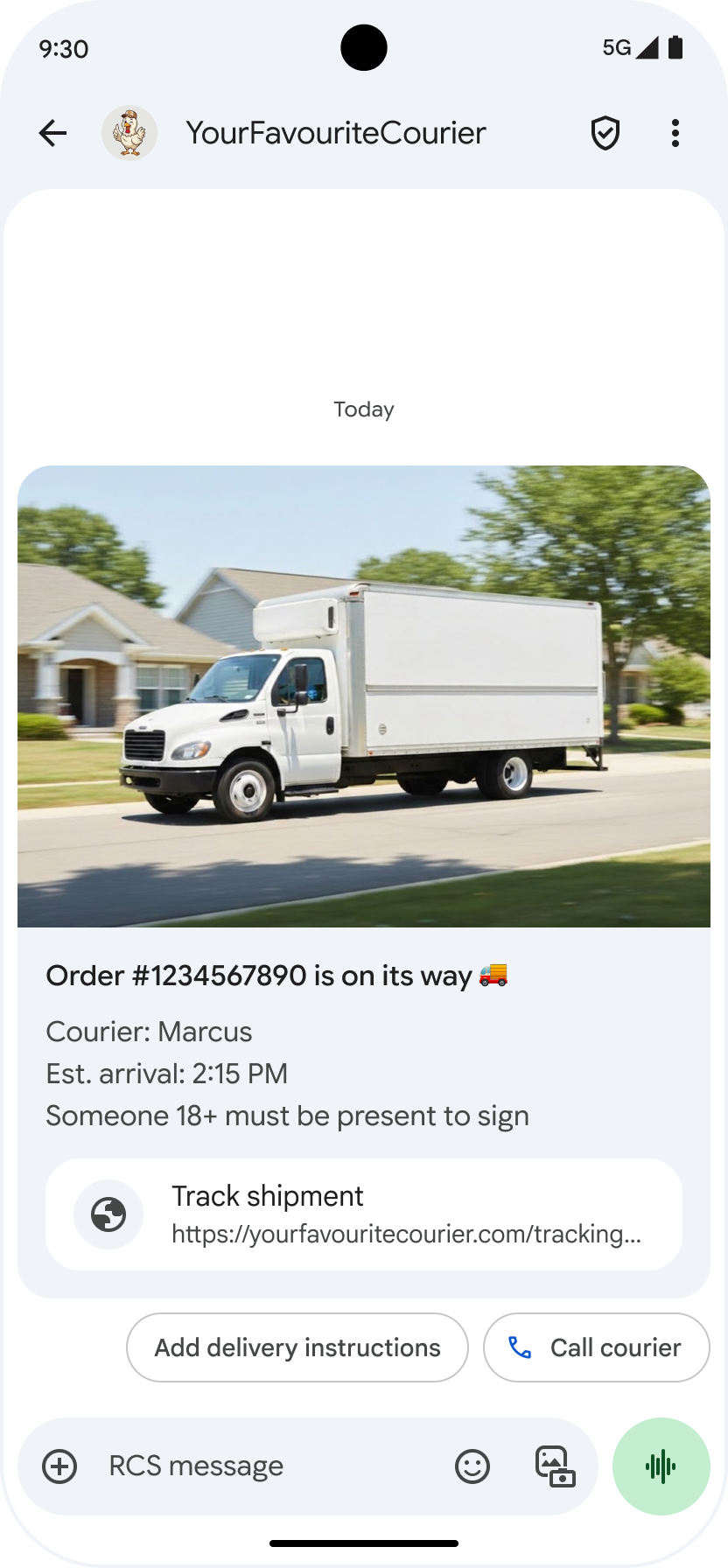
Menampilkan URL yang mendasarinya : Untuk meningkatkan transparansi dalam pesan A2P, Google Messages menampilkan alamat URL yang mendasarinya dalam tindakan yang disarankan 'Buka URL'. Perubahan ini memengaruhi tindakan yang disarankan dalam rich card standar dan carousel rich card .
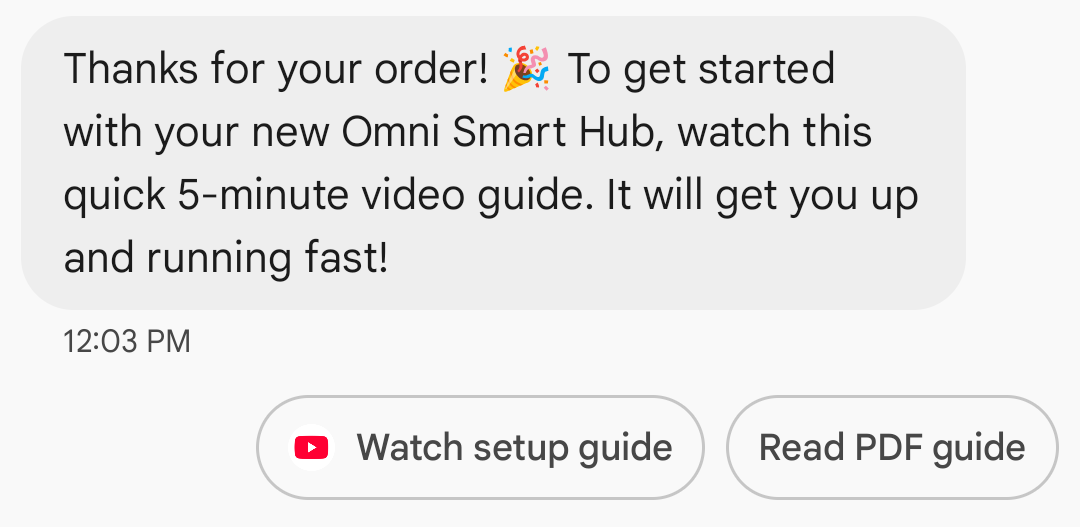
Tampilan ikon aplikasi untuk tautan web : Jika pengguna telah mengkonfigurasi aplikasi default untuk halaman web, aplikasi tersebut akan terbuka sebagai pengganti browser atau webview, dan tombol saran akan menampilkan ikon aplikasi. Agar ikon aplikasi muncul di Google Messages, Anda perlu memberikan URL lengkap dan langsung. Jika Anda menggunakan URL yang dipersingkat, ikon Buka URL default akan ditampilkan sebagai gantinya.
Contoh
Kode berikut mengirimkan aksi pembukaan URL. Untuk opsi pemformatan dan nilai, lihat OpenUrlAction .
keriting
curl -X POST "https://REGION-rcsbusinessmessaging.googleapis.com/v1/phones/PHONE_NUMBER/agentMessages?messageId=MESSAGE_ID&agentId=AGENT_ID" \
-H "Content-Type: application/json" \
-H "User-Agent: curl/rcs-business-messaging" \
-H "`oauth2l header --json PATH_TO_SERVICE_ACCOUNT_KEY rcsbusinessmessaging`" \
-d '{
  "contentMessage": {
    "text": "Hello, world!",
    "suggestions": [
      {
        "action": {
          "text": "Open Google",
          "postbackData": "postback_data_1234",
          "openUrlAction": {
            "url": "https://www.google.com"
          }
        }
      }
    ]
  }
}'
Node.js
// Reference to RBM API helper
const rbmApiHelper = require('@google/rcsbusinessmessaging');

// Define an open URL suggested action
let suggestions = [
   {
      action: {
         text: 'Open Google',
         postbackData: 'postback_data_1234',
         openUrlAction: {
            url: 'https://www.google.com'
         }
      }
   },
];

let params = {
   messageText: 'Hello, world!',
   msisdn: '+12223334444',
   suggestions: suggestions,
};

// Send a simple message with an open URL suggested action
rbmApiHelper.sendMessage(params, function(response) {
   console.log(response);
});
Jawa
import com.google.api.services.rcsbusinessmessaging.v1.model.OpenUrlAction;
import com.google.api.services.rcsbusinessmessaging.v1.model.SuggestedAction;
import com.google.api.services.rcsbusinessmessaging.v1.model.Suggestion;
import com.google.rbm.RbmApiHelper;
…

try {
   // Create an instance of the RBM API helper
   RbmApiHelper rbmApiHelper = new RbmApiHelper();

   // Create suggestions for chip list
   List<Suggestion> suggestions = new ArrayList<Suggestion>();

   // creating an open url suggested action
   OpenUrlAction openUrlAction = new OpenUrlAction();
   openUrlAction.setUrl("https://www.google.com");

   // creating a suggested action based on an open url action
   SuggestedAction suggestedAction = new SuggestedAction();
   suggestedAction.setText("Open Google");
   suggestedAction.setPostbackData("postback_data_1234");
   suggestedAction.setOpenUrlAction(openUrlAction);

   // attaching action to a suggestion
   Suggestion suggestion = new Suggestion();
   suggestion.setAction(suggestedAction);

   suggestions.add(suggestion);

   // Send simple text message with the suggestion action
   rbmApiHelper.sendTextMessage(
      "Hello, world!",
      "+12223334444",
      suggestions
   );
} catch(Exception e) {
   e.printStackTrace();
}
Python
# Reference to RBM Python client helper and messaging object structure
from rcs_business_messaging import rbm_service
from rcs_business_messaging import messages

# Create an open url suggested action
suggestions = [
      messages.OpenUrlAction('Open Google',
            'reply:postback_data_1234',
            'https://www.google.com')
]

# Create text message to send to user
text_msg = messages.TextMessage('Hello, world!')
cluster = messages.MessageCluster().append_message(text_msg)

# Append suggestions for the message to send to the user
for suggestion in suggestions:
    cluster.append_suggestion_chip(suggestion)

# Send a simple message with suggested action to the device
cluster.send_to_msisdn('+12223334444')
C#
using Google.Apis.RCSBusinessMessaging.v1.Data;
using RCSBusinessMessaging;
…

// Create an instance of the RBM API helper
RbmApiHelper rbmApiHelper = new RbmApiHelper(credentialsFileLocation,
                                                 projectId);

// Create an open url action
OpenUrlAction openUrlAction = new OpenUrlAction
{
    Url = "https://www.google.com"
};

// Attach the open url action to a suggested action
SuggestedAction suggestedAction = new SuggestedAction
{
    OpenUrlAction = openUrlAction,
    Text = "Open Google",
    PostbackData = "postback_data_1234"
};

// Attach the action to a suggestion object
Suggestion suggestion = new Suggestion
{
    Action = suggestedAction
};

List<Suggestion> suggestions = new List<Suggestion>
{
    suggestion
};

rbmApiHelper.SendTextMessage(
    "Hello, world!",
    "+12223334444",
    suggestions
);
Buka URL dengan webview
Tindakan Buka URL dengan webview memuat halaman web yang ditentukan di dalam aplikasi perpesanan dengan mesin rendering browser default Anda. Ini memungkinkan pengguna untuk berinteraksi dengan halaman web tanpa meninggalkan percakapan RCS for Business. Jika perangkat pengguna tidak mendukung webview, halaman web akan terbuka di browser pengguna. Untuk mengaktifkan webview, lihat OpenURLApplication .
Webview memiliki tiga mode tampilan. Untuk opsi pemformatan dan nilai, lihat WebviewViewMode .
- Penuh: Halaman web memenuhi seluruh layar.
- Setengah: Halaman web tersebut menempati setengah dari layar.
- Tinggi: Halaman web tersebut menempati tiga perempat layar.
Contoh
Kode berikut mengirimkan aksi Buka URL dengan tampilan web. Untuk opsi pemformatan dan nilai, lihat OpenURLAction .
keriting
curl -X POST "https://REGION-rcsbusinessmessaging.googleapis.com/v1/phones/PHONE_NUMBER/agentMessages?messageId=MESSAGE_ID&agentId=AGENT_ID" \
-H "Content-Type: application/json" \
-H "User-Agent: curl/rcs-business-messaging" \
-H "`oauth2l header --json PATH_TO_SERVICE_ACCOUNT_KEY rcsbusinessmessaging`" \
-d '{
 "contentMessage": {
   "text": "Hello, world!",
   "suggestions": [
     {
       "action": {
         "text": "Open Google",
         "postbackData": "postback_data_1234",
         "openUrlAction": {
           "url": "https://www.google.com",
           "application": "WEBVIEW",
           "webviewViewMode": "FULL",
           "description": "Accessibility description"
         }
       }
     }
   ]
 }
}'
Jawa
import com.google.api.services.rcsbusinessmessaging.v1.model.OpenUrlAction;
import com.google.api.services.rcsbusinessmessaging.v1.model.SuggestedAction;
import com.google.api.services.rcsbusinessmessaging.v1.model.Suggestion;
import com.google.rbm.RbmApiHelper;
…

try {

   String URL = "https://www.google.com";

   // Create an instance of the RBM API helper
   RbmApiHelper rbmApiHelper = new RbmApiHelper();

   // Create suggestions for chip list
   List<Suggestion> suggestions = new ArrayList<Suggestion>();

   // Create suggestion to view webpage in full mode
   Suggestion viewInFullMode =  getUrlActionInWebview(URL, "FULL")
   suggestions.add(viewInFullMode);

   // create suggestion to view webpage in half mode
   Suggestion viewInHalfMode =  getUrlActionInWebview(URL, "HALF")
   suggestions.add(viewInHalfMode);

   // create suggestion to view webpage in tall mode
   Suggestion viewInTallMode =  getUrlActionInWebview(URL, "TALL")
   suggestions.add(viewInTallMode);

   // Send simple text message with the suggested action
   rbmApiHelper.sendTextMessage(
      "Hello, world!",
      "+12223334444",
      suggestions
   );
} catch(Exception e) {
   e.printStackTrace();
}

  /**
    * Creates a suggested action to open URL in webview.
    *
    * @return a suggestion object for an open URL in webview action .
    */
    private Suggestion getUrlActionInWebview(String url,
                                             String viewMode) {
      // create an open url action
      OpenUrlAction openUrlAction = new OpenUrlAction();
      openUrlAction.setUrl(url);
      openUrlAction.setApplication("WEBVIEW");
      openUrlAction.setWebviewViewMode(viewMode);
      openUrlAction.setDescription("Accessibility description");

      // attach the open url action to a suggested action
      SuggestedAction suggestedAction = new SuggestedAction();
      suggestedAction.setOpenUrlAction(openUrlAction);
      suggestedAction.setText('display_text');
      suggestedAction.setPostbackData('postback_data_123');

      // attach the action to a suggestion object
      Suggestion suggestion = new Suggestion();
      suggestion.setAction(suggestedAction);

      return suggestion;
    }
Buat acara kalender
Tindakan Buat acara kalender membuka aplikasi kalender pengguna dan mulai membuat acara baru dengan informasi yang ditentukan.
Judul acara kalender wajib diisi. Judul memiliki panjang maksimal 100 karakter. Deskripsi acara kalender bersifat opsional dan memiliki panjang maksimal 500 karakter.
Contoh
Kode berikut mengirimkan aksi pembuatan acara kalender. Untuk opsi pemformatan dan nilai, lihat CreateCalendarEventAction .
keriting
curl -X POST "https://REGION-rcsbusinessmessaging.googleapis.com/v1/phones/PHONE_NUMBER/agentMessages?messageId=MESSAGE_ID&agentId=AGENT_ID" \
-H "Content-Type: application/json" \
-H "User-Agent: curl/rcs-business-messaging" \
-H "`oauth2l header --json PATH_TO_SERVICE_ACCOUNT_KEY rcsbusinessmessaging`" \
-d '{
  "contentMessage": {
    "text": "Hello, world!",
    "suggestions": [
      {
        "action": {
          "text": "Save to calendar",
          "postbackData": "postback_data_1234",
          "fallbackUrl": "https://www.google.com/calendar",
          "createCalendarEventAction": {
            "startTime": "2020-06-30T19:00:00Z",
            "endTime": "2020-06-30T20:00:00Z",
            "title": "My calendar event",
            "description": "Description of the calendar event"
          }
        }
      }
    ]
  }
}'
Node.js
// Reference to RBM API helper
const rbmApiHelper = require('@google/rcsbusinessmessaging');

// Define a create calendar event suggested action
let suggestions = [
   {
      action: {
         text: 'Save to calendar',
         postbackData: 'postback_data_1234',
         createCalendarEventAction: {
            startTime: '2020-06-30T19:00:00Z',
            endTime: '2020-06-30T20:00:00Z',
            title: 'My calendar event',
            description: 'Description of the calendar event',
         },
      }
   },
];

let params = {
   messageText: 'Hello, world!',
   msisdn: '+12223334444',
   suggestions: suggestions,
};

// Send a simple message with a create calendar event suggested action
rbmApiHelper.sendMessage(params, function(response) {
   console.log(response);
});
Jawa
import com.google.api.services.rcsbusinessmessaging.v1.model.CreateCalendarEventAction;
import com.google.api.services.rcsbusinessmessaging.v1.model.SuggestedAction;
import com.google.api.services.rcsbusinessmessaging.v1.model.Suggestion;
import com.google.rbm.RbmApiHelper;
…

try {
   // Create an instance of the RBM API helper
   RbmApiHelper rbmApiHelper = new RbmApiHelper();

   // Create suggestions for chip list
   List<Suggestion> suggestions = new ArrayList<Suggestion>();

   // creating a create calendar event suggested action
   CreateCalendarEventAction createCalendarEventAction = new CreateCalendarEventAction();
   calendarEventAction.setTitle("My calendar event");
   calendarEventAction.setDescription("Description of the calendar event");
   calendarEventAction.setStartTime("2020-06-30T19:00:00Z");
   calendarEventAction.setEndTime("2020-06-30T20:00:00Z");

   // creating a suggested action based on a create calendar event action
   SuggestedAction suggestedAction = new SuggestedAction();
   suggestedAction.setText("Save to calendar");
   suggestedAction.setPostbackData("postback_data_1234");
   suggestedAction.setCreateCalendarEventAction(createCalendarEventAction);

   // attaching action to a suggestion
   Suggestion suggestion = new Suggestion();
   suggestion.setAction(suggestedAction);

   suggestions.add(suggestion);

   // Send simple text message with the suggestion action
   rbmApiHelper.sendTextMessage(
      "Hello, world!",
      "+12223334444",
      suggestions
   );
} catch(Exception e) {
   e.printStackTrace();
}
Python
# Reference to RBM Python client helper and messaging object structure
from rcs_business_messaging import rbm_service
from rcs_business_messaging import messages

# Create a calendar event suggested action
suggestions = [
      messages.CreateCalendarEventAction('Save to Calendar',
                             'reply:postback_data_1234',
                             '2020-06-30T19:00:00Z',
                             '2020-06-30T20:00:00Z',
                             'My calendar event',
                             'Description of the calendar event')

]

# Create text message to send to user
text_msg = messages.TextMessage('Hello, world!')
cluster = messages.MessageCluster().append_message(text_msg)

# Append suggestions for the message to send to the user
for suggestion in suggestions:
    cluster.append_suggestion_chip(suggestion)

# Send a simple message with suggested action to the device
cluster.send_to_msisdn('+12223334444')
C#
using Google.Apis.RCSBusinessMessaging.v1.Data;
using RCSBusinessMessaging;
…

// Create an instance of the RBM API helper
RbmApiHelper rbmApiHelper = new RbmApiHelper(credentialsFileLocation,
                                                 projectId);

// Create a calendar event action
CreateCalendarEventAction calendarEventAction = new CreateCalendarEventAction
{
    Title = "My calendar event",
    Description = "Description of the calendar event",
    StartTime = "2020-06-30T19:00:00Z",
    EndTime = "2020-06-30T20:00:00Z"
};

// Attach the calendar event action to a suggested action
SuggestedAction suggestedAction = new SuggestedAction
{
    CreateCalendarEventAction = calendarEventAction,
    Text = "Save to calendar",
    PostbackData = "postback_data_1234"
};

// Attach the action to a suggestion object
Suggestion suggestion = new Suggestion
{
    Action = suggestedAction
};

List<Suggestion> suggestions = new List<Suggestion>
{
    suggestion
};

rbmApiHelper.SendTextMessage(
    "Hello, world!",
    "+12223334444",
    suggestions
);
Daftar chip saran
Agen Anda mengirimkan daftar saran berupa kode (chip list) beserta pesan untuk memandu tindakan pengguna selanjutnya. Daftar kode hanya akan ditampilkan ketika pesan terkait berada di bagian bawah percakapan. Pesan-pesan selanjutnya dalam percakapan (baik dari pengguna maupun agen Anda) akan menimpa daftar kode tersebut.
Chip dalam daftar tersebut adalah saran balasan dan saran tindakan .
Daftar chip berisi maksimal 11 chip saran, dan setiap label chip dapat memiliki maksimal 25 karakter.
Untuk opsi pemformatan dan nilai, lihat AgentContentMessage .
Kartu kaya
Rich cards menggabungkan media, teks, dan saran interaktif ke dalam satu pesan. Fitur ini ideal untuk menyajikan informasi terkait (misalnya, produk beserta gambar, nama, dan harganya) dan memandu pengguna dengan langkah selanjutnya yang jelas, seperti saran "Lihat detail".
Sebuah rich card dapat berisi hal-hal berikut:
- Media (gambar, GIF, atau video)
- Teks judul
- Teks deskripsi
- Saran balasan dan saran tindakan (maksimal 4)
Masing-masing kolom ini bersifat opsional, tetapi setidaknya salah satu dari kolom 1–3 harus disertakan dalam rich card.
Beberapa kartu dapat dikirim bersamaan dalam carousel yang bergulir secara horizontal.
Perlu dicatat bahwa total muatan untuk kartu memori berkapasitas besar adalah 250 KB.
Untuk detail teknis selengkapnya, lihat dokumentasi Rich cards .
Tinggi kartu
Kartu kaya (rich cards) akan melebar secara vertikal untuk menyesuaikan isinya. Kartu ini memiliki tinggi minimum 112 DP dan tinggi maksimum 344 DP. Jika isi kartu tidak cukup besar untuk mengisi tinggi minimum kartu, kartu akan melebar dan mengisi ruang kosong yang tersisa.
Media dalam rich card harus sesuai dengan salah satu dari tiga tinggi berikut:
- Pendek: 112 DP
- Sedang: 168 DP
- Tinggi: 264 DP
Jika media tidak sesuai dengan dimensi kartu berdasarkan tinggi yang dipilih, pratinjau media akan dipilih dengan memperbesar dan memotong media tersebut.
Contoh
Kode berikut mengirimkan rich card dengan gambar dan saran balasan. Untuk opsi pemformatan dan nilai, lihat RichCard .
keriting
curl -X POST "https://REGION-rcsbusinessmessaging.googleapis.com/v1/phones/PHONE_NUMBER/agentMessages?messageId=MESSAGE_ID&agentId=AGENT_ID" \
-H "Content-Type: application/json" \
-H "User-Agent: curl/rcs-business-messaging" \
-H "`oauth2l header --json PATH_TO_SERVICE_ACCOUNT_KEY rcsbusinessmessaging`" \
-d '{
  "contentMessage": {
    "richCard": {
      "standaloneCard": {
        "thumbnailImageAlignment": "RIGHT",
        "cardOrientation": "VERTICAL",
        "cardContent": {
          "title": "Hello, world!",
          "description": "RBM is awesome!",
          "media": {
            "height": "TALL",
            "contentInfo":{
              "fileUrl": "http://www.google.com/logos/doodles/2015/googles-new-logo-5078286822539264.3-hp2x.gif",
              "forceRefresh": false
            }
          },
          "suggestions": [
            {
              "reply": {
                "text": "Suggestion #1",
                "postbackData": "suggestion_1"
              }
            },
            {
              "reply": {
                "text": "Suggestion #2",
                "postbackData": "suggestion_2"
              }
            }
          ]
        }
      }
    }
  }
}'
Node.js
// Reference to RBM API helper
const rbmApiHelper = require('@google/rcsbusinessmessaging');

// Suggested replies to be used in the card
let suggestions = [
   {
      reply: {
         'text': 'Suggestion #1',
         'postbackData': 'suggestion_1',
      },
   },
   {
      reply: {
         'text': 'Suggestion #2',
         'postbackData': 'suggestion_2',
      },
   },
];

// Image to be displayed by the card
let imageUrl = 'http://www.google.com/logos/doodles/2015/googles-new-logo-5078286822539264.3-hp2x.gif';

// Definition of the card parameters
let params = {
   messageText: 'Hello, world!',
   messageDescription: 'RBM is awesome!',
   msisdn: '+12223334444',
   suggestions: suggestions,
   imageUrl: imageUrl,
   height: 'TALL',
};

// Send rich card to device
rbmApiHelper.sendRichCard(params, function(response) {
   console.log(response);
});
Jawa
import com.google.api.services.rcsbusinessmessaging.v1.model.StandaloneCard;
import com.google.api.services.rcsbusinessmessaging.v1.model.Suggestion;
import com.google.rbm.cards.CardOrientation;
import com.google.rbm.cards.MediaHeight;
import com.google.rbm.RbmApiHelper;
import com.google.rbm.SuggestionHelper;
…

try {
   // Create an instance of the RBM API helper
   RbmApiHelper rbmApiHelper = new RbmApiHelper();

   // Create suggestions for chip list
   List<Suggestion> suggestions = new ArrayList<Suggestion>();
   suggestions.add(
      new SuggestionHelper("Suggestion #1", "suggestion_1").getSuggestedReply());

   suggestions.add(
      new SuggestionHelper("Suggestion #2", "suggestion_2").getSuggestedReply());

   String imageUrl = "http://www.google.com/logos/doodles/2015/googles-new-logo-5078286822539264.3-hp2x.gif";

   // Create a standalone rich card to send to the user
   StandaloneCard standaloneCard = rbmApiHelper.createStandaloneCard(
       "Hello, world!",
       "RBM is awesome!",
       imageUrl,
       MediaHeight.MEDIUM,
       CardOrientation.VERTICAL,
       suggestions
   );

   rbmApiHelper.sendStandaloneCard(standaloneCard, "+12223334444");
} catch(Exception e) {
   e.printStackTrace();
}
Python
# Reference to RBM Python client helper and messaging object structure
from rcs_business_messaging import rbm_service
from rcs_business_messaging import messages

# Suggested replies to be used in the card
suggestions = [
      messages.SuggestedReply('Suggestion #1', 'reply:suggestion_1'),
      messages.SuggestedReply('Suggestion #2', 'reply:suggestion_2')
]

# Image to be displayed by the card
image_url = 'http://www.google.com/logos/doodles/2015/googles-new-logo-5078286822539264.3-hp2x.gif';

# Define rich card structure
rich_card = messages.StandaloneCard('VERTICAL',
                                    'Hello, world!',
                                    'RBM is awesome!',
                                    suggestions,
                                    image_url,
                                    None,
                                    None,
                                    'MEDIUM')

# Append rich card and send to the user
cluster = messages.MessageCluster().append_message(rich_card)
cluster.send_to_msisdn('+12223334444')
C#
using Google.Apis.RCSBusinessMessaging.v1.Data;
using RCSBusinessMessaging;
using RCSBusinessMessaging.Cards;
…

// Create an instance of the RBM API helper
RbmApiHelper rbmApiHelper = new RbmApiHelper(credentialsFileLocation,
                                             projectId);

List<Suggestion> suggestions = new List<Suggestion>
{
   // Create suggestion chips
   new SuggestionHelper("Suggestion #1", "suggestion_1").SuggestedReply(),
   new SuggestionHelper("Suggestion #2", "suggestion_2").SuggestedReply()
};

string imageUrl = "http://www.google.com/logos/doodles/2015/googles-new-logo-5078286822539264.3-hp2x.gif";

// Create rich card with suggestions
StandaloneCard standaloneCard = rbmApiHelper.CreateStandaloneCard(
   "Hello, world!",
   "RBM is awesome",
   imageUrl,
   MediaHeight.TALL,
   CardOrientation.VERTICAL,
   suggestions
);

// Send rich card to user
rbmApiHelper.SendStandaloneCard(standaloneCard, "+12223334444");
Carousel kartu yang kaya
Carousel menggabungkan beberapa kartu kaya fitur , memungkinkan pengguna untuk membandingkan item dan bereaksi terhadap masing-masing item secara individual.
Carousel dapat berisi minimal dua dan maksimal sepuluh rich card. Rich card di dalam carousel harus sesuai dengan persyaratan umum rich card untuk konten dan tinggi, seperti yang dijelaskan dalam dokumentasi Rich cards . Untuk informasi lebih lanjut tentang tata letak dan spesifikasi carousel, lihat dokumentasi Carousel .
Contoh
Kode berikut mengirimkan carousel kartu kaya. Untuk opsi pemformatan dan nilai, lihat RichCard .
keriting
curl -X POST "https://REGION-rcsbusinessmessaging.googleapis.com/v1/phones/PHONE_NUMBER/agentMessages?messageId=MESSAGE_ID&agentId=AGENT_ID" \
-H "Content-Type: application/json" \
-H "User-Agent: curl/rcs-business-messaging" \
-H "`oauth2l header --json PATH_TO_SERVICE_ACCOUNT_KEY rcsbusinessmessaging`" \
-d '{
  "contentMessage": {
    "richCard": {
      "carouselCard": {
        "cardWidth": "MEDIUM",
        "cardContents": [
          {
            "title": "Card #1",
            "description": "The description for card #1",
            "suggestions": [
              {
                "reply": {
                  "text": "Card #1",
                  "postbackData": "card_1"
                }
              }
            ],
            "media": {
              "height": "MEDIUM",
              "contentInfo": {
                "fileUrl": "https://storage.googleapis.com/welcome-bot-sample-images/200.jpg",
                "forceRefresh": false
              }
            }
          },
          {
            "title": "Card #2",
            "description": "The description for card #2",
            "suggestions": [
              {
                "reply": {
                  "text": "Card #2",
                  "postbackData": "card_2"
                }
              }
            ],
            "media": {
              "height": "MEDIUM",
              "contentInfo": {
                "fileUrl": "https://storage.googleapis.com/welcome-bot-sample-images/201.jpg",
                "forceRefresh": false
              }
            }
          }
        ]
      }
    }
  }
}'
Node.js
// Reference to RBM API helper
const rbmApiHelper = require('@google/rcsbusinessmessaging');

// Images for the carousel cards
let card1Image = 'https://storage.googleapis.com/welcome-bot-sample-images/200.jpg';
let card2Image = 'https://storage.googleapis.com/welcome-bot-sample-images/201.jpg';

// Define the card contents for a carousel with two cards, each with one suggested reply
let cardContents = [
   {
      title: 'Card #1',
      description: 'The description for card #1',
      suggestions: [
         {
            reply: {
               text: 'Card #1',
               postbackData: 'card_1',
            }
         }
      ],
      media: {
         height: 'MEDIUM',
         contentInfo: {
            fileUrl: card1Image,
            forceRefresh: false,
         },
      },
   },
   {
      title: 'Card #2',
      description: 'The description for card #2',
      suggestions: [
         {
            reply: {
               text: 'Card #2',
               postbackData: 'card_2',
            }
         }
      ],
      media: {
         height: 'MEDIUM',
         contentInfo: {
            fileUrl: card2Image,
            forceRefresh: false,
         },
      },
   },
];

// Definition of carousel card
let params = {
   msisdn: '+12223334444',
   cardContents: cardContents,
};

// Send the device the carousel card defined above
rbmApiHelper.sendCarouselCard(params, function(response) {
   console.log(response);
});
Jawa
import com.google.api.services.rcsbusinessmessaging.v1.model.CardContent;
import com.google.api.services.rcsbusinessmessaging.v1.model.Suggestion;
import com.google.rbm.cards.CardOrientation;
import com.google.rbm.cards.CardWidth;
import com.google.rbm.cards.MediaHeight;
import com.google.rbm.RbmApiHelper;
import com.google.rbm.SuggestionHelper;
…

try {
            // Create an instance of the RBM API helper
            RbmApiHelper rbmApiHelper = new RbmApiHelper();

            List cardContents = new ArrayList();

            // Images for the carousel cards
            String card1Image = "https://storage.googleapis.com/welcome-bot-sample-images/200.jpg";

            // Create suggestions for first carousel card
            List card1Suggestions = new ArrayList();
            card1Suggestions.add(
                new SuggestionHelper("Card #1", "card_1"));

            cardContents.add(
                new StandaloneCardHelper(
                    "Card #1",
                    "The description for card #1",
                    card1Image,
                    card1Suggestions)
                    .getCardContent(MediaHeight.SHORT)
            );

            // Images for the carousel cards
            String card2Image = "https://storage.googleapis.com/welcome-bot-sample-images/201.jpg";

            // Create suggestions for second carousel card
            List card2Suggestions = new ArrayList();
            card2Suggestions.add(
                new SuggestionHelper("Card #2", "card_2"));

            cardContents.add(
                new StandaloneCardHelper(
                    "Card #2",
                    "The description for card #2",
                    card2Image,
                    card2Suggestions)
                    .getCardContent(MediaHeight.SHORT)
            );

            // Send the carousel to the user
            rbmApiHelper.sendCarouselCards(cardContents, CardWidth.MEDIUM, "+12223334444");
        } catch(Exception e) {
            e.printStackTrace();
        }
Python
# Reference to RBM Python client helper and messaging object structure
from rcs_business_messaging import rbm_service
from rcs_business_messaging import messages

# Images for the carousel cards
card_image_1 = 'https://storage.googleapis.com/welcome-bot-sample-images/200.jpg';
card_image_2 = 'https://storage.googleapis.com/welcome-bot-sample-images/201.jpg';

# Suggested replies to be used in the cards
suggestions1 = [
      messages.SuggestedReply('Card #1', 'reply:card_1')
]

suggestions2 = [
      messages.SuggestedReply('Card #2', 'reply:card_2')
]

# Define the card contents for a carousel with two cards,
# each with one suggested reply
card_contents = []
card_contents.append(messages.CardContent('Card #1',
                                          'The description for card #1',
                                          card_image_1,
                                          'MEDIUM',
                                          suggestions1))

card_contents.append(messages.CardContent('Card #2',
                                          'The description for card #2',
                                          card_image_2,
                                          'MEDIUM',
                                          suggestions2))

# Send the device the carousel card defined above
carousel_card = messages.CarouselCard('MEDIUM', card_contents)
cluster = messages.MessageCluster().append_message(carousel_card)
cluster.send_to_msisdn('+12223334444')
C#
using Google.Apis.RCSBusinessMessaging.v1.Data;
using RCSBusinessMessaging;
using RCSBusinessMessaging.Cards;
…

// Create an instance of the RBM API helper
RbmApiHelper rbmApiHelper = new RbmApiHelper(credentialsFileLocation,
                                             projectId);

// Image references to be used in the carousel cards
string card1Image = "https://storage.googleapis.com/welcome-bot-sample-images/200.jpg";
string card2Image = "https://storage.googleapis.com/welcome-bot-sample-images/201.jpg";

// Suggestion chip lists to be used in carousel cards
List<Suggestion> suggestions1 = new List<Suggestion>
{
   new SuggestionHelper("Card #1", "card_1").SuggestedReply()
};

List<Suggestion> suggestions2 = new List<Suggestion>
{
   new SuggestionHelper("Card #2", "card_2").SuggestedReply()
};

// Create the card content for the carousel
List<CardContent> cardContents = new List<CardContent>
{
   // Add items as card content
   new StandaloneCardHelper(
                    "Card #1",
                    "The description for card #1",
                    card1Image,
                    suggestions1).GetCardContent(),
   new StandaloneCardHelper(
                    "Card #2",
                    "The description for card #2",
                    card2Image,
                    suggestions2).GetCardContent()
};

// Send the carousel to the user
rbmApiHelper.SendCarouselCards(cardContents, CardWidth.MEDIUM, msisdn);