

如果您有可生成实时出价 (RTB) 信号的信号提供商 SDK,则可以开发安全信号适配器,让 Google Mobile Ads SDK 从您的 SDK 收集信号。
Google Mobile Ads SDK 会将您的信号转发给选定的参与 Authorized Buyers 和公开出价的买方。
下图展示了安全信号收集的请求-响应生命周期:
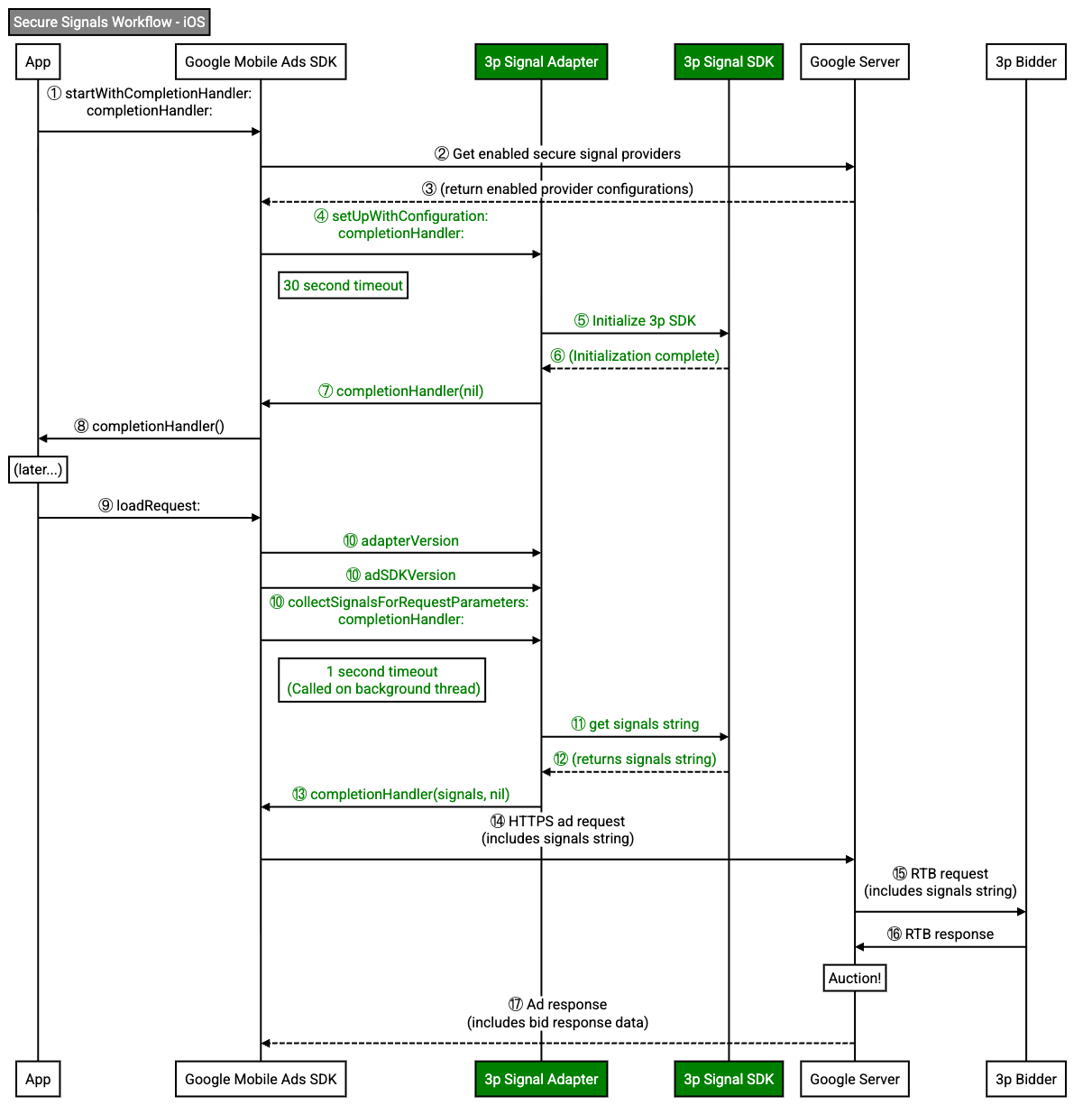
安全信号适配器负责适配器初始化和信号收集。
实现安全信号适配器
为 Google Mobile Ads SDK 实现安全信号适配器,以从您的 SDK 收集信号。
本指南介绍了如何通过实现 GADRTBAdapter 协议来实现安全信号适配器。
以下示例实现了 GADRTBAdapter 协议:
Objective-C
@interface SampleAdapterSnippets : NSObject <GADRTBAdapter>
@end
初始化适配器
当 Google Mobile Ads SDK 实例化安全信号适配器时,会调用 setUpWithConfiguration:completionHandler: 方法。Google Mobile Ads SDK使用此方法初始化 SDK。
当 SDK 完全初始化并准备好让 Google Mobile Ads SDK 收集信号时,请调用 GADMediationAdapterSetUpCompletionBlock 完成块。
如果安全信号适配器不回调,Google Mobile Ads SDK 就不会从安全信号适配器收集信号。
以下示例调用完成处理程序来通知 Google Mobile Ads SDK 您的 SDK 已成功初始化:
Objective-C
+ (void)setUpWithConfiguration:(GADMediationServerConfiguration *)configuration
completionHandler:(GADMediationAdapterSetUpCompletionBlock)completionHandler {
// Add your SDK initialization logic here.
// Invoke the completionHandler once initialization completes. Pass a nil
// error to indicate initialization succeeded.
completionHandler(nil);
}
报告适配器和 SDK 版本
您的安全信号适配器必须同时报告适配器版本和 SDK 版本。Google Mobile Ads SDK 会使用这些版本进行报告和问题排查。
如果您的 SDK 在同一二进制文件中实现了此适配器,则可以为适配器和 SDK 版本返回相同的版本。
以下示例返回安全信号适配器的版本:
Objective-C
+ (GADVersionNumber)adapterVersion {
// If your secure signals SDK implements this adapter in the same binary
// return the same version as your SDK.
// return [self adSDKVersion];
// If you built a separate binary for this secure signals adapter, return
// the adapter's version here.
GADVersionNumber version = {};
version.majorVersion = 4;
version.minorVersion = 5;
version.patchVersion = 6;
return version;
}
以下示例返回了安全信号适配器所交互的 SDK 版本:
Objective-C
将 kSDKVersionString 替换为您的 SDK 版本字符串。
收集信号
在每个广告请求中,Google Mobile Ads SDK 会在后台线程上同时从所有适配器收集信号。
以下示例通过调用 GADRTBSignalCompletionHandler 完成处理程序来收集信号并将其返回给 Google Mobile Ads SDK:
Objective-C
将 kSampleSignalPlaceholder 替换为您的安全信号字符串。
信号采集必须在一秒内完成。如果信号收集时间超过 1 秒,请考虑在初始化适配器时,在安全信号适配器或 SDK 中缓存信号。
如果安全信号适配器收集信号失败,请使用 nil 信号和 NSError 对象调用完成处理程序。
混淆信号
当您与出价方和甄选合作伙伴共享安全信号时,必须对信号进行混淆处理。
针对广告网络 extra 返回 nil 值
安全信号适配器不需要额外的网络 extra 参数。
以下示例中的 +networkExtrasClass 方法返回一个 nil 值:
Objective-C
+ (nullable Class<GADAdNetworkExtras>)networkExtrasClass {
// Network extras are not applicable because signal providers do not request ads.
return nil;
}