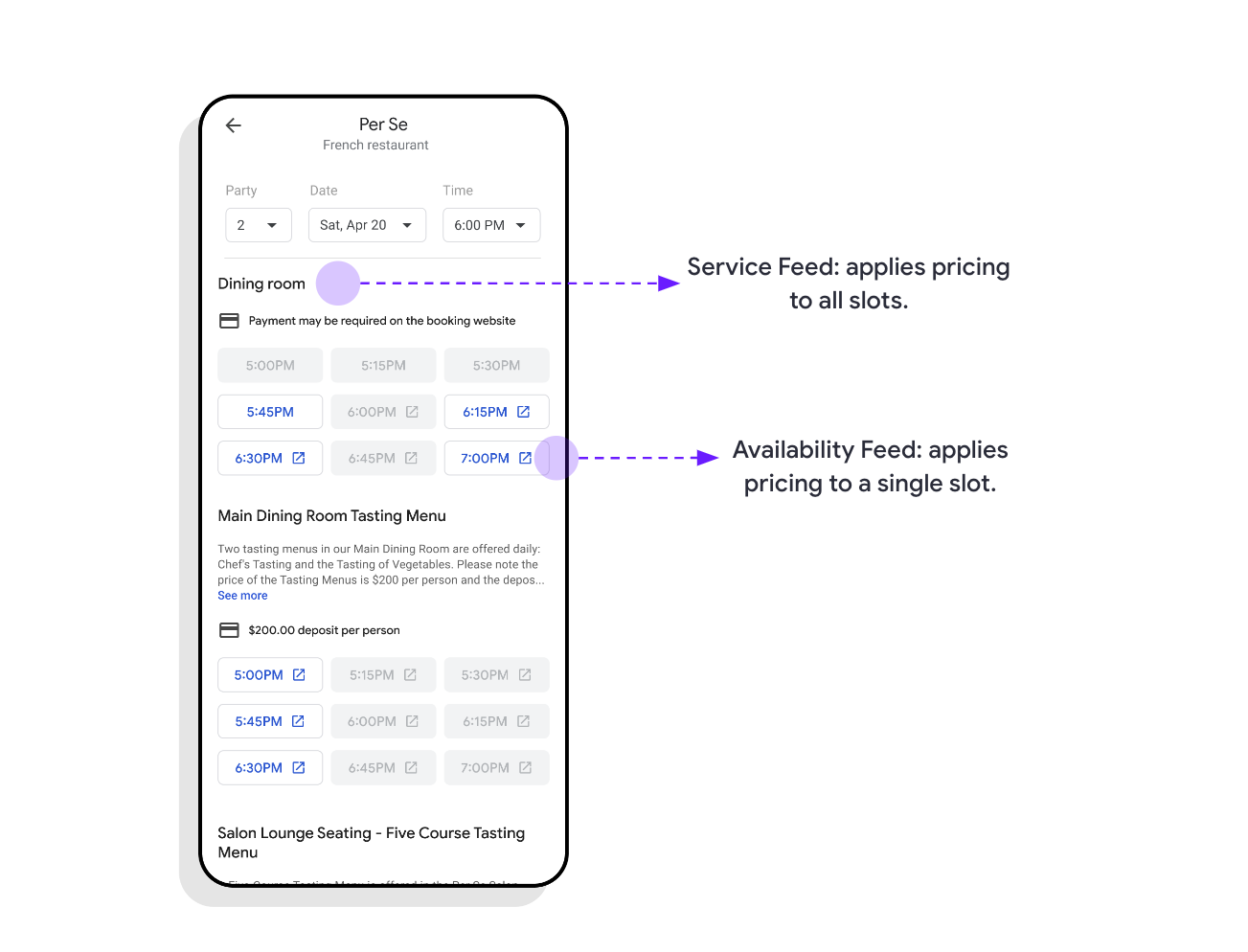
Setelah menyiapkan template URL, Anda dapat menambahkan pembayaran ke slot dengan menyelesaikan langkah-langkah berikut.
- Mengidentifikasi Slot Berbayar
- Setel Harga Slot
- Menetapkan Pembayaran di Muka
- Menetapkan Biaya Ketidakhadiran atau Pembatalan
- Menetapkan Setoran
- Menetapkan Kartu Kredit Diperlukan
1. Mengidentifikasi Slot Berbayar
Anda dapat menentukan harga menggunakan Feed Layanan atau Feed Ketersediaan. Dengan menentukan harga di tingkat layanan, Anda menetapkan semua slot ketersediaan dalam layanan atau ruang makan tersebut ke harga tetap. Sedangkan, menentukan harga di ketersediaan berarti Anda menetapkan harga untuk slot tertentu. Misalnya, situasi berikut dapat ditangani dengan menetapkan harga atau biaya di tingkat ketersediaan:
- Harga diturunkan pada hari Selasa dan dinaikkan pada hari Sabtu.
- Denda ketidakhadiran berlaku untuk ketersediaan antara pukul 17.00 dan 19.00.
- Mewajibkan deposit untuk jumlah tamu lebih dari 6 orang.
- Pemesanan di kamar tertentu memerlukan kartu kredit.
2. Menetapkan Harga Slot
Pembayaran di muka
Konfigurasi ini digunakan untuk menentukan bahwa jumlah layanan harus
dibayar penuh pada saat pemesanan. Pembayaran di muka ditentukan di tingkat ketersediaan melalui kolom payment pada feed Avaibility.
Contoh Pembayaran di Muka
{
  "availability": [{
    "merchant_id": "dining-A",
    "service_id": "reservation",
    "start_sec": 1535853600,
    "duration_sec": 2700,
    "spots_total": 2,
    "spots_open": 2,
    "resources": {
    "room_id": "A-dining-room",
    "room_name": "Wine Tasting Room",
    "party_size": 2,
    "prepayment": {
      "price_info": {
        "price": {
          "price_micros": 200000000,
          "currency_code": "USD"
        },
        "price_type": "PER_PERSON"
        }
      }
    }
  }]
}
Feed Ketersediaan
message Availability {
  ...
  // Optional prepayment information for this availability. Prepayment is only
  // available through the Payment Redirect Add-on
  Prepayment prepayment = 20;
}
Definisi Pembayaran di Muka
// A payment the user may be charged as part of their reservation.
message Prepayment {
  PriceInfo price_info = 1;
}
Biaya Ketidakhadiran atau Pembatalan
Denda ketidakhadiran atau pembatalan dapat ditagihkan kepada pengguna jika mereka tidak hadir ke reservasi mereka, atau jika mereka membatalkan setelah periode pembatalan. Jika periode pembatalan tidak ditentukan, periode pembatalan defaultnya adalah waktu mulai slot.
Untuk menentukan biaya ketidakhadiran, di feed layanan, Anda harus menyertakan kolom no_show_fee seperti yang ditunjukkan dalam contoh berikut:
Contoh Biaya Ketidakhadiran / Pembatalan
Deskripsi:
Dalam contoh ini, partner atau penjual diberi otorisasi untuk mengenakan biaya tetap sebesar $25 sebagaimana ditentukan dalam kolom `no_show_fee.fee.price_micros` jika pemegang janji temu tidak menghadiri janji temu. Biaya ini juga dapat dikenakan jika pengguna membatalkan dalam waktu 4 jam (14400 detik) sebelum janji temu, seperti yang ditentukan dalam kolom `scheduling_rules.min_advance_online_canceling`.{ "merchant_id": "merchant-1", "service_id": "service-2-b", "name": "Reservation", "description": "A dining reservation", "price": { "price_micros": 200000000, "currency_code": "USD" }, "scheduling_rules": { "min_advance_online_canceling": 14400 }, "no_show_fee": { "fee": { "price_micros": 25000000, "currency_code": "USD" }, "fee_type": "FIXED_RATE_DEFAULT" } }
Feed Layanan
message Service {
  ...
  // Defines a no show fee that may be charged to the user. Can be overridden
  // at the availability level. (optional)
  NoShowFee no_show_fee = 12;
}
Feed Ketersediaan
message Availability {
  ...
  // Defines a no show fee that may be charged to the user. Overrides the
  // service no show fee if one was specified. Setting this to an empty
  // NoShowFee message removes any service-level no show fee. (optional)
  NoShowFee no_show_fee = 13;
}
Definisi Biaya Ketidakhadiran
// A fee that a user may be charged if they have made a booking but do not
// show up.
message NoShowFee {
  // The amount the user may be charged if they do not show up for their
  // reservation.
  Price fee = 1;

  // Defines how the fee is determined from the availability.
  PriceType fee_type = 3;
}
Setoran
Deposit digunakan untuk mengumpulkan biaya awal sebagai persyaratan untuk pemesanan. Deposit dapat ditagihkan pada saat pemesanan atau nanti. Anda mungkin perlu menentukan persyaratan pengembalian dana deposit serta kapan pemesanan dapat dibatalkan secara online.
Untuk menentukan deposit, di feed layanan, Anda harus menyertakan kolom deposit
seperti yang ditunjukkan dalam contoh berikut:
Contoh Setoran
Deskripsi:
`min_advance_online_canceling` `deposit.min_advance_cancellation_sec`menentukan kapan deposit dapat dikembalikan dananya. Perhatikan bahwa dalam contoh, deposit dapat menentukan waktu pembatalan secara terpisah dari persyaratan pengembalian dana. Dalam hal ini, pengguna akan dapat membatalkan layanan secara online hingga 24 jam sebelumnya (86400 detik). Hal ini memastikan bahwa penjual diberi tahu secara langsung tentang pembatalan terlambat. Namun, pengguna mungkin masih berhak atas pengembalian dana deposit hingga 4 jam sebelumnya (14.400 detik) sebelum pemesanan (dengan menghubungi Anda atau penjual untuk pembatalan), yang akan ditampilkan dalam persyaratan saat checkout dan di email konfirmasi.{ "merchant_id": "merchant-1", "service_id": "service-2-b", "name": "Reservation", "description": "A dining reservation", "price": { "price_micros": 200000000, "currency_code": "USD" }, "scheduling_rules": { "min_advance_online_canceling": 86400, }, "deposit": { "deposit": { "price_micros": 25000000, "currency_code": "USD" }, "min_advance_cancellation_sec": 14400, "deposit_type": "FIXED_RATE_DEFAULT" } }
Feed Layanan
message Service {
  ...
  // Defines how a deposit may be charged to the user. Can be overridden at the
  // availability level. (optional)
  Deposit deposit = 11;
}
Feed Ketersediaan
message Availability {
  ...
  // Defines how a deposit may be charged to the user. Overrides the service
  // deposit if one was specified. Setting this to an empty Deposit message
  // removes any service-level deposit. (optional)
  Deposit deposit = 12;
}
Definisi Deposit
// A deposit that the user may be charged or have a hold on their credit card
// for.
message Deposit {
  // Deposit amount.
  Price deposit = 1;

  // Minimum advance cancellation for the deposit.
  int64 min_advance_cancellation_sec = 2;

  // Defines how the deposit is determined from the availability.
  PriceType deposit_type = 3;
}
Mewajibkan Kartu Kredit
Layanan mungkin memerlukan kartu kredit sebagai cara tambahan untuk memverifikasi identitas. Namun, atribut ini tidak boleh digunakan untuk pembayaran di muka, deposit, atau denda ketidakhadiran. Jika kasus penggunaan tersebut diperlukan, kasus penggunaan tersebut harus dikonfigurasi secara eksplisit. Mewajibkan kartu kredit sering kali menyebabkan penurunan signifikan dalam pemesanan untuk layanan ini.
Untuk mewajibkan kartu kredit diberikan selama checkout, Anda harus menyetel kolom
require_credit_card ke REQUIRE_CREDIT_CARD_ALWAYS.
Contoh Kartu Kredit Diperlukan
{
  "merchant_id": "merchant-1",
  "service_id": "reservation",
  "name": "reservation",
  "description": "Food reservation",
  "require_credit_card": "REQUIRE_CREDIT_CARD_ALWAYS"
}
Feed Layanan
message Service {
  ...
  // Indicates whether the user must provide a credit card in order to book this
  // service.
  // This value can be overridden at the availability level. (optional)
  RequireCreditCard require_credit_card = 13;
}
Feed Ketersediaan
message Availability {
  ...
  // Indicates whether the user must provide a credit card in order to book this
  // availability slot.
  // If the value is not set, it is inherited from the service level if it's set
  // there. (optional)
  RequireCreditCard require_credit_card = 14;
}
Definisi Require Credit Card
// Defines whether a credit card is required in order to book an appointment.
enum RequireCreditCard {
  // The credit card requirement is not explicitly specified and the
  // behaviour is identical to the one specified for CONDITIONAL.
  REQUIRE_CREDIT_CARD_UNSPECIFIED = 0;

  // Google will require a credit card for the booking if any of the following
  // conditions are met:
  // * the availability has a price and the prepayment_type is REQUIRED
  // * the no_show_fee is set
  // * the deposit field is set.
  REQUIRE_CREDIT_CARD_CONDITIONAL = 1;

  // A credit card is always required in order to book this availability
  // regardless of other field values.
  REQUIRE_CREDIT_CARD_ALWAYS = 2;
}
Definisi Tambahan
Definisi Rentang Harga
// Wrapper for a range of monetary amount treated as unbounded unless both
// values are set. At least one of min_amount and max_amount is required.
message PriceRange {
  // Minimum amount.
  Price min_price = 1;

  // Maximum amount. Should always be > min_price.
  Price max_price = 2;
}
Definisi Info Harga
// Container for price details.
message PriceInfo {
  oneof price_options {
    Price price = 1;

    // The upper and/or lower bound
    PriceRange price_range = 2
        ;
  }

  // Defines how price or price range is applied (per person or fixed)
  PriceType price_type = 3;
}
Definisi Jenis Harga
// Defines how a total price is determined from an availability.
enum PriceType {
  // The price is for a fixed amount. This is the default value if the field is
  // not set.
  //
  // Examples:
  //   $50 deposit to reserve a table; $20 no show fee for a yoga class
  FIXED_RATE_DEFAULT = 0;

  // The price specified is per person, and the total price is calculated
  // according to the party size specified in Resources as price_micros *
  // party_size. A PER_PERSON price must be accompanied by a party size in the
  // availability resources. If it is not, a party size of one is used.
  //
  // Examples:
  //   $10 each for tickets to a museum
  PER_PERSON = 1;
}