
구조화된 소프트웨어 앱 (SoftwareApplication) 데이터
웹페이지 본문에 소프트웨어 애플리케이션 정보를 마크업하면 Google 검색결과에서 앱 세부정보를 더 잘 표시할 수 있습니다.
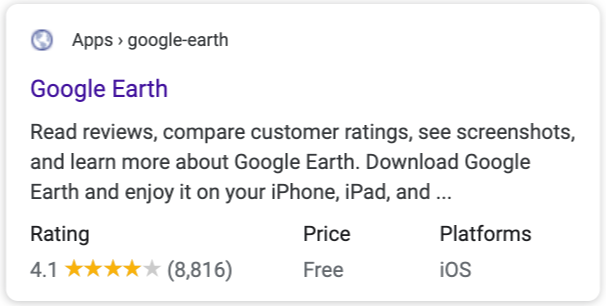
구조화된 데이터를 추가하는 방법
구조화된 데이터는 페이지 정보를 제공하고 페이지 콘텐츠를 분류하기 위한 표준화된 형식입니다. 구조화된 데이터를 처음 사용한다면 구조화된 데이터의 작동 방식을 자세히 알아보세요.
다음은 구조화된 데이터를 빌드, 테스트 및 출시하는 방법의 개요입니다.
- 필수 속성을 추가합니다. 사용 중인 형식에 따라 페이지에 구조화된 데이터를 삽입하는 위치를 알아보세요.
- 가이드라인을 따릅니다.
- 리치 결과 테스트를 사용하여 코드의 유효성을 검사하고 심각한 오류를 해결하세요. 또한 도구에서 신고될 수 있는 심각하지 않은 문제는 구조화된 데이터의 품질을 개선하는 데 도움이 될 수 있으므로 해결하는 것이 좋습니다. 그러나 리치 결과를 사용하기 위한 필수사항은 아닙니다.
- 구조화된 데이터를 포함하는 일부 페이지를 배포하고 URL 검사 도구를 사용하여 Google에서 페이지를 표시하는 방법을 테스트합니다. Google이 페이지에 액세스할 수 있으며
robots.txt 파일,
noindex태그 또는 로그인 요구사항에 의해 차단되지 않는지 확인합니다. 페이지가 정상적으로 표시되면 Google에 URL을 재크롤링하도록 요청할 수 있습니다. - Google에 향후 변경사항을 계속 알리려면 사이트맵을 제출하는 것이 좋습니다. 이는 Search Console Sitemap API를 사용하여 자동화할 수 있습니다.
예
다음은 JSON-LD 형식 소프트웨어 앱의 예입니다.
<html>
  <head>
    <title>Angry Birds</title>
    <script type="application/ld+json">
    {
      "@context": "https://schema.org",
      "@type": "SoftwareApplication",
      "name": "Angry Birds",
      "operatingSystem": "ANDROID",
      "applicationCategory": "GameApplication",
      "aggregateRating": {
        "@type": "AggregateRating",
        "ratingValue": 4.6,
        "ratingCount": 8864
      },
      "offers": {
        "@type": "Offer",
        "price": 1.00,
        "priceCurrency": "USD"
      }
    }
    </script>
  </head>
  <body>
  </body>
</html>다음은 RDFa 형식 소프트웨어 앱의 예입니다.
<div vocab="https://schema.org/" typeof="SoftwareApplication">
  <span property="name">Angry Birds</span> -

  REQUIRES <span property="operatingSystem">ANDROID</span>
  TYPE: <span property="applicationCategory" content="GameApplication">Game</span>

  RATING:
  <div property="aggregateRating" typeof="AggregateRating">
    <span property="ratingValue">4.6</span> (
    <span property="ratingCount">8864</span> ratings )
  </div>

  <div property="offers" typeof="Offer">
    Price: $<span property="price">1.00</span>
    <meta property="priceCurrency" content="USD" />
  </div>
</div>
다음은 마이크로데이터 형식 소프트웨어 앱의 예입니다.
<div itemscope itemtype="https://schema.org/SoftwareApplication">
  <span itemprop="name">Angry Birds</span> -

  REQUIRES <span itemprop="operatingSystem">ANDROID</span>
  TYPE: <span itemprop="applicationCategory" content="GameApplication">Game</span>

  RATING:
  <div itemprop="aggregateRating" itemscope itemtype="https://schema.org/AggregateRating">
    <span itemprop="ratingValue">4.6</span> (
    <span itemprop="ratingCount">8864</span> ratings )
  </div>

  <div itemprop="offers" itemscope itemtype="https://schema.org/Offer">
    Price: $<span itemprop="price">1.00</span>
    <meta itemprop="priceCurrency" content="USD" />
  </div>
</div>
가이드라인
앱을 리치 결과로 표시하려면 다음 가이드라인을 따라야 합니다.
구조화된 데이터 유형 정의
리치 결과에 콘텐츠를 표시하려면 필수 속성이 있어야 합니다. 권장 속성을 통해 콘텐츠에 관한 정보를 추가하여 더 만족스러운 사용자 환경을 제공할 수 있습니다.
SoftwareApplication
SoftwareApplication의 전체 정의는 schema.org/SoftwareApplication에서 확인할 수 있습니다.
Google에서 지원하는 속성은 다음과 같습니다.
| 필수 속성 | |||||
|---|---|---|---|---|---|
name
|
앱 이름입니다. |
||||
offers.price
|
앱을 판매하기 위한 제안입니다. 개발자에게
앱을 비용 지불 없이 사용할 수 있다면 "offers": { "@type": "Offer", "price": 0 }
앱의 가격이 0보다 큰 경우 "offers": { "@type": "Offer", "price": 1.00, "priceCurrency": "USD" } |
||||
| 평점 또는 리뷰 |
앱 평점 또는 리뷰입니다. 다음 속성 중 하나를 포함해야 합니다.
|
||||
| 권장 속성 | |
|---|---|
applicationCategory
|
앱의 유형입니다(예: 지원되는 앱 유형 목록
|
operatingSystem
|
앱을 사용하는 데 필요한 운영체제입니다(예 |
앱 하위유형의 확장 속성
모바일 애플리케이션과 웹 애플리케이션의 경우 Google은 MobileApplication과 WebApplication
도 지원합니다.
Google은 VideoGame 유형만 있는 소프트웨어 앱의 리치 결과를 표시하지 않습니다.
소프트웨어 앱이 리치 결과로 표시되도록 하려면 VideoGame 유형을 다른 유형과 함께 입력합니다. 예를 들면 다음과 같습니다.
{
  "@context": "https://schema.org",
  "@type": ["VideoGame", "MobileApplication"],
  ....
}
문제 해결
구조화된 데이터를 구현하거나 디버깅하는 데 문제가 있다면 다음 리소스를 참고하세요.
- 콘텐츠 관리 시스템(CMS)을 사용하거나 다른 사람이 내 사이트를 관리한다면 도움을 요청하세요. 문제를 자세히 설명하는 모든 Search Console 메시지를 CMS나 관리자에게 전달해야 합니다.
- Google은 구조화된 데이터를 사용하는 기능이라고 해서 검색결과에 표시된다고 보장하지 않습니다. Google에서 콘텐츠를 리치 결과로 표시할 수 없는 일반적인 이유 목록은 구조화된 데이터 일반 가이드라인을 참고하세요.
- 구조화된 데이터에 오류가 있을 수 있습니다. 구조화된 데이터 오류 목록 및 파싱할 수 없는 구조화된 데이터 보고서를 확인하세요.
- 페이지에 구조화된 데이터 직접 조치를 취하는 경우 페이지에 있는 구조화된 데이터는 무시됩니다. 하지만 페이지는 계속 Google 검색결과에 표시될 수 있습니다. 구조화된 데이터 문제를 해결하려면 직접 조치 보고서를 사용하세요.
- 가이드라인을 다시 검토하여 콘텐츠가 가이드라인을 준수하지 않는지 확인합니다. 스팸성 콘텐츠 또는 스팸성 마크업의 사용으로 인해 문제가 발생할 수 있습니다. 하지만 해당 문제가 구문 문제가 아닐 수도 있고, 이 경우 리치 결과 테스트에서는 이 문제를 식별할 수 없습니다.
- 누락된 리치 결과/전체 리치 결과 수 감소 문제 해결
- 다시 크롤링이 이루어지고 색인이 생성될 때까지 기다리세요. 페이지가 게시된 후 Google에서 페이지를 찾고 크롤링하기까지 며칠 정도 걸릴 수 있습니다. 크롤링 및 색인 생성에 관한 일반적인 질문은 Google 검색 크롤링 및 색인 생성 FAQ를 참고하세요.
- Google 검색 센터 포럼에 질문을 올려보세요.