將 Merchant Center 帳戶連結至 Google Ads 帳戶,即可將舊版的產品資料提供給您在之後建立的最高成效廣告活動。這麼做也可以簡化審查程序,並減少使用 API 管理帳戶時所需完成驗證程序的次數。詳情請參閱「連結 Merchant Center 和 Google Ads 帳戶」一文。
將每個 Merchant Center 客戶帳戶連結至商家的 Google Ads 廣告客戶帳戶。您也可以將多個 Google Ads 帳戶連結至同一個 Merchant Center 帳戶,而一個 Google Ads 帳戶可連結至多個 Merchant Center 帳戶,但我們不建議在「基礎原則」中這麼做。
使用者體驗指南
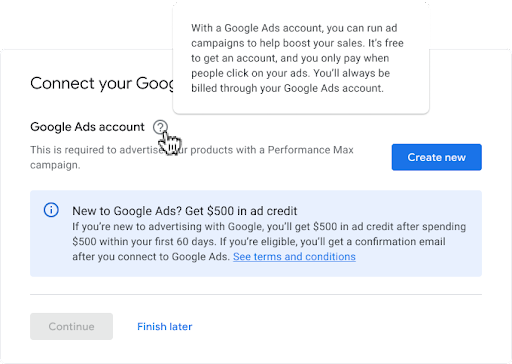
您可以提供更多資訊,說明連結 Google Ads 帳戶的目的。詳情請見下方範例。
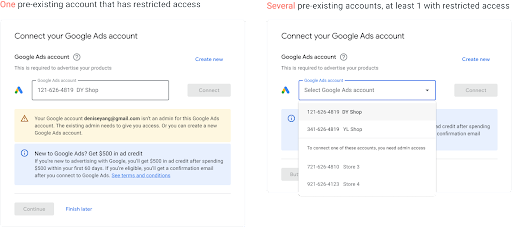
使用者可能有不同的 Google Ads 帳戶存取權層級。由於使用者只能連結自己擁有編輯權限的 Google Ads 帳戶,請在存取權發生問題時通知對方。可能的呈現方式如下。
多個問題可能與現有的 Google Ads 帳戶有關,如果 Google Ads 帳戶遭到停權,請不要將其列入使用者可選擇的名單。
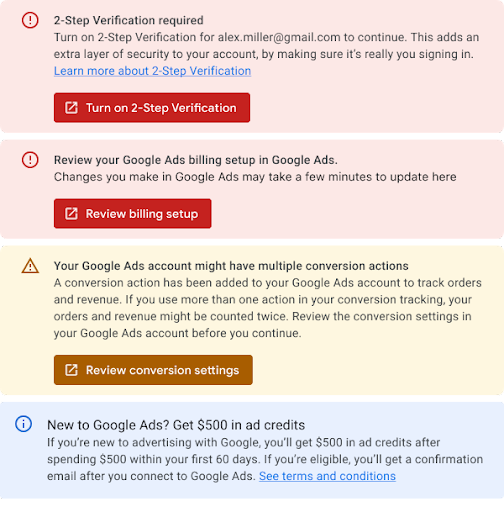
現有的 Google Ads 帳戶應該會顯示以下問題:
需要兩步驟驗證、帳單資訊需要更新,且已經啟用轉換追蹤。以下簡要說明您在選取 Google Ads 帳戶後,應顯示的所有訊息。詳情請參閱「4.5 錯誤處理」一節。
技術指南
如要將商家的 Google Ads 廣告客戶帳戶連結至商家的 Merchant Center 客戶帳戶,請透過 Merchant Center 要求連結。您可以要求商家在 Merchant Center 中手動完成,或使用 Content API for Shopping 自動執行此操作。請注意:
您必須是 Merchant Center 使用者,且角色設為「管理員」,才能提出連結要求。
您必須具備 Google Ads 帳戶的管理員存取權,才能連結 Google Ads 與 Merchant Center 帳戶。
如要將 Google Ads 帳戶連結至 Merchant Center 帳戶,請按照下列兩個步驟操作:
[[["容易理解","easyToUnderstand","thumb-up"],["確實解決了我的問題","solvedMyProblem","thumb-up"],["其他","otherUp","thumb-up"]],[["缺少我需要的資訊","missingTheInformationINeed","thumb-down"],["過於複雜/步驟過多","tooComplicatedTooManySteps","thumb-down"],["過時","outOfDate","thumb-down"],["翻譯問題","translationIssue","thumb-down"],["示例/程式碼問題","samplesCodeIssue","thumb-down"],["其他","otherDown","thumb-down"]],["上次更新時間:2025-07-25 (世界標準時間)。"],[],["Linking a Merchant Center account to a Google Ads account makes product data available for Performance Max campaigns. Initiate the link request from Merchant Center via Content API, requiring \"Admin\" user role, then accept it in Google Ads via Ads API, needing admin access. Multiple Google Ads accounts can link to one Merchant Center, and vice versa. Filter out suspended or manager accounts when displaying available Google Ads accounts and inform users about edit access requirements. Implement retry logic for link requests to prevent future API errors.\n"]]