

Geliştirici olarak kaydolmak, Google Cloud projenizi Merchant Center hesabınıza bağlayan ve geliştirici iletişim bilgilerinizi Google'a kaydeden zorunlu ve tek seferlik bir kurulum işlemidir. Bu sayede Google, sağladığınız ilgili teknik kişilere kritik hizmet duyuruları ve zorunlu güncellemeler gönderebilir.
Bu belge, Merchant API'yi kullanmaya başlama hakkında çok bölümlü bir serinin parçasıdır. Merchant API'ye kaydolduysanız sonraki bölüme geçebilirsiniz: İlk ürününüzü ekleme
Ön koşullar
Merchant API'yi kullanmak için kaydolmadan önce aşağıdaki şartları karşıladığınızdan emin olun:
- Merchant Center hesabı: Mevcut bir Merchant Center hesabınız olmalıdır. Kayıt yalnızca üretim hesapları için desteklenir. Test hesapları geliştirici kaydı için uygun değildir.
- Doğrulanmış ana sayfa: Merchant Center hesabınızda doğrulanmış bir web sitesi olmalıdır. Bu işlem, işletmenizle ilişkili alan adının sahibi olduğunuzu kanıtlar.
- Merchant Center hesabında yönetici erişimi: Kayıt çağrısını yetkilendirmek için kullandığınız e-posta veya hizmet hesabının, kaydolduğunuz Merchant Center hesabında
ADMINerişim türüne sahip olması gerekir. Daha fazla bilgi için Merchant API'ye istekleri yetkilendirme başlıklı makaleyi inceleyin. - Google Cloud proje kimliği: Uygulamanız, kimlik doğrulama için kimlik bilgileri sağlamak üzere özel bir Google Cloud projesiyle ilişkilendirilmelidir. Proje kimliğini nerede bulacağınızla ilgili ayrıntılar için Proje adını, numarasını ve kimliğini bulma başlıklı makaleyi inceleyin.
- Google'dan gelen güncellemeler için geliştirici iletişim noktası olarak sağladığınız, bir Google Hesabı ile ilişkili geçerli bir e-posta adresi. Hizmet hesabı e-posta adresi olmamalıdır. Merchant Center hesabının bir parçası olan bir e-posta adresini veya yeni bir e-posta adresini kullanabilirsiniz.
Merchant API ile geliştirici olarak kaydolma
Merchant API'yi kullanmak için geliştirici iletişim bilgilerinizi ve Google Cloud projenizi registerGcp yöntemiyle Merchant Center hesabınıza kaydetmeniz gerekir.
Birden fazla satıcı hesabıyla çalışıyor olsanız da olmasanız da kullanmayı planladığınız her Google Cloud projesi için kayıt işlemini bir kez gerçekleştirirsiniz. Birden fazla Google Cloud projesiyle çalışıyorsanız bunların herhangi birini veya tümünü aynı Merchant Center hesabına kaydedebilirsiniz.
Kayıt avantajları
Kaydolmanın avantajları:
- Teknik kişi oluşturma: Merchant Center'da teknik bir kişi oluşturur. Google, API'ye özel önemli güncellemeleri (ör. hizmet duyuruları ve yeni özelliklerle ilgili bilgiler) teknik kişiye gönderir.
- Birden fazla satıcı hesabı yönetimi: Yönettiğiniz tüm satıcı hesapları için geliştirici iletişim noktasını temsil etmenize olanak tanır.
Kayıt dışında, kayıtlı olmayan bir Google Cloud projesinden Merchant API'ye yapılan tüm çağrılar engellenir. Bu durumda, durum UNAUTHENTICATED olan 401 hata kodu ve aşağıdaki hata mesajı döndürülür:
GCP project with id {GCP_ID} and number {GCP_NUMBER} is not registered with the merchant account.
Follow these steps https://developers.google.com/merchant/api/guides/quickstart#register_as_a_developer
to register the GCP project with the merchant account then try calling the API again in 5 minutes.
Dikkat edilecek önemli noktalar
- Her Google Cloud projesi için tek seferlik kurulum: Kayıt, her Google Cloud projesi için tek seferlik bir kurulumdur ve Google Cloud projesindeki tüm kullanıcılar ve hizmet hesapları için geçerlidir. Merchant API'nin Google Cloud projenizde etkinleştirildiğinden emin olun.
- Her Google Cloud projesi, herhangi bir zamanda yalnızca tek bir Merchant Center hesabına kaydedilebilir: Bir Google Cloud projesini aynı anda birden fazla Merchant Center hesabına kaydetmeye çalışırsanız
ALREADY_REGISTEREDhatası alırsınız. Kayıt için aynı geliştirici e-posta adresini kullanın. Aynı Merchant Center hesabına birden fazla Google Cloud projesi kaydedilebileceğini unutmayın. Kayıtlı Google Cloud projenizi değiştirme veya rotasyona tabi tutma talimatları için Google Cloud projelerini yönetme ve taşıma başlıklı makaleyi inceleyin. Birden fazla satıcıyı yöneten üçüncü taraflar (3P'ler) için doğru hesabı belirleme: Uzun vadeli stabiliteyi sağlamak ve hizmet kesintilerini önlemek için birden fazla satıcıyı temsil eden veya yöneten üçüncü tarafların Google ekosisteminde uygun hesap yapısını kullanması gerekir. İşletmenizin türüne bağlı olarak, işletmenizin kimliğini temsil eden hesabı kaydetmenizi öneririz:
- Mevcut gelişmiş hesabı olan pazar yerleri: İşletmeniz pazar yeri olarak faaliyet gösteriyorsa ve tüm platformu temsil eden bir gelişmiş hesabı varsa bu mevcut hesap kimliğini kullanmanız gerekir.
- Karşılaştırmalı Alışveriş Hizmetleri (CSS): CSS iseniz benzersiz CSS hesabı kimliğinizi veya CSS grubu hesabı kimliğinizi kullanmanız gerekir.
- Ajanslar, geliştiriciler ve diğer 3. taraflar: Birden fazla satıcı hesabını yöneten ve işletmenizi temsil eden tek bir Merchant Center kimliğine sahip olmayan bir 3. taraf işletmesiyseniz (ör. ajans veya üçüncü taraf geliştirici) yeni bir birincil Merchant Center hesabı oluşturmalı ve bu hesabın gelişmiş hesaba dönüştürülmesini istemelisiniz. Gelişmiş hesaplar, alt hesapları yönetebilir ve üçüncü taraf işlemleri için gerekli yapıyı sağlayabilir.
Aşağıdaki tabloda, farklı iş ortağı türleri için öneriler verilmektedir:
İş Ortağı Türü Kaydedilmesi Önerilen Hesap Ticaret siteleri Ana (veya en büyük) gelişmiş hesabınız. Reklam Ajansları Şirketinizi temsil eden bağımsız bir hesap veya gelişmiş hesap. Merchant API'yi kullanmaya yeni başlıyorsanız bağımsız bir hesap oluşturmanızı öneririz. Karşılaştırmalı Alışveriş Hizmetleri (CSS) Hesabın CSS grubunun tamamını mı yoksa yalnızca bir grup içindeki belirli bir CSS'yi mi temsil ettiğine bağlı olarak CSS grubu hesap kimliğiniz veya belirli CSS hesap kimliğiniz. CSS gelişmiş hesabı kullanmayın. Satıcılar veya markalar Markanızı temsil eden ana hesabınız. Bağımsız veya gelişmiş hesap olabilir. Satış noktası (POS)/envanter veri sağlayıcıları Ana (veya en büyük) gelişmiş hesabınız. Diğer üçüncü taraflar Merchant Center hesabınız varsa kayıt için bu hesabı kullanabilirsiniz. Aksi takdirde bağımsız bir şirket hesabı oluşturun. Ardından web sitenizi doğrulayın. Yalnızca birincil Merchant Center hesabınız için kayıt yapın: Geliştirici kaydını yalnızca birincil Merchant Center hesabınızı kullanarak yaparsınız ve bağlı tüm Merchant Center alt hesaplarının geliştirici iletişim kişisi olursunuz. Merchant Center alt hesaplarınızın her biri için kayıt işlemi yapmayın.
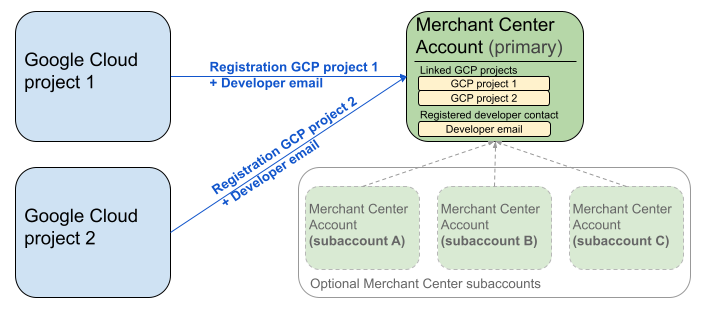
Yukarıdaki diyagramda, birden fazla Google Cloud projesi ve isteğe bağlı olarak birden fazla Merchant Center alt hesabı içeren bir birincil Merchant Center hesabı kullanılırken kayıt kurulumu gösterilmektedir.
Kimlik doğrulama şartı: Kayıt işlemi sırasında, kimliği doğrulanmış Merchant Center hesabı (kimlik bilgilerinizin bulunduğu hesap), kimliğine bürünülen Merchant Center hesabıyla (kaydettiğiniz hesap) eşleşmelidir. Ayrı bir üst hesap veya yönetici hesabıyla kimlik doğrulaması yaptıysanız alt hesap için kaydolamazsınız.
Yalnızca doğrulanmış web sitesi hesapları: Kayıt işlemine yalnızca doğrulanmış web sitesi olan Merchant Center hesapları için izin verilir.
Test hesapları için kayıt yapılamaz: Test hesapları için kayıt işlemi gerçekleştiremezsiniz.
Geliştirici e-posta adresi kaydettikten sonra:
- Kayıttan sonraki 5 dakika içinde Merchant API çağrıları yapabilirsiniz.
- E-posta adresi mevcut bir Merchant Center kullanıcısına aitse kullanıcıya
API developerrolü verilir. Aksi takdirde Merchant Center'da yeni bir kullanıcı oluşturulur ve bu kullanıcının, davetiyenin süresinin dolmasını ve kayıt sürecini yeniden başlatmak zorunda kalmasını önlemek için 14 gün içinde davetiyeyi kabul etmesi gerekir. Kayıt işlemini yalnızca kullanıcı davet bağlantısını tıkladıktan sonra tamamlarsınız.
Kayıt görüşmesini yapın
registerGcp yöntemini çağırarak kaydolursunuz. Kayıt çağrısını iki şekilde yapabilirsiniz:
- 1. seçenek: Doğrudan API çağrıları API uç noktalarına genellikle HTTP(S) üzerinden doğrudan ham istekler gönderirsiniz. İstek gövdesini oluşturma, üstbilgileri ayarlama (kimlik doğrulama dahil) ve yanıtı ayrıştırma gibi işlemleri manuel olarak yaparsınız.
- 2. seçenek: İstemci kitaplıkları Merchant API ile etkileşime geçmek için daha kolay ve dile özgü bir yol sunan önceden oluşturulmuş kitaplıkları kullanırsınız. Kimlik doğrulama ve yetkilendirme işlemlerini gerçekleştirir ve temel HTTP iletişimini soyutlamanın kolay bir yolunu sunarlar. Hızlı bir başlangıç için resmi kod örneklerinden yararlanabilirsiniz.
Kayıt görüşmesi için yetkilendirme
Merchant API isteklerini yetkilendirme adımında açıklandığı gibi iki farklı kimlik doğrulama senaryonuz vardır:
- OAuth 2.0: Birden fazla satıcı hesabını yöneten üçüncü taraf sağlayıcılar veya ajanslar için
- Hizmet hesapları: Kendi Merchant Center hesabınıza erişmek için kullanılır.
Kayıt çağrısının yetkilendirilmesi hakkında daha fazla bilgi için Kayıt çağrısı için kimlik doğrulama ve yetkilendirme işlemlerini nasıl yaparım? başlıklı makaleyi inceleyin.
Kayıt araması
Aşağıdaki örneklerde, doğrudan API çağrılarını veya istemci kitaplıklarını kullanarak kayıt çağrısı yaparsınız.
Kayıt çağrısını registerGcp yöntemini kullanarak yaparsınız.
POST https://merchantapi.googleapis.com/accounts/v1/accounts/{ACCOUNT_ID}/developerRegistration:registerGcp
Content-Type: application/json
Authorization: Bearer {ACCESS_TOKEN}"

{
  "developerEmail": "{DEVELOPER_EMAIL}"
}
Aşağıdakini değiştirin:
ACCOUNT_ID: Merchant Center kimliğinizACCESS_TOKEN: API çağrısı yapmak için kullanılan yetkilendirme jetonuDEVELOPER_EMAIL: Birincil teknik iletişim noktasının e-posta adresi
Başarılı bir çağrı, başarılı bağlantı durumunu onaylayan bir DeveloperRegistration kaynağı döndürür:
  "name": "accounts/{ACCOUNT_ID}/developerRegistration",
  "gcpIds": ["{GOOGLE_CLOUD_PROJECT_ID}"]
Python
Örnekleri indirin ve Python istemci kitaplıklarını ayarlamak için Google Merchant API Python Örnekleri'ndeki talimatları uygulayın.
from examples.authentication import configuration
from examples.authentication import generate_user_credentials
from google.shopping.merchant_accounts_v1 import DeveloperRegistrationServiceClient
from google.shopping.merchant_accounts_v1 import RegisterGcpRequest
def register_gcp(account_id: str, developer_email: str) -> None:
"""Registers the GCP project used to call the Merchant API with a developer email.
Args:
account_id: The ID of your Merchant Center account.
developer_email: The email address of the developer to register.
"""
# Get OAuth credentials.
credentials = generate_user_credentials.main()
# Create a client to the Developer Registration Service.
client = DeveloperRegistrationServiceClient(credentials=credentials)
# The name has the format: accounts/{account}/developerRegistration
name = f"accounts/{account_id}/developerRegistration"
# Create the request to register the GCP project.
request = RegisterGcpRequest(
name=name,
developer_email=developer_email,
)
# Make the API call and handle potential errors.
try:
print("Sending RegisterGcp request:")
response = client.register_gcp(request=request)
print("Registered GCP project successfully:")
print(response)
except RuntimeError as e:
print(f"An error occurred: {e}")
if __name__ == "__main__":
# Your Merchant Center account ID.
# This can be found in the Merchant Center UI.
_account_id = configuration.Configuration().read_merchant_info()
# The developer email to associate with the GCP project.
_developer_email = "YOUR_EMAIL_HERE"
register_gcp(_account_id, _developer_email)
Java
Java istemci kitaplıklarını ayarlamak için örnekleri indirin ve Google Merchant API Java Örnekleri'ndeki talimatları uygulayın.
import com.google.api.gax.core.FixedCredentialsProvider;
import com.google.auth.oauth2.GoogleCredentials;
import com.google.shopping.merchant.accounts.v1.DeveloperRegistration;
import com.google.shopping.merchant.accounts.v1.DeveloperRegistrationName;
import com.google.shopping.merchant.accounts.v1.DeveloperRegistrationServiceClient;
import com.google.shopping.merchant.accounts.v1.DeveloperRegistrationServiceSettings;
import com.google.shopping.merchant.accounts.v1.RegisterGcpRequest;
import shopping.merchant.samples.utils.Authenticator;
import shopping.merchant.samples.utils.Config;
/**
* This class demonstrates how to register the GCP project used to call the Merchant API with a
* developer email.
*/
public class RegisterGcpSample {
public static DeveloperRegistration registerGcp(Config config, String developerEmail) throws Exception {
// Obtains OAuth token based on the user's configuration.
GoogleCredentials credential = new Authenticator().authenticate();
// Creates service settings using the credentials retrieved above.
DeveloperRegistrationServiceSettings developerRegistrationServiceSettings =
DeveloperRegistrationServiceSettings.newBuilder()
.setCredentialsProvider(FixedCredentialsProvider.create(credential))
.build();
// Creates DeveloperRegistration name to identify the DeveloperRegistration.
// The name has the format: accounts/{account}/developerRegistration
String name =
DeveloperRegistrationName.newBuilder()
.setAccount(config.getAccountId().toString())
.build()
.toString();
// Calls the API and propagates any network failures/errors.
try (DeveloperRegistrationServiceClient developerRegistrationServiceClient =
DeveloperRegistrationServiceClient.create(developerRegistrationServiceSettings)) {
// Creates a request to register the GCP project with the developer email.
RegisterGcpRequest request =
RegisterGcpRequest.newBuilder().setName(name).setDeveloperEmail(developerEmail).build();
System.out.println("Sending RegisterGcp request:");
DeveloperRegistration response = developerRegistrationServiceClient.registerGcp(request);
System.out.println(response);
return response;
}
}
public static void main(String[] args) throws Exception {
Config config = Config.load();
String developerEmail = "YOUR_EMAIL_HERE"; // Replace with your email
registerGcp(config, developerEmail);
}
}
PHP
PHP istemci kitaplıklarını ayarlamak için örnekleri indirin ve Google Merchant API PHP Örnekleri'ndeki talimatları uygulayın.
require_once __DIR__ . '/../../../../vendor/autoload.php';
require_once __DIR__ . '/../../../Authentication/Authentication.php';
require_once __DIR__ . '/../../../Authentication/Config.php';
use Google\ApiCore\ApiException;
use Google\Shopping\Merchant\Accounts\V1\Client\DeveloperRegistrationServiceClient;
use Google\Shopping\Merchant\Accounts\V1\RegisterGcpRequest;
/**
* This class demonstrates how to register the GCP project used to call the
* Merchant API with a developer email.
*/
class RegisterGcpSample
{
/**
* A helper function to create the name string for the
* DeveloperRegistration.
*
* @param string $accountId The merchant account ID.
* @return string The name, which has the format:
* `accounts/{account}/developerRegistration`
*/
private static function getName(string $accountId): string
{
return sprintf("accounts/%s/developerRegistration", $accountId);
}
/**
* Registers the GCP project with a developer email.
*
* @param array $config The configuration data for authentication and account ID.
* @param string $developerEmail The email of the developer to register.
*/
public static function registerGcpSample(array $config, string $developerEmail): void
{
// Obtains OAuth credentials from the configuration file.
$credentials = Authentication::useServiceAccountOrTokenFile();
// Creates a configuration object for the client.
$options = ['credentials' => $credentials];
// Creates the DeveloperRegistrationServiceClient.
$developerRegistrationServiceClient = new DeveloperRegistrationServiceClient($options);
// Creates the name of the developer registration to identify it.
$name = self::getName($config['accountId']);
// Calls the API and handles any network failures.
try {
// Creates a request to register the GCP project with the developer email.
$request = new RegisterGcpRequest([
'name' => $name,
'developer_email' => $developerEmail
]);
printf("Sending RegisterGcp request:%s", PHP_EOL);
// The `registerGcp` method returns a `DeveloperRegistration` object
// upon success.
$response = $developerRegistrationServiceClient->registerGcp($request);
print "Successfully registered developer email '$developerEmail' for account {$config['accountId']}.\n";
print_r($response);
} catch (ApiException $e) {
printf("An error occurred: %s%s", $e->getMessage(), PHP_EOL);
}
}
/**
* Helper to execute the sample.
*/
public function callSample(): void
{
$config = Config::generateConfig();
// An email address for a developer to register for the API.
$developerEmail = 'YOUR_EMAIL_HERE'; // Replace with your email
self::registerGcpSample($config, $developerEmail);
}
}
// Executes the sample.
$sample = new RegisterGcpSample();
$sample->callSample();
cURL
curl -X POST "https://merchantapi.googleapis.com/accounts/v1/accounts/{ACCOUNT_ID}/developerRegistration:registerGcp" \
-H "Content-Type: application/json" \
-H "Authorization: Bearer {ACCESS_TOKEN}" \
-d '{
  "developerEmail": "{DEVELOPER_EMAIL}"
}'
Kaydı tamamlamak için Merchant Center'daki en az bir kullanıcının API developer rolüne sahip olduğundan emin olmanız gerekir. Bunun için aşağıdaki işlemlerden birini yapabilirsiniz:
registerGcpyönteminedeveloperEmaildeğerini sağlayın.- Merchant Center kullanıcı arayüzünde
API developerrolüne sahip yeni bir kullanıcı ekleyin. - Merchant Center kullanıcı arayüzünde mevcut bir kullanıcıya
API developerrolünü atayın. - Yeni bir kullanıcı oluşturmak ve bu kullanıcıya
accounts.users.createrolünü atamak içinAPI developeryöntemini çağırın. accounts.users.patchyöntemini kullanarak mevcut bir kullanıcıyaAPI developerrolünü atayın.
Kayıttan sonraki en iyi uygulamalar
Güçlü erişim yönetiminden yararlanmak ve gelecekte hizmet kesintilerini önlemek için ilk kaydı tamamladıktan sonra bir dizi en iyi uygulamayı uygulamanızı öneririz:
API developer için ek izinler verin
Kaydettiğiniz geliştirici iletişim kişisine otomatik olarak API developer rolü atanır. Bu rol, Merchant Center hesabını yönetmek veya tüm API çağrılarını yapmak için gerekli olan diğer izinleri içermez. Geliştiricilerinize kapsamlı erişim sağlamak için ADMIN veya STANDARD rollerini eklemenizi öneririz.
Bir kullanıcının erişim haklarını değiştirmek için accounts.users.patch yöntemini kullanın. Rol eklemek veya kaldırmak için istek gövdesinin updateMask alanında erişim haklarını belirtirsiniz:
PATCH https://merchantapi.googleapis.com/accounts/v1/{ACCOUNT_ID}/users/{DEVELOPER_EMAIL}?update_mask=access_rights
Content-Type: application/json
Authorization: Bearer {ACCESS_TOKEN}"

{
  "name": "accounts/{ACCOUNT_ID}/users/{DEVELOPER_EMAIL}",
  "access_rights": [ "ADMIN", "API_DEVELOPER" ]
}
Python
from examples.authentication import configuration
from examples.authentication import generate_user_credentials
from google.protobuf import field_mask_pb2
from google.shopping.merchant_accounts_v1 import AccessRight
from google.shopping.merchant_accounts_v1 import UpdateUserRequest
from google.shopping.merchant_accounts_v1 import User
from google.shopping.merchant_accounts_v1 import UserServiceClient
FieldMask = field_mask_pb2.FieldMask
_ACCOUNT = configuration.Configuration().read_merchant_info()
def update_user(user_email, user_access_right):
"""Updates a user to make it an admin of the MC account."""
credentials = generate_user_credentials.main()
client = UserServiceClient(credentials=credentials)
# Create user name string
name = "accounts/" + _ACCOUNT + "/users/" + user_email
user = User(name=name, access_rights=[user_access_right])
field_mask = FieldMask(paths=["access_rights"])
try:
request = UpdateUserRequest(user=user, update_mask=field_mask)
print("Sending Update User request")
response = client.update_user(request=request)
print("Updated User Name below")
print(response.name)
except RuntimeError as e:
print(e)
if __name__ == "__main__":
# Modify this email to update the right user
email = "USER_MAIL_ACCOUNT"
access_right = AccessRight.ADMIN
update_user(email, access_right)
Java
import com.google.api.gax.core.FixedCredentialsProvider;
import com.google.auth.oauth2.GoogleCredentials;
import com.google.protobuf.FieldMask;
import com.google.shopping.merchant.accounts.v1.AccessRight;
import com.google.shopping.merchant.accounts.v1.UpdateUserRequest;
import com.google.shopping.merchant.accounts.v1.User;
import com.google.shopping.merchant.accounts.v1.UserName;
import com.google.shopping.merchant.accounts.v1.UserServiceClient;
import com.google.shopping.merchant.accounts.v1.UserServiceSettings;
import shopping.merchant.samples.utils.Authenticator;
import shopping.merchant.samples.utils.Config;
/** This class demonstrates how to update a user to make it an admin of the MC account. */
public class UpdateUserSample {
public static void updateUser(Config config, String email, AccessRight accessRight)
throws Exception {
GoogleCredentials credential = new Authenticator().authenticate();
UserServiceSettings userServiceSettings =
UserServiceSettings.newBuilder()
.setCredentialsProvider(FixedCredentialsProvider.create(credential))
.build();
// Creates user name to identify user.
String name =
UserName.newBuilder()
.setAccount(config.getAccountId().toString())
.setEmail(email)
.build()
.toString();
// Create a user with the updated fields.
User user = User.newBuilder().setName(name).addAccessRights(accessRight).build();
FieldMask fieldMask = FieldMask.newBuilder().addPaths("access_rights").build();
try (UserServiceClient userServiceClient = UserServiceClient.create(userServiceSettings)) {
UpdateUserRequest request =
UpdateUserRequest.newBuilder().setUser(user).setUpdateMask(fieldMask).build();
System.out.println("Sending Update User request");
User response = userServiceClient.updateUser(request);
System.out.println("Updated User Name below");
System.out.println(response.getName());
} catch (Exception e) {
System.out.println(e);
}
}
public static void main(String[] args) throws Exception {
Config config = Config.load();
String email = "testUser@gmail.com";
// Give the user admin rights. Note that all other rights, like
// PERFORMANCE_REPORTING, would be overwritten in this example
// if the user had those access rights before the update.
AccessRight accessRight = AccessRight.ADMIN;
updateUser(config, email, accessRight);
}
}
PHP
use Google\ApiCore\ApiException;
use Google\Protobuf\FieldMask;
use Google\Shopping\Merchant\Accounts\V1\AccessRight;
use Google\Shopping\Merchant\Accounts\V1\UpdateUserRequest;
use Google\Shopping\Merchant\Accounts\V1\User;
use Google\Shopping\Merchant\Accounts\V1\Client\UserServiceClient;
/**
* Updates a user.
*
* @param array $config The configuration data.
* @param string $email The email address of the user.
* @param int $accessRight The access right to grant the user.
* @return void
*/
function updateUser($config, $email, $accessRights): void
{
// Gets the OAuth credentials to make the request.
$credentials = Authentication::useServiceAccountOrTokenFile();
// Creates options config containing credentials for the client to use.
$options = ['credentials' => $credentials];
// Creates a client.
$userServiceClient = new UserServiceClient($options);
// Creates user name to identify user.
$name = 'accounts/' . $config['accountId'] . "/users/" . $email;
$user = (new User())
->setName($name)
->setAccessRights($accessRights);
$fieldMask = (new FieldMask())->setPaths(['access_rights']);
// Calls the API and catches and prints any network failures/errors.
try {
$request = new UpdateUserRequest([
'user' => $user,
'update_mask' => $fieldMask,
]);
print "Sending Update User request\n";
$response = $userServiceClient->updateUser($request);
print "Updated User Name below\n";
print $response->getName() . "\n";
} catch (ApiException $e) {
print $e->getMessage();
}
}
$config = Config::generateConfig();
$email = "testUser@gmail.com";
$accessRights = [AccessRight::ADMIN];
updateUser($config, $email, $accessRights);
cURL
curl -X PATCH \
"https://merchantapi.googleapis.com/accounts/v1/{ACCOUNT_ID}/users/{USER_EMAIL}?update_mask=access_rights" \
-H "Content-Type: application/json" \
-H "Authorization: Bearer {ACCESS_TOKEN}" \
-d '{
  "access_rights": [
    "ADMIN",
    "API_DEVELOPER"
  ]
}'
Daha fazla geliştirici kişisi ekleme
Birincil geliştirici iletişim sorumlusu ayrılırsa veya erişimini kaybederse işletmenin kesintiye uğramaması için yedek iletişim sorumlularının olması çok önemlidir. Yedek olarak kullanmak üzere Merchant Center'da API developer rolüne sahip en az bir ek kullanıcı olmasını öneririz.
Merchant API'deki accounts.users hizmetini veya Merchant Center kullanıcı arayüzündeki Erişim ve hizmetler sayfasını kullanarak kullanıcı ekleyebilir ya da mevcut bir kullanıcıyı güncelleyebilirsiniz. Yedek geliştiricileri proaktif olarak ekleyerek tek bir kişiye bağlı olmayan, daha dayanıklı bir entegrasyon oluşturursunuz.
PATCH https://merchantapi.googleapis.com/products/v1/accounts/{ACCOUNT_ID}/users
Content-Type: application/json
Authorization: Bearer {ACCESS_TOKEN}"
{
  "user_id": {USER_EMAIL},
  "user": { "access_rights": [ "API_DEVELOPER", "ADMIN" ] }
}
Python
from examples.authentication import configuration
from examples.authentication import generate_user_credentials
from google.shopping.merchant_accounts_v1 import AccessRight
from google.shopping.merchant_accounts_v1 import CreateUserRequest
from google.shopping.merchant_accounts_v1 import User
from google.shopping.merchant_accounts_v1 import UserServiceClient
_ACCOUNT = configuration.Configuration().read_merchant_info()
def get_parent(account_id):
return f"accounts/{account_id}"
def create_user(user_email):
"""Creates a user for a Merchant Center account."""
# Get OAuth credentials
credentials = generate_user_credentials.main()
# Create a UserServiceClient
client = UserServiceClient(credentials=credentials)
# Create parent string
parent = get_parent(_ACCOUNT)
# Create the request
request = CreateUserRequest(
parent=parent,
user_id=user_email,
user=User(
access_rights=[AccessRight.ADMIN, AccessRight.PERFORMANCE_REPORTING]
),
)
try:
print("Sending Create User request")
response = client.create_user(request=request)
print("Inserted User Name below")
print(response.name)
except RuntimeError as e:
print(e)
if __name__ == "__main__":
# Modify this email to create a new user
email = "USER_MAIL_ACCOUNT"
create_user(email)
Java
import com.google.api.gax.core.FixedCredentialsProvider;
import com.google.auth.oauth2.GoogleCredentials;
import com.google.shopping.merchant.accounts.v1.AccessRight;
import com.google.shopping.merchant.accounts.v1.CreateUserRequest;
import com.google.shopping.merchant.accounts.v1.User;
import com.google.shopping.merchant.accounts.v1.UserServiceClient;
import com.google.shopping.merchant.accounts.v1.UserServiceSettings;
import shopping.merchant.samples.utils.Authenticator;
import shopping.merchant.samples.utils.Config;
/** This class demonstrates how to create a user for a Merchant Center account. */
public class CreateUserSample {
private static String getParent(String accountId) {
return String.format("accounts/%s", accountId);
}
public static void createUser(Config config, String email) throws Exception {
// Obtains OAuth token based on the user's configuration.
GoogleCredentials credential = new Authenticator().authenticate();
// Creates service settings using the credentials retrieved above.
UserServiceSettings userServiceSettings =
UserServiceSettings.newBuilder()
.setCredentialsProvider(FixedCredentialsProvider.create(credential))
.build();
// Creates parent to identify where to insert the user.
String parent = getParent(config.getAccountId().toString());
// Calls the API and catches and prints any network failures/errors.
try (UserServiceClient userServiceClient = UserServiceClient.create(userServiceSettings)) {
CreateUserRequest request =
CreateUserRequest.newBuilder()
.setParent(parent)
// This field is the email address of the user.
.setUserId(email)
.setUser(
User.newBuilder()
.addAccessRights(AccessRight.ADMIN)
.addAccessRights(AccessRight.PERFORMANCE_REPORTING)
.build())
.build();
System.out.println("Sending Create User request");
User response = userServiceClient.createUser(request);
System.out.println("Inserted User Name below");
// The last part of the user name will be the email address of the user.
// Format: `accounts/{account}/user/{user}`
System.out.println(response.getName());
} catch (Exception e) {
System.out.println(e);
}
}
public static void main(String[] args) throws Exception {
Config config = Config.load();
// The email address of this user.
String email = "testUser@gmail.com";
createUser(config, email);
}
}
PHP
use Google\ApiCore\ApiException;
use Google\Shopping\Merchant\Accounts\V1\AccessRight;
use Google\Shopping\Merchant\Accounts\V1\CreateUserRequest;
use Google\Shopping\Merchant\Accounts\V1\User;
use Google\Shopping\Merchant\Accounts\V1\Client\UserServiceClient;
/**
* Creates a user.
*
* @param array $config The configuration data.
* @param string $email The email address of the user.
* @return void
*/
function createUser($config, $email): void
{
// Gets the OAuth credentials to make the request.
$credentials = Authentication::useServiceAccountOrTokenFile();
// Creates options config containing credentials for the client to use.
$options = ['credentials' => $credentials];
// Creates a client.
$userServiceClient = new UserServiceClient($options);
// Creates parent to identify where to insert the user.
$parent = sprintf("accounts/%s", $config['accountId']);
// Calls the API and catches and prints any network failures/errors.
try {
$request = new CreateUserRequest([
'parent' => $parent,
'user_id' => $email,
'user' => (new User())
->setAccessRights([AccessRight::ADMIN,AccessRight::PERFORMANCE_REPORTING])
]);
print "Sending Create User request\n";
$response = $userServiceClient->createUser($request);
print "Inserted User Name below\n";
print $response->getName() . "\n";
} catch (ApiException $e) {
print $e->getMessage();
}
}
$config = Config::generateConfig();
$email = "testUser@gmail.com";
createUser($config, $email);
cURL
curl -X PATCH \
"https://merchantapi.googleapis.com/products/v1/accounts/{ACCOUNT_ID}/users/{USER_EMAIL}?update_mask=access_rights" \
-H "Content-Type: application/json" \
-H "Authorization: Bearer {ACCESS_TOKEN}" \
-d '{
  "access_rights": [
    "ADMIN",
    "API_DEVELOPER"
  ]
}'