
This section addresses common questions regarding Developer Registration for the Merchant API.
General Registration
Common questions about the registration process:
Is developer registration mandatory in order to use Merchant API?
Yes. You must register your developer contact information so that Google can send important API-specific updates, such as service announcements and new features information.
If you just want to explore and test Merchant API, you can use tools such as Google OAuth Playground and API Explorer which don't require registration.
How often do I need to register?
Registration is a one-time setup for each Google Cloud project. Whether you are working with multiple merchant accounts or not, you perform the registration operation only once, and it applies to all users and service accounts within the linked Google Cloud project.
Once a Google Cloud project is successfully registered, the link remains active unless it is explicitly removed by calling the unregisterGcp method. You can't register shared, Google-owned projects such as the APIs Explorer or OAuth Playground.
What email address should I provide as developer contact?
We recommend using an individual's corporate email address. Alternatively you could use general group aliases. You can't use service account emails, as communications are intended for human recipients. Google sends important API-specific updates, such as service announcements and new features information.
If the email address belongs to an existing user in the Merchant Center
account, they are automatically granted the API developer role. If not, an
invitation is sent to that address.
The developer contact email address field is optional in the registerGcp
method. If when you register you don't provide a value for this field, you must
create a user that has the API developer role either in
Merchant Center UI, or by calling the accounts.users.create
method.
Does the developer contact email need to be a Google Account?
Yes. To use an existing non-Google email, you can associate it with a Google Account by choosing the Use your existing email option in Create a Google Account signup process. You can't use service account emails as service accounts can't receive emails.
How do I perform authentication and authorization for the registration call?
Two distinct authentication scenarios are available for the authentication and authorization of the registration call, depending on your use case:
- OAuth 2.0: for third-party providers or agencies managing multiple merchant accounts
- Service Accounts: for access to your own Merchant Center account
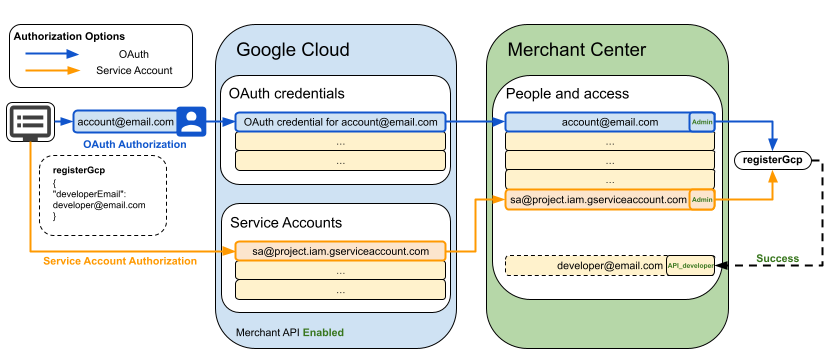
The preceding diagram shows the two authentication and authorization flows for the registration call. You can choose between:
- Using OAuth with an email address such as account@email.com associated with a Google Account
- Using a service account such as sa@project.iam.gserviceaccount.com
If you decide to go with OAuth:
- Create OAuth credentials in your Google Cloud project for your email
- Make sure that the authorizing email address exists in your
Merchant Center and that it has the
ADMINaccess type
If you decide to go with a service account:
- Make sure that the service account exists in your Google Cloud project
- Make sure that the email address associated with the service account exists in
your Merchant Center and that it has the
ADMINaccess type
Perform the registration call under the authenticating identity's security context, using direct API calls or client libraries. Provide an email address for the developer contact, for example developer@email.com.
If the registration call is successful, a user exists in your
Merchant Center with the provided developer email address and the
API developer role. You get as a response a DeveloperRegistration
resource.
What is the difference between the authenticating email and the one developer contact email?
The two email addresses serve distinct purposes within the Merchant API ecosystem:
- Authenticating email: You typically use an email associated with your
Google account or with a service account as an identity to authorize
requests to Merchant API provided that:
- It exists in your Merchant Center, and has the
ADMINrole. - A Google Cloud Project that has Merchant API enabled hosts the OAuth client or the service account associated with the email that authorizes the API calls.
- It exists in your Merchant Center, and has the
- Developer contact email: The developer contact email must also be
associated with a Google Account, but it serves as the primary contact for
critical service announcements and API updates from Google. It can belong to a
user or to a group of users. By default, it gets the
API developerrole in Merchant Center.
Must I accept the invitation received by the developer contact email?
Yes. The developer contact email recipient you provide has 14 days to accept the invitation. Registration is complete only after they have accepted the invitation. You can however, perform API calls during this time.
If the invitation is not accepted in the specified time, the invitation link expires. You can't perform Merchant API calls anymore and you have to restart the registration process.
Why is my developer registration failing with a "test account" error?
Developer registration is restricted to production (live) accounts to ensure integration stability. If you are using an account created specifically for testing that is marked as a "test account" in Merchant Center, the registration will be rejected.
Can I register a sub-account that I manage for a client?
We strongly recommend registering the account that represents your business identity. Registering a client's sub-account is not allowed and is error-prone; if that client leaves your service or deletes the account, your entire API integration might be disabled.
Does my website need to be claimed or just verified?
For developer registration, the website must be verified. This proves you have administrative control over the site associated with the account. While claiming is required for other features like Shopping ads, verification is the primary requirement for API registration.
Account and Project Management
Common questions about the account and project management:
I work with multiple Merchant Center accounts. Do I need to register every Merchant Center Account I want to use with the Merchant API?
No. If you are a third party developer or an agency that manages multiple merchants' accounts, you register your Google Cloud project with your own primary Merchant Center account, not with each of your merchants' accounts. In this way you represent the developer for all the API work you do for your merchants.
I work with multiple Merchant Center accounts. How do I choose my primary Merchant Center Account?
Choosing the primary account to use depends on your business type:
- Marketplaces with an existing advanced account: If your business operates as a marketplace and already has an advanced account representing the entire platform, use this existing account ID as the primary Merchant Center Account.
- Comparison Shopping Services (CSS): If you are a CSS, use your unique CSS account ID or CSS group account ID.
- Agencies, Developers, and other 3Ps: If you are a 3P business such as an agency or third-party developer that manages multiple merchant accounts and lack a single Merchant Center ID representing your business, you should create a new, primary Merchant Center Account and request converting it to an advanced account.
Once your Google Cloud project is registered to your primary Merchant Center account, you can use that same project to manage any other Merchant Center account you have access to, without needing to register those accounts individually.
I use multiple Google Cloud projects. Do I need to register each one?
Yes. Since the registration process links the calling Google Cloud project, you must perform the registerGcp call from each Google Cloud project you use to make API calls.
A single Google Cloud project can only be registered to exactly one Merchant Center account at a time. However, a single Merchant Center account can have multiple Google Cloud projects registered to it. Similarly, you can use the same developer email address to perform multiple registrations, across multiple Google Cloud projects or multiple Merchant Centers.
What happens if I register a Google Cloud project with multiple Merchant Center accounts?
Attempting to register a Google Cloud project that is already
registered with another Merchant Center account will result in an
ALREADY_REGISTERED error.
How do I authenticate the developer registration API call?
To authenticate the developer registration API call for the Merchant API, you use credentials managed through a Google Cloud Project. You have two primary options for the identity that performs the authentication:
- Google Account such as Gmail using OAuth 2.0: This method uses OAuth 2.0 client credentials generated within your Google Cloud Project. The API call is authorized on behalf of a specific Google Account that the user signs into.
- Service Account: This method uses a Google Cloud Service Account, which is a special type of Google Account intended for applications. Credentials for the Service Account are also managed within your Google Cloud project.
For a successful developer registration, the authenticating identity (Google Account or Service Account) must meet the following criteria within Merchant Center:
- Exists as a User in Merchant Center: The email address associated with the authenticating Google Account or the Service Account must be added as a user in the Merchant Center account you are registering.
- Admin Role Required: This user must have the
ADMINrole assigned to them within that specific Merchant Center account.
When making the API calls:
- If you are using Direct API calls, you must obtain and provide a valid
Access Token in the
Authorizationheader. This token is generated by the OAuth 2.0 flow for a Google Account or the server-to-server authentication flow for a Service Account. - Client libraries provided by Google typically handle the complexities of obtaining and refreshing Access Tokens for you as part of their configuration.
The authenticating user might not be the same as the developer contact user. For more information, see What is the difference between the authenticating email and the one developer contact email?
How often do I need to refresh access tokens?
Access tokens for both Service Accounts and OAuth 2.0 typically expire after 1 hour. However, the mechanism for getting a new one depends on which authentication method you are using:
- Service accounts use a private key or environment credentials to create a new access token whenever needed.
- OAuth 2.0 flows use a refresh_token to call the Google OAuth2 token endpoint to receive a new 1-hour access token.
We strongly recommend using the official Google Auth Libraries which handle this rotation automatically so your application never experiences downtime.
Users and Roles
Common questions about users and roles:
Must the developer email account exist already in Merchant Center?
No. If the registration email account does not exist already in
Merchant Center, Merchant API creates the account in Merchant Center
with the specified email in Pending status. If the developer email address
belongs to an existing user in the Merchant Center account, they are
automatically granted the API developer role.
Does the developer contact email need to have Admin rights in Merchant Center?
No. The Merchant Center user associated with the developer contact email
gets by default the API developer role that is required to receive
important notifications. However, it has minimal permissions within the
Merchant Center. To allow this user to make other API calls or manage
settings in the Merchant Center UI, you need to grant them additional
roles, such as STANDARD or ADMIN. For more information about the
Merchant Center roles, see Access types.
What permissions does the "API developer" role have?
The API developer role is a role with minimal rights in the
Merchant Center. If you plan on using the developer contact email to
authorize calls to Merchant API, we recommend adding ADMIN or STANDARD
permissions to enable the user to perform API calls.
Do I need to register each developer user or service account calling the API?
No. Developer registration is tied to the Google Cloud project being
used to make the API calls, not to individual users or service accounts. Once a
Google Cloud project is successfully registered with your primary
Merchant Center account, you can use any identity that is managed through
the linked Google Cloud project using OAuth credentials or service
accounts to authorize Merchant API calls, provided that they exist in your
Merchant Center and they have the ADMIN role assigned.
How do I change the developer contact email after the initial registration?
To manage or change contacts, use the standard accounts.users service or
the "Access and services" page in the Merchant Center UI to add or
remove users with the API developer role.
What happens if the last "API developer" user is removed from the Merchant Center account?
A 30-day grace period is triggered to avoid immediate service disruption. During this time:
- Admins will receive three mandatory service announcements by email (usually around 30, 17, and 4 days before the block).
- API calls will continue to function normally.
- If a new
API developeris not added before the grace period expires, API calls from the associated Google Cloud projects will be blocked with anAUTH_GCP_NOT_REGISTEREDerror.
When the 30-days grace period ends, API calls from the associated
Google Cloud projects are blocked, and they get an
AUTH_GCP_NOT_REGISTERED error until a valid developer contact is restored.
What happens if the Merchant Center ID to which developer registration is done is deleted?
Don't delete the Merchant Center account used for developer registration while your integration is active. Deleting this account immediately breaks your integration, and you will no longer be able to perform API calls from the associated Google Cloud project.
If you must delete that Merchant Center account, you should first call the unregisterGcp method to safely remove the link, and only then proceed with deleting the Merchant Center ID. If you want to keep using Merchant API, you need to register with another Merchant Center ID right after you unregister the current one. Only then proceed with deleting the Merchant Center ID.
Why can't I see the "API developer" role in Merchant Center?
The API developer role is only visible in the Merchant Center UI
after the developer registration is performed for the given Merchant Center
account. Merchant Center accounts without registrations don't see the
API developer role.
Special Use Cases
Common questions about special use cases:
I am an agency or a third-party developer managing multiple merchant accounts. What is the best way to set this up?
Third party developers and agencies should maintain their own primary Merchant Center account and register all of their Google Cloud projects to that single, centralized account. Don't register your Google Cloud project with each individual merchant's account.
How does registration work for Google App Scripts?
App Scripts usually run on a default Google Cloud project. You must register this default Google Cloud ID with your Merchant Center account. The Google Cloud ID is obtained automatically by the API, so you don't need to provide it as a parameter.
Can I check if a Merchant Center ID is registered to a specific Google Cloud project ID?
Yes. You can check which Merchant Center ID is registered to a specific Google Cloud project by using the getAccountForGcpRegistration method. To remove a Google Cloud project link to your Merchant Center account, use the unregisterGcp method.
Content API to Merchant API migration for Google & YouTube app on Shopify users
Common questions about Content API to Merchant API migration for third-party platforms and apps:
Do I need to do anything to migrate from Content API to Merchant API?
No action needed. If you use the Google & YouTube app on Shopify to manage your Merchant Center feeds, the Content API to Merchant API migration will be handled by Google.
Will the migration change my product IDs?
No, the migration doesn't change the product IDs in your Merchant Center feeds.
Do I need to reinstall the Google & YouTube app on Shopify to complete the transition?
No action is required from you to complete the transition. You don't need to reinstall the Google & YouTube app.
Why do I still find Content API data sources in Merchant Center?
Content API data sources may still appear in Merchant Center during the transition to Merchant API. These instances are expected and require no action from you.