
Use the API Integration and Code Assist Toolkit to accelerate your migration to Merchant API and build new integrations with AI-powered development tools.
Overview
When migrating from Content API for Shopping to Merchant API or building a new integration, you need to understand new service structures, resource names, and methods. AI-powered development tools are particularly suited to assist with the following operations:
- Code translation and migration: Helps you understand and convert legacy Content API for Shopping code into the new Merchant API format. This includes mapping product attributes to the new structure and updating dependency management files.
- API documentation expertise: Provides clear explanations of Merchant API resources, methods, fields, quotas, and best practices based on authoritative context from official Google API documentation.
- Code generation: Generates code snippets for various Merchant API tasks in languages including Python, Java, PHP, and other languages.
- Troubleshooting: Assists with diagnosing and fixing common API errors.
Choose the option that best fits your development environment and specific use case. Use the API Integration and Code Assist Toolkit to tailor the setup to your preferred workflow:
- Merchant API Developer Documentation MCP server for direct context retrieval
- Merchant API Agent Skills for workflow-driven guidance
The following diagram illustrates the setup options for an AI-assisted code migration across the most commonly used Integrated Development Environments (IDEs) such as Antigravity, Visual Studio Code, Cursor, or Copilot. It is possible to set up coding assistants such as Gemini, Claude, ChatGPT, Grok, and empower them with the Merchant API Developer Documentation MCP server or the Merchant API Agent Skills to be more grounded while boosting integration velocity.
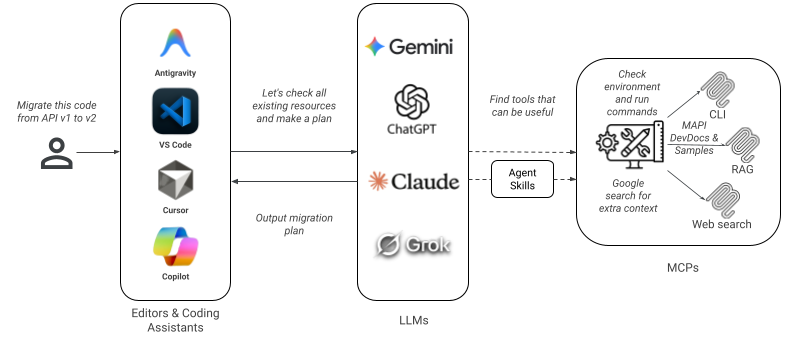
Merchant API Developer Documentation MCP Server
Get contextual intelligence about Merchant API from the coding assistant of your choice. Within your IDE, you can now access the developer documentation using the Model Context Protocol (MCP) service. This service feeds your coding assistant key information from official Google API documentation. For more information on the protocol itself, see the Model Context Protocol standard.
How it works
When you ask your MCP-enabled IDE coding assistant a question about Merchant API, the service retrieves the most relevant snippets of text and code from official resources and returns them as context to your coding assistant using a specialized Retrieval-Augmented Generation (RAG) backend. A RAG system is one that improves the quality of responses from LLMs by connecting them to external, up-to-date knowledge sources. This empowers your assistant to provide accurate, up-to-date answers without you ever having to leave your development environment.
Example workflow:
- You ask a question in your MCP-compatible coding assistant or Agent (e.g., natural language question, request for a code sample, or code translation).
- Your coding assistant sends a request for context to the MCP endpoint.
- The MCP service searches its indexed collection of official Merchant API documentation, guides, and code samples.
- The service returns authoritative snippets as context to your coding assistant.
- Your coding assistant leverages this context to generate a grounded answer or a code translation task.
Getting started
To integrate and use MCP, follow these steps:
1. Use a compatible tool
Open an IDE or coding assistant that supports the Model Context Protocol with streamable HTTP transport.
2. Configure the endpoint
To connect your IDE or coding assistant to MCP, use the provided remote endpoint details which may require you to input either the direct service URL or the MCP definition, depending on your tool's configuration:
Configuration setups:
Antigravity
Follow instructions in the Antigravity documentation.
"mcpServers": {
  "mapi-devdocs": {
    "command": "npx",
    "args": [
      "-y",
      "mcp-remote",
      "https://merchantapi.googleapis.com/devdocs/mcp"
    ]
  }
}
Visual Studio Code
Follow instructions in the Visual Studio Code documentation.
"servers": {
"mapi-devdocs": {
  "type": "http",
  "url": "https://merchantapi.googleapis.com/devdocs/mcp/"
  }
}
3. Add agent instructions (optional)
To enable your agent to directly translate code using MCP, provide it with the System Instructions: Merchant Integrator Agent Protocol. These instructions guide the agent on how to correctly utilize MCP for code translation. Depending on your tool, you can provide these instructions either in the system instructions configuration or as an additional context file for the agent.
Example usage scenarios
MCP can accelerate your workflow in the following common use cases:
Scenario 1: Migrate products.insert code
You can ask the agent to directly migrate a Content API for Shopping
products.insert integration code to Merchant API.
User prompt:
"Migrate
products.insertcode to Merchant API"
By providing your agent with system instructions and access to MCP, your agent
can translate Content API for Shopping code to Merchant API code directly in
your IDE. In this case, it will identify productInputs.insert as the
equivalent call and map the product attributes from the old format to the new
format required by Merchant API. It can also update required imports and
dependency management file (for example requirements.txt, pom.xml or
package.json). You can instruct the agent to do the changes in place or to
create a new folder.
Scenario 2: Find equivalent functionality
You have an existing application using the Content API for Shopping and need to update it. You can ask about a specific legacy method to get details on the new implementation and a relevant code sample.
User prompt:
"What is the Merchant API equivalent for the accountstatuses.get method in the Content API for Shopping?"
The MCP service provides context from the official migration guides and
reference documentation, letting your assistant respond with a detailed answer,
including the new API name, accounts.issues.
Scenario 3: Finding a code sample
You are implementing a new feature and need a practical example to follow.
User prompt:
"Show me a Python code sample for adding a new shipping service using Merchant API."
The MCP service retrieves relevant code samples from the official Google GitHub repositories and developer guides. Your assistant can then present a complete, ready-to-adapt code block.
Scenario 4: Understanding API concepts
You encounter a new concept or want to understand the structure of a resource or the overall Merchant API pattern.
User prompt:
"How do I update the inventory for a product using Merchant API?"
The MCP service returns context from the products resource documentation and
relevant guides. Your assistant can then explain how to use the
accounts.productInputs.insert method and provide the partial product resource
containing just the productId and the inventory-related fields you need to
update.
"How do I authorize my application calls with Merchant API?"
The MCP service retrieves context from the official authentication guides, which cover different authorization methods. Your assistant can then explain the primary options available, such as using a service account for server-to-server interactions or an OAuth 2.0 client ID when acting on behalf of a user.
Scenario 5: Adapting to API changes
Merchant API introduces new patterns — such as batching requests — that differ
from the Content API for Shopping. The Content API for Shopping uses specific
custombatch methods, while Merchant API uses a built-in, generic HTTP
batching feature.
User prompt:
"What is the new way to do a products.custombatch in Merchant API?"
The MCP service retrieves context from
Refactor code for concurrent requests
explaining that dedicated custombatch methods don't exist in Merchant API.
Instead, it provides documentation on using HTTP batching with a Content-Type
of multipart. Your assistant can then explain how to construct a single HTTP
request containing multiple API calls, sent to the
https://merchantapi.googleapis.com/batch/{sub-api}/v1 endpoint, and provide an
example of how to structure the multipart request. This turns a potentially
confusing migration task into a guided process.
Scenario 6: Translate a reporting query
You can ask the agent to translate a reporting query from Content API for Shopping to Merchant API.
User prompt:
"Migrate this reporting query from Content API to Merchant API: SELECT metrics.impressions, metrics.clicks, metrics.ctr FROM MerchantPerformanceView WHERE segments.date BETWEEN '2020-12-01' AND '2020-12-30'"
The MCP service retrieves the latest reporting reference documentation, developer guides, and migration guides. Based on this information, it transforms the query to the new structure and updates the fields to their new names and values.
Merchant API Agent Skills
The Agent Skills specification is an open standard adopted across AI development tools. Use Agent Skills to enhance your developer experience and optimize both, migrating from the Content API for Shopping and building new integrations. Merchant API Agent Skills packages domain-specific knowledge and tools to enhance the capabilities of AI agents and provides on-demand, expert assistance for documentation queries, code generation, and troubleshooting.
Merchant API Agent Skills are compatible with various AI-powered command-line tools and IDEs such as the Antigravity and Claude Code.
How it works
Merchant API Agent Skills provide a specialized expertise package built on the
open Agent Skills standard. Our agent skill mapi-developer-assistant acts as
an intelligent layer between your AI development tools and the underlying
Merchant API Dev Doc MCP Server. It embeds domain expertise and procedural
guidance, having the following properties:
- Zero Configuration: Automatically manages MCP Server connections, eliminating the need for manual endpoint setup.
- Expert Workflows: Refines user prompts into optimized queries to fetch the most relevant information effectively.
- Context Management & Token Efficiency: Uses "Progressive Disclosure" to load information on-demand and preserve the AI's context window.
- Enhanced Output Formatting: Provides instructions to format and structure output for actionable, readable, and consistent responses.
Example workflow:
- You ask a question about Merchant API in an AI development tool.
- Merchant API Agent Skill analyzes your intent, formulates a precise query, and applies its procedural knowledge to the request.
- The Agent Skill sends a request for context to the Merchant API Dev Doc MCP
Server located at
merchantapi.googleapis.com/devdocs/mcp/. - The MCP service searches its indexed collection of official Merchant API documentation, guides, and code samples.
- Your AI Agent leverages this information to provide a synthesized and actionable response.
Getting started
The Merchant API Agent Skills README provides step-by-step guidance on:
- Prerequisites for tools such as Antigravity command-line tool.
- Enabling Agent Skills support in your chosen tool.
- Installing the
mapi-developer-assistantskill from the GitHub repository as guided by the README. - Verifying the installation.
- Basic skill management commands.
For detailed installation and setup instructions for various AI tools, including Antigravity command-line tool, Claude Code, and others, follow the guidance from the README file.
Example prompts
Once installed and enabled in your AI development tools, the
mapi-developer-assistant skill is typically activated automatically when you
ask questions related to Merchant API.
"How do I insert a product using Merchant API in Python?"
"What is the Merchant API equivalent for the Content API
accountstatuses.getmethod?"
"Show me a Java example for handling authentication with Merchant API."
"I'm getting a '400 Bad Request' with a validation error when calling
productInputs.insert. How do I fix this?"
"What's the difference between
ProductInputandProductin Merchant API?"
Knowledge base sources
The MCP service builds its knowledge base exclusively from public and official sources to ensure the context it provides is accurate and reliable. The service indexes the entire content of the official developer site and code sample repository, including:
- Merchant API Developer Site: All guides, reference material, and documentation.
- Merchant API Apps Script service: Example of Merchant API usage from Apps Script.
- Official Code Samples: All official, Google-provided code samples for Merchant API from the GitHub repository.
- Client libraries: All official client libraries supported by Merchant API.