
Advanced Place Search component
The Advanced version of the Place Search component offers the same features as Place Search Essentials. It also lets you configure the action buttons of the component and apply search and filtering options to the reviews and media that appear.
Advanced Place Search configuration
Use AdvancedPlaceSearchView to access Advanced features.
Configure action buttons
Use the .cornerActions and .mainActions methods of AdvancedPlaceSearchView to remove or customize the action buttons.
Visual attribution requirements
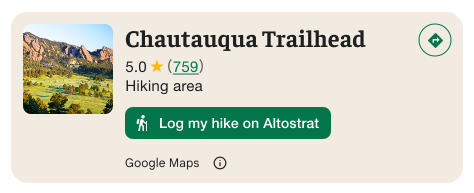
Important: You must make it clear to users when a custom action button will share user information with a third party other than Google. See visual attribution requirements.
The example shows a custom image that makes it clear that user information will be sent to "Altostrat".
Apply search and filtering options
Use the .searchMediaOptions and .searchReviewOptions methods of AdvancedPlaceSearchView to enable search and filtering for media or reviews.
Advanced Place Search examples
Create an main action button and remove corner actions
This code sample creates a main action button to favorite or unfavorite a place. It also ensures that no corner actions are configured.
Swift
struct AdvancedPlaceSearchDemoView: View {
  private let configuration = AdvancedPlaceSearchConfiguration(
    content: [.address(), .rating(), .type()],
    preferTruncation: true, // default is false
    theme: PlacesMaterialTheme(),
    attributionPosition: .bottom, // default is top
    mediaSize = .medium, // default is .small
    selectable: true // default is false
  )
  // can also do let placeSearchViewRequest = .searchNearby(...) to  configure a searchNearby request
  @State private var placeSearchViewRequest = .searchByText(
    SearchByTextRequest(
      textQuery: "Googleplex",
      placeProperties: [.all],
      locationBias: CircularCoordinateRegion(
        center: CLLocationCoordinate2D(latitude: 0, longitude: 0),
        radius: 0
      )
    )
  )

  @State private var favoritePlaces: Set<String> = []

  var body: some View {
    AdvancedPlaceSearchView(
      orientation: .horizontal, // default is vertical
      request: placeSearchViewRequest,
      configuration: configuration
    )
    .onLoad { places in
      print("places: \(places)")
    }
    .onRequestError { error in
      print("error: \(error)")
    }
    .onPlaceSelected { place, index in
      print("place: \(place)")
      print("index: \(index)")
    }
    .mainActions { place in
      var actions: [MainPlaceActionElement] = []

      let placeID = place.placeID!
      if self.favoritePlaces.contains(placeID) {
        actions.append(
          .action(
            MainPlaceAction(
              image: Image(systemName: "heart.fill"),
              label: "Unfavorite"
            ) { _ in self.toggleFavorite(placeID) }
          )
        )
      } else {
        actions.append(
          .action(
            MainPlaceAction(
              image: Image(systemName: "heart"),
              label: "Favorite"
            ) { _ in self.toggleFavorite(placeID) }
          )
        )
      }
      actions.append(.actionId(.openMap(style: .primary)))
      return actions
    }
    // Ensures that there are no corner actions.
    .cornerActions { _ in
      return []
    }
  }

  func toggleFavorite(_ placeID: String) {
    if favoritePlaces.contains(placeID) {
      favoritePlaces.remove(placeID)
    } else {
      favoritePlaces.insert(placeID)
    }
  }
}
Filter reviews and media
This code sample filters search results to only show media and reviews that mention "coffee".
Swift
struct DemoView: View {
  static let peetsCoffeePlaceID = "ChIJT7FdmYiAhYAROFOvrIxRJDU"

  // Query for loading the place details component.
  @State var query: PlaceDetailsQuery = PlaceDetailsQuery(
    identifier: .placeID(peetsCoffeePlaceID)
  )
  let searchMediaOptions = SearchMediaOptions(query: "coffee", rankPreference: .newest)
  let searchReviewOptions = SearchReviewsOptions(query: "coffee", rankPreference: .newest)

  var body: some View {
    AdvancedPlaceDetailsView(
      query: $query,
      configuration: AdvancedPlaceDetailsConfiguration(
        content: [.media(), .reviews()],
        theme: PlacesMaterialTheme()
      ),
      placeDetailsCallback: { _ in }
    )
    .searchMediaOptions(searchMediaOptions) { results in
      guard let result = results.first else { return }
      switch result {
      case .success(let summary):
        print("Summary: \(summary)")
      case .failure(let error):
        print("Error: \(error)")
      }
    }
    .searchReviewsOptions(searchReviewsOptions) { results in
      guard let result = results.first else { return }
      switch result {
      case .success(let summary):
        print("Summary: \(summary)")
      case .failure(let error):
        print("Error: \(error)")
      }
    }
  }