
Advanced Place Details component
The Advanced version of the Place Details component offers the same features as Places Details Essentials. It also lets you choose whether the Place name is displayed, configure the action buttons of the component, and apply search and filtering options to the reviews and media that are displayed.
Advanced Place Details configuration
Use AdvancedPlaceDetailsView or AdvancedPlaceDetailsCompactView to access advanced features.
Content display options
You can specify which content to display using the enums in AdvancedPlaceDetailsContent. You can configure all of the same content as Places Details Essentials, as well as choose whether the Place name is displayed.
Configure action buttons
Use the .cornerActions and .mainActions methods of AdvancedPlaceDetailsView or AdvancedPlaceDetailsCompactView to remove or customize the action buttons.
Visual attribution requirements
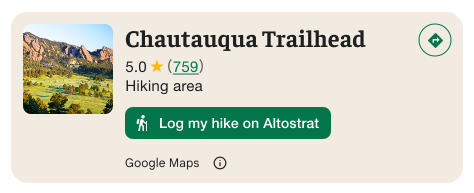
Important: You must make it clear to end-users when a custom action button will share user information with a third party other than Google. See visual attribution requirements.
The example at the right shows a custom image that makes it clear that user information will be sent to "Altostrat".
Apply search and filtering options
Use the .searchMediaOptions and .searchReviewOptions methods of AdvancedPlaceDetailsView or AdvancedPlaceDetailsCompactView to enable search and filtering for media or reviews.
Create custom content slots
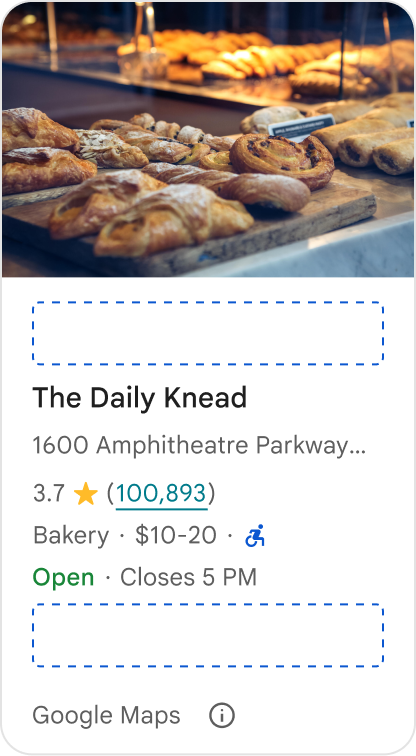
Custom content slots allow you to add your own content (such as AI-generated summaries, itinerary timestamps, or custom badges) directly into predefined layout zones.
To add custom content s, use the .placeDetailsCompactContentSlot method of AdvancedPlaceDetailsCompactView. The available positions are .basicSectionTop and .basicSectionBottom.
Attribution requirements and content suggestions for content slots
When a custom content slot is mounted, the disclosure automatically updates to clarify which content is provided by Google and that some content is provided by 3rd parties.
Do
Maintain a clear visual hierarchy between Google Place details and custom content to prevent any ambiguity about the source of the information.
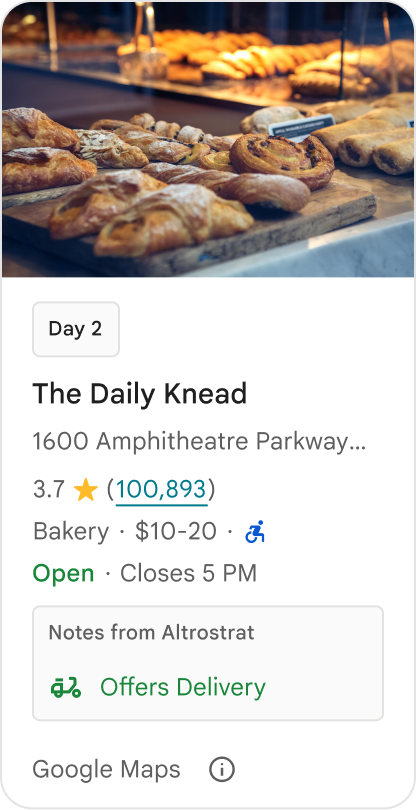
Do
Consider localized, high-value insights tailored to your users' immediate goals. Tailored content such as real-time booking windows or current availability helps users make faster, more informed decisions.
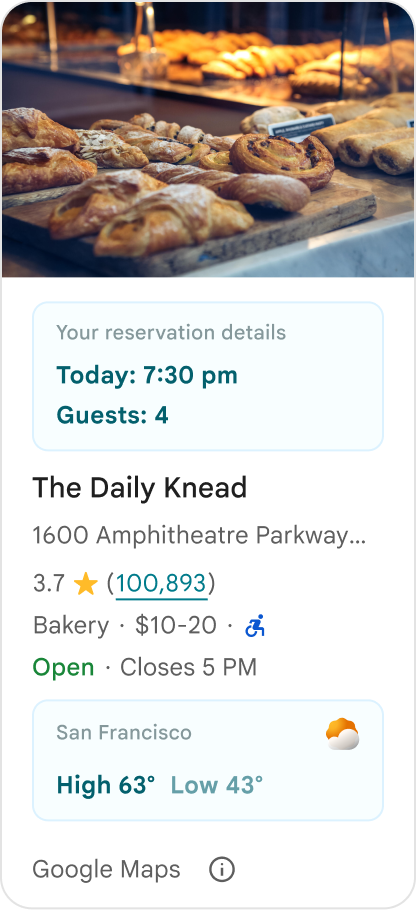
Don't
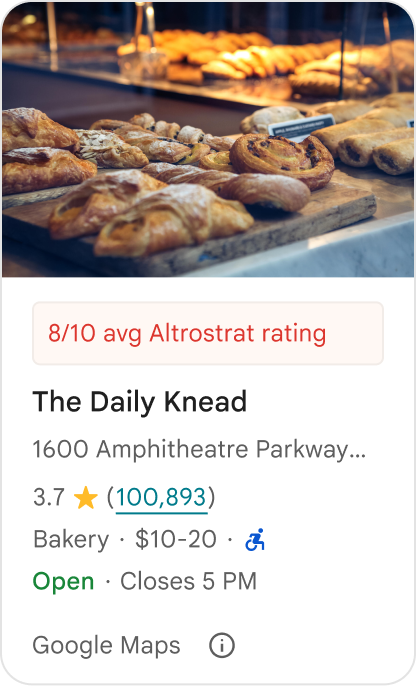
Don't duplicate existing Google Place details, such as ratings, reviews, or business hours, even if you have hidden the Google-provided content. Doing so can confuse users about the source of the content and whether it comes from Google or a third party.
Don't
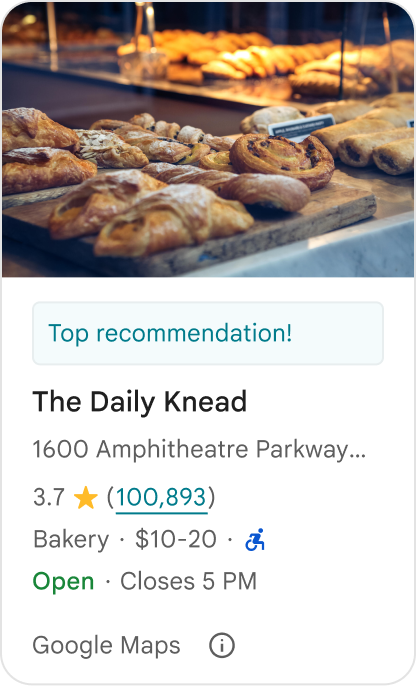
Don't display unattributed claims or badges (for example, "Top recommendation!") that could be mistaken for official Google endorsements. Custom content must explicitly attribute its source.
Don't
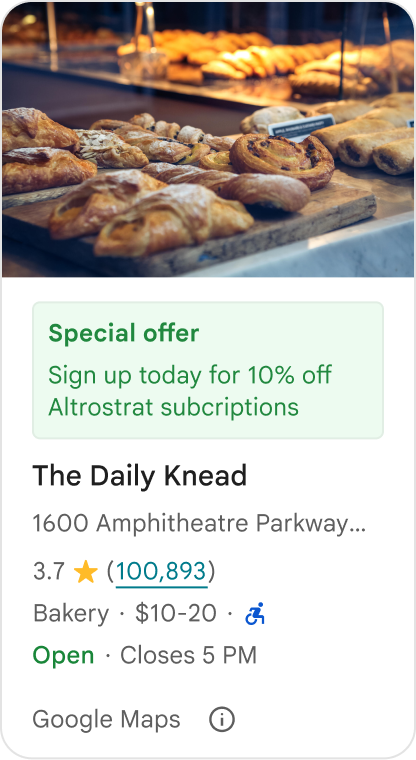
Don't include ads, marketing copy, promotional discounts, or subscription prompts within custom place containers.
Advanced Place Details examples
Omit the Place name
To omit the Place name, don't include.name in the content parameter of AdvancedPlaceDetailsConfiguration.
Swift
struct DemoView: View {
  static let peetsCoffeePlaceID = "ChIJT7FdmYiAhYAROFOvrIxRJDU"

  // Query for loading the place details component.
  @State var query: PlaceDetailsQuery = PlaceDetailsQuery(
    identifier: .placeID(peetsCoffeePlaceID)
  )
  @State private var favoritePlaces: Set<String> = []

  var body: some View {
    AdvancedPlaceDetailsView(
      query: $query,
      configuration: AdvancedPlaceDetailsConfiguration(
        content:[.address()],
        theme: PlacesMaterialTheme()
      ),
      placeDetailsCallback: { result in
        if let place = result.place {
          print("Place: \(place.description)")
        } else {
          print("Error: \(String(describing: result.error))")
        }
      }
    )
  }
}
Remove action buttons
Swift
struct DemoView: View {
  static let peetsCoffeePlaceID = "ChIJT7FdmYiAhYAROFOvrIxRJDU"

  @State var query: PlaceDetailsQuery = PlaceDetailsQuery(
    identifier: .placeID(peetsCoffeePlaceID)
  )

  var body: some View {
    AdvancedPlaceDetailsView(
      query: $query,
      configuration: AdvancedPlaceDetailsConfiguration(
        content: AdvancedPlaceDetailsView.allContent,
        theme: PlacesMaterialTheme()
      ),
      placeDetailsCallback: { result in
        if let place = result.place {
          print("Place: \(place.description)")
        } else {
          print("Error: \(String(describing: result.error))")
        }
      }
    )
    .mainActions{ _ in
      return []
    }
  }
}
Add custom and predefined actions
This sample adds an option for a user to favorite or unfavorite a place, along with the predefined Open in Maps action.
Swift
struct DemoView: View {
  static let peetsCoffeePlaceID = "ChIJT7FdmYiAhYAROFOvrIxRJDU"

  @State var query: PlaceDetailsQuery = PlaceDetailsQuery(
    identifier: .placeID(peetsCoffeePlaceID)
  )

  @State var favoritePlaces: Set<String> = []

  var body: some View {
    AdvancedPlaceDetailsView(
      query: $query,
      configuration: AdvancedPlaceDetailsConfiguration(
        content: AdvancedPlaceDetailsView.allContent,
        theme: PlacesMaterialTheme()
      ),
      placeDetailsCallback: { result in
        if let place = result.place {
          print("Place: \(place.description)")
        } else {
          print("Error: \(String(describing: result.error))")
        }
      }
    )
    .mainActions{ place in
      var actions: [MainPlaceActionElement] = []
      let placeID = place.placeID!
      if self.favoritePlaces.contains(placeID) {
        actions.append(
          .action(
            MainPlaceAction(
              image: Image(systemName: "heart.fill"),
              label: "Unfavorite"
            ) { _ in self.toggleFavorite(placeID) }
          )
        )
      } else {
        actions.append(
          .action(
            MainPlaceAction(
              image: Image(systemName: "heart"),
              label: "Favorite"
            ) { _ in self.toggleFavorite(placeID) }
          )
        )
      }
      actions.append(.actionId(.openMap(style: .primary)))
      return actions
    }
    .cornerActions { place in
      var actions: [CornerPlaceActionElement] = []
      let placeID = place.placeID!
      if self.favoritePlaces.contains(placeID) {
        actions.append(
          .action(
            CornerPlaceAction(
              image: Image(systemName: "heart.fill"),
              accessibilityLabel: "Unfavorite",
            ) { _ in self.toggleFavorite(placeID) }
          )
        )
      } else {
        actions.append(
          .action(
            CornerPlaceAction(
              image: Image(systemName: "heart"),
              accessibilityLabel: "Favorite",
            ) { _ in self.toggleFavorite(placeID) }
          )
        )
      }
      actions.append(.actionId(.openMap(style: .primary)))
      return actions
    }
  }

  func toggleFavorite(_ placeID: String) {
    if favoritePlaces.contains(placeID) {
      favoritePlaces.remove(placeID)
    } else {
      favoritePlaces.insert(placeID)
    }
  }
}
Filter reviews and media
This code sample shows only media and reviews that mention "coffee".
Swift
struct DemoView: View {
  static let peetsCoffeePlaceID = "ChIJT7FdmYiAhYAROFOvrIxRJDU"

  @State var query: PlaceDetailsQuery = PlaceDetailsQuery(
    identifier: .placeID(peetsCoffeePlaceID)
  )
  let searchMediaOptions = SearchMediaOptions(query: "coffee")
  let searchReviewsOptions = SearchReviewsOptions(query: "coffee")

  var body: some View {
    AdvancedPlaceDetailsView(
      query: $query,
      configuration: AdvancedPlaceDetailsConfiguration(
        content: [.media(), .reviews()],
        theme: PlacesMaterialTheme()
      ),
      placeDetailsCallback: { _ in }
    )
    .searchMediaOptions(searchMediaOptions) { results in
      guard let result = results.first else { return }
      switch result {
      case .success(let summary):
        print("Summary: \(summary)")
      case .failure(let error):
        print("Error: \(error)")
      }
    }
    .searchReviewsOptions(searchReviewsOptions) { results in
      guard let result = results.first else { return }
      switch result {
      case .success(let summary):
        print("Summary: \(summary)")
      case .failure(let error):
        print("Error: \(error)")
      }
    }
  }
}
Create content slots
This sample adds content to the basicSectionTop and basicSectionBottom slots.
Swift
import SwiftUI
import PlacesSwift

struct ItineraryCard: View {
    static let peetsCoffeePlaceID = "ChIJT7FdmYiAhYAROFOvrIxRJDU"

    @State var query: PlaceDetailsQuery = PlaceDetailsQuery(
      identifier: .placeID(peetsCoffeePlaceID)
    )

    var body: some View {
      AdvancedPlaceDetailsCompactView(
        orientation: .vertical,
        query: $query,
        configuration: AdvancedPlaceDetailsCompactConfiguration(
          content: AdvancedPlaceDetailsCompactView.allContent,
          theme: PlacesMaterialTheme()
        ),
        placeDetailsCallback: { _ in }
      )
      .placeDetailsCompactContentSlot(position: .basicSectionTop) { place in
        Text("Day 2 • 2:30 PM")
          .font(.caption)
          .fontWeight(.bold)
          .foregroundColor(.accentColor)
      }
      .placeDetailsCompactContentSlot(position: .basicSectionBottom) { place in
        VStack(alignment: .leading, spacing: 4) {
          Text("AI Notes")
            .font(.caption)
            .bold()
          Text("Great quiet atmosphere for morning meetings. Famous for house-roasted pour-overs.")
            .font(.footnote)
            .foregroundColor(.secondary)
        }
        .padding(8)
        .background(Color(.systemGray6))
        .cornerRadius(8)
      }
    }
}