

বর্তমান জায়গা বেছে নিন এবং ম্যাপে বিবরণ দেখুন
এই টিউটোরিয়াল থেকে আপনি জানতে পারবেন কীভাবে এমন একটি iOS অ্যাপ তৈরি করতে হয় যা ডিভাইসের বর্তমান লোকেশন খুঁজে বের করে, সম্ভাব্য লোকেশন শনাক্ত করে, ব্যবহারকারীকে সবচেয়ে উপযুক্ত লোকেশন বেছে নিতে প্রম্পট করে এবং বেছে নেওয়া লোকেশনের জন্য ম্যাপ মার্কার দেখায়।
এটি তাদের জন্য উপযুক্ত যাদের Swift বা Objective-C সম্পর্কে প্রাথমিক বা মধ্যবর্তী জ্ঞান এবং Xcode সম্পর্কে সাধারণ জ্ঞান রয়েছে। ম্যাপ তৈরি করার জন্য উন্নত নির্দেশিকা পেতে, ডেভেলপারদের নির্দেশিকা পড়ুন।
এই টিউটোরিয়াল ব্যবহার করে আপনি নিম্নলিখিত ম্যাপ তৈরি করবেন। ম্যাপ মার্কারটি ক্যালিফোর্নিয়ার সান ফ্রান্সিসকোতে অবস্থিত, তবে ডিভাইস বা সিমুলেটর যেখানেই থাকুক না কেন সেখানে চলে যাবে।
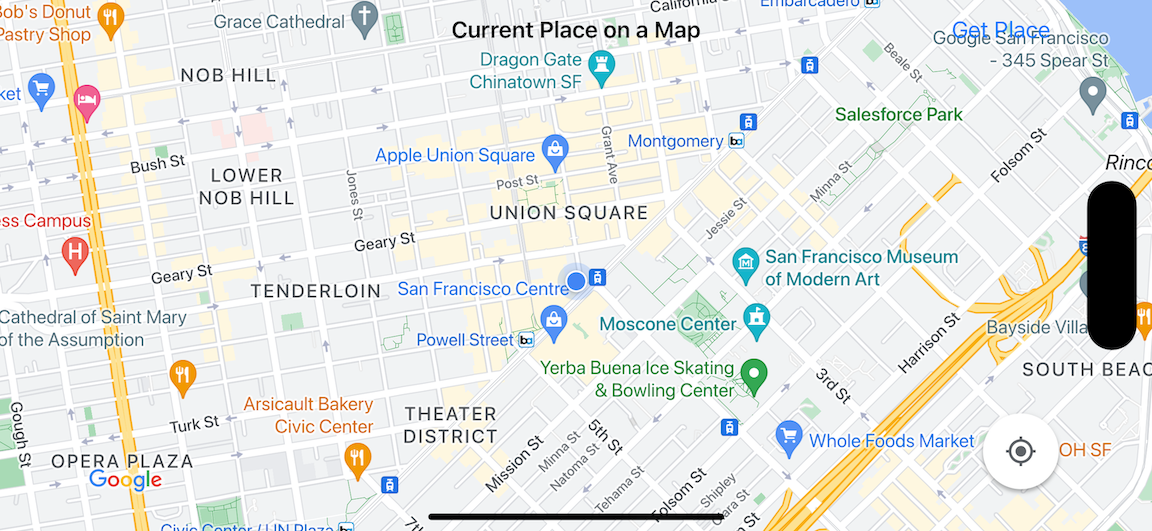
এই টিউটোরিয়াল iOS-এর জন্য Places SDK, iOS-এর জন্য Maps SDK এবং Apple Core লোকেশন ফ্রেমওয়ার্ক ব্যবহার করে।
কোড পান
GitHub থেকে Google Maps iOS স্যাম্পেল রিপোজিটরি ক্লোন বা ডাউনলোড করুন।অথবা, সোর্স কোড ডাউনলোড করতে নিম্নলিখিত বোতামে ক্লিক করুন:
MapViewController
Swift
import UIKit
import GoogleMaps
import GooglePlaces

class MapViewController: UIViewController {

  var locationManager: CLLocationManager!
  var currentLocation: CLLocation?
  var mapView: GMSMapView!
  var placesClient: GMSPlacesClient!
  var preciseLocationZoomLevel: Float = 15.0
  var approximateLocationZoomLevel: Float = 10.0

  // An array to hold the list of likely places.
  var likelyPlaces: [GMSPlace] = []

  // The currently selected place.
  var selectedPlace: GMSPlace?

  // Update the map once the user has made their selection.
  @IBAction func unwindToMain(segue: UIStoryboardSegue) {
    // Clear the map.
    mapView.clear()

    // Add a marker to the map.
    if let place = selectedPlace {
      let marker = GMSMarker(position: place.coordinate)
      marker.title = selectedPlace?.name
      marker.snippet = selectedPlace?.formattedAddress
      marker.map = mapView
    }

    listLikelyPlaces()
  }

  override func viewDidLoad() {
    super.viewDidLoad()

    // Initialize the location manager.
    locationManager = CLLocationManager()
    locationManager.desiredAccuracy = kCLLocationAccuracyBest
    locationManager.requestWhenInUseAuthorization()
    locationManager.distanceFilter = 50
    locationManager.startUpdatingLocation()
    locationManager.delegate = self

    placesClient = GMSPlacesClient.shared()

    // A default location to use when location permission is not granted.
    let defaultLocation = CLLocation(latitude: -33.869405, longitude: 151.199)

    // Create a map.
    let zoomLevel = locationManager.accuracyAuthorization == .fullAccuracy ? preciseLocationZoomLevel : approximateLocationZoomLevel
    let camera = GMSCameraPosition.camera(withLatitude: defaultLocation.coordinate.latitude,
                                          longitude: defaultLocation.coordinate.longitude,
                                          zoom: zoomLevel)
    let options = GMSMapViewOptions()
    options.camera = camera
    options.frame = view.bounds
    mapView = GMSMapView(options: options)
    mapView.settings.myLocationButton = true
    mapView.autoresizingMask = [.flexibleWidth, .flexibleHeight]
    mapView.isMyLocationEnabled = true

    // Add the map to the view, hide it until we've got a location update.
    view.addSubview(mapView)
    mapView.isHidden = true

    listLikelyPlaces()
  }

  // Populate the array with the list of likely places.
  func listLikelyPlaces() {
    // Clean up from previous sessions.
    likelyPlaces.removeAll()

    let placeFields: GMSPlaceField = [.name, .coordinate]
    placesClient.findPlaceLikelihoodsFromCurrentLocation(withPlaceFields: placeFields) { (placeLikelihoods, error) in
      guard error == nil else {
        // TODO: Handle the error.
        print("Current Place error: \(error!.localizedDescription)")
        return
      }

      guard let placeLikelihoods = placeLikelihoods else {
        print("No places found.")
        return
      }

      // Get likely places and add to the list.
      for likelihood in placeLikelihoods {
        let place = likelihood.place
        self.likelyPlaces.append(place)
      }
    }
  }

  // Prepare the segue.
  override func prepare(for segue: UIStoryboardSegue, sender: Any?) {
    if segue.identifier == "segueToSelect" {
      if let nextViewController = segue.destination as? PlacesViewController {
        nextViewController.likelyPlaces = likelyPlaces
      }
    }
  }
}

// Delegates to handle events for the location manager.
extension MapViewController: CLLocationManagerDelegate {

  // Handle incoming location events.
  func locationManager(_ manager: CLLocationManager, didUpdateLocations locations: [CLLocation]) {
    let location: CLLocation = locations.last!
    print("Location: \(location)")

    let zoomLevel = locationManager.accuracyAuthorization == .fullAccuracy ? preciseLocationZoomLevel : approximateLocationZoomLevel
    let camera = GMSCameraPosition.camera(withLatitude: location.coordinate.latitude,
                                          longitude: location.coordinate.longitude,
                                          zoom: zoomLevel)

    if mapView.isHidden {
      mapView.isHidden = false
      mapView.camera = camera
    } else {
      mapView.animate(to: camera)
    }

    listLikelyPlaces()
  }

  // Handle authorization for the location manager.
  func locationManager(_ manager: CLLocationManager, didChangeAuthorization status: CLAuthorizationStatus) {
    // Check accuracy authorization
    let accuracy = manager.accuracyAuthorization
    switch accuracy {
    case .fullAccuracy:
        print("Location accuracy is precise.")
    case .reducedAccuracy:
        print("Location accuracy is not precise.")
    @unknown default:
      fatalError()
    }

    // Handle authorization status
    switch status {
    case .restricted:
      print("Location access was restricted.")
    case .denied:
      print("User denied access to location.")
      // Display the map using the default location.
      mapView.isHidden = false
    case .notDetermined:
      print("Location status not determined.")
    case .authorizedAlways: fallthrough
    case .authorizedWhenInUse:
      print("Location status is OK.")
    @unknown default:
      fatalError()
    }
  }

  // Handle location manager errors.
  func locationManager(_ manager: CLLocationManager, didFailWithError error: Error) {
    locationManager.stopUpdatingLocation()
    print("Error: \(error)")
  }
}
Objective-C
#import "MapViewController.h"
#import "PlacesViewController.h"
@import CoreLocation;
@import GooglePlaces;
@import GoogleMaps;

@interface MapViewController () <CLLocationManagerDelegate>

@end

@implementation MapViewController {
  CLLocationManager *locationManager;
  CLLocation * _Nullable currentLocation;
  GMSMapView *mapView;
  GMSPlacesClient *placesClient;
  float preciseLocationZoomLevel;
  float approximateLocationZoomLevel;

  // An array to hold the list of likely places.
  NSMutableArray<GMSPlace *> *likelyPlaces;

  // The currently selected place.
  GMSPlace * _Nullable selectedPlace;
}

- (void)viewDidLoad {
  [super viewDidLoad];
  preciseLocationZoomLevel = 15.0;
  approximateLocationZoomLevel = 15.0;

  // Initialize the location manager.
  locationManager = [[CLLocationManager alloc] init];
  locationManager.desiredAccuracy = kCLLocationAccuracyBest;
  [locationManager requestWhenInUseAuthorization];
  locationManager.distanceFilter = 50;
  [locationManager startUpdatingLocation];
  locationManager.delegate = self;

  placesClient = [GMSPlacesClient sharedClient];

  // A default location to use when location permission is not granted.
  CLLocationCoordinate2D defaultLocation = CLLocationCoordinate2DMake(-33.869405, 151.199);

  // Create a map.
  float zoomLevel = locationManager.accuracyAuthorization == CLAccuracyAuthorizationFullAccuracy ? preciseLocationZoomLevel : approximateLocationZoomLevel;
  GMSCameraPosition *camera = [GMSCameraPosition cameraWithLatitude:defaultLocation.latitude
                                                          longitude:defaultLocation.longitude
                                                               zoom:zoomLevel];
  GMSMapViewOptions *options = [[GMSMapViewOptions alloc] init];
  options.camera = camera;
  options.frame = self.view.bounds;
  mapView = [[GMSMapView alloc] initWithOptions:options];
  mapView.settings.myLocationButton = YES;
  mapView.autoresizingMask = UIViewAutoresizingFlexibleWidth | UIViewAutoresizingFlexibleHeight;
  mapView.myLocationEnabled = YES;

  // Add the map to the view, hide it until we've got a location update.
  [self.view addSubview:mapView];
  mapView.hidden = YES;

  [self listLikelyPlaces];
}

// Populate the array with the list of likely places.
- (void) listLikelyPlaces
{
  // Clean up from previous sessions.
  likelyPlaces = [NSMutableArray array];

  GMSPlaceField placeFields = GMSPlaceFieldName | GMSPlaceFieldCoordinate;
  [placesClient findPlaceLikelihoodsFromCurrentLocationWithPlaceFields:placeFields callback:^(NSArray<GMSPlaceLikelihood *> * _Nullable likelihoods, NSError * _Nullable error) {
    if (error != nil) {
      // TODO: Handle the error.
      NSLog(@"Current Place error: %@", error.localizedDescription);
      return;
    }

    if (likelihoods == nil) {
      NSLog(@"No places found.");
      return;
    }

    for (GMSPlaceLikelihood *likelihood in likelihoods) {
      GMSPlace *place = likelihood.place;
      [likelyPlaces addObject:place];
    }
  }];
}

// Update the map once the user has made their selection.
- (void) unwindToMain:(UIStoryboardSegue *)segue
{
  // Clear the map.
  [mapView clear];

  // Add a marker to the map.
  if (selectedPlace != nil) {
    GMSMarker *marker = [GMSMarker markerWithPosition:selectedPlace.coordinate];
    marker.title = selectedPlace.name;
    marker.snippet = selectedPlace.formattedAddress;
    marker.map = mapView;
  }

  [self listLikelyPlaces];
}

// Prepare the segue.
- (void)prepareForSegue:(UIStoryboardSegue *)segue sender:(id)sender
{
  if ([segue.identifier isEqualToString:@"segueToSelect"]) {
    if ([segue.destinationViewController isKindOfClass:[PlacesViewController class]]) {
      PlacesViewController *placesViewController = (PlacesViewController *)segue.destinationViewController;
      placesViewController.likelyPlaces = likelyPlaces;
    }
  }
}

// Delegates to handle events for the location manager.
#pragma mark - CLLocationManagerDelegate

// Handle incoming location events.
- (void)locationManager:(CLLocationManager *)manager didUpdateLocations:(NSArray<CLLocation *> *)locations
{
  CLLocation *location = locations.lastObject;
  NSLog(@"Location: %@", location);

  float zoomLevel = locationManager.accuracyAuthorization == CLAccuracyAuthorizationFullAccuracy ? preciseLocationZoomLevel : approximateLocationZoomLevel;
  GMSCameraPosition * camera = [GMSCameraPosition cameraWithLatitude:location.coordinate.latitude
                                                           longitude:location.coordinate.longitude
                                                                zoom:zoomLevel];

  if (mapView.isHidden) {
    mapView.hidden = NO;
    mapView.camera = camera;
  } else {
    [mapView animateToCameraPosition:camera];
  }

  [self listLikelyPlaces];
}

// Handle authorization for the location manager.
- (void)locationManager:(CLLocationManager *)manager didChangeAuthorizationStatus:(CLAuthorizationStatus)status
{
  // Check accuracy authorization
  CLAccuracyAuthorization accuracy = manager.accuracyAuthorization;
  switch (accuracy) {
    case CLAccuracyAuthorizationFullAccuracy:
      NSLog(@"Location accuracy is precise.");
      break;
    case CLAccuracyAuthorizationReducedAccuracy:
      NSLog(@"Location accuracy is not precise.");
      break;
  }

  // Handle authorization status
  switch (status) {
    case kCLAuthorizationStatusRestricted:
      NSLog(@"Location access was restricted.");
      break;
    case kCLAuthorizationStatusDenied:
      NSLog(@"User denied access to location.");
      // Display the map using the default location.
      mapView.hidden = NO;
    case kCLAuthorizationStatusNotDetermined:
      NSLog(@"Location status not determined.");
    case kCLAuthorizationStatusAuthorizedAlways:
    case kCLAuthorizationStatusAuthorizedWhenInUse:
      NSLog(@"Location status is OK.");
  }
}

// Handle location manager errors.
- (void)locationManager:(CLLocationManager *)manager didFailWithError:(NSError *)error
{
  [manager stopUpdatingLocation];
  NSLog(@"Error: %@", error.localizedDescription);
}

@end
PlacesViewController
Swift
import UIKit
import GooglePlaces

class PlacesViewController: UIViewController {

  // ...

  // Pass the selected place to the new view controller.
  override func prepare(for segue: UIStoryboardSegue, sender: Any?) {
    if segue.identifier == "unwindToMain" {
      if let nextViewController = segue.destination as? MapViewController {
        nextViewController.selectedPlace = selectedPlace
      }
    }
  }
}

// Respond when a user selects a place.
extension PlacesViewController: UITableViewDelegate {
  func tableView(_ tableView: UITableView, didSelectRowAt indexPath: IndexPath) {
    selectedPlace = likelyPlaces[indexPath.row]
    performSegue(withIdentifier: "unwindToMain", sender: self)
  }

  // Adjust cell height to only show the first five items in the table
  // (scrolling is disabled in IB).
  func tableView(_ tableView: UITableView, heightForRowAt indexPath: IndexPath) -> CGFloat {
    return self.tableView.frame.size.height/5
  }

  // Make table rows display at proper height if there are less than 5 items.
  func tableView(_ tableView: UITableView, heightForFooterInSection section: Int) -> CGFloat {
    if (section == tableView.numberOfSections - 1) {
      return 1
    }
    return 0
  }
}

// Populate the table with the list of most likely places.
extension PlacesViewController: UITableViewDataSource {
  func tableView(_ tableView: UITableView, numberOfRowsInSection section: Int) -> Int {
    return likelyPlaces.count
  }

  func tableView(_ tableView: UITableView, cellForRowAt indexPath: IndexPath) -> UITableViewCell {
    let cell = tableView.dequeueReusableCell(withIdentifier: cellReuseIdentifier, for: indexPath)
    let collectionItem = likelyPlaces[indexPath.row]

    cell.textLabel?.text = collectionItem.name

    return cell
  }
}
Objective-C
#import "PlacesViewController.h"

@interface PlacesViewController () <UITableViewDataSource, UITableViewDelegate>
// ...

-(void)prepareForSegue:(UIStoryboardSegue *)segue sender:(id)sender
{

}

#pragma mark - UITableViewDelegate

// Respond when a user selects a place.
-(void)tableView:(UITableView *)tableView didSelectRowAtIndexPath:(NSIndexPath *)indexPath
{
  self.selectedPlace = [self.likelyPlaces objectAtIndex:indexPath.row];
  [self performSegueWithIdentifier:@"unwindToMain" sender:self];
}

// Adjust cell height to only show the first five items in the table
// (scrolling is disabled in IB).
-(CGFloat)tableView:(UITableView *)tableView heightForRowAtIndexPath:(NSIndexPath *)indexPath
{
  return self.tableView.frame.size.height/5;
}

// Make table rows display at proper height if there are less than 5 items.
-(CGFloat)tableView:(UITableView *)tableView heightForFooterInSection:(NSInteger)section
{
  if (section == tableView.numberOfSections - 1) {
    return 1;
  }
  return 0;
}

#pragma mark - UITableViewDataSource

- (NSInteger)tableView:(UITableView *)tableView numberOfRowsInSection:(NSInteger)section
{
  return self.likelyPlaces.count;
}

- (UITableViewCell *)tableView:(UITableView *)tableView cellForRowAtIndexPath:(NSIndexPath *)indexPath
{
  return [tableView dequeueReusableCellWithIdentifier:cellReuseIdentifier forIndexPath:indexPath];
}
@end
শুরু করুন
Swift প্যাকেজ ম্যানেজার
iOS-এর জন্য Maps SDK, Swift প্যাকেজ ম্যানেজার ব্যবহার করে ইনস্টল করা যেতে পারে।
- iOS-এর জন্য Maps SDK-এর আগে থেকে থাকা যেকোনও ডিপেন্ডেন্সি সরিয়ে দিন।
- টার্মিনাল উইন্ডো খুলে
tutorials/current-place-on-mapডিরেক্টরিতে যান। -
আপনার Xcode ওয়ার্কস্পেস বন্ধ করে নিম্নলিখিত কমান্ড রান করুন:
        sudo gem install cocoapods-deintegrate cocoapods-clean
        pod deintegrate
        pod cache clean --all
        rm Podfile
        rm current-place-on-map.xcworkspace
- আপনার Xcode প্রোজেক্ট খুলে podfile মুছে দিন।
- Places এবং Maps SDK যোগ করুন:
- File > Add Package Dependencies বিকল্পে যান।
- URL হিসেবে https://github.com/googlemaps/ios-places-sdk লিখুন, প্যাকেজটি পুল করতে Enter প্রেস করুন এবং প্যাকেজ যোগ করুন বিকল্পে ক্লিক করুন।
- URL হিসেবে https://github.com/googlemaps/ios-maps-sdk লিখুন, প্যাকেজটি পুল করতে Enter প্রেস করুন এবং প্যাকেজ যোগ করুন বিকল্পে ক্লিক করুন।
- আপনাকে হয়ত ফাইল > প্যাকেজ > প্যাকেজ ক্যাশে রিসেট করুন বিকল্প ব্যবহার করে প্যাকেজ ক্যাশে রিসেট করতে হবে।
API key পান এবং প্রয়োজনীয় API চালু করুন
এই টিউটোরিয়াল সম্পূর্ণ করতে, আপনার একটি Google API কী প্রয়োজন যা iOS-এর জন্য Maps SDK এবং Places API ব্যবহার করার জন্য অনুমোদিত।
- বিলিং অ্যাকাউন্ট এবং এই দুটি প্রোডাক্টের সাথে কাজ করে এমন প্রোজেক্ট সেট-আপ করতে Google Maps Platform-এর সাথে শুরু করুন-এ দেওয়া নির্দেশাবলী অনুসরণ করুন।
- আগে সেট-আপ করা ডেভেলপমেন্ট প্রোজেক্টের জন্য API key তৈরি করতে, API key পান বিকল্পে দেওয়া নির্দেশাবলী অনুসরণ করুন।
আপনার অ্যাপ্লিকেশনে API key যোগ করুন
আপনার AppDelegate.swift-এ API key যোগ করতে এই ধাপগুলি অনুসরণ করুন:
- মনে রাখবেন যে নিম্নলিখিত ইম্পোর্ট স্টেটমেন্ট ফাইলে যোগ করা হয়েছে:
import GooglePlaces
import GoogleMaps
- আপনার
application(_:didFinishLaunchingWithOptions:)মেথডে নিম্নলিখিত লাইনটি এডিট করুন, YOUR_API_KEY-এর জায়গায় আপনার API কী লিখুন:GMSPlacesClient.provideAPIKey("YOUR_API_KEY") GMSServices.provideAPIKey("YOUR_API_KEY")
আপনার অ্যাপ তৈরি ও রান করুন
- আপনার কম্পিউটারে iOS ডিভাইস কানেক্ট করুন অথবা Xcode স্কিম মেনু থেকে একটি সিমুলেটর বেছে নিন।
- আপনি কোনও ডিভাইস ব্যবহার করলে, লোকেশন পরিষেবা চালু আছে কিনা তা নিশ্চিত করুন। আপনি সিমুলেটর ব্যবহার করলে, ফিচার মেনু থেকে লোকেশন বেছে নিন।
- Xcode-এ, প্রোডাক্ট/রান মেনু বিকল্পে (বা প্লে বোতাম আইকন) ক্লিক করুন।
- Xcode অ্যাপটি তৈরি করে এবং তারপরে ডিভাইসে বা সিমুলেটরে অ্যাপটি রান করে।
- আপনার বর্তমান লোকেশনের চারপাশে বেশ কিছু মার্কার সহ একটি ম্যাপ দেখতে পাবেন।
সমস্যার সমাধান:
- আপনি ম্যাপ দেখতে না পেলে, API কী পেয়েছেন কিনা এবং সেটি অ্যাপে যোগ করেছেন কিনা তা চেক করুন, উপরে যেমন বর্ণনা করা হয়েছে। API key সম্পর্কে সমস্যার মেসেজ দেখতে Xcode-এর ডিবাগিং কনসোল চেক করুন।
- আপনি iOS বান্ডিল শনাক্তকারী দিয়ে API কী সীমাবদ্ধ করে থাকলে, অ্যাপের জন্য বান্ডিল শনাক্তকারী যোগ করতে কী এডিট করুন:
com.google.examples.current-place-on-map. - লোকেশন পরিষেবার জন্য অনুমতির অনুরোধ প্রত্যাখ্যান করা হলে ম্যাপ সঠিকভাবে
দেখানো হবে না।
- আপনি কোনও ডিভাইস ব্যবহার করলে, সেটিংস/সাধারণ/গোপনীয়তা/লোকেশন পরিষেবা বিকল্পে যান এবং লোকেশন পরিষেবা আবার চালু করুন।
- আপনি সিমুলেটর ব্যবহার করলে, সিমুলেটর/কন্টেন্ট ও সেটিংস রিসেট করুন... বিকল্পে যান
- আপনার ওয়াই-ফাই বা জিপিএস কানেকশন ভালো আছে কিনা তা নিশ্চিত করুন।
- অ্যাপ চালু হলেও ম্যাপ দেখা না গেলে, আপনার প্রোজেক্টের জন্য উপযুক্ত লোকেশন সংক্রান্ত অনুমতি সহ Info.plist আপডেট করেছেন কিনা তা নিশ্চিত করুন। অনুমতি ম্যানেজ করার ব্যাপারে আরও তথ্যের জন্য, নিচে দেওয়া আপনার অ্যাপে লোকেশন সংক্রান্ত অনুমতি অনুরোধ করা গাইড দেখুন।
- লগ দেখতে ও অ্যাপ ডিবাগ করতে Xcode ডিবাগিং টুল ব্যবহার করুন।
কোডটি বুঝুন
টিউটোরিয়ালের এই অংশে current-place-on-map অ্যাপের সবচেয়ে গুরুত্বপূর্ণ অংশগুলি ব্যাখ্যা করা হয়েছে, যাতে আপনি বুঝতে পারেন যে কীভাবে একই ধরনের অ্যাপ তৈরি করতে হয়।
current-place-on-map অ্যাপে দুটি ভিউ কন্ট্রোলার আছে:
একটি ব্যবহারকারীর বেছে নেওয়া জায়গা ম্যাপে দেখায় এবং অন্যটি
ব্যবহারকারীকে বেছে নেওয়ার জন্য সম্ভাব্য জায়গার তালিকা দেখায়। মনে রাখবেন যে
প্রতিটি ভিউ কন্ট্রোলারের কাছে সম্ভাব্য জায়গার তালিকা (likelyPlaces) ট্র্যাক করার জন্য এবং ব্যবহারকারীর
বাছাই (selectedPlace) দেখানোর জন্য একই ভেরিয়েবল থাকে। segues ব্যবহার করে
ভিউয়ের মধ্যে নেভিগেশন সম্পূর্ণ করা হয়।
লোকেশন অ্যাক্সেস করার অনুমতি চাওয়া হচ্ছে
লোকেশন পরিষেবা ব্যবহার করার জন্য আপনার অ্যাপকে অবশ্যই ব্যবহারকারীর কাছে সম্মতি চাইতে হবে। এটি করতে,
অ্যাপের জন্য Info.plist ফাইলে NSLocationAlwaysUsageDescription কী অন্তর্ভুক্ত করুন এবং প্রতিটি কী-এর ভ্যালু এমন একটি
স্ট্রিংয়ে সেট করুন যা বর্ণনা করে যে অ্যাপটি কীভাবে লোকেশন ডেটা ব্যবহার করতে চায়।
লোকেশন ম্যানেজার সেট-আপ করা
ডিভাইসের বর্তমান লোকেশন খুঁজে পেতে এবং ডিভাইস নতুন লোকেশনে গেলে নিয়মিত আপডেট পাওয়ার অনুরোধ করতে CLLocationManager ব্যবহার করুন। এই টিউটোরিয়ালে ডিভাইসের লোকেশন পাওয়ার জন্য প্রয়োজনীয় কোড দেওয়া আছে। আরও তথ্যের জন্য, Apple ডেভেলপার ডকুমেন্টেশনে ব্যবহারকারীর লোকেশন পাওয়া সংক্রান্ত নির্দেশিকা দেখুন।
- ক্লাস লেভেলে লোকেশন ম্যানেজার, বর্তমান লোকেশন, ম্যাপ ভিউ, প্লেস ক্লায়েন্ট এবং ডিফল্ট জুম লেভেল ঘোষণা করুন।
viewDidLoad()-এ লোকেশন ম্যানেজার ওGMSPlacesClientশুরু করুন।- সম্ভাব্য জায়গার তালিকা ও ব্যবহারকারীর বেছে নেওয়া জায়গা ধরে রাখার জন্য ভেরিয়েবল ঘোষণা করুন।
- এক্সটেনশন ক্লজ ব্যবহার করে লোকেশন ম্যানেজারের জন্য ইভেন্ট ম্যানেজ করতে ডেলিগেট যোগ করুন।
Swift
var locationManager: CLLocationManager!
var currentLocation: CLLocation?
var mapView: GMSMapView!
var placesClient: GMSPlacesClient!
var preciseLocationZoomLevel: Float = 15.0
var approximateLocationZoomLevel: Float = 10.0
Objective-C
CLLocationManager *locationManager;
CLLocation * _Nullable currentLocation;
GMSMapView *mapView;
GMSPlacesClient *placesClient;
float preciseLocationZoomLevel;
float approximateLocationZoomLevel;
Swift
// Initialize the location manager.
locationManager = CLLocationManager()
locationManager.desiredAccuracy = kCLLocationAccuracyBest
locationManager.requestWhenInUseAuthorization()
locationManager.distanceFilter = 50
locationManager.startUpdatingLocation()
locationManager.delegate = self

placesClient = GMSPlacesClient.shared()
Objective-C
// Initialize the location manager.
locationManager = [[CLLocationManager alloc] init];
locationManager.desiredAccuracy = kCLLocationAccuracyBest;
[locationManager requestWhenInUseAuthorization];
locationManager.distanceFilter = 50;
[locationManager startUpdatingLocation];
locationManager.delegate = self;

placesClient = [GMSPlacesClient sharedClient];
Swift
// An array to hold the list of likely places.
var likelyPlaces: [GMSPlace] = []

// The currently selected place.
var selectedPlace: GMSPlace?
Objective-C
// An array to hold the list of likely places.
NSMutableArray<GMSPlace *> *likelyPlaces;

// The currently selected place.
GMSPlace * _Nullable selectedPlace;
Swift
// Delegates to handle events for the location manager.
extension MapViewController: CLLocationManagerDelegate {

  // Handle incoming location events.
  func locationManager(_ manager: CLLocationManager, didUpdateLocations locations: [CLLocation]) {
    let location: CLLocation = locations.last!
    print("Location: \(location)")

    let zoomLevel = locationManager.accuracyAuthorization == .fullAccuracy ? preciseLocationZoomLevel : approximateLocationZoomLevel
    let camera = GMSCameraPosition.camera(withLatitude: location.coordinate.latitude,
                                          longitude: location.coordinate.longitude,
                                          zoom: zoomLevel)

    if mapView.isHidden {
      mapView.isHidden = false
      mapView.camera = camera
    } else {
      mapView.animate(to: camera)
    }

    listLikelyPlaces()
  }

  // Handle authorization for the location manager.
  func locationManager(_ manager: CLLocationManager, didChangeAuthorization status: CLAuthorizationStatus) {
    // Check accuracy authorization
    let accuracy = manager.accuracyAuthorization
    switch accuracy {
    case .fullAccuracy:
        print("Location accuracy is precise.")
    case .reducedAccuracy:
        print("Location accuracy is not precise.")
    @unknown default:
      fatalError()
    }

    // Handle authorization status
    switch status {
    case .restricted:
      print("Location access was restricted.")
    case .denied:
      print("User denied access to location.")
      // Display the map using the default location.
      mapView.isHidden = false
    case .notDetermined:
      print("Location status not determined.")
    case .authorizedAlways: fallthrough
    case .authorizedWhenInUse:
      print("Location status is OK.")
    @unknown default:
      fatalError()
    }
  }

  // Handle location manager errors.
  func locationManager(_ manager: CLLocationManager, didFailWithError error: Error) {
    locationManager.stopUpdatingLocation()
    print("Error: \(error)")
  }
}
Objective-C
// Delegates to handle events for the location manager.
#pragma mark - CLLocationManagerDelegate

// Handle incoming location events.
- (void)locationManager:(CLLocationManager *)manager didUpdateLocations:(NSArray<CLLocation *> *)locations
{
  CLLocation *location = locations.lastObject;
  NSLog(@"Location: %@", location);

  float zoomLevel = locationManager.accuracyAuthorization == CLAccuracyAuthorizationFullAccuracy ? preciseLocationZoomLevel : approximateLocationZoomLevel;
  GMSCameraPosition * camera = [GMSCameraPosition cameraWithLatitude:location.coordinate.latitude
                                                           longitude:location.coordinate.longitude
                                                                zoom:zoomLevel];

  if (mapView.isHidden) {
    mapView.hidden = NO;
    mapView.camera = camera;
  } else {
    [mapView animateToCameraPosition:camera];
  }

  [self listLikelyPlaces];
}

// Handle authorization for the location manager.
- (void)locationManager:(CLLocationManager *)manager didChangeAuthorizationStatus:(CLAuthorizationStatus)status
{
  // Check accuracy authorization
  CLAccuracyAuthorization accuracy = manager.accuracyAuthorization;
  switch (accuracy) {
    case CLAccuracyAuthorizationFullAccuracy:
      NSLog(@"Location accuracy is precise.");
      break;
    case CLAccuracyAuthorizationReducedAccuracy:
      NSLog(@"Location accuracy is not precise.");
      break;
  }

  // Handle authorization status
  switch (status) {
    case kCLAuthorizationStatusRestricted:
      NSLog(@"Location access was restricted.");
      break;
    case kCLAuthorizationStatusDenied:
      NSLog(@"User denied access to location.");
      // Display the map using the default location.
      mapView.hidden = NO;
    case kCLAuthorizationStatusNotDetermined:
      NSLog(@"Location status not determined.");
    case kCLAuthorizationStatusAuthorizedAlways:
    case kCLAuthorizationStatusAuthorizedWhenInUse:
      NSLog(@"Location status is OK.");
  }
}

// Handle location manager errors.
- (void)locationManager:(CLLocationManager *)manager didFailWithError:(NSError *)error
{
  [manager stopUpdatingLocation];
  NSLog(@"Error: %@", error.localizedDescription);
}
ম্যাপ যোগ করা হচ্ছে
ম্যাপ তৈরি করুন এবং মূল ভিউ কন্ট্রোলারে viewDidLoad()-এর ভিউতে এটি যোগ করুন। লোকেশন আপডেট না পাওয়া পর্যন্ত ম্যাপ লুকানো থাকে
(লোকেশন আপডেট CLLocationManagerDelegate
এক্সটেনশনে ম্যানেজ করা হয়)।
Swift
// A default location to use when location permission is not granted.
let defaultLocation = CLLocation(latitude: -33.869405, longitude: 151.199)

// Create a map.
let zoomLevel = locationManager.accuracyAuthorization == .fullAccuracy ? preciseLocationZoomLevel : approximateLocationZoomLevel
let camera = GMSCameraPosition.camera(withLatitude: defaultLocation.coordinate.latitude,
                                      longitude: defaultLocation.coordinate.longitude,
                                      zoom: zoomLevel)
let options = GMSMapViewOptions()
options.camera = camera
options.frame = view.bounds
mapView = GMSMapView(options: options)
mapView.settings.myLocationButton = true
mapView.autoresizingMask = [.flexibleWidth, .flexibleHeight]
mapView.isMyLocationEnabled = true

// Add the map to the view, hide it until we've got a location update.
view.addSubview(mapView)
mapView.isHidden = true
Objective-C
// A default location to use when location permission is not granted.
CLLocationCoordinate2D defaultLocation = CLLocationCoordinate2DMake(-33.869405, 151.199);

// Create a map.
float zoomLevel = locationManager.accuracyAuthorization == CLAccuracyAuthorizationFullAccuracy ? preciseLocationZoomLevel : approximateLocationZoomLevel;
GMSCameraPosition *camera = [GMSCameraPosition cameraWithLatitude:defaultLocation.latitude
                                                        longitude:defaultLocation.longitude
                                                             zoom:zoomLevel];
GMSMapViewOptions *options = [[GMSMapViewOptions alloc] init];
options.camera = camera;
options.frame = self.view.bounds;
mapView = [[GMSMapView alloc] initWithOptions:options];
mapView.settings.myLocationButton = YES;
mapView.autoresizingMask = UIViewAutoresizingFlexibleWidth | UIViewAutoresizingFlexibleHeight;
mapView.myLocationEnabled = YES;

// Add the map to the view, hide it until we've got a location update.
[self.view addSubview:mapView];
mapView.hidden = YES;
ব্যবহারকারীকে তার বর্তমান জায়গা বেছে নিতে প্রম্পট করা হচ্ছে
ব্যবহারকারীর বর্তমান লোকেশনের ভিত্তিতে সেরা পাঁচটি সম্ভাব্য জায়গা পেতে iOS-এর জন্য Places SDK ব্যবহার করুন এবং তালিকাটি
UITableView-এ দেখান। ব্যবহারকারী কোনও জায়গা বেছে নিলে, ম্যাপে
একটি মার্কার যোগ করুন।
UITableView-এ দেখানোর জন্য সম্ভাব্য জায়গার তালিকা পান, যেখান থেকে ব্যবহারকারী তার লোকেশন বেছে নিতে পারবেন।- ব্যবহারকারীকে সম্ভাব্য জায়গাগুলি দেখানোর জন্য একটি নতুন ভিউ খুলুন। "জায়গা পান" বিকল্পে ব্যবহারকারী ট্যাপ করলে, আমরা নতুন ভিউতে চলে যাই এবং ব্যবহারকারীকে বেছে নেওয়ার জন্য সম্ভাব্য জায়গার তালিকা দেখাই।
prepareফাংশনটি বর্তমান সম্ভাব্য স্থানের তালিকা সহPlacesViewControllerআপডেট করে, এবং একটি সেগুয়ে পারফর্ম করা হলে অটোমেটিক কল করা হয়। PlacesViewController-এ,UITableViewDataSourceডেলিগেট এক্সটেনশন ব্যবহার করে, সবচেয়ে সম্ভাব্য জায়গার তালিকা ব্যবহার করে টেবিলটি পূরণ করো।UITableViewDelegateপ্রতিনিধি এক্সটেনশন ব্যবহার করে ব্যবহারকারীর পছন্দ ম্যানেজ করুন।
Swift
// Populate the array with the list of likely places.
func listLikelyPlaces() {
  // Clean up from previous sessions.
  likelyPlaces.removeAll()

  let placeFields: GMSPlaceField = [.name, .coordinate]
  placesClient.findPlaceLikelihoodsFromCurrentLocation(withPlaceFields: placeFields) { (placeLikelihoods, error) in
    guard error == nil else {
      // TODO: Handle the error.
      print("Current Place error: \(error!.localizedDescription)")
      return
    }

    guard let placeLikelihoods = placeLikelihoods else {
      print("No places found.")
      return
    }

    // Get likely places and add to the list.
    for likelihood in placeLikelihoods {
      let place = likelihood.place
      self.likelyPlaces.append(place)
    }
  }
}
Objective-C
// Populate the array with the list of likely places.
- (void) listLikelyPlaces
{
  // Clean up from previous sessions.
  likelyPlaces = [NSMutableArray array];

  GMSPlaceField placeFields = GMSPlaceFieldName | GMSPlaceFieldCoordinate;
  [placesClient findPlaceLikelihoodsFromCurrentLocationWithPlaceFields:placeFields callback:^(NSArray<GMSPlaceLikelihood *> * _Nullable likelihoods, NSError * _Nullable error) {
    if (error != nil) {
      // TODO: Handle the error.
      NSLog(@"Current Place error: %@", error.localizedDescription);
      return;
    }

    if (likelihoods == nil) {
      NSLog(@"No places found.");
      return;
    }

    for (GMSPlaceLikelihood *likelihood in likelihoods) {
      GMSPlace *place = likelihood.place;
      [likelyPlaces addObject:place];
    }
  }];
}
Swift
// Prepare the segue.
override func prepare(for segue: UIStoryboardSegue, sender: Any?) {
  if segue.identifier == "segueToSelect" {
    if let nextViewController = segue.destination as? PlacesViewController {
      nextViewController.likelyPlaces = likelyPlaces
    }
  }
}
Objective-C
// Prepare the segue.
- (void)prepareForSegue:(UIStoryboardSegue *)segue sender:(id)sender
{
  if ([segue.identifier isEqualToString:@"segueToSelect"]) {
    if ([segue.destinationViewController isKindOfClass:[PlacesViewController class]]) {
      PlacesViewController *placesViewController = (PlacesViewController *)segue.destinationViewController;
      placesViewController.likelyPlaces = likelyPlaces;
    }
  }
}
Swift
// Populate the table with the list of most likely places.
extension PlacesViewController: UITableViewDataSource {
  func tableView(_ tableView: UITableView, numberOfRowsInSection section: Int) -> Int {
    return likelyPlaces.count
  }

  func tableView(_ tableView: UITableView, cellForRowAt indexPath: IndexPath) -> UITableViewCell {
    let cell = tableView.dequeueReusableCell(withIdentifier: cellReuseIdentifier, for: indexPath)
    let collectionItem = likelyPlaces[indexPath.row]

    cell.textLabel?.text = collectionItem.name

    return cell
  }
}
Objective-C
#pragma mark - UITableViewDataSource

- (NSInteger)tableView:(UITableView *)tableView numberOfRowsInSection:(NSInteger)section
{
  return self.likelyPlaces.count;
}

- (UITableViewCell *)tableView:(UITableView *)tableView cellForRowAtIndexPath:(NSIndexPath *)indexPath
{
  return [tableView dequeueReusableCellWithIdentifier:cellReuseIdentifier forIndexPath:indexPath];
}
@end
Swift
class PlacesViewController: UIViewController {

  // ...

  // Pass the selected place to the new view controller.
  override func prepare(for segue: UIStoryboardSegue, sender: Any?) {
    if segue.identifier == "unwindToMain" {
      if let nextViewController = segue.destination as? MapViewController {
        nextViewController.selectedPlace = selectedPlace
      }
    }
  }
}

// Respond when a user selects a place.
extension PlacesViewController: UITableViewDelegate {
  func tableView(_ tableView: UITableView, didSelectRowAt indexPath: IndexPath) {
    selectedPlace = likelyPlaces[indexPath.row]
    performSegue(withIdentifier: "unwindToMain", sender: self)
  }

  // Adjust cell height to only show the first five items in the table
  // (scrolling is disabled in IB).
  func tableView(_ tableView: UITableView, heightForRowAt indexPath: IndexPath) -> CGFloat {
    return self.tableView.frame.size.height/5
  }

  // Make table rows display at proper height if there are less than 5 items.
  func tableView(_ tableView: UITableView, heightForFooterInSection section: Int) -> CGFloat {
    if (section == tableView.numberOfSections - 1) {
      return 1
    }
    return 0
  }
}
Objective-C
@interface PlacesViewController () <UITableViewDataSource, UITableViewDelegate>
// ...

-(void)prepareForSegue:(UIStoryboardSegue *)segue sender:(id)sender
{

}

#pragma mark - UITableViewDelegate

// Respond when a user selects a place.
-(void)tableView:(UITableView *)tableView didSelectRowAtIndexPath:(NSIndexPath *)indexPath
{
  self.selectedPlace = [self.likelyPlaces objectAtIndex:indexPath.row];
  [self performSegueWithIdentifier:@"unwindToMain" sender:self];
}

// Adjust cell height to only show the first five items in the table
// (scrolling is disabled in IB).
-(CGFloat)tableView:(UITableView *)tableView heightForRowAtIndexPath:(NSIndexPath *)indexPath
{
  return self.tableView.frame.size.height/5;
}

// Make table rows display at proper height if there are less than 5 items.
-(CGFloat)tableView:(UITableView *)tableView heightForFooterInSection:(NSInteger)section
{
  if (section == tableView.numberOfSections - 1) {
    return 1;
  }
  return 0;
}
ম্যাপে মার্কার যোগ করুন
ব্যবহারকারী কোনও কিছু বেছে নিলে, আগের ভিউতে ফিরে যেতে আনওয়াইন্ড সেগুয়ে ব্যবহার করুন
এবং ম্যাপে মার্কার যোগ করুন। মূল ভিউ কন্ট্রোলারে ফিরে আসার পরে unwindToMain
IBAction অটোমেটিক কল করা হয়।
Swift
// Update the map once the user has made their selection.
@IBAction func unwindToMain(segue: UIStoryboardSegue) {
  // Clear the map.
  mapView.clear()

  // Add a marker to the map.
  if let place = selectedPlace {
    let marker = GMSMarker(position: place.coordinate)
    marker.title = selectedPlace?.name
    marker.snippet = selectedPlace?.formattedAddress
    marker.map = mapView
  }

  listLikelyPlaces()
}
Objective-C
// Update the map once the user has made their selection.
- (void) unwindToMain:(UIStoryboardSegue *)segue
{
  // Clear the map.
  [mapView clear];

  // Add a marker to the map.
  if (selectedPlace != nil) {
    GMSMarker *marker = [GMSMarker markerWithPosition:selectedPlace.coordinate];
    marker.title = selectedPlace.name;
    marker.snippet = selectedPlace.formattedAddress;
    marker.map = mapView;
  }

  [self listLikelyPlaces];
}
অভিনন্দন! আপনি এমন একটি iOS অ্যাপ তৈরি করেছেন যা ব্যবহারকারীকে তার বর্তমান জায়গা বেছে নিতে দেয় এবং Google ম্যাপে ফলাফল দেখায়। এই কাজ করার সময়, আপনি শিখেছেন কীভাবে iOS-এর জন্য Places SDK, iOS-এর জন্য Maps SDK এবং Apple Core Location ফ্রেমওয়ার্ক ব্যবহার করতে হয়।