

این راهنما به شما نشان میدهد که چگونه از Google Mobile Ads SDK برای بارگذاری و نمایش تبلیغات از maio با استفاده از AdMob Mediation استفاده کنید، و ادغامهای waterfall را پوشش میدهد. این راهنما نحوه اضافه کردن maio به پیکربندی میانجیگری یک واحد تبلیغاتی و نحوه ادغام SDK و آداپتور maio در یک برنامه iOS را پوشش میدهد.
رابط داشبورد maio از متن ژاپنی برای برچسبها، دکمهها و توضیحات استفاده میکند و تصاویر موجود در این راهنما ترجمه نشدهاند. با این حال، در توضیحات و دستورالعملهای این راهنما، برچسبها و دکمهها با معادلهای انگلیسی آنها ارجاع داده شدهاند. برای مثال، عبارت «URL スキーム» به معنای «طرح URL» است.
ادغامها و قالبهای تبلیغاتی پشتیبانیشده
آداپتور میانجیگری برای maio قابلیتهای زیر را دارد:
| ادغام | |
|---|---|
| مناقصه | |
| آبشار | |
| قالبها | |
| بنر | |
| بینابینی | |
| پاداش داده شده | |
| بومی | |
الزامات
- هدف استقرار iOS 13.0 یا بالاتر
جدیدترین Google Mobile Ads SDK
راهنمای شروع میانجیگری را تکمیل کنید.
مرحله ۱: تنظیمات را در رابط کاربری maio تنظیم کنید
ابتدا، وارد حساب کاربری maio خود شوید یا ثبت نام کنید . روی دکمه مدیریت برنامه در نوار کناری سمت چپ کلیک کنید و روی برنامه جدید کلیک کنید.
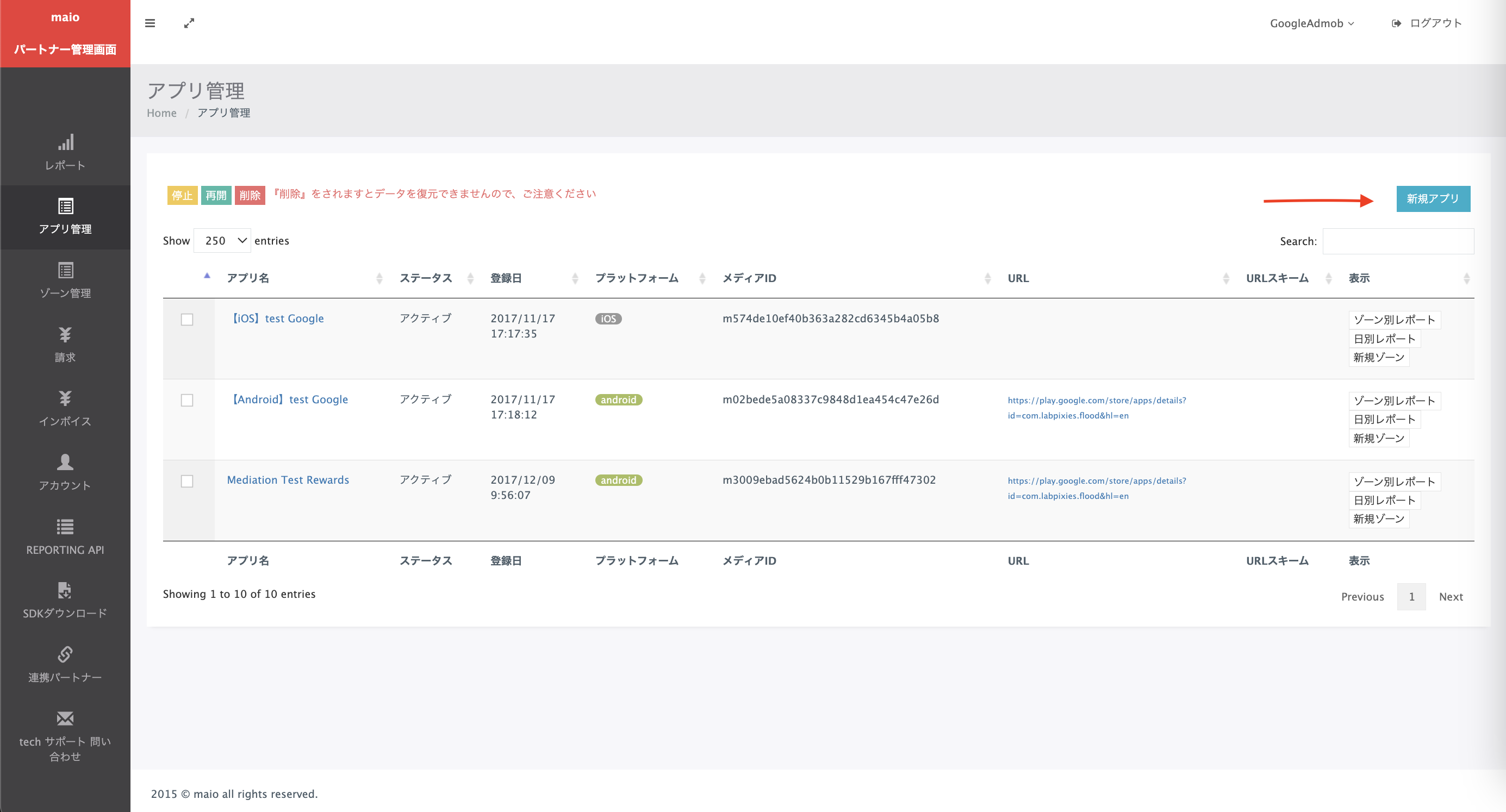
برگه مربوط به نوع تبلیغ مورد نظر خود را انتخاب کنید.
بینابینی
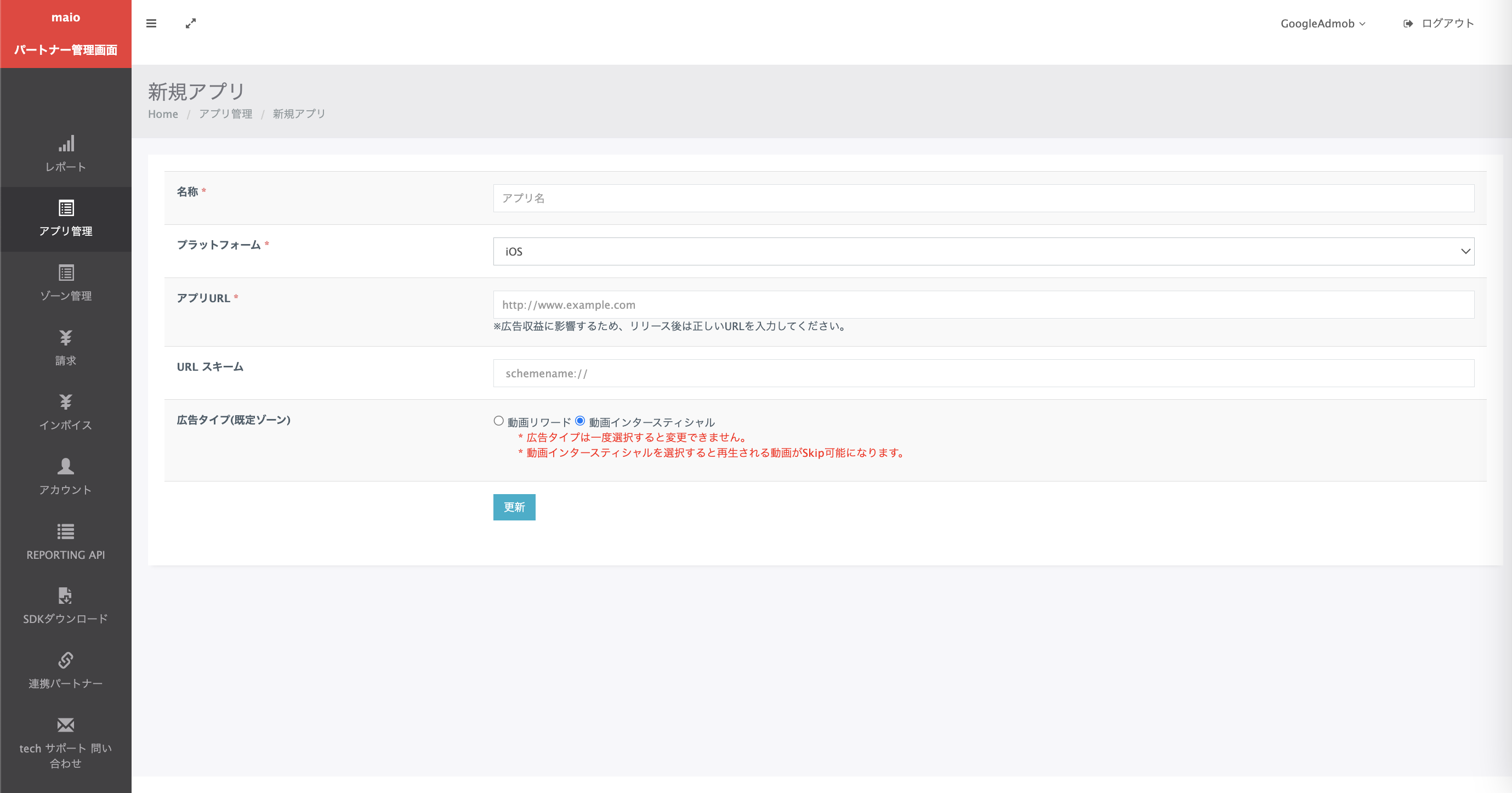
نام برنامه خود را وارد کنید، پلتفرم را انتخاب کنید و آدرس اینترنتی برنامه خود را ارائه دهید. نوع تبلیغ را بینابینی ویدیویی انتخاب کنید و سپس روی بهروزرسانی کلیک کنید.
پاداش داده شده
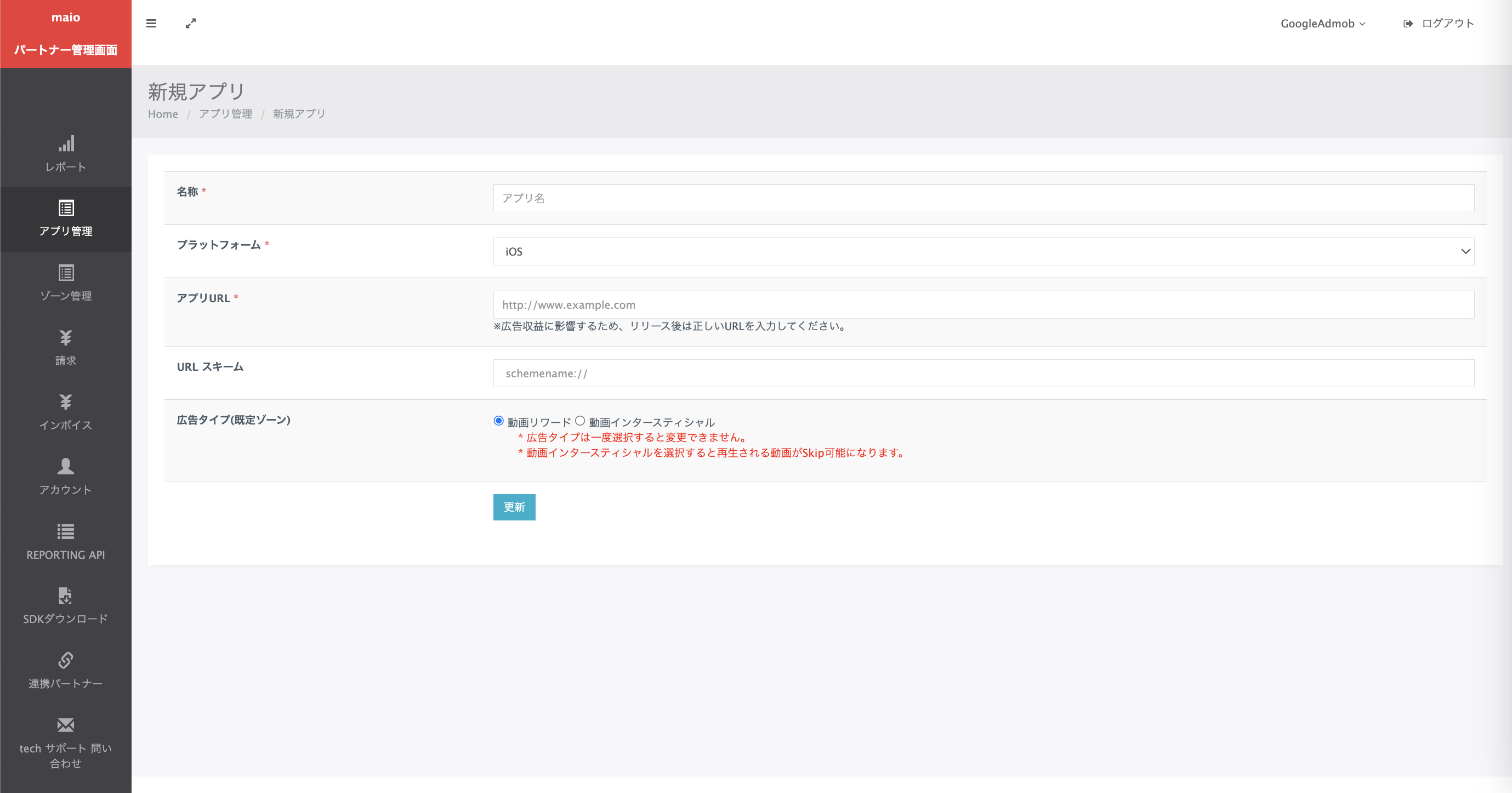
نام برنامه خود را وارد کنید، پلتفرم را انتخاب کنید و آدرس اینترنتی برنامه خود را ارائه دهید. نوع تبلیغ را Video Rewards انتخاب کنید و سپس روی بهروزرسانی کلیک کنید.
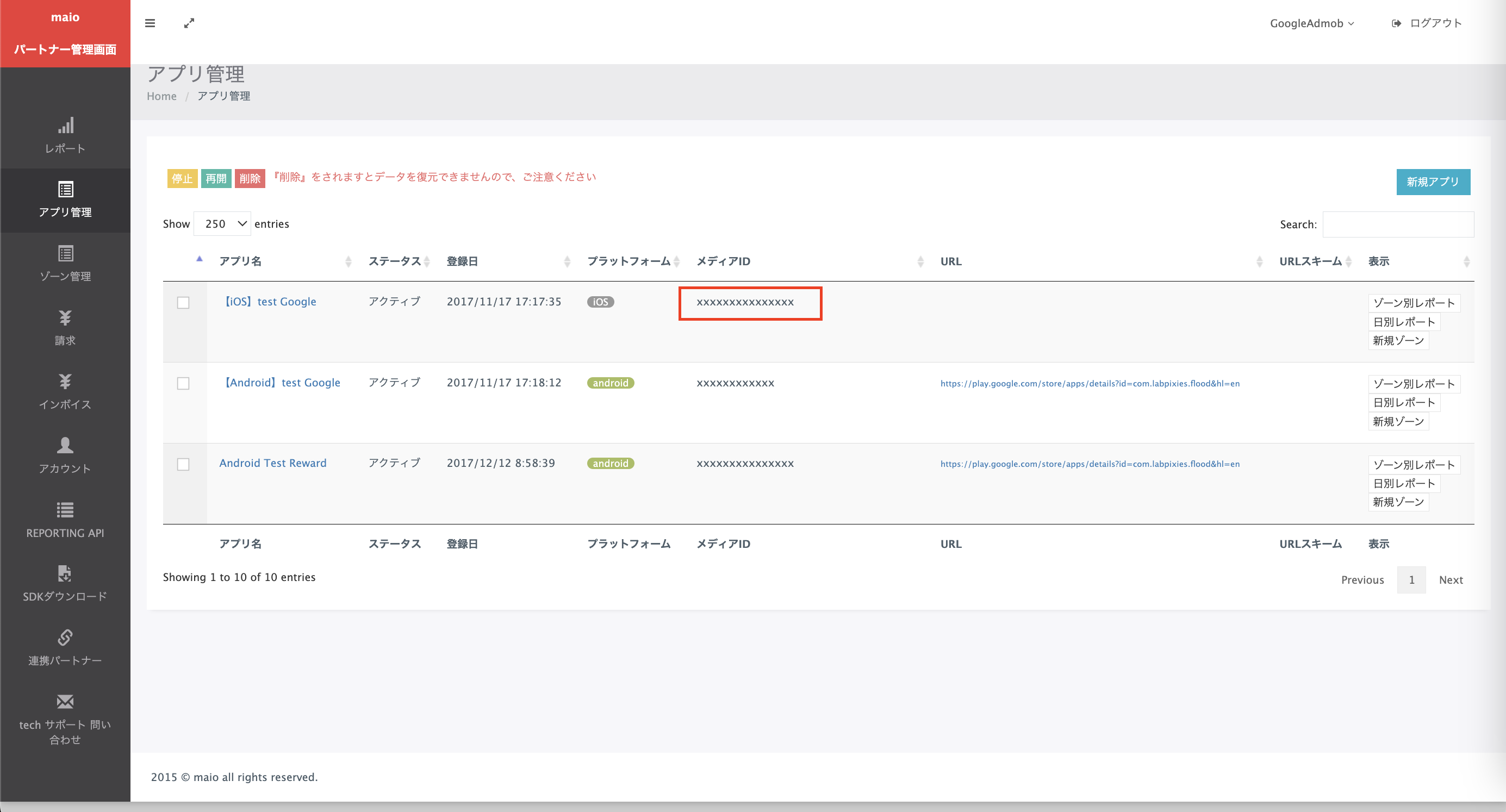
در صفحه مدیریت برنامه ، شناسه رسانه (Media ID) را یادداشت کنید. این شناسه برای تنظیم واحد تبلیغاتی AdMob شما در بخش بعدی مورد نیاز است.
در صفحه مدیریت منطقه ، شناسه منطقه را یادداشت کنید. همچنین برای تنظیم واحد تبلیغاتی AdMob شما در بخش بعدی مورد نیاز خواهد بود.
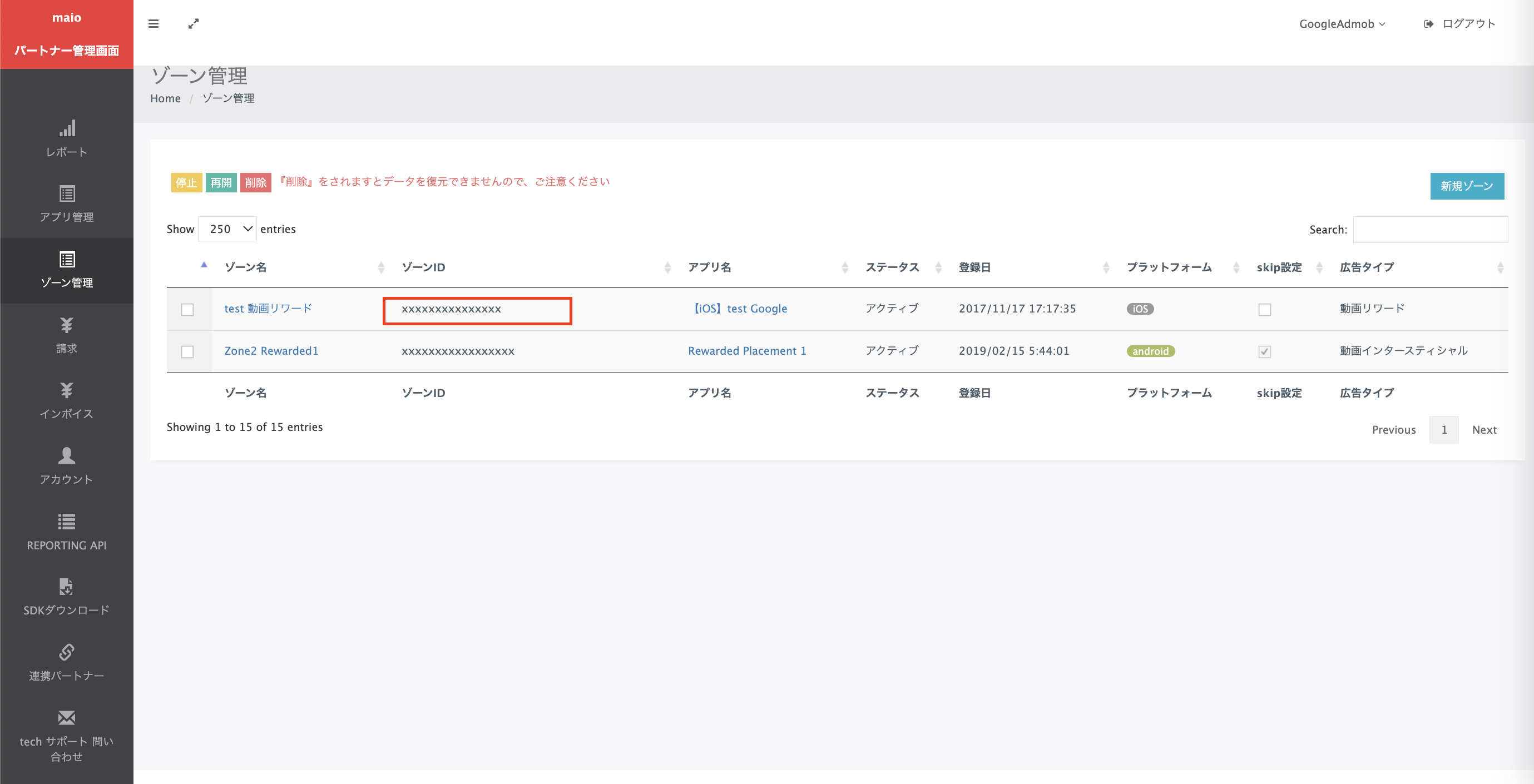
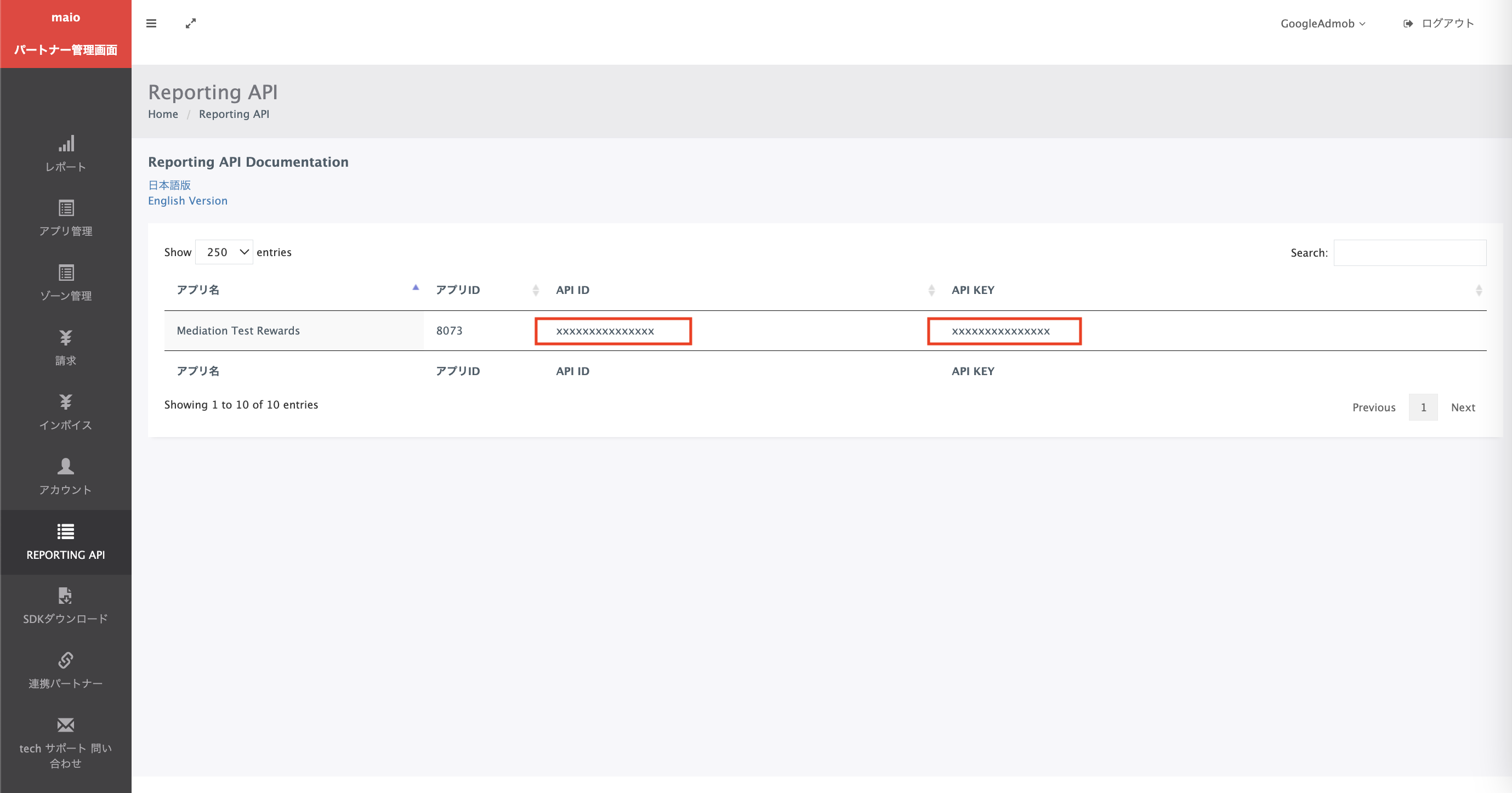
مرحله 2: تنظیم تقاضای خرید در رابط کاربری AdMob
تنظیمات میانجیگری را برای واحد تبلیغاتی خود پیکربندی کنید
شما باید maio را به پیکربندی میانجیگری برای واحد تبلیغاتی خود اضافه کنید.
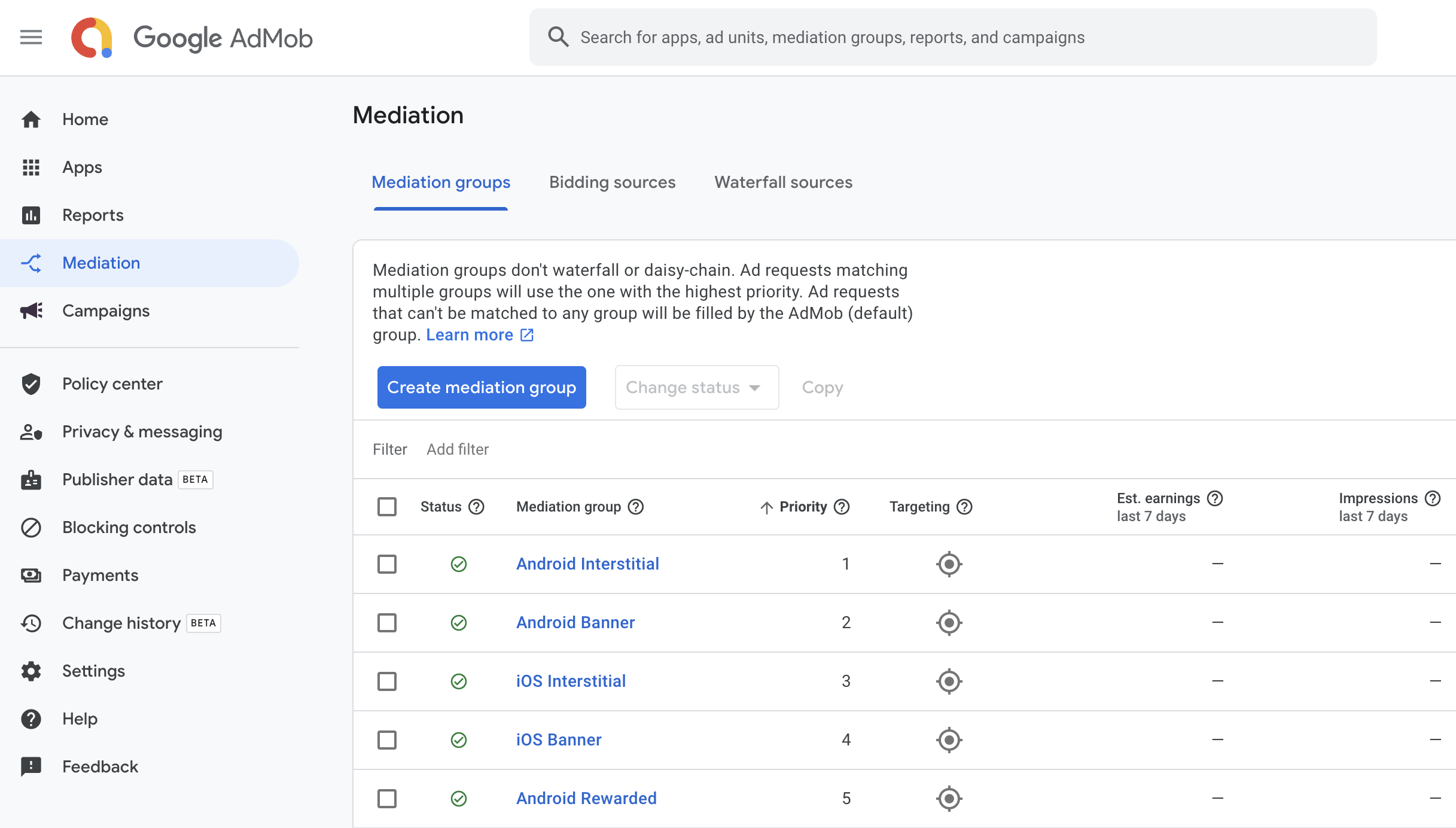
ابتدا، وارد حساب کاربری ادموب خود شوید. سپس، به برگه «میانجیگری» بروید. اگر یک گروه میانجیگری موجود دارید که میخواهید آن را تغییر دهید، روی نام آن گروه میانجیگری کلیک کنید تا آن را ویرایش کنید و به «افزودن مایو به عنوان منبع تبلیغ» بروید.
برای ایجاد یک گروه میانجیگری جدید، گزینه «ایجاد گروه میانجیگری» را انتخاب کنید.
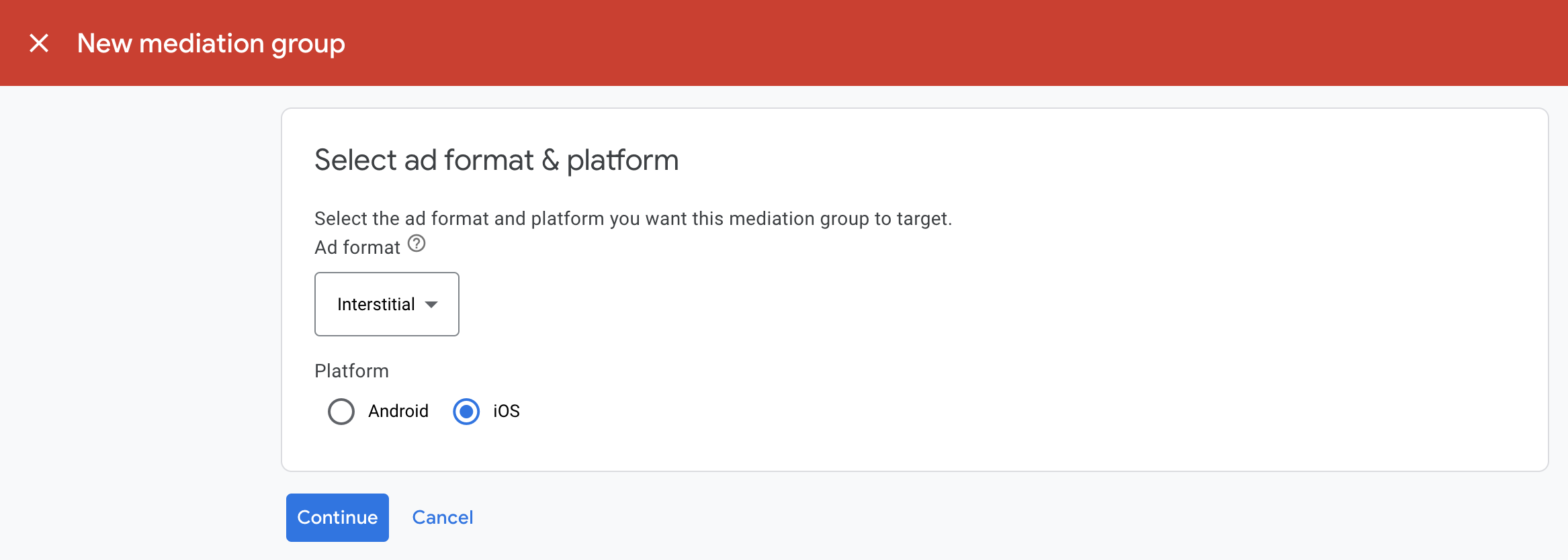
قالب و پلتفرم تبلیغ خود را وارد کنید، سپس روی ادامه کلیک کنید.
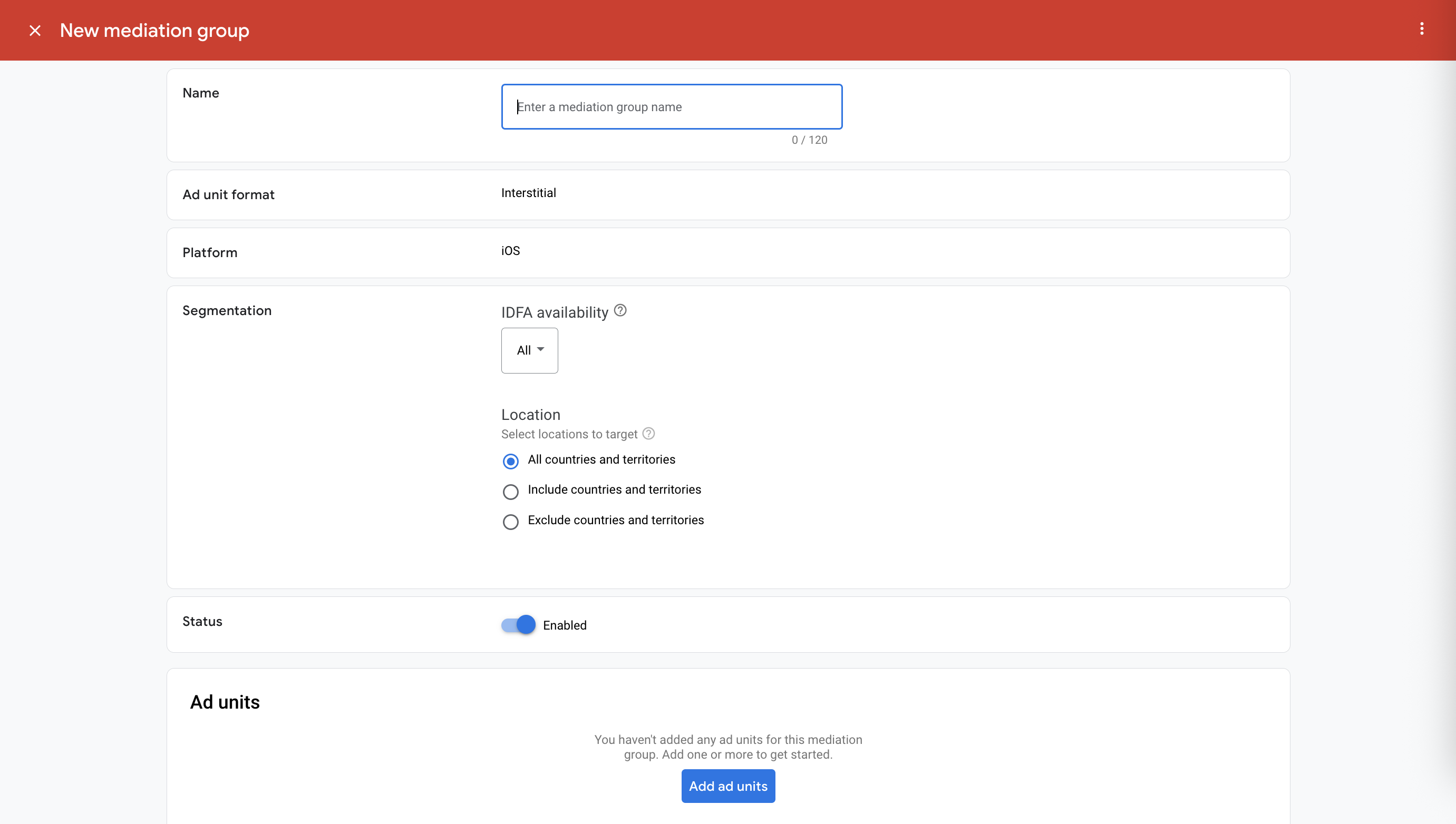
به گروه میانجیگری خود یک نام بدهید و مکانهایی را برای هدف قرار دادن انتخاب کنید. در مرحله بعد، وضعیت گروه میانجیگری را روی فعال (Enabled) تنظیم کنید و سپس روی افزودن واحدهای تبلیغاتی (Add Ad Units) کلیک کنید.
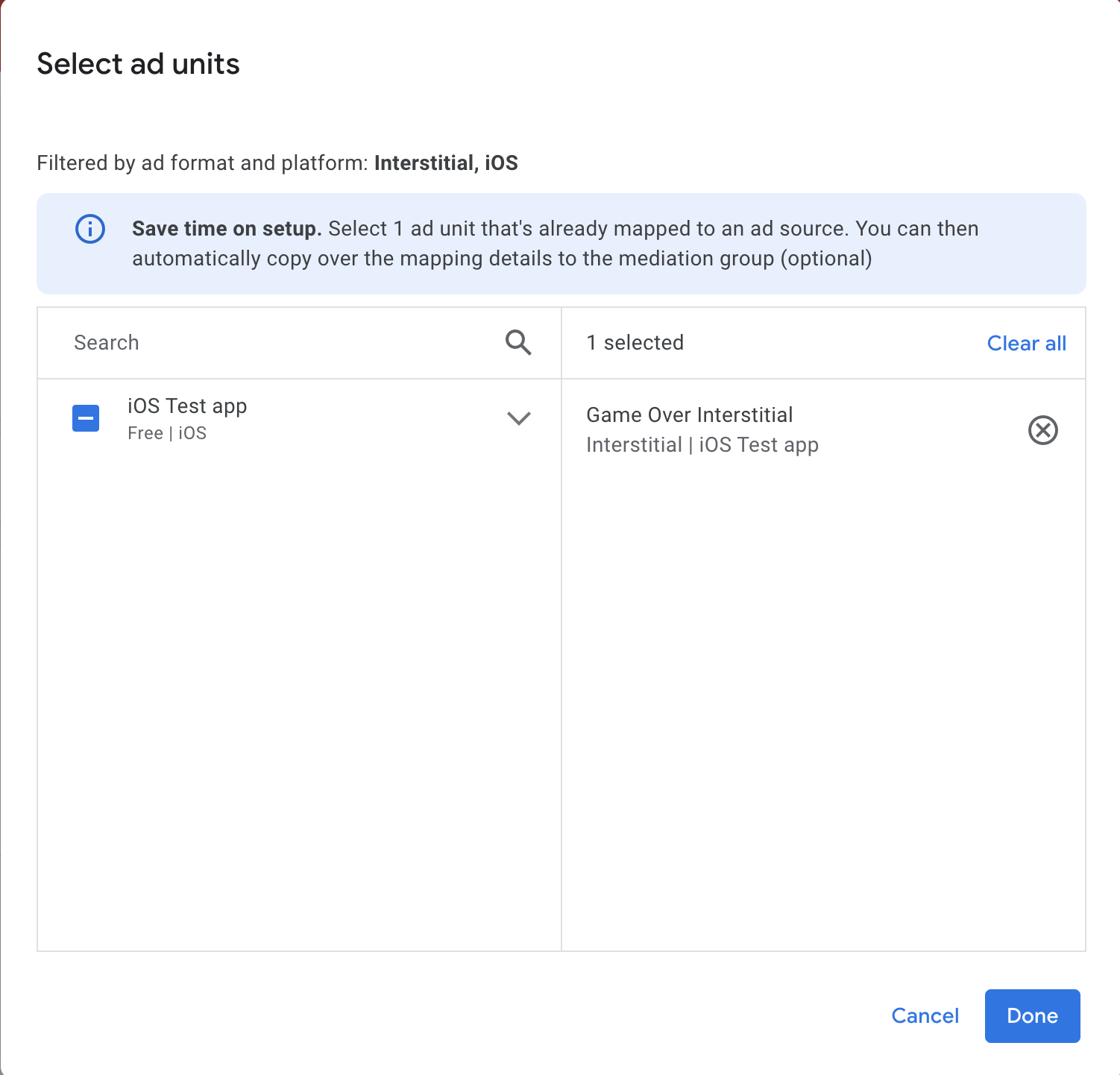
این گروه میانجی را با یک یا چند واحد تبلیغاتی AdMob موجود خود مرتبط کنید. سپس روی «انجام شد» کلیک کنید.
اکنون باید کارت واحدهای تبلیغاتی را ببینید که با واحدهای تبلیغاتی که انتخاب کردهاید پر شده است:
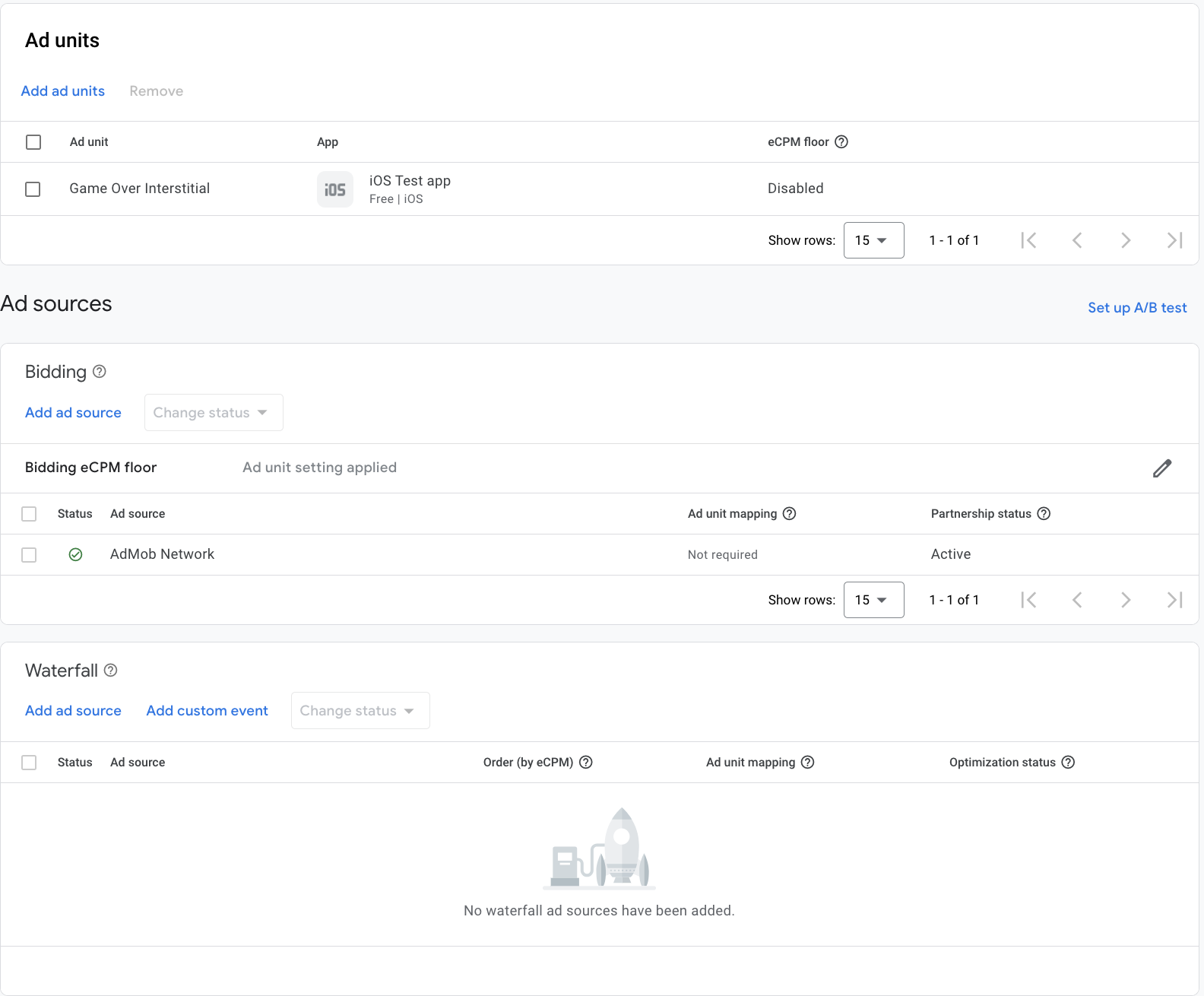
مایو را به عنوان منبع تبلیغات اضافه کنید
در زیر کارت Waterfall در بخش Ad Sources ، گزینه Add Ad Source را انتخاب کنید.
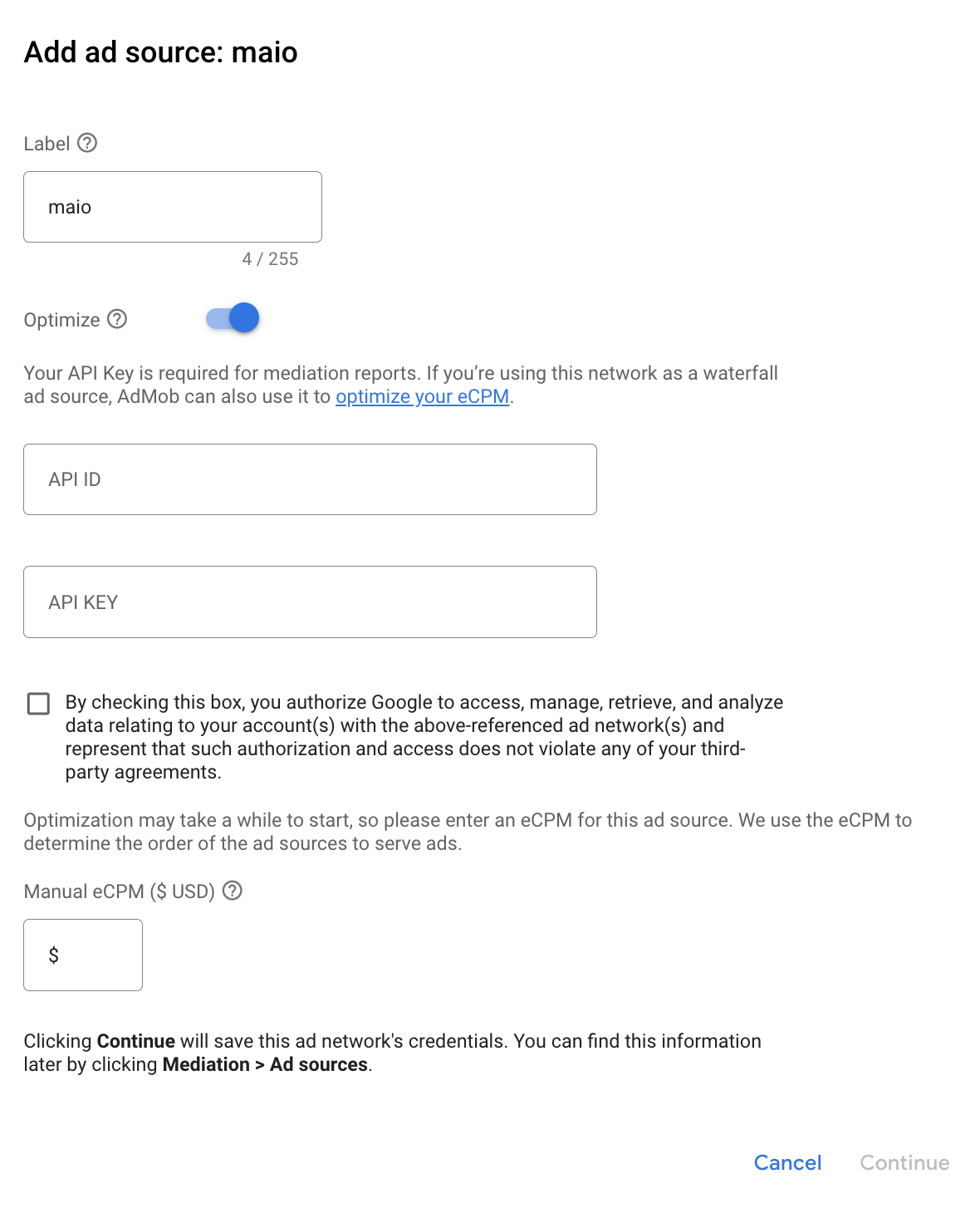
maio را انتخاب کنید و کلید Optimize را فعال کنید. شناسه API و کلید API که در بخش قبل به دست آوردید را وارد کنید تا بهینهسازی منبع تبلیغات برای maio تنظیم شود. سپس یک مقدار eCPM برای maio وارد کنید و روی ادامه کلیک کنید.
اگر از قبل نگاشتی برای maio دارید، میتوانید آن را انتخاب کنید. در غیر این صورت، روی افزودن نگاشت کلیک کنید.
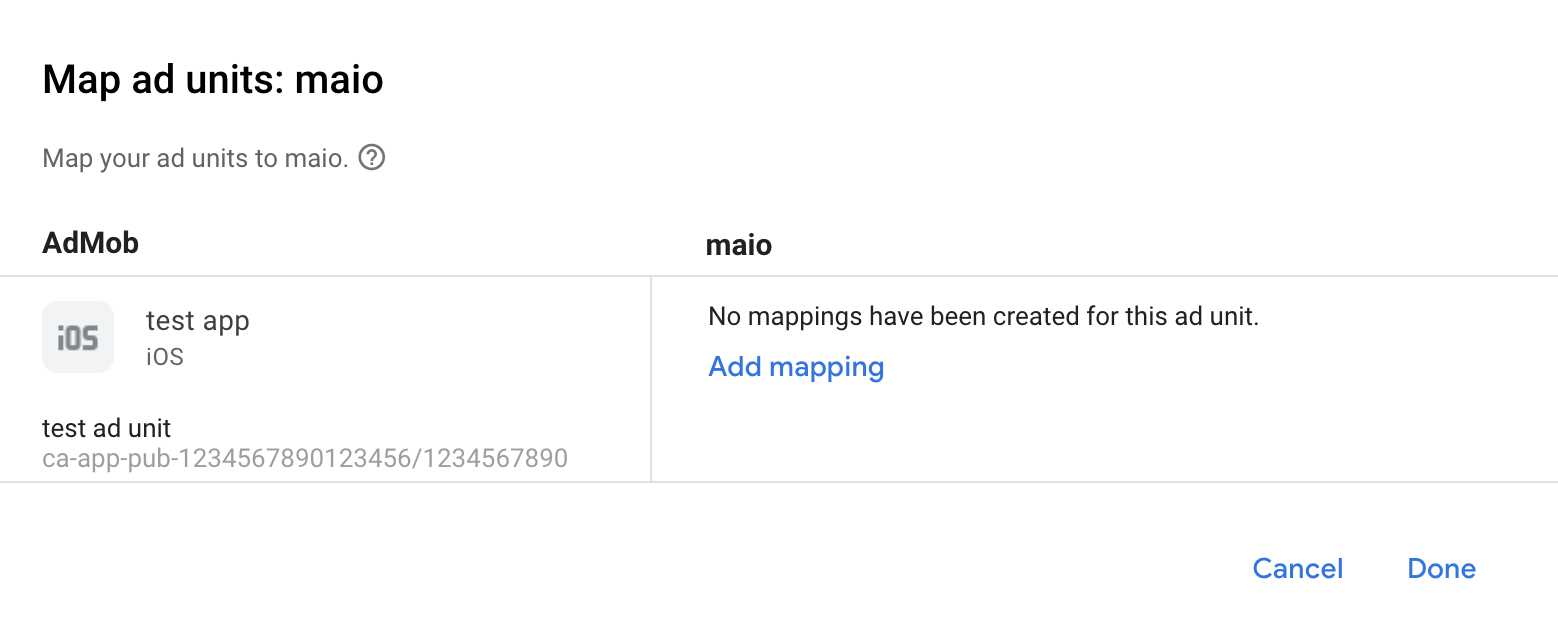
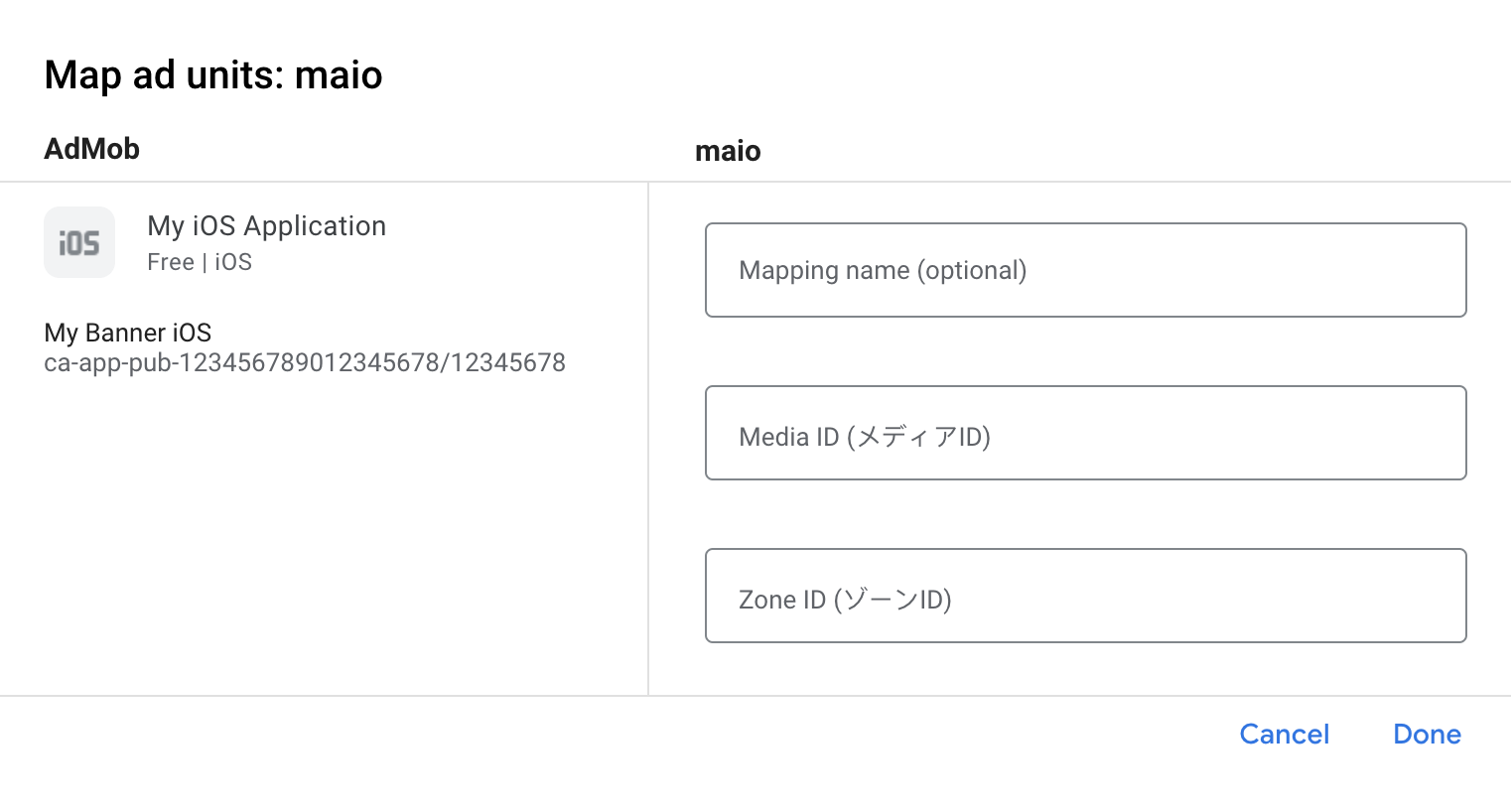
سپس، شناسه رسانه (Media ID) و شناسه منطقه (Zone ID) که در بخش قبل به دست آوردهاید را وارد کنید. سپس روی «انجام شد» (Done) کلیک کنید.
مرحله ۳: SDK و آداپتور maio را وارد کنید
استفاده از مدیر بسته Swift
قبل از ادامه، باید حداقل نسخه آداپتور پشتیبانی شده ۲.۲.۰.۰ را داشته باشید.
برای اضافه کردن یک وابستگی پکیج به پروژه خود، مراحل زیر را دنبال کنید:
در Xcode، به مسیر File > Add Package Dependencies... بروید.
در اعلانی که ظاهر میشود، آدرس بستهی زیر را جستجو کنید:
https://github.com/googleads/googleads-mobile-ios-mediation-maio.gitدر بخش «قانون وابستگی» ، شاخه (Branch) را انتخاب کنید.
در فیلد متن،
mainرا وارد کنید.
از کوکوپادز استفاده کنید
خط زیر را به Podfile پروژه خود اضافه کنید:
pod 'GoogleMobileAdsMediationMaio'از خط فرمان اجرا کنید:
pod install --repo-update
ادغام دستی
- آخرین نسخه maio SDK را دانلود کنید.
- آخرین نسخه آداپتور maio را از لینک دانلود موجود در Changelog دانلود کنید و
maioAdapter.frameworkرا در پروژه خود لینک کنید.
مرحله ۴: اضافه کردن کد مورد نیاز
پیادهسازی SKAdNetwork
برای افزودن شناسههای SKAdNetwork به فایل Info.plist پروژه خود ، مستندات maio را دنبال کنید.
مرحله ۵: پیادهسازی خود را آزمایش کنید
فعال کردن تبلیغات آزمایشی
مطمئن شوید که دستگاه آزمایشی خود را برای AdMob ثبت کردهاید .
ناشرانی که از نسخه ۷.۲۶.۰ یا بالاتر Google Mobile Ads SDK استفاده میکنند، هنگام درخواست، بهطور خودکار تبلیغات آزمایشی را از maio روی تلفنها و تبلتهایی که بهعنوان دستگاههای آزمایشی ثبت شدهاند، دریافت خواهند کرد.
تأیید تبلیغات آزمایشی
برای تأیید اینکه تبلیغات آزمایشی را از maio دریافت میکنید، آزمایش منبع تبلیغاتی واحد را در ad inspector با استفاده از منبع(های ) تبلیغاتی maio (Waterfall ) فعال کنید.
کدهای خطا
اگر آداپتور نتواند تبلیغی از maio دریافت کند، ناشران میتوانند خطای اساسی را از پاسخ تبلیغ با استفاده از GADResponseInfo.adNetworkInfoArray تحت کلاسهای زیر بررسی کنند:
| قالب | نام کلاس |
|---|---|
| بینابینی | آداپتور بینابینی GADMMaio |
| پاداش داده شده | آداپتور پاداشی GADMMaio |
در اینجا کدها و پیامهای همراه که توسط آداپتور maio هنگام عدم بارگیری یک تبلیغ نمایش داده میشوند، آمده است:
| کد خطا | دلیل |
|---|---|
| ۰-۱۰ | maio یک خطای مختص SDK را برگرداند. برای جزئیات بیشتر به کد maio مراجعه کنید. |
| ۱۰۱ | maio هنوز تبلیغی در دسترس ندارد. |
| ۱۰۲ | پارامترهای سرور نامعتبر است (مثلاً شناسه قرارگیری وجود ندارد). |
| ۱۰۳ | آداپتور maio از قالب تبلیغاتی که درخواست شده است پشتیبانی نمیکند. |
| ۱۰۴ | یک تبلیغ از قبل برای این پیکربندی شبکه بارگذاری شده است. |
| ۱۰۵ | درخواستهای دارای محدودیت سنی برای maio SDK را فیلتر کنید زیرا نمیتواند سیگنالهای دارای محدودیت سنی را دریافت کند. |
تغییرات آداپتور میانجیگری maio iOS
نسخه بعدی
- حداقل نسخه iOS را بهروزرسانی کنید تا وابستگی به SDK تبلیغات موبایلی گوگل کاهش یابد و امکان نسخههای فرعی فراهم شود.
نسخه ۲.۲.۱.۲
- درخواستهای دارای محدودیت سنی برای maio SDK را زمانی فیلتر کنید که
ageRestrictedTreatmentجدید رویGADAgeRestrictedTreatmentChildتنظیم شده باشد.
ساخته و آزمایش شده با:
- نسخه ۱۳.۳.۰ کیت توسعه نرمافزاری تبلیغات موبایلی گوگل.
- نسخه ۲.۲.۱ کیت توسعه نرمافزار مایو.
نسخه ۲.۲.۱.۱
- درخواستهای دارای محدودیت سنی برای maio SDK را فیلتر کنید زیرا نمیتواند سیگنالهای دارای محدودیت سنی را دریافت کند.
ساخته و آزمایش شده با:
- نسخه ۱۳.۲.۰ کیت توسعه نرمافزاری تبلیغات موبایلی گوگل.
- نسخه ۲.۲.۱ کیت توسعه نرمافزار مایو.
نسخه ۲.۲.۱.۰
- سازگاری تأیید شده با maio SDK نسخه ۲.۲.۱.
ساخته و آزمایش شده با:
- نسخه ۱۳.۱.۰ کیت توسعه نرمافزاری تبلیغات موبایلی گوگل.
- نسخه ۲.۲.۱ کیت توسعه نرمافزار مایو.
نسخه ۲.۲.۰.۳
- پشتیبانی از بنرهای تبلیغاتی آبشاری اضافه شد.
- وابستگی SDK تبلیغات موبایل گوگل به نسخه ۱۳.۰.۰ بهروزرسانی شد.
ساخته و آزمایش شده با:
- نسخه ۱۳.۰.۰ کیت توسعه نرمافزاری تبلیغات موبایلی گوگل.
- نسخه ۲.۲.۰ کیت توسعه نرمافزار مایو.
نسخه ۲.۲.۰.۲
- حداقل نسخه iOS برنامه CocoaPods به
13.0بهروزرسانی شد.
ساخته و آزمایش شده با:
- نسخه ۱۳.۰.۰ کیت توسعه نرمافزاری تبلیغات موبایلی گوگل.
- نسخه ۲.۲.۰ کیت توسعه نرمافزار مایو.
نسخه ۲.۲.۰.۱
- پیادهسازی پیشنهاد قیمت حذف شد زیرا مایو دیگر از پیشنهاد قیمت پشتیبانی نمیکند.
- آداپتور را برای استفاده از پروتکل
GADMediationAdapterبهروزرسانی کنید.
ساخته و آزمایش شده با:
- نسخه ۱۲.۱۱.۰ کیت توسعه نرمافزاری تبلیغات موبایلی گوگل.
- نسخه ۲.۲.۰ کیت توسعه نرمافزار مایو.
نسخه ۲.۲.۰.۰
- سازگاری تأیید شده با maio SDK نسخه ۲.۲.۰.
ساخته و آزمایش شده با:
- نسخه ۱۲.۱۱.۰ کیت توسعه نرمافزاری تبلیغات موبایلی گوگل.
- نسخه ۲.۲.۰ کیت توسعه نرمافزار مایو.
نسخه ۲.۱.۶.۱
- اکنون به نسخه ۱۲.۰.۰ یا بالاتر SDK تبلیغات موبایل گوگل نیاز دارد.
ساخته و آزمایش شده با:
- نسخه ۱۲.۰.۰ کیت توسعه نرمافزاری تبلیغات موبایلی گوگل.
- نسخه ۲.۱.۶ کیت توسعه نرمافزار مایو.
نسخه ۲.۱.۶.۰
- سازگاری تأیید شده با maio SDK نسخه ۲.۱.۶.
ساخته و آزمایش شده با:
- نسخه ۱۱.۱۳.۰ کیت توسعه نرمافزاری تبلیغات موبایلی گوگل.
- نسخه ۲.۱.۶ کیت توسعه نرمافزار مایو.
نسخه ۲.۱.۵.۱
-
CFBundleShortVersionStringبهروزرسانی شد تا به جای چهار جزء، سه جزء داشته باشد.
ساخته و آزمایش شده با:
- نسخه ۱۱.۱۰.۰ کیت توسعه نرمافزاری تبلیغات موبایلی گوگل.
- نسخه ۲.۱.۵ کیت توسعه نرمافزاری مایو.
نسخه ۲.۱.۵.۰
- سازگاری تأیید شده با maio SDK نسخه ۲.۱.۵.
ساخته و آزمایش شده با:
- نسخه ۱۱.۶.۰ کیت توسعه نرمافزاری تبلیغات موبایلی گوگل.
- نسخه ۲.۱.۵ کیت توسعه نرمافزاری مایو.
نسخه ۲.۱.۴.۰
- سازگاری تأیید شده با maio SDK نسخه ۲.۱.۴.
ساخته و آزمایش شده با:
- نسخه ۱۱.۲.۰ کیت توسعه نرمافزاری تبلیغات موبایلی گوگل.
- نسخه ۲.۱.۴ کیت توسعه نرمافزاری مایو.
نسخه ۲.۱.۳.۰
- سازگاری تأیید شده با maio SDK نسخه ۲.۱.۳.
ساخته و آزمایش شده با:
- نسخه ۱۱.۱.۰ کیت توسعه نرمافزاری تبلیغات موبایلی گوگل.
- نسخه ۲.۱.۳ کیت توسعه نرمافزاری مایو.
نسخه ۲.۱.۲.۱
- اکنون به نسخه ۱۱.۰ یا بالاتر SDK تبلیغات موبایل گوگل نیاز دارد.
-
Info.plistدر چارچوبهای موجود درMaioAdapter.xcframeworkگنجانده شده است.
ساخته و آزمایش شده با:
- نسخه ۱۱.۰.۱ کیت توسعه نرمافزاری تبلیغات موبایلی گوگل.
- نسخه ۲.۱.۲ کیت توسعه نرمافزاری مایو.
نسخه ۲.۱.۲.۰
- سازگاری تأیید شده با maio SDK نسخه ۲.۱.۲.
ساخته و آزمایش شده با:
- نسخه ۱۰.۱۴.۰ کیت توسعه نرمافزاری تبلیغات موبایلی گوگل.
- نسخه ۲.۱.۲ کیت توسعه نرمافزاری مایو.
نسخه ۲.۱.۱.۰
- سازگاری تأیید شده با maio SDK نسخه ۲.۱.۱.
ساخته و آزمایش شده با:
- نسخه ۱۰.۱۲.۰ کیت توسعه نرمافزاری تبلیغات موبایلی گوگل.
- نسخه ۲.۱.۱ کیت توسعه نرمافزاری مایو.
نسخه ۲.۰.۰.۰
- سازگاری تأیید شده با maio SDK نسخه ۲.۰.۰.
- وابستگی به
MaioOB SDKحذف شد. - پشتیبانی از معماری
armv7حذف شد. - اکنون به حداقل نسخه iOS 12.0 نیاز دارد.
- اکنون به نسخه ۱۰.۴.۰ یا بالاتر SDK تبلیغات موبایلی گوگل نیاز دارد.
ساخته و آزمایش شده با:
- نسخه ۱۰.۱۰.۰ کیت توسعه نرمافزاری تبلیغات موبایلی گوگل
- نسخه ۲.۰.۰ کیت توسعه نرمافزاری مایو.
نسخه ۱.۶.۳.۱
- اکنون به نسخه ۱۰.۰.۰ یا بالاتر SDK تبلیغات موبایل گوگل نیاز دارد.
ساخته و آزمایش شده با:
- نسخه ۱۰.۰.۰ کیت توسعه نرمافزاری تبلیغات موبایلی گوگل.
- نسخه ۱.۶.۳ کیت توسعه نرمافزاری مایو.
- نسخه ۲.۰.۰-آلفا از MaioOB SDK.
نسخه ۱.۶.۳.۰
- آداپتور برای استفاده از API
didRewardUserبهروزرسانی شد. - اکنون به نسخه ۹.۸.۰ یا بالاتر SDK تبلیغات موبایل گوگل نیاز دارد.
- سازگاری تأیید شده با maio SDK نسخه ۱.۶.۳ و maioOB SDK نسخه ۲.۰.۰-alpha.
ساخته و آزمایش شده با:
- نسخه ۹.۱۲.۰ کیت توسعه نرمافزاری تبلیغات موبایلی گوگل.
- نسخه ۱.۶.۳ کیت توسعه نرمافزاری مایو.
- نسخه ۲.۰.۰-آلفا از MaioOB SDK.
نسخه ۱.۶.۲.۰
- سازگاری تأیید شده با maio SDK نسخه ۱.۶.۲ و maioOB SDK نسخه ۲.۰.۰-alpha.
ساخته و آزمایش شده با:
- نسخه ۹.۵.۰ کیت توسعه نرمافزاری تبلیغات موبایلی گوگل.
- نسخه ۱.۶.۲ کیت توسعه نرمافزاری مایو.
- نسخه ۲.۰.۰-آلفا از MaioOB SDK.
نسخه ۱.۶.۱.۰
- سازگاری تأیید شده با maio SDK نسخه ۱.۶.۱ و maioOB SDK نسخه ۲.۰.۰-alpha.
ساخته و آزمایش شده با:
- نسخه ۹.۲.۰ کیت توسعه نرمافزاری تبلیغات موبایلی گوگل.
- نسخه ۱.۶.۱ کیت توسعه نرمافزار مایو.
- نسخه ۲.۰.۰-آلفا از MaioOB SDK.
نسخه ۱.۶.۰.۱
- سازگاری تأیید شده با نسخه ۹.۰.۰ کیت توسعه نرمافزاری تبلیغات موبایلی گوگل.
- اکنون به نسخه ۹.۰.۰ یا بالاتر SDK تبلیغات موبایل گوگل نیاز است.
ساخته و آزمایش شده با:
- نسخه ۹.۰.۰ کیت توسعه نرمافزاری تبلیغات موبایلی گوگل.
- نسخه ۱.۶.۰ کیت توسعه نرمافزار مایو.
- نسخه ۲.۰.۰-آلفا از MaioOB SDK.
نسخه ۱.۶.۰.۰
- سازگاری تأیید شده با maio SDK نسخه ۱.۶.۰ و maioOB SDK نسخه ۲.۰.۰-alpha.
ساخته و آزمایش شده با:
- نسخه ۸.۱۳.۰ کیت توسعه نرمافزاری تبلیغات موبایلی گوگل.
- اکنون به حداقل نسخه iOS 10.0 نیاز دارد.
- نسخه ۱.۶.۰ کیت توسعه نرمافزار مایو.
- نسخه ۲.۰.۰-آلفا از MaioOB SDK.
نسخه ۱.۵.۸.۰
- سازگاری تأیید شده با maio SDK نسخه ۱.۵.۸ و maioOB SDK نسخه ۲.۰.۰-alpha.
- قابلیت پیشنهاد قیمت برای قالبهای تبلیغات بینابینی و پاداشی به آداپتور اضافه شد.
- وابستگی کمتر به SDK تبلیغات موبایلی گوگل نسخه ۸.۰.۰ یا بالاتر.
ساخته و آزمایش شده با:
- نسخه ۸.۷.۰ کیت توسعه نرمافزاری تبلیغات موبایلی گوگل.
- نسخه ۱.۵.۸ کیت توسعه نرمافزاری مایو.
- نسخه ۲.۰.۰-آلفا از MaioOB SDK.
نسخه ۱.۵.۶.۱
- کدهای خطای استاندارد آداپتور و پیامها اضافه شد.
- آداپتور برای استفاده از فرمت
.xcframeworkبهروزرسانی شد. - اشکالی که باعث میشد گاهی اوقات رویدادهای تبلیغاتی جایزهدار ارسال نشوند، برطرف شد.
- اکنون به نسخه ۸.۳.۰ یا بالاتر SDK تبلیغات موبایلی گوگل نیاز دارد.
ساخته و آزمایش شده با:
- نسخه ۸.۳.۰ کیت توسعه نرمافزاری تبلیغات موبایلی گوگل.
- نسخه ۱.۵.۶ کیت توسعه نرمافزاری مایو.
نسخه ۱.۵.۶.۰
- سازگاری تأیید شده با maio SDK نسخه ۱.۵.۶.
- اکنون به نسخه ۷.۶۸.۰ یا بالاتر SDK تبلیغات موبایلی گوگل نیاز دارد.
ساخته و آزمایش شده با:
- نسخه ۷.۶۸.۰ کیت توسعه نرمافزاری تبلیغات موبایلی گوگل.
- نسخه ۱.۵.۶ کیت توسعه نرمافزاری مایو.
نسخه ۱.۵.۵.۰
- سازگاری تأیید شده با maio SDK نسخه ۱.۵.۵.
- اکنون به نسخه ۷.۶۴.۰ یا بالاتر SDK تبلیغات موبایلی گوگل نیاز دارد.
ساخته و آزمایش شده با:
- نسخه ۷.۶۴.۰ کیت توسعه نرمافزاری تبلیغات موبایلی گوگل.
- نسخه ۱.۵.۵ کیت توسعه نرمافزاری مایو.
نسخه ۱.۵.۴.۰
- سازگاری تأیید شده با maio SDK نسخه ۱.۵.۴.
- اکنون به نسخه ۷.۶۰.۰ یا بالاتر SDK تبلیغات موبایل گوگل نیاز دارد.
ساخته و آزمایش شده با:
- نسخه ۷.۶۰.۰ کیت توسعه نرمافزاری تبلیغات موبایلی گوگل.
- نسخه ۱.۵.۴ کیت توسعه نرمافزاری مایو.
نسخه ۱.۵.۳.۱
- برای محدود کردن زمانهای انتظار، اگر maio تبلیغی آماده نمایش نداشته باشد، درخواستهای تبلیغ فوراً با شکست مواجه میشوند.
- پشتیبانی از معماری i386 حذف شد.
ساخته و آزمایش شده با:
- نسخه ۷.۵۸.۰ کیت توسعه نرمافزاری تبلیغات موبایلی گوگل.
- نسخه ۱.۵.۳ کیت توسعه نرمافزاری مایو.
نسخه ۱.۵.۳.۰
- سازگاری تأیید شده با maio SDK نسخه ۱.۵.۳.
ساخته و آزمایش شده با:
- نسخه ۷.۵۵.۱ کیت توسعه نرمافزاری تبلیغات موبایلی گوگل.
- نسخه ۱.۵.۳ کیت توسعه نرمافزاری مایو.
نسخه ۱.۵.۲.۱
- مشکلی که باعث میشد آداپتور تابع فراخوانی
-rewardedAdDidPresent:را فراخوانی نکند، برطرف شد.
ساخته و آزمایش شده با:
- نسخه ۷.۵۳.۱ کیت توسعه نرمافزاری تبلیغات موبایلی گوگل.
- نسخه ۱.۵.۲ کیت توسعه نرمافزار مایو.
نسخه ۱.۵.۲.۰
- سازگاری تأیید شده با maio SDK نسخه ۱.۵.۲.
ساخته و آزمایش شده با:
- نسخه ۷.۵۳.۱ کیت توسعه نرمافزاری تبلیغات موبایلی گوگل.
- نسخه ۱.۵.۲ کیت توسعه نرمافزار مایو.
نسخه ۱.۵.۱.۰
- سازگاری تأیید شده با maio SDK نسخه ۱.۵.۱.
ساخته و آزمایش شده با:
- نسخه ۷.۵۲.۰ کیت توسعه نرمافزاری تبلیغات موبایلی گوگل.
- نسخه ۱.۵.۱ کیت توسعه نرمافزار مایو.
نسخه ۱.۵.۰.۰
- سازگاری تأیید شده با maio SDK نسخه ۱.۵.۰.
ساخته و آزمایش شده با
- نسخه ۷.۵۱.۰ کیت توسعه نرمافزاری تبلیغات موبایلی گوگل.
- نسخه ۱.۵.۰ کیت توسعه نرمافزاری (SDK) مایو ادز.
نسخه ۱.۴.۸.۰
- سازگاری تأیید شده با maio SDK نسخه ۱.۴.۸.
نسخه ۱.۴.۶.۰
- سازگاری تأیید شده با maio SDK نسخه ۱.۴.۶.
- آداپتور را بهروزرسانی کردیم تا از API پاداشدهیشده جدید استفاده کند.
- اکنون به نسخه ۷.۴۲.۲ یا بالاتر از SDK تبلیغات موبایلی گوگل نیاز است.
نسخه ۱.۴.۲.۰
- سازگاری تأیید شده با maio SDK نسخه ۱.۴.۲.
نسخه ۱.۴.۱.۰
- سازگاری تأیید شده با maio SDK نسخه ۱.۴.۱.
- مشکلی که باعث میشد آداپتور maio در صورت ارائه چندین MediaId از AdMob از کار بیفتد، برطرف شد.
نسخه ۱.۴.۰.۰
- سازگاری تأیید شده با maio SDK نسخه ۱.۴.۰.
نسخه ۱.۳.۲.۰
- سازگاری تأیید شده با maio SDK نسخه ۱.۳.۲.
نسخه ۱.۳.۱.۱
-
adapterDidCompletePlayingRewardBasedVideoAd:فراخوانی مجدد به آداپتور.
نسخه ۱.۳.۱.۰
- سازگاری تأیید شده با maio SDK نسخه ۱.۳.۱.
نسخه ۱.۳.۰.۰
- سازگاری تأیید شده با maio SDK نسخه ۱.۳.۰.
نسخه ۱.۲.۱۹.۰
- سازگاری تأیید شده با maio SDK نسخه ۱.۲.۱۹.
نسخه ۱.۲.۱۸.۰
- اولین انتشار!
- پشتیبانی از تبلیغات بینابینی و ویدیوهای جایزهدار اضافه شد.