
אם האפליקציה שלכם משתמשת ב-
כדי להציג תוכן מהאינטרנט, מומלץ להגדיר אותה כך שתוכלו לייצר הכנסות מהתוכן באמצעות מודעות בצורה אופטימלית.WKWebView
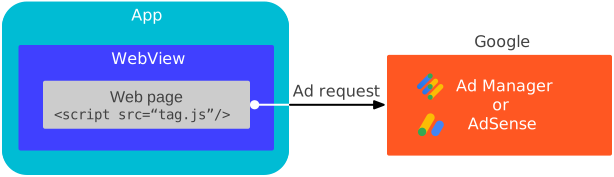
במדריך הזה מוסבר איך להגדיר אובייקט WKWebView.
תוכן מדיה
הגדרות ברירת המחדל לא WKWebView לא מותאמות למודעות וידאו. כדי להגדיר את WKWebView להפעלה מתוצאות החיפוש ולהפעלה אוטומטית של סרטונים,
צריך להשתמש בממשקי ה-API של
WKWebViewConfiguration.
Swift
import WebKit

class ViewController: UIViewController {

  var webView: WKWebView!

  override func viewDidLoad() {
    super.viewDidLoad()

    // Initialize a WKWebViewConfiguration object.
    let webViewConfiguration = WKWebViewConfiguration()
    // Let HTML videos with a "playsinline" attribute play inline.
    webViewConfiguration.allowsInlineMediaPlayback = true
    // Let HTML videos with an "autoplay" attribute play automatically.
    webViewConfiguration.mediaTypesRequiringUserActionForPlayback = []

    // Initialize the WKWebView with your WKWebViewConfiguration object.
    webView = WKWebView(frame: view.frame, configuration: webViewConfiguration)
    view.addSubview(webView)
  }
}
Objective-C
@import WebKit;

#import "ViewController.h"

@interface ViewController ()

@property(nonatomic, strong) WKWebView *webView;

@end

@implementation ViewController

- (void)viewDidLoad {
  [super viewDidLoad];

  // Initialize a WKWebViewConfiguration object.
  WKWebViewConfiguration *webViewConfiguration = [[WKWebViewConfiguration alloc] init];
  // Let HTML videos with a "playsinline" attribute play inline.
  webViewConfiguration.allowsInlineMediaPlayback = YES;
  // Let HTML videos with an "autoplay" attribute play automatically.
  webViewConfiguration.mediaTypesRequiringUserActionForPlayback = WKAudiovisualMediaTypeNone;

  // Initialize the WKWebView with your WKWebViewConfiguration object.
  self.webView = [[WKWebView alloc] initWithFrame:self.view.frame configuration:webViewConfiguration];
  [self.view addSubview:self.webView];
}
טעינת תוכן של תצוגת אינטרנט
קובצי Cookie וכתובות URL של דפים הם חשובים למונטיזציה של תצוגת אינטרנט, והם פועלים כמצופה רק כשמשתמשים ב-load(_:) עם כתובת URL מבוססת-רשת. כדי ש-WKWebView יעבוד הכי טוב, מומלץ מאוד לטעון תוכן אינטרנט מכתובת URL שמבוססת על רשת.
Swift
import WebKit

var webview: WKWebview!

class ViewController: UIViewController {
  override func viewDidLoad() {
    super.viewDidLoad()

    // Initialize a WKWebViewConfiguration object.
    let webViewConfiguration = WKWebViewConfiguration()
    // Let HTML videos with a "playsinline" attribute play inline.
    webViewConfiguration.allowsInlineMediaPlayback = true
    // Let HTML videos with an "autoplay" attribute play automatically.
    webViewConfiguration.mediaTypesRequiringUserActionForPlayback = []

    // Initialize the WKWebView with your WKWebViewConfiguration object.
    webView = WKWebView(frame: view.frame, configuration: webViewConfiguration)
    view.addSubview(webView)

    // Load the URL for optimized web view performance.
    guard let url = URL(string: "https://google.github.io/webview-ads/test/") else { return }
    let request = URLRequest(url: url)
    webView.load(request)
  }
}
Objective-C
@import WebKit;

#import "ViewController.h"

@interface ViewController ()

@property(nonatomic, strong) WKWebView *webView;

@end

@implementation ViewController

- (void)viewDidLoad {
  [super viewDidLoad];

  // Initialize a WKWebViewConfiguration object.
  WKWebViewConfiguration *webViewConfiguration = [[WKWebViewConfiguration alloc] init];
  // Let HTML videos with a "playsinline" attribute play inline.
  webViewConfiguration.allowsInlineMediaPlayback = YES;
  // Let HTML videos with an "autoplay" attribute play automatically.
  webViewConfiguration.mediaTypesRequiringUserActionForPlayback = WKAudiovisualMediaTypeNone;

  // Initialize the WKWebView with your WKWebViewConfiguration object.
  self.webView = [[WKWebView alloc] initWithFrame:self.view.frame configuration:webViewConfiguration];
  [self.view addSubview:self.webview];

  // Load the URL for optimized web view performance.
  NSURL *url = [NSURL URLWithString:@"https://google.github.io/webview-ads/test/"];
  NSURLRequest *request = [NSURLRequest requestWithURL:url];
  [webView loadRequest:request];
}
בדיקת תצוגת האינטרנט
במהלך פיתוח האפליקציה, מומלץ לטעון את כתובת ה-URL הזו לבדיקה:
https://google.github.io/webview-ads/test/
כדי לוודא שההגדרות האלה משפיעות על המודעות כמו שרציתם. כדי שייחשב שכתובת ה-URL שולבה בהצלחה כאופן מלא, צריך שיתקיימו התנאים הבאים:
הגדרות של תצוגת אינטרנט
- קובצי Cookie מהדומיין הנוכחי פועלים
- JavaScript מופעל
מודעת וידאו
- מודעת הווידאו מוצגת בתוך התוכן ולא נפתחת בנגן המובנה במסך מלא
- מודעת הווידאו מופעלת אוטומטית בלי ללחוץ על כפתור ההפעלה
- אפשר להפעיל מחדש את מודעת הווידאו
אחרי שהבדיקה מסתיימת, מחליפים את כתובת ה-URL לבדיקה בכתובת ה-URL שרוצים לטעון בתצוגת האינטרנט.