
WebView API for Ads מוודא שאותות מהאפליקציה זמינים לתגים ב-WKWebView, וכך בעלי תוכן דיגיטלי יכולים לשפר את המונטיזציה ולהגן על מפרסמים מפני ספאם.
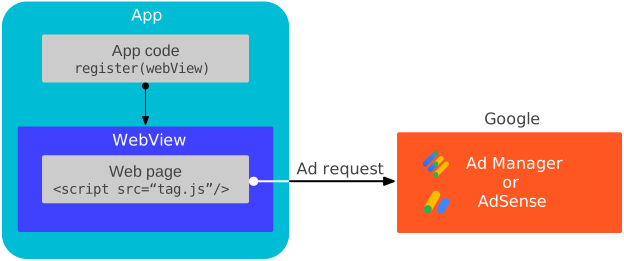
איך זה עובד
התקשורת עם Google Mobile Ads SDK מתרחשת רק בתגובה לאירועי מודעות שמופעלים על ידי אחד מהגורמים הבאים:
ה-SDK מוסיף פונקציות לטיפול בהודעות ל-WKWebView הרשום כדי להאזין לאירועי המודעות האלה. כדי להבין טוב יותר איך זה עובד, אפשר לעיין בקוד המקור של דף הבדיקה.
דרישות מוקדמות
- Google Mobile Ads SDK בגרסה 9.6.0 ואילך.
מעדכנים את הקובץ
Info.plistעם המפתח וערך המחרוזת הבאים. כך אפשר לעקוף בדיקה שמתבצעת ב-Google Mobile Ads SDK כדי לאתר ערך שלGADApplicationIdentifierשרלוונטי למפתחים שמטמיעים מודעות מחוץ ל-WebView. אם לא תבצעו את השלב הזה ולא תספקוGADApplicationIdentifier, ה-Google Mobile Ads SDK יקפיץGADInvalidInitializationExceptionכשהאפליקציה תופעל.<!-- Indicate Google Mobile Ads SDK usage is only for web view APIs for ads --> <key>GADIntegrationManager</key> <string>webview</string>
רישום תצוגת האינטרנט
קוראים לפונקציה
register(_:)
ב-main thread כדי ליצור חיבור עם ה-JavaScript handlers בקוד AdSense או ב-Google Publisher Tag בכל מופע של WKWebView. צריך לעשות את זה בשלב מוקדם ככל האפשר, למשל ב-method viewDidLoad של ה-view controller.
Swift
import WebKit

class ViewController: UIViewController {

  var webView: WKWebView!

  override func viewDidLoad() {
    super.viewDidLoad()

    // Initialize a WKWebViewConfiguration object.
    let webViewConfiguration = WKWebViewConfiguration()
    // Let HTML videos with a "playsinline" attribute play inline.
    webViewConfiguration.allowsInlineMediaPlayback = true
    // Let HTML videos with an "autoplay" attribute play automatically.
    webViewConfiguration.mediaTypesRequiringUserActionForPlayback = []

    // Initialize the WKWebView with your WKWebViewConfiguration object.
    webView = WKWebView(frame: view.frame, configuration: webViewConfiguration)
    view.addSubview(webView)

    // Register the web view.
    MobileAds.shared.register(webView)
  }
}
Objective-C
@import WebKit;

#import "ViewController.h"

@interface ViewController ()

@property(nonatomic, strong) WKWebView *webView;

@end

@implementation ViewController

- (void)viewDidLoad {
  [super viewDidLoad];

  // Initialize a WKWebViewConfiguration object.
  WKWebViewConfiguration *webViewConfiguration = [[WKWebViewConfiguration alloc] init];
  // Let HTML videos with a "playsinline" attribute play inline.
  webViewConfiguration.allowsInlineMediaPlayback = YES;
  // Let HTML videos with an "autoplay" attribute play automatically.
  webViewConfiguration.mediaTypesRequiringUserActionForPlayback = WKAudiovisualMediaTypeNone;

  // Initialize the WKWebView with your WKWebViewConfiguration object.
  self.webView = [[WKWebView alloc] initWithFrame:self.view.frame configuration:webViewConfiguration];
  [self.view addSubview:self.webView];

  // Register the web view.
  [GADMobileAds.sharedInstance registerWebView:self.webView];
}
בדיקת השילוב
לפני שמשתמשים בכתובת URL משלכם, מומלץ לטעון את כתובת ה-URL הבאה כדי לבדוק את השילוב:
https://google.github.io/webview-ads/test/#api-for-ads-tests
כדי שכתובת ה-URL לבדיקה תציג שורות סטטוס ירוקות, צריך שיתקיימו התנאים הבאים:
-
WKWebViewמחובר אל Google Mobile Ads SDK
השלבים הבאים
- מבקשים הסכמה ב-
WKWebView. ממשקי ה-API של Web view Ads לא מעבירים את ההסכמה שנאספה בהקשר של האפליקציה לנייד באמצעות מסגרות התאימות IAB TCF v2.3 או IAB CCPA לתגים בתצוגות האינטרנט. אם אתם רוצים להטמיע תהליך הסכמה אחד בתור הבעלים שלWKWebViewושל תוכן האינטרנט המתאים שמופעלת בו מונטיזציה, אתם צריכים לעבוד עם הפלטפורמה לניהול הסכמה כדי לאסוף הסכמה בהקשר שלWKWebView.