

如果您的应用使用
WKWebView 显示 Web 内容,建议您对其进行配置,以便通过广告实现内容变现效果最大化。
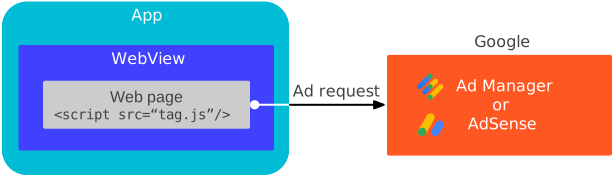
本指南介绍了如何提供信息,以便配置 WKWebView 对象。
媒体内容
WKWebView 的默认设置未针对视频广告进行优化。请使用
WKWebViewConfiguration
API 配置 WKWebView,以实现内嵌播放和自动播放视频。
Swift
import WebKit

class ViewController: UIViewController {

  var webView: WKWebView!

  override func viewDidLoad() {
    super.viewDidLoad()

    // Initialize a WKWebViewConfiguration object.
    let webViewConfiguration = WKWebViewConfiguration()
    // Let HTML videos with a "playsinline" attribute play inline.
    webViewConfiguration.allowsInlineMediaPlayback = true
    // Let HTML videos with an "autoplay" attribute play automatically.
    webViewConfiguration.mediaTypesRequiringUserActionForPlayback = []

    // Initialize the WKWebView with your WKWebViewConfiguration object.
    webView = WKWebView(frame: view.frame, configuration: webViewConfiguration)
    view.addSubview(webView)
  }
}
Objective-C
@import WebKit;

#import "ViewController.h"

@interface ViewController ()

@property(nonatomic, strong) WKWebView *webView;

@end

@implementation ViewController

- (void)viewDidLoad {
  [super viewDidLoad];

  // Initialize a WKWebViewConfiguration object.
  WKWebViewConfiguration *webViewConfiguration = [[WKWebViewConfiguration alloc] init];
  // Let HTML videos with a "playsinline" attribute play inline.
  webViewConfiguration.allowsInlineMediaPlayback = YES;
  // Let HTML videos with an "autoplay" attribute play automatically.
  webViewConfiguration.mediaTypesRequiringUserActionForPlayback = WKAudiovisualMediaTypeNone;

  // Initialize the WKWebView with your WKWebViewConfiguration object.
  self.webView = [[WKWebView alloc] initWithFrame:self.view.frame configuration:webViewConfiguration];
  [self.view addSubview:self.webView];
}
加载 WebView 内容
Cookie 和网页网址对于 WebView 变现非常重要,只有在将
load(_:) 与基于网络的网址搭配使用时,它们才能
按预期运行。为了优化
WKWebView性能,
我们强烈建议您从基于网络的网址加载 Web 内容。
Swift
import WebKit

var webview: WKWebview!

class ViewController: UIViewController {
  override func viewDidLoad() {
    super.viewDidLoad()

    // Initialize a WKWebViewConfiguration object.
    let webViewConfiguration = WKWebViewConfiguration()
    // Let HTML videos with a "playsinline" attribute play inline.
    webViewConfiguration.allowsInlineMediaPlayback = true
    // Let HTML videos with an "autoplay" attribute play automatically.
    webViewConfiguration.mediaTypesRequiringUserActionForPlayback = []

    // Initialize the WKWebView with your WKWebViewConfiguration object.
    webView = WKWebView(frame: view.frame, configuration: webViewConfiguration)
    view.addSubview(webView)

    // Load the URL for optimized web view performance.
    guard let url = URL(string: "https://google.github.io/webview-ads/test/") else { return }
    let request = URLRequest(url: url)
    webView.load(request)
  }
}
Objective-C
@import WebKit;

#import "ViewController.h"

@interface ViewController ()

@property(nonatomic, strong) WKWebView *webView;

@end

@implementation ViewController

- (void)viewDidLoad {
  [super viewDidLoad];

  // Initialize a WKWebViewConfiguration object.
  WKWebViewConfiguration *webViewConfiguration = [[WKWebViewConfiguration alloc] init];
  // Let HTML videos with a "playsinline" attribute play inline.
  webViewConfiguration.allowsInlineMediaPlayback = YES;
  // Let HTML videos with an "autoplay" attribute play automatically.
  webViewConfiguration.mediaTypesRequiringUserActionForPlayback = WKAudiovisualMediaTypeNone;

  // Initialize the WKWebView with your WKWebViewConfiguration object.
  self.webView = [[WKWebView alloc] initWithFrame:self.view.frame configuration:webViewConfiguration];
  [self.view addSubview:self.webview];

  // Load the URL for optimized web view performance.
  NSURL *url = [NSURL URLWithString:@"https://google.github.io/webview-ads/test/"];
  NSURLRequest *request = [NSURLRequest requestWithURL:url];
  [webView loadRequest:request];
}
测试 WebView
在应用开发期间,我们建议您加载以下测试网址:
https://google.github.io/webview-ads/test/
以验证这些设置是否对广告产生了预期效果。如果观察到以下情况,则表示测试网址已成功完成集成:
WebView 设置
- 第一方 Cookie 正常运行
- JavaScript 已启用
视频广告
- 视频广告内嵌播放,不会在全屏内置播放器中打开
- 视频广告自动播放,无需点击播放按钮
- 视频广告可以重播
测试完成后,请将测试网址替换为 WebView 打算加载的网址。