

Uygulamanız web içeriği göstermek için
WKWebView kullanıyorsa içeriğin reklamlarla en iyi şekilde para kazanabileceği şekilde yapılandırılması önerilir.
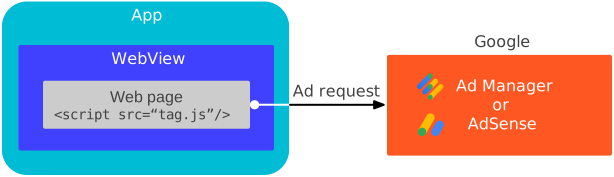
Bu kılavuzda, WKWebView nesnesinin nasıl yapılandırılacağıyla ilgili bilgilerin nasıl sağlanacağı gösterilmektedir.
Medya İçeriği
Varsayılan WKWebView ayarları video reklamlar için optimize edilmemiştir. WKWebView öğenizi satır içi oynatma ve otomatik video oynatma için yapılandırmak üzere WKWebViewConfiguration API'lerini kullanın.
Swift
import WebKit

class ViewController: UIViewController {

  var webView: WKWebView!

  override func viewDidLoad() {
    super.viewDidLoad()

    // Initialize a WKWebViewConfiguration object.
    let webViewConfiguration = WKWebViewConfiguration()
    // Let HTML videos with a "playsinline" attribute play inline.
    webViewConfiguration.allowsInlineMediaPlayback = true
    // Let HTML videos with an "autoplay" attribute play automatically.
    webViewConfiguration.mediaTypesRequiringUserActionForPlayback = []

    // Initialize the WKWebView with your WKWebViewConfiguration object.
    webView = WKWebView(frame: view.frame, configuration: webViewConfiguration)
    view.addSubview(webView)
  }
}
Objective-C
@import WebKit;

#import "ViewController.h"

@interface ViewController ()

@property(nonatomic, strong) WKWebView *webView;

@end

@implementation ViewController

- (void)viewDidLoad {
  [super viewDidLoad];

  // Initialize a WKWebViewConfiguration object.
  WKWebViewConfiguration *webViewConfiguration = [[WKWebViewConfiguration alloc] init];
  // Let HTML videos with a "playsinline" attribute play inline.
  webViewConfiguration.allowsInlineMediaPlayback = YES;
  // Let HTML videos with an "autoplay" attribute play automatically.
  webViewConfiguration.mediaTypesRequiringUserActionForPlayback = WKAudiovisualMediaTypeNone;

  // Initialize the WKWebView with your WKWebViewConfiguration object.
  self.webView = [[WKWebView alloc] initWithFrame:self.view.frame configuration:webViewConfiguration];
  [self.view addSubview:self.webView];
}
Web görünümü içeriğini yükleme
Çerezler ve sayfa URL'leri, web görünümü para kazanma özelliği için önemlidir ve yalnızca load(_:) ağ tabanlı bir URL ile kullanıldığında beklendiği gibi çalışır. WKWebView performansını optimize etmek için web içeriğini ağ tabanlı bir URL'den yüklemenizi önemle tavsiye ederiz.
Swift
import WebKit

var webview: WKWebview!

class ViewController: UIViewController {
  override func viewDidLoad() {
    super.viewDidLoad()

    // Initialize a WKWebViewConfiguration object.
    let webViewConfiguration = WKWebViewConfiguration()
    // Let HTML videos with a "playsinline" attribute play inline.
    webViewConfiguration.allowsInlineMediaPlayback = true
    // Let HTML videos with an "autoplay" attribute play automatically.
    webViewConfiguration.mediaTypesRequiringUserActionForPlayback = []

    // Initialize the WKWebView with your WKWebViewConfiguration object.
    webView = WKWebView(frame: view.frame, configuration: webViewConfiguration)
    view.addSubview(webView)

    // Load the URL for optimized web view performance.
    guard let url = URL(string: "https://google.github.io/webview-ads/test/") else { return }
    let request = URLRequest(url: url)
    webView.load(request)
  }
}
Objective-C
@import WebKit;

#import "ViewController.h"

@interface ViewController ()

@property(nonatomic, strong) WKWebView *webView;

@end

@implementation ViewController

- (void)viewDidLoad {
  [super viewDidLoad];

  // Initialize a WKWebViewConfiguration object.
  WKWebViewConfiguration *webViewConfiguration = [[WKWebViewConfiguration alloc] init];
  // Let HTML videos with a "playsinline" attribute play inline.
  webViewConfiguration.allowsInlineMediaPlayback = YES;
  // Let HTML videos with an "autoplay" attribute play automatically.
  webViewConfiguration.mediaTypesRequiringUserActionForPlayback = WKAudiovisualMediaTypeNone;

  // Initialize the WKWebView with your WKWebViewConfiguration object.
  self.webView = [[WKWebView alloc] initWithFrame:self.view.frame configuration:webViewConfiguration];
  [self.view addSubview:self.webview];

  // Load the URL for optimized web view performance.
  NSURL *url = [NSURL URLWithString:@"https://google.github.io/webview-ads/test/"];
  NSURLRequest *request = [NSURLRequest requestWithURL:url];
  [webView loadRequest:request];
}
Web görünümünü test etme
Uygulama geliştirme sırasında şu test URL'sini yüklemenizi öneririz:
https://google.github.io/webview-ads/test/
bu ayarların reklamlar üzerinde istenen etkiyi gösterdiğini doğrulayabilirsiniz. Test URL'si, aşağıdaki durumlar gözlemlenirse tam entegrasyon için başarı ölçütlerini karşılar:
Web görünümü ayarları
- Birinci taraf çerezleri çalışır
- JavaScript etkin
Video reklam
- Video reklam satır içi oynatılır ve tam ekran yerleşik oynatıcıda açılmaz.
- Video reklam, oynat düğmesi tıklanmadan otomatik olarak oynatılır.
- Video reklam yeniden oynatılabilir
Test tamamlandıktan sonra test URL'sini, web görünümünün yüklemeyi amaçladığı URL ile değiştirin.