

如果您有產生即時出價 (RTB) 信號的信號供應商 SDK,可以開發安全信號轉接程式,讓 Google Mobile Ads SDK 從您的 SDK 收集信號。
Google Mobile Ads SDK 會將信號轉送給選定的參與 Authorized Buyers 和公開出價買方。
下圖說明安全信號收集作業的請求-回應生命週期:
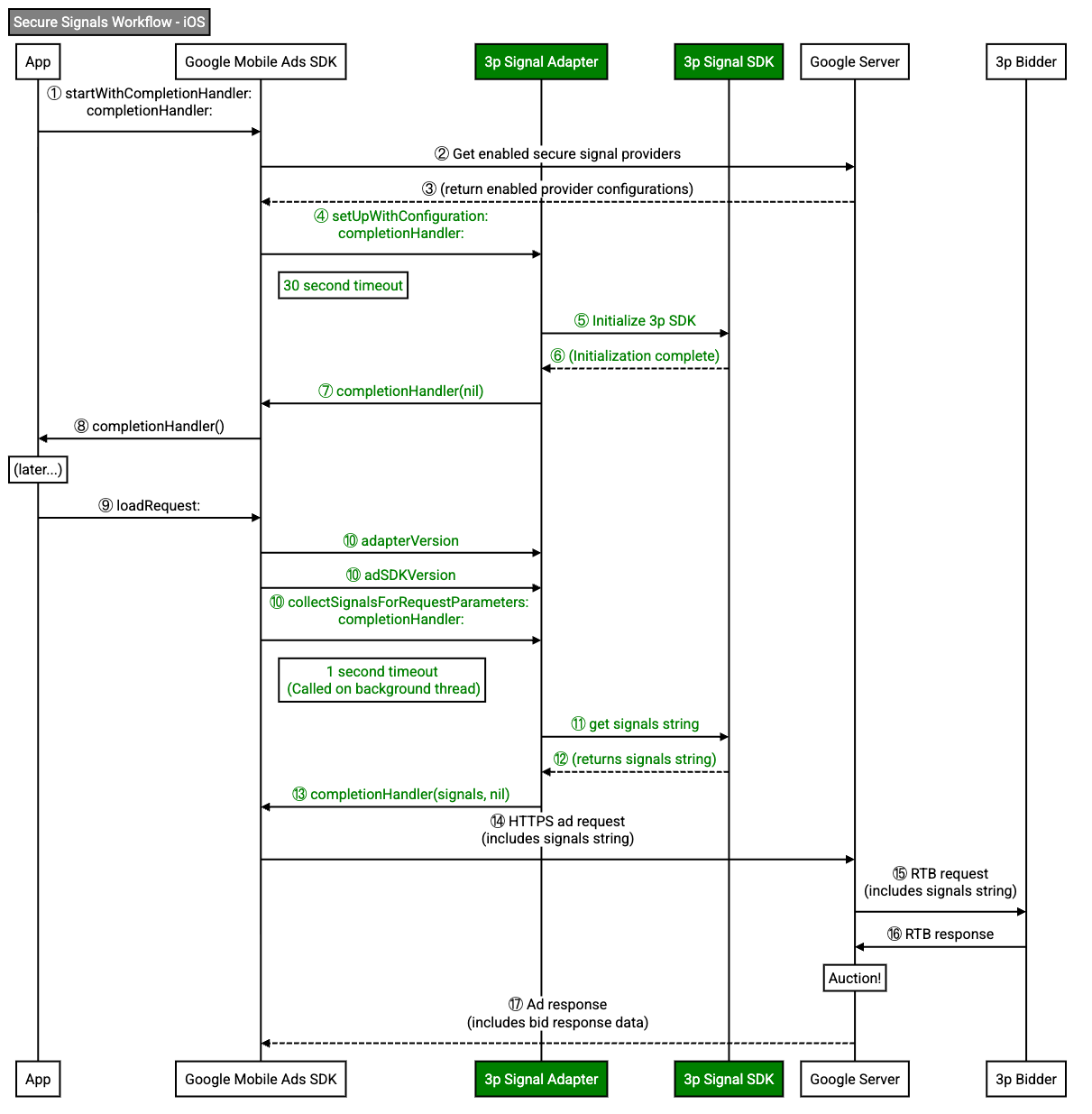
安全信號轉接程式負責初始化轉接程式和收集信號。
導入安全信號轉接程式
導入 Google Mobile Ads SDK 的安全信號轉接程式,從 SDK 收集信號。
本指南說明如何透過導入 GADRTBAdapter 通訊協定,導入安全信號轉接程式。
以下範例實作 GADRTBAdapter 通訊協定:
Objective-C
@interface SampleAdapterSnippets : NSObject <GADRTBAdapter>
@end
初始化轉接程式
Google Mobile Ads SDK 會在例項化安全信號介面卡時呼叫 setUpWithConfiguration:completionHandler: 方法。Google Mobile Ads SDK使用這個方法初始化 SDK。
SDK 完全初始化並準備好讓 Google Mobile Ads SDK 收集信號時,請呼叫 GADMediationAdapterSetUpCompletionBlock 完成區塊。
如果安全信號轉接程式未回呼,Google Mobile Ads SDK就不會從安全信號轉接程式收集信號。
以下範例會呼叫完成處理常式,通知 Google Mobile Ads SDK 您的 SDK 已成功初始化:
Objective-C
+ (void)setUpWithConfiguration:(GADMediationServerConfiguration *)configuration
completionHandler:(GADMediationAdapterSetUpCompletionBlock)completionHandler {
// Add your SDK initialization logic here.
// Invoke the completionHandler once initialization completes. Pass a nil
// error to indicate initialization succeeded.
completionHandler(nil);
}
回報轉接程式和 SDK 版本
安全信號轉接程式必須回報轉接程式版本和 SDK 版本。Google Mobile Ads SDK 會使用這些版本製作報表和排解問題。
如果 SDK 在同一個二進位檔中實作這個轉接程式,您可以為轉接程式和 SDK 版本傳回相同版本。
以下範例會傳回安全信號轉接程式的版本:
Objective-C
+ (GADVersionNumber)adapterVersion {
// If your secure signals SDK implements this adapter in the same binary
// return the same version as your SDK.
// return [self adSDKVersion];
// If you built a separate binary for this secure signals adapter, return
// the adapter's version here.
GADVersionNumber version = {};
version.majorVersion = 4;
version.minorVersion = 5;
version.patchVersion = 6;
return version;
}
以下範例會傳回安全信號轉接程式互動的 SDK 版本:
Objective-C
將 kSDKVersionString 替換為您的 SDK 版本字串。
收集信號
每次發出廣告請求時,Google Mobile Ads SDK 會在背景執行緒中,同時從所有轉接程式收集信號。
下列範例會呼叫 GADRTBSignalCompletionHandler 完成處理常式,收集信號並傳回至 Google Mobile Ads SDK:
Objective-C
將 kSampleSignalPlaceholder 替換為您的安全信號字串。
信號收集作業必須在一秒內完成。如果信號收集時間超過一秒,請考慮在初始化轉接程式時,將信號快取到安全信號轉接程式或 SDK 中。
如果安全信號轉接程式無法收集信號,請使用 nil 信號和 NSError 物件呼叫完成處理常式。
混淆信號
與出價方和收錄合作夥伴共用安全信號時,您必須對信號進行模糊處理。
傳回廣告聯播網額外資訊的 nil 值
安全信號轉接程式不需要額外的網路參數。
下列 +networkExtrasClass 方法會傳回 nil 值:
Objective-C
+ (nullable Class<GADAdNetworkExtras>)networkExtrasClass {
// Network extras are not applicable because signal providers do not request ads.
return nil;
}