
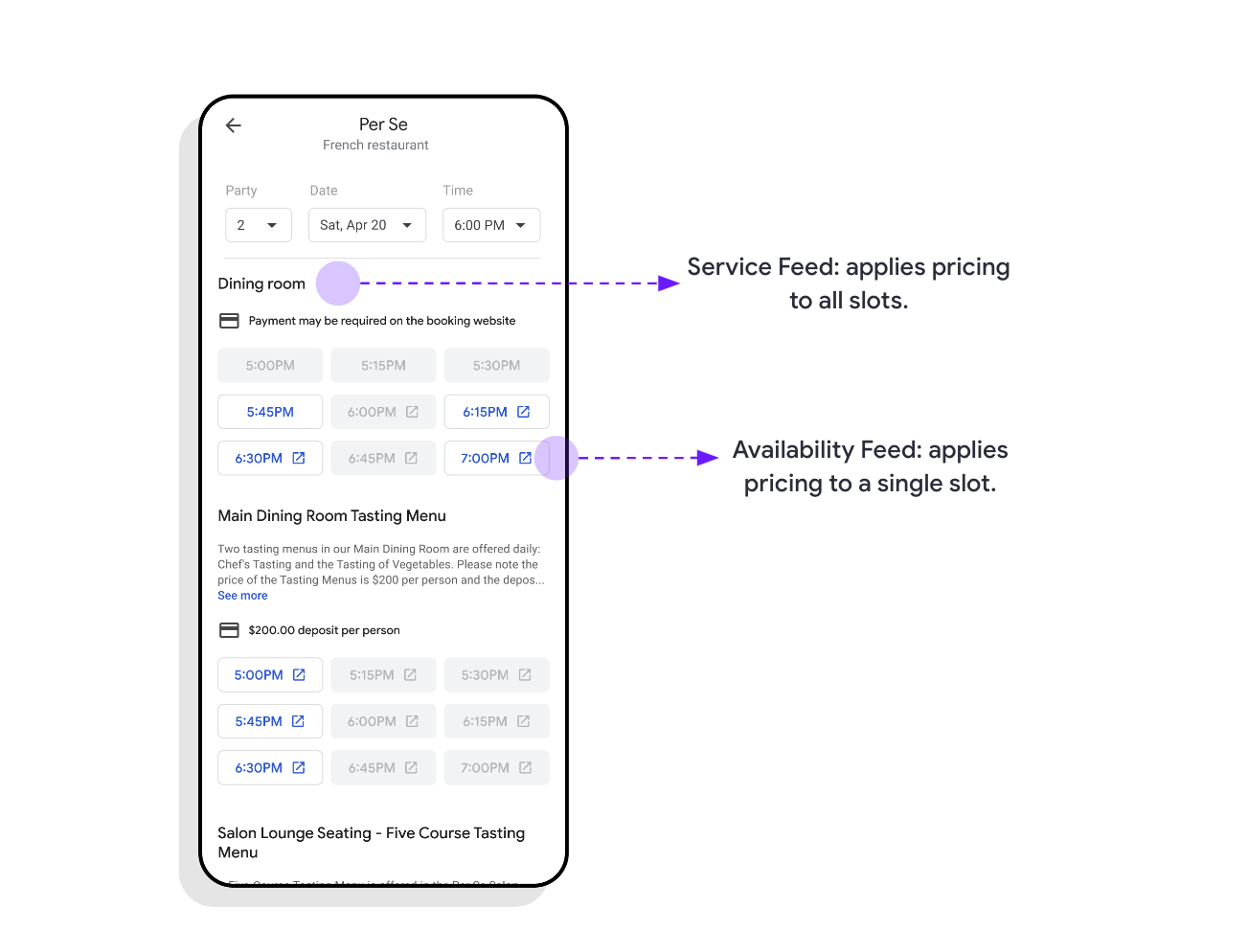
URL şablonunuzu oluşturduktan sonra aşağıdaki adımları uygulayarak yerlerinize ödeme ekleyebilirsiniz.
- Ücretli yerleri belirleme
- Slot Fiyatlarını Belirleme
- Ön ödemeleri ayarlama
- Gelmeme veya İptal Ücretleri Belirleme
- Mevduat ayarlama
- Kredi Kartı Gerekli Ayarını Yapma
1. Ücretli yerleri belirleme
Fiyatlandırmanızı Hizmet Feed'i veya Müsaitlik Durumu Feed'i'ni kullanarak tanımlayabilirsiniz. Fiyatı hizmet düzeyinde tanımlayarak söz konusu hizmet veya yemek salonundaki tüm uygunluk aralıklarını sabit bir fiyata ayarlarsınız. Fiyatı tanımlarken ise belirli bir zaman aralığı için fiyatı ayarlarsınız. Örneğin, aşağıdaki durumlar fiyatları veya ücretleri stok durumu düzeyinde belirleyerek ele alınabilir:
- Fiyatlar salı günleri düşürülür, cumartesi günleri ise artırılır.
- Saat 17:00 ile 19:00 arasındaki müsaitlik durumu için görünmeme ücreti uygulanmaz.
- 6'dan fazla kişilik gruplar için depozito alın.
- Belirli bir odadaki rezervasyonlar için kredi kartı gerekir.
2. Alan fiyatlarını ayarlama
Ön Ödeme
Bu yapılandırma, hizmet tutarının rezervasyon sırasında tam olarak ödenmesi gerektiğini belirtmek için kullanılır. Ön ödeme, Avaibility feed'inin payment alanı aracılığıyla kullanılabilirlik düzeyinde belirtilir.
Ön Ödeme Örneği
{
  "availability": [{
    "merchant_id": "dining-A",
    "service_id": "reservation",
    "start_sec": 1535853600,
    "duration_sec": 2700,
    "spots_total": 2,
    "spots_open": 2,
    "resources": {
    "room_id": "A-dining-room",
    "room_name": "Wine Tasting Room",
    "party_size": 2,
    "prepayment": {
      "price_info": {
        "price": {
          "price_micros": 200000000,
          "currency_code": "USD"
        },
        "price_type": "PER_PERSON"
        }
      }
    }
  }]
}
Stok durumu feed'i
message Availability {
  ...
  // Optional prepayment information for this availability. Prepayment is only
  // available through the Payment Redirect Add-on
  Prepayment prepayment = 20;
}
Ön Ödeme Tanımı
// A payment the user may be charged as part of their reservation.
message Prepayment {
  PriceInfo price_info = 1;
}
Rezervasyonu kullanmama veya iptal ücretleri
Kullanıcılar rezervasyonlarına katılmazsa veya iptal süresi sona erdikten sonra iptal ederse katılmama veya iptal ücreti alınabilir. İptal aralığı belirtilmezse varsayılan olarak aralığın başlangıç zamanı kullanılır.
Gösterilmeme ücreti belirtmek için hizmet feed'inde aşağıdaki örnekte gösterildiği gibi no_show_fee alanını eklemeniz gerekir:
Rezervasyonu Kullanmama / İptal Ücreti Örneği
Açıklama:
Örnekte, randevu sahibi randevuya katılmazsa iş ortağı veya satıcı, "no_show_fee.fee.price_micros" alanında belirtildiği gibi 25 ABD doları tutarında sabit bir ücret talep etmeye yetkilidir. Bu ücret, kullanıcının randevudan 4 saat (14.400 saniye) önce iptal etmesi durumunda da alınabilir. Bu süre, "scheduling_rules.min_advance_online_canceling" alanında belirtilir.{ "merchant_id": "merchant-1", "service_id": "service-2-b", "name": "Reservation", "description": "A dining reservation", "price": { "price_micros": 200000000, "currency_code": "USD" }, "scheduling_rules": { "min_advance_online_canceling": 14400 }, "no_show_fee": { "fee": { "price_micros": 25000000, "currency_code": "USD" }, "fee_type": "FIXED_RATE_DEFAULT" } }
Hizmet Feed'i
message Service {
  ...
  // Defines a no show fee that may be charged to the user. Can be overridden
  // at the availability level. (optional)
  NoShowFee no_show_fee = 12;
}
Stok durumu feed'i
message Availability {
  ...
  // Defines a no show fee that may be charged to the user. Overrides the
  // service no show fee if one was specified. Setting this to an empty
  // NoShowFee message removes any service-level no show fee. (optional)
  NoShowFee no_show_fee = 13;
}
Rezervasyonu Kullanmama Ücreti Tanımı
// A fee that a user may be charged if they have made a booking but do not
// show up.
message NoShowFee {
  // The amount the user may be charged if they do not show up for their
  // reservation.
  Price fee = 1;

  // Defines how the fee is determined from the availability.
  PriceType fee_type = 3;
}
Ödeme
Depozitolar, rezervasyon için gerekli olan ilk ücreti almak amacıyla kullanılır. Depozito, rezervasyon sırasında veya daha sonraki bir tarihte alınabilir. Depozitonun hangi şartlarda iade edilebileceğini ve rezervasyonun ne zaman online olarak iptal edilebileceğini tanımlamanız gerekebilir.
Depozito belirtmek için hizmet feed'inde aşağıdaki örnekte gösterildiği gibi deposit alanını eklemeniz gerekir:
Depozito Örneği
Açıklama:
`min_advance_online_canceling` `deposit.min_advance_cancellation_sec`, depozitonun ne zaman iade edilebileceğini tanımlar. Örnekte, depozitonun iptal süresinin geri ödeme şartlarından ayrı olarak belirtilebileceğini unutmayın. Bu durumda, kullanıcılar hizmeti 24 saat (86.400 saniye) öncesine kadar online olarak iptal edebilir. Bu sayede satıcı, geç iptallerden doğrudan haberdar olur. Ancak kullanıcı, rezervasyondan 4 saat öncesine kadar (14.400 saniye) depozitosunun iadesini talep edebilir (iptal için sizinle veya satıcıyla iletişime geçerek). Bu durum, ödeme sırasında şartlarda ve onay e-postasında gösterilir.{ "merchant_id": "merchant-1", "service_id": "service-2-b", "name": "Reservation", "description": "A dining reservation", "price": { "price_micros": 200000000, "currency_code": "USD" }, "scheduling_rules": { "min_advance_online_canceling": 86400, }, "deposit": { "deposit": { "price_micros": 25000000, "currency_code": "USD" }, "min_advance_cancellation_sec": 14400, "deposit_type": "FIXED_RATE_DEFAULT" } }
Hizmet Feed'i
message Service {
  ...
  // Defines how a deposit may be charged to the user. Can be overridden at the
  // availability level. (optional)
  Deposit deposit = 11;
}
Stok durumu feed'i
message Availability {
  ...
  // Defines how a deposit may be charged to the user. Overrides the service
  // deposit if one was specified. Setting this to an empty Deposit message
  // removes any service-level deposit. (optional)
  Deposit deposit = 12;
}
Depozito Tanımı
// A deposit that the user may be charged or have a hold on their credit card
// for.
message Deposit {
  // Deposit amount.
  Price deposit = 1;

  // Minimum advance cancellation for the deposit.
  int64 min_advance_cancellation_sec = 2;

  // Defines how the deposit is determined from the availability.
  PriceType deposit_type = 3;
}
Kredi kartı gerektir
Bir hizmet, kimliği doğrulamak için ek bir yöntem olarak kredi kartı isteyebilir. Ancak ön ödeme, depozito veya rezervasyonu iptal etmeme ücretleri için kullanılmamalıdır. Bu kullanım alanları gerekliyse açıkça yapılandırılmalıdır. Kredi kartı zorunluluğu, bu hizmet için rezervasyonlarda genellikle önemli bir düşüşe yol açar.
Ödeme sırasında kredi kartı verilmesini zorunlu kılmak için require_credit_card alanını REQUIRE_CREDIT_CARD_ALWAYS olarak ayarlamanız gerekir.
Kredi Kartı Gerekli Örneği
{
  "merchant_id": "merchant-1",
  "service_id": "reservation",
  "name": "reservation",
  "description": "Food reservation",
  "require_credit_card": "REQUIRE_CREDIT_CARD_ALWAYS"
}
Hizmet Feed'i
message Service {
  ...
  // Indicates whether the user must provide a credit card in order to book this
  // service.
  // This value can be overridden at the availability level. (optional)
  RequireCreditCard require_credit_card = 13;
}
Stok durumu feed'i
message Availability {
  ...
  // Indicates whether the user must provide a credit card in order to book this
  // availability slot.
  // If the value is not set, it is inherited from the service level if it's set
  // there. (optional)
  RequireCreditCard require_credit_card = 14;
}
Kredi Kartı Tanımı Gerektir
// Defines whether a credit card is required in order to book an appointment.
enum RequireCreditCard {
  // The credit card requirement is not explicitly specified and the
  // behaviour is identical to the one specified for CONDITIONAL.
  REQUIRE_CREDIT_CARD_UNSPECIFIED = 0;

  // Google will require a credit card for the booking if any of the following
  // conditions are met:
  // * the availability has a price and the prepayment_type is REQUIRED
  // * the no_show_fee is set
  // * the deposit field is set.
  REQUIRE_CREDIT_CARD_CONDITIONAL = 1;

  // A credit card is always required in order to book this availability
  // regardless of other field values.
  REQUIRE_CREDIT_CARD_ALWAYS = 2;
}
Ek Tanımlar
Fiyat Aralığı Tanımı
// Wrapper for a range of monetary amount treated as unbounded unless both
// values are set. At least one of min_amount and max_amount is required.
message PriceRange {
  // Minimum amount.
  Price min_price = 1;

  // Maximum amount. Should always be > min_price.
  Price max_price = 2;
}
Fiyat bilgisi tanımı
// Container for price details.
message PriceInfo {
  oneof price_options {
    Price price = 1;

    // The upper and/or lower bound
    PriceRange price_range = 2
        ;
  }

  // Defines how price or price range is applied (per person or fixed)
  PriceType price_type = 3;
}
Fiyat Türü Tanımı
// Defines how a total price is determined from an availability.
enum PriceType {
  // The price is for a fixed amount. This is the default value if the field is
  // not set.
  //
  // Examples:
  //   $50 deposit to reserve a table; $20 no show fee for a yoga class
  FIXED_RATE_DEFAULT = 0;

  // The price specified is per person, and the total price is calculated
  // according to the party size specified in Resources as price_micros *
  // party_size. A PER_PERSON price must be accompanied by a party size in the
  // availability resources. If it is not, a party size of one is used.
  //
  // Examples:
  //   $10 each for tickets to a museum
  PER_PERSON = 1;
}