

Google Workspace Model Context Protocol (MCP) 服务器使用服务器驱动的人机协同审批机制,在 AI 智能体执行操作(例如发送电子邮件、修改日历活动、更新或删除文件,或读取数据和元数据)之前保护用户数据。这些操作也受用户和管理员政策的约束。服务器使用 MCP 表单模式引导请求这些批准。
例如,用于发送 Gmail 邮件的审批对话框可能如下所示:
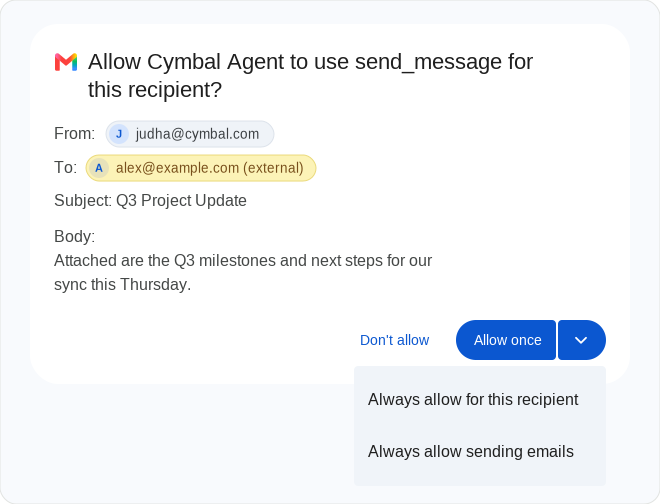
本指南介绍了如何连接到 /mcp/v1 端点、设计审批对话框以提供最佳用户体验,以及在 MCP 主机、MCP 客户端或智能体框架中实现无状态表单引导协议。
准备工作
在实现或配置 MCP 表单引导之前,请先完成前提条件,确定您的 MCP 主机或客户端是否需要自定义引导支持,并查看服务器端点。
前提条件
在自定义 MCP 主机或客户端中实现表单引导之前,请先完成以下设置要求:
- 在同一 Google Cloud 项目中启用 API 和 MCP 服务器:在启用目标 Google Workspace API 和 MCP 服务器端点的同一 Google Cloud 项目中创建 OAuth 2.0 客户端 ID。在创建 OAuth 客户端时,选择将此客户端用于 AI 赋能的智能体。如需查看完整说明,请参阅配置 Google Workspace MCP 服务器。
- 为目标工具请求所需的 OAuth 2.0 范围:使用
tools/call调用工具需要一个 OAuth 2.0Bearer访问令牌,其中包含该工具所需的范围,即使tools/list返回的可用工具与令牌范围无关。请查看服务器的 MCP 参考概览页面,了解每个工具所需的 OAuth 范围。
检查是否需要实现表单引导
我们建议您使用 MCP 表单引导连接到 /mcp/v1 端点,以便您的智能体可以访问整套 Google Workspace 工具和结果。您是否需要编写代码取决于 MCP 主机和 MCP 客户端的构建方式:
- 配置预构建的 MCP 主机:如果您要连接支持 MCP 表单引导的预构建 MCP 托管应用(例如 Google Antigravity 或 Claude Desktop),则无需编写表单引导代码:
- 连接到
/mcp/v1端点。如需了解设置步骤,请参阅配置 Google Workspace MCP 服务器。 - 将主机的内置本地工具确认设置设为始终允许
/mcp/v1上的 Google Workspace MCP 服务器,这样用户就不会因同一操作而收到两次提示。 - 如果您的预构建 MCP 主机尚不支持表单引导,您可以连接到受限的
/mcp/v1self后备端点,该端点会公开无需表单引导即可使用的工具,但特定调用可能仍需获得批准。
- 连接到
- 将 MCP 客户端 SDK 或智能体框架集成到 MCP 宿主中:如果您使用的 MCP 客户端库或智能体框架(例如智能体开发套件 [ADK])已在协议层处理表单引导,则仍需将其引导处理程序连接到 MCP 宿主的界面或 CLI 界面。请按照本指南中的审批界面建议进行实现,以便在
/mcp/v1上提供最佳用户体验。 - 构建自定义 MCP 客户端和宿主:如果您要构建自己的 MCP 客户端和宿主集成,请同时实现无状态表单引导协议和本指南中的审批界面建议,以连接到
/mcp/v1。
服务器端点
正式版 Google Workspace MCP 服务器和通用搜索 MCP 服务器提供主要的 /mcp/v1 端点和有限的 /mcp/v1self 后备端点:
| 端点 | 服务器网址 | 表单引导要求 | 可用工具 |
|---|---|---|---|
/mcp/v1 |
|
推荐的主要端点。与 mode: "form" 引导搭配使用。
|
公开服务器的所有工具和完整结果集,包括在默认政策下始终需要用户批准的工具。 |
/mcp/v1self |
|
后备端点。根据政策和目标资源,特定调用可能仍需要表单引导。 |
省略在默认政策下始终需要审批的工具,仅公开无需表单引导即可使用的工具,例如 update_doc。列表和搜索方法(例如 list_threads)仅返回无需审批即可访问的结果子集,而不会提示请求完整访问权限。
|
请尽可能将 /mcp/v1 与表单引导功能搭配使用,并为无法添加表单引导支持的 MCP 主机预留 /mcp/v1self。如果客户端以需要用户在任一端点批准的方式调用工具,但未声明支持表单引导,则服务器会阻止该调用并返回 MissingRequiredClientCapability 错误。
如需查看 /mcp/v1 和 /mcp/v1self 上针对每项服务提供了哪些工具,请查看服务器的工具参考概览页面:
- Gmail MCP 参考文档
- Drive MCP 参考文档
- Google 文档 MCP 参考文档
- Google 表格 MCP 参考文档
- Google 幻灯片 MCP 参考文档
- 日历 MCP 参考文档
- Chat MCP 参考文档
- 通用搜索 MCP 参考文档
表单引导的工作原理
Google Workspace MCP 服务器使用基于 2026-07-28 MCP Elicitation 规范的无状态、单连接请求和重试流程。
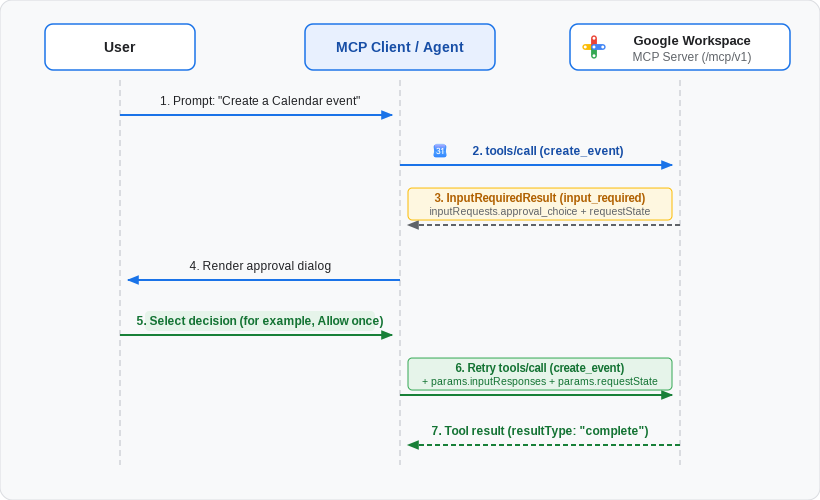
表单引导生命周期遵循以下步骤:
- 用户提示:用户要求智能体执行某项操作,例如创建日历活动。
- 初始
tools/call请求:MCP 客户端向/mcp/v1端点发送tools/call请求,以调用create_event等工具,并在params._meta中声明elicitation功能。 InputRequiredResult请采取行动:当请求的操作需要用户批准时,服务器会在运行工具之前暂停执行。服务器会返回一个result对象,其中包含resultType: "input_required"、一个以"approval_choice"为键的inputRequests映射(包含一个带有mode: "form"的elicitation/create请求)以及一个不透明的requestState字符串。- 审批对话框:MCP 客户端会呈现一个审批对话框,其中显示目标 Google Workspace 产品和工具、Markdown 确认消息、决策问题以及
enum和enumNames中允许的选择。 - 用户决定:用户选择一个批准选项,例如仅限这一次或不允许。
- 使用
inputResponses和requestState重试tools/call:MCP 客户端发送第二个tools/call请求,其中包含相同的工具name和arguments,以及包含用户为"approval_choice"选择的选项的顶级params.requestState和params.inputResponses字段。 - 工具执行结果:服务器验证
requestState是否绑定到初始调用中的确切工具参数,评估用户的决定,执行或结束工具调用,并返回包含resultType: "complete"的最终result。
当有人请求审批时
工具调用是否会触发 elicitation/create 质询,由 Google Workspace MCP 服务器根据系统、用户和管理员治理政策动态决定。政策评估可以考虑以下因素:
- 操作类型:默认情况下,与受众群体共享数据或修改共享资源的写入操作需要用户确认,除非用户或管理员政策允许,而自行写入(例如创建私有文件)默认情况下无需确认即可执行。删除操作始终需要每次调用确认,而无需永久批准,并且读取或元数据操作也可能需要确认,具体取决于用户或管理员政策。
- 内容所有权和公开范围:访问或修改其他用户拥有的文件或在用户组织外部共享的文件可能需要获得批准。
- 外部收件人:向用户网域之外的人员发送消息、共享文件或邀请参加者通常需要明确确认。
- 用户和管理员偏好设置:之前交易中保存的审批偏好设置或网域级管理员规则可能会要求或绕过特定工具的确认。
由于每次调用都会在服务器端进行政策评估,因此您的客户端必须准备好在任何 tools/call 调用中处理 InputRequiredResult 响应。切勿在客户端上硬编码工具敏感度规则或缓存审批决策。
审批选项参考
在 requestedSchema.properties.approval_choice 中,服务器会返回并行的 enum 和 enumNames 数组,这些数组表示当前请求可用的选项。在 Google Workspace MCP 服务器中,支持以下 enum 值:
enum 值 |
默认 enumNames 标签(英语) |
允许执行 | 提供时机和行为 |
|---|---|---|---|
ALLOW_ONCE |
允许一次 | 是 | 在每个审批提示中提供。运行当前工具调用一次,而不记录永久性规则。 |
DENY_ONCE |
不允许 | 否 |
在每个审批提示中提供。结束当前工具调用并返回 UserDeniedAction 错误,而不记录永久性规则。
|
ALLOW_TOOL_ALWAYS |
始终允许此工具 | 是 | 当用户和管理员政策允许在整个工具范围内进行永久性审批时,系统会提供此选项。运行当前调用,并预先批准同一智能体日后对同一工具的调用。 |
ALLOW_RESOURCE_ALWAYS |
对这个文件/文件夹/云端硬盘/邮件/活动/聊天室/对话/群聊/任务/内容始终允许 | 是 | 在修改或访问最多 100 个相同类型的资源时提供。当调用针对多个资源时,使用复数措辞,例如对这些文件始终允许。运行当前调用,并预先批准来自同一代理的针对相同资源 ID 的未来调用。 |
ALLOW_AUDIENCE_ALWAYS |
对该收件人/这些收件人始终允许 | 是 | 针对最多 100 位收件人提供发送、共享和邀请操作。运行当前调用,并预先批准同一代理将来对同一收件人集的调用。 |
ALLOW_OWNER_ALWAYS |
对这个所有者/这些所有者始终允许 | 是 | 在读取或接地提示涉及最多 3 个不同所有者的内容时提供。运行当前调用,并预先批准来自同一代理的未来调用,以访问这些用户拥有的内容。 |
任何单个 InputRequiredResult 仅包含适用于该特定工具调用的选项子集:
- 破坏性和删除操作:永久删除或删除资源的操作,或受管理员政策约束、要求每次调用都进行确认的操作,仅提供
ALLOW_ONCE和DENY_ONCE。 - 限定范围的操作:如果允许永久批准,服务器会返回
ALLOW_ONCE、适用的限定范围(例如ALLOW_AUDIENCE_ALWAYS或ALLOW_RESOURCE_ALWAYS)、ALLOW_TOOL_ALWAYS和DENY_ONCE。
始终呈现当前请求的 enum 和 enumNames 中返回的确切选项,而不是对按钮值进行硬编码。
旨在提供最佳用户体验的推荐做法
支持表单收集功能的标准 MCP 客户端可与 /mcp/v1 搭配使用,无需额外配置。不过,通用表单渲染器通常会将单选决策显示为单选按钮组或下拉菜单,并配有单独的提交按钮,这需要额外的点击,并且会隐藏目标 Google Workspace 应用上下文。
为了获得最佳的表单引导用户体验,请在 MCP 客户端中实现以下五项建议。建议 1 到 3 对应于以下审批对话框插图中的带编号标注:
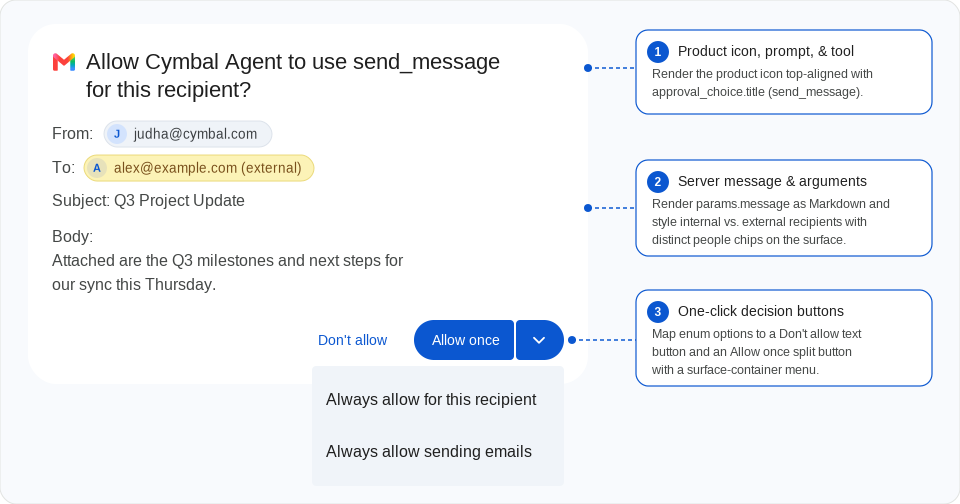
1. 显示商品名称、图标和工具
用户应能立即看到代理想要调用的 Google Workspace 产品和工具:
- 将 MCP 服务器在初始化或
server/discover期间提供的serverInfo元数据,或请求主机名(例如calendarmcp.googleapis.com)映射到 Google Workspace 产品名称和图标。 - 将
InputRequiredResult上的_meta呈现提示(例如title、icons和isConfirmation)视为可选增强功能。生产环境中的 Google Workspace MCP 服务器尚不会发出这些_meta字段,因此您的界面不应依赖这些字段。 - 显示
params.name中的目标工具名称,以便用户区分create_draft和create_event等操作。
2. 呈现服务器消息和 enumNames
保持客户端展示层简单,并直接呈现服务器提供的审批内容:
- 将
params.message渲染为 Markdown 并显示approval_choice.title:Google Workspace MCP 服务器已将操作详细信息格式化为inputRequests.approval_choice.params.message中的 Markdown,并在requestedSchema.properties.approval_choice.title中提供本地化的确认问题。直接使用安全的 Markdown 渲染器渲染message,而不是显示原始 Markdown 符号或编写自定义的每个工具参数格式设置逻辑,并在操作按钮上方清晰显示title。 - 将
enum值与enumNames标签配对:动态检查requestedSchema.properties.approval_choice。将enum中的每个标识符与enumNames中相同索引处的人类可读标签配对,并在与其他使用oneOf的 MCP 服务器交互时回退到 JSON 架构oneOf条目。
3. 一键操作,轻松决策
当 requestedSchema 包含单个枚举属性时,请避免呈现需要单独点击提交的单选按钮列表或下拉菜单:
- 两个选项,例如
Allow once和Don't allow:并排呈现两个按钮。点击任一按钮都会立即提交重试请求。 - 多个“允许”选项:当服务器返回
ALLOW_ONCE、一个或多个永久性允许范围(例如ALLOW_AUDIENCE_ALWAYS或ALLOW_TOOL_ALWAYS)以及DENY_ONCE时,系统会呈现一个主拆分按钮,该按钮默认设置为仅限一次,并带有一个光标菜单,用于显示其他“允许”选项,同时配有一个单独的不允许按钮。
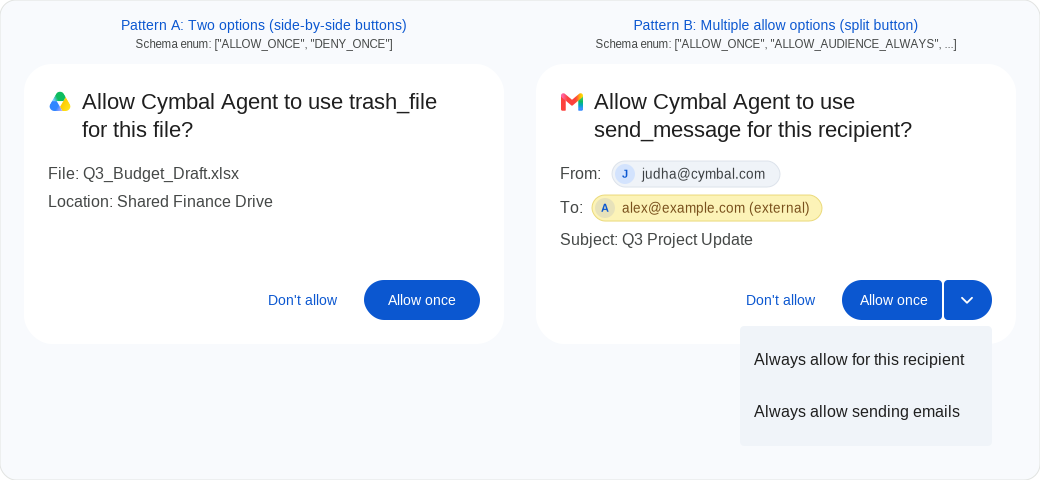
在模式 A 中,破坏性云端硬盘操作仅返回 ALLOW_ONCE 和 DENY_ONCE,客户端会将其呈现为两个并排按钮,分别对应不允许和允许一次。在模式 B 中,Gmail 操作会返回 ALLOW_ONCE、ALLOW_AUDIENCE_ALWAYS、ALLOW_TOOL_ALWAYS 和 DENY_ONCE,客户端会将其呈现为不允许按钮,以及允许一次拆分按钮,其菜单会显示永久允许选项。
4. 避免在/mcp/v1上显示重复的提示
许多 MCP 主机在执行任何外部工具之前都会显示内置的本地确认提示。在调用启用了表单引导的 Google Workspace MCP 服务器时,本地预执行提示会造成多余的双重提示体验,因为服务器会强制执行其自身的政策感知引导质询。
- 如果您要配置具有表单引导功能的预构建 MCP 主机:请将
/mcp/v1上 Google Workspace MCP 服务器的主机本地工具确认设置设为始终允许,并依赖服务器发起的引导对话框。如果您的主机不支持表单引导,并且连接到/mcp/v1self,请保持启用本地工具确认,以便在调用未触发服务器端审批时,在客户端显示提示。 - 如果您正在构建 MCP 主机:当为
*mcp.googleapis.com和people.googleapis.com(例如gmailmcp.googleapis.com、calendarmcp.googleapis.com、drivemcp.googleapis.com和workspacemcp.googleapis.com)启用表单引导时,请隐藏主机的通用预调用确认对话框。仅当服务器返回包含resultType: "input_required"的InputRequiredResult时,才提示用户。
5. 引导智能体在工具和拒绝方面的行为
推理模型可能会通过以下两种方式误解人机协同审批流程:
- 预先避免使用写入工具:如果模型假设调用写入工具(例如
send_message)会立即执行,而无需用户审核,则即使在用户要求发送电子邮件时,模型也可能会回退到草稿工具(例如create_draft)。 - 在拒绝后使用备用写入工具重试:如果用户在审批对话框中点击不允许,并且服务器返回
UserDeniedAction错误结果,则模型可能会将拒绝视为暂时性工具故障,并尝试使用其他写入工具实现相同的目标,从而触发不必要的第二次审批提示。
为防止出现这两个问题,请在智能体的系统提示中添加以下指令:
提示
When calling Google Workspace MCP tools:
1. Select the tool that directly matches the user's intent (for example,
   use send_message when asked to send an email). Sensitive tools
   automatically pause for user confirmation through MCP form elicitation
   before executing.
2. If a tool call fails because the user denied, declined, or canceled the
   approval request, stop immediately and acknowledge the user's decision.
   Do not retry the same action or call an alternative write tool unless
   the user explicitly asks you to do so in a new message.
传输和无状态协议要求
Google Workspace MCP 服务器通过无状态 Streamable HTTP 运行。 构建自定义 MCP 客户端时,请在每个请求中遵循以下网络要求:
- HTTP 标头:在对
/mcp/v1的所有POST请求中包含以下标头:Authorization: Bearer ACCESS_TOKENContent-Type: application/jsonAccept: application/json, text/event-streamMCP-Protocol-Version: 2026-07-28Accept-Language: BCP_47_LANGUAGE_TAG,将确认消息、问题和enumNames标签本地化为用户的首选语言,例如es-419, es;q=0.9, en;q=0.8。如果省略,文本默认为en-US。
- 响应内容类型:根据服务器和请求类型,HTTP 响应正文可以采用标准 JSON 格式(使用
Content-Type: application/json),也可以采用服务器发送事件 (SSE) 格式(使用Content-Type: text/event-stream,其中 JSON-RPC 载荷显示在data: {...}行中)。您的 HTTP 传输解析器必须接受这两种格式。 - 无状态发现:Google Workspace MCP 服务器不维护有状态
initialize会话。如需在启动时提取服务器元数据和功能,请发送包含"method": "server/discover"和"params": {}的 JSON-RPC 请求,该请求会返回result._meta["io.modelcontextprotocol/serverInfo"]中的服务器元数据。自定义确认_meta提示(例如isConfirmation、title和icons)尚未在生产InputRequiredResult响应中发出,因此请始终将_meta呈现字段视为可选字段,并回退到serverInfo或服务器主机名。 - 每个请求的
_meta功能:由于传输是无状态的,因此请在每个tools/list和tools/call请求的params中包含_meta,并使用以下键:"io.modelcontextprotocol/protocolVersion": "2026-07-28""io.modelcontextprotocol/clientInfo":{"name": "YOUR_APP_NAME","version": "VERSION"}"io.modelcontextprotocol/clientCapabilities":{"elicitation": {"form": {}}}
错误处理和参数绑定
当工具调用被屏蔽或重试未通过验证时,服务器会返回工具级错误结果或顶级 JSON-RPC 错误对象,具体取决于失败类别:
UserDeniedAction和AdminPolicyBlock:当用户拒绝批准提示或管理员政策阻止操作时,服务器会返回 JSON-RPCresult,其中包含"resultType": "complete"、"isError": true和result.content中的本地化出错提示。如果为服务和环境启用了该功能,服务器还会在result._meta["google.com/error"]中包含结构化错误元数据。由于result._meta["google.com/error"]是按服务和环境进行限制的,因此当result._meta["google.com/error"]不存在时,您的客户端必须回退到从result.content读取出错提示:UserDeniedAction:当用户选择DENY_ONCE、拒绝或取消审批表单时返回。默认英文消息为"Action canceled. The user declined the confirmation request."AdminPolicyBlock:当组织管理员政策禁止代理执行操作时返回。默认的英文消息为"Action could not be completed. Your administrator has blocked third-party agents from performing this action."
JSON
{ "jsonrpc": "2.0", "id": 3, "result": { "resultType": "complete", "isError": true, "content": [ { "type": "text", "text": "Action canceled. The user declined the confirmation request." } ], "_meta": { "google.com/error": { "code": 400, "message": "Action canceled. The user declined the confirmation request.", "status": "FAILED_PRECONDITION", "details": [ { "@type": "type.googleapis.com/google.rpc.ErrorInfo", "reason": "UserDeniedAction", "domain": "mcp.googleapis.com" } ] } } } }MissingRequiredClientCapability:如果客户端调用工具的方式要求在/mcp/v1或/mcp/v1self上进行用户确认,但未在_meta["io.modelcontextprotocol/clientCapabilities"]中声明表单引导支持,则会返回此错误。服务器会将此错误转换为顶级 JSON-RPCerror对象,其中包含代码-32021和error.data.requiredCapabilities中的所需功能对象:JSON
{ "jsonrpc": "2.0", "id": 2, "error": { "code": -32021, "message": "Action could not be completed. This action requires user confirmation, which this client does not support. Use a client that supports form elicitation to perform this action.", "data": { "requiredCapabilities": { "elicitation": { "form": {} } } } } }参数绑定强制执行:
requestState中的requestBinding令牌会以加密方式将初始审批质询绑定到首次调用时发送的确切工具arguments。如果客户端在重试调用时修改了params.arguments中的任何字段,或者传递了格式不正确或未绑定的params.requestState,则服务器会忽略无效的审批并返回新的InputRequiredResult质询,或者返回无效参数或前提条件失败错误,指示客户端在不使用inputResponses的情况下重试。
实现示例
以下端到端演示展示了 MCP 客户端如何调用 Calendar create_event 工具、在浏览器界面或终端 CLI 中呈现服务器的审批提示,以及如何使用 TypeScript 和 Python 提交用户的决定,最后还展示了可供编码智能体使用的可重用智能体技能。
客户审批界面
在基于浏览器的 MCP 客户端中,TypeScript 实现会呈现一个直观的审批卡片,其中显示日历图标、服务器主机名、工具名称、来自服务器的已渲染 Markdown message 预览、确认问题、不允许按钮和允许一次拆分按钮:
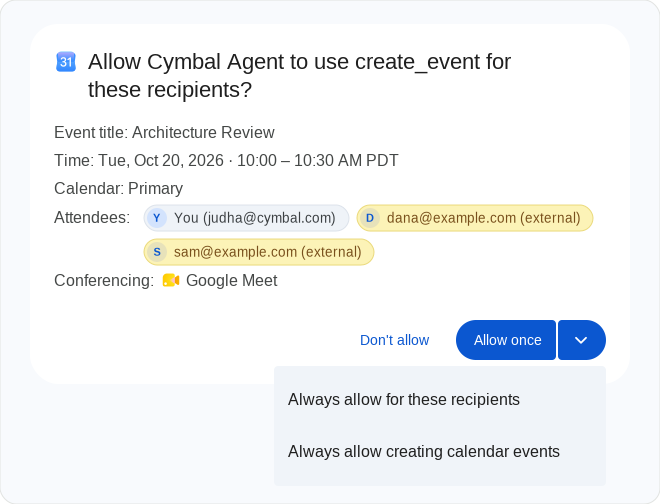
在基于终端的 MCP 客户端中,Python CLI 实现会将相同的 InputRequiredResult 载荷呈现为交互式编号提示:
CLI
=== Google Calendar (create_event) ===
Architecture Review
Tue, Oct 20 · 10:00 - 10:30 AM PDT · 🟢 No calendar conflicts
You, dana@example.com, sam@example.com
Conferencing: Google Meet

Allow Cymbal Agent to use create_event for these recipients?
  [1] Allow once (ALLOW_ONCE)
  [2] Always allow for these recipients (ALLOW_AUDIENCE_ALWAYS)
  [3] Always allow this tool (ALLOW_TOOL_ALWAYS)
  [4] Don't allow (DENY_ONCE)
Enter choice (1-4, or c to cancel):
初始通话和引导式回答
客户端首先会发送 tools/call 请求,以使用 create_event 工具创建日历活动:
JSON
{
  "jsonrpc": "2.0",
  "id": 2,
  "method": "tools/call",
  "params": {
    "name": "create_event",
    "arguments": {
      "calendarId": "primary",
      "summary": "Architecture Review",
      "startTime": "2026-10-20T10:00:00",
      "endTime": "2026-10-20T10:30:00",
      "timeZone": "America/Los_Angeles",
      "attendees": [
        {
          "email": "dana@example.com"
        },
        {
          "email": "sam@example.com"
        }
      ],
      "addGoogleMeetUrl": true
    },
    "_meta": {
      "io.modelcontextprotocol/protocolVersion": "2026-07-28",
      "io.modelcontextprotocol/clientInfo": {
        "name": "Cymbal Agent",
        "version": "1.0.0"
      },
      "io.modelcontextprotocol/clientCapabilities": {
        "elicitation": {
          "form": {}
        }
      }
    }
  }
}
如果需要审批,服务器会返回 InputRequiredResult:
JSON
{
  "jsonrpc": "2.0",
  "id": 2,
  "result": {
    "resultType": "input_required",
    "inputRequests": {
      "approval_choice": {
        "method": "elicitation/create",
        "params": {
          "mode": "form",
          "message": "**Architecture Review**  \nTue, Oct 20 · 10:00 - 10:30 AM PDT · 🟢 No calendar conflicts  \nYou, dana@example.com, sam@example.com  \n**Conferencing:** Google Meet",
          "requestedSchema": {
            "type": "object",
            "required": ["approval_choice"],
            "properties": {
              "approval_choice": {
                "type": "string",
                "title": "Allow Cymbal Agent to use create_event for these recipients?",
                "enum": [
                  "ALLOW_ONCE",
                  "ALLOW_AUDIENCE_ALWAYS",
                  "ALLOW_TOOL_ALWAYS",
                  "DENY_ONCE"
                ],
                "enumNames": [
                  "Allow once",
                  "Always allow for these recipients",
                  "Always allow this tool",
                  "Don't allow"
                ]
              }
            }
          }
        }
      }
    },
    "requestState": "{\"elicitationId\":\"...\",\"requestBinding\":\"...\"}"
  }
}
InputRequiredResult 响应包含以下关键字段:
result.resultType:当服务器暂停执行以等待用户输入时,设置为"input_required";当工具完成执行时,设置为"complete"。result.inputRequests:以请求标识符"approval_choice"为键的映射。每个条目都有"method": "elicitation/create"和一个具有"mode": "form"的params对象。_meta呈现提示:isConfirmation、title和icons等可选字段尚未在生产环境InputRequiredResult响应中发出。始终将_meta字段视为可选字段,并在缺少这些字段时从serverInfo或服务器主机名解析商品名称和图标。inputRequests.approval_choice.params.message:由服务器生成的 Markdown 格式的操作预览,或者确认问题(如果该工具未生成单独的预览卡片)。inputRequests.approval_choice.params.requestedSchema:一个 JSON 架构对象,其properties.approval_choice定义包含以下字段:title:本地化的确认问题,例如"Allow Cymbal Agent to use create_event for these recipients?"。当您在请求中提供_meta["io.modelcontextprotocol/clientInfo"].name时,服务器会将您的应用名称纳入此问题中。enum:ApprovalChoice标识符的有序数组,例如ALLOW_ONCE、ALLOW_AUDIENCE_ALWAYS、ALLOW_TOOL_ALWAYS和DENY_ONCE。enumNames:与enum中的每个条目对应的本地化人类可读标签的并行数组,例如Allow once、Always allow for these recipients、Always allow this tool和Don't allow。
result.requestState:一个不透明的 JSON 编码字符串,其中包含服务器的elicitationId和加密requestBinding令牌。您必须在重试调用时在params.requestState中原样返回此字符串。
重试、拒绝和取消载荷
在用户选择允许选项后,发送第二个 tools/call 请求,其中包含完全相同的 name 和 arguments,并将 requestState 和 inputResponses 作为 params 中的顶级字段传递:
JSON
{
  "jsonrpc": "2.0",
  "id": 3,
  "method": "tools/call",
  "params": {
    "name": "create_event",
    "arguments": {
      "calendarId": "primary",
      "summary": "Architecture Review",
      "startTime": "2026-10-20T10:00:00",
      "endTime": "2026-10-20T10:30:00",
      "timeZone": "America/Los_Angeles",
      "attendees": [
        {
          "email": "dana@example.com"
        },
        {
          "email": "sam@example.com"
        }
      ],
      "addGoogleMeetUrl": true
    },
    "requestState": "{\"elicitationId\":\"...\",\"requestBinding\":\"...\"}",
    "inputResponses": {
      "approval_choice": {
        "action": "accept",
        "content": {
          "approval_choice": "ALLOW_ONCE"
        }
      }
    },
    "_meta": {
      "io.modelcontextprotocol/protocolVersion": "2026-07-28",
      "io.modelcontextprotocol/clientInfo": {
        "name": "Cymbal Agent",
        "version": "1.0.0"
      },
      "io.modelcontextprotocol/clientCapabilities": {
        "elicitation": {
          "form": {}
        }
      }
    }
  }
}
MCP Elicitation 规范区分了提交表单值和关闭对话框。您可以通过以下两种方式在 params.inputResponses 中表示用户的否定决定:
提交
DENY_ONCE选择:当用户点击与DENY_ONCE对应的不允许按钮时,发送"action": "accept"和"content": {"approval_choice": "DENY_ONCE"}:JSON
{ "jsonrpc": "2.0", "id": 3, "method": "tools/call", "params": { "name": "create_event", "arguments": { "calendarId": "primary", "summary": "Architecture Review", "startTime": "2026-10-20T10:00:00", "endTime": "2026-10-20T10:30:00", "timeZone": "America/Los_Angeles", "attendees": [ { "email": "dana@example.com" }, { "email": "sam@example.com" } ], "addGoogleMeetUrl": true }, "requestState": "{\"elicitationId\":\"...\",\"requestBinding\":\"...\"}", "inputResponses": { "approval_choice": { "action": "accept", "content": { "approval_choice": "DENY_ONCE" } } }, "_meta": { "io.modelcontextprotocol/protocolVersion": "2026-07-28", "io.modelcontextprotocol/clientInfo": { "name": "Cymbal Agent", "version": "1.0.0" }, "io.modelcontextprotocol/clientCapabilities": { "elicitation": { "form": {} } } } } }拒绝或取消对话框:如果用户关闭或取消对话框,而未选择允许选项,请发送
"action": "decline"或"action": "cancel"并省略content字段:JSON
"inputResponses": {
  "approval_choice": {
    "action": "cancel"
  }
}
在这两种情况下,服务器都会将响应视为 DENY_ONCE,结束工具执行,并返回工具错误结果。
TypeScript Web 客户端
以下 TypeScript 示例直接从 InputRequiredResult 载荷中提取 Markdown message、确认问题和允许的选项,根据可选的 _meta 提示或服务器主机名解析产品标题,并使用用户的决定重放 tools/call:
TypeScript
const PROTOCOL_VERSION = "2026-07-28";
const CLIENT_INFO = { name: "Cymbal Agent", version: "1.0.0" };
const MAX_ELICITATION_ROUNDS = 3;

const HOST_TITLES: Record<string, string> = {
  "gmailmcp.googleapis.com": "Gmail",
  "calendarmcp.googleapis.com": "Google Calendar",
  "drivemcp.googleapis.com": "Google Drive",
  "docsmcp.googleapis.com": "Google Docs",
  "sheetsmcp.googleapis.com": "Google Sheets",
  "slidesmcp.googleapis.com": "Google Slides",
  "chatmcp.googleapis.com": "Google Chat",
  "people.googleapis.com": "Google Contacts",
  "tasksmcp.googleapis.com": "Google Tasks",
  "workspacemcp.googleapis.com": "Google Workspace",
};

interface ElicitationOption {
  value: string;
  label: string;
}

export interface ElicitationCardModel {
  requestKey: string;
  serverTitle: string;
  serverIconUrl?: string;
  toolName: string;
  markdownMessage: string;
  questionTitle: string;
  decisionFieldKey: string;
  denyOption?: ElicitationOption;
  primaryAllowOption?: ElicitationOption;
  secondaryAllowOptions: ElicitationOption[];
}

function buildBaseMeta(): Record<string, unknown> {
  return {
    "io.modelcontextprotocol/protocolVersion": PROTOCOL_VERSION,
    "io.modelcontextprotocol/clientInfo": CLIENT_INFO,
    "io.modelcontextprotocol/clientCapabilities": {
      elicitation: { form: {} },
    },
  };
}

/**
 * Extracts a UI view model directly from an InputRequiredResult response.
 * Render card.markdownMessage with a safe Markdown renderer in your UI.
 */
export function extractCardModel(
  rpcResult: Record<string, any>,
  toolName: string,
  serverHost = "workspacemcp.googleapis.com",
): ElicitationCardModel | null {
  const inputRequests: Record<string, any> = rpcResult.inputRequests ?? {};
  const requestEntry = Object.entries(inputRequests).find(
    ([, req]: [string, any]) =>
      req?.method === "elicitation/create" && req?.params?.mode === "form",
  );
  if (!requestEntry) {
    return null;
  }
  const [requestKey, elicitationReq] = requestEntry;

  const reqMeta = elicitationReq.params?._meta ?? {};
  const resultMeta = rpcResult._meta ?? {};
  const serverInfo = resultMeta["io.modelcontextprotocol/serverInfo"] ?? {};
  const icons: Array<{ src: string; mimeType?: string }> =
    reqMeta.icons ?? resultMeta.icons ?? serverInfo.icons ?? [];
  const preferredIcon =
    icons.find((icon) => icon.mimeType === "image/svg+xml") ?? icons[0];

  const properties: Record<string, any> =
    elicitationReq.params?.requestedSchema?.properties ?? {};
  const firstProperty = Object.entries(properties)[0];
  if (!firstProperty) {
    return null;
  }
  const [decisionFieldKey, fieldSchema] = firstProperty as [
    string,
    Record<string, any>,
  ];

  let options: ElicitationOption[] = [];
  if (Array.isArray(fieldSchema.enum)) {
    const enumNames: string[] = Array.isArray(fieldSchema.enumNames)
      ? fieldSchema.enumNames
      : [];
    options = fieldSchema.enum.map((val: string, idx: number) => ({
      value: val,
      label: enumNames[idx] ?? val,
    }));
  } else if (Array.isArray(fieldSchema.oneOf)) {
    options = fieldSchema.oneOf.map((opt: any) => ({
      value: opt.const,
      label: opt.title ?? opt.const,
    }));
  }

  const denyOption = options.find((opt) => opt.value.startsWith("DENY"));
  const allowOptions = options.filter(
    (opt) => !opt.value.startsWith("DENY"),
  );

  return {
    requestKey,
    serverTitle:
      reqMeta.title ??
      resultMeta.title ??
      serverInfo.title ??
      serverInfo.name ??
      HOST_TITLES[serverHost] ??
      "Google Workspace",
    serverIconUrl: preferredIcon?.src,
    toolName,
    markdownMessage:
      elicitationReq.params?.message ?? "Confirm this action.",
    questionTitle: fieldSchema.title ?? "Confirm this action?",
    decisionFieldKey,
    denyOption,
    primaryAllowOption: allowOptions[0],
    secondaryAllowOptions: allowOptions.slice(1),
  };
}

/**
 * Executes tools/call and replays with requestState and inputResponses
 * when the server returns an InputRequiredResult.
 */
export async function handleToolCallWithElicitation(
  sendRpc: (payload: Record<string, unknown>) => Promise<Record<string, any>>,
  promptUserInUi: (card: ElicitationCardModel) => Promise<string | null>,
  toolName: string,
  toolArgs: Record<string, unknown>,
  serverHost = "calendarmcp.googleapis.com",
): Promise<Record<string, any>> {
  let requestId = 1;
  let response = await sendRpc({
    jsonrpc: "2.0",
    id: requestId,
    method: "tools/call",
    params: {
      name: toolName,
      arguments: structuredClone(toolArgs),
      _meta: buildBaseMeta(),
    },
  });

  for (let round = 0; round < MAX_ELICITATION_ROUNDS; round++) {
    const result = response.result ?? {};
    if (result.resultType !== "input_required") {
      return response;
    }

    const card = extractCardModel(result, toolName, serverHost);
    if (!card) {
      return response;
    }

    const selectedValue = await promptUserInUi(card);
    const userResponse = selectedValue
      ? {
          action: "accept",
          content: { [card.decisionFieldKey]: selectedValue },
        }
      : { action: "cancel" };

    requestId += 1;
    response = await sendRpc({
      jsonrpc: "2.0",
      id: requestId,
      method: "tools/call",
      params: {
        name: toolName,
        arguments: structuredClone(toolArgs),
        ...(result.requestState !== undefined
          ? { requestState: result.requestState }
          : {}),
        inputResponses: {
          [card.requestKey]: userResponse,
        },
        _meta: buildBaseMeta(),
      },
    });
  }

  return response;
}
Python CLI 客户端
Python
import copy
import re
from typing import Any

PROTOCOL_VERSION = "2026-07-28"
CLIENT_INFO = {"name": "Cymbal CLI Agent", "version": "1.0.0"}
MAX_ELICITATION_ROUNDS = 3
HOST_TITLES = {
    "gmailmcp.googleapis.com": "Gmail",
    "calendarmcp.googleapis.com": "Google Calendar",
    "drivemcp.googleapis.com": "Google Drive",
    "docsmcp.googleapis.com": "Google Docs",
    "sheetsmcp.googleapis.com": "Google Sheets",
    "slidesmcp.googleapis.com": "Google Slides",
    "chatmcp.googleapis.com": "Google Chat",
    "people.googleapis.com": "Google Contacts",
    "tasksmcp.googleapis.com": "Google Tasks",
    "workspacemcp.googleapis.com": "Google Workspace",
}

def build_base_meta() -> dict[str, Any]:
  """Returns the required per-request _meta block for /mcp/v1 calls."""
  return {
      "io.modelcontextprotocol/protocolVersion": PROTOCOL_VERSION,
      "io.modelcontextprotocol/clientInfo": CLIENT_INFO,
      "io.modelcontextprotocol/clientCapabilities": {
          "elicitation": {"form": {}}
      },
  }

def strip_markdown(text: str) -> str:
  """Minimal example that strips basic Markdown for terminal display."""
  text = re.sub(r"\[([^\]]+)\]\(([^)]+)\)", r"\1 (\2)", text)
  text = re.sub(r"\*\*(.*?)\*\*", r"\1", text)
  return re.sub(r"`([^`]+)`", r"\1", text)

def extract_decision_options(
    requested_schema: dict[str, Any],
) -> tuple[str | None, str, list[dict[str, str]]]:
  """Extracts the property key, question title, and options from schema."""
  properties = requested_schema.get("properties", {})
  first_entry = next(iter(properties.items()), None)
  if first_entry is None:
    return None, "Confirm this action?", []

  field_key, field_schema = first_entry
  question_title = field_schema.get("title", "Confirm this action?")

  if "enum" in field_schema:
    enum_values = field_schema.get("enum", [])
    enum_names = field_schema.get("enumNames", [])
    options = [
        {
            "value": val,
            "label": enum_names[idx] if idx < len(enum_names) else val,
        }
        for idx, val in enumerate(enum_values)
    ]
  elif "oneOf" in field_schema:
    options = [
        {
            "value": item["const"],
            "label": item.get("title", item["const"]),
        }
        for item in field_schema["oneOf"]
    ]
  else:
    options = []
  return field_key, question_title, options

def prompt_user_in_cli(
    elicitation_req: dict[str, Any],
    result_meta: dict[str, Any],
    tool_name: str,
    server_host: str = "calendarmcp.googleapis.com",
) -> dict[str, Any]:
  """Renders a CLI approval prompt and returns the inputResponses entry."""
  params = elicitation_req.get("params", {})
  req_meta = params.get("_meta", {})
  server_info = result_meta.get(
      "io.modelcontextprotocol/serverInfo", {}
  )
  server_title = (
      req_meta.get("title")
      or result_meta.get("title")
      or server_info.get("title")
      or server_info.get("name")
      or HOST_TITLES.get(server_host, "Google Workspace MCP")
  )
  message = strip_markdown(params.get("message", "Confirm this action."))
  field_key, question_title, options = extract_decision_options(
      params.get("requestedSchema", {})
  )
  if not field_key or not options:
    return {"action": "cancel"}

  print(f"\n=== {server_title} ({tool_name}) ===")
  print(message)
  print(f"\n{strip_markdown(question_title)}")
  for idx, opt in enumerate(options, start=1):
    print(f"  [{idx}] {opt['label']} ({opt['value']})")

  choice = input(
      f"Enter choice (1-{len(options)}, or c to cancel): "
  ).strip()
  try:
    selected_idx = int(choice) - 1
    if 0 <= selected_idx < len(options):
      selected_value = options[selected_idx]["value"]
      return {
          "action": "accept",
          "content": {field_key: selected_value},
      }
  except ValueError:
    pass

  return {"action": "cancel"}

def handle_tool_call_with_elicitation(
    send_rpc_fn: Any, tool_name: str, tool_args: dict[str, Any]
) -> dict[str, Any]:
  """Executes tools/call and retries with inputResponses when elicited."""
  base_params = {
      "name": tool_name,
      "arguments": copy.deepcopy(tool_args),
      "_meta": build_base_meta(),
  }
  request_id = 1
  response = send_rpc_fn(
      {
          "jsonrpc": "2.0",
          "id": request_id,
          "method": "tools/call",
          "params": copy.deepcopy(base_params),
      }
  )

  for _ in range(MAX_ELICITATION_ROUNDS):
    result = response.get("result", {})
    if result.get("resultType") != "input_required":
      return response

    input_requests = result.get("inputRequests", {})
    if not isinstance(input_requests, dict) or not input_requests:
      return response

    result_meta = result.get("_meta", {})
    input_responses: dict[str, Any] = {}
    for req_key, req in input_requests.items():
      if (
          isinstance(req, dict)
          and req.get("method") == "elicitation/create"
          and req.get("params", {}).get("mode") == "form"
      ):
        input_responses[req_key] = prompt_user_in_cli(
            req, result_meta, tool_name
        )

    if not input_responses:
      return response

    request_id += 1
    retry_params = copy.deepcopy(base_params)
    request_state = result.get("requestState")
    if request_state is not None:
      retry_params["requestState"] = request_state
    retry_params["inputResponses"] = input_responses
    response = send_rpc_fn(
        {
            "jsonrpc": "2.0",
            "id": request_id,
            "method": "tools/call",
            "params": retry_params,
        }
    )

  return response
智能体 skill
将以下内容作为 skill 或提示,让编码智能体为智能体 Harness 实现表单引导功能:
提示
---
name: google-workspace-mcp-elicitation
metadata:
  version: "1.0.0"
  category: GoogleWorkspace
description: >-
  Implements Model Context Protocol (MCP) form elicitation
  (`elicitation/create`) for Human-in-the-Loop (HITL) approvals with Google
  Workspace MCP servers (Gmail, Calendar, Drive, Docs, Sheets, Slides, Chat,
  Contacts). Use when adding HITL confirmation prompts to an agent, handling
  Stateless HTTP (`2026-07-28`) Multi Round-Trip Requests
  (`resultType: "input_required"`), mapping elicitation schemas or `_meta`
  hints to UI controls, or troubleshooting Workspace MCP `401`/`403`/`405`
  and capability errors. Don't use for general OAuth 2.0 app setup unrelated
  to MCP or for authoring custom MCP servers.
---

# Implementing Google Workspace MCP Form Elicitation (HITL)

Use this guide to support **Model Context Protocol (MCP) Form Elicitation**
for Human-in-the-Loop (HITL) confirmations when integrating **Google
Workspace MCP servers** into an AI agent.

Rather than duplicating the MCP specification, this guide references the
canonical specs and focuses on **Google Workspace server nuances**, **mapping
protocol message fields to UI**, **upcoming Google Workspace `_meta`
extensions**, and **practical integration boundaries**:

- [MCP Elicitation Specification][mcp-elicitation]
- [MCP Multi Round-Trip Requests (MRTR) Specification][mcp-mrtr]
- [MCP Lifecycle & Initialization][mcp-life]
- [MCP Icons Utility Specification][mcp-icon]

---

## 1. Prerequisites, Nuances & Architectural Boundaries

### Prerequisites (Assumed Configured)

This skill focuses on **handling elicitation requests and mapping them to
UI**. It assumes the host application already has Google Workspace MCP
connectivity and OAuth 2.0 configured. If not yet set up, follow the
[Google Workspace MCP Server Configuration Guide][ws-mcp-setup] to configure:

1. **Google Cloud Project & Service Enablement**: A Google Cloud project with
   the target Google Workspace APIs and MCP endpoints enabled.
2. **OAuth 2.0 Bearer Authentication**: An OAuth 2.0 flow issuing user access
   tokens with the required service scopes, passed as
   `Authorization: Bearer {access_token}` on MCP HTTP `POST` requests. When
   using standard 3-legged OAuth 2.0, the OAuth client configuration must
   have the **"Used by an agent"** checkbox enabled.

Canonical MCP server URLs and default OAuth 2.0 scopes by service:

- **Gmail** (`https://gmailmcp.googleapis.com/mcp/v1`):
  - `https://www.googleapis.com/auth/gmail.modify`
  - `https://www.googleapis.com/auth/gmail.settings.basic`
- **Google Calendar** (`https://calendarmcp.googleapis.com/mcp/v1`):
  - `https://www.googleapis.com/auth/calendar.events`
  - `https://www.googleapis.com/auth/calendar.readonly`
- **Google Drive** (`https://drivemcp.googleapis.com/mcp/v1`):
  - `https://www.googleapis.com/auth/drive`
- **Google Docs** (`https://docsmcp.googleapis.com/mcp/v1`):
  - `https://www.googleapis.com/auth/documents`
- **Google Sheets** (`https://sheetsmcp.googleapis.com/mcp/v1`):
  - `https://www.googleapis.com/auth/spreadsheets`
- **Google Slides** (`https://slidesmcp.googleapis.com/mcp/v1`):
  - `https://www.googleapis.com/auth/presentations`
- **Google Chat** (`https://chatmcp.googleapis.com/mcp/v1`):
  - `https://www.googleapis.com/auth/chat.messages`
- **Google Contacts (preview)** (`https://people.googleapis.com/mcp/v1`):
  - `https://www.googleapis.com/auth/contacts`
- **Google Tasks** (`https://tasksmcp.googleapis.com/mcp/v1`):
  - `https://www.googleapis.com/auth/tasks`
- **Universal Search** (`https://workspacemcp.googleapis.com/mcp/v1`):
  - `https://www.googleapis.com/auth/gmail.readonly`
  - `https://www.googleapis.com/auth/drive.readonly`
  - `https://www.googleapis.com/auth/calendar.readonly`
  - `https://www.googleapis.com/auth/chat.messages.readonly`
  - `https://www.googleapis.com/auth/chat.spaces.readonly`
  - `https://www.googleapis.com/auth/chat.memberships.readonly`

### Key Nuances for Google Workspace MCP Servers

- **Markdown Messages**: Google Workspace MCP servers format `params.message`
  as **GitHub-Flavored Markdown** (headings, bold labels, bulleted lists of
  parameters, links). Render `params.message` with a Markdown renderer rather
  than plain text.
- **Selective Server-Side Gate (Writes & Sensitive/Shared Reads)**: Workspace
  form elicitation selectively gates sensitive operations on the server, such
  as **high-impact write operations** (for example, sending an email,
  scheduling a meeting with external attendees, modifying a shared document)
  as well as **reads of sensitive or externally shared data**, rather than
  triggering on every tool call or validating general agent intent. Because
  these sensitive actions already trigger a server-side `elicitation/create`
  prompt, enabling unconditional client-side pre-tool approvals (such as
  `needsApproval: true` on all tools) can double-prompt the user. Factor this
  server-side gate into your risk assessment when deciding whether to
  auto-approve tool calls, gate specific tools, or require pre-execution
  approval across the board.

### Architectural Boundaries: Do Not Fight the Framework

Pausing an in-flight tool call, presenting a prompt to a user, and resuming
execution cuts across the host application's language, agent framework, MCP
SDK, and UI surface. **Do not fight the host framework or re-implement MCP
from scratch**. Reuse what the framework and SDK already provide to the
fullest extent possible:

- **Reuse Built-In Framework & MCP SDK Elicitation Support First**: Before
  writing protocol or transport code, inspect the host application's agent
  framework and MCP client library for existing MCP tool adapters, capability
  negotiation, elicitation callbacks, and HITL interrupt/checkpoint
  mechanisms. Wire elicitation through those built-in extension points rather
  than replacing the SDK with a hand-rolled JSON-RPC client or custom
  tool-calling loop.
- **Stateless HTTP (`2026-07-28`) MRTR & Adapting Stateful Implementations**:
  Google Workspace MCP servers use Stateless HTTP (`2026-07-28`)
  [Multi Round-Trip Requests (MRTR)][mcp-mrtr] (`POST`-only, where `GET`
  returns `405`) to deliver `elicitation/create` prompts inside `tools/call`
  responses via `result.resultType === "input_required"`
  (`result.requestState`, `result.inputRequests`) and resume when
  `tools/call` is replayed with `params.requestState` and
  `params.inputResponses`. Supporting older stateful transports is not
  required for Google Workspace, but existing elicitation support in an SDK
  or host application might assume stateful server-initiated streams
  (`2025-11-25`). Verify how the existing client handles elicitation: if it
  already implements Stateless HTTP MRTR, use it directly. If it only listens
  for stateful server-to-client stream requests (or strips MRTR fields during
  typed deserialization), adapt the transport layer so `input_required`
  responses route through the SDK's registered elicitation handler and replay
  `tools/call` with `requestState` and `inputResponses`.
- **Elicitation Rendering Is a Presentation-Layer Concern**: Keep protocol
  and transport handling decoupled from UI rendering. Pass the structured
  elicitation request (`message`, `requestedSchema`, and `_meta`) to the host
  application's presentation layer rather than embedding UI markup inside
  agent or transport code, and render it using the application's native UI
  paradigm rather than assuming HTML.
- **Suspension & Resumption Principles**: Regardless of how the host
  application is deployed, suspending and resuming an elicitation must
  satisfy three behaviors:
  1. *Yield Cleanly Waiting for User Input*: Pause the in-flight tool
     execution while waiting for the user's decision, using the host
     runtime's native mechanism (such as awaiting an async callback/channel
     in-memory or yielding via the framework's checkpoint/interrupt
     primitive).
  2. *Preserve Correlation & Continuation Context*: Retain the correlation ID
     (`requestId`), opaque server `requestState`, and original tool call
     context (`name`, `arguments`, and any prior `inputResponses`) across the
     pause, in memory if the session stays alive or in durable storage if the
     process or turn can terminate before the user responds.
  3. *Accumulate Multi-Round-Trip Responses*: When replaying `tools/call`
     with `requestState` and `inputResponses`, keep accumulating responses
     across rounds if the server returns subsequent `input_required` stages
     until the tool returns a final `CallToolResult`.

---

## 2. Phase 1: Core Form Elicitation Support (Priority)

Start by supporting standard [MCP Form Elicitation][mcp-elicitation]
end-to-end using your framework's and MCP SDK's built-in primitives so any
schema renders and resolves cleanly on the host UI surface.

### Step 1: Enable Elicitation & Register Handler

1. Register an `elicitation/create` handler through your agent framework or
   MCP client SDK, and ensure the client advertises the `elicitation`
   capability during initialization (and in per-request capability metadata
   when using Stateless HTTP discovery):

   ```json
 {
   "capabilities": {
     "elicitation": {}
   }
 }
 ```

2. Verify that your client handles Stateless HTTP (`2026-07-28`)
   [MRTR][mcp-mrtr] (`result.resultType === "input_required"`). If the SDK
   does not yet handle `input_required` natively, adapt the transport so each
   entry in `result.inputRequests` (preserving `_meta` hints) is passed to
   your registered elicitation handler and `tools/call` is replayed with
   `params.requestState` and `params.inputResponses`.

### Step 2: Render Prompt on the Host UI Surface & Collect User Input

1. **Map Protocol Fields to the Host UI Surface**:
   - Render `params.message` using a **Markdown renderer appropriate for the
     host surface** (for example, GFM component in a web UI, formatted text
     widgets in a chat card, or terminal Markdown in a CLI/TUI).
   - Present input controls for `params.requestedSchema.properties` covering
     all [MCP Elicitation supported schema types][mcp-schema-types]
     (`string`, `number`, `integer`, `boolean`, and `enum` / `oneOf`).
2. **Collect the User's Decision**: Format the user's response per the
   [MCP Elicitation response specification][mcp-elicitation]:
   - **Submit Form / Select Option**:
     `{ "action": "accept", "content": { ... } }` *(Note: When the schema
     presents explicit `ALLOW_*` and `DENY_*` enum options, selecting a
     `DENY_*` option is still submitted with `action: "accept"` and the
     selected enum value in `content`.)*
   - **Decline**: `{ "action": "decline" }`
   - **Cancel / Dismiss**: `{ "action": "cancel" }`

### Step 3: Return the Elicitation Result

Return the `{ action, content }` result from your elicitation handler (or
pass it to your framework's resume mechanism) so the MCP client completes the
tool call and returns the final `CallToolResult` to the agent.

---

## 3. Phase 2: Optional UX Enhancements & Custom `_meta` Extensions

Once generic form elicitation works, you can optionally enhance the UX for
single-enum prompts and Google Workspace `_meta` extensions on your target UI
surface. Always treat `_meta` fields as optional (`undefined`-safe) so the UI
degrades cleanly to the Phase 1 form.

> [!NOTE]
> Google Workspace MCP servers define custom `_meta` presentation attributes
> (`isConfirmation`, `title`, `icons`, `learn_more_url`), but do not yet emit
> them in production responses. **Enhancement A** works today for `<= 4` enum
 options using standard schema fields, whereas **Enhancements B and C** rely
> on upcoming `_meta` attributes. **Only implement Enhancements B and C if
> explicitly directed to by the user.**

### Enhancement A: Single-Enum Auto-Submitting Action Buttons / Quick Choices

Most HITL confirmations ask a single multiple-choice question (where
`requestedSchema.properties` has **1 property** defining `enum` or `oneOf`).

- **When to Apply**: Present a single-enum schema as direct auto-submitting
  action buttons (or single-step quick choices in a TUI/CLI) **if and only
  if**:
  1. The single enum has **`<= 4` options**, **or**
  2. The prompt is explicitly flagged as a HITL confirmation
     (`params._meta?.isConfirmation === true`). Otherwise (for example, a
     generic single-enum prompt with `> 4` options), fall back to the
     standard Phase 1 selection form/menu.
- **Option Labels, Hierarchy & Submission**: Use `enumNames[i]` or
  `oneOf[i].title` (falling back to a human-readable format of the enum
  value) as the option label, assign visual emphasis in enum order
  (`1st option -> primary`, `2nd option -> secondary`,
  `3rd+ option -> tertiary`), and immediately submit
  `{ "action": "accept", "content": { "{field_name}": "{selected_value}" } }`
  when chosen, even when the user selects a `DENY_*` option.
- **Hide or De-Emphasize Redundant Decline/Cancel Controls**: Because HITL
  schemas already include explicit `DENY_*` enum options (which are
  functionally equivalent to declining/canceling on the server), presenting
  separate generic `Decline` and `Cancel` buttons alongside `Allow` and
  `Deny` enum choices is redundant. In this single-enum action view, omit a
  separate `Decline` control and map `{ "action": "cancel" }` only to a
  de-emphasized dismiss affordance appropriate to the surface (such as a
  corner close `x` icon / `Escape` key in a GUI, or a `[c] Cancel` key in a
  TUI).

### Enhancement B: Dynamic Button Stacking (Only If Explicitly Requested)

- **When to Apply**: On surfaces that support grouped/split buttons (or
  grouped action menus), stack related options **if and only if**
  `params._meta?.isConfirmation === true`. Never stack options based on enum
  names alone when `isConfirmation` is not `true`.
- **Do Not Assume a Fixed Enum Set (`ALLOW_*` / `DENY_*` Convention)**: The
  exact approval enum values are not a fixed list and might change over time
  (for example, `ALLOW_ONCE`, `ALLOW_SESSION`, `ALWAYS_ALLOW`, `DENY_ONCE`),
  following the `ALLOW_*` and `DENY_*` convention.
  1. **Group by Action Prefix (`ALLOW` vs. `DENY`)**: Group options
     dynamically by their action token/prefix, normalizing leading modifiers
     like `ALWAYS_` or `ONCE_` so all `ALLOW` variants (such as `ALLOW_ONCE`,
     `ALLOW_SESSION`, `ALWAYS_ALLOW`) stack into one group and `DENY`
     variants (such as `DENY_ONCE`) group into another.
  2. **Intra-Group Order**: Within each group, use the **first option in the
     schema's enum order** as the primary action, and place remaining options
     in that group (if any) into its secondary/split menu in enum order
     (rendering a standalone button/action when a group has only one option).
  3. **Inter-Group Hierarchy**: Order groups by their first appearance in the
     enum and assign visual emphasis accordingly (`1st group -> primary`,
     `2nd group -> secondary`, `3rd+ group -> tertiary`).

### Enhancement C: Custom `_meta` & `serverInfo` Hints (Only If Requested)

When present in the elicitation request's `params._meta` or the MCP server's
`Implementation` metadata (`serverInfo` from [MCP initialization][mcp-life]
or discovery), map these optional presentation fields to the confirmation
prompt (adapting to what the host UI surface supports):

- **Title (`params._meta?.title`)**: Use `params._meta.title` if non-empty.
  Otherwise fall back to `"{server_name} confirmation"`.
- **Service Icon (`params._meta?.icons` / `serverInfo?.icons`)**: Check
  `params._meta?.icons?.[0]?.src` first, then fall back to
  `serverInfo?.icons?.[0]?.src` (per the [MCP Icons specification][mcp-icon]).
  On graphical/card surfaces, render the icon only when a URL is present and
  hide it on load error.
- **Learn More Link (`params._meta?.learn_more_url`)**: If present, display a
  subtle "Learn more" link or URL reference in the prompt footer pointing to
  `learn_more_url`.

---

## 4. Verification & Troubleshooting

### Verification: Triggering Conditions & Expected Behavior

Because Google Workspace MCP servers apply **context-aware server-side
policies**, **not every tool call or write operation triggers an
elicitation**:

- **Absence of an Elicitation Is Often Expected**: Operations confined to the
  user's own private resources (for example, creating a Calendar event with
  no attendees, or editing a private unshared Google Doc) might execute
  immediately without an elicitation prompt. Do **not** treat a tool call
  succeeding without an elicitation as a bug in your client implementation.
- **Scenarios That Reliably Trigger Elicitation**: To test your elicitation
  flow end-to-end, use prompts that cross external or shared-resource
  boundaries, such as:
  - **Google Calendar**: Creating or updating an event **with an external
    participant** (such as `dana@example.com`), or deleting an event with
    attendees.
  - **Gmail**: Sending an email to a recipient, deleting a draft, or creating
    a mail filter.
  - **Google Docs / Drive**: Updating **a shared document** or reading
    sensitive/externally shared content.
- **End-to-End Validation Checklist**: Run a test prompt against one of the
  scenarios above, verify each item below, and if any step fails, diagnose
  the failure using the troubleshooting list below, apply the fix, and re-run
  the check until all items pass:
  - [ ] `params.message` renders as formatted Markdown on the target UI
    surface.
  - [ ] Approving (`accept`) replays `tools/call` with `requestState` and
    `inputResponses` and returns the completed tool output.
  - [ ] Declining (`decline`) or canceling (`cancel`) resolves cleanly
    without hanging the agent turn.

### Troubleshooting Definitive Errors (`40x` & Protocol Failures)

- **Server refuses to execute `tools/call` stating elicitation is not
  supported**:
  - *Root cause*: Definitive signal that the client did not advertise
    `elicitation` capability correctly.
  - *Resolution*: Ensure `capabilities: { elicitation: {} }` is sent during
    initialization (and in per-request client capability metadata if using
    Stateless HTTP discovery), and verify that your 3-legged OAuth 2.0 client
    has **"Used by an agent"** enabled.
- **`tools/call` returns `resultType: "input_required"` as raw tool output
  (no prompt shown)**:
  - *Root cause*: Definitive signal that the server triggered an elicitation,
    but the MCP client did not handle the Stateless HTTP (`2026-07-28`)
    [MRTR][mcp-mrtr] response (or stripped MRTR fields during typed
    deserialization).
  - *Resolution*: Verify your MCP client library supports Stateless HTTP MRTR
    (`2026-07-28`) and preserves `resultType`, `requestState`,
    `inputRequests`, and `_meta`, or handle `input_required` and replay
    `tools/call` with `requestState` and `inputResponses`.
- **`401 Unauthorized`**:
  - *Root cause*: Missing, expired, or invalid OAuth 2.0 access token.
  - *Resolution*: Verify `Authorization: Bearer {access_token}` is attached
    to every MCP HTTP `POST` request and refresh expired tokens.
- **`403 Forbidden` (Standard JSON error body)**:
  - *Root cause*: OAuth token is missing required Google Workspace scopes for
    the target server/tool, or the user lacks resource permission.
  - *Resolution*: Compare granted token scopes against the default OAuth 2.0
    scopes in Section 1 and re-consent.
- **`403 Forbidden` (Response body contains `{"result":{"tools":[...]}}`
  schema dump)**:
  - *Root cause*: Google Cloud project has not enabled the target Workspace
    MCP service (or is not allowlisted). Because unauthenticated `tools/list`
    discovery is permitted on the endpoint, the server returns the full
    `tools/list` schema payload in the HTTP `403` error body while keeping
    the `403` status code.
  - *Resolution*: Enable the corresponding MCP service on the OAuth client's
    Google Cloud project per the [Workspace MCP setup guide][ws-mcp-setup].
    Summarize this error in logs to avoid dumping 50KB+ of tool schemas.
- **`405 Method Not Allowed`**:
  - *Root cause*: MCP client or SDK sent an HTTP `GET` request (probing for
    legacy SSE) instead of `POST`.
  - *Resolution*: Google Workspace MCP endpoints are Stateless HTTP
    `POST`-only. Configure the transport for `POST`-only or short-circuit
    `GET` probes locally with `405`.

[mcp-elicitation]:
  https://modelcontextprotocol.io/specification/latest/client/elicitation
[mcp-mrtr]:
  https://modelcontextprotocol.io/specification/latest/basic/patterns/mrtr
[mcp-life]:
  https://modelcontextprotocol.io/specification/latest/basic/lifecycle
[mcp-icon]:
  https://modelcontextprotocol.io/specification/latest/basic/utilities/icons
[mcp-schema-types]:
  https://modelcontextprotocol.io/specification/latest/client/elicitation#supported-schema-types
[ws-mcp-setup]:
  https://developers.google.com/workspace/guides/configure-mcp-servers