

Máy chủ Model Context Protocol (MCP) của Google Workspace sử dụng quy trình phê duyệt do máy chủ điều khiển và có sự tham gia của con người để bảo vệ dữ liệu người dùng trước khi tác nhân AI thực hiện các hành động, chẳng hạn như gửi email, sửa đổi sự kiện trên lịch, cập nhật hoặc xoá tệp, hoặc đọc dữ liệu và siêu dữ liệu. Những hành động này cũng chịu sự điều chỉnh của các chính sách dành cho người dùng và quản trị viên. Máy chủ yêu cầu các phê duyệt này bằng cách sử dụng chế độ gợi ý biểu mẫu MCP.
Ví dụ: hộp thoại phê duyệt để gửi thư Gmail có thể trông như sau:
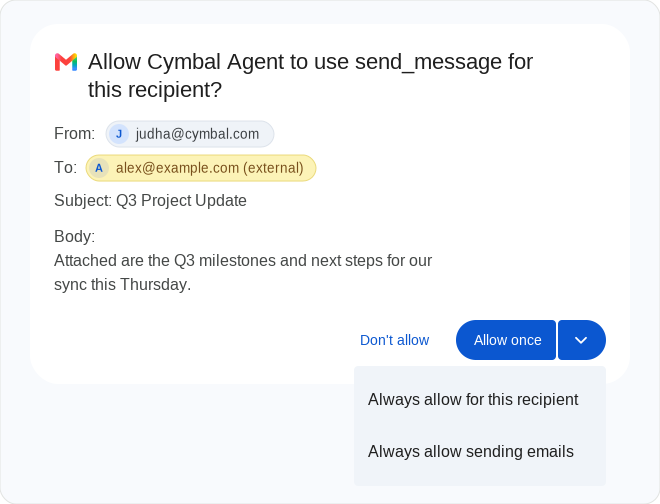
Hướng dẫn này giải thích cách kết nối với điểm cuối /mcp/v1, thiết kế hộp thoại phê duyệt để mang lại trải nghiệm tốt nhất cho người dùng và triển khai giao thức gợi ý biểu mẫu không có trạng thái trong máy chủ lưu trữ MCP, ứng dụng MCP hoặc khung vận hành tác nhân.
Trước khi bắt đầu
Trước khi triển khai hoặc định cấu hình tính năng gợi ý biểu mẫu MCP, hãy hoàn tất các điều kiện tiên quyết, xác định xem máy chủ lưu trữ hoặc ứng dụng khách MCP của bạn có cần hỗ trợ gợi ý tuỳ chỉnh hay không và xem xét các điểm cuối của máy chủ.
Điều kiện tiên quyết
Trước khi triển khai tính năng gợi ý biểu mẫu trong máy khách hoặc máy chủ MCP tuỳ chỉnh, hãy hoàn tất các yêu cầu thiết lập sau:
- Bật API và máy chủ MCP trong cùng một dự án Google Cloud: Tạo mã ứng dụng khách OAuth 2.0 trong cùng một dự án Google Cloud mà bạn bật API Google Workspace mục tiêu và điểm cuối máy chủ MCP. Chọn Sử dụng ứng dụng này cho tác nhân dựa trên AI khi tạo ứng dụng OAuth. Để xem hướng dẫn đầy đủ, hãy xem bài viết Định cấu hình máy chủ MCP của Google Workspace.
- Yêu cầu phạm vi OAuth 2.0 cần thiết cho các công cụ mục tiêu: Việc gọi một công cụ bằng
tools/callyêu cầu mã truy cập OAuth 2.0Bearerbao gồm phạm vi cần thiết cho công cụ đó, mặc dùtools/listtrả về các công cụ có sẵn độc lập với phạm vi mã thông báo. Kiểm tra trang tổng quan về tài liệu tham khảo MCP của máy chủ để biết phạm vi OAuth bắt buộc của từng công cụ.
Kiểm tra xem bạn có cần triển khai tính năng gợi ý biểu mẫu hay không
Bạn nên kết nối với điểm cuối /mcp/v1 bằng tính năng gợi ý biểu mẫu MCP để tác nhân của bạn có thể truy cập vào toàn bộ công cụ và kết quả của Google Workspace. Việc bạn có cần viết mã hay không phụ thuộc vào cách xây dựng máy chủ MCP và ứng dụng MCP:
- Định cấu hình máy chủ MCP tạo sẵn: Nếu đang kết nối một ứng dụng máy chủ MCP tạo sẵn (chẳng hạn như Google Antigravity hoặc Claude Desktop) hỗ trợ tính năng gợi ý biểu mẫu MCP, thì bạn không cần viết mã gợi ý biểu mẫu:
- Kết nối với điểm cuối
/mcp/v1. Để biết các bước thiết lập, hãy xem bài viết Định cấu hình máy chủ MCP của Google Workspace. - Đặt chế độ cài đặt xác nhận công cụ cục bộ tích hợp sẵn của máy chủ thành Luôn cho phép đối với máy chủ MCP của Google Workspace trên
/mcp/v1để người dùng không được nhắc hai lần cho cùng một hành động. - Nếu máy chủ MCP tạo sẵn của bạn chưa hỗ trợ tính năng gợi ý biểu mẫu, bạn có thể kết nối với điểm cuối dự phòng
/mcp/v1self, điểm cuối này hiển thị các công cụ hữu ích mà không cần gợi ý biểu mẫu, mặc dù các lệnh gọi cụ thể vẫn có thể cần được phê duyệt.
- Kết nối với điểm cuối
- Tích hợp SDK ứng dụng MCP hoặc khung tác nhân vào máy chủ MCP: Nếu bạn sử dụng thư viện ứng dụng MCP hoặc khung tác nhân như Bộ công cụ phát triển tác nhân (ADK) đã xử lý việc lấy thông tin biểu mẫu ở lớp giao thức, thì bạn vẫn cần kết nối trình xử lý lấy thông tin của thư viện đó vào giao diện người dùng hoặc giao diện CLI của máy chủ MCP. Triển khai các đề xuất về giao diện người dùng phê duyệt trong hướng dẫn này để mang lại trải nghiệm tốt nhất cho người dùng trên
/mcp/v1. - Xây dựng máy khách và máy chủ MCP tuỳ chỉnh: Nếu bạn đang xây dựng máy khách MCP và tích hợp máy chủ của riêng mình, hãy triển khai cả giao thức gợi ý biểu mẫu không có trạng thái và các đề xuất về giao diện người dùng phê duyệt trong hướng dẫn này để kết nối với
/mcp/v1.
Điểm cuối của máy chủ
Các máy chủ MCP của Google Workspace và máy chủ MCP của Universal Search trong giai đoạn phát hành rộng rãi cung cấp điểm cuối chính /mcp/v1 và điểm cuối dự phòng /mcp/v1self có giới hạn:
| Điểm cuối | URL máy chủ | Yêu cầu về việc gợi ý biểu mẫu | Các công cụ sẵn có |
|---|---|---|---|
/mcp/v1 |
|
Điểm cuối chính được đề xuất. Sử dụng với tính năng mode: "form"
gợi ý.
|
Cung cấp tất cả công cụ và tập hợp kết quả đầy đủ cho máy chủ, bao gồm cả những công cụ luôn yêu cầu người dùng phê duyệt theo chính sách mặc định. |
/mcp/v1self |
|
Điểm cuối dự phòng. Một số lệnh gọi cụ thể vẫn có thể yêu cầu gợi ý biểu mẫu, tuỳ thuộc vào chính sách và tài nguyên mục tiêu. |
Bỏ qua các công cụ luôn yêu cầu phê duyệt theo chính sách mặc định và chỉ hiển thị những công cụ hữu ích mà không cần lấy thông tin từ biểu mẫu, chẳng hạn như update_doc. Các phương thức liệt kê và tìm kiếm như list_threads chỉ trả về một nhóm nhỏ kết quả có thể truy cập được mà không cần phê duyệt, thay vì nhắc cấp quyền truy cập đầy đủ.
|
Sử dụng /mcp/v1 với tính năng gợi ý biểu mẫu bất cứ khi nào có thể và dành riêng /mcp/v1self cho các máy chủ MCP mà bạn không thể thêm tính năng hỗ trợ gợi ý biểu mẫu. Nếu một ứng dụng gọi một công cụ theo cách yêu cầu người dùng phê duyệt trên một trong hai điểm cuối mà không khai báo hỗ trợ thu thập thông tin qua biểu mẫu, thì máy chủ sẽ chặn lệnh gọi và trả về lỗi MissingRequiredClientCapability.
Để xem những công cụ nào có sẵn trên /mcp/v1 và /mcp/v1self cho mỗi dịch vụ, hãy xem trang tổng quan về tài liệu tham khảo công cụ của máy chủ:
- Tài liệu tham khảo về MCP của Gmail
- Tài liệu tham khảo về MCP cho Drive
- Tài liệu tham khảo về MCP cho Tài liệu
- Tài liệu tham khảo về MCP của Trang tính
- Tài liệu tham khảo về MCP cho Trang trình bày
- Tài liệu tham khảo về MCP của Lịch
- Tài liệu tham khảo về MCP cho Chat
- Tài liệu tham khảo về MCP cho tính năng Tìm kiếm chung
Cách hoạt động của tính năng gợi ý biểu mẫu
Máy chủ MCP của Google Workspace sử dụng quy trình yêu cầu và thử lại không có trạng thái, kết nối đơn dựa trên quy cách gợi ý MCP ngày 28 tháng 7 năm 2026.
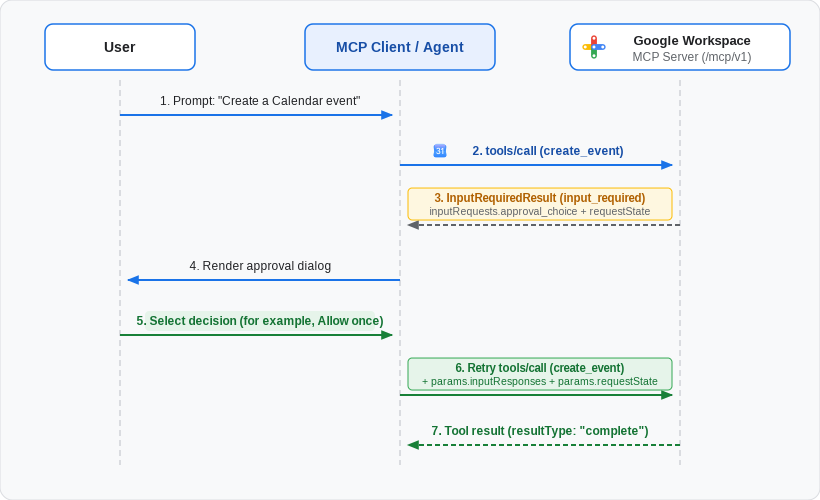
Vòng đời của việc gợi ý biểu mẫu gồm các bước sau:
- Câu lệnh của người dùng: Người dùng yêu cầu tác nhân thực hiện một hành động, chẳng hạn như tạo một sự kiện trên Lịch.
- Yêu cầu
tools/callban đầu: Ứng dụng MCP gửi một yêu cầutools/callđến điểm cuối/mcp/v1cho một công cụ nhưcreate_eventvà khai báo chức năngelicitationtrongparams._meta. - Việc cần làm
InputRequiredResult: Khi hành động được yêu cầu cần có sự phê duyệt của người dùng, máy chủ sẽ tạm dừng thực thi trước khi chạy công cụ. Máy chủ trả về một đối tượngresultcóresultType: "input_required", một bản đồinputRequestsđược khoá bằng"approval_choice"chứa một yêu cầuelicitation/createcómode: "form"và một chuỗirequestStatemờ. - Hộp thoại phê duyệt: Ứng dụng khách MCP hiển thị một hộp thoại phê duyệt cho thấy sản phẩm và công cụ Google Workspace mục tiêu, thông báo xác nhận Markdown, câu hỏi quyết định và các lựa chọn được phép từ
enumvàenumNames. - Quyết định của người dùng: Người dùng chọn một lựa chọn phê duyệt, chẳng hạn như Chỉ cho phép một lần hoặc Không cho phép.
- Thử lại
tools/callbằnginputResponsesvàrequestState: Ứng dụng MCP gửi yêu cầutools/callthứ hai có cùng công cụnamevàarguments, cùng với các trườngparams.requestStatevàparams.inputResponsescấp cao nhất chứa lựa chọn của người dùng cho"approval_choice". - Kết quả thực thi công cụ: Máy chủ xác minh rằng
requestStateđược liên kết với chính xác các đối số công cụ từ lệnh gọi ban đầu, đánh giá quyết định của người dùng, thực thi hoặc kết thúc lệnh gọi công cụ và trả vềresultcuối cùng bằngresultType: "complete".
Khi có yêu cầu phê duyệt
Việc một lệnh gọi công cụ có kích hoạt thử thách elicitation/create hay không được xác định linh động bởi máy chủ MCP của Google Workspace dựa trên các chính sách quản trị của hệ thống, người dùng và quản trị viên. Quá trình đánh giá chính sách có thể xem xét các yếu tố sau:
- Loại hành động: Theo mặc định, các hành động ghi chia sẻ dữ liệu được chia sẻ với đối tượng hoặc sửa đổi tài nguyên dùng chung đều cần có sự xác nhận của người dùng, trừ phi được người dùng hoặc chính sách của quản trị viên cho phép. Trong khi đó, theo mặc định, các hành động tự ghi như tạo tệp riêng tư sẽ được thực thi mà không cần xác nhận. Thao tác chuyển vào thùng rác luôn yêu cầu xác nhận cho mỗi lệnh gọi mà không có sự phê duyệt liên tục, còn thao tác đọc hoặc thao tác với siêu dữ liệu cũng có thể yêu cầu xác nhận tuỳ thuộc vào chính sách của người dùng hoặc quản trị viên.
- Quyền sở hữu và chế độ hiển thị nội dung: Việc truy cập hoặc sửa đổi các tệp do người dùng khác sở hữu hoặc được chia sẻ bên ngoài tổ chức của người dùng có thể cần được phê duyệt.
- Người nhận bên ngoài: Việc gửi thư, chia sẻ tệp hoặc mời người tham dự bên ngoài miền của người dùng thường cần có sự xác nhận rõ ràng.
- Lựa chọn ưu tiên của người dùng và quản trị viên: Các lựa chọn ưu tiên về việc phê duyệt được lưu từ các giao dịch trước đó hoặc quy tắc của quản trị viên trên toàn miền có thể yêu cầu hoặc bỏ qua bước xác nhận đối với một số công cụ cụ thể.
Vì việc đánh giá chính sách diễn ra phía máy chủ trong mỗi lệnh gọi, nên ứng dụng của bạn phải
chuẩn bị sẵn sàng để xử lý phản hồi InputRequiredResult cho mọi lệnh gọi
tools/call. Tuyệt đối không cố định giá trị trong mã đối với các quy tắc về độ nhạy của công cụ hoặc lưu quyết định phê duyệt vào bộ nhớ đệm trên ứng dụng khách.
Tham chiếu lựa chọn phê duyệt
Trong requestedSchema.properties.approval_choice, máy chủ trả về các mảng enum và enumNames song song, đại diện cho các lựa chọn có sẵn cho yêu cầu hiện tại. Trên các máy chủ MCP của Google Workspace, các giá trị enum sau đây được hỗ trợ:
Giá trị enum |
Nhãn enumNames mặc định bằng tiếng Anh |
Cho phép thực thi | Thời điểm cung cấp và hành vi |
|---|---|---|---|
ALLOW_ONCE |
Cho phép 1 lần | Có | Được cung cấp trên mọi lời nhắc phê duyệt. Chạy lệnh gọi công cụ hiện tại một lần mà không ghi lại quy tắc cố định. |
DENY_ONCE |
Không cho phép | Không |
Được cung cấp trên mọi lời nhắc phê duyệt. Kết thúc lệnh gọi công cụ hiện tại bằng lỗi
UserDeniedAction mà không ghi lại quy tắc cố định.
|
ALLOW_TOOL_ALWAYS |
Luôn cho phép công cụ này | Có | Được cung cấp khi chính sách của người dùng và quản trị viên cho phép phê duyệt liên tục trên toàn bộ công cụ. Chạy lệnh gọi hiện tại và phê duyệt trước các lệnh gọi trong tương lai đến cùng một công cụ từ cùng một tác nhân. |
ALLOW_RESOURCE_ALWAYS |
Luôn cho phép đối với tệp/thư mục/bộ nhớ/email/sự kiện/không gian/ cuộc trò chuyện/cuộc trò chuyện nhóm/việc cần làm/mục này | Có | Được cung cấp khi sửa đổi hoặc truy cập tối đa 100 tài nguyên cùng loại. Sử dụng từ ngữ ở dạng số nhiều, chẳng hạn như Luôn cho phép đối với những tệp này khi lệnh gọi nhắm đến nhiều tài nguyên. Chạy lệnh gọi hiện tại và phê duyệt trước các lệnh gọi trong tương lai từ cùng một tác nhân trên cùng một mã tài nguyên. |
ALLOW_AUDIENCE_ALWAYS |
Luôn cho phép đối với người nhận này/những người nhận này | Có | Được cung cấp cho các hành động gửi, chia sẻ và mời nhắm đến tối đa 100 người nhận. Chạy cuộc gọi hiện tại và phê duyệt trước các cuộc gọi trong tương lai từ cùng một nhân viên hỗ trợ đến cùng một nhóm người nhận. |
ALLOW_OWNER_ALWAYS |
Luôn cho phép đối với chủ sở hữu này/những chủ sở hữu này | Có | Được cung cấp cho các câu lệnh đọc hoặc câu lệnh dựa trên dữ liệu thực tế liên quan đến các mục của tối đa 3 chủ sở hữu riêng biệt. Chạy lệnh gọi hiện tại và phê duyệt trước các lệnh gọi trong tương lai từ cùng một nhân viên hỗ trợ cho các mục thuộc sở hữu của những người dùng đó. |
Mỗi InputRequiredResult chỉ bao gồm một nhóm nhỏ các lựa chọn áp dụng cho lệnh gọi công cụ cụ thể đó:
- Hành động huỷ bỏ và chuyển vào thùng rác: Những hành động xoá vĩnh viễn hoặc chuyển tài nguyên vào thùng rác, hoặc những hành động chịu sự điều chỉnh của chính sách quản trị viên yêu cầu xác nhận trong mỗi lệnh gọi, chỉ cung cấp
ALLOW_ONCEvàDENY_ONCE. - Hành động trong phạm vi: Khi cho phép phê duyệt cố định, máy chủ sẽ trả về
ALLOW_ONCE, phạm vi hẹp hiện hành nhưALLOW_AUDIENCE_ALWAYShoặcALLOW_RESOURCE_ALWAYS,ALLOW_TOOL_ALWAYSvàDENY_ONCE.
Luôn hiển thị chính xác các lựa chọn được trả về trong enum và enumNames cho yêu cầu hiện tại thay vì cố định giá trị trong mã của nút.
Các phương pháp hay nhất để mang lại trải nghiệm tốt nhất cho người dùng
Các ứng dụng MCP tiêu chuẩn hỗ trợ tính năng gợi ý biểu mẫu sẽ hoạt động ngay với /mcp/v1. Tuy nhiên, trình kết xuất biểu mẫu chung thường hiển thị các quyết định chọn một mục dưới dạng một nhóm nút chọn hoặc trình đơn thả xuống kết hợp với nút Gửi riêng biệt. Điều này đòi hỏi người dùng phải nhấp thêm và ẩn bối cảnh của ứng dụng Google Workspace mục tiêu.
Để có trải nghiệm người dùng tốt nhất khi gợi ý biểu mẫu, hãy triển khai 5 đề xuất sau trong ứng dụng MCP của bạn. Đề xuất từ 1 đến 3 tương ứng với các chú thích được đánh số trong hình minh hoạ hộp thoại phê duyệt sau đây:
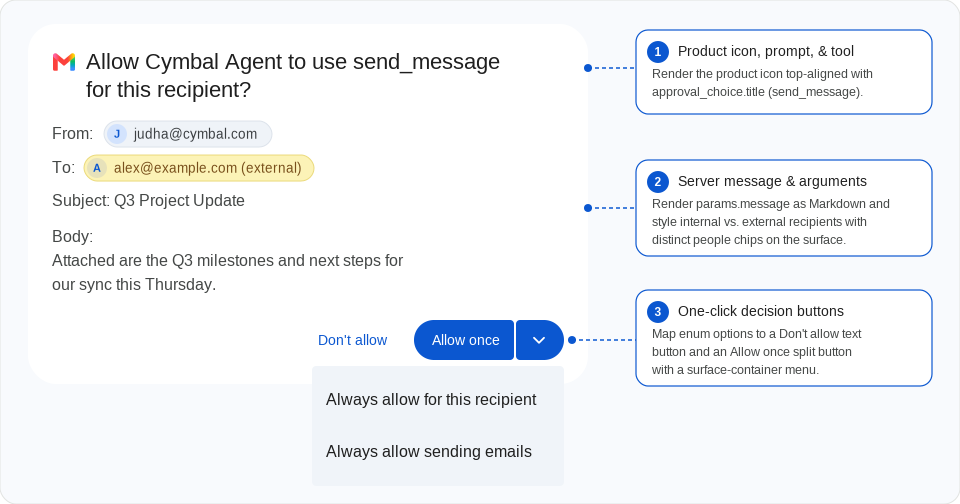
1. Hiển thị tên sản phẩm, biểu tượng và công cụ
Người dùng sẽ thấy ngay sản phẩm và công cụ Google Workspace mà tác nhân muốn gọi:
- Liên kết siêu dữ liệu
serverInfocủa máy chủ MCP từ quá trình khởi chạy hoặcserver/discover, hoặc tên máy chủ yêu cầu nhưcalendarmcp.googleapis.com, với tên và biểu tượng sản phẩm của Google Workspace. - Coi các gợi ý trình bày
_metatrênInputRequiredResultnhưtitle,iconsvàisConfirmationlà các tính năng nâng cao không bắt buộc. Môi trường phát hành chính thức Máy chủ MCP của Google Workspace chưa phát hành các trường_metanày, vì vậy, giao diện người dùng của bạn không nên phụ thuộc vào các trường này. - Hiển thị tên công cụ mục tiêu từ
params.nameđể người dùng có thể phân biệt giữa các thao tác nhưcreate_draftvàcreate_event.
2. Hiển thị thông báo của máy chủ và enumNames
Giữ cho lớp trình bày của ứng dụng khách đơn giản và kết xuất trực tiếp nội dung phê duyệt do máy chủ cung cấp:
- Hiển thị
params.messagedưới dạng Markdown và hiển thịapproval_choice.title: Các máy chủ MCP của Google Workspace đã định dạng thông tin chi tiết về hành động dưới dạng Markdown tronginputRequests.approval_choice.params.messagevà cung cấp câu hỏi xác nhận đã bản địa hoá trongrequestedSchema.properties.approval_choice.title. Hiển thịmessagetrực tiếp bằng trình kết xuất Markdown an toàn thay vì hiển thị các ký hiệu Markdown thô hoặc viết logic định dạng đối số tuỳ chỉnh cho mỗi công cụ, đồng thời hiển thịtitlerõ ràng phía trên các nút hành động. - Ghép nối các giá trị
enumvới nhãnenumNames: Kiểm trarequestedSchema.properties.approval_choicemột cách linh động. Ghép nối từng giá trị nhận dạng trongenumvới nhãn mà con người có thể đọc được ở cùng một chỉ mục trongenumNamesvà quay lại các mục nhập Lược đồ JSONoneOfnếu tương tác với các máy chủ MCP khác sử dụngoneOf.
3. Đơn giản hoá quyết định bằng các nút một lần nhấp
Khi requestedSchema chứa một thuộc tính enum duy nhất, hãy tránh hiển thị danh sách nút chọn hoặc trình đơn thả xuống yêu cầu nhấp vào nút Gửi riêng:
- Hai lựa chọn như
Allow oncevàDon't allow: Hiển thị hai nút cạnh nhau. Khi bạn nhấp vào một trong hai nút, yêu cầu thử lại sẽ được gửi ngay lập tức. - Nhiều lựa chọn cho phép: Khi máy chủ trả về
ALLOW_ONCE, một hoặc nhiều phạm vi cho phép liên tục nhưALLOW_AUDIENCE_ALWAYShoặcALLOW_TOOL_ALWAYSvàDENY_ONCE, hãy hiển thị nút phân tách chính mặc định là Chỉ cho phép một lần có trình đơn dấu mũ cho các lựa chọn cho phép bổ sung, kết hợp với nút Không cho phép riêng biệt.
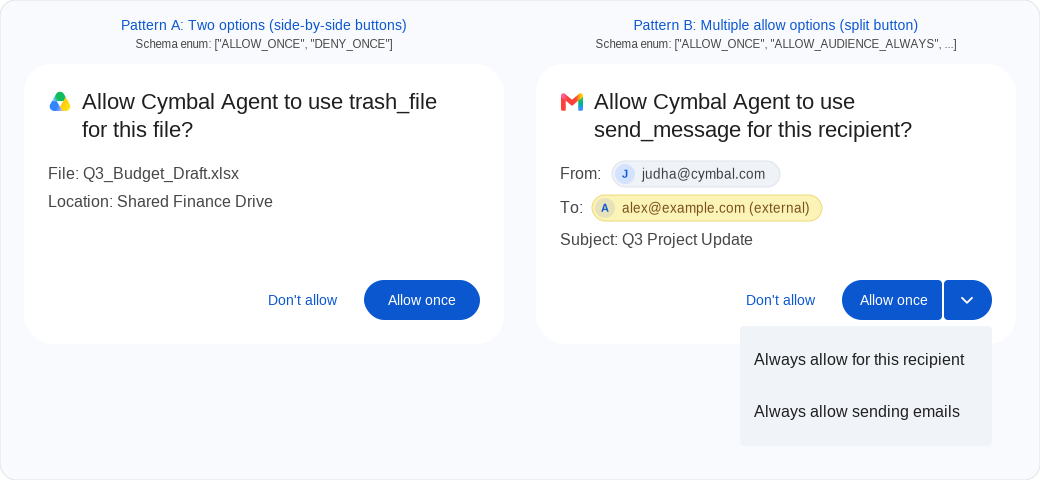
Trong Mẫu A, một hành động huỷ bỏ trên Drive chỉ trả về ALLOW_ONCE và DENY_ONCE. Ứng dụng sẽ hiển thị hai nút này cạnh nhau cho Không cho phép và Chỉ cho phép một lần. Trong Mẫu B, một hành động của Gmail sẽ trả về ALLOW_ONCE, ALLOW_AUDIENCE_ALWAYS, ALLOW_TOOL_ALWAYS và DENY_ONCE. Sau đó, ứng dụng sẽ hiển thị dưới dạng nút Không cho phép cùng với nút phân tách Cho phép một lần có trình đơn hiển thị các lựa chọn cho phép liên tục.
4. Tránh lời nhắc trùng lặp trên /mcp/v1
Nhiều máy chủ MCP có lời nhắc xác nhận cục bộ tích hợp sẵn trước khi thực thi bất kỳ công cụ bên ngoài nào. Khi gọi máy chủ MCP của Google Workspace có bật tính năng gợi ý biểu mẫu, các câu lệnh thực thi trước cục bộ sẽ tạo ra trải nghiệm câu lệnh kép thừa thãi vì máy chủ thực thi thử thách gợi ý nhận biết chính sách của riêng mình.
- Nếu bạn đang định cấu hình một máy chủ MCP tạo sẵn có tính năng gợi ý biểu mẫu: Hãy đặt chế độ cài đặt xác nhận công cụ cục bộ của máy chủ cho máy chủ MCP của Google Workspace trên
/mcp/v1thành Luôn cho phép và dựa vào hộp thoại gợi ý do máy chủ khởi tạo. Nếu máy chủ của bạn không hỗ trợ tính năng gợi ý biểu mẫu và kết nối với/mcp/v1self, hãy bật tính năng xác nhận công cụ cục bộ nếu bạn muốn lời nhắc phía máy khách cho các lệnh gọi không kích hoạt quy trình phê duyệt phía máy chủ. - Nếu bạn đang xây dựng máy chủ lưu trữ MCP: Hãy tắt hộp thoại xác nhận chung trước cuộc gọi của máy chủ lưu trữ khi tính năng gợi ý biểu mẫu được bật cho
*mcp.googleapis.comvàpeople.googleapis.com, chẳng hạn nhưgmailmcp.googleapis.com,calendarmcp.googleapis.com,drivemcp.googleapis.comvàworkspacemcp.googleapis.com. Chỉ nhắc người dùng khi máy chủ trả vềInputRequiredResultcóresultType: "input_required".
5. Hướng dẫn hành vi của tác nhân đối với các công cụ và trường hợp từ chối
Mô hình suy luận có thể diễn giải sai quy trình phê duyệt có sự tham gia của con người theo hai cách:
- Chủ động tránh các công cụ ghi: Nếu một mô hình giả định rằng việc gọi một công cụ ghi như
send_messagesẽ thực thi ngay lập tức mà không cần người dùng xem xét, thì mô hình đó có thể quay lại một công cụ nháp nhưcreate_draftngay cả khi người dùng yêu cầu gửi email. - Thử lại bằng các công cụ ghi khác sau khi bị từ chối: Nếu người dùng nhấp vào
Không cho phép trên hộp thoại phê duyệt và máy chủ trả về
kết quả lỗi
UserDeniedAction, thì mô hình có thể coi việc từ chối là một lỗi tạm thời của công cụ và cố gắng đạt được cùng một mục tiêu bằng cách sử dụng một công cụ ghi khác, kích hoạt lời nhắc phê duyệt thứ hai không mong muốn.
Để ngăn chặn cả hai vấn đề, hãy đưa các hướng dẫn sau vào câu lệnh hệ thống của nhân viên hỗ trợ:
Câu lệnh
When calling Google Workspace MCP tools:
1. Select the tool that directly matches the user's intent (for example,
   use send_message when asked to send an email). Sensitive tools
   automatically pause for user confirmation through MCP form elicitation
   before executing.
2. If a tool call fails because the user denied, declined, or canceled the
   approval request, stop immediately and acknowledge the user's decision.
   Do not retry the same action or call an alternative write tool unless
   the user explicitly asks you to do so in a new message.
Yêu cầu về giao thức truyền tải và giao thức không trạng thái
Máy chủ MCP của Google Workspace hoạt động qua Streamable HTTP không có trạng thái. Khi xây dựng ứng dụng MCP tuỳ chỉnh, hãy tuân thủ các yêu cầu về dây này trên mọi yêu cầu:
- Tiêu đề HTTP: Thêm các tiêu đề sau vào tất cả yêu cầu
POSTđến/mcp/v1:Authorization: Bearer ACCESS_TOKENContent-Type: application/jsonAccept: application/json, text/event-streamMCP-Protocol-Version: 2026-07-28Accept-Language: BCP_47_LANGUAGE_TAGđể bản địa hoá thông báo xác nhận, câu hỏi và nhãnenumNamessang ngôn ngữ ưu tiên của người dùng, chẳng hạn nhưes-419, es;q=0.9, en;q=0.8. Nếu bạn bỏ qua, văn bản sẽ mặc định làen-US.
- Loại nội dung phản hồi: Tuỳ thuộc vào máy chủ và loại yêu cầu, nội dung phản hồi HTTP có thể được định dạng dưới dạng JSON chuẩn với
Content-Type: application/jsonhoặc dưới dạng Sự kiện do máy chủ gửi (SSE) vớiContent-Type: text/event-stream, trong đó tải trọng JSON-RPC xuất hiện trên các dòngdata: {...}. Trình phân tích cú pháp truyền tải HTTP của bạn phải chấp nhận cả hai định dạng. - Khám phá không có trạng thái: Máy chủ MCP của Google Workspace không duy trì các phiên
initializecó trạng thái. Để tìm nạp siêu dữ liệu và chức năng của máy chủ khi khởi động, hãy gửi yêu cầu JSON-RPC bằng"method": "server/discover"và"params": {}. Thao tác này sẽ trả về siêu dữ liệu của máy chủ trongresult._meta["io.modelcontextprotocol/serverInfo"]. Các gợi ý xác nhận_metatuỳ chỉnh nhưisConfirmation,titlevàiconschưa được phát ra trong các phản hồiInputRequiredResultchính thức, vì vậy, hãy luôn coi các trường trình bày_metalà không bắt buộc và quay lạiserverInfohoặc tên máy chủ. - Chức năng
_metatheo yêu cầu: Vì phương thức truyền tải không có trạng thái, hãy đưa_metavào bên trongparamstrên mọi yêu cầutools/listvàtools/callbằng các khoá sau:"io.modelcontextprotocol/protocolVersion": "2026-07-28""io.modelcontextprotocol/clientInfo":{"name": "YOUR_APP_NAME","version": "VERSION"}"io.modelcontextprotocol/clientCapabilities":{"elicitation": {"form": {}}}
Xử lý lỗi và liên kết tham số
Khi một lệnh gọi công cụ bị chặn hoặc một lần thử lại không xác thực được, máy chủ sẽ trả về kết quả lỗi ở cấp công cụ hoặc đối tượng lỗi JSON-RPC cấp cao nhất, tuỳ thuộc vào danh mục lỗi:
UserDeniedActionvàAdminPolicyBlock: Khi người dùng từ chối lời nhắc phê duyệt hoặc chính sách của quản trị viên chặn hành động, máy chủ sẽ trả về một JSON-RPCresultcó"resultType": "complete","isError": truevà thông báo lỗi đã bản địa hoá trongresult.content. Khi được bật cho dịch vụ và môi trường, máy chủ cũng bao gồm siêu dữ liệu lỗi có cấu trúc trongresult._meta["google.com/error"]. Vìresult._meta["google.com/error"]được kiểm soát theo từng dịch vụ và môi trường, nên ứng dụng của bạn phải quay lại đọc thông báo lỗi từresult.contentkhi không córesult._meta["google.com/error"]:UserDeniedAction: Trả về khi người dùng chọnDENY_ONCE, từ chối hoặc huỷ biểu mẫu phê duyệt. Thông báo mặc định bằng tiếng Anh là"Action canceled. The user declined the confirmation request."AdminPolicyBlock: Trả về khi chính sách của quản trị viên tổ chức cấm tác nhân thực hiện thao tác. Thông báo mặc định bằng tiếng Anh là"Action could not be completed. Your administrator has blocked third-party agents from performing this action."
JSON
{ "jsonrpc": "2.0", "id": 3, "result": { "resultType": "complete", "isError": true, "content": [ { "type": "text", "text": "Action canceled. The user declined the confirmation request." } ], "_meta": { "google.com/error": { "code": 400, "message": "Action canceled. The user declined the confirmation request.", "status": "FAILED_PRECONDITION", "details": [ { "@type": "type.googleapis.com/google.rpc.ErrorInfo", "reason": "UserDeniedAction", "domain": "mcp.googleapis.com" } ] } } } }MissingRequiredClientCapability: Trả về khi một ứng dụng gọi một công cụ theo cách yêu cầu người dùng xác nhận trên/mcp/v1hoặc/mcp/v1selfmà không khai báo tính năng hỗ trợ thu thập thông tin qua biểu mẫu trong_meta["io.modelcontextprotocol/clientCapabilities"]. Máy chủ sẽ dịch lỗi này thành đối tượng JSON-RPCerrorcấp cao nhất có mã-32021và đối tượng chức năng bắt buộc trongerror.data.requiredCapabilities:JSON
{
  "jsonrpc": "2.0",
  "id": 2,
  "error": {
    "code": -32021,
    "message": "Action could not be completed. This action requires user confirmation, which this client does not support. Use a client that supports form elicitation to perform this action.",
    "data": {
      "requiredCapabilities": {
        "elicitation": {
          "form": {}
        }
      }
    }
  }
}
Thực thi liên kết tham số: Mã thông báo
requestBindingbên trongrequestStateliên kết bằng mật mã thử thách phê duyệt ban đầu với công cụ chính xácargumentsđược gửi trong lệnh gọi đầu tiên. Nếu ứng dụng sửa đổi bất kỳ trường nào trongparams.argumentstrong lệnh gọi thử lại hoặc chuyển mộtparams.requestStatekhông đúng định dạng hoặc không liên kết, thì máy chủ sẽ bỏ qua phê duyệt không hợp lệ và trả về một thử tháchInputRequiredResultmới hoặc trả về lỗi tham số không hợp lệ hoặc điều kiện tiên quyết không thành công hướng dẫn ứng dụng thử lại mà không cóinputResponses.
Ví dụ về cách triển khai
Hướng dẫn toàn diện sau đây minh hoạ cách ứng dụng MCP gọi công cụ Lịch create_event, hiển thị lời nhắc phê duyệt của máy chủ trong giao diện người dùng của trình duyệt hoặc CLI của thiết bị đầu cuối, đồng thời gửi quyết định của người dùng bằng TypeScript và Python, sau đó là kỹ năng tác nhân có thể sử dụng lại cho các tác nhân lập trình.
Các nền tảng phê duyệt của khách hàng
Trong ứng dụng MCP dựa trên trình duyệt, quá trình triển khai TypeScript sẽ hiển thị một thẻ phê duyệt trực quan cho thấy biểu tượng Lịch, tên máy chủ của máy chủ, tên công cụ, bản xem trước Markdown message được kết xuất từ máy chủ, câu hỏi xác nhận, nút Không cho phép và nút phân tách Cho phép một lần:
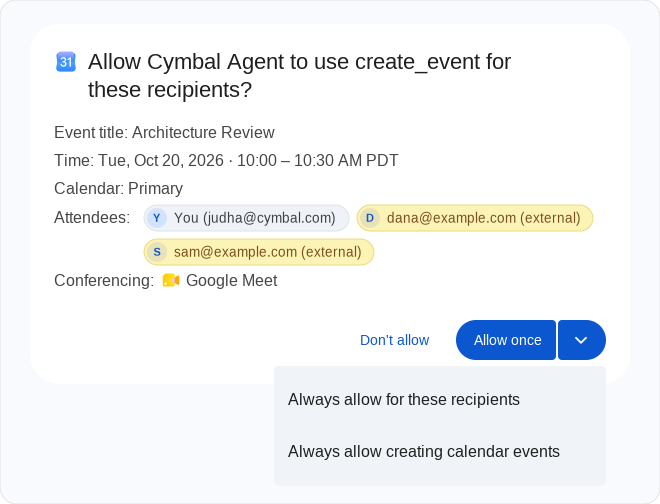
Trong ứng dụng MCP dựa trên thiết bị đầu cuối, quá trình triển khai CLI Python sẽ hiển thị cùng một tải trọng InputRequiredResult dưới dạng lời nhắc được đánh số tương tác:
CLI
=== Google Calendar (create_event) ===
Architecture Review
Tue, Oct 20 · 10:00 - 10:30 AM PDT · 🟢 No calendar conflicts
You, dana@example.com, sam@example.com
Conferencing: Google Meet

Allow Cymbal Agent to use create_event for these recipients?
  [1] Allow once (ALLOW_ONCE)
  [2] Always allow for these recipients (ALLOW_AUDIENCE_ALWAYS)
  [3] Always allow this tool (ALLOW_TOOL_ALWAYS)
  [4] Don't allow (DENY_ONCE)
Enter choice (1-4, or c to cancel):
Cuộc gọi ban đầu và phản hồi gợi ý
Ứng dụng khách bắt đầu bằng cách gửi yêu cầu tools/call để tạo sự kiện trên Lịch bằng công cụ create_event:
JSON
{
  "jsonrpc": "2.0",
  "id": 2,
  "method": "tools/call",
  "params": {
    "name": "create_event",
    "arguments": {
      "calendarId": "primary",
      "summary": "Architecture Review",
      "startTime": "2026-10-20T10:00:00",
      "endTime": "2026-10-20T10:30:00",
      "timeZone": "America/Los_Angeles",
      "attendees": [
        {
          "email": "dana@example.com"
        },
        {
          "email": "sam@example.com"
        }
      ],
      "addGoogleMeetUrl": true
    },
    "_meta": {
      "io.modelcontextprotocol/protocolVersion": "2026-07-28",
      "io.modelcontextprotocol/clientInfo": {
        "name": "Cymbal Agent",
        "version": "1.0.0"
      },
      "io.modelcontextprotocol/clientCapabilities": {
        "elicitation": {
          "form": {}
        }
      }
    }
  }
}
Khi cần phê duyệt, máy chủ sẽ phản hồi bằng InputRequiredResult:
JSON
{
  "jsonrpc": "2.0",
  "id": 2,
  "result": {
    "resultType": "input_required",
    "inputRequests": {
      "approval_choice": {
        "method": "elicitation/create",
        "params": {
          "mode": "form",
          "message": "**Architecture Review**  \nTue, Oct 20 · 10:00 - 10:30 AM PDT · 🟢 No calendar conflicts  \nYou, dana@example.com, sam@example.com  \n**Conferencing:** Google Meet",
          "requestedSchema": {
            "type": "object",
            "required": ["approval_choice"],
            "properties": {
              "approval_choice": {
                "type": "string",
                "title": "Allow Cymbal Agent to use create_event for these recipients?",
                "enum": [
                  "ALLOW_ONCE",
                  "ALLOW_AUDIENCE_ALWAYS",
                  "ALLOW_TOOL_ALWAYS",
                  "DENY_ONCE"
                ],
                "enumNames": [
                  "Allow once",
                  "Always allow for these recipients",
                  "Always allow this tool",
                  "Don't allow"
                ]
              }
            }
          }
        }
      }
    },
    "requestState": "{\"elicitationId\":\"...\",\"requestBinding\":\"...\"}"
  }
}
Phản hồi InputRequiredResult bao gồm các trường chính sau:
result.resultType: Đặt thành"input_required"khi máy chủ tạm dừng thực thi để người dùng nhập dữ liệu và"complete"khi công cụ thực thi xong.result.inputRequests: Bản đồ được khoá bằng giá trị nhận dạng yêu cầu"approval_choice". Mỗi mục nhập có"method": "elicitation/create"và một đối tượngparamscó"mode": "form"._metagợi ý trình bày: Các trường không bắt buộc nhưisConfirmation,titlevàiconschưa được phát hành trong các phản hồiInputRequiredResultchính thức. Luôn coi các trường_metalà không bắt buộc và phân giải tên cũng như biểu tượng sản phẩm từserverInfohoặc tên máy chủ khi không có.inputRequests.approval_choice.params.message: Bản xem trước hành động do máy chủ tạo ở định dạng Markdown hoặc câu hỏi xác nhận nếu công cụ không tạo thẻ xem trước riêng.inputRequests.approval_choice.params.requestedSchema: Đối tượng Giản đồ JSON có định nghĩaproperties.approval_choicechứa các trường sau:title: Câu hỏi xác nhận đã bản địa hoá, chẳng hạn như"Allow Cymbal Agent to use create_event for these recipients?". Khi bạn cung cấp_meta["io.modelcontextprotocol/clientInfo"].nametrong yêu cầu, máy chủ sẽ kết hợp tên ứng dụng của bạn vào câu hỏi này.enum: Một mảng có thứ tự gồm các giá trị nhận dạngApprovalChoice, chẳng hạn nhưALLOW_ONCE,ALLOW_AUDIENCE_ALWAYS,ALLOW_TOOL_ALWAYSvàDENY_ONCE.enumNames: Một mảng song song gồm các nhãn đã bản địa hoá mà con người có thể đọc được, tương ứng với từng mục trongenum, chẳng hạn nhưAllow once,Always allow for these recipients,Always allow this toolvàDon't allow.
result.requestState: Một chuỗi được mã hoá JSON mờ chứaelicitationIdcủa máy chủ và mã thông báorequestBindingmã hoá. Bạn phải lặp lại chuỗi này mà không thay đổi trongparams.requestStatetrong lệnh gọi thử lại.
Trọng tải thử lại, từ chối và huỷ
Sau khi người dùng chọn một lựa chọn cho phép, hãy gửi yêu cầu tools/call thứ hai có cùng name và arguments, đồng thời truyền requestState và inputResponses dưới dạng các trường cấp cao nhất bên trong params:
JSON
{
  "jsonrpc": "2.0",
  "id": 3,
  "method": "tools/call",
  "params": {
    "name": "create_event",
    "arguments": {
      "calendarId": "primary",
      "summary": "Architecture Review",
      "startTime": "2026-10-20T10:00:00",
      "endTime": "2026-10-20T10:30:00",
      "timeZone": "America/Los_Angeles",
      "attendees": [
        {
          "email": "dana@example.com"
        },
        {
          "email": "sam@example.com"
        }
      ],
      "addGoogleMeetUrl": true
    },
    "requestState": "{\"elicitationId\":\"...\",\"requestBinding\":\"...\"}",
    "inputResponses": {
      "approval_choice": {
        "action": "accept",
        "content": {
          "approval_choice": "ALLOW_ONCE"
        }
      }
    },
    "_meta": {
      "io.modelcontextprotocol/protocolVersion": "2026-07-28",
      "io.modelcontextprotocol/clientInfo": {
        "name": "Cymbal Agent",
        "version": "1.0.0"
      },
      "io.modelcontextprotocol/clientCapabilities": {
        "elicitation": {
          "form": {}
        }
      }
    }
  }
}
Thông số kỹ thuật của MCP Elicitation phân biệt giữa việc gửi giá trị biểu mẫu
và đóng hộp thoại. Bạn có thể thể hiện quyết định từ chối của người dùng trong params.inputResponses theo hai cách:
Gửi lựa chọn
DENY_ONCE: Khi người dùng nhấp vào nút Không cho phép tương ứng vớiDENY_ONCE, hãy gửi"action": "accept"bằng"content": {"approval_choice": "DENY_ONCE"}:JSON
{
  "jsonrpc": "2.0",
  "id": 3,
  "method": "tools/call",
  "params": {
    "name": "create_event",
    "arguments": {
      "calendarId": "primary",
      "summary": "Architecture Review",
      "startTime": "2026-10-20T10:00:00",
      "endTime": "2026-10-20T10:30:00",
      "timeZone": "America/Los_Angeles",
      "attendees": [
        {
          "email": "dana@example.com"
        },
        {
          "email": "sam@example.com"
        }
      ],
      "addGoogleMeetUrl": true
    },
    "requestState": "{\"elicitationId\":\"...\",\"requestBinding\":\"...\"}",
    "inputResponses": {
      "approval_choice": {
        "action": "accept",
        "content": {
          "approval_choice": "DENY_ONCE"
        }
      }
    },
    "_meta": {
      "io.modelcontextprotocol/protocolVersion": "2026-07-28",
      "io.modelcontextprotocol/clientInfo": {
        "name": "Cymbal Agent",
        "version": "1.0.0"
      },
      "io.modelcontextprotocol/clientCapabilities": {
        "elicitation": {
          "form": {}
        }
      }
    }
  }
}
Từ chối hoặc huỷ hộp thoại: Nếu người dùng đóng hoặc huỷ hộp thoại mà không chọn một lựa chọn cho phép, hãy gửi
"action": "decline"hoặc"action": "cancel"và bỏ qua trườngcontent:JSON
"inputResponses": {
  "approval_choice": {
    "action": "cancel"
  }
}
Trong cả hai trường hợp, máy chủ đều coi phản hồi là DENY_ONCE, kết thúc quá trình thực thi công cụ và trả về kết quả lỗi công cụ.
Ứng dụng web TypeScript
Ví dụ về TypeScript sau đây trích xuất Markdown message, câu hỏi xác nhận và các lựa chọn được cho phép trực tiếp từ tải trọng InputRequiredResult, phân giải tiêu đề sản phẩm từ gợi ý _meta không bắt buộc hoặc tên máy chủ của máy chủ, đồng thời phát lại tools/call theo quyết định của người dùng:
TypeScript
const PROTOCOL_VERSION = "2026-07-28";
const CLIENT_INFO = { name: "Cymbal Agent", version: "1.0.0" };
const MAX_ELICITATION_ROUNDS = 3;

const HOST_TITLES: Record<string, string> = {
  "gmailmcp.googleapis.com": "Gmail",
  "calendarmcp.googleapis.com": "Google Calendar",
  "drivemcp.googleapis.com": "Google Drive",
  "docsmcp.googleapis.com": "Google Docs",
  "sheetsmcp.googleapis.com": "Google Sheets",
  "slidesmcp.googleapis.com": "Google Slides",
  "chatmcp.googleapis.com": "Google Chat",
  "people.googleapis.com": "Google Contacts",
  "tasksmcp.googleapis.com": "Google Tasks",
  "workspacemcp.googleapis.com": "Google Workspace",
};

interface ElicitationOption {
  value: string;
  label: string;
}

export interface ElicitationCardModel {
  requestKey: string;
  serverTitle: string;
  serverIconUrl?: string;
  toolName: string;
  markdownMessage: string;
  questionTitle: string;
  decisionFieldKey: string;
  denyOption?: ElicitationOption;
  primaryAllowOption?: ElicitationOption;
  secondaryAllowOptions: ElicitationOption[];
}

function buildBaseMeta(): Record<string, unknown> {
  return {
    "io.modelcontextprotocol/protocolVersion": PROTOCOL_VERSION,
    "io.modelcontextprotocol/clientInfo": CLIENT_INFO,
    "io.modelcontextprotocol/clientCapabilities": {
      elicitation: { form: {} },
    },
  };
}

/**
 * Extracts a UI view model directly from an InputRequiredResult response.
 * Render card.markdownMessage with a safe Markdown renderer in your UI.
 */
export function extractCardModel(
  rpcResult: Record<string, any>,
  toolName: string,
  serverHost = "workspacemcp.googleapis.com",
): ElicitationCardModel | null {
  const inputRequests: Record<string, any> = rpcResult.inputRequests ?? {};
  const requestEntry = Object.entries(inputRequests).find(
    ([, req]: [string, any]) =>
      req?.method === "elicitation/create" && req?.params?.mode === "form",
  );
  if (!requestEntry) {
    return null;
  }
  const [requestKey, elicitationReq] = requestEntry;

  const reqMeta = elicitationReq.params?._meta ?? {};
  const resultMeta = rpcResult._meta ?? {};
  const serverInfo = resultMeta["io.modelcontextprotocol/serverInfo"] ?? {};
  const icons: Array<{ src: string; mimeType?: string }> =
    reqMeta.icons ?? resultMeta.icons ?? serverInfo.icons ?? [];
  const preferredIcon =
    icons.find((icon) => icon.mimeType === "image/svg+xml") ?? icons[0];

  const properties: Record<string, any> =
    elicitationReq.params?.requestedSchema?.properties ?? {};
  const firstProperty = Object.entries(properties)[0];
  if (!firstProperty) {
    return null;
  }
  const [decisionFieldKey, fieldSchema] = firstProperty as [
    string,
    Record<string, any>,
  ];

  let options: ElicitationOption[] = [];
  if (Array.isArray(fieldSchema.enum)) {
    const enumNames: string[] = Array.isArray(fieldSchema.enumNames)
      ? fieldSchema.enumNames
      : [];
    options = fieldSchema.enum.map((val: string, idx: number) => ({
      value: val,
      label: enumNames[idx] ?? val,
    }));
  } else if (Array.isArray(fieldSchema.oneOf)) {
    options = fieldSchema.oneOf.map((opt: any) => ({
      value: opt.const,
      label: opt.title ?? opt.const,
    }));
  }

  const denyOption = options.find((opt) => opt.value.startsWith("DENY"));
  const allowOptions = options.filter(
    (opt) => !opt.value.startsWith("DENY"),
  );

  return {
    requestKey,
    serverTitle:
      reqMeta.title ??
      resultMeta.title ??
      serverInfo.title ??
      serverInfo.name ??
      HOST_TITLES[serverHost] ??
      "Google Workspace",
    serverIconUrl: preferredIcon?.src,
    toolName,
    markdownMessage:
      elicitationReq.params?.message ?? "Confirm this action.",
    questionTitle: fieldSchema.title ?? "Confirm this action?",
    decisionFieldKey,
    denyOption,
    primaryAllowOption: allowOptions[0],
    secondaryAllowOptions: allowOptions.slice(1),
  };
}

/**
 * Executes tools/call and replays with requestState and inputResponses
 * when the server returns an InputRequiredResult.
 */
export async function handleToolCallWithElicitation(
  sendRpc: (payload: Record<string, unknown>) => Promise<Record<string, any>>,
  promptUserInUi: (card: ElicitationCardModel) => Promise<string | null>,
  toolName: string,
  toolArgs: Record<string, unknown>,
  serverHost = "calendarmcp.googleapis.com",
): Promise<Record<string, any>> {
  let requestId = 1;
  let response = await sendRpc({
    jsonrpc: "2.0",
    id: requestId,
    method: "tools/call",
    params: {
      name: toolName,
      arguments: structuredClone(toolArgs),
      _meta: buildBaseMeta(),
    },
  });

  for (let round = 0; round < MAX_ELICITATION_ROUNDS; round++) {
    const result = response.result ?? {};
    if (result.resultType !== "input_required") {
      return response;
    }

    const card = extractCardModel(result, toolName, serverHost);
    if (!card) {
      return response;
    }

    const selectedValue = await promptUserInUi(card);
    const userResponse = selectedValue
      ? {
          action: "accept",
          content: { [card.decisionFieldKey]: selectedValue },
        }
      : { action: "cancel" };

    requestId += 1;
    response = await sendRpc({
      jsonrpc: "2.0",
      id: requestId,
      method: "tools/call",
      params: {
        name: toolName,
        arguments: structuredClone(toolArgs),
        ...(result.requestState !== undefined
          ? { requestState: result.requestState }
          : {}),
        inputResponses: {
          [card.requestKey]: userResponse,
        },
        _meta: buildBaseMeta(),
      },
    });
  }

  return response;
}
Ứng dụng Python CLI
Python
import copy
import re
from typing import Any

PROTOCOL_VERSION = "2026-07-28"
CLIENT_INFO = {"name": "Cymbal CLI Agent", "version": "1.0.0"}
MAX_ELICITATION_ROUNDS = 3
HOST_TITLES = {
    "gmailmcp.googleapis.com": "Gmail",
    "calendarmcp.googleapis.com": "Google Calendar",
    "drivemcp.googleapis.com": "Google Drive",
    "docsmcp.googleapis.com": "Google Docs",
    "sheetsmcp.googleapis.com": "Google Sheets",
    "slidesmcp.googleapis.com": "Google Slides",
    "chatmcp.googleapis.com": "Google Chat",
    "people.googleapis.com": "Google Contacts",
    "tasksmcp.googleapis.com": "Google Tasks",
    "workspacemcp.googleapis.com": "Google Workspace",
}

def build_base_meta() -> dict[str, Any]:
  """Returns the required per-request _meta block for /mcp/v1 calls."""
  return {
      "io.modelcontextprotocol/protocolVersion": PROTOCOL_VERSION,
      "io.modelcontextprotocol/clientInfo": CLIENT_INFO,
      "io.modelcontextprotocol/clientCapabilities": {
          "elicitation": {"form": {}}
      },
  }

def strip_markdown(text: str) -> str:
  """Minimal example that strips basic Markdown for terminal display."""
  text = re.sub(r"\[([^\]]+)\]\(([^)]+)\)", r"\1 (\2)", text)
  text = re.sub(r"\*\*(.*?)\*\*", r"\1", text)
  return re.sub(r"`([^`]+)`", r"\1", text)

def extract_decision_options(
    requested_schema: dict[str, Any],
) -> tuple[str | None, str, list[dict[str, str]]]:
  """Extracts the property key, question title, and options from schema."""
  properties = requested_schema.get("properties", {})
  first_entry = next(iter(properties.items()), None)
  if first_entry is None:
    return None, "Confirm this action?", []

  field_key, field_schema = first_entry
  question_title = field_schema.get("title", "Confirm this action?")

  if "enum" in field_schema:
    enum_values = field_schema.get("enum", [])
    enum_names = field_schema.get("enumNames", [])
    options = [
        {
            "value": val,
            "label": enum_names[idx] if idx < len(enum_names) else val,
        }
        for idx, val in enumerate(enum_values)
    ]
  elif "oneOf" in field_schema:
    options = [
        {
            "value": item["const"],
            "label": item.get("title", item["const"]),
        }
        for item in field_schema["oneOf"]
    ]
  else:
    options = []
  return field_key, question_title, options

def prompt_user_in_cli(
    elicitation_req: dict[str, Any],
    result_meta: dict[str, Any],
    tool_name: str,
    server_host: str = "calendarmcp.googleapis.com",
) -> dict[str, Any]:
  """Renders a CLI approval prompt and returns the inputResponses entry."""
  params = elicitation_req.get("params", {})
  req_meta = params.get("_meta", {})
  server_info = result_meta.get(
      "io.modelcontextprotocol/serverInfo", {}
  )
  server_title = (
      req_meta.get("title")
      or result_meta.get("title")
      or server_info.get("title")
      or server_info.get("name")
      or HOST_TITLES.get(server_host, "Google Workspace MCP")
  )
  message = strip_markdown(params.get("message", "Confirm this action."))
  field_key, question_title, options = extract_decision_options(
      params.get("requestedSchema", {})
  )
  if not field_key or not options:
    return {"action": "cancel"}

  print(f"\n=== {server_title} ({tool_name}) ===")
  print(message)
  print(f"\n{strip_markdown(question_title)}")
  for idx, opt in enumerate(options, start=1):
    print(f"  [{idx}] {opt['label']} ({opt['value']})")

  choice = input(
      f"Enter choice (1-{len(options)}, or c to cancel): "
  ).strip()
  try:
    selected_idx = int(choice) - 1
    if 0 <= selected_idx < len(options):
      selected_value = options[selected_idx]["value"]
      return {
          "action": "accept",
          "content": {field_key: selected_value},
      }
  except ValueError:
    pass

  return {"action": "cancel"}

def handle_tool_call_with_elicitation(
    send_rpc_fn: Any, tool_name: str, tool_args: dict[str, Any]
) -> dict[str, Any]:
  """Executes tools/call and retries with inputResponses when elicited."""
  base_params = {
      "name": tool_name,
      "arguments": copy.deepcopy(tool_args),
      "_meta": build_base_meta(),
  }
  request_id = 1
  response = send_rpc_fn(
      {
          "jsonrpc": "2.0",
          "id": request_id,
          "method": "tools/call",
          "params": copy.deepcopy(base_params),
      }
  )

  for _ in range(MAX_ELICITATION_ROUNDS):
    result = response.get("result", {})
    if result.get("resultType") != "input_required":
      return response

    input_requests = result.get("inputRequests", {})
    if not isinstance(input_requests, dict) or not input_requests:
      return response

    result_meta = result.get("_meta", {})
    input_responses: dict[str, Any] = {}
    for req_key, req in input_requests.items():
      if (
          isinstance(req, dict)
          and req.get("method") == "elicitation/create"
          and req.get("params", {}).get("mode") == "form"
      ):
        input_responses[req_key] = prompt_user_in_cli(
            req, result_meta, tool_name
        )

    if not input_responses:
      return response

    request_id += 1
    retry_params = copy.deepcopy(base_params)
    request_state = result.get("requestState")
    if request_state is not None:
      retry_params["requestState"] = request_state
    retry_params["inputResponses"] = input_responses
    response = send_rpc_fn(
        {
            "jsonrpc": "2.0",
            "id": request_id,
            "method": "tools/call",
            "params": retry_params,
        }
    )

  return response
Kỹ năng của tác nhân
Sử dụng nội dung sau đây làm kỹ năng hoặc câu lệnh để tác nhân lập trình triển khai quy trình thu thập thông tin biểu mẫu cho khung vận hành tác nhân:
Câu lệnh
---
name: google-workspace-mcp-elicitation
metadata:
  version: "1.0.0"
  category: GoogleWorkspace
description: >-
  Implements Model Context Protocol (MCP) form elicitation
  (`elicitation/create`) for Human-in-the-Loop (HITL) approvals with Google
  Workspace MCP servers (Gmail, Calendar, Drive, Docs, Sheets, Slides, Chat,
  Contacts). Use when adding HITL confirmation prompts to an agent, handling
  Stateless HTTP (`2026-07-28`) Multi Round-Trip Requests
  (`resultType: "input_required"`), mapping elicitation schemas or `_meta`
  hints to UI controls, or troubleshooting Workspace MCP `401`/`403`/`405`
  and capability errors. Don't use for general OAuth 2.0 app setup unrelated
  to MCP or for authoring custom MCP servers.
---

# Implementing Google Workspace MCP Form Elicitation (HITL)

Use this guide to support **Model Context Protocol (MCP) Form Elicitation**
for Human-in-the-Loop (HITL) confirmations when integrating **Google
Workspace MCP servers** into an AI agent.

Rather than duplicating the MCP specification, this guide references the
canonical specs and focuses on **Google Workspace server nuances**, **mapping
protocol message fields to UI**, **upcoming Google Workspace `_meta`
extensions**, and **practical integration boundaries**:

- [MCP Elicitation Specification][mcp-elicitation]
- [MCP Multi Round-Trip Requests (MRTR) Specification][mcp-mrtr]
- [MCP Lifecycle & Initialization][mcp-life]
- [MCP Icons Utility Specification][mcp-icon]

---

## 1. Prerequisites, Nuances & Architectural Boundaries

### Prerequisites (Assumed Configured)

This skill focuses on **handling elicitation requests and mapping them to
UI**. It assumes the host application already has Google Workspace MCP
connectivity and OAuth 2.0 configured. If not yet set up, follow the
[Google Workspace MCP Server Configuration Guide][ws-mcp-setup] to configure:

1. **Google Cloud Project & Service Enablement**: A Google Cloud project with
   the target Google Workspace APIs and MCP endpoints enabled.
2. **OAuth 2.0 Bearer Authentication**: An OAuth 2.0 flow issuing user access
   tokens with the required service scopes, passed as
   `Authorization: Bearer {access_token}` on MCP HTTP `POST` requests. When
   using standard 3-legged OAuth 2.0, the OAuth client configuration must
   have the **"Used by an agent"** checkbox enabled.

Canonical MCP server URLs and default OAuth 2.0 scopes by service:

- **Gmail** (`https://gmailmcp.googleapis.com/mcp/v1`):
  - `https://www.googleapis.com/auth/gmail.modify`
  - `https://www.googleapis.com/auth/gmail.settings.basic`
- **Google Calendar** (`https://calendarmcp.googleapis.com/mcp/v1`):
  - `https://www.googleapis.com/auth/calendar.events`
  - `https://www.googleapis.com/auth/calendar.readonly`
- **Google Drive** (`https://drivemcp.googleapis.com/mcp/v1`):
  - `https://www.googleapis.com/auth/drive`
- **Google Docs** (`https://docsmcp.googleapis.com/mcp/v1`):
  - `https://www.googleapis.com/auth/documents`
- **Google Sheets** (`https://sheetsmcp.googleapis.com/mcp/v1`):
  - `https://www.googleapis.com/auth/spreadsheets`
- **Google Slides** (`https://slidesmcp.googleapis.com/mcp/v1`):
  - `https://www.googleapis.com/auth/presentations`
- **Google Chat** (`https://chatmcp.googleapis.com/mcp/v1`):
  - `https://www.googleapis.com/auth/chat.messages`
- **Google Contacts (preview)** (`https://people.googleapis.com/mcp/v1`):
  - `https://www.googleapis.com/auth/contacts`
- **Google Tasks** (`https://tasksmcp.googleapis.com/mcp/v1`):
  - `https://www.googleapis.com/auth/tasks`
- **Universal Search** (`https://workspacemcp.googleapis.com/mcp/v1`):
  - `https://www.googleapis.com/auth/gmail.readonly`
  - `https://www.googleapis.com/auth/drive.readonly`
  - `https://www.googleapis.com/auth/calendar.readonly`
  - `https://www.googleapis.com/auth/chat.messages.readonly`
  - `https://www.googleapis.com/auth/chat.spaces.readonly`
  - `https://www.googleapis.com/auth/chat.memberships.readonly`

### Key Nuances for Google Workspace MCP Servers

- **Markdown Messages**: Google Workspace MCP servers format `params.message`
  as **GitHub-Flavored Markdown** (headings, bold labels, bulleted lists of
  parameters, links). Render `params.message` with a Markdown renderer rather
  than plain text.
- **Selective Server-Side Gate (Writes & Sensitive/Shared Reads)**: Workspace
  form elicitation selectively gates sensitive operations on the server, such
  as **high-impact write operations** (for example, sending an email,
  scheduling a meeting with external attendees, modifying a shared document)
  as well as **reads of sensitive or externally shared data**, rather than
  triggering on every tool call or validating general agent intent. Because
  these sensitive actions already trigger a server-side `elicitation/create`
  prompt, enabling unconditional client-side pre-tool approvals (such as
  `needsApproval: true` on all tools) can double-prompt the user. Factor this
  server-side gate into your risk assessment when deciding whether to
  auto-approve tool calls, gate specific tools, or require pre-execution
  approval across the board.

### Architectural Boundaries: Do Not Fight the Framework

Pausing an in-flight tool call, presenting a prompt to a user, and resuming
execution cuts across the host application's language, agent framework, MCP
SDK, and UI surface. **Do not fight the host framework or re-implement MCP
from scratch**. Reuse what the framework and SDK already provide to the
fullest extent possible:

- **Reuse Built-In Framework & MCP SDK Elicitation Support First**: Before
  writing protocol or transport code, inspect the host application's agent
  framework and MCP client library for existing MCP tool adapters, capability
  negotiation, elicitation callbacks, and HITL interrupt/checkpoint
  mechanisms. Wire elicitation through those built-in extension points rather
  than replacing the SDK with a hand-rolled JSON-RPC client or custom
  tool-calling loop.
- **Stateless HTTP (`2026-07-28`) MRTR & Adapting Stateful Implementations**:
  Google Workspace MCP servers use Stateless HTTP (`2026-07-28`)
  [Multi Round-Trip Requests (MRTR)][mcp-mrtr] (`POST`-only, where `GET`
  returns `405`) to deliver `elicitation/create` prompts inside `tools/call`
  responses via `result.resultType === "input_required"`
  (`result.requestState`, `result.inputRequests`) and resume when
  `tools/call` is replayed with `params.requestState` and
  `params.inputResponses`. Supporting older stateful transports is not
  required for Google Workspace, but existing elicitation support in an SDK
  or host application might assume stateful server-initiated streams
  (`2025-11-25`). Verify how the existing client handles elicitation: if it
  already implements Stateless HTTP MRTR, use it directly. If it only listens
  for stateful server-to-client stream requests (or strips MRTR fields during
  typed deserialization), adapt the transport layer so `input_required`
  responses route through the SDK's registered elicitation handler and replay
  `tools/call` with `requestState` and `inputResponses`.
- **Elicitation Rendering Is a Presentation-Layer Concern**: Keep protocol
  and transport handling decoupled from UI rendering. Pass the structured
  elicitation request (`message`, `requestedSchema`, and `_meta`) to the host
  application's presentation layer rather than embedding UI markup inside
  agent or transport code, and render it using the application's native UI
  paradigm rather than assuming HTML.
- **Suspension & Resumption Principles**: Regardless of how the host
  application is deployed, suspending and resuming an elicitation must
  satisfy three behaviors:
  1. *Yield Cleanly Waiting for User Input*: Pause the in-flight tool
     execution while waiting for the user's decision, using the host
     runtime's native mechanism (such as awaiting an async callback/channel
     in-memory or yielding via the framework's checkpoint/interrupt
     primitive).
  2. *Preserve Correlation & Continuation Context*: Retain the correlation ID
     (`requestId`), opaque server `requestState`, and original tool call
     context (`name`, `arguments`, and any prior `inputResponses`) across the
     pause, in memory if the session stays alive or in durable storage if the
     process or turn can terminate before the user responds.
  3. *Accumulate Multi-Round-Trip Responses*: When replaying `tools/call`
     with `requestState` and `inputResponses`, keep accumulating responses
     across rounds if the server returns subsequent `input_required` stages
     until the tool returns a final `CallToolResult`.

---

## 2. Phase 1: Core Form Elicitation Support (Priority)

Start by supporting standard [MCP Form Elicitation][mcp-elicitation]
end-to-end using your framework's and MCP SDK's built-in primitives so any
schema renders and resolves cleanly on the host UI surface.

### Step 1: Enable Elicitation & Register Handler

1. Register an `elicitation/create` handler through your agent framework or
   MCP client SDK, and ensure the client advertises the `elicitation`
   capability during initialization (and in per-request capability metadata
   when using Stateless HTTP discovery):

   ```json
 {
   "capabilities": {
     "elicitation": {}
   }
 }
 ```

2. Verify that your client handles Stateless HTTP (`2026-07-28`)
   [MRTR][mcp-mrtr] (`result.resultType === "input_required"`). If the SDK
   does not yet handle `input_required` natively, adapt the transport so each
   entry in `result.inputRequests` (preserving `_meta` hints) is passed to
   your registered elicitation handler and `tools/call` is replayed with
   `params.requestState` and `params.inputResponses`.

### Step 2: Render Prompt on the Host UI Surface & Collect User Input

1. **Map Protocol Fields to the Host UI Surface**:
   - Render `params.message` using a **Markdown renderer appropriate for the
     host surface** (for example, GFM component in a web UI, formatted text
     widgets in a chat card, or terminal Markdown in a CLI/TUI).
   - Present input controls for `params.requestedSchema.properties` covering
     all [MCP Elicitation supported schema types][mcp-schema-types]
     (`string`, `number`, `integer`, `boolean`, and `enum` / `oneOf`).
2. **Collect the User's Decision**: Format the user's response per the
   [MCP Elicitation response specification][mcp-elicitation]:
   - **Submit Form / Select Option**:
     `{ "action": "accept", "content": { ... } }` *(Note: When the schema
     presents explicit `ALLOW_*` and `DENY_*` enum options, selecting a
     `DENY_*` option is still submitted with `action: "accept"` and the
     selected enum value in `content`.)*
   - **Decline**: `{ "action": "decline" }`
   - **Cancel / Dismiss**: `{ "action": "cancel" }`

### Step 3: Return the Elicitation Result

Return the `{ action, content }` result from your elicitation handler (or
pass it to your framework's resume mechanism) so the MCP client completes the
tool call and returns the final `CallToolResult` to the agent.

---

## 3. Phase 2: Optional UX Enhancements & Custom `_meta` Extensions

Once generic form elicitation works, you can optionally enhance the UX for
single-enum prompts and Google Workspace `_meta` extensions on your target UI
surface. Always treat `_meta` fields as optional (`undefined`-safe) so the UI
degrades cleanly to the Phase 1 form.

> [!NOTE]
> Google Workspace MCP servers define custom `_meta` presentation attributes
> (`isConfirmation`, `title`, `icons`, `learn_more_url`), but do not yet emit
> them in production responses. **Enhancement A** works today for `<= 4` enum
 options using standard schema fields, whereas **Enhancements B and C** rely
> on upcoming `_meta` attributes. **Only implement Enhancements B and C if
> explicitly directed to by the user.**

### Enhancement A: Single-Enum Auto-Submitting Action Buttons / Quick Choices

Most HITL confirmations ask a single multiple-choice question (where
`requestedSchema.properties` has **1 property** defining `enum` or `oneOf`).

- **When to Apply**: Present a single-enum schema as direct auto-submitting
  action buttons (or single-step quick choices in a TUI/CLI) **if and only
  if**:
  1. The single enum has **`<= 4` options**, **or**
  2. The prompt is explicitly flagged as a HITL confirmation
     (`params._meta?.isConfirmation === true`). Otherwise (for example, a
     generic single-enum prompt with `> 4` options), fall back to the
     standard Phase 1 selection form/menu.
- **Option Labels, Hierarchy & Submission**: Use `enumNames[i]` or
  `oneOf[i].title` (falling back to a human-readable format of the enum
  value) as the option label, assign visual emphasis in enum order
  (`1st option -> primary`, `2nd option -> secondary`,
  `3rd+ option -> tertiary`), and immediately submit
  `{ "action": "accept", "content": { "{field_name}": "{selected_value}" } }`
  when chosen, even when the user selects a `DENY_*` option.
- **Hide or De-Emphasize Redundant Decline/Cancel Controls**: Because HITL
  schemas already include explicit `DENY_*` enum options (which are
  functionally equivalent to declining/canceling on the server), presenting
  separate generic `Decline` and `Cancel` buttons alongside `Allow` and
  `Deny` enum choices is redundant. In this single-enum action view, omit a
  separate `Decline` control and map `{ "action": "cancel" }` only to a
  de-emphasized dismiss affordance appropriate to the surface (such as a
  corner close `x` icon / `Escape` key in a GUI, or a `[c] Cancel` key in a
  TUI).

### Enhancement B: Dynamic Button Stacking (Only If Explicitly Requested)

- **When to Apply**: On surfaces that support grouped/split buttons (or
  grouped action menus), stack related options **if and only if**
  `params._meta?.isConfirmation === true`. Never stack options based on enum
  names alone when `isConfirmation` is not `true`.
- **Do Not Assume a Fixed Enum Set (`ALLOW_*` / `DENY_*` Convention)**: The
  exact approval enum values are not a fixed list and might change over time
  (for example, `ALLOW_ONCE`, `ALLOW_SESSION`, `ALWAYS_ALLOW`, `DENY_ONCE`),
  following the `ALLOW_*` and `DENY_*` convention.
  1. **Group by Action Prefix (`ALLOW` vs. `DENY`)**: Group options
     dynamically by their action token/prefix, normalizing leading modifiers
     like `ALWAYS_` or `ONCE_` so all `ALLOW` variants (such as `ALLOW_ONCE`,
     `ALLOW_SESSION`, `ALWAYS_ALLOW`) stack into one group and `DENY`
     variants (such as `DENY_ONCE`) group into another.
  2. **Intra-Group Order**: Within each group, use the **first option in the
     schema's enum order** as the primary action, and place remaining options
     in that group (if any) into its secondary/split menu in enum order
     (rendering a standalone button/action when a group has only one option).
  3. **Inter-Group Hierarchy**: Order groups by their first appearance in the
     enum and assign visual emphasis accordingly (`1st group -> primary`,
     `2nd group -> secondary`, `3rd+ group -> tertiary`).

### Enhancement C: Custom `_meta` & `serverInfo` Hints (Only If Requested)

When present in the elicitation request's `params._meta` or the MCP server's
`Implementation` metadata (`serverInfo` from [MCP initialization][mcp-life]
or discovery), map these optional presentation fields to the confirmation
prompt (adapting to what the host UI surface supports):

- **Title (`params._meta?.title`)**: Use `params._meta.title` if non-empty.
  Otherwise fall back to `"{server_name} confirmation"`.
- **Service Icon (`params._meta?.icons` / `serverInfo?.icons`)**: Check
  `params._meta?.icons?.[0]?.src` first, then fall back to
  `serverInfo?.icons?.[0]?.src` (per the [MCP Icons specification][mcp-icon]).
  On graphical/card surfaces, render the icon only when a URL is present and
  hide it on load error.
- **Learn More Link (`params._meta?.learn_more_url`)**: If present, display a
  subtle "Learn more" link or URL reference in the prompt footer pointing to
  `learn_more_url`.

---

## 4. Verification & Troubleshooting

### Verification: Triggering Conditions & Expected Behavior

Because Google Workspace MCP servers apply **context-aware server-side
policies**, **not every tool call or write operation triggers an
elicitation**:

- **Absence of an Elicitation Is Often Expected**: Operations confined to the
  user's own private resources (for example, creating a Calendar event with
  no attendees, or editing a private unshared Google Doc) might execute
  immediately without an elicitation prompt. Do **not** treat a tool call
  succeeding without an elicitation as a bug in your client implementation.
- **Scenarios That Reliably Trigger Elicitation**: To test your elicitation
  flow end-to-end, use prompts that cross external or shared-resource
  boundaries, such as:
  - **Google Calendar**: Creating or updating an event **with an external
    participant** (such as `dana@example.com`), or deleting an event with
    attendees.
  - **Gmail**: Sending an email to a recipient, deleting a draft, or creating
    a mail filter.
  - **Google Docs / Drive**: Updating **a shared document** or reading
    sensitive/externally shared content.
- **End-to-End Validation Checklist**: Run a test prompt against one of the
  scenarios above, verify each item below, and if any step fails, diagnose
  the failure using the troubleshooting list below, apply the fix, and re-run
  the check until all items pass:
  - [ ] `params.message` renders as formatted Markdown on the target UI
    surface.
  - [ ] Approving (`accept`) replays `tools/call` with `requestState` and
    `inputResponses` and returns the completed tool output.
  - [ ] Declining (`decline`) or canceling (`cancel`) resolves cleanly
    without hanging the agent turn.

### Troubleshooting Definitive Errors (`40x` & Protocol Failures)

- **Server refuses to execute `tools/call` stating elicitation is not
  supported**:
  - *Root cause*: Definitive signal that the client did not advertise
    `elicitation` capability correctly.
  - *Resolution*: Ensure `capabilities: { elicitation: {} }` is sent during
    initialization (and in per-request client capability metadata if using
    Stateless HTTP discovery), and verify that your 3-legged OAuth 2.0 client
    has **"Used by an agent"** enabled.
- **`tools/call` returns `resultType: "input_required"` as raw tool output
  (no prompt shown)**:
  - *Root cause*: Definitive signal that the server triggered an elicitation,
    but the MCP client did not handle the Stateless HTTP (`2026-07-28`)
    [MRTR][mcp-mrtr] response (or stripped MRTR fields during typed
    deserialization).
  - *Resolution*: Verify your MCP client library supports Stateless HTTP MRTR
    (`2026-07-28`) and preserves `resultType`, `requestState`,
    `inputRequests`, and `_meta`, or handle `input_required` and replay
    `tools/call` with `requestState` and `inputResponses`.
- **`401 Unauthorized`**:
  - *Root cause*: Missing, expired, or invalid OAuth 2.0 access token.
  - *Resolution*: Verify `Authorization: Bearer {access_token}` is attached
    to every MCP HTTP `POST` request and refresh expired tokens.
- **`403 Forbidden` (Standard JSON error body)**:
  - *Root cause*: OAuth token is missing required Google Workspace scopes for
    the target server/tool, or the user lacks resource permission.
  - *Resolution*: Compare granted token scopes against the default OAuth 2.0
    scopes in Section 1 and re-consent.
- **`403 Forbidden` (Response body contains `{"result":{"tools":[...]}}`
  schema dump)**:
  - *Root cause*: Google Cloud project has not enabled the target Workspace
    MCP service (or is not allowlisted). Because unauthenticated `tools/list`
    discovery is permitted on the endpoint, the server returns the full
    `tools/list` schema payload in the HTTP `403` error body while keeping
    the `403` status code.
  - *Resolution*: Enable the corresponding MCP service on the OAuth client's
    Google Cloud project per the [Workspace MCP setup guide][ws-mcp-setup].
    Summarize this error in logs to avoid dumping 50KB+ of tool schemas.
- **`405 Method Not Allowed`**:
  - *Root cause*: MCP client or SDK sent an HTTP `GET` request (probing for
    legacy SSE) instead of `POST`.
  - *Resolution*: Google Workspace MCP endpoints are Stateless HTTP
    `POST`-only. Configure the transport for `POST`-only or short-circuit
    `GET` probes locally with `405`.

[mcp-elicitation]:
  https://modelcontextprotocol.io/specification/latest/client/elicitation
[mcp-mrtr]:
  https://modelcontextprotocol.io/specification/latest/basic/patterns/mrtr
[mcp-life]:
  https://modelcontextprotocol.io/specification/latest/basic/lifecycle
[mcp-icon]:
  https://modelcontextprotocol.io/specification/latest/basic/utilities/icons
[mcp-schema-types]:
  https://modelcontextprotocol.io/specification/latest/client/elicitation#supported-schema-types
[ws-mcp-setup]:
  https://developers.google.com/workspace/guides/configure-mcp-servers