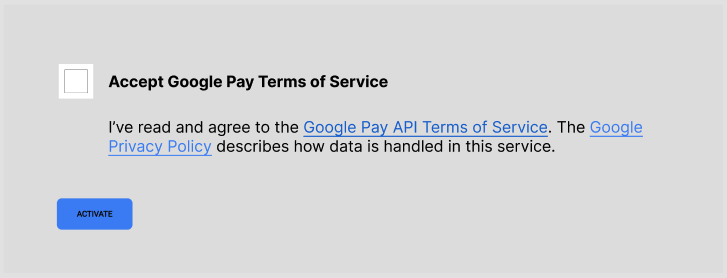
This guide describes the user consent Terms of Service (ToS) acceptance flow that you should present to your merchants when they want to offer Google Pay as a checkout option.
Overview
Merchants who are interested in offering Google Pay as a checkout option need to accept the Google Pay API Terms of Service (ToS) using your dashboard. The user consent UI to accept the Google Pay ToS must present the following elements:
- A checkbox to accept the Google Pay ToS.
- A header for the user consent stating: Accept Google Pay API Terms of Service.
- A body for the user consent stating: I've read and agree to the Google Pay API Terms of Service. The Google Privacy Policy describes how data is handled in this service.
- A button to accept the Google Pay Terms of Service and activate Google Pay at checkout for the merchant.
In the consent text, "Google Pay API Terms of Service" must be a hyperlink to https://payments.developers.google.com/terms/sellertos and "Google Privacy Policy" must be a hyperlink to https://policies.google.com/privacy.
When the user consent is presented, ensure that users can understand which parts of the consent text are hyperlinked.
Dos and Don'ts
| 👍 Do | 👎 Don't |
|---|---|
| I've read and agree to the Google Pay API Terms of Service. The Google Privacy Policy describes how data is handled in this service. | I've read and agree to the Google Pay API Terms of Service. The Google Privacy Policy describes how data is handled in this service. |
Put it together in your dashboard
The following is an example wireframe of how you should present the ToS acceptance flow for your merchants: