Send feedback
Submit proof of identity
Stay organized with collections
Save and categorize content based on your preferences.
Note: This documentation covers only the
preAuthorizedCode as evidence. For other evidence types, reach out
to your Google representative.In this phase, the Issuer receives identity verification evidence and makes an
approval decision.
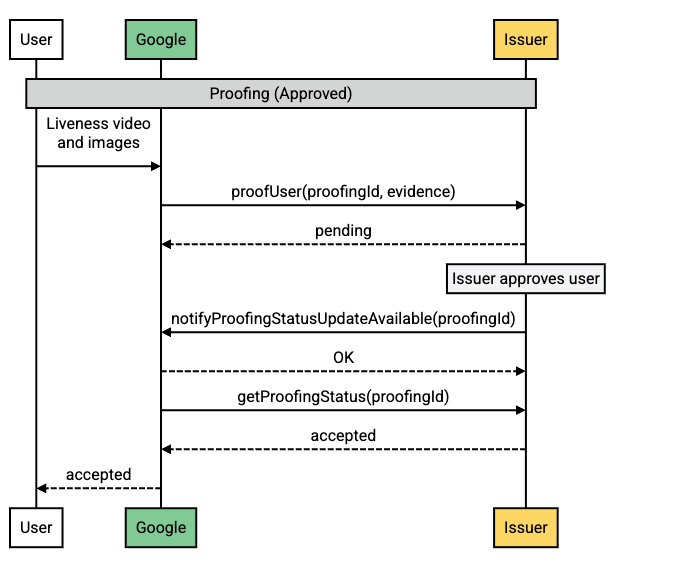
Approved case
Request flow
Flow description
Step
Source
Description
1
Android-powered device
A user submits the liveness video and physical identity document
images for VDC registration.
2
Google servers
Google calls proofUser, sending the
evidence and a proofing ID to the Issuer.
3
Issuer servers
The Issuer sets the approval to pending and reviews the
submitted evidence.
4
Issuer servers
The Issuer calls notifyProofingStatusUpdateAvailable to
notify Google that a status update is available for this proofing
request.
5
Google servers
Google calls getProofingStatus to determine the status of
the proofing request.
6
Issuer servers
The Issuer returns the accepted status.
7
Google servers
Google relays the status to the user.
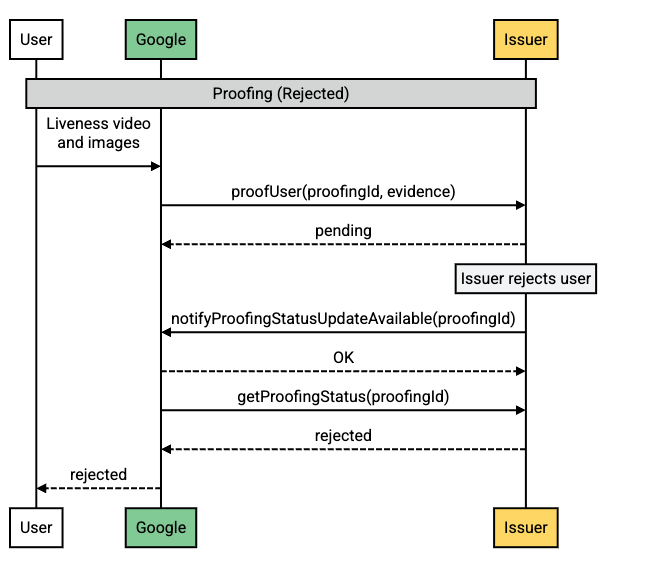
Rejected case
Request flow
Flow description
Step
Source
Description
1
Android-powered device
A user submits the liveness video and physical identity document
images for VDC registration.
2
Google servers
Google calls proofUser, sending the
evidence and a proofing ID to the Issuer.
3
Issuer servers
The Issuer sets the approval to pending and reviews the
submitted evidence.
4
Issuer servers
The Issuer calls notifyProofingStatusUpdateAvailable to
notify Google that a status update is available for this proofing
request.
5
Google servers
Google calls getProofingStatus to determine the status of
the proofing request.
6
Issuer servers
The Issuer returns the rejected status.
7
Google servers
Google relays the status to the user.
Send feedback
Except as otherwise noted, the content of this page is licensed under the Creative Commons Attribution 4.0 License , and code samples are licensed under the Apache 2.0 License . For details, see the Google Developers Site Policies . Java is a registered trademark of Oracle and/or its affiliates.
Last updated 2026-08-21 UTC.
Need to tell us more?
[[["Easy to understand","easyToUnderstand","thumb-up"],["Solved my problem","solvedMyProblem","thumb-up"],["Other","otherUp","thumb-up"]],[["Missing the information I need","missingTheInformationINeed","thumb-down"],["Too complicated / too many steps","tooComplicatedTooManySteps","thumb-down"],["Out of date","outOfDate","thumb-down"],["Samples / code issue","samplesCodeIssue","thumb-down"],["Other","otherDown","thumb-down"]],["Last updated 2026-08-21 UTC."],[],[]]