

註冊為開發人員是必要的一次性設定程序,可將 Google Cloud 雲端專案連結至 Merchant Center 帳戶,並向 Google 註冊開發人員聯絡資訊。這樣 Google 就能將重要服務公告和必要更新,傳送給您提供的相關技術聯絡人。
本文件是 Merchant API 入門系列的一部分。如果已註冊 Merchant API,可以跳至下一節: 插入第一個產品
必要條件
註冊使用 Merchant API 前,請確認你符合下列規定:
- Merchant Center 帳戶:您必須擁有 Merchant Center 帳戶。只有正式版帳戶可以註冊。 測試帳戶不符合開發人員註冊資格。
- 已驗證的首頁:Merchant Center 帳戶必須有已驗證的網站。這可證明你擁有與商家相關聯的網域。
- Merchant Center 帳戶的管理員存取權:用於授權註冊呼叫的電子郵件或服務帳戶,必須在要註冊的 Merchant Center 帳戶中具備
ADMIN存取權類型。詳情請參閱「授權 Merchant API 要求」。 - Google Cloud 雲端專案 ID:應用程式必須與專屬 Google Cloud 雲端專案建立關聯,才能提供驗證憑證。如要瞭解如何查看專案 ID,請參閱「尋找專案名稱、編號和 ID」。
- 與 Google 帳戶相關聯的有效電子郵件地址,用於接收 Google 提供的開發人員最新資訊。不得為服務帳戶電子郵件地址。你可以使用 Merchant Center 帳戶中現有的電子郵件地址,也可以使用新的電子郵件地址。
透過 Merchant API 註冊為開發人員
如要使用 Content API,必須透過 registerGcp 方法,向 Merchant Center 帳戶註冊開發人員聯絡資訊和 Google Cloud 專案。
無論是否使用多個商家帳戶,您都必須為每個要使用的 Google Cloud 專案執行一次註冊作業。如果你使用多個 Google Cloud 專案,可以將任何或所有專案註冊至同一個 Merchant Center 帳戶。
註冊福利
註冊可享有以下好處:
- 建立技術聯絡人:在 Merchant Center 中建立技術聯絡人。Google 會向技術聯絡人傳送重要的 API 相關更新,例如服務公告和新功能資訊。
- 管理多個商家帳戶:您可以代表所有管理的商家帳戶,擔任開發人員聯絡窗口。
除了註冊之外,系統會封鎖未註冊 Google 雲端專案對 Merchant API 的任何呼叫,並傳回 401 錯誤代碼,狀態為 UNAUTHENTICATED,並顯示下列錯誤訊息:
GCP project with id {GCP_ID} and number {GCP_NUMBER} is not registered with the merchant account.
Follow these steps https://developers.google.com/merchant/api/guides/quickstart#register_as_a_developer
to register the GCP project with the merchant account then try calling the API again in 5 minutes.
重要注意事項
- 為每個 Google Cloud 專案進行一次性設定:註冊是每個 Google Cloud 專案的一次性設定,適用於 Google Cloud 專案中的所有使用者和服務帳戶。確認 Google Cloud 雲端專案已啟用 Merchant API。
- 每個 Google Cloud 專案一次只能註冊一個 Merchant Center 帳戶:如果嘗試同時註冊一個 Google Cloud 專案和多個 Merchant Center 帳戶,會收到
ALREADY_REGISTERED錯誤。請使用相同的開發人員電子郵件地址註冊。請注意,多個 Google Cloud 專案可以註冊至同一個 Merchant Center 帳戶。如需變更或輪替已註冊 Google Cloud 雲端專案的操作說明,請參閱「管理及轉換 Google Cloud 雲端專案」。 為管理多個商家的第三方 (3P) 指定正確帳戶:為確保長期穩定性並避免服務中斷,代表或管理多個商家的第三方必須在 Google 生態系統中使用適當的帳戶結構。建議您根據業務類型,註冊代表商家身分的帳戶:
- 已有進階帳戶的市集:如果貴商家是市集,且已有代表整個平台的進階帳戶,請使用這個現有帳戶 ID。
- 購物比較服務 (CSS):如果您是 CSS,請使用專屬 CSS 帳戶 ID 或 CSS 群組帳戶 ID。
- 代理商、開發人員和其他第三方:如果您是第三方商家,例如代理商或第三方開發人員,管理多個商家帳戶,但沒有代表商家的單一 Merchant Center ID,請建立新的主要 Merchant Center 帳戶,並要求轉換為進階帳戶。進階帳戶可以管理子帳戶,並為第三方作業提供必要架構。
下表提供不同合作夥伴類型的建議:
合作夥伴類型 建議註冊的帳戶 市集 主要 (或最大) 進階帳戶。 廣告代理商 代表貴公司的獨立帳戶或進階帳戶。如果你剛開始使用 Merchant API,建議建立獨立帳戶。 購物比較服務 (CSS) 您的 CSS 群組帳戶 ID 或特定 CSS 帳戶 ID,視帳戶代表整個 CSS 群組或群組內的特定 CSS 而定。請勿使用 CSS 進階帳戶。 商家或品牌 代表品牌的帳戶。可以是獨立帳戶或進階帳戶。 銷售點 (POS)/商品目錄資料供應商 主要 (或最大) 進階帳戶。 其他第三方 如果你有 Merchant Center 帳戶,可以使用該帳戶註冊。否則,請建立公司獨立帳戶。接著驗證網站。 只為主要 Merchant Center 註冊:你只能使用主要 Merchant Center 帳戶進行開發人員註冊,並成為所有已連結 Merchant Center 子帳戶的開發人員聯絡人。請勿為每個 Merchant Center 子帳戶執行註冊。
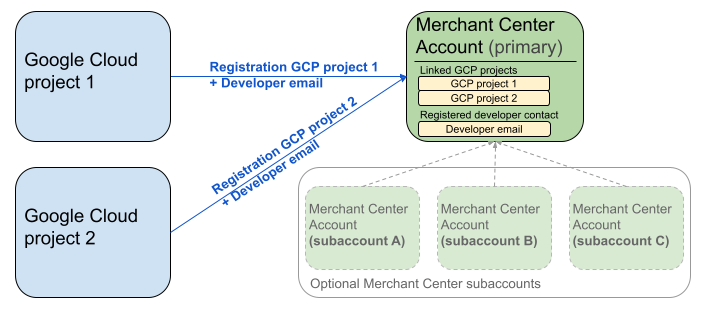
上圖顯示使用多個 Google Cloud 專案和一個主要 Merchant Center 時的註冊設定,以及選用的多個 Merchant Center 子帳戶。
驗證規定:註冊時,通過驗證的 Merchant Center 帳戶 (即憑證所在的帳戶) 必須與模擬的 Merchant Center 帳戶 (即註冊的帳戶) 相符。如果您是透過其他上層或管理員帳戶進行驗證,就無法註冊子帳戶。
僅限已驗證網站的帳戶:只有已驗證網站的 Merchant Center 帳戶才能註冊。
無法註冊測試帳戶:您無法註冊測試帳戶。
註冊開發人員電子郵件地址後:
- 註冊後 5 分鐘內,即可呼叫 Merchant API。
- 如果電子郵件地址屬於現有 Merchant Center 使用者,系統會授予
API developer角色。否則,系統會在 Merchant Center 中建立新使用者,且該使用者必須在 14 天內接受邀請,以免邀請失效,必須重新開始註冊程序。使用者點選邀請連結後,您才完成註冊程序。
撥打註冊電話
呼叫 registerGcp 方法即可註冊。你可以透過下列兩種方式進行註冊通話:
- 方法 1:直接呼叫 API:直接向 API 端點發出原始要求,通常是透過 HTTP(S)。您必須手動處理各個環節,例如建立要求主體、設定標頭 (包括驗證) 和剖析回應。
- 選項 2:用戶端程式庫:使用預先建構的程式庫,以更方便、符合語言習慣的方式與 Merchant API 互動。這些函式庫會處理驗證和授權,並提供便利的方式,將底層的 HTTP 通訊抽象化。我們提供官方程式碼範例,協助您快速上手。
註冊通話授權
如「授權對 Merchant API 的要求」步驟所述,您有兩種不同的驗證情境:
- OAuth 2.0:適用於管理多個商家帳戶的第三方供應商或代理商
- 服務帳戶:用於存取自己的 Merchant Center 帳戶
如要進一步瞭解註冊呼叫的授權,請參閱「如何執行註冊呼叫的驗證和授權?」一節。
註冊通話
在下列範例中,您將使用直接 API 呼叫或用戶端程式庫執行註冊呼叫。
您可以使用 registerGcp 方法執行註冊呼叫。
POST https://merchantapi.googleapis.com/accounts/v1/accounts/{ACCOUNT_ID}/developerRegistration:registerGcp
Content-Type: application/json
Authorization: Bearer {ACCESS_TOKEN}"

{
  "developerEmail": "{DEVELOPER_EMAIL}"
}
更改下列內容:
ACCOUNT_ID:你的 Merchant Center IDACCESS_TOKEN:用於發出 API 呼叫的授權權杖DEVELOPER_EMAIL:主要技術聯絡人的電子郵件地址
如果呼叫成功,會傳回 DeveloperRegistration 資源,確認連結狀態為成功:
  "name": "accounts/{ACCOUNT_ID}/developerRegistration",
  "gcpIds": ["{GOOGLE_CLOUD_PROJECT_ID}"]
Python
下載範例,並按照「Google Merchant API Python 範例」的指引設定 Python 用戶端程式庫。
from examples.authentication import configuration
from examples.authentication import generate_user_credentials
from google.shopping.merchant_accounts_v1 import DeveloperRegistrationServiceClient
from google.shopping.merchant_accounts_v1 import RegisterGcpRequest
def register_gcp(account_id: str, developer_email: str) -> None:
"""Registers the GCP project used to call the Merchant API with a developer email.
Args:
account_id: The ID of your Merchant Center account.
developer_email: The email address of the developer to register.
"""
# Get OAuth credentials.
credentials = generate_user_credentials.main()
# Create a client to the Developer Registration Service.
client = DeveloperRegistrationServiceClient(credentials=credentials)
# The name has the format: accounts/{account}/developerRegistration
name = f"accounts/{account_id}/developerRegistration"
# Create the request to register the GCP project.
request = RegisterGcpRequest(
name=name,
developer_email=developer_email,
)
# Make the API call and handle potential errors.
try:
print("Sending RegisterGcp request:")
response = client.register_gcp(request=request)
print("Registered GCP project successfully:")
print(response)
except RuntimeError as e:
print(f"An error occurred: {e}")
if __name__ == "__main__":
# Your Merchant Center account ID.
# This can be found in the Merchant Center UI.
_account_id = configuration.Configuration().read_merchant_info()
# The developer email to associate with the GCP project.
_developer_email = "YOUR_EMAIL_HERE"
register_gcp(_account_id, _developer_email)
Java
下載範例,並按照 Google Merchant API Java 範例中的指南設定 Java 用戶端程式庫。
import com.google.api.gax.core.FixedCredentialsProvider;
import com.google.auth.oauth2.GoogleCredentials;
import com.google.shopping.merchant.accounts.v1.DeveloperRegistration;
import com.google.shopping.merchant.accounts.v1.DeveloperRegistrationName;
import com.google.shopping.merchant.accounts.v1.DeveloperRegistrationServiceClient;
import com.google.shopping.merchant.accounts.v1.DeveloperRegistrationServiceSettings;
import com.google.shopping.merchant.accounts.v1.RegisterGcpRequest;
import shopping.merchant.samples.utils.Authenticator;
import shopping.merchant.samples.utils.Config;
/**
* This class demonstrates how to register the GCP project used to call the Merchant API with a
* developer email.
*/
public class RegisterGcpSample {
public static DeveloperRegistration registerGcp(Config config, String developerEmail) throws Exception {
// Obtains OAuth token based on the user's configuration.
GoogleCredentials credential = new Authenticator().authenticate();
// Creates service settings using the credentials retrieved above.
DeveloperRegistrationServiceSettings developerRegistrationServiceSettings =
DeveloperRegistrationServiceSettings.newBuilder()
.setCredentialsProvider(FixedCredentialsProvider.create(credential))
.build();
// Creates DeveloperRegistration name to identify the DeveloperRegistration.
// The name has the format: accounts/{account}/developerRegistration
String name =
DeveloperRegistrationName.newBuilder()
.setAccount(config.getAccountId().toString())
.build()
.toString();
// Calls the API and propagates any network failures/errors.
try (DeveloperRegistrationServiceClient developerRegistrationServiceClient =
DeveloperRegistrationServiceClient.create(developerRegistrationServiceSettings)) {
// Creates a request to register the GCP project with the developer email.
RegisterGcpRequest request =
RegisterGcpRequest.newBuilder().setName(name).setDeveloperEmail(developerEmail).build();
System.out.println("Sending RegisterGcp request:");
DeveloperRegistration response = developerRegistrationServiceClient.registerGcp(request);
System.out.println(response);
return response;
}
}
public static void main(String[] args) throws Exception {
Config config = Config.load();
String developerEmail = "YOUR_EMAIL_HERE"; // Replace with your email
registerGcp(config, developerEmail);
}
}
PHP
下載範例,並按照「Google Merchant API PHP 範例」的指引設定 PHP 用戶端程式庫。
require_once __DIR__ . '/../../../../vendor/autoload.php';
require_once __DIR__ . '/../../../Authentication/Authentication.php';
require_once __DIR__ . '/../../../Authentication/Config.php';
use Google\ApiCore\ApiException;
use Google\Shopping\Merchant\Accounts\V1\Client\DeveloperRegistrationServiceClient;
use Google\Shopping\Merchant\Accounts\V1\RegisterGcpRequest;
/**
* This class demonstrates how to register the GCP project used to call the
* Merchant API with a developer email.
*/
class RegisterGcpSample
{
/**
* A helper function to create the name string for the
* DeveloperRegistration.
*
* @param string $accountId The merchant account ID.
* @return string The name, which has the format:
* `accounts/{account}/developerRegistration`
*/
private static function getName(string $accountId): string
{
return sprintf("accounts/%s/developerRegistration", $accountId);
}
/**
* Registers the GCP project with a developer email.
*
* @param array $config The configuration data for authentication and account ID.
* @param string $developerEmail The email of the developer to register.
*/
public static function registerGcpSample(array $config, string $developerEmail): void
{
// Obtains OAuth credentials from the configuration file.
$credentials = Authentication::useServiceAccountOrTokenFile();
// Creates a configuration object for the client.
$options = ['credentials' => $credentials];
// Creates the DeveloperRegistrationServiceClient.
$developerRegistrationServiceClient = new DeveloperRegistrationServiceClient($options);
// Creates the name of the developer registration to identify it.
$name = self::getName($config['accountId']);
// Calls the API and handles any network failures.
try {
// Creates a request to register the GCP project with the developer email.
$request = new RegisterGcpRequest([
'name' => $name,
'developer_email' => $developerEmail
]);
printf("Sending RegisterGcp request:%s", PHP_EOL);
// The `registerGcp` method returns a `DeveloperRegistration` object
// upon success.
$response = $developerRegistrationServiceClient->registerGcp($request);
print "Successfully registered developer email '$developerEmail' for account {$config['accountId']}.\n";
print_r($response);
} catch (ApiException $e) {
printf("An error occurred: %s%s", $e->getMessage(), PHP_EOL);
}
}
/**
* Helper to execute the sample.
*/
public function callSample(): void
{
$config = Config::generateConfig();
// An email address for a developer to register for the API.
$developerEmail = 'YOUR_EMAIL_HERE'; // Replace with your email
self::registerGcpSample($config, $developerEmail);
}
}
// Executes the sample.
$sample = new RegisterGcpSample();
$sample->callSample();
cURL
curl -X POST "https://merchantapi.googleapis.com/accounts/v1/accounts/{ACCOUNT_ID}/developerRegistration:registerGcp" \
-H "Content-Type: application/json" \
-H "Authorization: Bearer {ACCESS_TOKEN}" \
-d '{
  "developerEmail": "{DEVELOPER_EMAIL}"
}'
如要完成註冊,請務必確認 Merchant Center 中至少有一位使用者具備API developer角色。如要達成這個目標,您可以執行下列其中一項作業:
- 將
developerEmail提供給registerGcp方法。 - 在 Merchant Center 使用者介面中,新增具有
API developer角色的使用者。 - 在 Merchant Center 使用者介面中,將
API developer角色指派給現有使用者。 - 呼叫
accounts.users.create方法來建立新使用者,並指派API developer角色。 - 使用
accounts.users.patch方法,將API developer角色指派給現有使用者。
註冊後的最佳做法
為充分運用強大的存取權管理功能,並避免日後服務中斷,建議您在完成初始註冊後,遵循下列最佳做法:
授予 API developer 其他權限
註冊開發人員聯絡人時,系統會自動指派 API developer 角色。這個角色不包含管理 Merchant Center 帳戶或發出所有 API 呼叫所需的其他權限。建議為開發人員新增 ADMIN 或 STANDARD 角色,提供完整存取權。
如要修改使用者的存取權,請使用 accounts.users.patch 方法。您可以在要求主體的 updateMask 欄位中指定存取權,藉此新增或移除角色:
PATCH https://merchantapi.googleapis.com/accounts/v1/{ACCOUNT_ID}/users/{DEVELOPER_EMAIL}?update_mask=access_rights
Content-Type: application/json
Authorization: Bearer {ACCESS_TOKEN}"

{
  "name": "accounts/{ACCOUNT_ID}/users/{DEVELOPER_EMAIL}",
  "access_rights": [ "ADMIN", "API_DEVELOPER" ]
}
Python
from examples.authentication import configuration
from examples.authentication import generate_user_credentials
from google.protobuf import field_mask_pb2
from google.shopping.merchant_accounts_v1 import AccessRight
from google.shopping.merchant_accounts_v1 import UpdateUserRequest
from google.shopping.merchant_accounts_v1 import User
from google.shopping.merchant_accounts_v1 import UserServiceClient
FieldMask = field_mask_pb2.FieldMask
_ACCOUNT = configuration.Configuration().read_merchant_info()
def update_user(user_email, user_access_right):
"""Updates a user to make it an admin of the MC account."""
credentials = generate_user_credentials.main()
client = UserServiceClient(credentials=credentials)
# Create user name string
name = "accounts/" + _ACCOUNT + "/users/" + user_email
user = User(name=name, access_rights=[user_access_right])
field_mask = FieldMask(paths=["access_rights"])
try:
request = UpdateUserRequest(user=user, update_mask=field_mask)
print("Sending Update User request")
response = client.update_user(request=request)
print("Updated User Name below")
print(response.name)
except RuntimeError as e:
print(e)
if __name__ == "__main__":
# Modify this email to update the right user
email = "USER_MAIL_ACCOUNT"
access_right = AccessRight.ADMIN
update_user(email, access_right)
Java
import com.google.api.gax.core.FixedCredentialsProvider;
import com.google.auth.oauth2.GoogleCredentials;
import com.google.protobuf.FieldMask;
import com.google.shopping.merchant.accounts.v1.AccessRight;
import com.google.shopping.merchant.accounts.v1.UpdateUserRequest;
import com.google.shopping.merchant.accounts.v1.User;
import com.google.shopping.merchant.accounts.v1.UserName;
import com.google.shopping.merchant.accounts.v1.UserServiceClient;
import com.google.shopping.merchant.accounts.v1.UserServiceSettings;
import shopping.merchant.samples.utils.Authenticator;
import shopping.merchant.samples.utils.Config;
/** This class demonstrates how to update a user to make it an admin of the MC account. */
public class UpdateUserSample {
public static void updateUser(Config config, String email, AccessRight accessRight)
throws Exception {
GoogleCredentials credential = new Authenticator().authenticate();
UserServiceSettings userServiceSettings =
UserServiceSettings.newBuilder()
.setCredentialsProvider(FixedCredentialsProvider.create(credential))
.build();
// Creates user name to identify user.
String name =
UserName.newBuilder()
.setAccount(config.getAccountId().toString())
.setEmail(email)
.build()
.toString();
// Create a user with the updated fields.
User user = User.newBuilder().setName(name).addAccessRights(accessRight).build();
FieldMask fieldMask = FieldMask.newBuilder().addPaths("access_rights").build();
try (UserServiceClient userServiceClient = UserServiceClient.create(userServiceSettings)) {
UpdateUserRequest request =
UpdateUserRequest.newBuilder().setUser(user).setUpdateMask(fieldMask).build();
System.out.println("Sending Update User request");
User response = userServiceClient.updateUser(request);
System.out.println("Updated User Name below");
System.out.println(response.getName());
} catch (Exception e) {
System.out.println(e);
}
}
public static void main(String[] args) throws Exception {
Config config = Config.load();
String email = "testUser@gmail.com";
// Give the user admin rights. Note that all other rights, like
// PERFORMANCE_REPORTING, would be overwritten in this example
// if the user had those access rights before the update.
AccessRight accessRight = AccessRight.ADMIN;
updateUser(config, email, accessRight);
}
}
PHP
use Google\ApiCore\ApiException;
use Google\Protobuf\FieldMask;
use Google\Shopping\Merchant\Accounts\V1\AccessRight;
use Google\Shopping\Merchant\Accounts\V1\UpdateUserRequest;
use Google\Shopping\Merchant\Accounts\V1\User;
use Google\Shopping\Merchant\Accounts\V1\Client\UserServiceClient;
/**
* Updates a user.
*
* @param array $config The configuration data.
* @param string $email The email address of the user.
* @param int $accessRight The access right to grant the user.
* @return void
*/
function updateUser($config, $email, $accessRights): void
{
// Gets the OAuth credentials to make the request.
$credentials = Authentication::useServiceAccountOrTokenFile();
// Creates options config containing credentials for the client to use.
$options = ['credentials' => $credentials];
// Creates a client.
$userServiceClient = new UserServiceClient($options);
// Creates user name to identify user.
$name = 'accounts/' . $config['accountId'] . "/users/" . $email;
$user = (new User())
->setName($name)
->setAccessRights($accessRights);
$fieldMask = (new FieldMask())->setPaths(['access_rights']);
// Calls the API and catches and prints any network failures/errors.
try {
$request = new UpdateUserRequest([
'user' => $user,
'update_mask' => $fieldMask,
]);
print "Sending Update User request\n";
$response = $userServiceClient->updateUser($request);
print "Updated User Name below\n";
print $response->getName() . "\n";
} catch (ApiException $e) {
print $e->getMessage();
}
}
$config = Config::generateConfig();
$email = "testUser@gmail.com";
$accessRights = [AccessRight::ADMIN];
updateUser($config, $email, $accessRights);
cURL
curl -X PATCH \
"https://merchantapi.googleapis.com/accounts/v1/{ACCOUNT_ID}/users/{USER_EMAIL}?update_mask=access_rights" \
-H "Content-Type: application/json" \
-H "Authorization: Bearer {ACCESS_TOKEN}" \
-d '{
  "access_rights": [
    "ADMIN",
    "API_DEVELOPER"
  ]
}'
新增更多開發人員聯絡資料
為避免主要開發人員聯絡人離職或失去存取權時,業務受到影響,請務必新增備援聯絡人。建議在 Merchant Center 中,至少再指派一名使用者擔任API developer角色,做為備用。
如要新增使用者或更新現有使用者,請使用 Merchant API 中的 accounts.users 服務,或 Merchant Center 使用者介面中的「存取權和服務」頁面。主動新增備用開發人員,可建立更具彈性的整合,不依賴單一個體。
PATCH https://merchantapi.googleapis.com/products/v1/accounts/{ACCOUNT_ID}/users
Content-Type: application/json
Authorization: Bearer {ACCESS_TOKEN}"
{
  "user_id": {USER_EMAIL},
  "user": { "access_rights": [ "API_DEVELOPER", "ADMIN" ] }
}
Python
from examples.authentication import configuration
from examples.authentication import generate_user_credentials
from google.shopping.merchant_accounts_v1 import AccessRight
from google.shopping.merchant_accounts_v1 import CreateUserRequest
from google.shopping.merchant_accounts_v1 import User
from google.shopping.merchant_accounts_v1 import UserServiceClient
_ACCOUNT = configuration.Configuration().read_merchant_info()
def get_parent(account_id):
return f"accounts/{account_id}"
def create_user(user_email):
"""Creates a user for a Merchant Center account."""
# Get OAuth credentials
credentials = generate_user_credentials.main()
# Create a UserServiceClient
client = UserServiceClient(credentials=credentials)
# Create parent string
parent = get_parent(_ACCOUNT)
# Create the request
request = CreateUserRequest(
parent=parent,
user_id=user_email,
user=User(
access_rights=[AccessRight.ADMIN, AccessRight.PERFORMANCE_REPORTING]
),
)
try:
print("Sending Create User request")
response = client.create_user(request=request)
print("Inserted User Name below")
print(response.name)
except RuntimeError as e:
print(e)
if __name__ == "__main__":
# Modify this email to create a new user
email = "USER_MAIL_ACCOUNT"
create_user(email)
Java
import com.google.api.gax.core.FixedCredentialsProvider;
import com.google.auth.oauth2.GoogleCredentials;
import com.google.shopping.merchant.accounts.v1.AccessRight;
import com.google.shopping.merchant.accounts.v1.CreateUserRequest;
import com.google.shopping.merchant.accounts.v1.User;
import com.google.shopping.merchant.accounts.v1.UserServiceClient;
import com.google.shopping.merchant.accounts.v1.UserServiceSettings;
import shopping.merchant.samples.utils.Authenticator;
import shopping.merchant.samples.utils.Config;
/** This class demonstrates how to create a user for a Merchant Center account. */
public class CreateUserSample {
private static String getParent(String accountId) {
return String.format("accounts/%s", accountId);
}
public static void createUser(Config config, String email) throws Exception {
// Obtains OAuth token based on the user's configuration.
GoogleCredentials credential = new Authenticator().authenticate();
// Creates service settings using the credentials retrieved above.
UserServiceSettings userServiceSettings =
UserServiceSettings.newBuilder()
.setCredentialsProvider(FixedCredentialsProvider.create(credential))
.build();
// Creates parent to identify where to insert the user.
String parent = getParent(config.getAccountId().toString());
// Calls the API and catches and prints any network failures/errors.
try (UserServiceClient userServiceClient = UserServiceClient.create(userServiceSettings)) {
CreateUserRequest request =
CreateUserRequest.newBuilder()
.setParent(parent)
// This field is the email address of the user.
.setUserId(email)
.setUser(
User.newBuilder()
.addAccessRights(AccessRight.ADMIN)
.addAccessRights(AccessRight.PERFORMANCE_REPORTING)
.build())
.build();
System.out.println("Sending Create User request");
User response = userServiceClient.createUser(request);
System.out.println("Inserted User Name below");
// The last part of the user name will be the email address of the user.
// Format: `accounts/{account}/user/{user}`
System.out.println(response.getName());
} catch (Exception e) {
System.out.println(e);
}
}
public static void main(String[] args) throws Exception {
Config config = Config.load();
// The email address of this user.
String email = "testUser@gmail.com";
createUser(config, email);
}
}
PHP
use Google\ApiCore\ApiException;
use Google\Shopping\Merchant\Accounts\V1\AccessRight;
use Google\Shopping\Merchant\Accounts\V1\CreateUserRequest;
use Google\Shopping\Merchant\Accounts\V1\User;
use Google\Shopping\Merchant\Accounts\V1\Client\UserServiceClient;
/**
* Creates a user.
*
* @param array $config The configuration data.
* @param string $email The email address of the user.
* @return void
*/
function createUser($config, $email): void
{
// Gets the OAuth credentials to make the request.
$credentials = Authentication::useServiceAccountOrTokenFile();
// Creates options config containing credentials for the client to use.
$options = ['credentials' => $credentials];
// Creates a client.
$userServiceClient = new UserServiceClient($options);
// Creates parent to identify where to insert the user.
$parent = sprintf("accounts/%s", $config['accountId']);
// Calls the API and catches and prints any network failures/errors.
try {
$request = new CreateUserRequest([
'parent' => $parent,
'user_id' => $email,
'user' => (new User())
->setAccessRights([AccessRight::ADMIN,AccessRight::PERFORMANCE_REPORTING])
]);
print "Sending Create User request\n";
$response = $userServiceClient->createUser($request);
print "Inserted User Name below\n";
print $response->getName() . "\n";
} catch (ApiException $e) {
print $e->getMessage();
}
}
$config = Config::generateConfig();
$email = "testUser@gmail.com";
createUser($config, $email);
cURL
curl -X PATCH \
"https://merchantapi.googleapis.com/products/v1/accounts/{ACCOUNT_ID}/users/{USER_EMAIL}?update_mask=access_rights" \
-H "Content-Type: application/json" \
-H "Authorization: Bearer {ACCESS_TOKEN}" \
-d '{
  "access_rights": [
    "ADMIN",
    "API_DEVELOPER"
  ]
}'