

Đăng ký làm nhà phát triển là một quy trình thiết lập bắt buộc, chỉ cần thực hiện một lần để liên kết dự án trên đám mây của Google với tài khoản Merchant Center và đăng ký thông tin liên hệ của nhà phát triển với Google. Nhờ đó, Google có thể gửi thông báo dịch vụ quan trọng và thông tin cập nhật bắt buộc cho các đầu mối liên hệ kỹ thuật có liên quan mà bạn cung cấp.
Tài liệu này là một phần trong loạt tài liệu gồm nhiều phần về cách bắt đầu sử dụng Merchant API. Nếu đã đăng ký Merchant API, bạn có thể chuyển sang phần tiếp theo: Thêm sản phẩm đầu tiên
Điều kiện tiên quyết
Trước khi đăng ký sử dụng Merchant API, hãy đảm bảo bạn đáp ứng các yêu cầu sau:
- Tài khoản Merchant Center: Bạn cần có một tài khoản Merchant Center hiện tại. Chỉ tài khoản chính thức mới được hỗ trợ đăng ký. Tài khoản thử nghiệm không đủ điều kiện đăng ký làm nhà phát triển.
- Trang chủ đã xác minh: Tài khoản Merchant Center của bạn phải có một trang web đã xác minh. Thao tác này chứng minh quyền sở hữu miền liên kết với doanh nghiệp của bạn.
- Quyền quản trị đối với tài khoản Merchant Center: Email hoặc tài khoản dịch vụ mà bạn dùng để uỷ quyền cho lệnh gọi đăng ký phải có loại quyền truy cập
ADMINtrong tài khoản Merchant Center mà bạn đang đăng ký. Để biết thêm thông tin, hãy xem bài viết Uỷ quyền cho các yêu cầu gửi đến Merchant API. - Mã dự án trên Google Cloud: Ứng dụng của bạn phải được liên kết với một dự án chuyên biệt trên Google Cloud để cung cấp thông tin xác thực cho quá trình xác thực. Để biết thông tin chi tiết về cách tìm mã dự án, hãy xem bài viết Tìm tên, số và mã dự án.
- Địa chỉ email hợp lệ được liên kết với một Tài khoản Google mà bạn cung cấp làm đầu mối liên hệ của nhà phát triển để nhận thông tin cập nhật từ Google. Không được là email của tài khoản dịch vụ. Bạn có thể sử dụng địa chỉ email đã có trong tài khoản Merchant Center hoặc một địa chỉ email mới.
Đăng ký làm nhà phát triển với Merchant API
Để sử dụng Merchant API, bạn phải đăng ký thông tin liên hệ của nhà phát triển và dự án trên đám mây của Google với tài khoản Merchant Center thông qua phương thức registerGcp.
Cho dù bạn có làm việc với nhiều tài khoản người bán hay không, bạn vẫn thực hiện thao tác đăng ký một lần cho mỗi dự án Google Cloud mà bạn dự định sử dụng. Nếu đang làm việc với nhiều dự án trên Google Cloud, bạn có thể đăng ký bất kỳ hoặc tất cả dự án đó vào cùng một Tài khoản Merchant Center.
Lợi ích của việc đăng ký
Việc đăng ký mang lại những lợi ích sau:
- Tạo người liên hệ kỹ thuật: Thao tác này sẽ tạo một người liên hệ kỹ thuật trong Merchant Center. Google sẽ gửi thông tin cập nhật quan trọng về API cụ thể đến người liên hệ phụ trách kỹ thuật, chẳng hạn như thông báo dịch vụ và thông tin về tính năng mới.
- Quản lý nhiều tài khoản người bán: Cho phép bạn đại diện cho đầu mối liên hệ của nhà phát triển đối với tất cả tài khoản người bán mà bạn quản lý.
Ngoại trừ việc đăng ký, mọi lệnh gọi đến Merchant API từ một dự án trên đám mây của Google chưa đăng ký đều bị chặn, trả về mã lỗi 401 có trạng thái UNAUTHENTICATED và thông báo lỗi sau:
GCP project with id {GCP_ID} and number {GCP_NUMBER} is not registered with the merchant account.
Follow these steps https://developers.google.com/merchant/api/guides/quickstart#register_as_a_developer
to register the GCP project with the merchant account then try calling the API again in 5 minutes.
Điểm quan trọng cần lưu ý
- Thiết lập một lần cho mỗi dự án Google Cloud: Việc đăng ký là một quy trình thiết lập một lần cho mỗi dự án Google Cloud và áp dụng cho tất cả người dùng và tài khoản dịch vụ trong dự án Google Cloud. Hãy đảm bảo rằng bạn đã bật Merchant API trong dự án trên đám mây của Google Cloud.
- Mỗi dự án Google Cloud chỉ có thể được đăng ký bằng một tài khoản Merchant Center duy nhất tại một thời điểm bất kỳ: Nếu cố gắng đăng ký một dự án Google Cloud bằng nhiều tài khoản Merchant Center cùng lúc, bạn sẽ nhận được lỗi
ALREADY_REGISTERED. Sử dụng cùng một địa chỉ email của nhà phát triển để đăng ký. Xin lưu ý rằng bạn có thể đăng ký nhiều dự án Google Cloud cho cùng một tài khoản Merchant Center. Để biết hướng dẫn về cách thay đổi hoặc xoay vòng dự án trên đám mây đã đăng ký trên Google Cloud, hãy xem phần Quản lý và chuyển đổi dự án trên Google Cloud. Chỉ định tài khoản phù hợp cho Bên thứ ba (3P) quản lý nhiều người bán: Để đảm bảo tính ổn định lâu dài và tránh gián đoạn dịch vụ, bên thứ ba đại diện hoặc quản lý nhiều người bán cần sử dụng cấu trúc tài khoản phù hợp trong hệ sinh thái của Google. Bạn nên đăng ký tài khoản đại diện cho danh tính doanh nghiệp của mình, tuỳ thuộc vào loại hình doanh nghiệp:
- Trang web thương mại có tài khoản nâng cao hiện có: Nếu doanh nghiệp của bạn hoạt động như một trang web thương mại và đã có một tài khoản nâng cao đại diện cho toàn bộ nền tảng, thì bạn nên sử dụng mã tài khoản hiện có này.
- Dịch vụ so sánh giá (CSS): Nếu là một CSS, bạn nên sử dụng mã tài khoản CSS hoặc mã tài khoản nhóm Dịch vụ so sánh giá riêng biệt của mình.
- Công ty quảng cáo, nhà phát triển và các bên thứ ba khác: Nếu bạn là doanh nghiệp bên thứ ba (chẳng hạn như công ty quảng cáo hoặc nhà phát triển bên thứ ba) quản lý nhiều tài khoản nhà bán hàng và không có một Mã truy cập Merchant Center duy nhất đại diện cho doanh nghiệp của bạn, thì bạn nên tạo một tài khoản Merchant Center chính mới và yêu cầu chuyển đổi tài khoản đó thành tài khoản nâng cao. Tài khoản nâng cao có thể quản lý tài khoản phụ và cung cấp cấu trúc cần thiết cho các hoạt động của bên thứ ba.
Bảng sau đây đưa ra các đề xuất cho nhiều loại đối tác:
Loại Đối tác Tài khoản nên đăng ký Sàn thương mại điện tử Tài khoản nâng cao chính (hoặc lớn nhất) của bạn. Công ty quảng cáo Tài khoản độc lập hoặc tài khoản nâng cao đại diện cho công ty của bạn. Nếu mới bắt đầu sử dụng Merchant API, bạn nên tạo một tài khoản độc lập. Dịch vụ so sánh giá (CSS) Mã tài khoản nhóm Dịch vụ so sánh giá hoặc mã tài khoản Dịch vụ so sánh giá cụ thể, tuỳ thuộc vào việc tài khoản đó đại diện cho toàn bộ nhóm Dịch vụ so sánh giá hay chỉ một Dịch vụ so sánh giá cụ thể trong một nhóm. Không sử dụng tài khoản nâng cao CSS. Người bán hoặc thương hiệu Tài khoản chính đại diện cho thương hiệu của bạn. Có thể là tài khoản độc lập hoặc tài khoản nâng cao. Nhà cung cấp dữ liệu về kho hàng/điểm bán hàng (POS) Tài khoản nâng cao chính (hoặc lớn nhất) của bạn. Các bên thứ ba khác Nếu có tài khoản Merchant Center, bạn có thể sử dụng tài khoản đó để đăng ký. Nếu không, hãy tạo một tài khoản độc lập cho công ty. Sau đó, hãy xác minh trang web của bạn. Chỉ đăng ký cho tài khoản Merchant Center chính: Bạn chỉ đăng ký nhà phát triển bằng tài khoản Merchant Center chính và bạn sẽ trở thành người liên hệ của nhà phát triển cho tất cả các tài khoản phụ Merchant Center được liên kết. Đừng đăng ký cho từng tài khoản phụ Merchant Center.
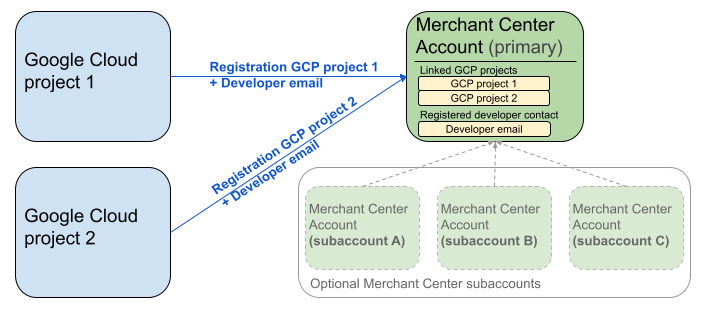
Sơ đồ trước cho thấy cách thiết lập quy trình đăng ký khi sử dụng nhiều dự án trên Google Cloud và một tài khoản Merchant Center chính, có thể có nhiều tài khoản phụ Merchant Center.
Yêu cầu xác thực: Khi thực hiện đăng ký, tài khoản Merchant Center đã xác thực (là tài khoản chứa thông tin xác thực của bạn) phải khớp với tài khoản Merchant Center được mạo danh (là tài khoản bạn đang đăng ký). Bạn không thể đăng ký tài khoản phụ nếu được xác thực bằng một tài khoản mẹ hoặc tài khoản người quản lý riêng biệt.
Chỉ dành cho tài khoản có trang web đã xác minh: Chỉ những tài khoản Merchant Center có trang web đã xác minh mới được phép đăng ký.
Không đăng ký cho tài khoản thử nghiệm: Bạn không thể đăng ký cho tài khoản thử nghiệm.
Sau khi đăng ký địa chỉ email của nhà phát triển:
- Bạn có thể thực hiện các lệnh gọi Merchant API trong vòng 5 phút kể từ khi đăng ký.
- Nếu email thuộc về một người dùng Merchant Center hiện tại, thì người dùng đó sẽ được cấp vai trò
API developer. Nếu không, một người dùng mới sẽ được tạo trong Merchant Center và họ phải chấp nhận lời mời trong vòng 14 ngày để tránh lời mời hết hạn và phải bắt đầu lại quy trình đăng ký. Bạn chỉ hoàn tất quy trình đăng ký sau khi người dùng nhấp vào đường liên kết của lời mời.
Gọi điện để đăng ký
Bạn đăng ký bằng cách gọi phương thức registerGcp. Bạn có hai lựa chọn để thực hiện lệnh gọi đăng ký:
- Cách 1: Lệnh gọi API trực tiếp Bạn gửi yêu cầu thô đến các điểm cuối API trực tiếp, thường là qua HTTP(S). Bạn tự xử lý các khía cạnh như tạo phần nội dung yêu cầu, đặt tiêu đề (bao gồm cả xác thực) và phân tích cú pháp phản hồi.
- Cách 2: Thư viện ứng dụng Bạn sử dụng các thư viện tạo sẵn để có cách tương tác thuận tiện và phù hợp với ngôn ngữ hơn với Merchant API. Các thư viện này xử lý việc xác thực và uỷ quyền, đồng thời cung cấp một cách thuận tiện để trừu tượng hoá hoạt động giao tiếp HTTP cơ bản. Bạn có thể sử dụng các mẫu mã chính thức để bắt đầu nhanh chóng.
Uỷ quyền cho lệnh gọi đăng ký
Như đã mô tả trong bước Uỷ quyền yêu cầu cho Merchant API, bạn có hai kịch bản xác thực riêng biệt:
- OAuth 2.0: dành cho các nhà cung cấp hoặc công ty quảng cáo bên thứ ba quản lý nhiều tài khoản nhà bán hàng
- Tài khoản dịch vụ: để truy cập vào tài khoản Merchant Center của riêng bạn
Để biết thêm thông tin về việc uỷ quyền cho lệnh gọi đăng ký, hãy xem bài viết Làm cách nào để thực hiện quy trình xác thực và uỷ quyền cho lệnh gọi đăng ký?
Cuộc gọi đăng ký
Trong các ví dụ sau, bạn thực hiện lệnh gọi đăng ký bằng cách sử dụng lệnh gọi API trực tiếp hoặc thư viện ứng dụng.
Bạn thực hiện lệnh gọi đăng ký bằng phương thức registerGcp.
POST https://merchantapi.googleapis.com/accounts/v1/accounts/{ACCOUNT_ID}/developerRegistration:registerGcp
Content-Type: application/json
Authorization: Bearer {ACCESS_TOKEN}"

{
  "developerEmail": "{DEVELOPER_EMAIL}"
}
Thay thế nội dung sau:
ACCOUNT_ID: mã truy cập Merchant CenterACCESS_TOKEN: mã thông báo uỷ quyền để thực hiện lệnh gọi APIDEVELOPER_EMAIL: địa chỉ email của người liên hệ chính về kỹ thuật
Một lệnh gọi thành công sẽ trả về tài nguyên DeveloperRegistration, xác nhận trạng thái liên kết thành công:
  "name": "accounts/{ACCOUNT_ID}/developerRegistration",
  "gcpIds": ["{GOOGLE_CLOUD_PROJECT_ID}"]
Python
Tải các mẫu xuống và làm theo hướng dẫn trong Mẫu Python của Google Merchant API để thiết lập thư viện ứng dụng Python.
from examples.authentication import configuration
from examples.authentication import generate_user_credentials
from google.shopping.merchant_accounts_v1 import DeveloperRegistrationServiceClient
from google.shopping.merchant_accounts_v1 import RegisterGcpRequest
def register_gcp(account_id: str, developer_email: str) -> None:
"""Registers the GCP project used to call the Merchant API with a developer email.
Args:
account_id: The ID of your Merchant Center account.
developer_email: The email address of the developer to register.
"""
# Get OAuth credentials.
credentials = generate_user_credentials.main()
# Create a client to the Developer Registration Service.
client = DeveloperRegistrationServiceClient(credentials=credentials)
# The name has the format: accounts/{account}/developerRegistration
name = f"accounts/{account_id}/developerRegistration"
# Create the request to register the GCP project.
request = RegisterGcpRequest(
name=name,
developer_email=developer_email,
)
# Make the API call and handle potential errors.
try:
print("Sending RegisterGcp request:")
response = client.register_gcp(request=request)
print("Registered GCP project successfully:")
print(response)
except RuntimeError as e:
print(f"An error occurred: {e}")
if __name__ == "__main__":
# Your Merchant Center account ID.
# This can be found in the Merchant Center UI.
_account_id = configuration.Configuration().read_merchant_info()
# The developer email to associate with the GCP project.
_developer_email = "YOUR_EMAIL_HERE"
register_gcp(_account_id, _developer_email)
Java
Tải các mẫu xuống và làm theo hướng dẫn trong Mẫu Java của Google Merchant API để thiết lập thư viện ứng dụng Java.
import com.google.api.gax.core.FixedCredentialsProvider;
import com.google.auth.oauth2.GoogleCredentials;
import com.google.shopping.merchant.accounts.v1.DeveloperRegistration;
import com.google.shopping.merchant.accounts.v1.DeveloperRegistrationName;
import com.google.shopping.merchant.accounts.v1.DeveloperRegistrationServiceClient;
import com.google.shopping.merchant.accounts.v1.DeveloperRegistrationServiceSettings;
import com.google.shopping.merchant.accounts.v1.RegisterGcpRequest;
import shopping.merchant.samples.utils.Authenticator;
import shopping.merchant.samples.utils.Config;
/**
* This class demonstrates how to register the GCP project used to call the Merchant API with a
* developer email.
*/
public class RegisterGcpSample {
public static DeveloperRegistration registerGcp(Config config, String developerEmail) throws Exception {
// Obtains OAuth token based on the user's configuration.
GoogleCredentials credential = new Authenticator().authenticate();
// Creates service settings using the credentials retrieved above.
DeveloperRegistrationServiceSettings developerRegistrationServiceSettings =
DeveloperRegistrationServiceSettings.newBuilder()
.setCredentialsProvider(FixedCredentialsProvider.create(credential))
.build();
// Creates DeveloperRegistration name to identify the DeveloperRegistration.
// The name has the format: accounts/{account}/developerRegistration
String name =
DeveloperRegistrationName.newBuilder()
.setAccount(config.getAccountId().toString())
.build()
.toString();
// Calls the API and propagates any network failures/errors.
try (DeveloperRegistrationServiceClient developerRegistrationServiceClient =
DeveloperRegistrationServiceClient.create(developerRegistrationServiceSettings)) {
// Creates a request to register the GCP project with the developer email.
RegisterGcpRequest request =
RegisterGcpRequest.newBuilder().setName(name).setDeveloperEmail(developerEmail).build();
System.out.println("Sending RegisterGcp request:");
DeveloperRegistration response = developerRegistrationServiceClient.registerGcp(request);
System.out.println(response);
return response;
}
}
public static void main(String[] args) throws Exception {
Config config = Config.load();
String developerEmail = "YOUR_EMAIL_HERE"; // Replace with your email
registerGcp(config, developerEmail);
}
}
PHP
Tải các mẫu xuống và làm theo hướng dẫn trong Mẫu PHP của Google Merchant API để thiết lập thư viện ứng dụng PHP.
require_once __DIR__ . '/../../../../vendor/autoload.php';
require_once __DIR__ . '/../../../Authentication/Authentication.php';
require_once __DIR__ . '/../../../Authentication/Config.php';
use Google\ApiCore\ApiException;
use Google\Shopping\Merchant\Accounts\V1\Client\DeveloperRegistrationServiceClient;
use Google\Shopping\Merchant\Accounts\V1\RegisterGcpRequest;
/**
* This class demonstrates how to register the GCP project used to call the
* Merchant API with a developer email.
*/
class RegisterGcpSample
{
/**
* A helper function to create the name string for the
* DeveloperRegistration.
*
* @param string $accountId The merchant account ID.
* @return string The name, which has the format:
* `accounts/{account}/developerRegistration`
*/
private static function getName(string $accountId): string
{
return sprintf("accounts/%s/developerRegistration", $accountId);
}
/**
* Registers the GCP project with a developer email.
*
* @param array $config The configuration data for authentication and account ID.
* @param string $developerEmail The email of the developer to register.
*/
public static function registerGcpSample(array $config, string $developerEmail): void
{
// Obtains OAuth credentials from the configuration file.
$credentials = Authentication::useServiceAccountOrTokenFile();
// Creates a configuration object for the client.
$options = ['credentials' => $credentials];
// Creates the DeveloperRegistrationServiceClient.
$developerRegistrationServiceClient = new DeveloperRegistrationServiceClient($options);
// Creates the name of the developer registration to identify it.
$name = self::getName($config['accountId']);
// Calls the API and handles any network failures.
try {
// Creates a request to register the GCP project with the developer email.
$request = new RegisterGcpRequest([
'name' => $name,
'developer_email' => $developerEmail
]);
printf("Sending RegisterGcp request:%s", PHP_EOL);
// The `registerGcp` method returns a `DeveloperRegistration` object
// upon success.
$response = $developerRegistrationServiceClient->registerGcp($request);
print "Successfully registered developer email '$developerEmail' for account {$config['accountId']}.\n";
print_r($response);
} catch (ApiException $e) {
printf("An error occurred: %s%s", $e->getMessage(), PHP_EOL);
}
}
/**
* Helper to execute the sample.
*/
public function callSample(): void
{
$config = Config::generateConfig();
// An email address for a developer to register for the API.
$developerEmail = 'YOUR_EMAIL_HERE'; // Replace with your email
self::registerGcpSample($config, $developerEmail);
}
}
// Executes the sample.
$sample = new RegisterGcpSample();
$sample->callSample();
cURL
curl -X POST "https://merchantapi.googleapis.com/accounts/v1/accounts/{ACCOUNT_ID}/developerRegistration:registerGcp" \
-H "Content-Type: application/json" \
-H "Authorization: Bearer {ACCESS_TOKEN}" \
-d '{
  "developerEmail": "{DEVELOPER_EMAIL}"
}'
Để hoàn tất quy trình đăng ký, bạn phải đảm bảo rằng ít nhất một người dùng trong Merchant Center có vai trò API developer. Để đạt được mục tiêu này, bạn có thể thực hiện một trong các thao tác sau:
- Cung cấp
developerEmailcho phương thứcregisterGcp. - Thêm người dùng mới có vai trò
API developertrong giao diện người dùng của Merchant Center. - Chỉ định vai trò
API developercho một người dùng hiện có trong giao diện người dùng của Merchant Center. - Gọi phương thức
accounts.users.createđể tạo người dùng mới và chỉ định vai tròAPI developercho người dùng đó. - Chỉ định vai trò
API developercho một người dùng hiện tại bằng phương thứcaccounts.users.patch.
Các phương pháp hay nhất sau khi đăng ký
Để hưởng lợi từ việc quản lý quyền truy cập hiệu quả và ngăn chặn tình trạng gián đoạn dịch vụ trong tương lai, bạn nên làm theo một số phương pháp hay nhất sau khi hoàn tất quy trình đăng ký ban đầu:
Cấp thêm quyền cho API developer
Khi bạn đăng ký một người liên hệ của nhà phát triển, họ sẽ tự động được chỉ định vai trò API developer. Vai trò này không bao gồm các quyền cần thiết khác
để quản lý tài khoản Merchant Center hoặc thực hiện tất cả lệnh gọi API. Bạn nên thêm vai trò ADMIN hoặc STANDARD cho nhà phát triển để cấp quyền truy cập toàn diện.
Để sửa đổi quyền truy cập của người dùng, hãy sử dụng phương thức accounts.users.patch. Bạn chỉ định quyền truy cập trong trường updateMask của nội dung yêu cầu để thêm hoặc xoá vai trò:
PATCH https://merchantapi.googleapis.com/accounts/v1/{ACCOUNT_ID}/users/{DEVELOPER_EMAIL}?update_mask=access_rights
Content-Type: application/json
Authorization: Bearer {ACCESS_TOKEN}"

{
  "name": "accounts/{ACCOUNT_ID}/users/{DEVELOPER_EMAIL}",
  "access_rights": [ "ADMIN", "API_DEVELOPER" ]
}
Python
from examples.authentication import configuration
from examples.authentication import generate_user_credentials
from google.protobuf import field_mask_pb2
from google.shopping.merchant_accounts_v1 import AccessRight
from google.shopping.merchant_accounts_v1 import UpdateUserRequest
from google.shopping.merchant_accounts_v1 import User
from google.shopping.merchant_accounts_v1 import UserServiceClient
FieldMask = field_mask_pb2.FieldMask
_ACCOUNT = configuration.Configuration().read_merchant_info()
def update_user(user_email, user_access_right):
"""Updates a user to make it an admin of the MC account."""
credentials = generate_user_credentials.main()
client = UserServiceClient(credentials=credentials)
# Create user name string
name = "accounts/" + _ACCOUNT + "/users/" + user_email
user = User(name=name, access_rights=[user_access_right])
field_mask = FieldMask(paths=["access_rights"])
try:
request = UpdateUserRequest(user=user, update_mask=field_mask)
print("Sending Update User request")
response = client.update_user(request=request)
print("Updated User Name below")
print(response.name)
except RuntimeError as e:
print(e)
if __name__ == "__main__":
# Modify this email to update the right user
email = "USER_MAIL_ACCOUNT"
access_right = AccessRight.ADMIN
update_user(email, access_right)
Java
import com.google.api.gax.core.FixedCredentialsProvider;
import com.google.auth.oauth2.GoogleCredentials;
import com.google.protobuf.FieldMask;
import com.google.shopping.merchant.accounts.v1.AccessRight;
import com.google.shopping.merchant.accounts.v1.UpdateUserRequest;
import com.google.shopping.merchant.accounts.v1.User;
import com.google.shopping.merchant.accounts.v1.UserName;
import com.google.shopping.merchant.accounts.v1.UserServiceClient;
import com.google.shopping.merchant.accounts.v1.UserServiceSettings;
import shopping.merchant.samples.utils.Authenticator;
import shopping.merchant.samples.utils.Config;
/** This class demonstrates how to update a user to make it an admin of the MC account. */
public class UpdateUserSample {
public static void updateUser(Config config, String email, AccessRight accessRight)
throws Exception {
GoogleCredentials credential = new Authenticator().authenticate();
UserServiceSettings userServiceSettings =
UserServiceSettings.newBuilder()
.setCredentialsProvider(FixedCredentialsProvider.create(credential))
.build();
// Creates user name to identify user.
String name =
UserName.newBuilder()
.setAccount(config.getAccountId().toString())
.setEmail(email)
.build()
.toString();
// Create a user with the updated fields.
User user = User.newBuilder().setName(name).addAccessRights(accessRight).build();
FieldMask fieldMask = FieldMask.newBuilder().addPaths("access_rights").build();
try (UserServiceClient userServiceClient = UserServiceClient.create(userServiceSettings)) {
UpdateUserRequest request =
UpdateUserRequest.newBuilder().setUser(user).setUpdateMask(fieldMask).build();
System.out.println("Sending Update User request");
User response = userServiceClient.updateUser(request);
System.out.println("Updated User Name below");
System.out.println(response.getName());
} catch (Exception e) {
System.out.println(e);
}
}
public static void main(String[] args) throws Exception {
Config config = Config.load();
String email = "testUser@gmail.com";
// Give the user admin rights. Note that all other rights, like
// PERFORMANCE_REPORTING, would be overwritten in this example
// if the user had those access rights before the update.
AccessRight accessRight = AccessRight.ADMIN;
updateUser(config, email, accessRight);
}
}
PHP
use Google\ApiCore\ApiException;
use Google\Protobuf\FieldMask;
use Google\Shopping\Merchant\Accounts\V1\AccessRight;
use Google\Shopping\Merchant\Accounts\V1\UpdateUserRequest;
use Google\Shopping\Merchant\Accounts\V1\User;
use Google\Shopping\Merchant\Accounts\V1\Client\UserServiceClient;
/**
* Updates a user.
*
* @param array $config The configuration data.
* @param string $email The email address of the user.
* @param int $accessRight The access right to grant the user.
* @return void
*/
function updateUser($config, $email, $accessRights): void
{
// Gets the OAuth credentials to make the request.
$credentials = Authentication::useServiceAccountOrTokenFile();
// Creates options config containing credentials for the client to use.
$options = ['credentials' => $credentials];
// Creates a client.
$userServiceClient = new UserServiceClient($options);
// Creates user name to identify user.
$name = 'accounts/' . $config['accountId'] . "/users/" . $email;
$user = (new User())
->setName($name)
->setAccessRights($accessRights);
$fieldMask = (new FieldMask())->setPaths(['access_rights']);
// Calls the API and catches and prints any network failures/errors.
try {
$request = new UpdateUserRequest([
'user' => $user,
'update_mask' => $fieldMask,
]);
print "Sending Update User request\n";
$response = $userServiceClient->updateUser($request);
print "Updated User Name below\n";
print $response->getName() . "\n";
} catch (ApiException $e) {
print $e->getMessage();
}
}
$config = Config::generateConfig();
$email = "testUser@gmail.com";
$accessRights = [AccessRight::ADMIN];
updateUser($config, $email, $accessRights);
cURL
curl -X PATCH \
"https://merchantapi.googleapis.com/accounts/v1/{ACCOUNT_ID}/users/{USER_EMAIL}?update_mask=access_rights" \
-H "Content-Type: application/json" \
-H "Authorization: Bearer {ACCESS_TOKEN}" \
-d '{
  "access_rights": [
    "ADMIN",
    "API_DEVELOPER"
  ]
}'
Thêm thông tin liên hệ khác của nhà phát triển
Để tránh gián đoạn hoạt động kinh doanh nếu người liên hệ chính của nhà phát triển rời đi hoặc mất quyền truy cập, bạn cần phải có người liên hệ dự phòng. Bạn nên có ít nhất một người dùng khác có vai trò API developer trong Merchant Center để làm người dùng dự phòng.
Bạn có thể thêm người dùng hoặc cập nhật người dùng hiện có bằng dịch vụ accounts.users trong Merchant API hoặc trang Quyền truy cập và dịch vụ trong giao diện người dùng Merchant Center. Bằng cách chủ động thêm nhà phát triển dự phòng, bạn sẽ tạo ra một quy trình tích hợp linh hoạt hơn, không phụ thuộc vào một cá nhân duy nhất.
PATCH https://merchantapi.googleapis.com/products/v1/accounts/{ACCOUNT_ID}/users
Content-Type: application/json
Authorization: Bearer {ACCESS_TOKEN}"
{
  "user_id": {USER_EMAIL},
  "user": { "access_rights": [ "API_DEVELOPER", "ADMIN" ] }
}
Python
from examples.authentication import configuration
from examples.authentication import generate_user_credentials
from google.shopping.merchant_accounts_v1 import AccessRight
from google.shopping.merchant_accounts_v1 import CreateUserRequest
from google.shopping.merchant_accounts_v1 import User
from google.shopping.merchant_accounts_v1 import UserServiceClient
_ACCOUNT = configuration.Configuration().read_merchant_info()
def get_parent(account_id):
return f"accounts/{account_id}"
def create_user(user_email):
"""Creates a user for a Merchant Center account."""
# Get OAuth credentials
credentials = generate_user_credentials.main()
# Create a UserServiceClient
client = UserServiceClient(credentials=credentials)
# Create parent string
parent = get_parent(_ACCOUNT)
# Create the request
request = CreateUserRequest(
parent=parent,
user_id=user_email,
user=User(
access_rights=[AccessRight.ADMIN, AccessRight.PERFORMANCE_REPORTING]
),
)
try:
print("Sending Create User request")
response = client.create_user(request=request)
print("Inserted User Name below")
print(response.name)
except RuntimeError as e:
print(e)
if __name__ == "__main__":
# Modify this email to create a new user
email = "USER_MAIL_ACCOUNT"
create_user(email)
Java
import com.google.api.gax.core.FixedCredentialsProvider;
import com.google.auth.oauth2.GoogleCredentials;
import com.google.shopping.merchant.accounts.v1.AccessRight;
import com.google.shopping.merchant.accounts.v1.CreateUserRequest;
import com.google.shopping.merchant.accounts.v1.User;
import com.google.shopping.merchant.accounts.v1.UserServiceClient;
import com.google.shopping.merchant.accounts.v1.UserServiceSettings;
import shopping.merchant.samples.utils.Authenticator;
import shopping.merchant.samples.utils.Config;
/** This class demonstrates how to create a user for a Merchant Center account. */
public class CreateUserSample {
private static String getParent(String accountId) {
return String.format("accounts/%s", accountId);
}
public static void createUser(Config config, String email) throws Exception {
// Obtains OAuth token based on the user's configuration.
GoogleCredentials credential = new Authenticator().authenticate();
// Creates service settings using the credentials retrieved above.
UserServiceSettings userServiceSettings =
UserServiceSettings.newBuilder()
.setCredentialsProvider(FixedCredentialsProvider.create(credential))
.build();
// Creates parent to identify where to insert the user.
String parent = getParent(config.getAccountId().toString());
// Calls the API and catches and prints any network failures/errors.
try (UserServiceClient userServiceClient = UserServiceClient.create(userServiceSettings)) {
CreateUserRequest request =
CreateUserRequest.newBuilder()
.setParent(parent)
// This field is the email address of the user.
.setUserId(email)
.setUser(
User.newBuilder()
.addAccessRights(AccessRight.ADMIN)
.addAccessRights(AccessRight.PERFORMANCE_REPORTING)
.build())
.build();
System.out.println("Sending Create User request");
User response = userServiceClient.createUser(request);
System.out.println("Inserted User Name below");
// The last part of the user name will be the email address of the user.
// Format: `accounts/{account}/user/{user}`
System.out.println(response.getName());
} catch (Exception e) {
System.out.println(e);
}
}
public static void main(String[] args) throws Exception {
Config config = Config.load();
// The email address of this user.
String email = "testUser@gmail.com";
createUser(config, email);
}
}
PHP
use Google\ApiCore\ApiException;
use Google\Shopping\Merchant\Accounts\V1\AccessRight;
use Google\Shopping\Merchant\Accounts\V1\CreateUserRequest;
use Google\Shopping\Merchant\Accounts\V1\User;
use Google\Shopping\Merchant\Accounts\V1\Client\UserServiceClient;
/**
* Creates a user.
*
* @param array $config The configuration data.
* @param string $email The email address of the user.
* @return void
*/
function createUser($config, $email): void
{
// Gets the OAuth credentials to make the request.
$credentials = Authentication::useServiceAccountOrTokenFile();
// Creates options config containing credentials for the client to use.
$options = ['credentials' => $credentials];
// Creates a client.
$userServiceClient = new UserServiceClient($options);
// Creates parent to identify where to insert the user.
$parent = sprintf("accounts/%s", $config['accountId']);
// Calls the API and catches and prints any network failures/errors.
try {
$request = new CreateUserRequest([
'parent' => $parent,
'user_id' => $email,
'user' => (new User())
->setAccessRights([AccessRight::ADMIN,AccessRight::PERFORMANCE_REPORTING])
]);
print "Sending Create User request\n";
$response = $userServiceClient->createUser($request);
print "Inserted User Name below\n";
print $response->getName() . "\n";
} catch (ApiException $e) {
print $e->getMessage();
}
}
$config = Config::generateConfig();
$email = "testUser@gmail.com";
createUser($config, $email);
cURL
curl -X PATCH \
"https://merchantapi.googleapis.com/products/v1/accounts/{ACCOUNT_ID}/users/{USER_EMAIL}?update_mask=access_rights" \
-H "Content-Type: application/json" \
-H "Authorization: Bearer {ACCESS_TOKEN}" \
-d '{
  "access_rights": [
    "ADMIN",
    "API_DEVELOPER"
  ]
}'