

การลงทะเบียนเป็นนักพัฒนาแอปเป็นกระบวนการตั้งค่าแบบครั้งเดียวที่บังคับใช้ ซึ่งจะลิงก์โปรเจ็กต์ที่อยู่ในระบบคลาวด์ของ Google Cloud กับบัญชี Merchant Center และลงทะเบียนข้อมูลติดต่อของนักพัฒนาแอปกับ Google การดำเนินการนี้จะช่วยให้ Google ส่งประกาศเกี่ยวกับการให้บริการที่สำคัญและการอัปเดตที่บังคับใช้ไปยังผู้ติดต่อด้านเทคนิคที่เกี่ยวข้องซึ่งคุณระบุไว้ได้
เอกสารนี้เป็นส่วนหนึ่งของชุดเอกสารหลายส่วนเกี่ยวกับการเริ่มต้นใช้งาน Merchant API. หากลงทะเบียนกับ Merchant API แล้ว คุณ สามารถข้ามไปยังส่วนถัดไปได้: แทรกผลิตภัณฑ์แรก
ข้อกำหนดเบื้องต้น
ก่อนลงทะเบียนเพื่อใช้ Merchant API โปรดตรวจสอบว่าคุณมีคุณสมบัติตรงตามข้อกำหนดต่อไปนี้
- บัญชี Merchant Center: คุณต้องมีบัญชี Merchant Center อยู่แล้ว ระบบรองรับการลงทะเบียนสำหรับบัญชีที่ใช้งานจริงเท่านั้น บัญชีทดสอบ ไม่มีสิทธิ์ลงทะเบียนเป็นนักพัฒนาแอป
- หน้าแรกที่ยืนยันแล้ว: บัญชี Merchant Center ต้องมี เว็บไซต์ที่ยืนยันแล้ว ซึ่งเป็นการพิสูจน์ว่าคุณเป็นเจ้าของโดเมนที่เชื่อมโยงกับธุรกิจ
- สิทธิ์เข้าถึงระดับผู้ดูแลระบบในบัญชี Merchant Center: อีเมลหรือบัญชีบริการ
ที่คุณใช้ให้สิทธิ์การเรียกการลงทะเบียนต้องมีสิทธิ์เข้าถึงประเภท
ADMINในบัญชี Merchant Center ที่คุณลงทะเบียน ดูข้อมูลเพิ่มเติมได้ที่ การให้สิทธิ์คำขอไปยัง Merchant API - รหัสโปรเจ็กต์ Google Cloud: แอปพลิเคชันของคุณต้องเชื่อมโยงกับโปรเจ็กต์ที่อยู่ในระบบคลาวด์ Google ที่เฉพาะเจาะจงเพื่อระบุข้อมูลเข้าสู่ระบบสำหรับการตรวจสอบสิทธิ์ ดูรายละเอียดเกี่ยวกับตำแหน่งที่จะหารหัสโปรเจ็กต์ได้ที่ ค้นหาชื่อ หมายเลข และรหัสโปรเจ็กต์
- อีเมลที่ถูกต้องซึ่งเชื่อมโยงกับบัญชี Google ที่คุณระบุเป็นผู้ติดต่อหลักของนักพัฒนาแอปสำหรับการรับข้อมูลอัปเดตจาก Google ต้องไม่ใช่อีเมลของบัญชีบริการ คุณสามารถใช้อีเมลที่เป็นส่วนหนึ่งของบัญชี Merchant Center อยู่แล้วหรืออีเมลใหม่ก็ได้
ลงทะเบียนเป็นนักพัฒนาแอปด้วย Merchant API
หากต้องการใช้ Merchant API คุณต้อง ลงทะเบียนข้อมูลติดต่อของนักพัฒนาแอป และโปรเจ็กต์ Google Cloud กับบัญชี Merchant Center ผ่านเมธอด registerGcp
ไม่ว่าคุณจะทำงานกับบัญชีผู้ขายหลายบัญชีหรือไม่ก็ตาม คุณต้องดำเนินการลงทะเบียน 1 ครั้งสำหรับโปรเจ็กต์ที่อยู่ในระบบคลาวด์ Google แต่ละโปรเจ็กต์ที่ต้องการใช้ หากทำงานกับโปรเจ็กต์ Google Cloud หลายโปรเจ็กต์ คุณสามารถลงทะเบียนโปรเจ็กต์ใดก็ได้หรือทั้งหมด กับบัญชี Merchant Center บัญชีเดียวกัน
สิทธิประโยชน์ของการลงทะเบียน
การลงทะเบียนมีสิทธิประโยชน์ดังต่อไปนี้
- การสร้างผู้ติดต่อด้านเทคนิค: สร้างผู้ติดต่อด้านเทคนิคใน Merchant Center Google จะส่งข้อมูลอัปเดตที่สำคัญเกี่ยวกับ API ไปยังผู้ติดต่อด้านเทคนิค เช่น ประกาศเกี่ยวกับการให้บริการและข้อมูลฟีเจอร์ใหม่
- การจัดการบัญชีผู้ขายหลายบัญชี: ช่วยให้คุณเป็น ผู้ติดต่อหลักของนักพัฒนาแอปสำหรับบัญชีผู้ขายทั้งหมดที่คุณจัดการ
ระบบจะบล็อกการเรียกใช้ Merchant API จากโปรเจ็กต์ Google Cloud ที่ไม่ได้ลงทะเบียนทั้งหมด ยกเว้นการลงทะเบียน โดยจะแสดงรหัสข้อผิดพลาด 401 ที่มีสถานะ UNAUTHENTICATED และข้อความแสดงข้อผิดพลาดต่อไปนี้
GCP project with id {GCP_ID} and number {GCP_NUMBER} is not registered with the merchant account.
Follow these steps https://developers.google.com/merchant/api/guides/quickstart#register_as_a_developer
to register the GCP project with the merchant account then try calling the API again in 5 minutes.
สิ่งสำคัญที่ต้องคำนึงถึง
- การตั้งค่าแบบครั้งเดียวสำหรับโปรเจ็กต์ Google Cloud แต่ละโปรเจ็กต์: การลงทะเบียนเป็นการตั้งค่าแบบครั้งเดียวสำหรับโปรเจ็กต์ Google Cloud แต่ละโปรเจ็กต์ และมีผลกับผู้ใช้และบัญชีบริการทั้งหมดภายในโปรเจ็กต์ Google Cloud ตรวจสอบว่าได้เปิดใช้ Merchant API ในโปรเจ็กต์ Google Cloud แล้ว
- โปรเจ็กต์ Google Cloud แต่ละโปรเจ็กต์จะลงทะเบียนกับบัญชี Merchant Center ได้เพียงบัญชีเดียวในแต่ละครั้ง: หากพยายามลงทะเบียนโปรเจ็กต์ Google Cloud โปรเจ็กต์เดียวกับบัญชี Merchant Center หลายบัญชีพร้อมกัน คุณจะได้รับข้อผิดพลาด
ALREADY_REGISTEREDใช้อีเมลนักพัฒนาแอปเดียวกันสำหรับการลงทะเบียน โปรดทราบว่าคุณลงทะเบียนโปรเจ็กต์ Google Cloud หลายโปรเจ็กต์กับบัญชี Merchant Center บัญชีเดียวกันได้ ดูวิธีการเปลี่ยนหรือหมุนเวียนโปรเจ็กต์ Google Cloud ที่ลงทะเบียนไว้ได้ที่ ดู จัดการและเปลี่ยนโปรเจ็กต์ Google Cloud กำหนดบัญชีที่ถูกต้องสำหรับบุคคลที่สาม (3P) ที่จัดการผู้ขายหลายราย: บุคคลที่สามที่เป็นตัวแทนหรือจัดการผู้ขายหลายรายต้องใช้โครงสร้างบัญชีที่เหมาะสมภายในระบบนิเวศของ Google เพื่อให้มั่นใจถึงความเสถียรในระยะยาวและหลีกเลี่ยงการหยุดชะงักของบริการ เราขอแนะนำให้คุณลงทะเบียนบัญชีที่แสดงถึงข้อมูลประจำตัวของธุรกิจ โดยขึ้นอยู่กับประเภทธุรกิจ ดังนี้
- มาร์เก็ตเพลสที่มีบัญชีขั้นสูงอยู่แล้ว: หากธุรกิจของคุณ ดำเนินการในรูปแบบมาร์เก็ตเพลสและมีบัญชีขั้นสูง อยู่แล้วซึ่งแสดงถึงแพลตฟอร์มทั้งหมด คุณควรใช้รหัสบัญชีที่มีอยู่
- บริการช็อปปิ้งแบบเปรียบเทียบสินค้า (CSS): หากคุณเป็น CSS คุณควรใช้รหัสบัญชี CSS ที่ไม่ซ้ำกันหรือรหัสบัญชีกลุ่ม CSS
- เอเจนซี นักพัฒนาแอป และ 3P อื่นๆ: หากคุณเป็นธุรกิจ 3P เช่น เอเจนซีหรือนักพัฒนาแอปของบุคคลที่สามที่จัดการบัญชีผู้ขายหลายบัญชีและไม่มี รหัส Merchant Center เดียวที่แสดงถึงธุรกิจของคุณ คุณควร สร้างบัญชี Merchant Center หลักบัญชีใหม่และขอเปลี่ยน เป็นบัญชีขั้นสูง บัญชีขั้นสูงสามารถจัดการบัญชีย่อยและมีโครงสร้างที่จำเป็นสำหรับการดำเนินงานของ 3P
ตารางต่อไปนี้แสดงคำแนะนำสำหรับพาร์ทเนอร์ประเภทต่างๆ
ประเภทพาร์ทเนอร์ บัญชีที่แนะนำให้ลงทะเบียน มาร์เก็ตเพลส บัญชีขั้นสูงหลัก (หรือใหญ่ที่สุด) ของคุณ เอเจนซีโฆษณา บัญชีแบบสแตนด์อโลนหรือบัญชีขั้นสูงที่แสดงถึงบริษัทของคุณ หากเพิ่งเริ่มต้นใช้งาน Merchant API เราขอแนะนำให้สร้างบัญชีแบบสแตนด์อโลน บริการช็อปปิ้งแบบเปรียบเทียบสินค้า (CSS) รหัสบัญชีกลุ่ม CSS หรือรหัสบัญชี CSS ที่เฉพาะเจาะจง ทั้งนี้ขึ้นอยู่กับว่าบัญชีนั้นแสดงถึงกลุ่ม CSS ทั้งหมดหรือเฉพาะ CSS ภายในกลุ่ม อย่าใช้ บัญชีขั้นสูงของ CSS ผู้ขายหรือแบรนด์ บัญชีหลักที่แสดงถึงแบรนด์ของคุณ อาจเป็นบัญชีแบบสแตนด์อโลนหรือบัญชีขั้นสูง ผู้ให้บริการข้อมูล ณ จุดขาย (POS)/สินค้าคงคลัง บัญชีขั้นสูงหลัก (หรือใหญ่ที่สุด) ของคุณ 3P อื่นๆ หากมีบัญชี Merchant Center คุณสามารถใช้บัญชีดังกล่าวในการลงทะเบียนได้ ไม่เช่นนั้น ให้สร้างบัญชีแบบสแตนด์อโลนของบริษัท จากนั้นยืนยันเว็บไซต์ ลงทะเบียนเฉพาะ Merchant Center หลัก: คุณ ลงทะเบียนนักพัฒนาแอปโดยใช้บัญชี Merchant Center หลักเท่านั้น และจะกลายเป็นผู้ติดต่อหลักของนักพัฒนาแอปสำหรับบัญชีย่อย Merchant Center ทั้งหมดที่ลิงก์ไว้ อย่าลงทะเบียนสำหรับบัญชีย่อย Merchant Center แต่ละบัญชี
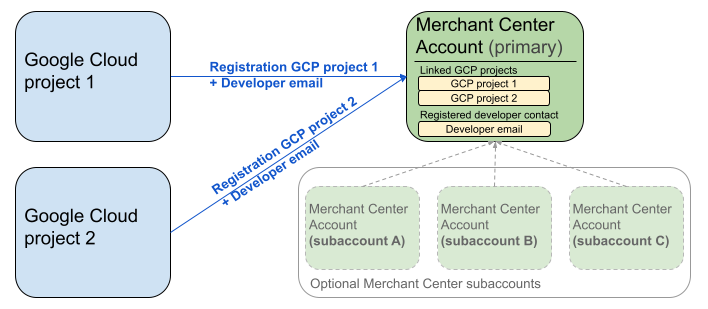
แผนภาพข้างต้นแสดงการตั้งค่าการลงทะเบียนเมื่อใช้โปรเจ็กต์ Google Cloud หลายโปรเจ็กต์และ Merchant Center หลัก 1 บัญชีพร้อมบัญชีย่อย Merchant Center หลายบัญชี (ไม่บังคับ)
ข้อกำหนดในการตรวจสอบสิทธิ์: เมื่อลงทะเบียน บัญชี Merchant Center ที่ ตรวจสอบสิทธิ์แล้ว (ซึ่งเป็นบัญชีที่มีข้อมูลเข้าสู่ระบบของคุณ) ต้องตรงกับบัญชี Merchant Center ที่แอบอ้าง (ซึ่งเป็นบัญชีที่คุณลงทะเบียน) คุณจะลงทะเบียนบัญชีย่อยไม่ได้หากตรวจสอบสิทธิ์ด้วยบัญชีหลักหรือบัญชีดูแลจัดการแยกต่างหาก
บัญชีเว็บไซต์ที่ยืนยันแล้วเท่านั้น: ระบบอนุญาตให้ลงทะเบียนเฉพาะ บัญชี Merchant Center ที่มีเว็บไซต์ที่ยืนยันแล้ว
ไม่มีการลงทะเบียนสำหรับ บัญชีทดสอบ: คุณจะ ลงทะเบียนบัญชีทดสอบไม่ได้
เมื่อลงทะเบียนอีเมลนักพัฒนาแอปแล้ว:
- คุณสามารถเรียกใช้ Merchant API ได้ภายใน 5 นาทีหลังจากการลงทะเบียน
- หากอีเมลเป็นของผู้ใช้ Merchant Center ที่มีอยู่ ระบบจะ
มอบบทบาท
API developerให้ผู้ใช้ดังกล่าว ไม่เช่นนั้น ระบบจะสร้างผู้ใช้ใหม่ใน Merchant Center และผู้ใช้ต้องยอมรับคำเชิญภายใน 14 วันเพื่อไม่ให้คำเชิญหมดอายุและต้องเริ่มกระบวนการลงทะเบียนใหม่ คุณจะทำกระบวนการลงทะเบียนให้เสร็จสมบูรณ์ได้หลังจากที่ผู้ใช้คลิกลิงก์คำเชิญแล้วเท่านั้น
เรียกใช้การลงทะเบียน
คุณลงทะเบียนโดยเรียกใช้เมธอด registerGcp โดยมีตัวเลือกในการเรียกใช้การลงทะเบียน 2 ตัวเลือก ดังนี้
- ตัวเลือกที่ 1: การเรียก API โดยตรง คุณส่งคำขอไปยังปลายทาง API โดยตรง ซึ่งโดยปกติจะผ่าน HTTP(S) คุณต้องจัดการด้วยตนเองในส่วนต่างๆ เช่น การสร้างเนื้อหาคำขอ การตั้งค่าส่วนหัว (รวมถึงการตรวจสอบสิทธิ์) และการแยกวิเคราะห์การตอบกลับ
- ตัวเลือกที่ 2: ไลบรารีของไคลเอ็นต์ คุณใช้ไลบรารีที่สร้างไว้ล่วงหน้าซึ่งมีวิธีที่สะดวกและเป็นภาษาที่ใช้กันทั่วไปในการโต้ตอบกับ Merchant API ไลบรารีเหล่านี้จะจัดการการตรวจสอบสิทธิ์และการให้สิทธิ์ รวมถึงมีวิธีที่สะดวกในการแยกการสื่อสาร HTTP ที่อยู่เบื้องหลัง เรามีโค้ด ตัวอย่างอย่างเป็นทางการที่จะช่วยให้คุณเริ่มต้นใช้งานได้อย่างรวดเร็ว
การให้สิทธิ์สำหรับการเรียกใช้การลงทะเบียน
ตามที่อธิบายไว้ในขั้นตอนการให้สิทธิ์คำขอไปยัง Merchant API คุณมีสถานการณ์การตรวจสอบสิทธิ์ที่แตกต่างกันสอง สถานการณ์ ดังนี้
- OAuth 2.0: สำหรับผู้ให้บริการหรือเอเจนซีบุคคลที่สามที่จัดการบัญชีผู้ขายหลายบัญชี
- บัญชีบริการ: สำหรับการเข้าถึงบัญชี Merchant Center ของคุณเอง
ดูข้อมูลเพิ่มเติมเกี่ยวกับการให้สิทธิ์การเรียกใช้การลงทะเบียนได้ที่ฉัน จะทำการตรวจสอบสิทธิ์และการให้สิทธิ์สำหรับการเรียกใช้การลงทะเบียนได้อย่างไร
การเรียกใช้การลงทะเบียน
ในตัวอย่างต่อไปนี้ คุณจะเรียกใช้การลงทะเบียนโดยใช้การเรียกใช้ API โดยตรงหรือไลบรารีของไคลเอ็นต์
คุณเรียกใช้การลงทะเบียนโดยใช้เมธอด registerGcp
POST https://merchantapi.googleapis.com/accounts/v1/accounts/{ACCOUNT_ID}/developerRegistration:registerGcp
Content-Type: application/json
Authorization: Bearer {ACCESS_TOKEN}"

{
  "developerEmail": "{DEVELOPER_EMAIL}"
}
แทนที่ค่าต่อไปนี้
ACCOUNT_ID: รหัส Merchant CenterACCESS_TOKEN: โทเค็นการให้สิทธิ์เพื่อการเรียก APIDEVELOPER_EMAIL: อีเมลของผู้ติดต่อหลักด้านเทคนิค
การเรียกใช้ที่สำเร็จจะแสดงทรัพยากร DeveloperRegistration ซึ่งยืนยันสถานะการลิงก์ที่สำเร็จ
  "name": "accounts/{ACCOUNT_ID}/developerRegistration",
  "gcpIds": ["{GOOGLE_CLOUD_PROJECT_ID}"]
Python
ดาวน์โหลดตัวอย่างและทำตามคำแนะนำจาก ตัวอย่าง Python ของ Google Merchant API เพื่อตั้งค่าไลบรารีของไคลเอ็นต์ Python
from examples.authentication import configuration
from examples.authentication import generate_user_credentials
from google.shopping.merchant_accounts_v1 import DeveloperRegistrationServiceClient
from google.shopping.merchant_accounts_v1 import RegisterGcpRequest
def register_gcp(account_id: str, developer_email: str) -> None:
"""Registers the GCP project used to call the Merchant API with a developer email.
Args:
account_id: The ID of your Merchant Center account.
developer_email: The email address of the developer to register.
"""
# Get OAuth credentials.
credentials = generate_user_credentials.main()
# Create a client to the Developer Registration Service.
client = DeveloperRegistrationServiceClient(credentials=credentials)
# The name has the format: accounts/{account}/developerRegistration
name = f"accounts/{account_id}/developerRegistration"
# Create the request to register the GCP project.
request = RegisterGcpRequest(
name=name,
developer_email=developer_email,
)
# Make the API call and handle potential errors.
try:
print("Sending RegisterGcp request:")
response = client.register_gcp(request=request)
print("Registered GCP project successfully:")
print(response)
except RuntimeError as e:
print(f"An error occurred: {e}")
if __name__ == "__main__":
# Your Merchant Center account ID.
# This can be found in the Merchant Center UI.
_account_id = configuration.Configuration().read_merchant_info()
# The developer email to associate with the GCP project.
_developer_email = "YOUR_EMAIL_HERE"
register_gcp(_account_id, _developer_email)
Java
ดาวน์โหลดตัวอย่างและทำตามคำแนะนำจาก ตัวอย่าง Java ของ Google Merchant API เพื่อตั้งค่าไลบรารีของไคลเอ็นต์ Java
import com.google.api.gax.core.FixedCredentialsProvider;
import com.google.auth.oauth2.GoogleCredentials;
import com.google.shopping.merchant.accounts.v1.DeveloperRegistration;
import com.google.shopping.merchant.accounts.v1.DeveloperRegistrationName;
import com.google.shopping.merchant.accounts.v1.DeveloperRegistrationServiceClient;
import com.google.shopping.merchant.accounts.v1.DeveloperRegistrationServiceSettings;
import com.google.shopping.merchant.accounts.v1.RegisterGcpRequest;
import shopping.merchant.samples.utils.Authenticator;
import shopping.merchant.samples.utils.Config;
/**
* This class demonstrates how to register the GCP project used to call the Merchant API with a
* developer email.
*/
public class RegisterGcpSample {
public static DeveloperRegistration registerGcp(Config config, String developerEmail) throws Exception {
// Obtains OAuth token based on the user's configuration.
GoogleCredentials credential = new Authenticator().authenticate();
// Creates service settings using the credentials retrieved above.
DeveloperRegistrationServiceSettings developerRegistrationServiceSettings =
DeveloperRegistrationServiceSettings.newBuilder()
.setCredentialsProvider(FixedCredentialsProvider.create(credential))
.build();
// Creates DeveloperRegistration name to identify the DeveloperRegistration.
// The name has the format: accounts/{account}/developerRegistration
String name =
DeveloperRegistrationName.newBuilder()
.setAccount(config.getAccountId().toString())
.build()
.toString();
// Calls the API and propagates any network failures/errors.
try (DeveloperRegistrationServiceClient developerRegistrationServiceClient =
DeveloperRegistrationServiceClient.create(developerRegistrationServiceSettings)) {
// Creates a request to register the GCP project with the developer email.
RegisterGcpRequest request =
RegisterGcpRequest.newBuilder().setName(name).setDeveloperEmail(developerEmail).build();
System.out.println("Sending RegisterGcp request:");
DeveloperRegistration response = developerRegistrationServiceClient.registerGcp(request);
System.out.println(response);
return response;
}
}
public static void main(String[] args) throws Exception {
Config config = Config.load();
String developerEmail = "YOUR_EMAIL_HERE"; // Replace with your email
registerGcp(config, developerEmail);
}
}
PHP
ดาวน์โหลดตัวอย่างและทำตามคำแนะนำจาก ตัวอย่าง PHP ของ Google Merchant API เพื่อตั้งค่าไลบรารีของไคลเอ็นต์ PHP
require_once __DIR__ . '/../../../../vendor/autoload.php';
require_once __DIR__ . '/../../../Authentication/Authentication.php';
require_once __DIR__ . '/../../../Authentication/Config.php';
use Google\ApiCore\ApiException;
use Google\Shopping\Merchant\Accounts\V1\Client\DeveloperRegistrationServiceClient;
use Google\Shopping\Merchant\Accounts\V1\RegisterGcpRequest;
/**
* This class demonstrates how to register the GCP project used to call the
* Merchant API with a developer email.
*/
class RegisterGcpSample
{
/**
* A helper function to create the name string for the
* DeveloperRegistration.
*
* @param string $accountId The merchant account ID.
* @return string The name, which has the format:
* `accounts/{account}/developerRegistration`
*/
private static function getName(string $accountId): string
{
return sprintf("accounts/%s/developerRegistration", $accountId);
}
/**
* Registers the GCP project with a developer email.
*
* @param array $config The configuration data for authentication and account ID.
* @param string $developerEmail The email of the developer to register.
*/
public static function registerGcpSample(array $config, string $developerEmail): void
{
// Obtains OAuth credentials from the configuration file.
$credentials = Authentication::useServiceAccountOrTokenFile();
// Creates a configuration object for the client.
$options = ['credentials' => $credentials];
// Creates the DeveloperRegistrationServiceClient.
$developerRegistrationServiceClient = new DeveloperRegistrationServiceClient($options);
// Creates the name of the developer registration to identify it.
$name = self::getName($config['accountId']);
// Calls the API and handles any network failures.
try {
// Creates a request to register the GCP project with the developer email.
$request = new RegisterGcpRequest([
'name' => $name,
'developer_email' => $developerEmail
]);
printf("Sending RegisterGcp request:%s", PHP_EOL);
// The `registerGcp` method returns a `DeveloperRegistration` object
// upon success.
$response = $developerRegistrationServiceClient->registerGcp($request);
print "Successfully registered developer email '$developerEmail' for account {$config['accountId']}.\n";
print_r($response);
} catch (ApiException $e) {
printf("An error occurred: %s%s", $e->getMessage(), PHP_EOL);
}
}
/**
* Helper to execute the sample.
*/
public function callSample(): void
{
$config = Config::generateConfig();
// An email address for a developer to register for the API.
$developerEmail = 'YOUR_EMAIL_HERE'; // Replace with your email
self::registerGcpSample($config, $developerEmail);
}
}
// Executes the sample.
$sample = new RegisterGcpSample();
$sample->callSample();
cURL
curl -X POST "https://merchantapi.googleapis.com/accounts/v1/accounts/{ACCOUNT_ID}/developerRegistration:registerGcp" \
-H "Content-Type: application/json" \
-H "Authorization: Bearer {ACCESS_TOKEN}" \
-d '{
  "developerEmail": "{DEVELOPER_EMAIL}"
}'
หากต้องการลงทะเบียนให้เสร็จสมบูรณ์ คุณต้องตรวจสอบว่าผู้ใช้ใน
Merchant Center อย่างน้อย 1 รายมีบทบาท API developer คุณสามารถดำเนินการอย่างใดอย่างหนึ่งต่อไปนี้เพื่อให้บรรลุเป้าหมายนี้
- ระบุ
developerEmailให้กับเมธอดregisterGcp - เพิ่มผู้ใช้ใหม่ที่มีบทบาท
API developerใน UI ของ Merchant Center - มอบหมายบทบาท
API developerให้กับผู้ใช้ที่มีอยู่ใน UI ของ Merchant Center - เรียกใช้เมธอด
accounts.users.createเพื่อสร้างผู้ใช้ใหม่และ มอบหมายบทบาทAPI developerให้ผู้ใช้ดังกล่าว - มอบหมายบทบาท
API developerให้กับผู้ใช้ที่มีอยู่โดยใช้เมธอดaccounts.users.patch
แนวทางปฏิบัติแนะนำหลังการลงทะเบียน
เราขอแนะนำให้ทำตามชุดแนวทางปฏิบัติแนะนำต่อไปนี้หลังจากลงทะเบียนครั้งแรกเสร็จสมบูรณ์ เพื่อรับประโยชน์จากการจัดการการเข้าถึงที่มีประสิทธิภาพและป้องกันการหยุดชะงักของบริการในอนาคต
ให้สิทธิ์เพิ่มเติมแก่ API developer
เมื่อลงทะเบียนผู้ติดต่อหลักของนักพัฒนาแอป ระบบจะมอบหมายบทบาท
API developer ให้โดยอัตโนมัติ บทบาทนี้ไม่รวมสิทธิ์อื่นๆ ที่จำเป็นสำหรับการจัดการบัญชี Merchant Center หรือการเรียกใช้ API ทั้งหมด เราขอแนะนำให้เพิ่มบทบาท ADMIN หรือ STANDARD ให้กับนักพัฒนาแอปเพื่อให้สิทธิ์เข้าถึงที่ครอบคลุม
หากต้องการแก้ไขสิทธิ์เข้าถึงของผู้ใช้ ให้ใช้เมธอด accounts.users.patch คุณระบุสิทธิ์เข้าถึงในช่อง updateMask ของเนื้อหาคำขอเพื่อเพิ่มหรือนำบทบาทออก
PATCH https://merchantapi.googleapis.com/accounts/v1/{ACCOUNT_ID}/users/{DEVELOPER_EMAIL}?update_mask=access_rights
Content-Type: application/json
Authorization: Bearer {ACCESS_TOKEN}"

{
  "name": "accounts/{ACCOUNT_ID}/users/{DEVELOPER_EMAIL}",
  "access_rights": [ "ADMIN", "API_DEVELOPER" ]
}
Python
from examples.authentication import configuration
from examples.authentication import generate_user_credentials
from google.protobuf import field_mask_pb2
from google.shopping.merchant_accounts_v1 import AccessRight
from google.shopping.merchant_accounts_v1 import UpdateUserRequest
from google.shopping.merchant_accounts_v1 import User
from google.shopping.merchant_accounts_v1 import UserServiceClient
FieldMask = field_mask_pb2.FieldMask
_ACCOUNT = configuration.Configuration().read_merchant_info()
def update_user(user_email, user_access_right):
"""Updates a user to make it an admin of the MC account."""
credentials = generate_user_credentials.main()
client = UserServiceClient(credentials=credentials)
# Create user name string
name = "accounts/" + _ACCOUNT + "/users/" + user_email
user = User(name=name, access_rights=[user_access_right])
field_mask = FieldMask(paths=["access_rights"])
try:
request = UpdateUserRequest(user=user, update_mask=field_mask)
print("Sending Update User request")
response = client.update_user(request=request)
print("Updated User Name below")
print(response.name)
except RuntimeError as e:
print(e)
if __name__ == "__main__":
# Modify this email to update the right user
email = "USER_MAIL_ACCOUNT"
access_right = AccessRight.ADMIN
update_user(email, access_right)
Java
import com.google.api.gax.core.FixedCredentialsProvider;
import com.google.auth.oauth2.GoogleCredentials;
import com.google.protobuf.FieldMask;
import com.google.shopping.merchant.accounts.v1.AccessRight;
import com.google.shopping.merchant.accounts.v1.UpdateUserRequest;
import com.google.shopping.merchant.accounts.v1.User;
import com.google.shopping.merchant.accounts.v1.UserName;
import com.google.shopping.merchant.accounts.v1.UserServiceClient;
import com.google.shopping.merchant.accounts.v1.UserServiceSettings;
import shopping.merchant.samples.utils.Authenticator;
import shopping.merchant.samples.utils.Config;
/** This class demonstrates how to update a user to make it an admin of the MC account. */
public class UpdateUserSample {
public static void updateUser(Config config, String email, AccessRight accessRight)
throws Exception {
GoogleCredentials credential = new Authenticator().authenticate();
UserServiceSettings userServiceSettings =
UserServiceSettings.newBuilder()
.setCredentialsProvider(FixedCredentialsProvider.create(credential))
.build();
// Creates user name to identify user.
String name =
UserName.newBuilder()
.setAccount(config.getAccountId().toString())
.setEmail(email)
.build()
.toString();
// Create a user with the updated fields.
User user = User.newBuilder().setName(name).addAccessRights(accessRight).build();
FieldMask fieldMask = FieldMask.newBuilder().addPaths("access_rights").build();
try (UserServiceClient userServiceClient = UserServiceClient.create(userServiceSettings)) {
UpdateUserRequest request =
UpdateUserRequest.newBuilder().setUser(user).setUpdateMask(fieldMask).build();
System.out.println("Sending Update User request");
User response = userServiceClient.updateUser(request);
System.out.println("Updated User Name below");
System.out.println(response.getName());
} catch (Exception e) {
System.out.println(e);
}
}
public static void main(String[] args) throws Exception {
Config config = Config.load();
String email = "testUser@gmail.com";
// Give the user admin rights. Note that all other rights, like
// PERFORMANCE_REPORTING, would be overwritten in this example
// if the user had those access rights before the update.
AccessRight accessRight = AccessRight.ADMIN;
updateUser(config, email, accessRight);
}
}
PHP
use Google\ApiCore\ApiException;
use Google\Protobuf\FieldMask;
use Google\Shopping\Merchant\Accounts\V1\AccessRight;
use Google\Shopping\Merchant\Accounts\V1\UpdateUserRequest;
use Google\Shopping\Merchant\Accounts\V1\User;
use Google\Shopping\Merchant\Accounts\V1\Client\UserServiceClient;
/**
* Updates a user.
*
* @param array $config The configuration data.
* @param string $email The email address of the user.
* @param int $accessRight The access right to grant the user.
* @return void
*/
function updateUser($config, $email, $accessRights): void
{
// Gets the OAuth credentials to make the request.
$credentials = Authentication::useServiceAccountOrTokenFile();
// Creates options config containing credentials for the client to use.
$options = ['credentials' => $credentials];
// Creates a client.
$userServiceClient = new UserServiceClient($options);
// Creates user name to identify user.
$name = 'accounts/' . $config['accountId'] . "/users/" . $email;
$user = (new User())
->setName($name)
->setAccessRights($accessRights);
$fieldMask = (new FieldMask())->setPaths(['access_rights']);
// Calls the API and catches and prints any network failures/errors.
try {
$request = new UpdateUserRequest([
'user' => $user,
'update_mask' => $fieldMask,
]);
print "Sending Update User request\n";
$response = $userServiceClient->updateUser($request);
print "Updated User Name below\n";
print $response->getName() . "\n";
} catch (ApiException $e) {
print $e->getMessage();
}
}
$config = Config::generateConfig();
$email = "testUser@gmail.com";
$accessRights = [AccessRight::ADMIN];
updateUser($config, $email, $accessRights);
cURL
curl -X PATCH \
"https://merchantapi.googleapis.com/accounts/v1/{ACCOUNT_ID}/users/{USER_EMAIL}?update_mask=access_rights" \
-H "Content-Type: application/json" \
-H "Authorization: Bearer {ACCESS_TOKEN}" \
-d '{
  "access_rights": [
    "ADMIN",
    "API_DEVELOPER"
  ]
}'
เพิ่มผู้ติดต่อหลักของนักพัฒนาแอปเพิ่มเติม
การมีผู้ติดต่อสำรองเป็นสิ่งสำคัญเพื่อหลีกเลี่ยงการหยุดชะงักของธุรกิจหากผู้ติดต่อหลักของนักพัฒนาแอปออกจากบริษัทหรือสูญเสียสิทธิ์เข้าถึง เราขอแนะนำให้มีผู้ใช้เพิ่มเติมอย่างน้อย
1 รายที่มีบทบาท API developer ใน Merchant Center เพื่อ
ทำหน้าที่เป็นผู้ติดต่อสำรอง
คุณสามารถเพิ่มผู้ใช้หรืออัปเดตผู้ใช้ที่มีอยู่ด้วยบริการ accounts.users ใน Merchant API หรือหน้า Access and services ใน UI ของ Merchant Center การเพิ่มนักพัฒนาแอปสำรองไว้ล่วงหน้าจะช่วยให้คุณสร้างการผสานรวมที่ยืดหยุ่นมากขึ้นซึ่งไม่ขึ้นอยู่กับบุคคลเพียงคนเดียว
PATCH https://merchantapi.googleapis.com/products/v1/accounts/{ACCOUNT_ID}/users
Content-Type: application/json
Authorization: Bearer {ACCESS_TOKEN}"
{
  "user_id": {USER_EMAIL},
  "user": { "access_rights": [ "API_DEVELOPER", "ADMIN" ] }
}
Python
from examples.authentication import configuration
from examples.authentication import generate_user_credentials
from google.shopping.merchant_accounts_v1 import AccessRight
from google.shopping.merchant_accounts_v1 import CreateUserRequest
from google.shopping.merchant_accounts_v1 import User
from google.shopping.merchant_accounts_v1 import UserServiceClient
_ACCOUNT = configuration.Configuration().read_merchant_info()
def get_parent(account_id):
return f"accounts/{account_id}"
def create_user(user_email):
"""Creates a user for a Merchant Center account."""
# Get OAuth credentials
credentials = generate_user_credentials.main()
# Create a UserServiceClient
client = UserServiceClient(credentials=credentials)
# Create parent string
parent = get_parent(_ACCOUNT)
# Create the request
request = CreateUserRequest(
parent=parent,
user_id=user_email,
user=User(
access_rights=[AccessRight.ADMIN, AccessRight.PERFORMANCE_REPORTING]
),
)
try:
print("Sending Create User request")
response = client.create_user(request=request)
print("Inserted User Name below")
print(response.name)
except RuntimeError as e:
print(e)
if __name__ == "__main__":
# Modify this email to create a new user
email = "USER_MAIL_ACCOUNT"
create_user(email)
Java
import com.google.api.gax.core.FixedCredentialsProvider;
import com.google.auth.oauth2.GoogleCredentials;
import com.google.shopping.merchant.accounts.v1.AccessRight;
import com.google.shopping.merchant.accounts.v1.CreateUserRequest;
import com.google.shopping.merchant.accounts.v1.User;
import com.google.shopping.merchant.accounts.v1.UserServiceClient;
import com.google.shopping.merchant.accounts.v1.UserServiceSettings;
import shopping.merchant.samples.utils.Authenticator;
import shopping.merchant.samples.utils.Config;
/** This class demonstrates how to create a user for a Merchant Center account. */
public class CreateUserSample {
private static String getParent(String accountId) {
return String.format("accounts/%s", accountId);
}
public static void createUser(Config config, String email) throws Exception {
// Obtains OAuth token based on the user's configuration.
GoogleCredentials credential = new Authenticator().authenticate();
// Creates service settings using the credentials retrieved above.
UserServiceSettings userServiceSettings =
UserServiceSettings.newBuilder()
.setCredentialsProvider(FixedCredentialsProvider.create(credential))
.build();
// Creates parent to identify where to insert the user.
String parent = getParent(config.getAccountId().toString());
// Calls the API and catches and prints any network failures/errors.
try (UserServiceClient userServiceClient = UserServiceClient.create(userServiceSettings)) {
CreateUserRequest request =
CreateUserRequest.newBuilder()
.setParent(parent)
// This field is the email address of the user.
.setUserId(email)
.setUser(
User.newBuilder()
.addAccessRights(AccessRight.ADMIN)
.addAccessRights(AccessRight.PERFORMANCE_REPORTING)
.build())
.build();
System.out.println("Sending Create User request");
User response = userServiceClient.createUser(request);
System.out.println("Inserted User Name below");
// The last part of the user name will be the email address of the user.
// Format: `accounts/{account}/user/{user}`
System.out.println(response.getName());
} catch (Exception e) {
System.out.println(e);
}
}
public static void main(String[] args) throws Exception {
Config config = Config.load();
// The email address of this user.
String email = "testUser@gmail.com";
createUser(config, email);
}
}
PHP
use Google\ApiCore\ApiException;
use Google\Shopping\Merchant\Accounts\V1\AccessRight;
use Google\Shopping\Merchant\Accounts\V1\CreateUserRequest;
use Google\Shopping\Merchant\Accounts\V1\User;
use Google\Shopping\Merchant\Accounts\V1\Client\UserServiceClient;
/**
* Creates a user.
*
* @param array $config The configuration data.
* @param string $email The email address of the user.
* @return void
*/
function createUser($config, $email): void
{
// Gets the OAuth credentials to make the request.
$credentials = Authentication::useServiceAccountOrTokenFile();
// Creates options config containing credentials for the client to use.
$options = ['credentials' => $credentials];
// Creates a client.
$userServiceClient = new UserServiceClient($options);
// Creates parent to identify where to insert the user.
$parent = sprintf("accounts/%s", $config['accountId']);
// Calls the API and catches and prints any network failures/errors.
try {
$request = new CreateUserRequest([
'parent' => $parent,
'user_id' => $email,
'user' => (new User())
->setAccessRights([AccessRight::ADMIN,AccessRight::PERFORMANCE_REPORTING])
]);
print "Sending Create User request\n";
$response = $userServiceClient->createUser($request);
print "Inserted User Name below\n";
print $response->getName() . "\n";
} catch (ApiException $e) {
print $e->getMessage();
}
}
$config = Config::generateConfig();
$email = "testUser@gmail.com";
createUser($config, $email);
cURL
curl -X PATCH \
"https://merchantapi.googleapis.com/products/v1/accounts/{ACCOUNT_ID}/users/{USER_EMAIL}?update_mask=access_rights" \
-H "Content-Type: application/json" \
-H "Authorization: Bearer {ACCESS_TOKEN}" \
-d '{
  "access_rights": [
    "ADMIN",
    "API_DEVELOPER"
  ]
}'