

デベロッパーとして登録することは、Google Cloud プロジェクトを Merchant Center アカウントにリンクし、デベロッパーの連絡先情報を Google に登録する、1 回限りの必須の設定プロセスです。これにより、Google は、お客様が提供した関連する技術担当者に、重要なサービスに関するお知らせや必須のアップデートを送信できるようになります。
このドキュメントは、Merchant API の使用を開始するための複数のパートからなるシリーズの一部です。 Merchant API にすでに登録している場合は、次のセクションに進んでください。 最初の商品を挿入する
前提条件
Merchant API を使用するために登録する前に、次の要件を満たしていることを確認してください。
- Merchant Center アカウント: 既存の Merchant Center アカウントが必要です。登録は本番環境アカウントでのみサポートされています。 テスト アカウント はデベロッパー登録の対象外です。
- 確認済みのホームページ: Merchant Center アカウントに 確認済みのウェブサイトが必要です。 これにより、ビジネスに関連付けられているドメインの所有権が証明されます。
- Merchant Center アカウントの管理者権限: 登録呼び出しの承認に使用するメールまたはサービス
アカウントには、登録する Merchant Center アカウントの
ADMINアクセス タイプが必要です。詳細については、Merchant API へのリクエストを承認するをご覧ください。 - Google Cloud プロジェクト ID: アプリケーションは、認証用の認証情報を提供するために、専用の Google Cloud プロジェクトに関連付けられている必要があります。プロジェクト ID の確認方法について詳しくは、 プロジェクト名、番号、ID を確認するをご覧ください。
- Google アカウントに関連付けられている有効なメールアドレス : Google からの最新情報を受け取るデベロッパーの連絡先として提供します。サービス アカウントのメールアドレスは使用できません。Merchant Center アカウントにすでに登録されているメールアドレスを使用することも、新しいメールアドレスを使用することもできます。
Merchant API でデベロッパーとして登録する
Merchant API を使用するには、registerGcp メソッドを使用して、デベロッパーの連絡先 情報と Google Cloud プロジェクトを Merchant Center アカウントに登録する必要があります。
複数の販売者アカウントを使用しているかどうかに関係なく、使用する Google Cloud プロジェクトごとに 1 回登録操作を行います 。複数の Google Cloud プロジェクト を使用している場合は、一部またはすべて を同じ Merchant Center アカウントに登録できます。
登録のメリット
登録には次の利点があります。
- 技術担当者の作成: Merchant Center に技術担当者が作成されます。Google は、サービスに関するお知らせや新機能の情報など、API 固有の重要な最新情報を技術担当者に送信します。
- 複数の販売者アカウントの管理: 管理するすべての販売者アカウントの デベロッパーの連絡先を表すことができます。
登録されていない Google Cloud プロジェクトから Merchant API を呼び出すと、登録を除き、401 エラーコードとステータス UNAUTHENTICATED が返され、次のエラー メッセージが表示されます。
GCP project with id {GCP_ID} and number {GCP_NUMBER} is not registered with the merchant account.
Follow these steps https://developers.google.com/merchant/api/guides/quickstart#register_as_a_developer
to register the GCP project with the merchant account then try calling the API again in 5 minutes.
重要な考慮事項
- Google Cloud プロジェクトごとに 1 回限りの設定: 登録は Google Cloud プロジェクトごとに 1 回限りの設定であり、Google Cloud プロジェクト内のすべての ユーザーとサービス アカウントに適用されます。Google Cloud プロジェクトで Merchant API が有効になっていることを確認してください。
- 各 Google Cloud プロジェクトは、任意の時点で 1 つの
Merchant Center アカウントにのみ登録できます: 1 つの
Google Cloud プロジェクトを複数の Merchant Center アカウントに
同時に登録しようとすると、
ALREADY_REGISTEREDエラーが発生します。登録には同じデベロッパーのメールアドレスを使用してください。複数の Google Cloud プロジェクトを同じ Merchant Center アカウントに登録できます。登録済みの Google Cloud プロジェクトを変更またはローテーションする手順については、 Google Cloud プロジェクトを管理して移行するをご覧ください。 複数の販売者を管理するサードパーティ(3P)の正しいアカウントを指定する: 長期的な安定性を確保し、サービスの中断を回避するため、複数の販売者を代理または管理するサードパーティは、Google エコシステム内で適切なアカウント構造を使用する必要があります。業種に応じて、ビジネス アイデンティティを表すアカウントを登録することをおすすめします。
- 既存のアドバンス アカウントを持つショッピングモール: ビジネスがショッピングモールとして運営されており、プラットフォーム全体を表すアドバンス アカウントがすでにある場合は、この既存のアカウント ID を使用する必要があります。
- ショッピング比較サービス(CSS): CSS の場合は、一意の CSS アカウント ID または CSS グループ アカウント ID を使用する必要があります。
- 代理店、デベロッパー、その他のサードパーティ: 代理店やサードパーティのデベロッパーなど、複数の販売者アカウントを管理しているサードパーティのビジネスで、ビジネスを表す単一の Merchant Center ID がない場合は、新しいプライマリ Merchant Center アカウントを作成し、アドバンス アカウントに変換するようリクエストする必要があります。アドバンス アカウントでは、サブアカウントを管理し、サードパーティの運用に必要な構造を提供できます。
次の表に、パートナー タイプごとの推奨事項を示します。
パートナー タイプ 登録するアカウント(推奨) ショッピングモール メイン(または最大)のアドバンス アカウント。 広告代理店 独立アカウントまたは会社を表すアドバンス アカウント。Merchant API を初めて使用する場合は、独立アカウントを作成することをおすすめします。 ショッピング比較サービス(CSS) アカウントが CSS グループ全体を表すか、グループ内の特定の CSS のみを表すかに応じて、CSS グループ アカウント ID または特定の CSS アカウント ID。CSS アドバンス アカウントは使用しないでください。 販売者またはブランド ブランドを表すメイン アカウント。スタンドアロン アカウントまたはアドバンス アカウントを使用できます。 POS / 在庫データ プロバイダ メイン(または最大)のアドバンス アカウント。 その他のサードパーティ Merchant Center アカウントをお持ちの場合は、登録に使用できます。お持ちでない場合は、会社の独立アカウントを作成します。次に、ウェブサイトの所有権を証明します。 プライマリ Merchant Center のみ登録する: デベロッパー登録はプライマリ Merchant Center アカウントのみを使用して行い、リンクされているすべての Merchant Center サブアカウントのデベロッパーの連絡先となります。Merchant Center サブアカウントごとに登録しないでください。
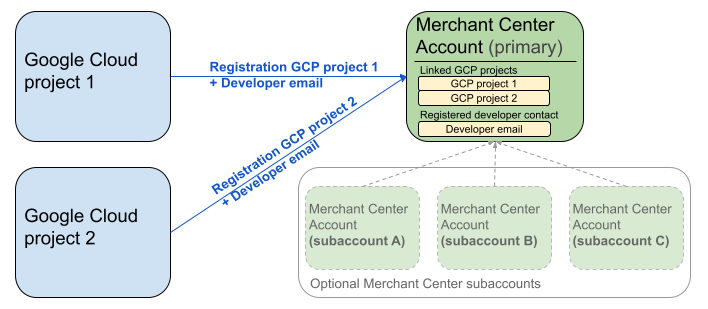
上の図は、複数の Google Cloud プロジェクトと 1 つのプライマリ Merchant Center を使用し、必要に応じて複数の Merchant Center サブアカウントを使用する場合の登録設定を示しています。
認証要件: 登録を行う場合、 認証済みの Merchant Center アカウント(認証情報が存在するアカウント)は、なりすまし Merchant Center アカウント (登録するアカウント)と一致する必要があります。別の親アカウントまたは MCC アカウントで認証されている場合は、サブアカウントに登録できません。
確認済みのウェブサイト アカウントのみ: 登録は、 確認済みのウェブサイトを持つ Merchant Center アカウントでのみ許可されます。
テスト アカウントの登録は不可: テスト アカウントの登録は できません。
デベロッパーのメールアドレスを登録すると:
- 登録後 5 分以内に Merchant API 呼び出しを行うことができます。
- メールアドレスが既存の Merchant Center ユーザーに属している場合は、
API developerロールが付与されます。それ以外の場合は、Merchant Center に新しいユーザーが作成されます。招待状の有効期限が切れて登録プロセスを再開する必要がないように、14 日以内に招待状を承諾する必要があります。登録プロセスは、ユーザーが招待リンクをクリックした後にのみ完了します。
登録呼び出しを行う
登録するには、registerGcp メソッドを呼び出します。登録呼び出しを行うには、次の 2 つの方法があります。
- 方法 1: API 呼び出しを直接行う 通常は HTTP(S) 経由で、API エンドポイントに未加工のリクエストを直接送信します。リクエスト本文の作成、ヘッダーの設定(認証を含む)、レスポンスの解析などの処理を手動で行います。
- 方法 2: クライアント ライブラリ Merchant API を操作するための、より便利な言語固有の方法を提供する事前構築済みのライブラリを使用します。 認証と承認を処理し、基盤となる HTTP 通信を抽象化する便利な方法を提供します。すぐに使用を開始できるように、公式のコード サンプルが用意されています。
登録呼び出しの承認
Merchant API へのリクエストを承認するの手順で説明したように、認証シナリオは次の 2 つに分かれています。
- OAuth 2.0: 複数の 販売アカウントを管理するサードパーティ プロバイダまたは代理店向け
- サービス アカウント: 自分の Merchant Center アカウントへのアクセス用
登録呼び出しの承認について詳しくは、登録呼び出しの認証と承認を行う方法 をご覧ください。
登録呼び出し
次の例では、直接 API 呼び出しまたはクライアント ライブラリを使用して登録呼び出しを行います。
登録呼び出しは、 registerGcp メソッドを使用して行います。
POST https://merchantapi.googleapis.com/accounts/v1/accounts/{ACCOUNT_ID}/developerRegistration:registerGcp
Content-Type: application/json
Authorization: Bearer {ACCESS_TOKEN}"

{
  "developerEmail": "{DEVELOPER_EMAIL}"
}
次のように置き換えます。
ACCOUNT_ID: Merchant Center IDACCESS_TOKEN: API 呼び出しを行うための認証トークンDEVELOPER_EMAIL: プライマリ技術担当者のメールアドレス
呼び出しが成功すると、DeveloperRegistration リソースが返され、 リンクが正常に確立されたことが確認されます。
  "name": "accounts/{ACCOUNT_ID}/developerRegistration",
  "gcpIds": ["{GOOGLE_CLOUD_PROJECT_ID}"]
Python
サンプルをダウンロードし、 Google Merchant API Python サンプル のガイダンスに沿って Python クライアント ライブラリを設定します。
from examples.authentication import configuration
from examples.authentication import generate_user_credentials
from google.shopping.merchant_accounts_v1 import DeveloperRegistrationServiceClient
from google.shopping.merchant_accounts_v1 import RegisterGcpRequest
def register_gcp(account_id: str, developer_email: str) -> None:
"""Registers the GCP project used to call the Merchant API with a developer email.
Args:
account_id: The ID of your Merchant Center account.
developer_email: The email address of the developer to register.
"""
# Get OAuth credentials.
credentials = generate_user_credentials.main()
# Create a client to the Developer Registration Service.
client = DeveloperRegistrationServiceClient(credentials=credentials)
# The name has the format: accounts/{account}/developerRegistration
name = f"accounts/{account_id}/developerRegistration"
# Create the request to register the GCP project.
request = RegisterGcpRequest(
name=name,
developer_email=developer_email,
)
# Make the API call and handle potential errors.
try:
print("Sending RegisterGcp request:")
response = client.register_gcp(request=request)
print("Registered GCP project successfully:")
print(response)
except RuntimeError as e:
print(f"An error occurred: {e}")
if __name__ == "__main__":
# Your Merchant Center account ID.
# This can be found in the Merchant Center UI.
_account_id = configuration.Configuration().read_merchant_info()
# The developer email to associate with the GCP project.
_developer_email = "YOUR_EMAIL_HERE"
register_gcp(_account_id, _developer_email)
Java
サンプルをダウンロードし、 Google Merchant API Java サンプル のガイダンスに沿って Java クライアント ライブラリを設定します。
import com.google.api.gax.core.FixedCredentialsProvider;
import com.google.auth.oauth2.GoogleCredentials;
import com.google.shopping.merchant.accounts.v1.DeveloperRegistration;
import com.google.shopping.merchant.accounts.v1.DeveloperRegistrationName;
import com.google.shopping.merchant.accounts.v1.DeveloperRegistrationServiceClient;
import com.google.shopping.merchant.accounts.v1.DeveloperRegistrationServiceSettings;
import com.google.shopping.merchant.accounts.v1.RegisterGcpRequest;
import shopping.merchant.samples.utils.Authenticator;
import shopping.merchant.samples.utils.Config;
/**
* This class demonstrates how to register the GCP project used to call the Merchant API with a
* developer email.
*/
public class RegisterGcpSample {
public static DeveloperRegistration registerGcp(Config config, String developerEmail) throws Exception {
// Obtains OAuth token based on the user's configuration.
GoogleCredentials credential = new Authenticator().authenticate();
// Creates service settings using the credentials retrieved above.
DeveloperRegistrationServiceSettings developerRegistrationServiceSettings =
DeveloperRegistrationServiceSettings.newBuilder()
.setCredentialsProvider(FixedCredentialsProvider.create(credential))
.build();
// Creates DeveloperRegistration name to identify the DeveloperRegistration.
// The name has the format: accounts/{account}/developerRegistration
String name =
DeveloperRegistrationName.newBuilder()
.setAccount(config.getAccountId().toString())
.build()
.toString();
// Calls the API and propagates any network failures/errors.
try (DeveloperRegistrationServiceClient developerRegistrationServiceClient =
DeveloperRegistrationServiceClient.create(developerRegistrationServiceSettings)) {
// Creates a request to register the GCP project with the developer email.
RegisterGcpRequest request =
RegisterGcpRequest.newBuilder().setName(name).setDeveloperEmail(developerEmail).build();
System.out.println("Sending RegisterGcp request:");
DeveloperRegistration response = developerRegistrationServiceClient.registerGcp(request);
System.out.println(response);
return response;
}
}
public static void main(String[] args) throws Exception {
Config config = Config.load();
String developerEmail = "YOUR_EMAIL_HERE"; // Replace with your email
registerGcp(config, developerEmail);
}
}
PHP
サンプルをダウンロードし、 Google Merchant API PHP サンプル のガイダンスに沿って PHP クライアント ライブラリを設定します。
require_once __DIR__ . '/../../../../vendor/autoload.php';
require_once __DIR__ . '/../../../Authentication/Authentication.php';
require_once __DIR__ . '/../../../Authentication/Config.php';
use Google\ApiCore\ApiException;
use Google\Shopping\Merchant\Accounts\V1\Client\DeveloperRegistrationServiceClient;
use Google\Shopping\Merchant\Accounts\V1\RegisterGcpRequest;
/**
* This class demonstrates how to register the GCP project used to call the
* Merchant API with a developer email.
*/
class RegisterGcpSample
{
/**
* A helper function to create the name string for the
* DeveloperRegistration.
*
* @param string $accountId The merchant account ID.
* @return string The name, which has the format:
* `accounts/{account}/developerRegistration`
*/
private static function getName(string $accountId): string
{
return sprintf("accounts/%s/developerRegistration", $accountId);
}
/**
* Registers the GCP project with a developer email.
*
* @param array $config The configuration data for authentication and account ID.
* @param string $developerEmail The email of the developer to register.
*/
public static function registerGcpSample(array $config, string $developerEmail): void
{
// Obtains OAuth credentials from the configuration file.
$credentials = Authentication::useServiceAccountOrTokenFile();
// Creates a configuration object for the client.
$options = ['credentials' => $credentials];
// Creates the DeveloperRegistrationServiceClient.
$developerRegistrationServiceClient = new DeveloperRegistrationServiceClient($options);
// Creates the name of the developer registration to identify it.
$name = self::getName($config['accountId']);
// Calls the API and handles any network failures.
try {
// Creates a request to register the GCP project with the developer email.
$request = new RegisterGcpRequest([
'name' => $name,
'developer_email' => $developerEmail
]);
printf("Sending RegisterGcp request:%s", PHP_EOL);
// The `registerGcp` method returns a `DeveloperRegistration` object
// upon success.
$response = $developerRegistrationServiceClient->registerGcp($request);
print "Successfully registered developer email '$developerEmail' for account {$config['accountId']}.\n";
print_r($response);
} catch (ApiException $e) {
printf("An error occurred: %s%s", $e->getMessage(), PHP_EOL);
}
}
/**
* Helper to execute the sample.
*/
public function callSample(): void
{
$config = Config::generateConfig();
// An email address for a developer to register for the API.
$developerEmail = 'YOUR_EMAIL_HERE'; // Replace with your email
self::registerGcpSample($config, $developerEmail);
}
}
// Executes the sample.
$sample = new RegisterGcpSample();
$sample->callSample();
cURL
curl -X POST "https://merchantapi.googleapis.com/accounts/v1/accounts/{ACCOUNT_ID}/developerRegistration:registerGcp" \
-H "Content-Type: application/json" \
-H "Authorization: Bearer {ACCESS_TOKEN}" \
-d '{
  "developerEmail": "{DEVELOPER_EMAIL}"
}'
登録を完了するには、Merchant Center のユーザーが少なくとも 1 人 API developer ロールを持っている必要があります。これを行うには、次のいずれかの操作を行います。
registerGcpメソッドにdeveloperEmailを指定します。- Merchant Center UI で
API developerロールを持つ新しいユーザーを追加します。 - Merchant Center UI で既存のユーザーに
API developerロールを割り当てます。 accounts.users.createメソッドを呼び出して新規ユーザーを作成し、API developerロールを割り当てます。-
accounts.users.patchメソッドを使用して、既存のユーザーにAPI developerロールを割り当てます。
登録後のベスト プラクティス
堅牢なアクセス管理のメリットを享受し、将来のサービスの中断を防ぐため、最初の登録が完了したら、一連のベスト プラクティスに従うことをおすすめします。
API developer に追加の権限を付与する
デベロッパーの連絡先を登録すると、API developer ロールが自動的に割り当てられます。このロールには、Merchant Center アカウントの管理やすべての API 呼び出しに必要な他の権限は含まれていません。包括的なアクセス権を付与するには、デベロッパーに ADMIN ロールまたは STANDARD ロールを追加することをおすすめします。
ユーザーのアクセス権を変更するには、accounts.users.patch メソッドを使用します。リクエスト本文の updateMask フィールドでアクセス権を指定して、ロールを追加または削除します。
PATCH https://merchantapi.googleapis.com/accounts/v1/{ACCOUNT_ID}/users/{DEVELOPER_EMAIL}?update_mask=access_rights
Content-Type: application/json
Authorization: Bearer {ACCESS_TOKEN}"

{
  "name": "accounts/{ACCOUNT_ID}/users/{DEVELOPER_EMAIL}",
  "access_rights": [ "ADMIN", "API_DEVELOPER" ]
}
Python
from examples.authentication import configuration
from examples.authentication import generate_user_credentials
from google.protobuf import field_mask_pb2
from google.shopping.merchant_accounts_v1 import AccessRight
from google.shopping.merchant_accounts_v1 import UpdateUserRequest
from google.shopping.merchant_accounts_v1 import User
from google.shopping.merchant_accounts_v1 import UserServiceClient
FieldMask = field_mask_pb2.FieldMask
_ACCOUNT = configuration.Configuration().read_merchant_info()
def update_user(user_email, user_access_right):
"""Updates a user to make it an admin of the MC account."""
credentials = generate_user_credentials.main()
client = UserServiceClient(credentials=credentials)
# Create user name string
name = "accounts/" + _ACCOUNT + "/users/" + user_email
user = User(name=name, access_rights=[user_access_right])
field_mask = FieldMask(paths=["access_rights"])
try:
request = UpdateUserRequest(user=user, update_mask=field_mask)
print("Sending Update User request")
response = client.update_user(request=request)
print("Updated User Name below")
print(response.name)
except RuntimeError as e:
print(e)
if __name__ == "__main__":
# Modify this email to update the right user
email = "USER_MAIL_ACCOUNT"
access_right = AccessRight.ADMIN
update_user(email, access_right)
Java
import com.google.api.gax.core.FixedCredentialsProvider;
import com.google.auth.oauth2.GoogleCredentials;
import com.google.protobuf.FieldMask;
import com.google.shopping.merchant.accounts.v1.AccessRight;
import com.google.shopping.merchant.accounts.v1.UpdateUserRequest;
import com.google.shopping.merchant.accounts.v1.User;
import com.google.shopping.merchant.accounts.v1.UserName;
import com.google.shopping.merchant.accounts.v1.UserServiceClient;
import com.google.shopping.merchant.accounts.v1.UserServiceSettings;
import shopping.merchant.samples.utils.Authenticator;
import shopping.merchant.samples.utils.Config;
/** This class demonstrates how to update a user to make it an admin of the MC account. */
public class UpdateUserSample {
public static void updateUser(Config config, String email, AccessRight accessRight)
throws Exception {
GoogleCredentials credential = new Authenticator().authenticate();
UserServiceSettings userServiceSettings =
UserServiceSettings.newBuilder()
.setCredentialsProvider(FixedCredentialsProvider.create(credential))
.build();
// Creates user name to identify user.
String name =
UserName.newBuilder()
.setAccount(config.getAccountId().toString())
.setEmail(email)
.build()
.toString();
// Create a user with the updated fields.
User user = User.newBuilder().setName(name).addAccessRights(accessRight).build();
FieldMask fieldMask = FieldMask.newBuilder().addPaths("access_rights").build();
try (UserServiceClient userServiceClient = UserServiceClient.create(userServiceSettings)) {
UpdateUserRequest request =
UpdateUserRequest.newBuilder().setUser(user).setUpdateMask(fieldMask).build();
System.out.println("Sending Update User request");
User response = userServiceClient.updateUser(request);
System.out.println("Updated User Name below");
System.out.println(response.getName());
} catch (Exception e) {
System.out.println(e);
}
}
public static void main(String[] args) throws Exception {
Config config = Config.load();
String email = "testUser@gmail.com";
// Give the user admin rights. Note that all other rights, like
// PERFORMANCE_REPORTING, would be overwritten in this example
// if the user had those access rights before the update.
AccessRight accessRight = AccessRight.ADMIN;
updateUser(config, email, accessRight);
}
}
PHP
use Google\ApiCore\ApiException;
use Google\Protobuf\FieldMask;
use Google\Shopping\Merchant\Accounts\V1\AccessRight;
use Google\Shopping\Merchant\Accounts\V1\UpdateUserRequest;
use Google\Shopping\Merchant\Accounts\V1\User;
use Google\Shopping\Merchant\Accounts\V1\Client\UserServiceClient;
/**
* Updates a user.
*
* @param array $config The configuration data.
* @param string $email The email address of the user.
* @param int $accessRight The access right to grant the user.
* @return void
*/
function updateUser($config, $email, $accessRights): void
{
// Gets the OAuth credentials to make the request.
$credentials = Authentication::useServiceAccountOrTokenFile();
// Creates options config containing credentials for the client to use.
$options = ['credentials' => $credentials];
// Creates a client.
$userServiceClient = new UserServiceClient($options);
// Creates user name to identify user.
$name = 'accounts/' . $config['accountId'] . "/users/" . $email;
$user = (new User())
->setName($name)
->setAccessRights($accessRights);
$fieldMask = (new FieldMask())->setPaths(['access_rights']);
// Calls the API and catches and prints any network failures/errors.
try {
$request = new UpdateUserRequest([
'user' => $user,
'update_mask' => $fieldMask,
]);
print "Sending Update User request\n";
$response = $userServiceClient->updateUser($request);
print "Updated User Name below\n";
print $response->getName() . "\n";
} catch (ApiException $e) {
print $e->getMessage();
}
}
$config = Config::generateConfig();
$email = "testUser@gmail.com";
$accessRights = [AccessRight::ADMIN];
updateUser($config, $email, $accessRights);
cURL
curl -X PATCH \
"https://merchantapi.googleapis.com/accounts/v1/{ACCOUNT_ID}/users/{USER_EMAIL}?update_mask=access_rights" \
-H "Content-Type: application/json" \
-H "Authorization: Bearer {ACCESS_TOKEN}" \
-d '{
  "access_rights": [
    "ADMIN",
    "API_DEVELOPER"
  ]
}'
デベロッパーの連絡先を追加する
プライマリ デベロッパーの連絡先が退職した場合やアクセス権を失った場合にビジネスが中断しないようにするには、冗長な連絡先を用意することが重要です。バックアップとして、Merchant Center に API developer ロールを持つユーザーを少なくとも 1 人追加することをおすすめします。
ユーザーを追加したり、既存のユーザーを更新したりするには、Merchant API の accounts.users サービスまたは Merchant Center UI の [**アクセスと サービス**] ページを使用します。バックアップ デベロッパーを事前に追加することで、単一の個人に依存しない、より復元力の高い統合を作成できます。
PATCH https://merchantapi.googleapis.com/products/v1/accounts/{ACCOUNT_ID}/users
Content-Type: application/json
Authorization: Bearer {ACCESS_TOKEN}"
{
  "user_id": {USER_EMAIL},
  "user": { "access_rights": [ "API_DEVELOPER", "ADMIN" ] }
}
Python
from examples.authentication import configuration
from examples.authentication import generate_user_credentials
from google.shopping.merchant_accounts_v1 import AccessRight
from google.shopping.merchant_accounts_v1 import CreateUserRequest
from google.shopping.merchant_accounts_v1 import User
from google.shopping.merchant_accounts_v1 import UserServiceClient
_ACCOUNT = configuration.Configuration().read_merchant_info()
def get_parent(account_id):
return f"accounts/{account_id}"
def create_user(user_email):
"""Creates a user for a Merchant Center account."""
# Get OAuth credentials
credentials = generate_user_credentials.main()
# Create a UserServiceClient
client = UserServiceClient(credentials=credentials)
# Create parent string
parent = get_parent(_ACCOUNT)
# Create the request
request = CreateUserRequest(
parent=parent,
user_id=user_email,
user=User(
access_rights=[AccessRight.ADMIN, AccessRight.PERFORMANCE_REPORTING]
),
)
try:
print("Sending Create User request")
response = client.create_user(request=request)
print("Inserted User Name below")
print(response.name)
except RuntimeError as e:
print(e)
if __name__ == "__main__":
# Modify this email to create a new user
email = "USER_MAIL_ACCOUNT"
create_user(email)
Java
import com.google.api.gax.core.FixedCredentialsProvider;
import com.google.auth.oauth2.GoogleCredentials;
import com.google.shopping.merchant.accounts.v1.AccessRight;
import com.google.shopping.merchant.accounts.v1.CreateUserRequest;
import com.google.shopping.merchant.accounts.v1.User;
import com.google.shopping.merchant.accounts.v1.UserServiceClient;
import com.google.shopping.merchant.accounts.v1.UserServiceSettings;
import shopping.merchant.samples.utils.Authenticator;
import shopping.merchant.samples.utils.Config;
/** This class demonstrates how to create a user for a Merchant Center account. */
public class CreateUserSample {
private static String getParent(String accountId) {
return String.format("accounts/%s", accountId);
}
public static void createUser(Config config, String email) throws Exception {
// Obtains OAuth token based on the user's configuration.
GoogleCredentials credential = new Authenticator().authenticate();
// Creates service settings using the credentials retrieved above.
UserServiceSettings userServiceSettings =
UserServiceSettings.newBuilder()
.setCredentialsProvider(FixedCredentialsProvider.create(credential))
.build();
// Creates parent to identify where to insert the user.
String parent = getParent(config.getAccountId().toString());
// Calls the API and catches and prints any network failures/errors.
try (UserServiceClient userServiceClient = UserServiceClient.create(userServiceSettings)) {
CreateUserRequest request =
CreateUserRequest.newBuilder()
.setParent(parent)
// This field is the email address of the user.
.setUserId(email)
.setUser(
User.newBuilder()
.addAccessRights(AccessRight.ADMIN)
.addAccessRights(AccessRight.PERFORMANCE_REPORTING)
.build())
.build();
System.out.println("Sending Create User request");
User response = userServiceClient.createUser(request);
System.out.println("Inserted User Name below");
// The last part of the user name will be the email address of the user.
// Format: `accounts/{account}/user/{user}`
System.out.println(response.getName());
} catch (Exception e) {
System.out.println(e);
}
}
public static void main(String[] args) throws Exception {
Config config = Config.load();
// The email address of this user.
String email = "testUser@gmail.com";
createUser(config, email);
}
}
PHP
use Google\ApiCore\ApiException;
use Google\Shopping\Merchant\Accounts\V1\AccessRight;
use Google\Shopping\Merchant\Accounts\V1\CreateUserRequest;
use Google\Shopping\Merchant\Accounts\V1\User;
use Google\Shopping\Merchant\Accounts\V1\Client\UserServiceClient;
/**
* Creates a user.
*
* @param array $config The configuration data.
* @param string $email The email address of the user.
* @return void
*/
function createUser($config, $email): void
{
// Gets the OAuth credentials to make the request.
$credentials = Authentication::useServiceAccountOrTokenFile();
// Creates options config containing credentials for the client to use.
$options = ['credentials' => $credentials];
// Creates a client.
$userServiceClient = new UserServiceClient($options);
// Creates parent to identify where to insert the user.
$parent = sprintf("accounts/%s", $config['accountId']);
// Calls the API and catches and prints any network failures/errors.
try {
$request = new CreateUserRequest([
'parent' => $parent,
'user_id' => $email,
'user' => (new User())
->setAccessRights([AccessRight::ADMIN,AccessRight::PERFORMANCE_REPORTING])
]);
print "Sending Create User request\n";
$response = $userServiceClient->createUser($request);
print "Inserted User Name below\n";
print $response->getName() . "\n";
} catch (ApiException $e) {
print $e->getMessage();
}
}
$config = Config::generateConfig();
$email = "testUser@gmail.com";
createUser($config, $email);
cURL
curl -X PATCH \
"https://merchantapi.googleapis.com/products/v1/accounts/{ACCOUNT_ID}/users/{USER_EMAIL}?update_mask=access_rights" \
-H "Content-Type: application/json" \
-H "Authorization: Bearer {ACCESS_TOKEN}" \
-d '{
  "access_rights": [
    "ADMIN",
    "API_DEVELOPER"
  ]
}'