

La registrazione come sviluppatore è una procedura di configurazione obbligatoria e una tantum che collega il tuo progetto Google Cloud al tuo account Merchant Center e registra i tuoi dati di contatto sviluppatore con Google. In questo modo, Google può inviare annunci di servizio importanti e aggiornamenti obbligatori ai contatti tecnici pertinenti che fornisci.
Questo documento fa parte di una serie in più parti sulla guida introduttiva all'API Merchant. Se hai già eseguito la registrazione con l'API Merchant, puoi passare alla sezione successiva: Inserisci il tuo primo prodotto
Prerequisiti
Prima di registrarti per utilizzare l'API Merchant, assicurati di soddisfare i seguenti requisiti:
- Account Merchant Center: devi avere un account Merchant Center esistente. La registrazione è supportata solo per gli account di produzione. Gli account di test non sono idonei per la registrazione dello sviluppatore.
- Home page verificata: il tuo account Merchant Center deve avere un sito web verificato. In questo modo, dimostri di avere la proprietà del dominio associato alla tua attività.
- Accesso amministrativo all'account Merchant Center: l'indirizzo email o il service
account che utilizzi per autorizzare la chiamata di registrazione deve avere il tipo di accesso
ADMINnell'account Merchant Center in cui stai eseguendo la registrazione. Per saperne di più, consulta Autorizzare le richieste all'API Merchant. - ID progetto Google Cloud: la tua applicazione deve essere associata a un progetto Google Cloud dedicato per fornire le credenziali per l'autenticazione. Per informazioni dettagliate su dove trovare l'ID progetto, consulta Trovare il nome, il numero e l'ID del progetto.
- Un indirizzo email valido associato a un Account Google che fornisci come punto di contatto dello sviluppatore per gli aggiornamenti di Google. Non deve essere un indirizzo email di un service account. Puoi utilizzare un indirizzo email già incluso nell'account Merchant Center o uno nuovo.
Registrarsi come sviluppatore con l'API Merchant
Per utilizzare l'API Merchant, devi registrare i tuoi dati di contatto sviluppatore e il progetto Google Cloud con il tuo account Merchant Center tramite il metodo registerGcp.
Indipendentemente dal fatto che tu stia lavorando con più account commerciante o meno, esegui l'operazione di registrazione una volta per ogni progetto Google Cloud che intendi utilizzare. Se lavori con più progetti Google Cloud , puoi registrarli tutti o alcuni nello stesso account Merchant Center.
Vantaggi della registrazione
La registrazione offre i seguenti vantaggi:
- Creazione di un contatto tecnico: crea un contatto tecnico in Merchant Center. Google invia aggiornamenti importanti specifici dell'API al contatto tecnico, ad esempio annunci di servizio e informazioni sulle nuove funzionalità.
- Gestione di più account commerciante: ti consente di rappresentare il punto di contatto dello sviluppatore per tutti gli account commerciante che gestisci.
Ad eccezione della registrazione, tutte le chiamate all'API Merchant da un progetto Google Cloud non registrato vengono bloccate e viene restituito un codice di errore 401 con lo stato UNAUTHENTICATED e il seguente messaggio di errore:
GCP project with id {GCP_ID} and number {GCP_NUMBER} is not registered with the merchant account.
Follow these steps https://developers.google.com/merchant/api/guides/quickstart#register_as_a_developer
to register the GCP project with the merchant account then try calling the API again in 5 minutes.
Considerazioni importanti
- Configurazione una tantum per ogni progetto Google Cloud: la registrazione è una configurazione una tantum per ogni progetto Google Cloud e si applica a tutti gli utenti e ai service account all'interno del progetto Google Cloud. Assicurati che l'API Merchant sia abilitata nel tuo progetto Google Cloud.
- Ogni progetto Google Cloud può essere registrato con un solo
account Merchant Center alla volta: se provi a registrare un
progetto Google Cloud con più account Merchant Center
contemporaneamente, riceverai un errore
ALREADY_REGISTERED. Utilizza lo stesso indirizzo email dello sviluppatore per la registrazione. Tieni presente che più progetti Google Cloud possono essere registrati nello stesso account Merchant Center. Per istruzioni su come modificare o ruotare il tuo progetto Google Cloud registrato, consulta Gestire ed eseguire la transizione dei progetti Google Cloud. Designare l'account corretto per le terze parti (3P) che gestiscono più commercianti: per garantire la stabilità a lungo termine ed evitare interruzioni del servizio, le terze parti che rappresentano o gestiscono più commercianti devono utilizzare la struttura di account appropriata all'interno dell'ecosistema Google. Ti consigliamo di registrare l'account che rappresenta l'identità della tua attività, a seconda del tipo di attività:
- Marketplace con un account avanzato esistente: se la tua attività opera come marketplace e ha già un account avanzato che rappresenta l'intera piattaforma, devi utilizzare questo ID account esistente.
- Servizi di shopping comparativo (CSS): se sei un CSS, devi utilizzare il tuo ID account CSS univoco o l'ID account del gruppo di CSS.
- Agenzie, sviluppatori e altre terze parti: se sei un'attività di terze parti, ad esempio un' agenzia o uno sviluppatore di terze parti, che gestisce più account commerciante e non ha un singolo ID Merchant Center che rappresenta la tua attività, devi creare un nuovo account Merchant Center principale e richiedere la conversione in un account avanzato. Gli account avanzati possono gestire i subaccount e fornire la struttura necessaria per le operazioni di terze parti.
La tabella seguente fornisce suggerimenti per diversi tipi di partner:
Tipo partner Account consigliato per la registrazione Marketplace Il tuo account avanzato principale (o più grande). Agenzie pubblicitarie Un account autonomo o un account avanzato che rappresenta la tua azienda. Se hai appena iniziato a utilizzare l'API Merchant, ti consigliamo di creare un account autonomo. Servizi di shopping comparativo (CSS) L'ID account del gruppo di CSS o l'ID account CSS specifico, a seconda che l'account rappresenti l'intero gruppo di CSS o solo un CSS specifico all'interno di un gruppo. Non utilizzare un account avanzato CSS. Commercianti o brand Il tuo account principale che rappresenta il tuo brand. Può essere un account autonomo o avanzato. Fornitori di dati di inventario/POS Il tuo account avanzato principale (o più grande). Altre terze parti Se hai un account Merchant Center, puoi utilizzarlo per la registrazione. In caso contrario, crea un account autonomo aziendale. Poi verifica il tuo sito web. Esegui la registrazione solo per il tuo Merchant Center principale: esegui la registrazione dello sviluppatore utilizzando solo il tuo Merchant Center principale account e diventi il contatto dello sviluppatore per tutti i subaccount Merchant Center collegati. Non eseguire la registrazione per ciascuno dei tuoi subaccount Merchant Center.
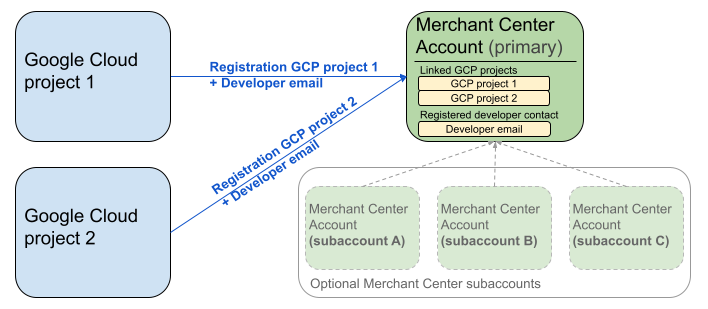
Il diagramma precedente mostra la configurazione della registrazione quando si utilizzano più progetti Google Cloud e un account Merchant Center principale con, facoltativamente, più subaccount Merchant Center.
Requisito di autenticazione: quando esegui la registrazione, l' account Merchant Center autenticato (ovvero l'account in cui risiedono le tue credenziali) deve corrispondere all'account Merchant Center rappresentato (ovvero l'account in cui stai eseguendo la registrazione). Non puoi registrarti a un subaccount se hai eseguito l'autenticazione con un account amministratore o principale separato.
Solo account con sito web verificato: la registrazione è consentita solo per gli account Merchant Center con un sito web verificato.
Nessuna registrazione per gli account di test: non puoi eseguire la registrazione per gli account di test.
Una volta registrato un indirizzo email dello sviluppatore:
- Puoi effettuare chiamate all'API Merchant entro 5 minuti dalla registrazione.
- Se l'indirizzo email appartiene a un utente Merchant Center esistente, gli viene assegnato il ruolo
API developer. In caso contrario, viene creato un nuovo utente in Merchant Center e deve accettare un invito entro 14 giorni per evitare che scada e che debba riavviare la procedura di registrazione. Completi la procedura di registrazione solo dopo che l'utente ha fatto clic sul link di invito.
Effettuare la chiamata di registrazione
Per registrarti, chiama il metodo registerGcp. Hai due opzioni per effettuare la chiamata di registrazione:
- Opzione 1: chiamate API dirette Effettui richieste non elaborate direttamente agli endpoint API, in genere tramite HTTP(S). Gestisci manualmente aspetti come la formazione del corpo della richiesta, l'impostazione delle intestazioni (inclusa l'autenticazione) e l'analisi della risposta.
- Opzione 2: librerie client Utilizzi le librerie predefinite che offrono un modo più pratico e idiomatico per interagire con l'API Merchant. Gestiscono l'autenticazione e l'autorizzazione e offrono un modo pratico per astrarre la comunicazione HTTP sottostante. Sono disponibili esempi di codice ufficiali per iniziare rapidamente.
Autorizzazione per la chiamata di registrazione
Come descritto nel passaggio Autorizzare le richieste all'API Merchant, hai due scenari di autenticazione distinti:
- OAuth 2.0: per fornitori di terze parti o agenzie che gestiscono più account commerciante
- Account di servizio: per l'accesso al tuo account Merchant Center
Per saperne di più sull'autorizzazione della chiamata di registrazione, consulta Come faccio a eseguire l'autenticazione e l'autorizzazione per la chiamata di registrazione?
Chiamata di registrazione
Negli esempi seguenti, esegui la chiamata di registrazione utilizzando chiamate API dirette o librerie client.
Esegui la chiamata di registrazione utilizzando il registerGcp.
POST https://merchantapi.googleapis.com/accounts/v1/accounts/{ACCOUNT_ID}/developerRegistration:registerGcp
Content-Type: application/json
Authorization: Bearer {ACCESS_TOKEN}"

{
  "developerEmail": "{DEVELOPER_EMAIL}"
}
Sostituisci quanto segue:
ACCOUNT_ID: il tuo ID Merchant CenterACCESS_TOKEN: il token di autorizzazione per effettuare la chiamata APIDEVELOPER_EMAIL: l'indirizzo email del contatto tecnico principale
Una chiamata riuscita restituisce una risorsa DeveloperRegistration, che conferma lo stato di collegamento riuscito:
  "name": "accounts/{ACCOUNT_ID}/developerRegistration",
  "gcpIds": ["{GOOGLE_CLOUD_PROJECT_ID}"]
Python
Scarica gli esempi e segui le indicazioni degli esempi Python dell'API Google Merchant per configurare le librerie client Python.
from examples.authentication import configuration
from examples.authentication import generate_user_credentials
from google.shopping.merchant_accounts_v1 import DeveloperRegistrationServiceClient
from google.shopping.merchant_accounts_v1 import RegisterGcpRequest
def register_gcp(account_id: str, developer_email: str) -> None:
"""Registers the GCP project used to call the Merchant API with a developer email.
Args:
account_id: The ID of your Merchant Center account.
developer_email: The email address of the developer to register.
"""
# Get OAuth credentials.
credentials = generate_user_credentials.main()
# Create a client to the Developer Registration Service.
client = DeveloperRegistrationServiceClient(credentials=credentials)
# The name has the format: accounts/{account}/developerRegistration
name = f"accounts/{account_id}/developerRegistration"
# Create the request to register the GCP project.
request = RegisterGcpRequest(
name=name,
developer_email=developer_email,
)
# Make the API call and handle potential errors.
try:
print("Sending RegisterGcp request:")
response = client.register_gcp(request=request)
print("Registered GCP project successfully:")
print(response)
except RuntimeError as e:
print(f"An error occurred: {e}")
if __name__ == "__main__":
# Your Merchant Center account ID.
# This can be found in the Merchant Center UI.
_account_id = configuration.Configuration().read_merchant_info()
# The developer email to associate with the GCP project.
_developer_email = "YOUR_EMAIL_HERE"
register_gcp(_account_id, _developer_email)
Java
Scarica gli esempi e segui le indicazioni da esempi Java dell'API Google Merchant per configurare le librerie client Java.
import com.google.api.gax.core.FixedCredentialsProvider;
import com.google.auth.oauth2.GoogleCredentials;
import com.google.shopping.merchant.accounts.v1.DeveloperRegistration;
import com.google.shopping.merchant.accounts.v1.DeveloperRegistrationName;
import com.google.shopping.merchant.accounts.v1.DeveloperRegistrationServiceClient;
import com.google.shopping.merchant.accounts.v1.DeveloperRegistrationServiceSettings;
import com.google.shopping.merchant.accounts.v1.RegisterGcpRequest;
import shopping.merchant.samples.utils.Authenticator;
import shopping.merchant.samples.utils.Config;
/**
* This class demonstrates how to register the GCP project used to call the Merchant API with a
* developer email.
*/
public class RegisterGcpSample {
public static DeveloperRegistration registerGcp(Config config, String developerEmail) throws Exception {
// Obtains OAuth token based on the user's configuration.
GoogleCredentials credential = new Authenticator().authenticate();
// Creates service settings using the credentials retrieved above.
DeveloperRegistrationServiceSettings developerRegistrationServiceSettings =
DeveloperRegistrationServiceSettings.newBuilder()
.setCredentialsProvider(FixedCredentialsProvider.create(credential))
.build();
// Creates DeveloperRegistration name to identify the DeveloperRegistration.
// The name has the format: accounts/{account}/developerRegistration
String name =
DeveloperRegistrationName.newBuilder()
.setAccount(config.getAccountId().toString())
.build()
.toString();
// Calls the API and propagates any network failures/errors.
try (DeveloperRegistrationServiceClient developerRegistrationServiceClient =
DeveloperRegistrationServiceClient.create(developerRegistrationServiceSettings)) {
// Creates a request to register the GCP project with the developer email.
RegisterGcpRequest request =
RegisterGcpRequest.newBuilder().setName(name).setDeveloperEmail(developerEmail).build();
System.out.println("Sending RegisterGcp request:");
DeveloperRegistration response = developerRegistrationServiceClient.registerGcp(request);
System.out.println(response);
return response;
}
}
public static void main(String[] args) throws Exception {
Config config = Config.load();
String developerEmail = "YOUR_EMAIL_HERE"; // Replace with your email
registerGcp(config, developerEmail);
}
}
PHP
Scarica gli esempi e segui le indicazioni degli esempi PHP dell'API Google Merchant per configurare le librerie client PHP.
require_once __DIR__ . '/../../../../vendor/autoload.php';
require_once __DIR__ . '/../../../Authentication/Authentication.php';
require_once __DIR__ . '/../../../Authentication/Config.php';
use Google\ApiCore\ApiException;
use Google\Shopping\Merchant\Accounts\V1\Client\DeveloperRegistrationServiceClient;
use Google\Shopping\Merchant\Accounts\V1\RegisterGcpRequest;
/**
* This class demonstrates how to register the GCP project used to call the
* Merchant API with a developer email.
*/
class RegisterGcpSample
{
/**
* A helper function to create the name string for the
* DeveloperRegistration.
*
* @param string $accountId The merchant account ID.
* @return string The name, which has the format:
* `accounts/{account}/developerRegistration`
*/
private static function getName(string $accountId): string
{
return sprintf("accounts/%s/developerRegistration", $accountId);
}
/**
* Registers the GCP project with a developer email.
*
* @param array $config The configuration data for authentication and account ID.
* @param string $developerEmail The email of the developer to register.
*/
public static function registerGcpSample(array $config, string $developerEmail): void
{
// Obtains OAuth credentials from the configuration file.
$credentials = Authentication::useServiceAccountOrTokenFile();
// Creates a configuration object for the client.
$options = ['credentials' => $credentials];
// Creates the DeveloperRegistrationServiceClient.
$developerRegistrationServiceClient = new DeveloperRegistrationServiceClient($options);
// Creates the name of the developer registration to identify it.
$name = self::getName($config['accountId']);
// Calls the API and handles any network failures.
try {
// Creates a request to register the GCP project with the developer email.
$request = new RegisterGcpRequest([
'name' => $name,
'developer_email' => $developerEmail
]);
printf("Sending RegisterGcp request:%s", PHP_EOL);
// The `registerGcp` method returns a `DeveloperRegistration` object
// upon success.
$response = $developerRegistrationServiceClient->registerGcp($request);
print "Successfully registered developer email '$developerEmail' for account {$config['accountId']}.\n";
print_r($response);
} catch (ApiException $e) {
printf("An error occurred: %s%s", $e->getMessage(), PHP_EOL);
}
}
/**
* Helper to execute the sample.
*/
public function callSample(): void
{
$config = Config::generateConfig();
// An email address for a developer to register for the API.
$developerEmail = 'YOUR_EMAIL_HERE'; // Replace with your email
self::registerGcpSample($config, $developerEmail);
}
}
// Executes the sample.
$sample = new RegisterGcpSample();
$sample->callSample();
cURL
curl -X POST "https://merchantapi.googleapis.com/accounts/v1/accounts/{ACCOUNT_ID}/developerRegistration:registerGcp" \
-H "Content-Type: application/json" \
-H "Authorization: Bearer {ACCESS_TOKEN}" \
-d '{
  "developerEmail": "{DEVELOPER_EMAIL}"
}'
Per completare la registrazione, devi assicurarti che almeno un utente in Merchant Center abbia il ruolo API developer. Per farlo, puoi eseguire una delle seguenti operazioni:
- Fornisci
developerEmailal metodoregisterGcp. - Aggiungi un nuovo utente con il ruolo
API developernell'interfaccia utente di Merchant Center. - Assegna il ruolo
API developera un utente esistente nell'interfaccia utente di Merchant Center. - Chiama il metodo
accounts.users.createper creare un nuovo utente e assegnargli il ruoloAPI developer. - Assegna il ruolo
API developera un utente esistente utilizzando ilaccounts.users.patchmetodo.
Best practice dopo la registrazione
Per usufruire di una gestione degli accessi efficace ed evitare interruzioni del servizio future, ti consigliamo di seguire una serie di best practice dopo aver completato la registrazione iniziale:
Concedere autorizzazioni aggiuntive a API developer
Quando registri un contatto sviluppatore, gli viene assegnato automaticamente il ruolo API developer. Questo ruolo non include altre autorizzazioni necessarie per gestire l'account Merchant Center o effettuare tutte le chiamate API. Ti consigliamo di aggiungere i ruoli ADMIN o STANDARD ai tuoi sviluppatori per fornire un accesso completo.
Per modificare i diritti di accesso di un utente, utilizza il metodo accounts.users.patch. Specifica i diritti di accesso nel campo updateMask del corpo della richiesta per aggiungere o rimuovere i ruoli:
PATCH https://merchantapi.googleapis.com/accounts/v1/{ACCOUNT_ID}/users/{DEVELOPER_EMAIL}?update_mask=access_rights
Content-Type: application/json
Authorization: Bearer {ACCESS_TOKEN}"

{
  "name": "accounts/{ACCOUNT_ID}/users/{DEVELOPER_EMAIL}",
  "access_rights": [ "ADMIN", "API_DEVELOPER" ]
}
Python
from examples.authentication import configuration
from examples.authentication import generate_user_credentials
from google.protobuf import field_mask_pb2
from google.shopping.merchant_accounts_v1 import AccessRight
from google.shopping.merchant_accounts_v1 import UpdateUserRequest
from google.shopping.merchant_accounts_v1 import User
from google.shopping.merchant_accounts_v1 import UserServiceClient
FieldMask = field_mask_pb2.FieldMask
_ACCOUNT = configuration.Configuration().read_merchant_info()
def update_user(user_email, user_access_right):
"""Updates a user to make it an admin of the MC account."""
credentials = generate_user_credentials.main()
client = UserServiceClient(credentials=credentials)
# Create user name string
name = "accounts/" + _ACCOUNT + "/users/" + user_email
user = User(name=name, access_rights=[user_access_right])
field_mask = FieldMask(paths=["access_rights"])
try:
request = UpdateUserRequest(user=user, update_mask=field_mask)
print("Sending Update User request")
response = client.update_user(request=request)
print("Updated User Name below")
print(response.name)
except RuntimeError as e:
print(e)
if __name__ == "__main__":
# Modify this email to update the right user
email = "USER_MAIL_ACCOUNT"
access_right = AccessRight.ADMIN
update_user(email, access_right)
Java
import com.google.api.gax.core.FixedCredentialsProvider;
import com.google.auth.oauth2.GoogleCredentials;
import com.google.protobuf.FieldMask;
import com.google.shopping.merchant.accounts.v1.AccessRight;
import com.google.shopping.merchant.accounts.v1.UpdateUserRequest;
import com.google.shopping.merchant.accounts.v1.User;
import com.google.shopping.merchant.accounts.v1.UserName;
import com.google.shopping.merchant.accounts.v1.UserServiceClient;
import com.google.shopping.merchant.accounts.v1.UserServiceSettings;
import shopping.merchant.samples.utils.Authenticator;
import shopping.merchant.samples.utils.Config;
/** This class demonstrates how to update a user to make it an admin of the MC account. */
public class UpdateUserSample {
public static void updateUser(Config config, String email, AccessRight accessRight)
throws Exception {
GoogleCredentials credential = new Authenticator().authenticate();
UserServiceSettings userServiceSettings =
UserServiceSettings.newBuilder()
.setCredentialsProvider(FixedCredentialsProvider.create(credential))
.build();
// Creates user name to identify user.
String name =
UserName.newBuilder()
.setAccount(config.getAccountId().toString())
.setEmail(email)
.build()
.toString();
// Create a user with the updated fields.
User user = User.newBuilder().setName(name).addAccessRights(accessRight).build();
FieldMask fieldMask = FieldMask.newBuilder().addPaths("access_rights").build();
try (UserServiceClient userServiceClient = UserServiceClient.create(userServiceSettings)) {
UpdateUserRequest request =
UpdateUserRequest.newBuilder().setUser(user).setUpdateMask(fieldMask).build();
System.out.println("Sending Update User request");
User response = userServiceClient.updateUser(request);
System.out.println("Updated User Name below");
System.out.println(response.getName());
} catch (Exception e) {
System.out.println(e);
}
}
public static void main(String[] args) throws Exception {
Config config = Config.load();
String email = "testUser@gmail.com";
// Give the user admin rights. Note that all other rights, like
// PERFORMANCE_REPORTING, would be overwritten in this example
// if the user had those access rights before the update.
AccessRight accessRight = AccessRight.ADMIN;
updateUser(config, email, accessRight);
}
}
PHP
use Google\ApiCore\ApiException;
use Google\Protobuf\FieldMask;
use Google\Shopping\Merchant\Accounts\V1\AccessRight;
use Google\Shopping\Merchant\Accounts\V1\UpdateUserRequest;
use Google\Shopping\Merchant\Accounts\V1\User;
use Google\Shopping\Merchant\Accounts\V1\Client\UserServiceClient;
/**
* Updates a user.
*
* @param array $config The configuration data.
* @param string $email The email address of the user.
* @param int $accessRight The access right to grant the user.
* @return void
*/
function updateUser($config, $email, $accessRights): void
{
// Gets the OAuth credentials to make the request.
$credentials = Authentication::useServiceAccountOrTokenFile();
// Creates options config containing credentials for the client to use.
$options = ['credentials' => $credentials];
// Creates a client.
$userServiceClient = new UserServiceClient($options);
// Creates user name to identify user.
$name = 'accounts/' . $config['accountId'] . "/users/" . $email;
$user = (new User())
->setName($name)
->setAccessRights($accessRights);
$fieldMask = (new FieldMask())->setPaths(['access_rights']);
// Calls the API and catches and prints any network failures/errors.
try {
$request = new UpdateUserRequest([
'user' => $user,
'update_mask' => $fieldMask,
]);
print "Sending Update User request\n";
$response = $userServiceClient->updateUser($request);
print "Updated User Name below\n";
print $response->getName() . "\n";
} catch (ApiException $e) {
print $e->getMessage();
}
}
$config = Config::generateConfig();
$email = "testUser@gmail.com";
$accessRights = [AccessRight::ADMIN];
updateUser($config, $email, $accessRights);
cURL
curl -X PATCH \
"https://merchantapi.googleapis.com/accounts/v1/{ACCOUNT_ID}/users/{USER_EMAIL}?update_mask=access_rights" \
-H "Content-Type: application/json" \
-H "Authorization: Bearer {ACCESS_TOKEN}" \
-d '{
  "access_rights": [
    "ADMIN",
    "API_DEVELOPER"
  ]
}'
Aggiungere altri contatti sviluppatori
Per evitare interruzioni dell'attività se il contatto sviluppatore principale lascia l'azienda o perde l'accesso, è fondamentale avere contatti ridondanti. Ti consigliamo di avere almeno un altro utente con il ruolo API developer in Merchant Center come backup.
Puoi aggiungere un utente o aggiornarne uno esistente con il accounts.users service nell'API Merchant o nella pagina Access and services nell'interfaccia utente di Merchant Center. Aggiungendo in modo proattivo sviluppatori di backup, crei un'integrazione più resiliente che non dipende da una singola persona.
PATCH https://merchantapi.googleapis.com/products/v1/accounts/{ACCOUNT_ID}/users
Content-Type: application/json
Authorization: Bearer {ACCESS_TOKEN}"
{
  "user_id": {USER_EMAIL},
  "user": { "access_rights": [ "API_DEVELOPER", "ADMIN" ] }
}
Python
from examples.authentication import configuration
from examples.authentication import generate_user_credentials
from google.shopping.merchant_accounts_v1 import AccessRight
from google.shopping.merchant_accounts_v1 import CreateUserRequest
from google.shopping.merchant_accounts_v1 import User
from google.shopping.merchant_accounts_v1 import UserServiceClient
_ACCOUNT = configuration.Configuration().read_merchant_info()
def get_parent(account_id):
return f"accounts/{account_id}"
def create_user(user_email):
"""Creates a user for a Merchant Center account."""
# Get OAuth credentials
credentials = generate_user_credentials.main()
# Create a UserServiceClient
client = UserServiceClient(credentials=credentials)
# Create parent string
parent = get_parent(_ACCOUNT)
# Create the request
request = CreateUserRequest(
parent=parent,
user_id=user_email,
user=User(
access_rights=[AccessRight.ADMIN, AccessRight.PERFORMANCE_REPORTING]
),
)
try:
print("Sending Create User request")
response = client.create_user(request=request)
print("Inserted User Name below")
print(response.name)
except RuntimeError as e:
print(e)
if __name__ == "__main__":
# Modify this email to create a new user
email = "USER_MAIL_ACCOUNT"
create_user(email)
Java
import com.google.api.gax.core.FixedCredentialsProvider;
import com.google.auth.oauth2.GoogleCredentials;
import com.google.shopping.merchant.accounts.v1.AccessRight;
import com.google.shopping.merchant.accounts.v1.CreateUserRequest;
import com.google.shopping.merchant.accounts.v1.User;
import com.google.shopping.merchant.accounts.v1.UserServiceClient;
import com.google.shopping.merchant.accounts.v1.UserServiceSettings;
import shopping.merchant.samples.utils.Authenticator;
import shopping.merchant.samples.utils.Config;
/** This class demonstrates how to create a user for a Merchant Center account. */
public class CreateUserSample {
private static String getParent(String accountId) {
return String.format("accounts/%s", accountId);
}
public static void createUser(Config config, String email) throws Exception {
// Obtains OAuth token based on the user's configuration.
GoogleCredentials credential = new Authenticator().authenticate();
// Creates service settings using the credentials retrieved above.
UserServiceSettings userServiceSettings =
UserServiceSettings.newBuilder()
.setCredentialsProvider(FixedCredentialsProvider.create(credential))
.build();
// Creates parent to identify where to insert the user.
String parent = getParent(config.getAccountId().toString());
// Calls the API and catches and prints any network failures/errors.
try (UserServiceClient userServiceClient = UserServiceClient.create(userServiceSettings)) {
CreateUserRequest request =
CreateUserRequest.newBuilder()
.setParent(parent)
// This field is the email address of the user.
.setUserId(email)
.setUser(
User.newBuilder()
.addAccessRights(AccessRight.ADMIN)
.addAccessRights(AccessRight.PERFORMANCE_REPORTING)
.build())
.build();
System.out.println("Sending Create User request");
User response = userServiceClient.createUser(request);
System.out.println("Inserted User Name below");
// The last part of the user name will be the email address of the user.
// Format: `accounts/{account}/user/{user}`
System.out.println(response.getName());
} catch (Exception e) {
System.out.println(e);
}
}
public static void main(String[] args) throws Exception {
Config config = Config.load();
// The email address of this user.
String email = "testUser@gmail.com";
createUser(config, email);
}
}
PHP
use Google\ApiCore\ApiException;
use Google\Shopping\Merchant\Accounts\V1\AccessRight;
use Google\Shopping\Merchant\Accounts\V1\CreateUserRequest;
use Google\Shopping\Merchant\Accounts\V1\User;
use Google\Shopping\Merchant\Accounts\V1\Client\UserServiceClient;
/**
* Creates a user.
*
* @param array $config The configuration data.
* @param string $email The email address of the user.
* @return void
*/
function createUser($config, $email): void
{
// Gets the OAuth credentials to make the request.
$credentials = Authentication::useServiceAccountOrTokenFile();
// Creates options config containing credentials for the client to use.
$options = ['credentials' => $credentials];
// Creates a client.
$userServiceClient = new UserServiceClient($options);
// Creates parent to identify where to insert the user.
$parent = sprintf("accounts/%s", $config['accountId']);
// Calls the API and catches and prints any network failures/errors.
try {
$request = new CreateUserRequest([
'parent' => $parent,
'user_id' => $email,
'user' => (new User())
->setAccessRights([AccessRight::ADMIN,AccessRight::PERFORMANCE_REPORTING])
]);
print "Sending Create User request\n";
$response = $userServiceClient->createUser($request);
print "Inserted User Name below\n";
print $response->getName() . "\n";
} catch (ApiException $e) {
print $e->getMessage();
}
}
$config = Config::generateConfig();
$email = "testUser@gmail.com";
createUser($config, $email);
cURL
curl -X PATCH \
"https://merchantapi.googleapis.com/products/v1/accounts/{ACCOUNT_ID}/users/{USER_EMAIL}?update_mask=access_rights" \
-H "Content-Type: application/json" \
-H "Authorization: Bearer {ACCESS_TOKEN}" \
-d '{
  "access_rights": [
    "ADMIN",
    "API_DEVELOPER"
  ]
}'