

Pendaftaran sebagai developer adalah proses penyiapan satu kali yang wajib dilakukan untuk menautkan project Google Cloud ke akun Merchant Center Anda, dan mendaftarkan informasi kontak developer Anda ke Google. Hal ini memungkinkan Google mengirimkan pengumuman layanan penting dan update wajib kepada kontak teknis yang relevan yang Anda berikan.
Dokumen ini adalah bagian dari seri multi-bagian tentang cara memulai Merchant API. Jika sudah terdaftar di Merchant API, Anda dapat langsung ke bagian berikutnya: Memasukkan produk pertama
Prasyarat
Sebelum mendaftar untuk menggunakan Merchant API, pastikan Anda memenuhi persyaratan berikut:
- Akun Merchant Center: Anda memerlukan akun Merchant Center yang sudah ada. Pendaftaran hanya didukung untuk akun produksi. Akun pengujian tidak memenuhi syarat untuk pendaftaran developer.
- Beranda yang terverifikasi: Akun Merchant Center Anda harus memiliki situs yang terverifikasi. Hal ini membuktikan kepemilikan domain yang terkait dengan bisnis Anda.
- Akses Admin di akun Merchant Center: Email atau akun layanan
yang Anda gunakan untuk mengotorisasi panggilan pendaftaran harus memiliki
ADMINjenis akses di akun Merchant Center yang Anda daftarkan. Untuk mengetahui informasi selengkapnya, lihat Mengotorisasi permintaan ke Merchant API. - Project ID Google Cloud: Aplikasi Anda harus dikaitkan dengan project Google Cloud khusus untuk memberikan kredensial untuk autentikasi. Untuk mengetahui detail tentang tempat menemukan project ID, lihat Menemukan nama, nomor, dan ID project.
- Alamat email valid yang terkait dengan Akun Google yang Anda berikan sebagai kontak developer untuk menerima info terbaru dari Google. Tidak boleh berupa email akun layanan. Anda dapat menggunakan alamat email yang sudah menjadi bagian dari akun Merchant Center atau alamat email baru.
Mendaftar sebagai developer dengan Merchant API
Untuk menggunakan Merchant API, Anda harus mendaftarkan informasi kontak developer dan project Google Cloud Anda ke akun Merchant Center Anda melalui metode registerGcp.
Baik Anda bekerja dengan beberapa akun penjual atau tidak, Anda melakukan operasi pendaftaran satu kali untuk setiap project Google Cloud yang ingin Anda gunakan. Jika Anda bekerja dengan beberapa project Google Cloud , Anda dapat mendaftarkan semua atau salah satu project tersebut ke Akun Merchant Center yang sama.
Manfaat pendaftaran
Pendaftaran memberikan manfaat berikut:
- Pembuatan kontak teknis: Membuat kontak teknis di Merchant Center. Google mengirimkan info terbaru penting khusus API kepada kontak teknis, seperti pengumuman layanan dan informasi fitur baru.
- Pengelolaan beberapa akun penjual: Memungkinkan Anda mewakili kontak developer untuk semua akun penjual yang Anda kelola.
Kecuali pendaftaran, semua panggilan ke Merchant API dari project Google Cloud yang tidak terdaftar akan diblokir, dan menampilkan kode error 401 dengan status UNAUTHENTICATED dan pesan error berikut:
GCP project with id {GCP_ID} and number {GCP_NUMBER} is not registered with the merchant account.
Follow these steps https://developers.google.com/merchant/api/guides/quickstart#register_as_a_developer
to register the GCP project with the merchant account then try calling the API again in 5 minutes.
Pertimbangan penting
- Penyiapan satu kali untuk setiap project Google Cloud: Pendaftaran adalah penyiapan satu kali untuk setiap project Google Cloud, dan berlaku untuk semua pengguna dan akun layanan dalam project Google Cloud. Pastikan Merchant API diaktifkan di project Google Cloud Anda.
- Setiap project Google Cloud hanya dapat didaftarkan ke satu
akun Merchant Center pada waktu tertentu: Jika Anda mencoba mendaftarkan satu
project Google Cloud ke beberapa akun Merchant Center
secara bersamaan, Anda akan menerima error
ALREADY_REGISTERED. Gunakan alamat email developer yang sama untuk pendaftaran. Perhatikan bahwa beberapa project Google Cloud dapat didaftarkan ke Akun Merchant Center yang sama. Untuk mengetahui petunjuk tentang cara mengubah atau mengganti project Google Cloud terdaftar Anda, lihat Mengelola dan melakukan transisi project Google Cloud. Menetapkan akun yang benar untuk Pihak Ketiga (3P) yang Mengelola Beberapa Penjual: Untuk memastikan stabilitas jangka panjang dan menghindari gangguan layanan, pihak ketiga yang mewakili atau mengelola beberapa penjual harus menggunakan struktur akun yang sesuai dalam ekosistem Google. Sebaiknya daftarkan akun yang mewakili identitas bisnis Anda, bergantung pada jenis bisnis Anda:
- Marketplace dengan akun tingkat lanjut yang sudah ada: Jika bisnis Anda beroperasi sebagai marketplace dan sudah memiliki akun tingkat lanjut yang mewakili seluruh platform, Anda harus menggunakan ID akun yang sudah ada ini.
- Comparison Shopping Service (CSS): Jika Anda adalah CSS, Anda harus menggunakan ID akun CSS unik atau ID akun kelompok CSS.
- Agensi, Developer, dan 3P lainnya: Jika Anda adalah bisnis 3P seperti agensi atau developer pihak ketiga yang mengelola beberapa akun penjual dan tidak memiliki satu ID Merchant Center yang mewakili bisnis Anda, Anda harus membuat Akun Merchant Center utama yang baru dan meminta untuk mengonversinya menjadi akun tingkat lanjut. Akun tingkat lanjut dapat mengelola sub-akun dan menyediakan struktur yang diperlukan untuk operasi 3P.
Tabel berikut memberikan rekomendasi untuk berbagai jenis partner:
Jenis Partner Akun yang Direkomendasikan untuk Didaftarkan Marketplace Akun tingkat lanjut utama (atau terbesar) Anda. Agensi Iklan Akun mandiri atau akun tingkat lanjut yang mewakili perusahaan Anda. Jika Anda baru memulai Merchant API, sebaiknya buat akun mandiri. Layanan Perbandingan Belanja (CSS) ID akun kelompok CSS atau ID akun CSS tertentu, bergantung pada apakah akun tersebut mewakili seluruh kelompok CSS atau hanya CSS tertentu dalam kelompok. Jangan gunakan akun tingkat lanjut CSS. Penjual atau Merek Akun utama yang mewakili merek Anda. Dapat berupa akun mandiri atau akun tingkat lanjut. Penyedia data Tempat Penjualan (POS)/Inventaris Akun tingkat lanjut utama (atau terbesar) Anda. 3P lainnya Jika memiliki akun Merchant Center, Anda dapat menggunakannya untuk pendaftaran. Jika tidak, buat akun mandiri perusahaan. Kemudian, verifikasi situs Anda. Lakukan pendaftaran hanya untuk Merchant Center utama Anda: Anda melakukan pendaftaran developer hanya menggunakan akun Merchant Center utama Anda, dan Anda menjadi kontak developer untuk semua sub-akun Merchant Center tertaut. Jangan lakukan pendaftaran untuk setiap sub-akun Merchant Center Anda.
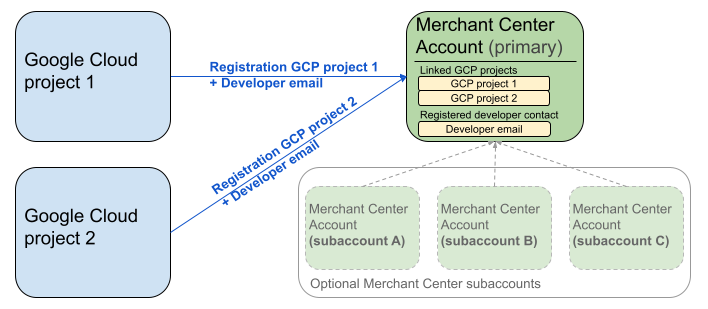
Diagram sebelumnya menunjukkan penyiapan pendaftaran saat menggunakan beberapa project Google Cloud dan satu Merchant Center utama dengan beberapa sub-akun Merchant Center opsional.
Persyaratan autentikasi: Saat melakukan pendaftaran, akun Merchant Center yang diautentikasi (yaitu akun tempat kredensial Anda berada), harus cocok dengan akun Merchant Center yang di-impersonate (yaitu akun yang Anda daftarkan). Anda tidak dapat mendaftar untuk sub-akun jika Anda diautentikasi dengan akun induk atau pengelola terpisah.
Hanya akun situs yang terverifikasi: Pendaftaran hanya diizinkan untuk akun Merchant Center dengan situs yang terverifikasi.
Tidak ada pendaftaran untuk akun pengujian: Anda tidak dapat melakukan pendaftaran untuk akun pengujian.
Setelah Anda mendaftarkan alamat email developer:
- Anda dapat melakukan panggilan Merchant API dalam waktu 5 menit setelah pendaftaran.
- Jika email tersebut milik pengguna Merchant Center yang sudah ada, pengguna tersebut akan diberi peran
API developer. Jika tidak, pengguna baru akan dibuat di Merchant Center dan pengguna tersebut harus menerima undangan dalam waktu 14 hari agar undangan tidak habis masa berlakunya dan agar tidak perlu memulai ulang proses pendaftaran. Anda hanya menyelesaikan proses pendaftaran setelah pengguna mengklik link undangan.
Melakukan panggilan pendaftaran
Anda mendaftar dengan memanggil metode registerGcp. Anda memiliki dua opsi untuk melakukan panggilan pendaftaran:
- Opsi 1: Panggilan API langsung Anda membuat permintaan mentah ke endpoint API secara langsung, biasanya melalui HTTP(S). Anda menangani aspek seperti membentuk isi permintaan, menetapkan header (termasuk autentikasi), dan mengurai respons secara manual.
- Opsi 2: Library klien Anda menggunakan library bawaan yang menawarkan cara yang lebih mudah dan idiomatis untuk berinteraksi dengan Merchant API. Library ini menangani autentikasi dan otorisasi, serta menawarkan cara mudah untuk mengabstraksi komunikasi HTTP yang mendasarinya. Contoh kode resmi tersedia untuk membantu Anda memulai dengan cepat.
Otorisasi untuk panggilan pendaftaran
Seperti yang dijelaskan dalam langkah Mengotorisasi permintaan ke Merchant API, Anda memiliki dua skenario autentikasi yang berbeda:
- OAuth 2.0: untuk penyedia atau agensi pihak ketiga yang mengelola beberapa akun penjual
- Akun Layanan: untuk akses ke akun Merchant Center Anda sendiri
Untuk mengetahui informasi selengkapnya tentang otorisasi panggilan pendaftaran, lihat Bagaimana cara melakukan autentikasi dan otorisasi untuk panggilan pendaftaran?
Panggilan pendaftaran
Dalam contoh berikut, Anda melakukan panggilan pendaftaran menggunakan panggilan API langsung atau library klien.
Anda melakukan panggilan pendaftaran menggunakan metode registerGcp.
POST https://merchantapi.googleapis.com/accounts/v1/accounts/{ACCOUNT_ID}/developerRegistration:registerGcp
Content-Type: application/json
Authorization: Bearer {ACCESS_TOKEN}"

{
  "developerEmail": "{DEVELOPER_EMAIL}"
}
Ganti kode berikut:
ACCOUNT_ID: ID Merchant Center AndaACCESS_TOKEN: token otorisasi untuk melakukan Panggilan APIDEVELOPER_EMAIL: alamat email kontak teknis utama
Panggilan yang berhasil akan menampilkan resource DeveloperRegistration, yang mengonfirmasi status penautan yang berhasil:
  "name": "accounts/{ACCOUNT_ID}/developerRegistration",
  "gcpIds": ["{GOOGLE_CLOUD_PROJECT_ID}"]
Python
Download contoh dan ikuti panduan dari Contoh Python Google Merchant API untuk menyiapkan library klien Python.
from examples.authentication import configuration
from examples.authentication import generate_user_credentials
from google.shopping.merchant_accounts_v1 import DeveloperRegistrationServiceClient
from google.shopping.merchant_accounts_v1 import RegisterGcpRequest
def register_gcp(account_id: str, developer_email: str) -> None:
"""Registers the GCP project used to call the Merchant API with a developer email.
Args:
account_id: The ID of your Merchant Center account.
developer_email: The email address of the developer to register.
"""
# Get OAuth credentials.
credentials = generate_user_credentials.main()
# Create a client to the Developer Registration Service.
client = DeveloperRegistrationServiceClient(credentials=credentials)
# The name has the format: accounts/{account}/developerRegistration
name = f"accounts/{account_id}/developerRegistration"
# Create the request to register the GCP project.
request = RegisterGcpRequest(
name=name,
developer_email=developer_email,
)
# Make the API call and handle potential errors.
try:
print("Sending RegisterGcp request:")
response = client.register_gcp(request=request)
print("Registered GCP project successfully:")
print(response)
except RuntimeError as e:
print(f"An error occurred: {e}")
if __name__ == "__main__":
# Your Merchant Center account ID.
# This can be found in the Merchant Center UI.
_account_id = configuration.Configuration().read_merchant_info()
# The developer email to associate with the GCP project.
_developer_email = "YOUR_EMAIL_HERE"
register_gcp(_account_id, _developer_email)
Java
Download contoh dan ikuti panduan dari Contoh Java Google Merchant API untuk menyiapkan library klien Java.
import com.google.api.gax.core.FixedCredentialsProvider;
import com.google.auth.oauth2.GoogleCredentials;
import com.google.shopping.merchant.accounts.v1.DeveloperRegistration;
import com.google.shopping.merchant.accounts.v1.DeveloperRegistrationName;
import com.google.shopping.merchant.accounts.v1.DeveloperRegistrationServiceClient;
import com.google.shopping.merchant.accounts.v1.DeveloperRegistrationServiceSettings;
import com.google.shopping.merchant.accounts.v1.RegisterGcpRequest;
import shopping.merchant.samples.utils.Authenticator;
import shopping.merchant.samples.utils.Config;
/**
* This class demonstrates how to register the GCP project used to call the Merchant API with a
* developer email.
*/
public class RegisterGcpSample {
public static DeveloperRegistration registerGcp(Config config, String developerEmail) throws Exception {
// Obtains OAuth token based on the user's configuration.
GoogleCredentials credential = new Authenticator().authenticate();
// Creates service settings using the credentials retrieved above.
DeveloperRegistrationServiceSettings developerRegistrationServiceSettings =
DeveloperRegistrationServiceSettings.newBuilder()
.setCredentialsProvider(FixedCredentialsProvider.create(credential))
.build();
// Creates DeveloperRegistration name to identify the DeveloperRegistration.
// The name has the format: accounts/{account}/developerRegistration
String name =
DeveloperRegistrationName.newBuilder()
.setAccount(config.getAccountId().toString())
.build()
.toString();
// Calls the API and propagates any network failures/errors.
try (DeveloperRegistrationServiceClient developerRegistrationServiceClient =
DeveloperRegistrationServiceClient.create(developerRegistrationServiceSettings)) {
// Creates a request to register the GCP project with the developer email.
RegisterGcpRequest request =
RegisterGcpRequest.newBuilder().setName(name).setDeveloperEmail(developerEmail).build();
System.out.println("Sending RegisterGcp request:");
DeveloperRegistration response = developerRegistrationServiceClient.registerGcp(request);
System.out.println(response);
return response;
}
}
public static void main(String[] args) throws Exception {
Config config = Config.load();
String developerEmail = "YOUR_EMAIL_HERE"; // Replace with your email
registerGcp(config, developerEmail);
}
}
PHP
Download contoh dan ikuti panduan dari Contoh PHP Google Merchant API untuk menyiapkan library klien PHP.
require_once __DIR__ . '/../../../../vendor/autoload.php';
require_once __DIR__ . '/../../../Authentication/Authentication.php';
require_once __DIR__ . '/../../../Authentication/Config.php';
use Google\ApiCore\ApiException;
use Google\Shopping\Merchant\Accounts\V1\Client\DeveloperRegistrationServiceClient;
use Google\Shopping\Merchant\Accounts\V1\RegisterGcpRequest;
/**
* This class demonstrates how to register the GCP project used to call the
* Merchant API with a developer email.
*/
class RegisterGcpSample
{
/**
* A helper function to create the name string for the
* DeveloperRegistration.
*
* @param string $accountId The merchant account ID.
* @return string The name, which has the format:
* `accounts/{account}/developerRegistration`
*/
private static function getName(string $accountId): string
{
return sprintf("accounts/%s/developerRegistration", $accountId);
}
/**
* Registers the GCP project with a developer email.
*
* @param array $config The configuration data for authentication and account ID.
* @param string $developerEmail The email of the developer to register.
*/
public static function registerGcpSample(array $config, string $developerEmail): void
{
// Obtains OAuth credentials from the configuration file.
$credentials = Authentication::useServiceAccountOrTokenFile();
// Creates a configuration object for the client.
$options = ['credentials' => $credentials];
// Creates the DeveloperRegistrationServiceClient.
$developerRegistrationServiceClient = new DeveloperRegistrationServiceClient($options);
// Creates the name of the developer registration to identify it.
$name = self::getName($config['accountId']);
// Calls the API and handles any network failures.
try {
// Creates a request to register the GCP project with the developer email.
$request = new RegisterGcpRequest([
'name' => $name,
'developer_email' => $developerEmail
]);
printf("Sending RegisterGcp request:%s", PHP_EOL);
// The `registerGcp` method returns a `DeveloperRegistration` object
// upon success.
$response = $developerRegistrationServiceClient->registerGcp($request);
print "Successfully registered developer email '$developerEmail' for account {$config['accountId']}.\n";
print_r($response);
} catch (ApiException $e) {
printf("An error occurred: %s%s", $e->getMessage(), PHP_EOL);
}
}
/**
* Helper to execute the sample.
*/
public function callSample(): void
{
$config = Config::generateConfig();
// An email address for a developer to register for the API.
$developerEmail = 'YOUR_EMAIL_HERE'; // Replace with your email
self::registerGcpSample($config, $developerEmail);
}
}
// Executes the sample.
$sample = new RegisterGcpSample();
$sample->callSample();
cURL
curl -X POST "https://merchantapi.googleapis.com/accounts/v1/accounts/{ACCOUNT_ID}/developerRegistration:registerGcp" \
-H "Content-Type: application/json" \
-H "Authorization: Bearer {ACCESS_TOKEN}" \
-d '{
  "developerEmail": "{DEVELOPER_EMAIL}"
}'
Untuk menyelesaikan pendaftaran, Anda harus memastikan bahwa setidaknya satu pengguna di Merchant Center memiliki peran API developer. Untuk mencapainya, Anda dapat melakukan salah satu operasi berikut:
- Memberikan
developerEmailke metoderegisterGcp. - Menambahkan pengguna baru yang memiliki peran
API developerdi UI Merchant Center. - Menetapkan peran
API developerkepada pengguna yang sudah ada di UI Merchant Center. - Memanggil metode
accounts.users.createuntuk membuat pengguna baru dan menetapkan peranAPI developerkepadanya. - Menetapkan peran
API developerkepada pengguna yang sudah ada menggunakan metodeaccounts.users.patch.
Praktik Terbaik setelah pendaftaran
Untuk mendapatkan manfaat dari pengelolaan akses yang kuat dan mencegah gangguan layanan di masa mendatang, sebaiknya ikuti serangkaian praktik terbaik setelah Anda menyelesaikan pendaftaran awal:
Memberikan izin tambahan kepada API developer
Saat Anda mendaftarkan kontak developer, kontak tersebut akan otomatis diberi peran API developer. Peran ini tidak mencakup izin lain yang diperlukan untuk mengelola akun Merchant Center atau melakukan semua panggilan API. Sebaiknya tambahkan peran ADMIN atau STANDARD kepada developer Anda untuk memberikan akses yang komprehensif.
Untuk mengubah hak akses pengguna, gunakan metode accounts.users.patch. Anda menentukan hak akses di kolom updateMask isi permintaan untuk menambahkan atau menghapus peran:
PATCH https://merchantapi.googleapis.com/accounts/v1/{ACCOUNT_ID}/users/{DEVELOPER_EMAIL}?update_mask=access_rights
Content-Type: application/json
Authorization: Bearer {ACCESS_TOKEN}"

{
  "name": "accounts/{ACCOUNT_ID}/users/{DEVELOPER_EMAIL}",
  "access_rights": [ "ADMIN", "API_DEVELOPER" ]
}
Python
from examples.authentication import configuration
from examples.authentication import generate_user_credentials
from google.protobuf import field_mask_pb2
from google.shopping.merchant_accounts_v1 import AccessRight
from google.shopping.merchant_accounts_v1 import UpdateUserRequest
from google.shopping.merchant_accounts_v1 import User
from google.shopping.merchant_accounts_v1 import UserServiceClient
FieldMask = field_mask_pb2.FieldMask
_ACCOUNT = configuration.Configuration().read_merchant_info()
def update_user(user_email, user_access_right):
"""Updates a user to make it an admin of the MC account."""
credentials = generate_user_credentials.main()
client = UserServiceClient(credentials=credentials)
# Create user name string
name = "accounts/" + _ACCOUNT + "/users/" + user_email
user = User(name=name, access_rights=[user_access_right])
field_mask = FieldMask(paths=["access_rights"])
try:
request = UpdateUserRequest(user=user, update_mask=field_mask)
print("Sending Update User request")
response = client.update_user(request=request)
print("Updated User Name below")
print(response.name)
except RuntimeError as e:
print(e)
if __name__ == "__main__":
# Modify this email to update the right user
email = "USER_MAIL_ACCOUNT"
access_right = AccessRight.ADMIN
update_user(email, access_right)
Java
import com.google.api.gax.core.FixedCredentialsProvider;
import com.google.auth.oauth2.GoogleCredentials;
import com.google.protobuf.FieldMask;
import com.google.shopping.merchant.accounts.v1.AccessRight;
import com.google.shopping.merchant.accounts.v1.UpdateUserRequest;
import com.google.shopping.merchant.accounts.v1.User;
import com.google.shopping.merchant.accounts.v1.UserName;
import com.google.shopping.merchant.accounts.v1.UserServiceClient;
import com.google.shopping.merchant.accounts.v1.UserServiceSettings;
import shopping.merchant.samples.utils.Authenticator;
import shopping.merchant.samples.utils.Config;
/** This class demonstrates how to update a user to make it an admin of the MC account. */
public class UpdateUserSample {
public static void updateUser(Config config, String email, AccessRight accessRight)
throws Exception {
GoogleCredentials credential = new Authenticator().authenticate();
UserServiceSettings userServiceSettings =
UserServiceSettings.newBuilder()
.setCredentialsProvider(FixedCredentialsProvider.create(credential))
.build();
// Creates user name to identify user.
String name =
UserName.newBuilder()
.setAccount(config.getAccountId().toString())
.setEmail(email)
.build()
.toString();
// Create a user with the updated fields.
User user = User.newBuilder().setName(name).addAccessRights(accessRight).build();
FieldMask fieldMask = FieldMask.newBuilder().addPaths("access_rights").build();
try (UserServiceClient userServiceClient = UserServiceClient.create(userServiceSettings)) {
UpdateUserRequest request =
UpdateUserRequest.newBuilder().setUser(user).setUpdateMask(fieldMask).build();
System.out.println("Sending Update User request");
User response = userServiceClient.updateUser(request);
System.out.println("Updated User Name below");
System.out.println(response.getName());
} catch (Exception e) {
System.out.println(e);
}
}
public static void main(String[] args) throws Exception {
Config config = Config.load();
String email = "testUser@gmail.com";
// Give the user admin rights. Note that all other rights, like
// PERFORMANCE_REPORTING, would be overwritten in this example
// if the user had those access rights before the update.
AccessRight accessRight = AccessRight.ADMIN;
updateUser(config, email, accessRight);
}
}
PHP
use Google\ApiCore\ApiException;
use Google\Protobuf\FieldMask;
use Google\Shopping\Merchant\Accounts\V1\AccessRight;
use Google\Shopping\Merchant\Accounts\V1\UpdateUserRequest;
use Google\Shopping\Merchant\Accounts\V1\User;
use Google\Shopping\Merchant\Accounts\V1\Client\UserServiceClient;
/**
* Updates a user.
*
* @param array $config The configuration data.
* @param string $email The email address of the user.
* @param int $accessRight The access right to grant the user.
* @return void
*/
function updateUser($config, $email, $accessRights): void
{
// Gets the OAuth credentials to make the request.
$credentials = Authentication::useServiceAccountOrTokenFile();
// Creates options config containing credentials for the client to use.
$options = ['credentials' => $credentials];
// Creates a client.
$userServiceClient = new UserServiceClient($options);
// Creates user name to identify user.
$name = 'accounts/' . $config['accountId'] . "/users/" . $email;
$user = (new User())
->setName($name)
->setAccessRights($accessRights);
$fieldMask = (new FieldMask())->setPaths(['access_rights']);
// Calls the API and catches and prints any network failures/errors.
try {
$request = new UpdateUserRequest([
'user' => $user,
'update_mask' => $fieldMask,
]);
print "Sending Update User request\n";
$response = $userServiceClient->updateUser($request);
print "Updated User Name below\n";
print $response->getName() . "\n";
} catch (ApiException $e) {
print $e->getMessage();
}
}
$config = Config::generateConfig();
$email = "testUser@gmail.com";
$accessRights = [AccessRight::ADMIN];
updateUser($config, $email, $accessRights);
cURL
curl -X PATCH \
"https://merchantapi.googleapis.com/accounts/v1/{ACCOUNT_ID}/users/{USER_EMAIL}?update_mask=access_rights" \
-H "Content-Type: application/json" \
-H "Authorization: Bearer {ACCESS_TOKEN}" \
-d '{
  "access_rights": [
    "ADMIN",
    "API_DEVELOPER"
  ]
}'
Menambahkan lebih banyak kontak developer
Untuk menghindari gangguan bisnis jika kontak developer utama keluar atau kehilangan akses, penting untuk memiliki kontak cadangan. Sebaiknya miliki setidaknya satu pengguna tambahan dengan peran API developer di Merchant Center untuk berfungsi sebagai cadangan.
Anda dapat menambahkan pengguna atau memperbarui pengguna yang sudah ada dengan layanan accounts.users di Merchant API atau halaman Akses dan layanan di UI Merchant Center. Dengan menambahkan developer cadangan secara proaktif, Anda membuat integrasi yang lebih tangguh dan tidak bergantung pada satu orang.
PATCH https://merchantapi.googleapis.com/products/v1/accounts/{ACCOUNT_ID}/users
Content-Type: application/json
Authorization: Bearer {ACCESS_TOKEN}"
{
  "user_id": {USER_EMAIL},
  "user": { "access_rights": [ "API_DEVELOPER", "ADMIN" ] }
}
Python
from examples.authentication import configuration
from examples.authentication import generate_user_credentials
from google.shopping.merchant_accounts_v1 import AccessRight
from google.shopping.merchant_accounts_v1 import CreateUserRequest
from google.shopping.merchant_accounts_v1 import User
from google.shopping.merchant_accounts_v1 import UserServiceClient
_ACCOUNT = configuration.Configuration().read_merchant_info()
def get_parent(account_id):
return f"accounts/{account_id}"
def create_user(user_email):
"""Creates a user for a Merchant Center account."""
# Get OAuth credentials
credentials = generate_user_credentials.main()
# Create a UserServiceClient
client = UserServiceClient(credentials=credentials)
# Create parent string
parent = get_parent(_ACCOUNT)
# Create the request
request = CreateUserRequest(
parent=parent,
user_id=user_email,
user=User(
access_rights=[AccessRight.ADMIN, AccessRight.PERFORMANCE_REPORTING]
),
)
try:
print("Sending Create User request")
response = client.create_user(request=request)
print("Inserted User Name below")
print(response.name)
except RuntimeError as e:
print(e)
if __name__ == "__main__":
# Modify this email to create a new user
email = "USER_MAIL_ACCOUNT"
create_user(email)
Java
import com.google.api.gax.core.FixedCredentialsProvider;
import com.google.auth.oauth2.GoogleCredentials;
import com.google.shopping.merchant.accounts.v1.AccessRight;
import com.google.shopping.merchant.accounts.v1.CreateUserRequest;
import com.google.shopping.merchant.accounts.v1.User;
import com.google.shopping.merchant.accounts.v1.UserServiceClient;
import com.google.shopping.merchant.accounts.v1.UserServiceSettings;
import shopping.merchant.samples.utils.Authenticator;
import shopping.merchant.samples.utils.Config;
/** This class demonstrates how to create a user for a Merchant Center account. */
public class CreateUserSample {
private static String getParent(String accountId) {
return String.format("accounts/%s", accountId);
}
public static void createUser(Config config, String email) throws Exception {
// Obtains OAuth token based on the user's configuration.
GoogleCredentials credential = new Authenticator().authenticate();
// Creates service settings using the credentials retrieved above.
UserServiceSettings userServiceSettings =
UserServiceSettings.newBuilder()
.setCredentialsProvider(FixedCredentialsProvider.create(credential))
.build();
// Creates parent to identify where to insert the user.
String parent = getParent(config.getAccountId().toString());
// Calls the API and catches and prints any network failures/errors.
try (UserServiceClient userServiceClient = UserServiceClient.create(userServiceSettings)) {
CreateUserRequest request =
CreateUserRequest.newBuilder()
.setParent(parent)
// This field is the email address of the user.
.setUserId(email)
.setUser(
User.newBuilder()
.addAccessRights(AccessRight.ADMIN)
.addAccessRights(AccessRight.PERFORMANCE_REPORTING)
.build())
.build();
System.out.println("Sending Create User request");
User response = userServiceClient.createUser(request);
System.out.println("Inserted User Name below");
// The last part of the user name will be the email address of the user.
// Format: `accounts/{account}/user/{user}`
System.out.println(response.getName());
} catch (Exception e) {
System.out.println(e);
}
}
public static void main(String[] args) throws Exception {
Config config = Config.load();
// The email address of this user.
String email = "testUser@gmail.com";
createUser(config, email);
}
}
PHP
use Google\ApiCore\ApiException;
use Google\Shopping\Merchant\Accounts\V1\AccessRight;
use Google\Shopping\Merchant\Accounts\V1\CreateUserRequest;
use Google\Shopping\Merchant\Accounts\V1\User;
use Google\Shopping\Merchant\Accounts\V1\Client\UserServiceClient;
/**
* Creates a user.
*
* @param array $config The configuration data.
* @param string $email The email address of the user.
* @return void
*/
function createUser($config, $email): void
{
// Gets the OAuth credentials to make the request.
$credentials = Authentication::useServiceAccountOrTokenFile();
// Creates options config containing credentials for the client to use.
$options = ['credentials' => $credentials];
// Creates a client.
$userServiceClient = new UserServiceClient($options);
// Creates parent to identify where to insert the user.
$parent = sprintf("accounts/%s", $config['accountId']);
// Calls the API and catches and prints any network failures/errors.
try {
$request = new CreateUserRequest([
'parent' => $parent,
'user_id' => $email,
'user' => (new User())
->setAccessRights([AccessRight::ADMIN,AccessRight::PERFORMANCE_REPORTING])
]);
print "Sending Create User request\n";
$response = $userServiceClient->createUser($request);
print "Inserted User Name below\n";
print $response->getName() . "\n";
} catch (ApiException $e) {
print $e->getMessage();
}
}
$config = Config::generateConfig();
$email = "testUser@gmail.com";
createUser($config, $email);
cURL
curl -X PATCH \
"https://merchantapi.googleapis.com/products/v1/accounts/{ACCOUNT_ID}/users/{USER_EMAIL}?update_mask=access_rights" \
-H "Content-Type: application/json" \
-H "Authorization: Bearer {ACCESS_TOKEN}" \
-d '{
  "access_rights": [
    "ADMIN",
    "API_DEVELOPER"
  ]
}'