

डेवलपर के तौर पर रजिस्टर करना ज़रूरी है. यह एक बार की जाने वाली सेटअप प्रोसेस है. इससे आपका Google Cloud प्रोजेक्ट, आपके Merchant Center खाते से लिंक हो जाता है. साथ ही, Google के पास डेवलपर के तौर पर आपकी संपर्क जानकारी रजिस्टर हो जाती है. इससे Google, आपके दिए गए तकनीकी संपर्कों को सेवा में हुए अहम बदलावों का एलान और ज़रूरी अपडेट भेज पाता है.
यह दस्तावेज़, Merchant API का इस्तेमाल शुरू करने के बारे में कई हिस्सों वाली सीरीज़ का हिस्सा है. अगर आपने पहले ही Merchant API के लिए रजिस्टर कर लिया है, तो अगले सेक्शन पर जाएं: अपना पहला प्रॉडक्ट डालें
ज़रूरी शर्तें
Merchant API का इस्तेमाल करने के लिए रजिस्टर करने से पहले, पक्का करें कि आपने ये ज़रूरी शर्तें पूरी की हों:
- Merchant Center खाता: आपके पास पहले से कोई Merchant Center खाता होना चाहिए. रजिस्ट्रेशन सिर्फ़ प्रोडक्शन खातों के लिए किया जा सकता है. टेस्ट खातों को डेवलपर के तौर पर रजिस्टर नहीं किया जा सकता.
- पुष्टि किया गया होम पेज: आपके Merchant Center खाते में पुष्टि की गई वेबसाइट होनी चाहिए. इससे आपके कारोबार से जुड़े डोमेन के मालिकाना हक की पुष्टि होती है.
- Merchant Center खाते का एडमिन ऐक्सेस: रजिस्ट्रेशन कॉल को अनुमति देने के लिए इस्तेमाल किए जाने वाले ईमेल या सेवा खाते के पास, रजिस्टर किए जा रहे Merchant Center खाते में
ADMINऐक्सेस टाइप होना चाहिए. ज़्यादा जानकारी के लिए, Merchant API को अनुरोधों की अनुमति देना लेख पढ़ें. - Google Cloud प्रोजेक्ट आईडी: आपके ऐप्लिकेशन को किसी Google Cloud प्रोजेक्ट से जुड़ा होना चाहिए, ताकि पुष्टि करने के लिए क्रेडेंशियल उपलब्ध कराए जा सकें. प्रोजेक्ट आईडी कहां मिलेगा, इस बारे में ज़्यादा जानने के लिए, प्रोजेक्ट का नाम, नंबर, और आईडी ढूंढना लेख पढ़ें.
- Google खाते से जुड़ा एक मान्य ईमेल पता, जिसे आपने Google से अपडेट पाने के लिए, डेवलपर के संपर्क के तौर पर दिया है. यह सेवा खाते का ईमेल पता नहीं होना चाहिए. इसके लिए, Merchant Center खाते से पहले से जुड़े किसी ईमेल पते या किसी नए ईमेल पते का इस्तेमाल किया जा सकता है.
Merchant API के साथ डेवलपर के तौर पर रजिस्टर करना
Merchant API का इस्तेमाल करने के लिए, आपको registerGcp तरीके का इस्तेमाल करके, अपने Merchant Center खाते में डेवलपर की संपर्क जानकारी और Google क्लाउड प्रोजेक्ट को रजिस्टर करना होगा.
चाहे आप एक से ज़्यादा कारोबारी खातों के साथ काम कर रहे हों या नहीं, आपको हर उस Google Cloud प्रोजेक्ट के लिए एक बार रजिस्ट्रेशन करना होगा जिसका आपको इस्तेमाल करना है. अगर एक से ज़्यादा Google Cloud प्रोजेक्ट का इस्तेमाल किया जा रहा है, तो किसी भी या सभी प्रोजेक्ट को एक ही Merchant Center खाते में रजिस्टर किया जा सकता है.
रजिस्ट्रेशन के फ़ायदे
रजिस्ट्रेशन करने पर ये फ़ायदे मिलते हैं:
- तकनीकी संपर्क बनाना: इससे Merchant Center में तकनीकी संपर्क बनाया जाता है. Google, तकनीकी संपर्क को एपीआई से जुड़े अहम अपडेट भेजता है. जैसे, सेवा में हुए अहम बदलावों का एलान और नई सुविधाओं की जानकारी.
- एक से ज़्यादा कारोबारी खातों को मैनेज करना: इससे आपको उन सभी कारोबारी खातों के लिए डेवलपर के तौर पर संपर्क करने वाले व्यक्ति के तौर पर खुद को दिखाने की सुविधा मिलती है जिन्हें मैनेज किया जाता है.
रजिस्ट्रेशन के अलावा, बिना रजिस्टर किए गए Google Cloud प्रोजेक्ट से Merchant API को किए गए सभी कॉल ब्लॉक कर दिए जाते हैं. साथ ही, 401 स्टेटस के साथ UNAUTHENTICATED गड़बड़ी कोड और यह गड़बड़ी का मैसेज दिखता है:
GCP project with id {GCP_ID} and number {GCP_NUMBER} is not registered with the merchant account.
Follow these steps https://developers.google.com/merchant/api/guides/quickstart#register_as_a_developer
to register the GCP project with the merchant account then try calling the API again in 5 minutes.
विचार करने वाली ज़रूरी बातें
- हर Google Cloud प्रोजेक्ट के लिए एक बार सेटअप करना: रजिस्ट्रेशन, हर Google Cloud प्रोजेक्ट के लिए एक बार सेटअप किया जाता है. यह Google Cloud प्रोजेक्ट में मौजूद सभी उपयोगकर्ताओं और सेवा खातों पर लागू होता है. पक्का करें कि आपके Google Cloud प्रोजेक्ट में Merchant API चालू हो.
- किसी भी समय, Google Cloud के हर प्रोजेक्ट को सिर्फ़ एक Merchant Center खाते के साथ रजिस्टर किया जा सकता है: अगर Google Cloud के किसी प्रोजेक्ट को एक साथ कई Merchant Center खातों के साथ रजिस्टर करने की कोशिश की जाती है, तो आपको
ALREADY_REGISTEREDगड़बड़ी का मैसेज मिलेगा. रजिस्ट्रेशन के लिए, डेवलपर के तौर पर इस्तेमाल किए गए ईमेल पते का ही इस्तेमाल करें. ध्यान दें कि एक ही Merchant Center खाते में, कई Google Cloud प्रोजेक्ट रजिस्टर किए जा सकते हैं. रजिस्टर किए गए Google क्लाउड प्रोजेक्ट को बदलने या रोटेट करने के निर्देशों के लिए, Google Cloud प्रोजेक्ट मैनेज करना और उन्हें ट्रांसफ़र करना लेख पढ़ें. एक से ज़्यादा कारोबारियों या कंपनियों को मैनेज करने वाले तीसरे पक्षों (3P) के लिए सही खाता तय करना: लंबे समय तक स्थिरता बनाए रखने और सेवा में रुकावटों से बचने के लिए, एक से ज़्यादा कारोबारियों या कंपनियों को मैनेज करने वाले तीसरे पक्षों को Google के नेटवर्क में सही खाता स्ट्रक्चर का इस्तेमाल करना होगा. हमारा सुझाव है कि आप अपने कारोबार के टाइप के हिसाब से, उस खाते को रजिस्टर करें जो आपके कारोबार की पहचान दिखाता है:
- ऐडवांस खाते वाले मार्केटप्लेस: अगर आपका कारोबार मार्केटप्लेस के तौर पर काम करता है और आपके पास पहले से ही ऐसा ऐडवांस खाता है जो पूरे प्लैटफ़ॉर्म को दिखाता है, तो आपको इस मौजूदा खाते के आईडी का इस्तेमाल करना चाहिए.
- कंपैरिज़न शॉपिंग सर्विस (सीएसएस): अगर आप कोई सीएसएस हैं, तो आपको अपने यूनीक सीएसएस खाता आईडी या सीएसएस ग्रुप खाता आईडी का इस्तेमाल करना चाहिए.
- एजेंसियां, डेवलपर, और अन्य तीसरे पक्ष: अगर आप तीसरे पक्ष का कारोबार हैं, जैसे कि एजेंसी या तीसरे पक्ष का डेवलपर, जो कई कारोबारी खातों को मैनेज करता है और आपके पास अपने कारोबार को दिखाने वाला कोई एक Merchant Center आईडी नहीं है, तो आपको एक नया, प्राइमरी Merchant Center खाता बनाना चाहिए. साथ ही, उसे ऐडवांस खाते में बदलने का अनुरोध करना चाहिए. एडवांस खाते, उप-खातों को मैनेज कर सकते हैं. साथ ही, तीसरे पक्ष की कार्रवाइयों के लिए ज़रूरी स्ट्रक्चर उपलब्ध करा सकते हैं.
यहां दी गई टेबल में, अलग-अलग तरह के पार्टनर के लिए सुझाव दिए गए हैं:
पार्टनर प्रकार रजिस्टर करने के लिए सुझाया गया खाता मार्केटप्लेस आपका मुख्य (या सबसे बड़ा) ऐडवांस खाता. विज्ञापन एजेंसियां आपकी कंपनी का स्टैंडअलोन खाता या ऐडवांस खाता. अगर आपने Merchant API का इस्तेमाल अभी शुरू किया है, तो हमारा सुझाव है कि आप एक स्टैंडअलोन खाता बनाएं. कंपैरिज़न शॉपिंग सर्विस (सीएसएस) आपका सीएसएस ग्रुप खाता आईडी या सीएसएस खाता आईडी. यह इस बात पर निर्भर करता है कि खाता पूरे सीएसएस ग्रुप को दिखाता है या ग्रुप में सिर्फ़ किसी सीएसएस को. सीएसएस के ऐडवांस खाते का इस्तेमाल न करें. कारोबारी, कंपनियां या ब्रैंड आपका मुख्य खाता, जो आपके ब्रैंड को दिखाता है. यह स्टैंडअलोन या ऐडवांस खाता हो सकता है. बिक्री की जगह (पीओएस)/इन्वेंट्री का डेटा मुहैया कराने वाली कंपनियां आपका मुख्य (या सबसे बड़ा) ऐडवांस खाता. अन्य तीसरे पक्ष अगर आपके पास Merchant Center खाता है, तो इसका इस्तेमाल रजिस्ट्रेशन के लिए किया जा सकता है. अगर ऐसा नहीं है, तो कंपनी का स्टैंडअलोन खाता बनाएं. इसके बाद, अपनी वेबसाइट की पुष्टि करें. सिर्फ़ अपने प्राइमरी Merchant Center खाते के लिए रजिस्ट्रेशन करें: डेवलपर के तौर पर रजिस्ट्रेशन करने के लिए, सिर्फ़ अपने प्राइमरी Merchant Center खाते का इस्तेमाल करें. ऐसा करने पर, आपको लिंक किए गए सभी Merchant Center उप-खातों के लिए डेवलपर संपर्क के तौर पर सेट कर दिया जाएगा. Merchant Center खाते के हर उप-खाते के लिए रजिस्ट्रेशन न करें.
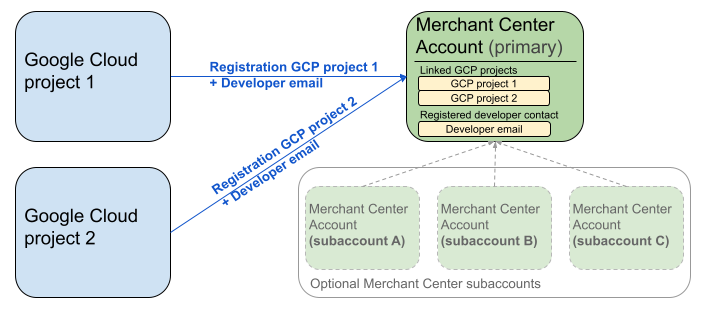
ऊपर दिए गए डायग्राम में, रजिस्ट्रेशन सेटअप दिखाया गया है. इसमें एक से ज़्यादा Google Cloud प्रोजेक्ट और एक मुख्य Merchant Center खाते का इस्तेमाल किया जा रहा है. साथ ही, इसमें एक से ज़्यादा Merchant Center उप-खाते इस्तेमाल करने का विकल्प भी है.
पुष्टि करने की ज़रूरी शर्त: रजिस्ट्रेशन करते समय, पुष्टि किया गया Merchant Center खाता (वह खाता जिसमें आपके क्रेडेंशियल मौजूद हैं) और वह Merchant Center खाता (वह खाता जिसे रजिस्टर किया जा रहा है) एक ही होना चाहिए जिसकी पहचान का इस्तेमाल किया जा रहा है. अगर आपकी पुष्टि किसी अलग पैरंट या मैनेजर खाते से की गई है, तो उप-खाते के लिए रजिस्टर नहीं किया जा सकता.
सिर्फ़ पुष्टि की गई वेबसाइट वाले खाते: रजिस्ट्रेशन सिर्फ़ उन Merchant Center खातों के लिए किया जा सकता है जिनकी वेबसाइट की पुष्टि हो चुकी है.
टेस्ट खातों के लिए रजिस्ट्रेशन नहीं किया जा सकता: टेस्ट खातों के लिए रजिस्ट्रेशन नहीं किया जा सकता.
डेवलपर का ईमेल पता रजिस्टर करने के बाद:
- रजिस्ट्रेशन के पांच मिनट के अंदर, Merchant API कॉल किए जा सकते हैं.
- अगर ईमेल पता, Merchant Center के किसी मौजूदा उपयोगकर्ता का है, तो उसे
API developerकी भूमिका दी जाती है. ऐसा न होने पर, Merchant Center में एक नया उपयोगकर्ता बनाया जाता है. उसे 14 दिनों के अंदर न्योता स्वीकार करना होगा, ताकि न्योता रद्द न हो और उसे रजिस्ट्रेशन की प्रोसेस फिर से शुरू न करनी पड़े. रजिस्ट्रेशन की प्रोसेस तब पूरी होती है, जब उपयोगकर्ता न्योते के लिंक पर क्लिक करता है.
रजिस्ट्रेशन के लिए कॉल करना
registerGcp तरीके को कॉल करके रजिस्टर करें. रजिस्ट्रेशन कॉल करने के लिए, आपके पास दो विकल्प हैं:
- पहला विकल्प: डायरेक्ट एपीआई कॉल एपीआई एंडपॉइंट पर सीधे तौर पर रॉ अनुरोध किए जाते हैं. आम तौर पर, एचटीटीपी(एस) के ज़रिए. आपको अनुरोध का मुख्य हिस्सा बनाने, हेडर सेट करने (इसमें पुष्टि करना भी शामिल है), और जवाब को पार्स करने जैसे पहलुओं को मैन्युअल तरीके से मैनेज करना होता है.
- दूसरा विकल्प: क्लाइंट लाइब्रेरी पहले से बनी हुई लाइब्रेरी का इस्तेमाल करें. ये लाइब्रेरी, Merchant API के साथ इंटरैक्ट करने का ज़्यादा आसान और भाषा के हिसाब से सही तरीका उपलब्ध कराती हैं. ये पुष्टि करने और अनुमति देने की प्रोसेस को मैनेज करते हैं. साथ ही, एचटीटीपी कम्यूनिकेशन को आसान तरीके से ऐब्स्ट्रैक्ट करने का विकल्प देते हैं. शुरू करने में आपकी मदद के लिए, आधिकारिक कोड सैंपल उपलब्ध हैं.
रजिस्ट्रेशन कॉल के लिए अनुमति
Merchant API को अनुरोध भेजने की अनुमति देना चरण में बताए गए तरीके के मुताबिक, आपके पास पुष्टि करने के दो अलग-अलग तरीके हैं:
- OAuth 2.0: तीसरे पक्ष की उन कंपनियों या एजेंसियों के लिए जो कई कारोबारी खातों को मैनेज करती हैं
- सेवा खाते: अपने Merchant Center खाते को ऐक्सेस करने के लिए
रजिस्ट्रेशन कॉल की अनुमति के बारे में ज़्यादा जानने के लिए, मैं रजिस्ट्रेशन कॉल के लिए पुष्टि और अनुमति कैसे करूं? लेख पढ़ें
रजिस्ट्रेशन कॉल
यहां दिए गए उदाहरणों में, रजिस्ट्रेशन कॉल को डायरेक्ट एपीआई कॉल या क्लाइंट लाइब्रेरी का इस्तेमाल करके किया जाता है.
registerGcp तरीके का इस्तेमाल करके, रजिस्ट्रेशन कॉल किया जाता है.
POST https://merchantapi.googleapis.com/accounts/v1/accounts/{ACCOUNT_ID}/developerRegistration:registerGcp
Content-Type: application/json
Authorization: Bearer {ACCESS_TOKEN}"

{
  "developerEmail": "{DEVELOPER_EMAIL}"
}
इनकी जगह ये डालें:
ACCOUNT_ID: आपके Merchant Center का आईडीACCESS_TOKEN: एपीआई कॉल करने के लिए अनुमति देने वाला टोकनDEVELOPER_EMAIL: प्राइमरी टेक्निकल कॉन्टैक्ट का ईमेल पता
कॉल पूरा होने पर, DeveloperRegistration संसाधन दिखता है. इससे यह पुष्टि होती है कि खाता लिंक हो गया है:
  "name": "accounts/{ACCOUNT_ID}/developerRegistration",
  "gcpIds": ["{GOOGLE_CLOUD_PROJECT_ID}"]
Python
Python क्लाइंट लाइब्रेरी सेट अप करने के लिए, सैंपल डाउनलोड करें और Google Merchant API Python सैंपल में दिए गए दिशा-निर्देशों का पालन करें.
from examples.authentication import configuration
from examples.authentication import generate_user_credentials
from google.shopping.merchant_accounts_v1 import DeveloperRegistrationServiceClient
from google.shopping.merchant_accounts_v1 import RegisterGcpRequest
def register_gcp(account_id: str, developer_email: str) -> None:
"""Registers the GCP project used to call the Merchant API with a developer email.
Args:
account_id: The ID of your Merchant Center account.
developer_email: The email address of the developer to register.
"""
# Get OAuth credentials.
credentials = generate_user_credentials.main()
# Create a client to the Developer Registration Service.
client = DeveloperRegistrationServiceClient(credentials=credentials)
# The name has the format: accounts/{account}/developerRegistration
name = f"accounts/{account_id}/developerRegistration"
# Create the request to register the GCP project.
request = RegisterGcpRequest(
name=name,
developer_email=developer_email,
)
# Make the API call and handle potential errors.
try:
print("Sending RegisterGcp request:")
response = client.register_gcp(request=request)
print("Registered GCP project successfully:")
print(response)
except RuntimeError as e:
print(f"An error occurred: {e}")
if __name__ == "__main__":
# Your Merchant Center account ID.
# This can be found in the Merchant Center UI.
_account_id = configuration.Configuration().read_merchant_info()
# The developer email to associate with the GCP project.
_developer_email = "YOUR_EMAIL_HERE"
register_gcp(_account_id, _developer_email)
Java
Java क्लाइंट लाइब्रेरी सेट अप करने के लिए, सैंपल डाउनलोड करें और Google Merchant API Java Samples में दिए गए दिशा-निर्देशों का पालन करें.
import com.google.api.gax.core.FixedCredentialsProvider;
import com.google.auth.oauth2.GoogleCredentials;
import com.google.shopping.merchant.accounts.v1.DeveloperRegistration;
import com.google.shopping.merchant.accounts.v1.DeveloperRegistrationName;
import com.google.shopping.merchant.accounts.v1.DeveloperRegistrationServiceClient;
import com.google.shopping.merchant.accounts.v1.DeveloperRegistrationServiceSettings;
import com.google.shopping.merchant.accounts.v1.RegisterGcpRequest;
import shopping.merchant.samples.utils.Authenticator;
import shopping.merchant.samples.utils.Config;
/**
* This class demonstrates how to register the GCP project used to call the Merchant API with a
* developer email.
*/
public class RegisterGcpSample {
public static DeveloperRegistration registerGcp(Config config, String developerEmail) throws Exception {
// Obtains OAuth token based on the user's configuration.
GoogleCredentials credential = new Authenticator().authenticate();
// Creates service settings using the credentials retrieved above.
DeveloperRegistrationServiceSettings developerRegistrationServiceSettings =
DeveloperRegistrationServiceSettings.newBuilder()
.setCredentialsProvider(FixedCredentialsProvider.create(credential))
.build();
// Creates DeveloperRegistration name to identify the DeveloperRegistration.
// The name has the format: accounts/{account}/developerRegistration
String name =
DeveloperRegistrationName.newBuilder()
.setAccount(config.getAccountId().toString())
.build()
.toString();
// Calls the API and propagates any network failures/errors.
try (DeveloperRegistrationServiceClient developerRegistrationServiceClient =
DeveloperRegistrationServiceClient.create(developerRegistrationServiceSettings)) {
// Creates a request to register the GCP project with the developer email.
RegisterGcpRequest request =
RegisterGcpRequest.newBuilder().setName(name).setDeveloperEmail(developerEmail).build();
System.out.println("Sending RegisterGcp request:");
DeveloperRegistration response = developerRegistrationServiceClient.registerGcp(request);
System.out.println(response);
return response;
}
}
public static void main(String[] args) throws Exception {
Config config = Config.load();
String developerEmail = "YOUR_EMAIL_HERE"; // Replace with your email
registerGcp(config, developerEmail);
}
}
PHP
PHP क्लाइंट लाइब्रेरी सेट अप करने के लिए, सैंपल डाउनलोड करें और Google Merchant API PHP सैंपल में दिए गए दिशा-निर्देशों का पालन करें.
require_once __DIR__ . '/../../../../vendor/autoload.php';
require_once __DIR__ . '/../../../Authentication/Authentication.php';
require_once __DIR__ . '/../../../Authentication/Config.php';
use Google\ApiCore\ApiException;
use Google\Shopping\Merchant\Accounts\V1\Client\DeveloperRegistrationServiceClient;
use Google\Shopping\Merchant\Accounts\V1\RegisterGcpRequest;
/**
* This class demonstrates how to register the GCP project used to call the
* Merchant API with a developer email.
*/
class RegisterGcpSample
{
/**
* A helper function to create the name string for the
* DeveloperRegistration.
*
* @param string $accountId The merchant account ID.
* @return string The name, which has the format:
* `accounts/{account}/developerRegistration`
*/
private static function getName(string $accountId): string
{
return sprintf("accounts/%s/developerRegistration", $accountId);
}
/**
* Registers the GCP project with a developer email.
*
* @param array $config The configuration data for authentication and account ID.
* @param string $developerEmail The email of the developer to register.
*/
public static function registerGcpSample(array $config, string $developerEmail): void
{
// Obtains OAuth credentials from the configuration file.
$credentials = Authentication::useServiceAccountOrTokenFile();
// Creates a configuration object for the client.
$options = ['credentials' => $credentials];
// Creates the DeveloperRegistrationServiceClient.
$developerRegistrationServiceClient = new DeveloperRegistrationServiceClient($options);
// Creates the name of the developer registration to identify it.
$name = self::getName($config['accountId']);
// Calls the API and handles any network failures.
try {
// Creates a request to register the GCP project with the developer email.
$request = new RegisterGcpRequest([
'name' => $name,
'developer_email' => $developerEmail
]);
printf("Sending RegisterGcp request:%s", PHP_EOL);
// The `registerGcp` method returns a `DeveloperRegistration` object
// upon success.
$response = $developerRegistrationServiceClient->registerGcp($request);
print "Successfully registered developer email '$developerEmail' for account {$config['accountId']}.\n";
print_r($response);
} catch (ApiException $e) {
printf("An error occurred: %s%s", $e->getMessage(), PHP_EOL);
}
}
/**
* Helper to execute the sample.
*/
public function callSample(): void
{
$config = Config::generateConfig();
// An email address for a developer to register for the API.
$developerEmail = 'YOUR_EMAIL_HERE'; // Replace with your email
self::registerGcpSample($config, $developerEmail);
}
}
// Executes the sample.
$sample = new RegisterGcpSample();
$sample->callSample();
cURL
curl -X POST "https://merchantapi.googleapis.com/accounts/v1/accounts/{ACCOUNT_ID}/developerRegistration:registerGcp" \
-H "Content-Type: application/json" \
-H "Authorization: Bearer {ACCESS_TOKEN}" \
-d '{
  "developerEmail": "{DEVELOPER_EMAIL}"
}'
रजिस्ट्रेशन पूरा करने के लिए, आपको यह पक्का करना होगा कि Merchant Center में कम से कम एक उपयोगकर्ता के पास API developer की भूमिका हो. इसके लिए, इनमें से कोई एक कार्रवाई करें:
registerGcpतरीके मेंdeveloperEmailकी वैल्यू दें.- Merchant Center के यूज़र इंटरफ़ेस (यूआई) में,
API developerभूमिका वाले किसी नए उपयोगकर्ता को जोड़ें. - Merchant Center के यूज़र इंटरफ़ेस (यूआई) में, किसी मौजूदा उपयोगकर्ता को
API developerकी भूमिका असाइन करें. - नया उपयोगकर्ता बनाने और उसे
API developerकी भूमिका असाइन करने के लिए,accounts.users.createतरीके को कॉल करें. accounts.users.patchतरीके का इस्तेमाल करके, किसी मौजूदा उपयोगकर्ता कोAPI developerकी भूमिका असाइन करें.
रजिस्ट्रेशन के बाद के सबसे सही तरीके
ऐक्सेस मैनेजमेंट का बेहतर फ़ायदा पाने और आने वाले समय में सेवा में रुकावटों को रोकने के लिए, हमारा सुझाव है कि शुरुआती रजिस्ट्रेशन पूरा करने के बाद, सबसे सही तरीकों का पालन करें:
API developer को अतिरिक्त अनुमतियां दें
डेवलपर से संपर्क करने की जानकारी रजिस्टर करने पर, उन्हें API developer की भूमिका अपने-आप असाइन हो जाती है. इस भूमिका में, Merchant Center खाते को मैनेज करने या सभी एपीआई कॉल करने के लिए ज़रूरी अन्य अनुमतियां शामिल नहीं होती हैं. हमारा सुझाव है कि आप अपने डेवलपर को ADMIN या STANDARD की भूमिकाएं दें, ताकि उन्हें पूरा ऐक्सेस मिल सके.
किसी उपयोगकर्ता के ऐक्सेस अधिकारों में बदलाव करने के लिए, accounts.users.patch तरीके का इस्तेमाल करें. भूमिकाएं जोड़ने या हटाने के लिए, अनुरोध के मुख्य हिस्से के updateMask फ़ील्ड में ऐक्सेस के अधिकार तय करें:
PATCH https://merchantapi.googleapis.com/accounts/v1/{ACCOUNT_ID}/users/{DEVELOPER_EMAIL}?update_mask=access_rights
Content-Type: application/json
Authorization: Bearer {ACCESS_TOKEN}"

{
  "name": "accounts/{ACCOUNT_ID}/users/{DEVELOPER_EMAIL}",
  "access_rights": [ "ADMIN", "API_DEVELOPER" ]
}
Python
from examples.authentication import configuration
from examples.authentication import generate_user_credentials
from google.protobuf import field_mask_pb2
from google.shopping.merchant_accounts_v1 import AccessRight
from google.shopping.merchant_accounts_v1 import UpdateUserRequest
from google.shopping.merchant_accounts_v1 import User
from google.shopping.merchant_accounts_v1 import UserServiceClient
FieldMask = field_mask_pb2.FieldMask
_ACCOUNT = configuration.Configuration().read_merchant_info()
def update_user(user_email, user_access_right):
"""Updates a user to make it an admin of the MC account."""
credentials = generate_user_credentials.main()
client = UserServiceClient(credentials=credentials)
# Create user name string
name = "accounts/" + _ACCOUNT + "/users/" + user_email
user = User(name=name, access_rights=[user_access_right])
field_mask = FieldMask(paths=["access_rights"])
try:
request = UpdateUserRequest(user=user, update_mask=field_mask)
print("Sending Update User request")
response = client.update_user(request=request)
print("Updated User Name below")
print(response.name)
except RuntimeError as e:
print(e)
if __name__ == "__main__":
# Modify this email to update the right user
email = "USER_MAIL_ACCOUNT"
access_right = AccessRight.ADMIN
update_user(email, access_right)
Java
import com.google.api.gax.core.FixedCredentialsProvider;
import com.google.auth.oauth2.GoogleCredentials;
import com.google.protobuf.FieldMask;
import com.google.shopping.merchant.accounts.v1.AccessRight;
import com.google.shopping.merchant.accounts.v1.UpdateUserRequest;
import com.google.shopping.merchant.accounts.v1.User;
import com.google.shopping.merchant.accounts.v1.UserName;
import com.google.shopping.merchant.accounts.v1.UserServiceClient;
import com.google.shopping.merchant.accounts.v1.UserServiceSettings;
import shopping.merchant.samples.utils.Authenticator;
import shopping.merchant.samples.utils.Config;
/** This class demonstrates how to update a user to make it an admin of the MC account. */
public class UpdateUserSample {
public static void updateUser(Config config, String email, AccessRight accessRight)
throws Exception {
GoogleCredentials credential = new Authenticator().authenticate();
UserServiceSettings userServiceSettings =
UserServiceSettings.newBuilder()
.setCredentialsProvider(FixedCredentialsProvider.create(credential))
.build();
// Creates user name to identify user.
String name =
UserName.newBuilder()
.setAccount(config.getAccountId().toString())
.setEmail(email)
.build()
.toString();
// Create a user with the updated fields.
User user = User.newBuilder().setName(name).addAccessRights(accessRight).build();
FieldMask fieldMask = FieldMask.newBuilder().addPaths("access_rights").build();
try (UserServiceClient userServiceClient = UserServiceClient.create(userServiceSettings)) {
UpdateUserRequest request =
UpdateUserRequest.newBuilder().setUser(user).setUpdateMask(fieldMask).build();
System.out.println("Sending Update User request");
User response = userServiceClient.updateUser(request);
System.out.println("Updated User Name below");
System.out.println(response.getName());
} catch (Exception e) {
System.out.println(e);
}
}
public static void main(String[] args) throws Exception {
Config config = Config.load();
String email = "testUser@gmail.com";
// Give the user admin rights. Note that all other rights, like
// PERFORMANCE_REPORTING, would be overwritten in this example
// if the user had those access rights before the update.
AccessRight accessRight = AccessRight.ADMIN;
updateUser(config, email, accessRight);
}
}
PHP
use Google\ApiCore\ApiException;
use Google\Protobuf\FieldMask;
use Google\Shopping\Merchant\Accounts\V1\AccessRight;
use Google\Shopping\Merchant\Accounts\V1\UpdateUserRequest;
use Google\Shopping\Merchant\Accounts\V1\User;
use Google\Shopping\Merchant\Accounts\V1\Client\UserServiceClient;
/**
* Updates a user.
*
* @param array $config The configuration data.
* @param string $email The email address of the user.
* @param int $accessRight The access right to grant the user.
* @return void
*/
function updateUser($config, $email, $accessRights): void
{
// Gets the OAuth credentials to make the request.
$credentials = Authentication::useServiceAccountOrTokenFile();
// Creates options config containing credentials for the client to use.
$options = ['credentials' => $credentials];
// Creates a client.
$userServiceClient = new UserServiceClient($options);
// Creates user name to identify user.
$name = 'accounts/' . $config['accountId'] . "/users/" . $email;
$user = (new User())
->setName($name)
->setAccessRights($accessRights);
$fieldMask = (new FieldMask())->setPaths(['access_rights']);
// Calls the API and catches and prints any network failures/errors.
try {
$request = new UpdateUserRequest([
'user' => $user,
'update_mask' => $fieldMask,
]);
print "Sending Update User request\n";
$response = $userServiceClient->updateUser($request);
print "Updated User Name below\n";
print $response->getName() . "\n";
} catch (ApiException $e) {
print $e->getMessage();
}
}
$config = Config::generateConfig();
$email = "testUser@gmail.com";
$accessRights = [AccessRight::ADMIN];
updateUser($config, $email, $accessRights);
cURL
curl -X PATCH \
"https://merchantapi.googleapis.com/accounts/v1/{ACCOUNT_ID}/users/{USER_EMAIL}?update_mask=access_rights" \
-H "Content-Type: application/json" \
-H "Authorization: Bearer {ACCESS_TOKEN}" \
-d '{
  "access_rights": [
    "ADMIN",
    "API_DEVELOPER"
  ]
}'
डेवलपर के और संपर्क जोड़ना
अगर प्राइमरी डेवलपर संपर्क छोड़ देता है या उसके पास ऐक्सेस नहीं रहता है, तो कारोबार में रुकावट से बचने के लिए, डुप्लीकेट संपर्क होना ज़रूरी है. हमारा सुझाव है कि Merchant Center खाते में कम से कम एक और उपयोगकर्ता को API developer की भूमिका असाइन करें, ताकि वह बैकअप के तौर पर काम कर सके.
Merchant API में accounts.users सेवा का इस्तेमाल करके, किसी उपयोगकर्ता को जोड़ा जा सकता है या मौजूदा उपयोगकर्ता की जानकारी अपडेट की जा सकती है. इसके अलावा, Merchant Center के यूज़र इंटरफ़ेस (यूआई) में ऐक्सेस और सेवाएं पेज पर जाकर भी ऐसा किया जा सकता है. बैकअप के तौर पर डेवलपर जोड़ने से, आपको एक ऐसा इंटिग्रेशन बनाने में मदद मिलती है जो किसी एक व्यक्ति पर निर्भर नहीं होता.
PATCH https://merchantapi.googleapis.com/products/v1/accounts/{ACCOUNT_ID}/users
Content-Type: application/json
Authorization: Bearer {ACCESS_TOKEN}"
{
  "user_id": {USER_EMAIL},
  "user": { "access_rights": [ "API_DEVELOPER", "ADMIN" ] }
}
Python
from examples.authentication import configuration
from examples.authentication import generate_user_credentials
from google.shopping.merchant_accounts_v1 import AccessRight
from google.shopping.merchant_accounts_v1 import CreateUserRequest
from google.shopping.merchant_accounts_v1 import User
from google.shopping.merchant_accounts_v1 import UserServiceClient
_ACCOUNT = configuration.Configuration().read_merchant_info()
def get_parent(account_id):
return f"accounts/{account_id}"
def create_user(user_email):
"""Creates a user for a Merchant Center account."""
# Get OAuth credentials
credentials = generate_user_credentials.main()
# Create a UserServiceClient
client = UserServiceClient(credentials=credentials)
# Create parent string
parent = get_parent(_ACCOUNT)
# Create the request
request = CreateUserRequest(
parent=parent,
user_id=user_email,
user=User(
access_rights=[AccessRight.ADMIN, AccessRight.PERFORMANCE_REPORTING]
),
)
try:
print("Sending Create User request")
response = client.create_user(request=request)
print("Inserted User Name below")
print(response.name)
except RuntimeError as e:
print(e)
if __name__ == "__main__":
# Modify this email to create a new user
email = "USER_MAIL_ACCOUNT"
create_user(email)
Java
import com.google.api.gax.core.FixedCredentialsProvider;
import com.google.auth.oauth2.GoogleCredentials;
import com.google.shopping.merchant.accounts.v1.AccessRight;
import com.google.shopping.merchant.accounts.v1.CreateUserRequest;
import com.google.shopping.merchant.accounts.v1.User;
import com.google.shopping.merchant.accounts.v1.UserServiceClient;
import com.google.shopping.merchant.accounts.v1.UserServiceSettings;
import shopping.merchant.samples.utils.Authenticator;
import shopping.merchant.samples.utils.Config;
/** This class demonstrates how to create a user for a Merchant Center account. */
public class CreateUserSample {
private static String getParent(String accountId) {
return String.format("accounts/%s", accountId);
}
public static void createUser(Config config, String email) throws Exception {
// Obtains OAuth token based on the user's configuration.
GoogleCredentials credential = new Authenticator().authenticate();
// Creates service settings using the credentials retrieved above.
UserServiceSettings userServiceSettings =
UserServiceSettings.newBuilder()
.setCredentialsProvider(FixedCredentialsProvider.create(credential))
.build();
// Creates parent to identify where to insert the user.
String parent = getParent(config.getAccountId().toString());
// Calls the API and catches and prints any network failures/errors.
try (UserServiceClient userServiceClient = UserServiceClient.create(userServiceSettings)) {
CreateUserRequest request =
CreateUserRequest.newBuilder()
.setParent(parent)
// This field is the email address of the user.
.setUserId(email)
.setUser(
User.newBuilder()
.addAccessRights(AccessRight.ADMIN)
.addAccessRights(AccessRight.PERFORMANCE_REPORTING)
.build())
.build();
System.out.println("Sending Create User request");
User response = userServiceClient.createUser(request);
System.out.println("Inserted User Name below");
// The last part of the user name will be the email address of the user.
// Format: `accounts/{account}/user/{user}`
System.out.println(response.getName());
} catch (Exception e) {
System.out.println(e);
}
}
public static void main(String[] args) throws Exception {
Config config = Config.load();
// The email address of this user.
String email = "testUser@gmail.com";
createUser(config, email);
}
}
PHP
use Google\ApiCore\ApiException;
use Google\Shopping\Merchant\Accounts\V1\AccessRight;
use Google\Shopping\Merchant\Accounts\V1\CreateUserRequest;
use Google\Shopping\Merchant\Accounts\V1\User;
use Google\Shopping\Merchant\Accounts\V1\Client\UserServiceClient;
/**
* Creates a user.
*
* @param array $config The configuration data.
* @param string $email The email address of the user.
* @return void
*/
function createUser($config, $email): void
{
// Gets the OAuth credentials to make the request.
$credentials = Authentication::useServiceAccountOrTokenFile();
// Creates options config containing credentials for the client to use.
$options = ['credentials' => $credentials];
// Creates a client.
$userServiceClient = new UserServiceClient($options);
// Creates parent to identify where to insert the user.
$parent = sprintf("accounts/%s", $config['accountId']);
// Calls the API and catches and prints any network failures/errors.
try {
$request = new CreateUserRequest([
'parent' => $parent,
'user_id' => $email,
'user' => (new User())
->setAccessRights([AccessRight::ADMIN,AccessRight::PERFORMANCE_REPORTING])
]);
print "Sending Create User request\n";
$response = $userServiceClient->createUser($request);
print "Inserted User Name below\n";
print $response->getName() . "\n";
} catch (ApiException $e) {
print $e->getMessage();
}
}
$config = Config::generateConfig();
$email = "testUser@gmail.com";
createUser($config, $email);
cURL
curl -X PATCH \
"https://merchantapi.googleapis.com/products/v1/accounts/{ACCOUNT_ID}/users/{USER_EMAIL}?update_mask=access_rights" \
-H "Content-Type: application/json" \
-H "Authorization: Bearer {ACCESS_TOKEN}" \
-d '{
  "access_rights": [
    "ADMIN",
    "API_DEVELOPER"
  ]
}'