

التسجيل كمطوّر هو عملية إعداد إلزامية تتم لمرة واحدة، ويتم من خلالها ربط مشروعك على Google Cloud بحسابك على Merchant Center وتسجيل معلومات الاتصال الخاصة بك كمطوّر لدى Google. يتيح ذلك لـ Google إرسال إشعارات عن الخدمة المهمة والتحديثات الإلزامية إلى جهات الاتصال الفنية ذات الصلة التي تقدّمها.
هذا المستند هو جزء من سلسلة متعدّدة الأجزاء حول بدء استخدام Merchant API. إذا سبق لك التسجيل في Merchant API، يمكنك الانتقال إلى القسم التالي: إدراج منتجك الأول
المتطلبات الأساسية
قبل التسجيل لاستخدام Merchant API، تأكَّد من استيفاء المتطلبات التالية:
- حساب Merchant Center: يجب أن يكون لديك حساب حالي على Merchant Center. لا يمكن التسجيل إلا باستخدام حسابات الإصدار العلني. حسابات الاختبار غير مؤهَّلة للتسجيل كمطوّر.
- صفحة رئيسية تم تأكيدها: يجب أن يتضمّن حسابك على Merchant Center موقعًا إلكترونيًا تم تأكيده. يُثبت هذا الإجراء ملكية النطاق المرتبط بنشاطك التجاري.
- إذن وصول إداري إلى حساب Merchant Center: يجب أن يكون لدى عنوان البريد الإلكتروني أو حساب الخدمة الذي تستخدمه لمنح الإذن بطلب التسجيل نوع الوصول
ADMINفي حساب Merchant Center الذي تسجّل فيه. لمزيد من المعلومات، يُرجى الاطّلاع على تفويض الطلبات إلى Merchant API. - رقم تعريف مشروع Google Cloud: يجب ربط تطبيقك بمشروع Google Cloud مخصّص لتقديم بيانات الاعتماد للمصادقة. للحصول على تفاصيل حول مكان العثور على رقم تعريف المشروع، اطّلِع على مقالة العثور على اسم المشروع ورقمه ومعرّفه.
- عنوان بريد إلكتروني صالح مرتبط بحساب Google تقدّمه كجهة تواصل مع المطوّر لتلقّي آخر الأخبار من Google. يجب ألا يكون عنوان بريد إلكتروني لحساب خدمة. يمكنك استخدام عنوان بريد إلكتروني سبق أن استخدمته لإنشاء حساب على Merchant Center أو عنوان بريد إلكتروني جديد.
التسجيل كمطوّر باستخدام Merchant API
لاستخدام Merchant API، يجب تسجيل معلومات الاتصال الخاصة بالمطوّر ومشروع Google Cloud مع حسابك على Merchant Center من خلال طريقة registerGcp.
سواء كنت تعمل مع حسابات تجّار متعددة أم لا، عليك إجراء عملية التسجيل مرة واحدة لكل مشروع على Google Cloud تنوي استخدامه. إذا كنت تعمل على مشاريع متعددة على Google Cloud، يمكنك تسجيل بعضها أو جميعها في حساب Merchant Center نفسه.
مزايا التسجيل
يوفّر التسجيل المزايا التالية:
- إنشاء جهة اتصال تقنية: يؤدي هذا الإجراء إلى إنشاء جهة اتصال تقنية في Merchant Center. ترسل Google تحديثات مهمة خاصة بواجهة برمجة التطبيقات إلى جهة الاتصال المسؤولة عن الدعم الفني، مثل إشعارات الخدمة ومعلومات الميزات الجديدة.
- إدارة حسابات تاجر متعددة: تتيح لك تمثيل جهة التواصل مع المطوّر لجميع حسابات التاجر التي تديرها.
باستثناء عملية التسجيل، يتم حظر أي طلبات يتم إرسالها إلى Merchant API من مشروع على السحابة الإلكترونية غير مسجّل على Google Cloud، ويتم عرض رمز الخطأ 401 مع الحالة UNAUTHENTICATED ورسالة الخطأ التالية:
GCP project with id {GCP_ID} and number {GCP_NUMBER} is not registered with the merchant account.
Follow these steps https://developers.google.com/merchant/api/guides/quickstart#register_as_a_developer
to register the GCP project with the merchant account then try calling the API again in 5 minutes.
اعتبارات مهمة
- الإعداد لمرة واحدة لكل مشروع على Google Cloud: التسجيل هو عملية إعداد لمرة واحدة لكل مشروع على Google Cloud، وينطبق على جميع المستخدمين وحسابات الخدمة ضِمن مشروع Google Cloud. تأكَّد من تفعيل Merchant API في مشروعك على Google Cloud.
- يمكن تسجيل كل مشروع على Google Cloud باستخدام حساب واحد فقط على Merchant Center في أي وقت: إذا حاولت تسجيل مشروع واحد على Google Cloud باستخدام حسابات متعددة على Merchant Center في الوقت نفسه، سيظهر لك الخطأ
ALREADY_REGISTERED. استخدِم عنوان البريد الإلكتروني نفسه الخاص بالمطوّر للتسجيل. يُرجى العِلم أنّه يمكن تسجيل عدة مشاريع على Google Cloud في حساب Merchant Center نفسه. للحصول على تعليمات حول تغيير أو تدوير مشروع Google Cloud المسجَّل، يُرجى الاطّلاع على إدارة مشاريع Google Cloud ونقلها. تحديد الحساب المناسب للجهات الخارجية التي تدير عدة تجّار: لضمان الاستقرار على المدى الطويل وتجنُّب انقطاع الخدمة، يجب أن تستخدم الجهات الخارجية التي تمثّل عدة تجّار أو تديرهم بنية الحساب المناسبة ضمن نظام Google المتكامل. ننصحك بتسجيل الحساب الذي يمثّل هوية نشاطك التجاري، وذلك حسب نوع نشاطك التجاري:
- الأسواق التي لديها حساب حالي بامتيازات متقدّمة: إذا كان نشاطك التجاري يعمل كسوق ولديه حاليًا حساب بامتيازات متقدّمة يمثّل المنصة بأكملها، عليك استخدام رقم تعريف هذا الحساب الحالي.
- خدمات مقارنة الأسعار (CSS): إذا كنت تمثّل خدمة CSS، عليك استخدام رقم تعريف حساب CSS الفريد أو رقم تعريف حساب مجموعة CSS.
- الوكالات والمطوّرون والجهات الخارجية الأخرى: إذا كنت تمثّل نشاطًا تجاريًا تابعًا لجهة خارجية، مثل وكالة أو مطوّر خارجي يدير حسابات تجّار متعدّدة وليس لديك معرّف Merchant Center واحد يمثّل نشاطك التجاري، عليك إنشاء حساب أساسي جديد على Merchant Center وطلب تحويله إلى حساب بامتيازات متقدّمة. تتيح الحسابات بامتيازات متقدّمة إدارة الحسابات الفرعية وتوفير البنية اللازمة لعمليات الجهات الخارجية.
يقدّم الجدول التالي اقتراحات لأنواع الشركاء المختلفة:
نوع الشريك الحساب المقترَح للتسجيل الأسواق حسابك الرئيسي (أو الأكبر) بامتيازات متقدّمة وكالات الإعلان حساب مستقل أو حساب بامتيازات متقدّمة يمثّل شركتك إذا كنت قد بدأت حديثًا باستخدام Merchant API، ننصحك بإنشاء حساب مستقل. خدمات مقارنة الأسعار (CSS) رقم تعريف حساب مجموعة CSS أو رقم تعريف حساب CSS محدّد، حسب ما إذا كان الحساب يمثّل مجموعة CSS بأكملها أو خدمة CSS محدّدة ضمن مجموعة لا تستخدِم حسابًا بامتيازات متقدّمة في CSS. التجّار أو العلامات التجارية حسابك الرئيسي الذي يمثّل علامتك التجارية يمكن أن يكون حسابًا مستقلاً أو حسابًا بامتيازات متقدّمة. مزوّدو بيانات المستودع/نقاط البيع حسابك الرئيسي (أو الأكبر) بامتيازات متقدّمة الجهات الخارجية الأخرى إذا كان لديك حساب على Merchant Center، يمكنك استخدامه للتسجيل. بخلاف ذلك، يمكنك إنشاء حساب مستقل للشركة. بعد ذلك، عليك إثبات ملكية موقعك الإلكتروني. إجراء عملية التسجيل لحسابك الأساسي على Merchant Center فقط: يمكنك إجراء عملية تسجيل المطوّر باستخدام حسابك الأساسي على Merchant Center فقط، وستصبح جهة اتصال المطوّر لجميع الحسابات الفرعية المرتبطة على Merchant Center. لا تسجِّل كل حساب من حساباتك الفرعية على Merchant Center.
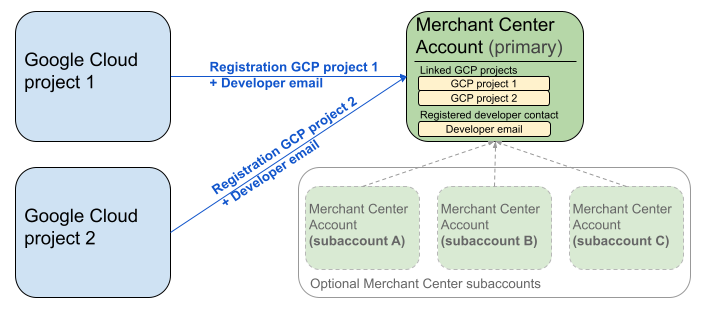
يعرض المخطّط البياني السابق إعدادات التسجيل عند استخدام عدة مشاريع على Google Cloud وحساب Merchant Center أساسي واحد مع عدة حسابات فرعية اختيارية على Merchant Center.
متطلبات المصادقة: عند إجراء عملية التسجيل، يجب أن يتطابق حساب Merchant Center الذي تمت المصادقة عليه (وهو الحساب الذي تتوفّر فيه بيانات الاعتماد) مع حساب Merchant Center الذي يتم انتحال هويته (وهو الحساب الذي يتم تسجيله). لا يمكنك التسجيل للحصول على حساب فرعي إذا تمت مصادقتك باستخدام حساب رئيسي أو حساب إداري منفصل.
الحسابات التي تتضمّن مواقع إلكترونية تم تأكيدها فقط: لا يُسمح بالتسجيل إلا لحسابات Merchant Center التي تتضمّن موقعًا إلكترونيًا تم تأكيده.
عدم تسجيل الحسابات التجريبية: لا يمكنك إجراء عملية التسجيل للحسابات التجريبية.
بعد تسجيل عنوان بريد إلكتروني للمطوِّر:
- يمكنك تنفيذ طلبات بيانات من واجهة برمجة التطبيقات Merchant API في غضون 5 دقائق من التسجيل.
- إذا كان عنوان البريد الإلكتروني ينتمي إلى مستخدم حالي في Merchant Center، يتم منحه دور "
API developer". في الحالات الأخرى، يتم إنشاء مستخدم جديد في Merchant Center، ويجب أن يقبل الدعوة في غضون 14 يومًا لتجنّب انتهاء صلاحيتها واضطراره إلى إعادة بدء عملية التسجيل. لا تُكمل عملية التسجيل إلا بعد أن ينقر المستخدم على رابط الدعوة.
إجراء مكالمة التسجيل
يمكنك التسجيل من خلال استدعاء طريقة registerGcp. لديك خياران لإجراء مكالمة التسجيل:
- الخيار 1: طلبات مباشرة من واجهة برمجة التطبيقات يمكنك إرسال طلبات أولية إلى نقاط نهاية واجهة برمجة التطبيقات مباشرةً، عادةً عبر HTTP(S). يمكنك التعامل يدويًا مع جوانب مثل تشكيل نص الطلب وإعداد العناوين (بما في ذلك المصادقة) وتحليل الاستجابة.
- الخيار 2: مكتبات العملاء يمكنك استخدام المكتبات المُعدّة مسبقًا والتي توفّر طريقة أكثر ملاءمةً وتوافقًا مع اللغة للتفاعل مع Merchant API. وتتولّى هذه المكتبات المصادقة والترخيص، وتوفّر طريقة ملائمة لإخفاء تفاصيل اتصال HTTP الأساسي. تتوفّر عينات الرموز الرسمية لمساعدتك على البدء بسرعة.
تفويض لإجراء مكالمة التسجيل
كما هو موضّح في خطوة تفويض الطلبات إلى Merchant API، لديك سيناريوهان مختلفان للمصادقة:
- OAuth 2.0: لمقدّمي الخدمات الخارجيين أو الوكالات التي تدير حسابات تجّار متعددة
- حسابات الخدمة: للوصول إلى حسابك على Merchant Center
لمزيد من المعلومات حول تفويض طلب التسجيل، يُرجى الاطّلاع على كيف يمكنني إجراء المصادقة والتفويض لطلب التسجيل؟
مكالمة التسجيل
في الأمثلة التالية، يتم تنفيذ طلب التسجيل باستخدام طلبات مباشرة من واجهة برمجة التطبيقات أو مكتبات العميل.
يمكنك إجراء مكالمة التسجيل باستخدام طريقة registerGcp.
POST https://merchantapi.googleapis.com/accounts/v1/accounts/{ACCOUNT_ID}/developerRegistration:registerGcp
Content-Type: application/json
Authorization: Bearer {ACCESS_TOKEN}"

{
  "developerEmail": "{DEVELOPER_EMAIL}"
}
غيِّر القيم في السلسلة على الشكل التالي:
ACCOUNT_ID: معرّف Merchant CenterACCESS_TOKEN: رمز التفويض لإجراء طلب البيانات من واجهة برمجة التطبيقات-
DEVELOPER_EMAIL: عنوان البريد الإلكتروني لجهة الاتصال التقنية الأساسية
يعرض الطلب الناجح مصدر DeveloperRegistration، مؤكّدًا حالة الربط الناجحة:
  "name": "accounts/{ACCOUNT_ID}/developerRegistration",
  "gcpIds": ["{GOOGLE_CLOUD_PROJECT_ID}"]
Python
نزِّل النماذج واتّبِع الإرشادات الواردة في نماذج Python لواجهة Google Merchant API لإعداد مكتبات برامج Python.
from examples.authentication import configuration
from examples.authentication import generate_user_credentials
from google.shopping.merchant_accounts_v1 import DeveloperRegistrationServiceClient
from google.shopping.merchant_accounts_v1 import RegisterGcpRequest
def register_gcp(account_id: str, developer_email: str) -> None:
"""Registers the GCP project used to call the Merchant API with a developer email.
Args:
account_id: The ID of your Merchant Center account.
developer_email: The email address of the developer to register.
"""
# Get OAuth credentials.
credentials = generate_user_credentials.main()
# Create a client to the Developer Registration Service.
client = DeveloperRegistrationServiceClient(credentials=credentials)
# The name has the format: accounts/{account}/developerRegistration
name = f"accounts/{account_id}/developerRegistration"
# Create the request to register the GCP project.
request = RegisterGcpRequest(
name=name,
developer_email=developer_email,
)
# Make the API call and handle potential errors.
try:
print("Sending RegisterGcp request:")
response = client.register_gcp(request=request)
print("Registered GCP project successfully:")
print(response)
except RuntimeError as e:
print(f"An error occurred: {e}")
if __name__ == "__main__":
# Your Merchant Center account ID.
# This can be found in the Merchant Center UI.
_account_id = configuration.Configuration().read_merchant_info()
# The developer email to associate with the GCP project.
_developer_email = "YOUR_EMAIL_HERE"
register_gcp(_account_id, _developer_email)
جافا
نزِّل النماذج واتّبِع الإرشادات الواردة في نماذج Google Merchant API للغة Java لإعداد مكتبات برامج Java.
import com.google.api.gax.core.FixedCredentialsProvider;
import com.google.auth.oauth2.GoogleCredentials;
import com.google.shopping.merchant.accounts.v1.DeveloperRegistration;
import com.google.shopping.merchant.accounts.v1.DeveloperRegistrationName;
import com.google.shopping.merchant.accounts.v1.DeveloperRegistrationServiceClient;
import com.google.shopping.merchant.accounts.v1.DeveloperRegistrationServiceSettings;
import com.google.shopping.merchant.accounts.v1.RegisterGcpRequest;
import shopping.merchant.samples.utils.Authenticator;
import shopping.merchant.samples.utils.Config;
/**
* This class demonstrates how to register the GCP project used to call the Merchant API with a
* developer email.
*/
public class RegisterGcpSample {
public static DeveloperRegistration registerGcp(Config config, String developerEmail) throws Exception {
// Obtains OAuth token based on the user's configuration.
GoogleCredentials credential = new Authenticator().authenticate();
// Creates service settings using the credentials retrieved above.
DeveloperRegistrationServiceSettings developerRegistrationServiceSettings =
DeveloperRegistrationServiceSettings.newBuilder()
.setCredentialsProvider(FixedCredentialsProvider.create(credential))
.build();
// Creates DeveloperRegistration name to identify the DeveloperRegistration.
// The name has the format: accounts/{account}/developerRegistration
String name =
DeveloperRegistrationName.newBuilder()
.setAccount(config.getAccountId().toString())
.build()
.toString();
// Calls the API and propagates any network failures/errors.
try (DeveloperRegistrationServiceClient developerRegistrationServiceClient =
DeveloperRegistrationServiceClient.create(developerRegistrationServiceSettings)) {
// Creates a request to register the GCP project with the developer email.
RegisterGcpRequest request =
RegisterGcpRequest.newBuilder().setName(name).setDeveloperEmail(developerEmail).build();
System.out.println("Sending RegisterGcp request:");
DeveloperRegistration response = developerRegistrationServiceClient.registerGcp(request);
System.out.println(response);
return response;
}
}
public static void main(String[] args) throws Exception {
Config config = Config.load();
String developerEmail = "YOUR_EMAIL_HERE"; // Replace with your email
registerGcp(config, developerEmail);
}
}
PHP
نزِّل النماذج واتّبِع الإرشادات الواردة في نماذج PHP في Google Merchant API لإعداد مكتبات برامج PHP.
require_once __DIR__ . '/../../../../vendor/autoload.php';
require_once __DIR__ . '/../../../Authentication/Authentication.php';
require_once __DIR__ . '/../../../Authentication/Config.php';
use Google\ApiCore\ApiException;
use Google\Shopping\Merchant\Accounts\V1\Client\DeveloperRegistrationServiceClient;
use Google\Shopping\Merchant\Accounts\V1\RegisterGcpRequest;
/**
* This class demonstrates how to register the GCP project used to call the
* Merchant API with a developer email.
*/
class RegisterGcpSample
{
/**
* A helper function to create the name string for the
* DeveloperRegistration.
*
* @param string $accountId The merchant account ID.
* @return string The name, which has the format:
* `accounts/{account}/developerRegistration`
*/
private static function getName(string $accountId): string
{
return sprintf("accounts/%s/developerRegistration", $accountId);
}
/**
* Registers the GCP project with a developer email.
*
* @param array $config The configuration data for authentication and account ID.
* @param string $developerEmail The email of the developer to register.
*/
public static function registerGcpSample(array $config, string $developerEmail): void
{
// Obtains OAuth credentials from the configuration file.
$credentials = Authentication::useServiceAccountOrTokenFile();
// Creates a configuration object for the client.
$options = ['credentials' => $credentials];
// Creates the DeveloperRegistrationServiceClient.
$developerRegistrationServiceClient = new DeveloperRegistrationServiceClient($options);
// Creates the name of the developer registration to identify it.
$name = self::getName($config['accountId']);
// Calls the API and handles any network failures.
try {
// Creates a request to register the GCP project with the developer email.
$request = new RegisterGcpRequest([
'name' => $name,
'developer_email' => $developerEmail
]);
printf("Sending RegisterGcp request:%s", PHP_EOL);
// The `registerGcp` method returns a `DeveloperRegistration` object
// upon success.
$response = $developerRegistrationServiceClient->registerGcp($request);
print "Successfully registered developer email '$developerEmail' for account {$config['accountId']}.\n";
print_r($response);
} catch (ApiException $e) {
printf("An error occurred: %s%s", $e->getMessage(), PHP_EOL);
}
}
/**
* Helper to execute the sample.
*/
public function callSample(): void
{
$config = Config::generateConfig();
// An email address for a developer to register for the API.
$developerEmail = 'YOUR_EMAIL_HERE'; // Replace with your email
self::registerGcpSample($config, $developerEmail);
}
}
// Executes the sample.
$sample = new RegisterGcpSample();
$sample->callSample();
cURL
curl -X POST "https://merchantapi.googleapis.com/accounts/v1/accounts/{ACCOUNT_ID}/developerRegistration:registerGcp" \
-H "Content-Type: application/json" \
-H "Authorization: Bearer {ACCESS_TOKEN}" \
-d '{
  "developerEmail": "{DEVELOPER_EMAIL}"
}'
لإكمال عملية التسجيل، يجب التأكّد من أنّ مستخدمًا واحدًا على الأقل في Merchant Center لديه دور "API developer". لتحقيق ذلك، يمكنك
إجراء إحدى العمليات التالية:
- قدِّم
developerEmailإلى الطريقةregisterGcp. - أضِف مستخدمًا جديدًا لديه دور
API developerفي واجهة مستخدم Merchant Center. - يجب إسناد دور "
API developer" إلى مستخدم حالي في واجهة مستخدم Merchant Center. - استدعِ طريقة
accounts.users.createلإنشاء مستخدم جديد وتعيين دورAPI developerله. - يمكنك إسناد دور "
API developer" إلى مستخدم حالي باستخدام طريقةaccounts.users.patch.
أفضل الممارسات بعد التسجيل
للاستفادة من الإدارة الفعّالة لإمكانية الوصول ومنع انقطاع الخدمة في المستقبل، ننصحك باتّباع مجموعة من أفضل الممارسات بعد إكمال عملية التسجيل الأولية:
منح أذونات إضافية لـ API developer
عند تسجيل جهة اتصال خاصة بالمطوّر، يتم تلقائيًا منحها دور
API developer. لا يتضمّن هذا الدور الأذونات الأخرى اللازمة لإدارة حساب Merchant Center أو إجراء جميع طلبات البيانات من واجهة برمجة التطبيقات. ننصحك بإضافة دورَي ADMIN أو STANDARD إلى المطوّرين لمنحهم إذن وصول شامل.
لتعديل حقوق وصول مستخدم، استخدِم طريقة accounts.users.patch. يمكنك تحديد حقوق الوصول في حقل updateMask في نص الطلب لإضافة أدوار أو إزالتها:
PATCH https://merchantapi.googleapis.com/accounts/v1/{ACCOUNT_ID}/users/{DEVELOPER_EMAIL}?update_mask=access_rights
Content-Type: application/json
Authorization: Bearer {ACCESS_TOKEN}"

{
  "name": "accounts/{ACCOUNT_ID}/users/{DEVELOPER_EMAIL}",
  "access_rights": [ "ADMIN", "API_DEVELOPER" ]
}
Python
from examples.authentication import configuration
from examples.authentication import generate_user_credentials
from google.protobuf import field_mask_pb2
from google.shopping.merchant_accounts_v1 import AccessRight
from google.shopping.merchant_accounts_v1 import UpdateUserRequest
from google.shopping.merchant_accounts_v1 import User
from google.shopping.merchant_accounts_v1 import UserServiceClient
FieldMask = field_mask_pb2.FieldMask
_ACCOUNT = configuration.Configuration().read_merchant_info()
def update_user(user_email, user_access_right):
"""Updates a user to make it an admin of the MC account."""
credentials = generate_user_credentials.main()
client = UserServiceClient(credentials=credentials)
# Create user name string
name = "accounts/" + _ACCOUNT + "/users/" + user_email
user = User(name=name, access_rights=[user_access_right])
field_mask = FieldMask(paths=["access_rights"])
try:
request = UpdateUserRequest(user=user, update_mask=field_mask)
print("Sending Update User request")
response = client.update_user(request=request)
print("Updated User Name below")
print(response.name)
except RuntimeError as e:
print(e)
if __name__ == "__main__":
# Modify this email to update the right user
email = "USER_MAIL_ACCOUNT"
access_right = AccessRight.ADMIN
update_user(email, access_right)
لغة Java
import com.google.api.gax.core.FixedCredentialsProvider;
import com.google.auth.oauth2.GoogleCredentials;
import com.google.protobuf.FieldMask;
import com.google.shopping.merchant.accounts.v1.AccessRight;
import com.google.shopping.merchant.accounts.v1.UpdateUserRequest;
import com.google.shopping.merchant.accounts.v1.User;
import com.google.shopping.merchant.accounts.v1.UserName;
import com.google.shopping.merchant.accounts.v1.UserServiceClient;
import com.google.shopping.merchant.accounts.v1.UserServiceSettings;
import shopping.merchant.samples.utils.Authenticator;
import shopping.merchant.samples.utils.Config;
/** This class demonstrates how to update a user to make it an admin of the MC account. */
public class UpdateUserSample {
public static void updateUser(Config config, String email, AccessRight accessRight)
throws Exception {
GoogleCredentials credential = new Authenticator().authenticate();
UserServiceSettings userServiceSettings =
UserServiceSettings.newBuilder()
.setCredentialsProvider(FixedCredentialsProvider.create(credential))
.build();
// Creates user name to identify user.
String name =
UserName.newBuilder()
.setAccount(config.getAccountId().toString())
.setEmail(email)
.build()
.toString();
// Create a user with the updated fields.
User user = User.newBuilder().setName(name).addAccessRights(accessRight).build();
FieldMask fieldMask = FieldMask.newBuilder().addPaths("access_rights").build();
try (UserServiceClient userServiceClient = UserServiceClient.create(userServiceSettings)) {
UpdateUserRequest request =
UpdateUserRequest.newBuilder().setUser(user).setUpdateMask(fieldMask).build();
System.out.println("Sending Update User request");
User response = userServiceClient.updateUser(request);
System.out.println("Updated User Name below");
System.out.println(response.getName());
} catch (Exception e) {
System.out.println(e);
}
}
public static void main(String[] args) throws Exception {
Config config = Config.load();
String email = "testUser@gmail.com";
// Give the user admin rights. Note that all other rights, like
// PERFORMANCE_REPORTING, would be overwritten in this example
// if the user had those access rights before the update.
AccessRight accessRight = AccessRight.ADMIN;
updateUser(config, email, accessRight);
}
}
PHP
use Google\ApiCore\ApiException;
use Google\Protobuf\FieldMask;
use Google\Shopping\Merchant\Accounts\V1\AccessRight;
use Google\Shopping\Merchant\Accounts\V1\UpdateUserRequest;
use Google\Shopping\Merchant\Accounts\V1\User;
use Google\Shopping\Merchant\Accounts\V1\Client\UserServiceClient;
/**
* Updates a user.
*
* @param array $config The configuration data.
* @param string $email The email address of the user.
* @param int $accessRight The access right to grant the user.
* @return void
*/
function updateUser($config, $email, $accessRights): void
{
// Gets the OAuth credentials to make the request.
$credentials = Authentication::useServiceAccountOrTokenFile();
// Creates options config containing credentials for the client to use.
$options = ['credentials' => $credentials];
// Creates a client.
$userServiceClient = new UserServiceClient($options);
// Creates user name to identify user.
$name = 'accounts/' . $config['accountId'] . "/users/" . $email;
$user = (new User())
->setName($name)
->setAccessRights($accessRights);
$fieldMask = (new FieldMask())->setPaths(['access_rights']);
// Calls the API and catches and prints any network failures/errors.
try {
$request = new UpdateUserRequest([
'user' => $user,
'update_mask' => $fieldMask,
]);
print "Sending Update User request\n";
$response = $userServiceClient->updateUser($request);
print "Updated User Name below\n";
print $response->getName() . "\n";
} catch (ApiException $e) {
print $e->getMessage();
}
}
$config = Config::generateConfig();
$email = "testUser@gmail.com";
$accessRights = [AccessRight::ADMIN];
updateUser($config, $email, $accessRights);
cURL
curl -X PATCH \
"https://merchantapi.googleapis.com/accounts/v1/{ACCOUNT_ID}/users/{USER_EMAIL}?update_mask=access_rights" \
-H "Content-Type: application/json" \
-H "Authorization: Bearer {ACCESS_TOKEN}" \
-d '{
  "access_rights": [
    "ADMIN",
    "API_DEVELOPER"
  ]
}'
إضافة المزيد من جهات الاتصال الخاصة بالمطوّرين
لتجنُّب تعطُّل النشاط التجاري في حال مغادرة جهة الاتصال الأساسية للمؤسسة أو فقدانها إذن الوصول، من الضروري توفير جهات اتصال احتياطية. ننصحك بإضافة مستخدم واحد على الأقل لديه دور "API developer" في Merchant Center ليكون بمثابة مستخدم احتياطي.
يمكنك إضافة مستخدم أو تعديل مستخدم حالي باستخدام خدمة accounts.users في Merchant API أو صفحة الوصول والخدمات في واجهة مستخدم Merchant Center. من خلال إضافة مطوّرين احتياطيين بشكل استباقي، يمكنك إنشاء عملية دمج أكثر مرونة لا تعتمد على شخص واحد.
PATCH https://merchantapi.googleapis.com/products/v1/accounts/{ACCOUNT_ID}/users
Content-Type: application/json
Authorization: Bearer {ACCESS_TOKEN}"
{
  "user_id": {USER_EMAIL},
  "user": { "access_rights": [ "API_DEVELOPER", "ADMIN" ] }
}
Python
from examples.authentication import configuration
from examples.authentication import generate_user_credentials
from google.shopping.merchant_accounts_v1 import AccessRight
from google.shopping.merchant_accounts_v1 import CreateUserRequest
from google.shopping.merchant_accounts_v1 import User
from google.shopping.merchant_accounts_v1 import UserServiceClient
_ACCOUNT = configuration.Configuration().read_merchant_info()
def get_parent(account_id):
return f"accounts/{account_id}"
def create_user(user_email):
"""Creates a user for a Merchant Center account."""
# Get OAuth credentials
credentials = generate_user_credentials.main()
# Create a UserServiceClient
client = UserServiceClient(credentials=credentials)
# Create parent string
parent = get_parent(_ACCOUNT)
# Create the request
request = CreateUserRequest(
parent=parent,
user_id=user_email,
user=User(
access_rights=[AccessRight.ADMIN, AccessRight.PERFORMANCE_REPORTING]
),
)
try:
print("Sending Create User request")
response = client.create_user(request=request)
print("Inserted User Name below")
print(response.name)
except RuntimeError as e:
print(e)
if __name__ == "__main__":
# Modify this email to create a new user
email = "USER_MAIL_ACCOUNT"
create_user(email)
لغة Java
import com.google.api.gax.core.FixedCredentialsProvider;
import com.google.auth.oauth2.GoogleCredentials;
import com.google.shopping.merchant.accounts.v1.AccessRight;
import com.google.shopping.merchant.accounts.v1.CreateUserRequest;
import com.google.shopping.merchant.accounts.v1.User;
import com.google.shopping.merchant.accounts.v1.UserServiceClient;
import com.google.shopping.merchant.accounts.v1.UserServiceSettings;
import shopping.merchant.samples.utils.Authenticator;
import shopping.merchant.samples.utils.Config;
/** This class demonstrates how to create a user for a Merchant Center account. */
public class CreateUserSample {
private static String getParent(String accountId) {
return String.format("accounts/%s", accountId);
}
public static void createUser(Config config, String email) throws Exception {
// Obtains OAuth token based on the user's configuration.
GoogleCredentials credential = new Authenticator().authenticate();
// Creates service settings using the credentials retrieved above.
UserServiceSettings userServiceSettings =
UserServiceSettings.newBuilder()
.setCredentialsProvider(FixedCredentialsProvider.create(credential))
.build();
// Creates parent to identify where to insert the user.
String parent = getParent(config.getAccountId().toString());
// Calls the API and catches and prints any network failures/errors.
try (UserServiceClient userServiceClient = UserServiceClient.create(userServiceSettings)) {
CreateUserRequest request =
CreateUserRequest.newBuilder()
.setParent(parent)
// This field is the email address of the user.
.setUserId(email)
.setUser(
User.newBuilder()
.addAccessRights(AccessRight.ADMIN)
.addAccessRights(AccessRight.PERFORMANCE_REPORTING)
.build())
.build();
System.out.println("Sending Create User request");
User response = userServiceClient.createUser(request);
System.out.println("Inserted User Name below");
// The last part of the user name will be the email address of the user.
// Format: `accounts/{account}/user/{user}`
System.out.println(response.getName());
} catch (Exception e) {
System.out.println(e);
}
}
public static void main(String[] args) throws Exception {
Config config = Config.load();
// The email address of this user.
String email = "testUser@gmail.com";
createUser(config, email);
}
}
PHP
use Google\ApiCore\ApiException;
use Google\Shopping\Merchant\Accounts\V1\AccessRight;
use Google\Shopping\Merchant\Accounts\V1\CreateUserRequest;
use Google\Shopping\Merchant\Accounts\V1\User;
use Google\Shopping\Merchant\Accounts\V1\Client\UserServiceClient;
/**
* Creates a user.
*
* @param array $config The configuration data.
* @param string $email The email address of the user.
* @return void
*/
function createUser($config, $email): void
{
// Gets the OAuth credentials to make the request.
$credentials = Authentication::useServiceAccountOrTokenFile();
// Creates options config containing credentials for the client to use.
$options = ['credentials' => $credentials];
// Creates a client.
$userServiceClient = new UserServiceClient($options);
// Creates parent to identify where to insert the user.
$parent = sprintf("accounts/%s", $config['accountId']);
// Calls the API and catches and prints any network failures/errors.
try {
$request = new CreateUserRequest([
'parent' => $parent,
'user_id' => $email,
'user' => (new User())
->setAccessRights([AccessRight::ADMIN,AccessRight::PERFORMANCE_REPORTING])
]);
print "Sending Create User request\n";
$response = $userServiceClient->createUser($request);
print "Inserted User Name below\n";
print $response->getName() . "\n";
} catch (ApiException $e) {
print $e->getMessage();
}
}
$config = Config::generateConfig();
$email = "testUser@gmail.com";
createUser($config, $email);
cURL
curl -X PATCH \
"https://merchantapi.googleapis.com/products/v1/accounts/{ACCOUNT_ID}/users/{USER_EMAIL}?update_mask=access_rights" \
-H "Content-Type: application/json" \
-H "Authorization: Bearer {ACCESS_TOKEN}" \
-d '{
  "access_rights": [
    "ADMIN",
    "API_DEVELOPER"
  ]
}'