

개발자로 등록하는 것은 Google Cloud 프로젝트를 판매자 센터 계정에 연결하고 개발자 연락처 정보를 Google에 등록하는 필수적인 일회성 설정 프로세스입니다. 이를 통해 Google은 제공한 관련 기술 담당자에게 중요한 서비스 공지사항과 필수 업데이트를 전송할 수 있습니다.
이 문서는 Merchant API 시작에 관한 여러 편으로 구성된 시리즈의 일부입니다. 이미 Merchant API에 등록한 경우 다음 섹션인 첫 번째 제품 삽입 으로 건너뛰어도 됩니다.
기본 요건
Merchant API를 사용하기 위해 등록하기 전에 다음 요구사항을 충족하는지 확인하세요.
- 판매자 센터 계정: 기존 판매자 센터 계정이 있어야 합니다. 등록은 프로덕션 계정에서만 지원됩니다. 테스트 계정 은 개발자 등록에 적합하지 않습니다.
- 확인된 홈페이지: 판매자 센터 계정에 확인된 웹사이트가 있어야 합니다. 이를 통해 비즈니스와 연결된 도메인의 소유권을 증명할 수 있습니다.
- 판매자 센터 계정의 관리 액세스 권한: 등록 호출을 승인하는 데 사용하는 이메일 또는 서비스
계정에는 등록하려는 판매자 센터 계정의
ADMIN액세스 유형이 있어야 합니다. 자세한 내용은 Merchant API에 대한 요청 승인을(를) 참고하세요. - Google Cloud 프로젝트 ID: 애플리케이션은 인증을 위한 사용자 인증 정보를 제공하기 위해 전용 Google Cloud 프로젝트와 연결되어야 합니다. 프로젝트 ID를 찾는 위치에 관한 자세한 내용은 프로젝트 이름, 번호, ID 찾기를 참고하세요.
- Google 계정과 연결된 유효한 이메일 주소 를 Google의 업데이트를 위한 개발자 연락처로 제공합니다. 서비스 계정 이메일이 아니어야 합니다. 판매자 센터 계정에 이미 포함된 이메일 주소 또는 새 이메일 주소를 사용할 수 있습니다.
Merchant API로 개발자로 등록
여러 판매자 계정으로 작업하는지 여부와 관계없이 사용하려는 각 Google Cloud 프로젝트에 대해 등록 작업을 한 번 수행 합니다. 여러 Google Cloud 프로젝트로 작업하는 경우 일부 또는 전부를 동일한 판매자 센터 계정에 등록할 수 있습니다.
등록 혜택
등록을 통해 다음과 같은 이점을 얻을 수 있습니다.
- 기술 담당자 생성: 판매자 센터에 기술 담당자를 만듭니다. Google은 서비스 공지사항 및 새 기능 정보와 같은 중요한 API 관련 업데이트를 기술 담당자에게 전송합니다.
- 여러 판매자 계정 관리: 관리하는 모든 판매자 계정의 개발자 연락처를 나타낼 수 있습니다.
등록을 제외하고 등록되지 않은 Google Cloud 프로젝트에서 Merchant API를 호출하면 차단되고 상태가 UNAUTHENTICATED인 401 오류 코드와 다음 오류 메시지가 반환됩니다.
GCP project with id {GCP_ID} and number {GCP_NUMBER} is not registered with the merchant account.
Follow these steps https://developers.google.com/merchant/api/guides/quickstart#register_as_a_developer
to register the GCP project with the merchant account then try calling the API again in 5 minutes.
중요 고려사항
- 각 Google Cloud 프로젝트에 대한 일회성 설정: 등록은 각 Google Cloud 프로젝트에 대한 일회성 설정이며 Google Cloud 프로젝트 내의 모든 사용자 및 서비스 계정에 적용됩니다. Google Cloud 프로젝트에서 Merchant API가 사용 설정되어 있는지 확인합니다.
- 각 Google Cloud 프로젝트는 특정 시점에 하나의
판매자 센터 계정에만 등록할 수 있습니다: 하나의
Google Cloud 프로젝트를 여러 판매자 센터 계정에
동시에 등록하려고 하면
ALREADY_REGISTERED오류가 발생합니다. 등록에 동일한 개발자 이메일 주소를 사용합니다. 여러 Google Cloud 프로젝트를 동일한 판매자 센터 계정에 등록할 수 있습니다. 여러 판매자를 관리하는 서드 파티 (3P)의 올바른 계정 지정: 장기적인 안정성을 보장하고 서비스 중단을 방지하려면 여러 판매자를 대신하거나 관리하는 서드 파티는 Google 생태계 내에서 적절한 계정 구조를 사용해야 합니다. 비즈니스 유형에 따라 비즈니스 ID를 나타내는 계정을 등록하는 것이 좋습니다.
- 기존 고급 계정이 있는 마켓: 비즈니스가 마켓으로 운영되고 전체 플랫폼을 나타내는 고급 계정 이 이미 있는 경우 이 기존 계정 ID를 사용해야 합니다.
- 비교 쇼핑 서비스 (CSS): CSS인 경우 고유한 CSS 계정 ID 또는 CSS 그룹 계정 ID를 사용해야 합니다.
- 대행사, 개발자 및 기타 3P: 대행사 또는 서드 파티 개발자와 같은 3P 비즈니스가 여러 판매자 계정을 관리하고 비즈니스를 나타내는 단일 판매자 센터 ID가 없는 경우 새 기본 판매자 센터 계정을 만들고 고급 계정으로 전환을 요청해야 합니다. 고급 계정은 하위 계정을 관리하고 3P 운영에 필요한 구조를 제공할 수 있습니다.
다음 표에서는 다양한 파트너 유형에 대한 권장사항을 제공합니다.
파트너 유형 등록할 권장 계정 마켓 기본 (또는 가장 큰) 고급 계정입니다. 광고 대행사 회사 또는 고급 계정을 나타내는 독립형 계정입니다. Merchant API를 처음 사용하는 경우 독립형 계정을 만드는 것이 좋습니다. 비교 쇼핑 서비스 (CSS) 계정이 전체 CSS 그룹을 나타내는지 아니면 그룹 내의 특정 CSS만 나타내는지에 따라 CSS 그룹 계정 ID 또는 특정 CSS 계정 ID입니다. CSS 고급 계정을 사용하지 마세요. 판매자 또는 브랜드 브랜드를 나타내는 기본 계정입니다. 독립형 계정 또는 고급 계정일 수 있습니다. 판매 시점 (POS)/인벤토리 데이터 제공업체 기본 (또는 가장 큰) 고급 계정입니다. 기타 3P 판매자 센터 계정이 있는 경우 등록에 사용할 수 있습니다. 그렇지 않은 경우 회사 독립형 계정을 만듭니다. 그런 다음 웹사이트를 확인합니다. 기본 판매자 센터에만 등록 실행: 기본 판매자 센터 계정만 사용하여 개발자 등록을 실행하고 연결된 모든 판매자 센터 하위 계정의 개발자 연락처가 됩니다. 판매자 센터 하위 계정마다 등록을 실행하지 마세요.
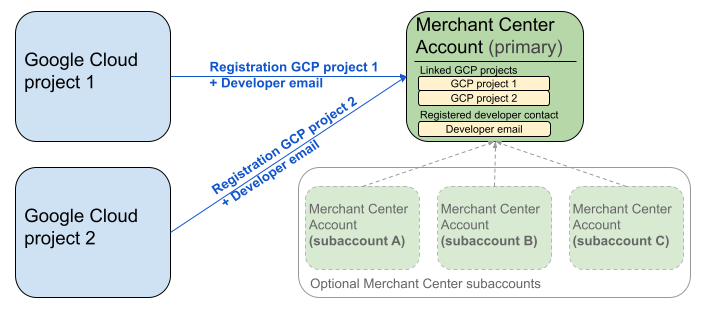
위의 다이어그램은 여러 Google Cloud 프로젝트와 기본 판매자 센터(선택적으로 여러 판매자 센터 하위 계정 포함)를 사용할 때의 등록 설정을 보여줍니다.
인증 요구사항: 등록을 실행할 때 인증된 판매자 센터 계정 (사용자 인증 정보가 있는 계정)은 가장된 판매자 센터 계정 (등록 중인 계정)과 일치해야 합니다. 별도의 상위 또는 관리자 계정으로 인증된 경우 하위 계정에 등록할 수 없습니다.
확인된 웹사이트 계정만 해당: 등록은 확인된 웹사이트가 있는 판매자 센터 계정에서만 허용됩니다.
개발자 이메일 주소를 등록한 후:
- 등록 후 5분 이내에 Merchant API 호출을 실행할 수 있습니다.
- 이메일이 기존 판매자 센터 사용자의 이메일인 경우
API developer역할이 부여됩니다. 그렇지 않으면 판매자 센터에 신규 사용자가 생성되며 사용자는 만료를 방지하고 등록 프로세스를 다시 시작하지 않도록 14일 이내에 초대를 수락해야 합니다. 사용자가 초대 링크를 클릭한 후에만 등록 프로세스를 완료합니다.
등록 호출하기
registerGcp 메서드를 호출하여 등록합니다. 등록 호출을 실행하는 방법에는 두 가지가 있습니다.
- 옵션 1: 직접 API 호출 일반적으로 HTTP(S)를 통해 API 엔드포인트에 직접 원시 요청을 합니다. 요청 본문 구성, 헤더 설정 (인증 포함), 응답 파싱과 같은 측면을 수동으로 처리합니다.
- 옵션 2: 클라이언트 라이브러리 Merchant API와 상호작용하는 더 편리한 언어 관용적 방법을 제공하는 사전 빌드된 라이브러리를 사용합니다. 인증 및 승인을 처리하고 기본 HTTP 통신을 추상화하는 편리한 방법을 제공합니다. 공식 코드 샘플을 사용하여 빠르게 시작할 수 있습니다.
등록 호출 승인
Merchant API에 대한 요청 승인 단계에 설명된 대로 두 가지 고유한 인증 시나리오가 있습니다.
- OAuth 2.0: 여러 판매자 계정을 관리하는 서드 파티 제공업체 또는 대행사
- 서비스 계정: 자체 판매자 센터 계정에 액세스
등록 호출 승인에 관한 자세한 내용은 등록 호출에 대한 인증 및 승인을 실행하려면 어떻게 해야 하나요?를 참고하세요.
등록 호출
다음 예에서는 직접 API 호출 또는 클라이언트 라이브러리를 사용하여 등록 호출을 실행합니다.
registerGcp 메서드를 사용하여 등록 호출을 실행합니다. registerGcp
POST https://merchantapi.googleapis.com/accounts/v1/accounts/{ACCOUNT_ID}/developerRegistration:registerGcp
Content-Type: application/json
Authorization: Bearer {ACCESS_TOKEN}"

{
  "developerEmail": "{DEVELOPER_EMAIL}"
}
다음을 바꿉니다.
ACCOUNT_ID: 판매자 센터 IDACCESS_TOKEN: API 호출을 실행하는 승인 토큰DEVELOPER_EMAIL: 기본 기술 담당자의 이메일 주소
호출이 성공하면 DeveloperRegistration 리소스가 반환되어 연결 성공 상태를 확인합니다.
  "name": "accounts/{ACCOUNT_ID}/developerRegistration",
  "gcpIds": ["{GOOGLE_CLOUD_PROJECT_ID}"]
Python
샘플을 다운로드하고 Google Merchant API Python 샘플 의 안내에 따라 Python 클라이언트 라이브러리를 설정합니다.
from examples.authentication import configuration
from examples.authentication import generate_user_credentials
from google.shopping.merchant_accounts_v1 import DeveloperRegistrationServiceClient
from google.shopping.merchant_accounts_v1 import RegisterGcpRequest
def register_gcp(account_id: str, developer_email: str) -> None:
"""Registers the GCP project used to call the Merchant API with a developer email.
Args:
account_id: The ID of your Merchant Center account.
developer_email: The email address of the developer to register.
"""
# Get OAuth credentials.
credentials = generate_user_credentials.main()
# Create a client to the Developer Registration Service.
client = DeveloperRegistrationServiceClient(credentials=credentials)
# The name has the format: accounts/{account}/developerRegistration
name = f"accounts/{account_id}/developerRegistration"
# Create the request to register the GCP project.
request = RegisterGcpRequest(
name=name,
developer_email=developer_email,
)
# Make the API call and handle potential errors.
try:
print("Sending RegisterGcp request:")
response = client.register_gcp(request=request)
print("Registered GCP project successfully:")
print(response)
except RuntimeError as e:
print(f"An error occurred: {e}")
if __name__ == "__main__":
# Your Merchant Center account ID.
# This can be found in the Merchant Center UI.
_account_id = configuration.Configuration().read_merchant_info()
# The developer email to associate with the GCP project.
_developer_email = "YOUR_EMAIL_HERE"
register_gcp(_account_id, _developer_email)
Java
샘플을 다운로드하고 Google Merchant API Java 샘플 의 안내에 따라 Java 클라이언트 라이브러리를 설정합니다.
import com.google.api.gax.core.FixedCredentialsProvider;
import com.google.auth.oauth2.GoogleCredentials;
import com.google.shopping.merchant.accounts.v1.DeveloperRegistration;
import com.google.shopping.merchant.accounts.v1.DeveloperRegistrationName;
import com.google.shopping.merchant.accounts.v1.DeveloperRegistrationServiceClient;
import com.google.shopping.merchant.accounts.v1.DeveloperRegistrationServiceSettings;
import com.google.shopping.merchant.accounts.v1.RegisterGcpRequest;
import shopping.merchant.samples.utils.Authenticator;
import shopping.merchant.samples.utils.Config;
/**
* This class demonstrates how to register the GCP project used to call the Merchant API with a
* developer email.
*/
public class RegisterGcpSample {
public static void registerGcp(Config config, String developerEmail) throws Exception {
// Obtains OAuth token based on the user's configuration.
GoogleCredentials credential = new Authenticator().authenticate();
// Creates service settings using the credentials retrieved above.
DeveloperRegistrationServiceSettings developerRegistrationServiceSettings =
DeveloperRegistrationServiceSettings.newBuilder()
.setCredentialsProvider(FixedCredentialsProvider.create(credential))
.build();
// Creates DeveloperRegistration name to identify the DeveloperRegistration.
// The name has the format: accounts/{account}/developerRegistration
String name =
DeveloperRegistrationName.newBuilder()
.setAccount(config.getAccountId().toString())
.build()
.toString();
// Calls the API and catches and prints any network failures/errors.
try (DeveloperRegistrationServiceClient developerRegistrationServiceClient =
DeveloperRegistrationServiceClient.create(developerRegistrationServiceSettings)) {
// Creates a request to register the GCP project with the developer email.
RegisterGcpRequest request =
RegisterGcpRequest.newBuilder().setName(name).setDeveloperEmail(developerEmail).build();
System.out.println("Sending RegisterGcp request:");
DeveloperRegistration response = developerRegistrationServiceClient.registerGcp(request);
System.out.println(response);
} catch (Exception e) {
System.out.println(e);
}
}
public static void main(String[] args) throws Exception {
Config config = Config.load();
String developerEmail = "YOUR_EMAIL_HERE"; // Replace with your email
registerGcp(config, developerEmail);
}
}
PHP
샘플을 다운로드하고 Google Merchant API PHP 샘플 의 안내에 따라 PHP 클라이언트 라이브러리를 설정합니다.
require_once __DIR__ . '/../../../../vendor/autoload.php';
require_once __DIR__ . '/../../../Authentication/Authentication.php';
require_once __DIR__ . '/../../../Authentication/Config.php';
use Google\ApiCore\ApiException;
use Google\Shopping\Merchant\Accounts\V1\Client\DeveloperRegistrationServiceClient;
use Google\Shopping\Merchant\Accounts\V1\RegisterGcpRequest;
/**
* This class demonstrates how to register the GCP project used to call the
* Merchant API with a developer email.
*/
class RegisterGcpSample
{
/**
* A helper function to create the name string for the
* DeveloperRegistration.
*
* @param string $accountId The merchant account ID.
* @return string The name, which has the format:
* `accounts/{account}/developerRegistration`
*/
private static function getName(string $accountId): string
{
return sprintf("accounts/%s/developerRegistration", $accountId);
}
/**
* Registers the GCP project with a developer email.
*
* @param array $config The configuration data for authentication and account ID.
* @param string $developerEmail The email of the developer to register.
*/
public static function registerGcpSample(array $config, string $developerEmail): void
{
// Obtains OAuth credentials from the configuration file.
$credentials = Authentication::useServiceAccountOrTokenFile();
// Creates a configuration object for the client.
$options = ['credentials' => $credentials];
// Creates the DeveloperRegistrationServiceClient.
$developerRegistrationServiceClient = new DeveloperRegistrationServiceClient($options);
// Creates the name of the developer registration to identify it.
$name = self::getName($config['accountId']);
// Calls the API and handles any network failures.
try {
// Creates a request to register the GCP project with the developer email.
$request = new RegisterGcpRequest([
'name' => $name,
'developer_email' => $developerEmail
]);
printf("Sending RegisterGcp request:%s", PHP_EOL);
// The `registerGcp` method returns a `DeveloperRegistration` object
// upon success.
$response = $developerRegistrationServiceClient->registerGcp($request);
print "Successfully registered developer email '$developerEmail' for account {$config['accountId']}.\n";
print_r($response);
} catch (ApiException $e) {
printf("An error occurred: %s%s", $e->getMessage(), PHP_EOL);
}
}
/**
* Helper to execute the sample.
*/
public function callSample(): void
{
$config = Config::generateConfig();
// An email address for a developer to register for the API.
$developerEmail = 'YOUR_EMAIL_HERE'; // Replace with your email
self::registerGcpSample($config, $developerEmail);
}
}
// Executes the sample.
$sample = new RegisterGcpSample();
$sample->callSample();
cURL
curl -X POST "https://merchantapi.googleapis.com/accounts/v1/accounts/{ACCOUNT_ID}/developerRegistration:registerGcp" \
-H "Content-Type: application/json" \
-H "Authorization: Bearer {ACCESS_TOKEN}" \
-d '{
  "developerEmail": "{DEVELOPER_EMAIL}"
}'
등록을 완료하려면
판매자 센터의 사용자 중 한 명 이상에게 API developer 역할이 있어야 합니다. 이를 위해 다음 작업 중 하나를 실행하면 됩니다.
registerGcp메서드에developerEmail을 제공합니다.- 판매자 센터 UI에서
API developer역할이 있는 신규 사용자를 추가합니다. - 판매자 센터 UI에서 기존 사용자에게
API developer역할을 할당합니다. accounts.users.create메서드를 호출하여 신규 사용자를 만들고API developer역할을 할당합니다.API developer역할을accounts.users.patch메서드를 사용하여 기존 사용자에게 할당합니다.
등록 후 권장사항
강력한 액세스 관리를 활용하고 향후 서비스 중단을 방지하려면 초기 등록을 완료한 후 일련의 권장사항을 따르는 것이 좋습니다.
API developer에게 추가 권한 부여
개발자 연락처를 등록하면
API developer 역할이 자동으로 할당됩니다. 이 역할에는 판매자 센터 계정을 관리하거나 모든 API 호출을 실행하는 데 필요한 다른 권한이 포함되어 있지 않습니다. 개발자에게 ADMIN 또는 STANDARD 역할을 추가하여 포괄적인 액세스 권한을 제공하는 것이 좋습니다.
사용자의 액세스 권한을 수정하려면 accounts.users.patch 메서드를 사용합니다. 요청 본문의 updateMask 필드에서 액세스 권한을 지정하여 역할을 추가하거나 삭제합니다.
PATCH https://merchantapi.googleapis.com/accounts/v1/{ACCOUNT_ID}/users/{DEVELOPER_EMAIL}?update_mask=access_rights
Content-Type: application/json
Authorization: Bearer {ACCESS_TOKEN}"

{
  "name": "accounts/{ACCOUNT_ID}/users/{DEVELOPER_EMAIL}",
  "access_rights": [ "ADMIN", "API_DEVELOPER" ]
}
Python
from examples.authentication import configuration
from examples.authentication import generate_user_credentials
from google.protobuf import field_mask_pb2
from google.shopping.merchant_accounts_v1 import AccessRight
from google.shopping.merchant_accounts_v1 import UpdateUserRequest
from google.shopping.merchant_accounts_v1 import User
from google.shopping.merchant_accounts_v1 import UserServiceClient
FieldMask = field_mask_pb2.FieldMask
_ACCOUNT = configuration.Configuration().read_merchant_info()
def update_user(user_email, user_access_right):
"""Updates a user to make it an admin of the MC account."""
credentials = generate_user_credentials.main()
client = UserServiceClient(credentials=credentials)
# Create user name string
name = "accounts/" + _ACCOUNT + "/users/" + user_email
user = User(name=name, access_rights=[user_access_right])
field_mask = FieldMask(paths=["access_rights"])
try:
request = UpdateUserRequest(user=user, update_mask=field_mask)
print("Sending Update User request")
response = client.update_user(request=request)
print("Updated User Name below")
print(response.name)
except RuntimeError as e:
print(e)
if __name__ == "__main__":
# Modify this email to update the right user
email = "USER_MAIL_ACCOUNT"
access_right = AccessRight.ADMIN
update_user(email, access_right)
자바
import com.google.api.gax.core.FixedCredentialsProvider;
import com.google.auth.oauth2.GoogleCredentials;
import com.google.protobuf.FieldMask;
import com.google.shopping.merchant.accounts.v1.AccessRight;
import com.google.shopping.merchant.accounts.v1.UpdateUserRequest;
import com.google.shopping.merchant.accounts.v1.User;
import com.google.shopping.merchant.accounts.v1.UserName;
import com.google.shopping.merchant.accounts.v1.UserServiceClient;
import com.google.shopping.merchant.accounts.v1.UserServiceSettings;
import shopping.merchant.samples.utils.Authenticator;
import shopping.merchant.samples.utils.Config;
/** This class demonstrates how to update a user to make it an admin of the MC account. */
public class UpdateUserSample {
public static void updateUser(Config config, String email, AccessRight accessRight)
throws Exception {
GoogleCredentials credential = new Authenticator().authenticate();
UserServiceSettings userServiceSettings =
UserServiceSettings.newBuilder()
.setCredentialsProvider(FixedCredentialsProvider.create(credential))
.build();
// Creates user name to identify user.
String name =
UserName.newBuilder()
.setAccount(config.getAccountId().toString())
.setEmail(email)
.build()
.toString();
// Create a user with the updated fields.
User user = User.newBuilder().setName(name).addAccessRights(accessRight).build();
FieldMask fieldMask = FieldMask.newBuilder().addPaths("access_rights").build();
try (UserServiceClient userServiceClient = UserServiceClient.create(userServiceSettings)) {
UpdateUserRequest request =
UpdateUserRequest.newBuilder().setUser(user).setUpdateMask(fieldMask).build();
System.out.println("Sending Update User request");
User response = userServiceClient.updateUser(request);
System.out.println("Updated User Name below");
System.out.println(response.getName());
} catch (Exception e) {
System.out.println(e);
}
}
public static void main(String[] args) throws Exception {
Config config = Config.load();
String email = "testUser@gmail.com";
// Give the user admin rights. Note that all other rights, like
// PERFORMANCE_REPORTING, would be overwritten in this example
// if the user had those access rights before the update.
AccessRight accessRight = AccessRight.ADMIN;
updateUser(config, email, accessRight);
}
}
PHP
use Google\ApiCore\ApiException;
use Google\Protobuf\FieldMask;
use Google\Shopping\Merchant\Accounts\V1\AccessRight;
use Google\Shopping\Merchant\Accounts\V1\UpdateUserRequest;
use Google\Shopping\Merchant\Accounts\V1\User;
use Google\Shopping\Merchant\Accounts\V1\Client\UserServiceClient;
/**
* Updates a user.
*
* @param array $config The configuration data.
* @param string $email The email address of the user.
* @param int $accessRight The access right to grant the user.
* @return void
*/
function updateUser($config, $email, $accessRights): void
{
// Gets the OAuth credentials to make the request.
$credentials = Authentication::useServiceAccountOrTokenFile();
// Creates options config containing credentials for the client to use.
$options = ['credentials' => $credentials];
// Creates a client.
$userServiceClient = new UserServiceClient($options);
// Creates user name to identify user.
$name = 'accounts/' . $config['accountId'] . "/users/" . $email;
$user = (new User())
->setName($name)
->setAccessRights($accessRights);
$fieldMask = (new FieldMask())->setPaths(['access_rights']);
// Calls the API and catches and prints any network failures/errors.
try {
$request = new UpdateUserRequest([
'user' => $user,
'update_mask' => $fieldMask,
]);
print "Sending Update User request\n";
$response = $userServiceClient->updateUser($request);
print "Updated User Name below\n";
print $response->getName() . "\n";
} catch (ApiException $e) {
print $e->getMessage();
}
}
$config = Config::generateConfig();
$email = "testUser@gmail.com";
$accessRights = [AccessRight::ADMIN];
updateUser($config, $email, $accessRights);
cURL
curl -X PATCH \
"https://merchantapi.googleapis.com/accounts/v1/{ACCOUNT_ID}/users/{USER_EMAIL}?update_mask=access_rights" \
-H "Content-Type: application/json" \
-H "Authorization: Bearer {ACCESS_TOKEN}" \
-d '{
  "access_rights": [
    "ADMIN",
    "API_DEVELOPER"
  ]
}'
개발자 연락처 추가
기본 개발자 연락처가 퇴사하거나 액세스 권한을 잃은 경우 비즈니스 중단을 방지하려면 중복 연락처가 있어야 합니다. 판매자 센터에 API developer 역할이 있는 사용자를 한 명 이상 추가하여 백업으로 사용하는 것이 좋습니다.
판매자 API의 accounts.users 서비스 또는 판매자 센터 UI의 액세스 및 서비스 페이지를 사용하여 사용자를 추가하거나 기존 사용자를 업데이트할 수 있습니다. 백업 개발자를 사전에 추가하면 단일 개인에게 의존하지 않는 더욱 복원력이 뛰어난 통합을 만들 수 있습니다.
PATCH https://merchantapi.googleapis.com/products/v1/accounts/{ACCOUNT_ID}/users
Content-Type: application/json
Authorization: Bearer {ACCESS_TOKEN}"
{
  "user_id": {USER_EMAIL},
  "user": { "access_rights": [ "API_DEVELOPER", "ADMIN" ] }
}
Python
from examples.authentication import configuration
from examples.authentication import generate_user_credentials
from google.shopping.merchant_accounts_v1 import AccessRight
from google.shopping.merchant_accounts_v1 import CreateUserRequest
from google.shopping.merchant_accounts_v1 import User
from google.shopping.merchant_accounts_v1 import UserServiceClient
_ACCOUNT = configuration.Configuration().read_merchant_info()
def get_parent(account_id):
return f"accounts/{account_id}"
def create_user(user_email):
"""Creates a user for a Merchant Center account."""
# Get OAuth credentials
credentials = generate_user_credentials.main()
# Create a UserServiceClient
client = UserServiceClient(credentials=credentials)
# Create parent string
parent = get_parent(_ACCOUNT)
# Create the request
request = CreateUserRequest(
parent=parent,
user_id=user_email,
user=User(
access_rights=[AccessRight.ADMIN, AccessRight.PERFORMANCE_REPORTING]
),
)
try:
print("Sending Create User request")
response = client.create_user(request=request)
print("Inserted User Name below")
print(response.name)
except RuntimeError as e:
print(e)
if __name__ == "__main__":
# Modify this email to create a new user
email = "USER_MAIL_ACCOUNT"
create_user(email)
자바
import com.google.api.gax.core.FixedCredentialsProvider;
import com.google.auth.oauth2.GoogleCredentials;
import com.google.shopping.merchant.accounts.v1.AccessRight;
import com.google.shopping.merchant.accounts.v1.CreateUserRequest;
import com.google.shopping.merchant.accounts.v1.User;
import com.google.shopping.merchant.accounts.v1.UserServiceClient;
import com.google.shopping.merchant.accounts.v1.UserServiceSettings;
import shopping.merchant.samples.utils.Authenticator;
import shopping.merchant.samples.utils.Config;
/** This class demonstrates how to create a user for a Merchant Center account. */
public class CreateUserSample {
private static String getParent(String accountId) {
return String.format("accounts/%s", accountId);
}
public static void createUser(Config config, String email) throws Exception {
// Obtains OAuth token based on the user's configuration.
GoogleCredentials credential = new Authenticator().authenticate();
// Creates service settings using the credentials retrieved above.
UserServiceSettings userServiceSettings =
UserServiceSettings.newBuilder()
.setCredentialsProvider(FixedCredentialsProvider.create(credential))
.build();
// Creates parent to identify where to insert the user.
String parent = getParent(config.getAccountId().toString());
// Calls the API and catches and prints any network failures/errors.
try (UserServiceClient userServiceClient = UserServiceClient.create(userServiceSettings)) {
CreateUserRequest request =
CreateUserRequest.newBuilder()
.setParent(parent)
// This field is the email address of the user.
.setUserId(email)
.setUser(
User.newBuilder()
.addAccessRights(AccessRight.ADMIN)
.addAccessRights(AccessRight.PERFORMANCE_REPORTING)
.build())
.build();
System.out.println("Sending Create User request");
User response = userServiceClient.createUser(request);
System.out.println("Inserted User Name below");
// The last part of the user name will be the email address of the user.
// Format: `accounts/{account}/user/{user}`
System.out.println(response.getName());
} catch (Exception e) {
System.out.println(e);
}
}
public static void main(String[] args) throws Exception {
Config config = Config.load();
// The email address of this user.
String email = "testUser@gmail.com";
createUser(config, email);
}
}
PHP
use Google\ApiCore\ApiException;
use Google\Shopping\Merchant\Accounts\V1\AccessRight;
use Google\Shopping\Merchant\Accounts\V1\CreateUserRequest;
use Google\Shopping\Merchant\Accounts\V1\User;
use Google\Shopping\Merchant\Accounts\V1\Client\UserServiceClient;
/**
* Creates a user.
*
* @param array $config The configuration data.
* @param string $email The email address of the user.
* @return void
*/
function createUser($config, $email): void
{
// Gets the OAuth credentials to make the request.
$credentials = Authentication::useServiceAccountOrTokenFile();
// Creates options config containing credentials for the client to use.
$options = ['credentials' => $credentials];
// Creates a client.
$userServiceClient = new UserServiceClient($options);
// Creates parent to identify where to insert the user.
$parent = sprintf("accounts/%s", $config['accountId']);
// Calls the API and catches and prints any network failures/errors.
try {
$request = new CreateUserRequest([
'parent' => $parent,
'user_id' => $email,
'user' => (new User())
->setAccessRights([AccessRight::ADMIN,AccessRight::PERFORMANCE_REPORTING])
]);
print "Sending Create User request\n";
$response = $userServiceClient->createUser($request);
print "Inserted User Name below\n";
print $response->getName() . "\n";
} catch (ApiException $e) {
print $e->getMessage();
}
}
$config = Config::generateConfig();
$email = "testUser@gmail.com";
createUser($config, $email);
cURL
curl -X PATCH \
"https://merchantapi.googleapis.com/products/v1/accounts/{ACCOUNT_ID}/users/{USER_EMAIL}?update_mask=access_rights" \
-H "Content-Type: application/json" \
-H "Authorization: Bearer {ACCESS_TOKEN}" \
-d '{
  "access_rights": [
    "ADMIN",
    "API_DEVELOPER"
  ]
}'