

ডেভেলপার হিসেবে নিবন্ধন করা একটি বাধ্যতামূলক ও এককালীন সেটআপ প্রক্রিয়া, যা আপনার গুগল ক্লাউড প্রজেক্টকে আপনার মার্চেন্ট সেন্টার অ্যাকাউন্টের সাথে সংযুক্ত করে এবং গুগলের কাছে আপনার ডেভেলপার যোগাযোগের তথ্য নিবন্ধন করে। এর ফলে, গুগল আপনার দেওয়া প্রাসঙ্গিক প্রযুক্তিগত যোগাযোগের ঠিকানায় গুরুত্বপূর্ণ পরিষেবা সংক্রান্ত ঘোষণা এবং আবশ্যিক আপডেট পাঠাতে পারে।
এই ডকুমেন্টটি মার্চেন্ট এপিআই (Merchant API) দিয়ে কাজ শুরু করার বিষয়ে একটি বহু-অংশীয় সিরিজের অংশ। আপনি যদি ইতিমধ্যেই মার্চেন্ট এপিআই-তে রেজিস্টার করে থাকেন, তাহলে আপনি পরবর্তী বিভাগে চলে যেতে পারেন: আপনার প্রথম প্রোডাক্টটি যোগ করুন।
পূর্বশর্ত
মার্চেন্ট এপিআই ব্যবহার করার জন্য নিবন্ধন করার আগে, নিশ্চিত করুন যে আপনি নিম্নলিখিত শর্তাবলী পূরণ করেছেন:
- মার্চেন্ট সেন্টার অ্যাকাউন্ট : আপনার একটি বিদ্যমান মার্চেন্ট সেন্টার অ্যাকাউন্ট থাকতে হবে। শুধুমাত্র প্রোডাকশন অ্যাকাউন্টের জন্য রেজিস্ট্রেশন সমর্থিত। টেস্ট অ্যাকাউন্টগুলো ডেভেলপার রেজিস্ট্রেশনের জন্য যোগ্য নয়।
- যাচাইকৃত হোমপেজ : আপনার মার্চেন্ট সেন্টার অ্যাকাউন্টের একটি যাচাইকৃত ওয়েবসাইট থাকতে হবে। এটি আপনার ব্যবসার সাথে যুক্ত ডোমেইনের মালিকানা প্রমাণ করে।
- মার্চেন্ট সেন্টার অ্যাকাউন্টে অ্যাডমিন অ্যাক্সেস : রেজিস্ট্রেশন কল অনুমোদন করার জন্য আপনি যে ইমেল বা পরিষেবা অ্যাকাউন্টটি ব্যবহার করেন, আপনি যে মার্চেন্ট সেন্টার অ্যাকাউন্টে রেজিস্ট্রেশন করছেন সেখানে সেটির অবশ্যই
ADMINঅ্যাক্সেস টাইপ থাকতে হবে। আরও তথ্যের জন্য, মার্চেন্ট এপিআই (Merchant API)-তে অনুরোধ অনুমোদন করা দেখুন। - গুগল ক্লাউড প্রজেক্ট আইডি : প্রমাণীকরণের জন্য ক্রেডেনশিয়াল সরবরাহ করতে আপনার অ্যাপ্লিকেশনটিকে অবশ্যই একটি নির্দিষ্ট গুগল ক্লাউড প্রজেক্টের সাথে যুক্ত থাকতে হবে। প্রজেক্ট আইডি কোথায় খুঁজে পাবেন সে সম্পর্কে বিস্তারিত জানতে, ‘প্রজেক্টের নাম, নম্বর এবং আইডি খুঁজুন’ দেখুন।
- গুগল থেকে আপডেট পাওয়ার জন্য ডেভেলপার যোগাযোগ ব্যক্তি হিসেবে আপনার দেওয়া গুগল অ্যাকাউন্টের সাথে যুক্ত একটি বৈধ ইমেল ঠিকানা । এটি কোনো সার্ভিস অ্যাকাউন্টের ইমেল হওয়া যাবে না। আপনি মার্চেন্ট সেন্টার অ্যাকাউন্টের অন্তর্ভুক্ত কোনো ইমেল ঠিকানা অথবা একটি নতুন ইমেল ঠিকানাও ব্যবহার করতে পারেন।
মার্চেন্ট এপিআই-এর সাথে ডেভেলপার হিসেবে নিবন্ধন করুন
মার্চেন্ট এপিআই ব্যবহার করতে হলে, আপনাকে অবশ্যই `registerGcp` পদ্ধতির মাধ্যমে আপনার মার্চেন্ট সেন্টার অ্যাকাউন্টে আপনার ডেভেলপার যোগাযোগের তথ্য এবং গুগল ক্লাউড প্রজেক্ট নিবন্ধন করতে হবে ।
আপনি একাধিক মার্চেন্ট অ্যাকাউন্ট ব্যবহার করুন বা না করুন, আপনার ব্যবহার করতে ইচ্ছুক প্রতিটি গুগল ক্লাউড প্রজেক্টের জন্য রেজিস্ট্রেশন প্রক্রিয়াটি একবারই সম্পন্ন করতে হবে । আপনি যদি একাধিক গুগল ক্লাউড প্রজেক্ট নিয়ে কাজ করেন, তবে সেগুলোর যেকোনো একটি বা সবগুলো একই মার্চেন্ট সেন্টার অ্যাকাউন্টে রেজিস্টার করতে পারেন।
নিবন্ধনের সুবিধা
নিবন্ধনের মাধ্যমে নিম্নলিখিত সুবিধাগুলো পাওয়া যায়:
- টেকনিক্যাল কন্টাক্ট তৈরি : এটি মার্চেন্ট সেন্টারে একটি টেকনিক্যাল কন্টাক্ট তৈরি করে। গুগল এই টেকনিক্যাল কন্টাক্টকে এপিআই-সম্পর্কিত গুরুত্বপূর্ণ আপডেট, যেমন পরিষেবা ঘোষণা এবং নতুন ফিচারের তথ্য পাঠায়।
- একাধিক মার্চেন্ট অ্যাকাউন্ট ব্যবস্থাপনা : এটি আপনাকে আপনার পরিচালিত সমস্ত মার্চেন্ট অ্যাকাউন্টের জন্য ডেভেলপার হিসেবে যোগাযোগের কেন্দ্রবিন্দু হতে দেয়।
রেজিস্ট্রেশন ব্যতীত, একটি অনিবন্ধিত গুগল ক্লাউড প্রজেক্ট থেকে মার্চেন্ট এপিআই-তে যেকোনো কল ব্লক করা হয় এবং UNAUTHENTICATED স্ট্যাটাস সহ একটি 401 এরর কোড ও নিম্নলিখিত এরর মেসেজটি রিটার্ন করা হয়:
GCP project with id {GCP_ID} and number {GCP_NUMBER} is not registered with the merchant account.
Follow these steps https://developers.google.com/merchant/api/guides/quickstart#register_as_a_developer
to register the GCP project with the merchant account then try calling the API again in 5 minutes.
গুরুত্বপূর্ণ বিবেচ্য বিষয়
- প্রতিটি গুগল ক্লাউড প্রজেক্টের জন্য এককালীন সেটআপ : রেজিস্ট্রেশন হলো প্রতিটি গুগল ক্লাউড প্রজেক্টের জন্য একটি এককালীন সেটআপ, এবং এটি গুগল ক্লাউড প্রজেক্টের অন্তর্ভুক্ত সকল ব্যবহারকারী ও সার্ভিস অ্যাকাউন্টের জন্য প্রযোজ্য। আপনার গুগল ক্লাউড প্রজেক্টে মার্চেন্ট এপিআই (Merchant API) সক্রিয় করা আছে কিনা তা নিশ্চিত করুন।
- যেকোনো সময়ে প্রতিটি গুগল ক্লাউড প্রজেক্ট শুধুমাত্র একটি মার্চেন্ট সেন্টার অ্যাকাউন্টের সাথেই রেজিস্টার করা যাবে : আপনি যদি একই সাথে একাধিক মার্চেন্ট সেন্টার অ্যাকাউন্টের সাথে একটি গুগল ক্লাউড প্রজেক্ট রেজিস্টার করার চেষ্টা করেন, তাহলে আপনি একটি
ALREADY_REGISTEREDএরর পাবেন। রেজিস্ট্রেশনের জন্য একই ডেভেলপার ইমেল অ্যাড্রেস ব্যবহার করুন। মনে রাখবেন যে, একই মার্চেন্ট সেন্টার অ্যাকাউন্টে একাধিক গুগল ক্লাউড প্রজেক্ট রেজিস্টার করা যেতে পারে। একাধিক মার্চেন্ট পরিচালনাকারী থার্ড পার্টিদের (3Ps) জন্য সঠিক অ্যাকাউন্ট নির্ধারণ করুন: দীর্ঘমেয়াদী স্থিতিশীলতা নিশ্চিত করতে এবং পরিষেবা বিঘ্ন এড়াতে, যে সকল থার্ড পার্টি একাধিক মার্চেন্টের প্রতিনিধিত্ব বা পরিচালনা করে, তাদের গুগল ইকোসিস্টেমের মধ্যে উপযুক্ত অ্যাকাউন্ট কাঠামো ব্যবহার করা প্রয়োজন। আমরা সুপারিশ করি যে, আপনার ব্যবসার ধরনের উপর নির্ভর করে, আপনি সেই অ্যাকাউন্টটি নিবন্ধন করুন যা আপনার ব্যবসায়িক পরিচয়কে প্রতিনিধিত্ব করে:
- বিদ্যমান অ্যাডভান্সড অ্যাকাউন্টসহ মার্কেটপ্লেস: যদি আপনার ব্যবসা একটি মার্কেটপ্লেস হিসেবে পরিচালিত হয় এবং পুরো প্ল্যাটফর্মের প্রতিনিধিত্বকারী একটি অ্যাডভান্সড অ্যাকাউন্ট আগে থেকেই থাকে, তাহলে আপনার এই বিদ্যমান অ্যাকাউন্ট আইডিটি ব্যবহার করা উচিত।
- তুলনাভিত্তিক কেনাকাটা পরিষেবা (CSS): আপনি যদি একজন CSS হন, তবে আপনার অনন্য CSS অ্যাকাউন্ট আইডি অথবা CSS গ্রুপ অ্যাকাউন্ট আইডি ব্যবহার করা উচিত।
- এজেন্সি, ডেভেলপার এবং অন্যান্য থার্ড-পার্টি (3P): আপনি যদি এজেন্সি বা থার্ড-পার্টি ডেভেলপারের মতো কোনো 3P ব্যবসা হন, যা একাধিক মার্চেন্ট অ্যাকাউন্ট পরিচালনা করে এবং আপনার ব্যবসার প্রতিনিধিত্বকারী কোনো একক মার্চেন্ট সেন্টার আইডি না থাকে, তাহলে আপনার একটি নতুন, প্রাইমারি মার্চেন্ট সেন্টার অ্যাকাউন্ট তৈরি করা উচিত এবং সেটিকে একটি অ্যাডভান্সড অ্যাকাউন্টে রূপান্তর করার জন্য অনুরোধ করা উচিত। অ্যাডভান্সড অ্যাকাউন্টগুলো সাব-অ্যাকাউন্ট পরিচালনা করতে পারে এবং 3P কার্যক্রমের জন্য প্রয়োজনীয় কাঠামো প্রদান করতে পারে।
নিম্নলিখিত সারণিতে বিভিন্ন ধরণের অংশীদারদের জন্য সুপারিশ প্রদান করা হয়েছে:
অংশীদারের ধরন নিবন্ধনের জন্য প্রস্তাবিত অ্যাকাউন্ট বাজার আপনার প্রধান (বা সবচেয়ে বড়) অ্যাডভান্সড অ্যাকাউন্ট। বিজ্ঞাপন সংস্থাগুলি একটি স্বতন্ত্র অ্যাকাউন্ট অথবা আপনার কোম্পানির প্রতিনিধিত্বকারী একটি উন্নত অ্যাকাউন্ট। আপনি যদি মার্চেন্ট এপিআই (Merchant API) দিয়ে সবেমাত্র কাজ শুরু করে থাকেন, তবে আমরা একটি স্বতন্ত্র অ্যাকাউন্ট তৈরি করার পরামর্শ দিই। তুলনা কেনাকাটা পরিষেবা (সিএসএস) আপনার CSS গ্রুপ অ্যাকাউন্ট আইডি অথবা নির্দিষ্ট CSS অ্যাকাউন্ট আইডি, যা নির্ভর করে অ্যাকাউন্টটি সম্পূর্ণ CSS গ্রুপকে নাকি গ্রুপের মধ্যে থাকা কোনো নির্দিষ্ট CSS-কে প্রতিনিধিত্ব করে তার উপর। কোনো CSS অ্যাডভান্সড অ্যাকাউন্ট ব্যবহার করবেন না । বণিক বা ব্র্যান্ড আপনার প্রধান অ্যাকাউন্ট যা আপনার ব্র্যান্ডের প্রতিনিধিত্ব করে। এটি স্বতন্ত্র বা উন্নত অ্যাকাউন্ট হতে পারে। পয়েন্ট অফ সেল (POS)/ইনভেন্টরি ডেটা সরবরাহকারী আপনার প্রধান (বা সবচেয়ে বড়) অ্যাডভান্সড অ্যাকাউন্ট। অন্যান্য 3P আপনার যদি মার্চেন্ট সেন্টার অ্যাকাউন্ট থাকে, তবে নিবন্ধনের জন্য সেটি ব্যবহার করতে পারেন। অন্যথায়, কোম্পানির জন্য একটি স্বতন্ত্র অ্যাকাউন্ট তৈরি করুন। এরপর আপনার ওয়েবসাইটটি যাচাই করুন । শুধুমাত্র আপনার প্রাথমিক মার্চেন্ট সেন্টারের জন্য রেজিস্ট্রেশন করুন : আপনি শুধুমাত্র আপনার প্রাথমিক মার্চেন্ট সেন্টার অ্যাকাউন্ট ব্যবহার করে ডেভেলপার রেজিস্ট্রেশন করবেন এবং লিঙ্ক করা সমস্ত মার্চেন্ট সেন্টার সাব-অ্যাকাউন্টের জন্য আপনিই ডেভেলপার কন্টাক্ট হবেন। আপনার প্রতিটি মার্চেন্ট সেন্টার সাব-অ্যাকাউন্টের জন্য আলাদাভাবে রেজিস্ট্রেশন করবেন না।
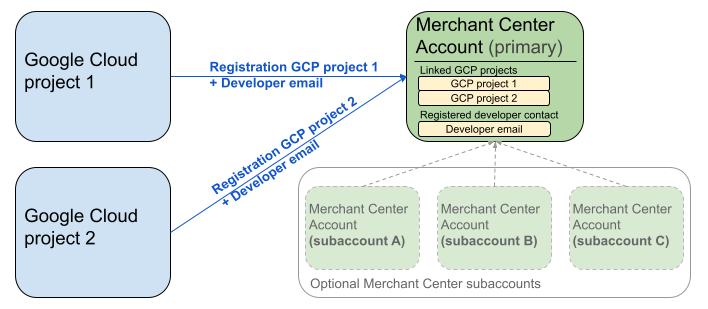
পূর্ববর্তী ডায়াগ্রামটিতে একাধিক গুগল ক্লাউড প্রজেক্ট এবং একটি প্রধান মার্চেন্ট সেন্টার ব্যবহারের ক্ষেত্রে রেজিস্ট্রেশন সেটআপ দেখানো হয়েছে, যেখানে ঐচ্ছিকভাবে একাধিক মার্চেন্ট সেন্টার সাব-অ্যাকাউন্টও থাকতে পারে।
প্রমাণীকরণের আবশ্যকতা : রেজিস্ট্রেশন করার সময়, প্রমাণীকৃত মার্চেন্ট সেন্টার অ্যাকাউন্ট (যে অ্যাকাউন্টে আপনার ক্রেডেনশিয়াল থাকে), ছদ্মবেশী মার্চেন্ট সেন্টার অ্যাকাউন্টের (যে অ্যাকাউন্টটি আপনি রেজিস্টার করছেন) সাথে অবশ্যই মিলতে হবে। আপনি যদি একটি পৃথক প্যারেন্ট বা ম্যানেজার অ্যাকাউন্ট দিয়ে প্রমাণীকৃত হন, তাহলে সাব-অ্যাকাউন্টের জন্য রেজিস্টার করতে পারবেন না।
শুধুমাত্র যাচাইকৃত ওয়েবসাইট অ্যাকাউন্ট : শুধুমাত্র যাচাইকৃত ওয়েবসাইট আছে এমন মার্চেন্ট সেন্টার অ্যাকাউন্টগুলোর জন্যই নিবন্ধন অনুমোদিত।
টেস্ট অ্যাকাউন্টের জন্য নিবন্ধন করা যাবে না।
একবার আপনি একজন ডেভেলপারের ইমেল ঠিকানা নিবন্ধন করলে :
- নিবন্ধনের ৫ মিনিটের মধ্যেই আপনি মার্চেন্ট এপিআই কল করতে পারবেন।
- যদি ইমেলটি মার্চেন্ট সেন্টারের কোনো বিদ্যমান ব্যবহারকারীর হয়, তবে তাকে
API developerরোলটি দেওয়া হয়। অন্যথায়, মার্চেন্ট সেন্টারে একজন নতুন ব্যবহারকারী তৈরি করা হয় এবং আমন্ত্রণটির মেয়াদ শেষ হয়ে যাওয়া ও রেজিস্ট্রেশন প্রক্রিয়াটি পুনরায় শুরু করা এড়ানোর জন্য তাকে অবশ্যই ১৪ দিনের মধ্যে আমন্ত্রণটি গ্রহণ করতে হবে। ব্যবহারকারী আমন্ত্রণ লিঙ্কে ক্লিক করার পরেই রেজিস্ট্রেশন প্রক্রিয়াটি সম্পন্ন হয়।
নিবন্ধনের জন্য কল করুন
আপনি registerGcp মেথডটি কল করে নিবন্ধন করেন। নিবন্ধন কলটি করার জন্য আপনার কাছে দুটি বিকল্প রয়েছে:
- বিকল্প ১: সরাসরি এপিআই কল। আপনি সাধারণত HTTP(S) এর মাধ্যমে সরাসরি এপিআই এন্ডপয়েন্টগুলিতে র' রিকোয়েস্ট পাঠান। রিকোয়েস্ট বডি তৈরি করা, হেডার সেট করা (অথেনটিকেশন সহ), এবং রেসপন্স পার্স করার মতো বিষয়গুলি আপনি নিজে হাতে সামলান।
- বিকল্প ২: ক্লায়েন্ট লাইব্রেরি। আপনি আগে থেকে তৈরি লাইব্রেরিগুলো ব্যবহার করতে পারেন, যা মার্চেন্ট এপিআই-এর সাথে ইন্টারঅ্যাক্ট করার জন্য আরও সুবিধাজনক এবং প্রচলিত ভাষার রীতিসম্মত একটি উপায় প্রদান করে। এগুলো অথেন্টিকেশন ও অথরাইজেশন পরিচালনা করে এবং অন্তর্নিহিত HTTP কমিউনিকেশনকে আড়াল করার একটি সুবিধাজনক উপায় দেয়। দ্রুত কাজ শুরু করার জন্য অফিশিয়াল কোড স্যাম্পল পাওয়া যায়।
নিবন্ধনের জন্য আহ্বানের অনুমোদন
মার্চেন্ট এপিআই-তে অনুরোধ অনুমোদন করার ধাপে যেমন বর্ণনা করা হয়েছে, আপনার দুটি স্বতন্ত্র প্রমাণীকরণ পরিস্থিতি রয়েছে:
- OAuth 2.0 : একাধিক মার্চেন্ট অ্যাকাউন্ট পরিচালনাকারী তৃতীয় পক্ষের প্রদানকারী বা সংস্থাগুলির জন্য
- সার্ভিস অ্যাকাউন্ট : আপনার নিজের মার্চেন্ট সেন্টার অ্যাকাউন্টে প্রবেশের জন্য
রেজিস্ট্রেশন কলের অনুমোদন সম্পর্কে আরও তথ্যের জন্য, “আমি কীভাবে রেজিস্ট্রেশন কলের জন্য প্রমাণীকরণ এবং অনুমোদন সম্পাদন করব?” দেখুন।
নিবন্ধনের জন্য ফোন করুন
নিম্নলিখিত উদাহরণগুলিতে, আপনি সরাসরি এপিআই কল অথবা ক্লায়েন্ট লাইব্রেরি ব্যবহার করে রেজিস্ট্রেশন কলটি সম্পাদন করবেন।
আপনি registerGcp মেথডটি ব্যবহার করে রেজিস্ট্রেশন কলটি সম্পন্ন করেন।
POST https://merchantapi.googleapis.com/accounts/v1/accounts/{ACCOUNT_ID}/developerRegistration:registerGcp
Content-Type: application/json
Authorization: Bearer {ACCESS_TOKEN}"

{
  "developerEmail": "{DEVELOPER_EMAIL}"
}
নিম্নলিখিতগুলি প্রতিস্থাপন করুন:
-
ACCOUNT_ID: আপনার মার্চেন্ট সেন্টার আইডি -
ACCESS_TOKEN: এপিআই কল করার জন্য অনুমোদন টোকেন -
DEVELOPER_EMAIL: প্রধান কারিগরি যোগাযোগের ইমেইল ঠিকানা
একটি সফল কল একটি DeveloperRegistration রিসোর্স ফেরত দেয়, যা সফল লিঙ্কিং স্ট্যাটাস নিশ্চিত করে:
  "name": "accounts/{ACCOUNT_ID}/developerRegistration",
  "gcpIds": ["{GOOGLE_CLOUD_PROJECT_ID}"]
পাইথন
স্যাম্পলগুলো ডাউনলোড করুন এবং পাইথন ক্লায়েন্ট লাইব্রেরিগুলো সেট আপ করার জন্য গুগল মার্চেন্ট এপিআই পাইথন স্যাম্পলস- এর নির্দেশনা অনুসরণ করুন।
from examples.authentication import configuration
from examples.authentication import generate_user_credentials
from google.shopping.merchant_accounts_v1 import DeveloperRegistrationServiceClient
from google.shopping.merchant_accounts_v1 import RegisterGcpRequest
def register_gcp(account_id: str, developer_email: str) -> None:
"""Registers the GCP project used to call the Merchant API with a developer email.
Args:
account_id: The ID of your Merchant Center account.
developer_email: The email address of the developer to register.
"""
# Get OAuth credentials.
credentials = generate_user_credentials.main()
# Create a client to the Developer Registration Service.
client = DeveloperRegistrationServiceClient(credentials=credentials)
# The name has the format: accounts/{account}/developerRegistration
name = f"accounts/{account_id}/developerRegistration"
# Create the request to register the GCP project.
request = RegisterGcpRequest(
name=name,
developer_email=developer_email,
)
# Make the API call and handle potential errors.
try:
print("Sending RegisterGcp request:")
response = client.register_gcp(request=request)
print("Registered GCP project successfully:")
print(response)
except RuntimeError as e:
print(f"An error occurred: {e}")
if __name__ == "__main__":
# Your Merchant Center account ID.
# This can be found in the Merchant Center UI.
_account_id = configuration.Configuration().read_merchant_info()
# The developer email to associate with the GCP project.
_developer_email = "YOUR_EMAIL_HERE"
register_gcp(_account_id, _developer_email)
জাভা
স্যাম্পলগুলো ডাউনলোড করুন এবং জাভা ক্লায়েন্ট লাইব্রেরিগুলো সেট আপ করার জন্য Google Merchant API Java Samples- এর নির্দেশনা অনুসরণ করুন।
import com.google.api.gax.core.FixedCredentialsProvider;
import com.google.auth.oauth2.GoogleCredentials;
import com.google.shopping.merchant.accounts.v1.DeveloperRegistration;
import com.google.shopping.merchant.accounts.v1.DeveloperRegistrationName;
import com.google.shopping.merchant.accounts.v1.DeveloperRegistrationServiceClient;
import com.google.shopping.merchant.accounts.v1.DeveloperRegistrationServiceSettings;
import com.google.shopping.merchant.accounts.v1.RegisterGcpRequest;
import shopping.merchant.samples.utils.Authenticator;
import shopping.merchant.samples.utils.Config;
/**
* This class demonstrates how to register the GCP project used to call the Merchant API with a
* developer email.
*/
public class RegisterGcpSample {
public static void registerGcp(Config config, String developerEmail) throws Exception {
// Obtains OAuth token based on the user's configuration.
GoogleCredentials credential = new Authenticator().authenticate();
// Creates service settings using the credentials retrieved above.
DeveloperRegistrationServiceSettings developerRegistrationServiceSettings =
DeveloperRegistrationServiceSettings.newBuilder()
.setCredentialsProvider(FixedCredentialsProvider.create(credential))
.build();
// Creates DeveloperRegistration name to identify the DeveloperRegistration.
// The name has the format: accounts/{account}/developerRegistration
String name =
DeveloperRegistrationName.newBuilder()
.setAccount(config.getAccountId().toString())
.build()
.toString();
// Calls the API and catches and prints any network failures/errors.
try (DeveloperRegistrationServiceClient developerRegistrationServiceClient =
DeveloperRegistrationServiceClient.create(developerRegistrationServiceSettings)) {
// Creates a request to register the GCP project with the developer email.
RegisterGcpRequest request =
RegisterGcpRequest.newBuilder().setName(name).setDeveloperEmail(developerEmail).build();
System.out.println("Sending RegisterGcp request:");
DeveloperRegistration response = developerRegistrationServiceClient.registerGcp(request);
System.out.println(response);
} catch (Exception e) {
System.out.println(e);
}
}
public static void main(String[] args) throws Exception {
Config config = Config.load();
String developerEmail = "YOUR_EMAIL_HERE"; // Replace with your email
registerGcp(config, developerEmail);
}
}
পিএইচপি
স্যাম্পলগুলো ডাউনলোড করুন এবং পিএইচপি ক্লায়েন্ট লাইব্রেরিগুলো সেট আপ করার জন্য গুগল মার্চেন্ট এপিআই পিএইচপি স্যাম্পলস- এর নির্দেশনা অনুসরণ করুন।
require_once __DIR__ . '/../../../../vendor/autoload.php';
require_once __DIR__ . '/../../../Authentication/Authentication.php';
require_once __DIR__ . '/../../../Authentication/Config.php';
use Google\ApiCore\ApiException;
use Google\Shopping\Merchant\Accounts\V1\Client\DeveloperRegistrationServiceClient;
use Google\Shopping\Merchant\Accounts\V1\RegisterGcpRequest;
/**
* This class demonstrates how to register the GCP project used to call the
* Merchant API with a developer email.
*/
class RegisterGcpSample
{
/**
* A helper function to create the name string for the
* DeveloperRegistration.
*
* @param string $accountId The merchant account ID.
* @return string The name, which has the format:
* `accounts/{account}/developerRegistration`
*/
private static function getName(string $accountId): string
{
return sprintf("accounts/%s/developerRegistration", $accountId);
}
/**
* Registers the GCP project with a developer email.
*
* @param array $config The configuration data for authentication and account ID.
* @param string $developerEmail The email of the developer to register.
*/
public static function registerGcpSample(array $config, string $developerEmail): void
{
// Obtains OAuth credentials from the configuration file.
$credentials = Authentication::useServiceAccountOrTokenFile();
// Creates a configuration object for the client.
$options = ['credentials' => $credentials];
// Creates the DeveloperRegistrationServiceClient.
$developerRegistrationServiceClient = new DeveloperRegistrationServiceClient($options);
// Creates the name of the developer registration to identify it.
$name = self::getName($config['accountId']);
// Calls the API and handles any network failures.
try {
// Creates a request to register the GCP project with the developer email.
$request = new RegisterGcpRequest([
'name' => $name,
'developer_email' => $developerEmail
]);
printf("Sending RegisterGcp request:%s", PHP_EOL);
// The `registerGcp` method returns a `DeveloperRegistration` object
// upon success.
$response = $developerRegistrationServiceClient->registerGcp($request);
print "Successfully registered developer email '$developerEmail' for account {$config['accountId']}.\n";
print_r($response);
} catch (ApiException $e) {
printf("An error occurred: %s%s", $e->getMessage(), PHP_EOL);
}
}
/**
* Helper to execute the sample.
*/
public function callSample(): void
{
$config = Config::generateConfig();
// An email address for a developer to register for the API.
$developerEmail = 'YOUR_EMAIL_HERE'; // Replace with your email
self::registerGcpSample($config, $developerEmail);
}
}
// Executes the sample.
$sample = new RegisterGcpSample();
$sample->callSample();
cURL
curl -X POST "https://merchantapi.googleapis.com/accounts/v1/accounts/{ACCOUNT_ID}/developerRegistration:registerGcp" \
-H "Content-Type: application/json" \
-H "Authorization: Bearer {ACCESS_TOKEN}" \
-d '{
  "developerEmail": "{DEVELOPER_EMAIL}"
}'
নিবন্ধন সম্পন্ন করতে, আপনাকে অবশ্যই নিশ্চিত করতে হবে যে মার্চেন্ট সেন্টারে অন্তত একজন ব্যবহারকারীর API developer রোল রয়েছে। এটি করার জন্য, আপনি নিম্নলিখিত অপারেশনগুলোর মধ্যে একটি সম্পাদন করতে পারেন:
-
registerGcpমেথডেdeveloperEmailপ্রদান করুন। - মার্চেন্ট সেন্টার UI-তে
API developerভূমিকা সম্পন্ন একজন নতুন ব্যবহারকারী যোগ করুন। - মার্চেন্ট সেন্টার UI-তে একজন বিদ্যমান ব্যবহারকারীকে
API developerভূমিকাটি বরাদ্দ করুন। - নতুন ব্যবহারকারী তৈরি করতে এবং তাকে
API developerভূমিকা বরাদ্দ করতেaccounts.users.createপদ্ধতিটি কল করুন। -
accounts.users.patchমেথড ব্যবহার করে একজন বিদ্যমান ব্যবহারকারীকেAPI developerরোলটি অ্যাসাইন করুন।
নিবন্ধনের পর সর্বোত্তম অনুশীলন
শক্তিশালী অ্যাক্সেস ম্যানেজমেন্টের সুবিধা পেতে এবং ভবিষ্যতে পরিষেবা বিঘ্নিত হওয়া রোধ করতে, প্রাথমিক নিবন্ধন সম্পন্ন করার পর আমরা আপনাকে কিছু সর্বোত্তম অনুশীলন অনুসরণ করার পরামর্শ দিই:
API developer অতিরিক্ত অনুমতি প্রদান করুন
আপনি যখন কোনো ডেভেলপার কন্টাক্ট রেজিস্টার করেন, তখন তাদেরকে স্বয়ংক্রিয়ভাবে API developer রোলটি দেওয়া হয়। এই রোলে মার্চেন্ট সেন্টার অ্যাকাউন্ট পরিচালনা বা সমস্ত এপিআই কল করার জন্য প্রয়োজনীয় অন্যান্য অনুমতি অন্তর্ভুক্ত থাকে না। আমরা আপনার ডেভেলপারদের ব্যাপক অ্যাক্সেস প্রদানের জন্য ADMIN বা STANDARD রোল যোগ করার পরামর্শ দিই।
কোনো ব্যবহারকারীর অ্যাক্সেস অধিকার পরিবর্তন করতে, accounts.users.patch মেথডটি ব্যবহার করুন। রোল যোগ বা অপসারণ করতে, আপনি রিকোয়েস্ট বডির updateMask ফিল্ডে অ্যাক্সেস অধিকার নির্দিষ্ট করেন:
PATCH https://merchantapi.googleapis.com/accounts/v1/{ACCOUNT_ID}/users/{DEVELOPER_EMAIL}?update_mask=access_rights
Content-Type: application/json
Authorization: Bearer {ACCESS_TOKEN}"

{
  "name": "accounts/{ACCOUNT_ID}/users/{DEVELOPER_EMAIL}",
  "access_rights": [ "ADMIN", "API_DEVELOPER" ]
}
পাইথন
from examples.authentication import configuration
from examples.authentication import generate_user_credentials
from google.protobuf import field_mask_pb2
from google.shopping.merchant_accounts_v1 import AccessRight
from google.shopping.merchant_accounts_v1 import UpdateUserRequest
from google.shopping.merchant_accounts_v1 import User
from google.shopping.merchant_accounts_v1 import UserServiceClient
FieldMask = field_mask_pb2.FieldMask
_ACCOUNT = configuration.Configuration().read_merchant_info()
def update_user(user_email, user_access_right):
"""Updates a user to make it an admin of the MC account."""
credentials = generate_user_credentials.main()
client = UserServiceClient(credentials=credentials)
# Create user name string
name = "accounts/" + _ACCOUNT + "/users/" + user_email
user = User(name=name, access_rights=[user_access_right])
field_mask = FieldMask(paths=["access_rights"])
try:
request = UpdateUserRequest(user=user, update_mask=field_mask)
print("Sending Update User request")
response = client.update_user(request=request)
print("Updated User Name below")
print(response.name)
except RuntimeError as e:
print(e)
if __name__ == "__main__":
# Modify this email to update the right user
email = "USER_MAIL_ACCOUNT"
access_right = AccessRight.ADMIN
update_user(email, access_right)
জাভা
import com.google.api.gax.core.FixedCredentialsProvider;
import com.google.auth.oauth2.GoogleCredentials;
import com.google.protobuf.FieldMask;
import com.google.shopping.merchant.accounts.v1.AccessRight;
import com.google.shopping.merchant.accounts.v1.UpdateUserRequest;
import com.google.shopping.merchant.accounts.v1.User;
import com.google.shopping.merchant.accounts.v1.UserName;
import com.google.shopping.merchant.accounts.v1.UserServiceClient;
import com.google.shopping.merchant.accounts.v1.UserServiceSettings;
import shopping.merchant.samples.utils.Authenticator;
import shopping.merchant.samples.utils.Config;
/** This class demonstrates how to update a user to make it an admin of the MC account. */
public class UpdateUserSample {
public static void updateUser(Config config, String email, AccessRight accessRight)
throws Exception {
GoogleCredentials credential = new Authenticator().authenticate();
UserServiceSettings userServiceSettings =
UserServiceSettings.newBuilder()
.setCredentialsProvider(FixedCredentialsProvider.create(credential))
.build();
// Creates user name to identify user.
String name =
UserName.newBuilder()
.setAccount(config.getAccountId().toString())
.setEmail(email)
.build()
.toString();
// Create a user with the updated fields.
User user = User.newBuilder().setName(name).addAccessRights(accessRight).build();
FieldMask fieldMask = FieldMask.newBuilder().addPaths("access_rights").build();
try (UserServiceClient userServiceClient = UserServiceClient.create(userServiceSettings)) {
UpdateUserRequest request =
UpdateUserRequest.newBuilder().setUser(user).setUpdateMask(fieldMask).build();
System.out.println("Sending Update User request");
User response = userServiceClient.updateUser(request);
System.out.println("Updated User Name below");
System.out.println(response.getName());
} catch (Exception e) {
System.out.println(e);
}
}
public static void main(String[] args) throws Exception {
Config config = Config.load();
String email = "testUser@gmail.com";
// Give the user admin rights. Note that all other rights, like
// PERFORMANCE_REPORTING, would be overwritten in this example
// if the user had those access rights before the update.
AccessRight accessRight = AccessRight.ADMIN;
updateUser(config, email, accessRight);
}
}
পিএইচপি
use Google\ApiCore\ApiException;
use Google\Protobuf\FieldMask;
use Google\Shopping\Merchant\Accounts\V1\AccessRight;
use Google\Shopping\Merchant\Accounts\V1\UpdateUserRequest;
use Google\Shopping\Merchant\Accounts\V1\User;
use Google\Shopping\Merchant\Accounts\V1\Client\UserServiceClient;
/**
* Updates a user.
*
* @param array $config The configuration data.
* @param string $email The email address of the user.
* @param int $accessRight The access right to grant the user.
* @return void
*/
function updateUser($config, $email, $accessRights): void
{
// Gets the OAuth credentials to make the request.
$credentials = Authentication::useServiceAccountOrTokenFile();
// Creates options config containing credentials for the client to use.
$options = ['credentials' => $credentials];
// Creates a client.
$userServiceClient = new UserServiceClient($options);
// Creates user name to identify user.
$name = 'accounts/' . $config['accountId'] . "/users/" . $email;
$user = (new User())
->setName($name)
->setAccessRights($accessRights);
$fieldMask = (new FieldMask())->setPaths(['access_rights']);
// Calls the API and catches and prints any network failures/errors.
try {
$request = new UpdateUserRequest([
'user' => $user,
'update_mask' => $fieldMask,
]);
print "Sending Update User request\n";
$response = $userServiceClient->updateUser($request);
print "Updated User Name below\n";
print $response->getName() . "\n";
} catch (ApiException $e) {
print $e->getMessage();
}
}
$config = Config::generateConfig();
$email = "testUser@gmail.com";
$accessRights = [AccessRight::ADMIN];
updateUser($config, $email, $accessRights);
cURL
curl -X PATCH \
"https://merchantapi.googleapis.com/accounts/v1/{ACCOUNT_ID}/users/{USER_EMAIL}?update_mask=access_rights" \
-H "Content-Type: application/json" \
-H "Authorization: Bearer {ACCESS_TOKEN}" \
-d '{
  "access_rights": [
    "ADMIN",
    "API_DEVELOPER"
  ]
}'
আরও ডেভেলপার পরিচিতি যোগ করুন
প্রধান ডেভেলপার যোগাযোগকারী চাকরি ছেড়ে দিলে বা অ্যাক্সেস হারালে ব্যবসায়িক ব্যাঘাত এড়ানোর জন্য, অতিরিক্ত যোগাযোগকারী থাকা অত্যন্ত গুরুত্বপূর্ণ। ব্যাকআপ হিসেবে কাজ করার জন্য মার্চেন্ট সেন্টারে API developer ভূমিকা সহ অন্তত একজন অতিরিক্ত ব্যবহারকারী রাখার পরামর্শ দেওয়া হয়।
আপনি মার্চেন্ট এপিআই-এর accounts.users সার্ভিস অথবা মার্চেন্ট সেন্টার ইউআই-এর অ্যাক্সেস অ্যান্ড সার্ভিসেস পেজ ব্যবহার করে একজন ব্যবহারকারী যোগ করতে বা বিদ্যমান ব্যবহারকারীকে আপডেট করতে পারেন। সক্রিয়ভাবে ব্যাকআপ ডেভেলপার যুক্ত করার মাধ্যমে, আপনি এমন একটি অধিক স্থিতিস্থাপক ইন্টিগ্রেশন তৈরি করেন যা কোনো একক ব্যক্তির উপর নির্ভরশীল নয়।
PATCH https://merchantapi.googleapis.com/products/v1/accounts/{ACCOUNT_ID}/users
Content-Type: application/json
Authorization: Bearer {ACCESS_TOKEN}"
{
  "user_id": {USER_EMAIL},
  "user": { "access_rights": [ "API_DEVELOPER", "ADMIN" ] }
}
পাইথন
from examples.authentication import configuration
from examples.authentication import generate_user_credentials
from google.shopping.merchant_accounts_v1 import AccessRight
from google.shopping.merchant_accounts_v1 import CreateUserRequest
from google.shopping.merchant_accounts_v1 import User
from google.shopping.merchant_accounts_v1 import UserServiceClient
_ACCOUNT = configuration.Configuration().read_merchant_info()
def get_parent(account_id):
return f"accounts/{account_id}"
def create_user(user_email):
"""Creates a user for a Merchant Center account."""
# Get OAuth credentials
credentials = generate_user_credentials.main()
# Create a UserServiceClient
client = UserServiceClient(credentials=credentials)
# Create parent string
parent = get_parent(_ACCOUNT)
# Create the request
request = CreateUserRequest(
parent=parent,
user_id=user_email,
user=User(
access_rights=[AccessRight.ADMIN, AccessRight.PERFORMANCE_REPORTING]
),
)
try:
print("Sending Create User request")
response = client.create_user(request=request)
print("Inserted User Name below")
print(response.name)
except RuntimeError as e:
print(e)
if __name__ == "__main__":
# Modify this email to create a new user
email = "USER_MAIL_ACCOUNT"
create_user(email)
জাভা
import com.google.api.gax.core.FixedCredentialsProvider;
import com.google.auth.oauth2.GoogleCredentials;
import com.google.shopping.merchant.accounts.v1.AccessRight;
import com.google.shopping.merchant.accounts.v1.CreateUserRequest;
import com.google.shopping.merchant.accounts.v1.User;
import com.google.shopping.merchant.accounts.v1.UserServiceClient;
import com.google.shopping.merchant.accounts.v1.UserServiceSettings;
import shopping.merchant.samples.utils.Authenticator;
import shopping.merchant.samples.utils.Config;
/** This class demonstrates how to create a user for a Merchant Center account. */
public class CreateUserSample {
private static String getParent(String accountId) {
return String.format("accounts/%s", accountId);
}
public static void createUser(Config config, String email) throws Exception {
// Obtains OAuth token based on the user's configuration.
GoogleCredentials credential = new Authenticator().authenticate();
// Creates service settings using the credentials retrieved above.
UserServiceSettings userServiceSettings =
UserServiceSettings.newBuilder()
.setCredentialsProvider(FixedCredentialsProvider.create(credential))
.build();
// Creates parent to identify where to insert the user.
String parent = getParent(config.getAccountId().toString());
// Calls the API and catches and prints any network failures/errors.
try (UserServiceClient userServiceClient = UserServiceClient.create(userServiceSettings)) {
CreateUserRequest request =
CreateUserRequest.newBuilder()
.setParent(parent)
// This field is the email address of the user.
.setUserId(email)
.setUser(
User.newBuilder()
.addAccessRights(AccessRight.ADMIN)
.addAccessRights(AccessRight.PERFORMANCE_REPORTING)
.build())
.build();
System.out.println("Sending Create User request");
User response = userServiceClient.createUser(request);
System.out.println("Inserted User Name below");
// The last part of the user name will be the email address of the user.
// Format: `accounts/{account}/user/{user}`
System.out.println(response.getName());
} catch (Exception e) {
System.out.println(e);
}
}
public static void main(String[] args) throws Exception {
Config config = Config.load();
// The email address of this user.
String email = "testUser@gmail.com";
createUser(config, email);
}
}
পিএইচপি
use Google\ApiCore\ApiException;
use Google\Shopping\Merchant\Accounts\V1\AccessRight;
use Google\Shopping\Merchant\Accounts\V1\CreateUserRequest;
use Google\Shopping\Merchant\Accounts\V1\User;
use Google\Shopping\Merchant\Accounts\V1\Client\UserServiceClient;
/**
* Creates a user.
*
* @param array $config The configuration data.
* @param string $email The email address of the user.
* @return void
*/
function createUser($config, $email): void
{
// Gets the OAuth credentials to make the request.
$credentials = Authentication::useServiceAccountOrTokenFile();
// Creates options config containing credentials for the client to use.
$options = ['credentials' => $credentials];
// Creates a client.
$userServiceClient = new UserServiceClient($options);
// Creates parent to identify where to insert the user.
$parent = sprintf("accounts/%s", $config['accountId']);
// Calls the API and catches and prints any network failures/errors.
try {
$request = new CreateUserRequest([
'parent' => $parent,
'user_id' => $email,
'user' => (new User())
->setAccessRights([AccessRight::ADMIN,AccessRight::PERFORMANCE_REPORTING])
]);
print "Sending Create User request\n";
$response = $userServiceClient->createUser($request);
print "Inserted User Name below\n";
print $response->getName() . "\n";
} catch (ApiException $e) {
print $e->getMessage();
}
}
$config = Config::generateConfig();
$email = "testUser@gmail.com";
createUser($config, $email);
cURL
curl -X PATCH \
"https://merchantapi.googleapis.com/products/v1/accounts/{ACCOUNT_ID}/users/{USER_EMAIL}?update_mask=access_rights" \
-H "Content-Type: application/json" \
-H "Authorization: Bearer {ACCESS_TOKEN}" \
-d '{
  "access_rights": [
    "ADMIN",
    "API_DEVELOPER"
  ]
}'