

การลงทะเบียนเป็นนักพัฒนาแอปเป็นกระบวนการตั้งค่าแบบครั้งเดียวที่จำเป็น ซึ่งจะลิงก์โปรเจ็กต์ที่อยู่ในระบบคลาวด์ของ Google Cloud กับบัญชี Merchant Center และลงทะเบียนข้อมูลติดต่อของนักพัฒนาแอปกับ Google ซึ่งจะช่วยให้ Google ส่งประกาศเกี่ยวกับการให้บริการที่สำคัญและการอัปเดตที่จำเป็นไปยังผู้ติดต่อด้านเทคนิคที่เกี่ยวข้องที่คุณระบุ
เอกสารนี้เป็นส่วนหนึ่งของชุดเอกสารหลายส่วนเกี่ยวกับการเริ่มต้นใช้งาน Merchant API หากลงทะเบียนกับ Merchant API แล้ว คุณ สามารถข้ามไปยังส่วนถัดไปได้ แทรกผลิตภัณฑ์แรก
ข้อกำหนดเบื้องต้น
ก่อนลงทะเบียนเพื่อใช้ Merchant API โปรดตรวจสอบว่าคุณมีคุณสมบัติตรงตามข้อกำหนดต่อไปนี้
- บัญชี Merchant Center: คุณต้องมีบัญชี Merchant Center อยู่แล้ว การลงทะเบียนรองรับเฉพาะบัญชีที่ใช้งานจริง บัญชีทดสอบ ไม่มีสิทธิ์ลงทะเบียนเป็นนักพัฒนาแอป
- หน้าแรกที่ยืนยันแล้ว: บัญชี Merchant Center ต้องมีเว็บไซต์ที่ยืนยันแล้ว ซึ่งเป็นการพิสูจน์ความเป็นเจ้าของโดเมนที่เชื่อมโยงกับธุรกิจของคุณ
- สิทธิ์เข้าถึงระดับผู้ดูแลระบบในบัญชี Merchant Center: อีเมลหรือบัญชีบริการ
ที่คุณใช้เพื่อให้สิทธิ์การเรียกการลงทะเบียนต้องมีสิทธิ์เข้าถึงระดับ
ADMINในบัญชี Merchant Center ที่คุณลงทะเบียน ดูข้อมูลเพิ่มเติมได้ที่การให้สิทธิ์คำขอไปยัง Merchant API - รหัสโปรเจ็กต์ Google Cloud: แอปพลิเคชันของคุณต้องเชื่อมโยง กับโปรเจ็กต์ Google Cloud โดยเฉพาะเพื่อระบุข้อมูลเข้าสู่ระบบสำหรับ การตรวจสอบสิทธิ์ ดูรายละเอียดเกี่ยวกับตำแหน่งที่จะค้นหารหัสโปรเจ็กต์ได้ที่ค้นหาชื่อ หมายเลข และรหัสโปรเจ็กต์
- อีเมลที่ถูกต้องซึ่งเชื่อมโยงกับบัญชี Google ที่คุณระบุเป็น ผู้ติดต่อสำหรับนักพัฒนาแอปเพื่อรับข้อมูลอัปเดตจาก Google ต้องไม่ใช่ อีเมลของบัญชีบริการ คุณสามารถใช้อีเมลที่เป็นส่วนหนึ่งของบัญชี Merchant Center อยู่แล้วหรือจะใช้อีเมลใหม่ก็ได้
ลงทะเบียนเป็นนักพัฒนาแอปด้วย Merchant API
หากต้องการใช้ Merchant API คุณต้องลงทะเบียนข้อมูลติดต่อของนักพัฒนาซอฟต์แวร์และโปรเจ็กต์ที่อยู่ในระบบคลาวด์ของ Google กับบัญชี Merchant Center ผ่านเมธอด registerGcp
ไม่ว่าคุณจะใช้บัญชีผู้ขายหลายบัญชีหรือไม่ก็ตาม คุณต้องดำเนินการลงทะเบียน 1 ครั้งสำหรับแต่ละโปรเจ็กต์ Google Cloud ที่คุณต้องการใช้ หากคุณใช้โปรเจ็กต์ Google Cloud หลายโปรเจ็กต์ คุณสามารถลงทะเบียนโปรเจ็กต์ใดก็ได้หรือทั้งหมดกับบัญชี Merchant Center เดียวกัน
สิทธิประโยชน์ของการจดทะเบียน
การลงทะเบียนมีประโยชน์ดังนี้
- การสร้างผู้ติดต่อด้านเทคนิค: สร้างผู้ติดต่อด้านเทคนิคใน Merchant Center Google จะส่งข้อมูลอัปเดตที่สำคัญเกี่ยวกับ API ไปยัง ผู้ติดต่อด้านเทคนิค เช่น ประกาศการให้บริการและข้อมูลฟีเจอร์ใหม่
- การจัดการบัญชีผู้ขายหลายบัญชี: ช่วยให้คุณเป็นตัวแทนผู้ติดต่อของนักพัฒนาแอปสำหรับบัญชีผู้ขายทั้งหมดที่คุณจัดการ
ยกเว้นการลงทะเบียน การเรียกใช้ Merchant API จากโปรเจ็กต์ Google Cloud ที่ไม่ได้ลงทะเบียน
จะถูกบล็อกและแสดง401รหัสข้อผิดพลาดที่มี
สถานะ UNAUTHENTICATED และข้อความแสดงข้อผิดพลาดต่อไปนี้
GCP project with id {GCP_ID} and number {GCP_NUMBER} is not registered with the merchant account.
Follow these steps https://developers.google.com/merchant/api/guides/quickstart#register_as_a_developer
to register the GCP project with the merchant account then try calling the API again in 5 minutes.
สิ่งสำคัญที่ต้องคำนึงถึง
- การตั้งค่าแบบครั้งเดียวสำหรับแต่ละโปรเจ็กต์ที่อยู่ในระบบคลาวด์ของ Google: การลงทะเบียนเป็นการตั้งค่าแบบครั้งเดียวสำหรับแต่ละโปรเจ็กต์ที่อยู่ในระบบคลาวด์ของ Google และจะมีผลกับผู้ใช้และบัญชีบริการทั้งหมดภายในโปรเจ็กต์ที่อยู่ในระบบคลาวด์ของ Google ตรวจสอบ ว่าได้เปิดใช้ Merchant API ในโปรเจ็กต์ Google Cloud แล้ว
- โปรเจ็กต์ Google Cloud แต่ละโปรเจ็กต์จะลงทะเบียนกับบัญชี Merchant Center ได้เพียงบัญชีเดียวในแต่ละครั้ง: หากพยายามลงทะเบียนโปรเจ็กต์ Google Cloud โปรเจ็กต์เดียวกับบัญชี Merchant Center หลายบัญชีพร้อมกัน คุณจะได้รับ
ALREADY_REGISTEREDข้อผิดพลาด ใช้อีเมลของนักพัฒนาแอปเดียวกันในการลงทะเบียน โปรดทราบว่าคุณลงทะเบียนโปรเจ็กต์ Google Cloud หลายโปรเจ็กต์กับบัญชี Merchant Center เดียวกันได้ กำหนดบัญชีที่ถูกต้องสำหรับบุคคลที่สาม (3P) ที่จัดการผู้ขายหลายราย: เพื่อให้มั่นใจถึงความเสถียรในระยะยาวและหลีกเลี่ยงการหยุดชะงักของบริการ บุคคลที่สามที่เป็นตัวแทนหรือจัดการผู้ขายหลายรายจะต้อง ใช้โครงสร้างบัญชีที่เหมาะสมภายในระบบนิเวศของ Google เราขอแนะนำให้คุณลงทะเบียนบัญชีที่แสดงถึงตัวตนของธุรกิจ โดยขึ้นอยู่กับประเภทธุรกิจ ดังนี้
- มาร์เก็ตเพลสที่มีบัญชีขั้นสูงอยู่แล้ว: หากธุรกิจของคุณ ดำเนินการในรูปแบบมาร์เก็ตเพลสและมีบัญชีขั้นสูงอยู่แล้ว ซึ่งเป็นตัวแทนของทั้งแพลตฟอร์ม คุณควรใช้รหัสบัญชีที่มีอยู่นี้
- บริการช็อปปิ้งแบบเปรียบเทียบสินค้า (CSS): หากคุณเป็น CSS คุณควรใช้รหัสบัญชี CSS หรือรหัสบัญชีกลุ่ม CSS ที่ไม่ซ้ำกัน
- เอเจนซี นักพัฒนาซอฟต์แวร์ และบุคคลที่สามอื่นๆ: หากคุณเป็นธุรกิจบุคคลที่สาม เช่น เอเจนซีหรือนักพัฒนาซอฟต์แวร์บุคคลที่สามที่จัดการบัญชีผู้ขายหลายบัญชีและไม่มี รหัส Merchant Center เดียวที่แสดงถึงธุรกิจของคุณ คุณควร สร้างบัญชี Merchant Center หลักบัญชีใหม่และขอเปลี่ยน เป็นบัญชีขั้นสูง บัญชีขั้นสูงสามารถจัดการบัญชีย่อยและ จัดโครงสร้างที่จำเป็นสำหรับการดำเนินงานของบุคคลที่สาม
ตารางต่อไปนี้แสดงคําแนะนําสําหรับพาร์ทเนอร์ประเภทต่างๆ
ประเภทพาร์ทเนอร์ บัญชีที่แนะนำให้ลงทะเบียน มาร์เก็ตเพลส บัญชีขั้นสูงหลัก (หรือบัญชีขั้นสูงที่ใหญ่ที่สุด) เอเจนซีโฆษณา บัญชีแบบสแตนด์อโลนหรือบัญชีขั้นสูงที่เป็นตัวแทนของบริษัท หากเพิ่งเริ่มต้นใช้งาน Merchant API เราขอแนะนำให้สร้างบัญชีแบบสแตนด์อโลน บริการช็อปปิ้งแบบเปรียบเทียบสินค้า (CSS) รหัสบัญชีกลุ่ม CSS หรือรหัสบัญชี CSS ที่เฉพาะเจาะจง ทั้งนี้ขึ้นอยู่กับว่าบัญชีแสดงถึงกลุ่ม CSS ทั้งหมดหรือเฉพาะ CSS ภายในกลุ่ม อย่าใช้บัญชีขั้นสูงของ CSS ผู้ขายหรือแบรนด์ บัญชีหลักที่แสดงถึงแบรนด์ของคุณ อาจเป็นบัญชีแบบแยกเดี่ยวหรือบัญชีขั้นสูง ผู้ให้บริการข้อมูล ณ จุดขาย (POS)/สินค้าคงคลัง บัญชีขั้นสูงหลัก (หรือบัญชีขั้นสูงที่ใหญ่ที่สุด) บุคคลที่สามอื่นๆ หากมีบัญชี Merchant Center คุณจะใช้บัญชีดังกล่าวในการลงทะเบียนได้ หรือสร้างบัญชีแบบสแตนด์อโลนของบริษัท จากนั้นยืนยันเว็บไซต์ ลงทะเบียนเฉพาะ Merchant Center หลัก: คุณลงทะเบียนเป็นนักพัฒนาโดยใช้บัญชี Merchant Center หลักเท่านั้น และจะกลายเป็นผู้ติดต่อสำหรับนักพัฒนาของบัญชี Merchant Center ย่อยที่ลิงก์ทั้งหมด ไม่ต้องลงทะเบียนบัญชีย่อย Merchant Center แต่ละบัญชี
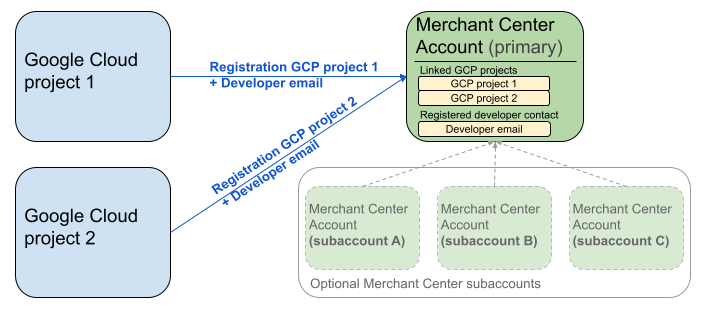
แผนภาพก่อนหน้าแสดงการตั้งค่าการลงทะเบียนเมื่อใช้โปรเจ็กต์ Google Cloud หลายโปรเจ็กต์และ Merchant Center หลัก 1 รายการที่มีบัญชีย่อย Merchant Center หลายบัญชี (ไม่บังคับ)
ข้อกำหนดในการตรวจสอบสิทธิ์: เมื่อลงทะเบียน บัญชี Merchant Center ที่ตรวจสอบสิทธิ์แล้ว (ซึ่งเป็นบัญชีที่มีข้อมูลเข้าสู่ระบบของคุณ) ต้องตรงกับบัญชี Merchant Center ที่มีการแอบอ้างเป็นบุคคลอื่น (ซึ่งเป็นบัญชีที่คุณลงทะเบียน) คุณจะลงทะเบียนบัญชีย่อยไม่ได้หากได้รับการตรวจสอบสิทธิ์ด้วยบัญชีหลักหรือบัญชีดูแลจัดการแยกต่างหาก
บัญชีเว็บไซต์ที่ยืนยันแล้วเท่านั้น: ระบบอนุญาตให้ลงทะเบียนได้เฉพาะบัญชี Merchant Center ที่มีเว็บไซต์ที่ยืนยันแล้ว
ไม่ต้องลงทะเบียนสำหรับ บัญชีทดสอบ: คุณไม่สามารถ ลงทะเบียนสำหรับบัญชีทดสอบได้
เมื่อลงทะเบียนอีเมลสำหรับนักพัฒนาแอปแล้ว
- คุณสามารถเรียกใช้ Merchant API ได้ภายใน 5 นาทีหลังจากลงทะเบียน
- หากอีเมลเป็นของผู้ใช้ Merchant Center ที่มีอยู่ ผู้ใช้จะได้รับบทบาท
API developerมิฉะนั้น ระบบจะสร้างผู้ใช้ใหม่ใน Merchant Center และผู้ใช้จะต้องยอมรับคำเชิญภายใน 14 วันเพื่อ ป้องกันไม่ให้คำเชิญหมดอายุและไม่ต้องเริ่มกระบวนการลงทะเบียนใหม่ คุณจะทำกระบวนการลงทะเบียนให้เสร็จสมบูรณ์ได้ก็ต่อเมื่อผู้ใช้คลิกลิงก์คำเชิญแล้วเท่านั้น
โทรเพื่อลงทะเบียน
คุณลงทะเบียนโดยเรียกใช้เมธอด registerGcp คุณมีตัวเลือก 2 อย่างในการโทรเพื่อลงทะเบียน ดังนี้
- ตัวเลือกที่ 1: การเรียก API โดยตรง คุณส่งคำขอดิบไปยังปลายทาง API โดยตรง ซึ่งโดยปกติจะผ่าน HTTP(S) คุณต้องจัดการด้านต่างๆ ด้วยตนเอง เช่น การสร้างเนื้อหาคำขอ การตั้งค่าส่วนหัว (รวมถึงการตรวจสอบสิทธิ์) และการแยกวิเคราะห์การตอบกลับ
- ตัวเลือกที่ 2: ไลบรารีของไคลเอ็นต์ คุณใช้ไลบรารีที่สร้างไว้ล่วงหน้าซึ่งมีวิธีที่สะดวกกว่าและเป็นไปตามภาษาในการโต้ตอบกับ Merchant API โดยจะจัดการการตรวจสอบสิทธิ์และการให้สิทธิ์ รวมถึงมีวิธีที่สะดวกในการ แยกการสื่อสาร HTTP ที่อยู่เบื้องหลังออก เรามีโค้ด ตัวอย่างอย่างเป็นทางการที่จะช่วยให้คุณเริ่มต้นใช้งานได้อย่างรวดเร็ว
การให้สิทธิ์สำหรับการเรียกการลงทะเบียน
ตามที่อธิบายไว้ในขั้นตอนให้สิทธิ์คำขอไปยัง Merchant API คุณมีสถานการณ์การตรวจสอบสิทธิ์ที่แตกต่างกัน 2 แบบ
- OAuth 2.0: สำหรับผู้ให้บริการหรือเอเจนซีบุคคลที่สามที่จัดการบัญชีผู้ขายหลายบัญชี
- บัญชีบริการ: สำหรับสิทธิ์เข้าถึงบัญชี Merchant Center ของคุณเอง
ดูข้อมูลเพิ่มเติมเกี่ยวกับการให้สิทธิ์การเรียกการลงทะเบียนได้ที่ฉันจะทำการตรวจสอบสิทธิ์และการให้สิทธิ์สำหรับการเรียกการลงทะเบียนได้อย่างไร
การโทรเพื่อลงทะเบียน
ในตัวอย่างต่อไปนี้ คุณจะเรียกการลงทะเบียนโดยใช้การเรียก API โดยตรง หรือไลบรารีของไคลเอ็นต์
คุณทำการเรียกการลงทะเบียนโดยใช้เมธอด registerGcp
POST https://merchantapi.googleapis.com/accounts/v1/accounts/{ACCOUNT_ID}/developerRegistration:registerGcp
Content-Type: application/json
Authorization: Bearer {ACCESS_TOKEN}"

{
  "developerEmail": "{DEVELOPER_EMAIL}"
}
แทนที่ค่าต่อไปนี้
ACCOUNT_ID: รหัส Merchant CenterACCESS_TOKEN: โทเค็นการให้สิทธิ์เพื่อทำการเรียก APIDEVELOPER_EMAIL: อีเมลของผู้ติดต่อหลักด้านเทคนิค
การเรียกที่สำเร็จจะแสดงทรัพยากร DeveloperRegistration ซึ่งยืนยันสถานะการลิงก์ที่สำเร็จ
  "name": "accounts/{ACCOUNT_ID}/developerRegistration",
  "gcpIds": ["{GOOGLE_CLOUD_PROJECT_ID}"]
Python
ดาวน์โหลดตัวอย่างและทำตามคำแนะนำจากตัวอย่าง Python ของ Google Merchant API เพื่อตั้งค่าไลบรารีของไคลเอ็นต์ Python
from examples.authentication import configuration
from examples.authentication import generate_user_credentials
from google.shopping.merchant_accounts_v1 import DeveloperRegistrationServiceClient
from google.shopping.merchant_accounts_v1 import RegisterGcpRequest
def register_gcp(account_id: str, developer_email: str) -> None:
"""Registers the GCP project used to call the Merchant API with a developer email.
Args:
account_id: The ID of your Merchant Center account.
developer_email: The email address of the developer to register.
"""
# Get OAuth credentials.
credentials = generate_user_credentials.main()
# Create a client to the Developer Registration Service.
client = DeveloperRegistrationServiceClient(credentials=credentials)
# The name has the format: accounts/{account}/developerRegistration
name = f"accounts/{account_id}/developerRegistration"
# Create the request to register the GCP project.
request = RegisterGcpRequest(
name=name,
developer_email=developer_email,
)
# Make the API call and handle potential errors.
try:
print("Sending RegisterGcp request:")
response = client.register_gcp(request=request)
print("Registered GCP project successfully:")
print(response)
except RuntimeError as e:
print(f"An error occurred: {e}")
if __name__ == "__main__":
# Your Merchant Center account ID.
# This can be found in the Merchant Center UI.
_account_id = configuration.Configuration().read_merchant_info()
# The developer email to associate with the GCP project.
_developer_email = "YOUR_EMAIL_HERE"
register_gcp(_account_id, _developer_email)
Java
ดาวน์โหลดตัวอย่างและทำตามคำแนะนำจาก ตัวอย่าง Java ของ Google Merchant API เพื่อตั้งค่าไลบรารีของไคลเอ็นต์ Java
import com.google.api.gax.core.FixedCredentialsProvider;
import com.google.auth.oauth2.GoogleCredentials;
import com.google.shopping.merchant.accounts.v1.DeveloperRegistration;
import com.google.shopping.merchant.accounts.v1.DeveloperRegistrationName;
import com.google.shopping.merchant.accounts.v1.DeveloperRegistrationServiceClient;
import com.google.shopping.merchant.accounts.v1.DeveloperRegistrationServiceSettings;
import com.google.shopping.merchant.accounts.v1.RegisterGcpRequest;
import shopping.merchant.samples.utils.Authenticator;
import shopping.merchant.samples.utils.Config;
/**
* This class demonstrates how to register the GCP project used to call the Merchant API with a
* developer email.
*/
public class RegisterGcpSample {
public static DeveloperRegistration registerGcp(Config config, String developerEmail) throws Exception {
// Obtains OAuth token based on the user's configuration.
GoogleCredentials credential = new Authenticator().authenticate();
// Creates service settings using the credentials retrieved above.
DeveloperRegistrationServiceSettings developerRegistrationServiceSettings =
DeveloperRegistrationServiceSettings.newBuilder()
.setCredentialsProvider(FixedCredentialsProvider.create(credential))
.build();
// Creates DeveloperRegistration name to identify the DeveloperRegistration.
// The name has the format: accounts/{account}/developerRegistration
String name =
DeveloperRegistrationName.newBuilder()
.setAccount(config.getAccountId().toString())
.build()
.toString();
// Calls the API and propagates any network failures/errors.
try (DeveloperRegistrationServiceClient developerRegistrationServiceClient =
DeveloperRegistrationServiceClient.create(developerRegistrationServiceSettings)) {
// Creates a request to register the GCP project with the developer email.
RegisterGcpRequest request =
RegisterGcpRequest.newBuilder().setName(name).setDeveloperEmail(developerEmail).build();
System.out.println("Sending RegisterGcp request:");
DeveloperRegistration response = developerRegistrationServiceClient.registerGcp(request);
System.out.println(response);
return response;
}
}
public static void main(String[] args) throws Exception {
Config config = Config.load();
String developerEmail = "YOUR_EMAIL_HERE"; // Replace with your email
registerGcp(config, developerEmail);
}
}
PHP
ดาวน์โหลดตัวอย่างและทำตามคำแนะนำจาก ตัวอย่าง PHP ของ Google Merchant API เพื่อตั้งค่าไลบรารีของไคลเอ็นต์ PHP
require_once __DIR__ . '/../../../../vendor/autoload.php';
require_once __DIR__ . '/../../../Authentication/Authentication.php';
require_once __DIR__ . '/../../../Authentication/Config.php';
use Google\ApiCore\ApiException;
use Google\Shopping\Merchant\Accounts\V1\Client\DeveloperRegistrationServiceClient;
use Google\Shopping\Merchant\Accounts\V1\RegisterGcpRequest;
/**
* This class demonstrates how to register the GCP project used to call the
* Merchant API with a developer email.
*/
class RegisterGcpSample
{
/**
* A helper function to create the name string for the
* DeveloperRegistration.
*
* @param string $accountId The merchant account ID.
* @return string The name, which has the format:
* `accounts/{account}/developerRegistration`
*/
private static function getName(string $accountId): string
{
return sprintf("accounts/%s/developerRegistration", $accountId);
}
/**
* Registers the GCP project with a developer email.
*
* @param array $config The configuration data for authentication and account ID.
* @param string $developerEmail The email of the developer to register.
*/
public static function registerGcpSample(array $config, string $developerEmail): void
{
// Obtains OAuth credentials from the configuration file.
$credentials = Authentication::useServiceAccountOrTokenFile();
// Creates a configuration object for the client.
$options = ['credentials' => $credentials];
// Creates the DeveloperRegistrationServiceClient.
$developerRegistrationServiceClient = new DeveloperRegistrationServiceClient($options);
// Creates the name of the developer registration to identify it.
$name = self::getName($config['accountId']);
// Calls the API and handles any network failures.
try {
// Creates a request to register the GCP project with the developer email.
$request = new RegisterGcpRequest([
'name' => $name,
'developer_email' => $developerEmail
]);
printf("Sending RegisterGcp request:%s", PHP_EOL);
// The `registerGcp` method returns a `DeveloperRegistration` object
// upon success.
$response = $developerRegistrationServiceClient->registerGcp($request);
print "Successfully registered developer email '$developerEmail' for account {$config['accountId']}.\n";
print_r($response);
} catch (ApiException $e) {
printf("An error occurred: %s%s", $e->getMessage(), PHP_EOL);
}
}
/**
* Helper to execute the sample.
*/
public function callSample(): void
{
$config = Config::generateConfig();
// An email address for a developer to register for the API.
$developerEmail = 'YOUR_EMAIL_HERE'; // Replace with your email
self::registerGcpSample($config, $developerEmail);
}
}
// Executes the sample.
$sample = new RegisterGcpSample();
$sample->callSample();
cURL
curl -X POST "https://merchantapi.googleapis.com/accounts/v1/accounts/{ACCOUNT_ID}/developerRegistration:registerGcp" \
-H "Content-Type: application/json" \
-H "Authorization: Bearer {ACCESS_TOKEN}" \
-d '{
  "developerEmail": "{DEVELOPER_EMAIL}"
}'
หากต้องการลงทะเบียนให้เสร็จสมบูรณ์ คุณต้องตรวจสอบว่ามีผู้ใช้ใน
Merchant Center อย่างน้อย 1 รายที่มีAPI developerบทบาท คุณสามารถทำได้โดย
ดำเนินการอย่างใดอย่างหนึ่งต่อไปนี้
- ระบุ
developerEmailไปยังเมธอดregisterGcp - เพิ่มผู้ใช้ใหม่ที่มีบทบาท
API developerใน UI ของ Merchant Center - มอบหมายบทบาท
API developerให้กับผู้ใช้ที่มีอยู่ใน UI ของ Merchant Center - เรียกใช้เมธอด
accounts.users.createเพื่อสร้างผู้ใช้ใหม่และ กำหนดบทบาทAPI developerให้กับผู้ใช้ - มอบหมายบทบาท
API developerให้กับผู้ใช้ที่มีอยู่โดยใช้วิธีaccounts.users.patch
แนวทางปฏิบัติแนะนำหลังการลงทะเบียน
เราขอแนะนำให้คุณทำตามชุดแนวทางปฏิบัติแนะนำหลังจากลงทะเบียนครั้งแรกเสร็จสมบูรณ์แล้ว เพื่อให้ได้รับประโยชน์จากการจัดการการเข้าถึงที่มีประสิทธิภาพและป้องกันการหยุดชะงักของบริการในอนาคต
ให้สิทธิ์เพิ่มเติมแก่ API developer
เมื่อลงทะเบียนผู้ติดต่อสำหรับนักพัฒนาแอป ระบบจะกำหนดบทบาท
API developer ให้โดยอัตโนมัติ บทบาทนี้ไม่มีสิทธิ์อื่นๆ ที่จำเป็น
สำหรับการจัดการบัญชี Merchant Center หรือการเรียก API ทั้งหมด เราขอแนะนำให้เพิ่มบทบาท ADMIN หรือ STANDARD ให้กับนักพัฒนาแอปเพื่อให้สิทธิ์เข้าถึงที่ครอบคลุม
หากต้องการแก้ไขสิทธิ์เข้าถึงของผู้ใช้ ให้ใช้เมธอด accounts.users.patch คุณระบุสิทธิ์เข้าถึงในช่อง updateMask ของเนื้อหาคำขอเพื่อ เพิ่มหรือนำบทบาทออกได้โดยทำดังนี้
PATCH https://merchantapi.googleapis.com/accounts/v1/{ACCOUNT_ID}/users/{DEVELOPER_EMAIL}?update_mask=access_rights
Content-Type: application/json
Authorization: Bearer {ACCESS_TOKEN}"

{
  "name": "accounts/{ACCOUNT_ID}/users/{DEVELOPER_EMAIL}",
  "access_rights": [ "ADMIN", "API_DEVELOPER" ]
}
Python
from examples.authentication import configuration
from examples.authentication import generate_user_credentials
from google.protobuf import field_mask_pb2
from google.shopping.merchant_accounts_v1 import AccessRight
from google.shopping.merchant_accounts_v1 import UpdateUserRequest
from google.shopping.merchant_accounts_v1 import User
from google.shopping.merchant_accounts_v1 import UserServiceClient
FieldMask = field_mask_pb2.FieldMask
_ACCOUNT = configuration.Configuration().read_merchant_info()
def update_user(user_email, user_access_right):
"""Updates a user to make it an admin of the MC account."""
credentials = generate_user_credentials.main()
client = UserServiceClient(credentials=credentials)
# Create user name string
name = "accounts/" + _ACCOUNT + "/users/" + user_email
user = User(name=name, access_rights=[user_access_right])
field_mask = FieldMask(paths=["access_rights"])
try:
request = UpdateUserRequest(user=user, update_mask=field_mask)
print("Sending Update User request")
response = client.update_user(request=request)
print("Updated User Name below")
print(response.name)
except RuntimeError as e:
print(e)
if __name__ == "__main__":
# Modify this email to update the right user
email = "USER_MAIL_ACCOUNT"
access_right = AccessRight.ADMIN
update_user(email, access_right)
Java
import com.google.api.gax.core.FixedCredentialsProvider;
import com.google.auth.oauth2.GoogleCredentials;
import com.google.protobuf.FieldMask;
import com.google.shopping.merchant.accounts.v1.AccessRight;
import com.google.shopping.merchant.accounts.v1.UpdateUserRequest;
import com.google.shopping.merchant.accounts.v1.User;
import com.google.shopping.merchant.accounts.v1.UserName;
import com.google.shopping.merchant.accounts.v1.UserServiceClient;
import com.google.shopping.merchant.accounts.v1.UserServiceSettings;
import shopping.merchant.samples.utils.Authenticator;
import shopping.merchant.samples.utils.Config;
/** This class demonstrates how to update a user to make it an admin of the MC account. */
public class UpdateUserSample {
public static void updateUser(Config config, String email, AccessRight accessRight)
throws Exception {
GoogleCredentials credential = new Authenticator().authenticate();
UserServiceSettings userServiceSettings =
UserServiceSettings.newBuilder()
.setCredentialsProvider(FixedCredentialsProvider.create(credential))
.build();
// Creates user name to identify user.
String name =
UserName.newBuilder()
.setAccount(config.getAccountId().toString())
.setEmail(email)
.build()
.toString();
// Create a user with the updated fields.
User user = User.newBuilder().setName(name).addAccessRights(accessRight).build();
FieldMask fieldMask = FieldMask.newBuilder().addPaths("access_rights").build();
try (UserServiceClient userServiceClient = UserServiceClient.create(userServiceSettings)) {
UpdateUserRequest request =
UpdateUserRequest.newBuilder().setUser(user).setUpdateMask(fieldMask).build();
System.out.println("Sending Update User request");
User response = userServiceClient.updateUser(request);
System.out.println("Updated User Name below");
System.out.println(response.getName());
} catch (Exception e) {
System.out.println(e);
}
}
public static void main(String[] args) throws Exception {
Config config = Config.load();
String email = "testUser@gmail.com";
// Give the user admin rights. Note that all other rights, like
// PERFORMANCE_REPORTING, would be overwritten in this example
// if the user had those access rights before the update.
AccessRight accessRight = AccessRight.ADMIN;
updateUser(config, email, accessRight);
}
}
PHP
use Google\ApiCore\ApiException;
use Google\Protobuf\FieldMask;
use Google\Shopping\Merchant\Accounts\V1\AccessRight;
use Google\Shopping\Merchant\Accounts\V1\UpdateUserRequest;
use Google\Shopping\Merchant\Accounts\V1\User;
use Google\Shopping\Merchant\Accounts\V1\Client\UserServiceClient;
/**
* Updates a user.
*
* @param array $config The configuration data.
* @param string $email The email address of the user.
* @param int $accessRight The access right to grant the user.
* @return void
*/
function updateUser($config, $email, $accessRights): void
{
// Gets the OAuth credentials to make the request.
$credentials = Authentication::useServiceAccountOrTokenFile();
// Creates options config containing credentials for the client to use.
$options = ['credentials' => $credentials];
// Creates a client.
$userServiceClient = new UserServiceClient($options);
// Creates user name to identify user.
$name = 'accounts/' . $config['accountId'] . "/users/" . $email;
$user = (new User())
->setName($name)
->setAccessRights($accessRights);
$fieldMask = (new FieldMask())->setPaths(['access_rights']);
// Calls the API and catches and prints any network failures/errors.
try {
$request = new UpdateUserRequest([
'user' => $user,
'update_mask' => $fieldMask,
]);
print "Sending Update User request\n";
$response = $userServiceClient->updateUser($request);
print "Updated User Name below\n";
print $response->getName() . "\n";
} catch (ApiException $e) {
print $e->getMessage();
}
}
$config = Config::generateConfig();
$email = "testUser@gmail.com";
$accessRights = [AccessRight::ADMIN];
updateUser($config, $email, $accessRights);
cURL
curl -X PATCH \
"https://merchantapi.googleapis.com/accounts/v1/{ACCOUNT_ID}/users/{USER_EMAIL}?update_mask=access_rights" \
-H "Content-Type: application/json" \
-H "Authorization: Bearer {ACCESS_TOKEN}" \
-d '{
  "access_rights": [
    "ADMIN",
    "API_DEVELOPER"
  ]
}'
เพิ่มรายชื่อติดต่อของนักพัฒนาแอปเพิ่มเติม
การมีรายชื่อติดต่อสำรองเป็นสิ่งสำคัญอย่างยิ่งเพื่อหลีกเลี่ยงการหยุดชะงักของธุรกิจในกรณีที่ผู้ติดต่อหลักของนักพัฒนาแอปลาออกหรือสูญเสียสิทธิ์เข้าถึง
เราขอแนะนำให้มีผู้ใช้เพิ่มเติมอย่างน้อย 1 คนที่มีบทบาทAPI developerใน Merchant Center เพื่อใช้เป็นข้อมูลสำรอง
คุณเพิ่มผู้ใช้หรืออัปเดตผู้ใช้ที่มีอยู่ได้ด้วยบริการ accounts.users ใน Merchant API หรือหน้าการเข้าถึงและ บริการใน UI ของ Merchant Center การเพิ่มนักพัฒนาแอปสำรองไว้ล่วงหน้าจะช่วยให้คุณสร้างการผสานรวมที่ยืดหยุ่นมากขึ้นซึ่งไม่ขึ้นอยู่กับบุคคลเพียงคนเดียว
PATCH https://merchantapi.googleapis.com/products/v1/accounts/{ACCOUNT_ID}/users
Content-Type: application/json
Authorization: Bearer {ACCESS_TOKEN}"
{
  "user_id": {USER_EMAIL},
  "user": { "access_rights": [ "API_DEVELOPER", "ADMIN" ] }
}
Python
from examples.authentication import configuration
from examples.authentication import generate_user_credentials
from google.shopping.merchant_accounts_v1 import AccessRight
from google.shopping.merchant_accounts_v1 import CreateUserRequest
from google.shopping.merchant_accounts_v1 import User
from google.shopping.merchant_accounts_v1 import UserServiceClient
_ACCOUNT = configuration.Configuration().read_merchant_info()
def get_parent(account_id):
return f"accounts/{account_id}"
def create_user(user_email):
"""Creates a user for a Merchant Center account."""
# Get OAuth credentials
credentials = generate_user_credentials.main()
# Create a UserServiceClient
client = UserServiceClient(credentials=credentials)
# Create parent string
parent = get_parent(_ACCOUNT)
# Create the request
request = CreateUserRequest(
parent=parent,
user_id=user_email,
user=User(
access_rights=[AccessRight.ADMIN, AccessRight.PERFORMANCE_REPORTING]
),
)
try:
print("Sending Create User request")
response = client.create_user(request=request)
print("Inserted User Name below")
print(response.name)
except RuntimeError as e:
print(e)
if __name__ == "__main__":
# Modify this email to create a new user
email = "USER_MAIL_ACCOUNT"
create_user(email)
Java
import com.google.api.gax.core.FixedCredentialsProvider;
import com.google.auth.oauth2.GoogleCredentials;
import com.google.shopping.merchant.accounts.v1.AccessRight;
import com.google.shopping.merchant.accounts.v1.CreateUserRequest;
import com.google.shopping.merchant.accounts.v1.User;
import com.google.shopping.merchant.accounts.v1.UserServiceClient;
import com.google.shopping.merchant.accounts.v1.UserServiceSettings;
import shopping.merchant.samples.utils.Authenticator;
import shopping.merchant.samples.utils.Config;
/** This class demonstrates how to create a user for a Merchant Center account. */
public class CreateUserSample {
private static String getParent(String accountId) {
return String.format("accounts/%s", accountId);
}
public static void createUser(Config config, String email) throws Exception {
// Obtains OAuth token based on the user's configuration.
GoogleCredentials credential = new Authenticator().authenticate();
// Creates service settings using the credentials retrieved above.
UserServiceSettings userServiceSettings =
UserServiceSettings.newBuilder()
.setCredentialsProvider(FixedCredentialsProvider.create(credential))
.build();
// Creates parent to identify where to insert the user.
String parent = getParent(config.getAccountId().toString());
// Calls the API and catches and prints any network failures/errors.
try (UserServiceClient userServiceClient = UserServiceClient.create(userServiceSettings)) {
CreateUserRequest request =
CreateUserRequest.newBuilder()
.setParent(parent)
// This field is the email address of the user.
.setUserId(email)
.setUser(
User.newBuilder()
.addAccessRights(AccessRight.ADMIN)
.addAccessRights(AccessRight.PERFORMANCE_REPORTING)
.build())
.build();
System.out.println("Sending Create User request");
User response = userServiceClient.createUser(request);
System.out.println("Inserted User Name below");
// The last part of the user name will be the email address of the user.
// Format: `accounts/{account}/user/{user}`
System.out.println(response.getName());
} catch (Exception e) {
System.out.println(e);
}
}
public static void main(String[] args) throws Exception {
Config config = Config.load();
// The email address of this user.
String email = "testUser@gmail.com";
createUser(config, email);
}
}
PHP
use Google\ApiCore\ApiException;
use Google\Shopping\Merchant\Accounts\V1\AccessRight;
use Google\Shopping\Merchant\Accounts\V1\CreateUserRequest;
use Google\Shopping\Merchant\Accounts\V1\User;
use Google\Shopping\Merchant\Accounts\V1\Client\UserServiceClient;
/**
* Creates a user.
*
* @param array $config The configuration data.
* @param string $email The email address of the user.
* @return void
*/
function createUser($config, $email): void
{
// Gets the OAuth credentials to make the request.
$credentials = Authentication::useServiceAccountOrTokenFile();
// Creates options config containing credentials for the client to use.
$options = ['credentials' => $credentials];
// Creates a client.
$userServiceClient = new UserServiceClient($options);
// Creates parent to identify where to insert the user.
$parent = sprintf("accounts/%s", $config['accountId']);
// Calls the API and catches and prints any network failures/errors.
try {
$request = new CreateUserRequest([
'parent' => $parent,
'user_id' => $email,
'user' => (new User())
->setAccessRights([AccessRight::ADMIN,AccessRight::PERFORMANCE_REPORTING])
]);
print "Sending Create User request\n";
$response = $userServiceClient->createUser($request);
print "Inserted User Name below\n";
print $response->getName() . "\n";
} catch (ApiException $e) {
print $e->getMessage();
}
}
$config = Config::generateConfig();
$email = "testUser@gmail.com";
createUser($config, $email);
cURL
curl -X PATCH \
"https://merchantapi.googleapis.com/products/v1/accounts/{ACCOUNT_ID}/users/{USER_EMAIL}?update_mask=access_rights" \
-H "Content-Type: application/json" \
-H "Authorization: Bearer {ACCESS_TOKEN}" \
-d '{
  "access_rights": [
    "ADMIN",
    "API_DEVELOPER"
  ]
}'