

คอมโพเนนต์เครื่องหมายระบุสถานที่
คอมโพเนนต์เครื่องหมายสถานที่ช่วยให้คุณสร้างคำอธิบายประกอบแผนที่ที่ปรับแต่งได้ซึ่งแสดงข้อมูลสถานที่สำคัญบนแผนที่โดยตรง คุณสามารถแสดงเนื้อหา เช่น คะแนนของสถานที่ ประเภทของสถานที่ สถานะเปิดหรือปิด ช่วงราคา หรือข้อความที่กำหนดเอง (เช่น ป้ายกำกับที่ AI สร้างขึ้นหรือหมายเลขแผนการเดินทาง) ซึ่งจะช่วยให้ผู้ใช้ได้รับประสบการณ์การสำรวจแผนที่ที่ให้ข้อมูลมากขึ้นโดยไม่ต้องแตะการ์ดสถานที่แบบละเอียด
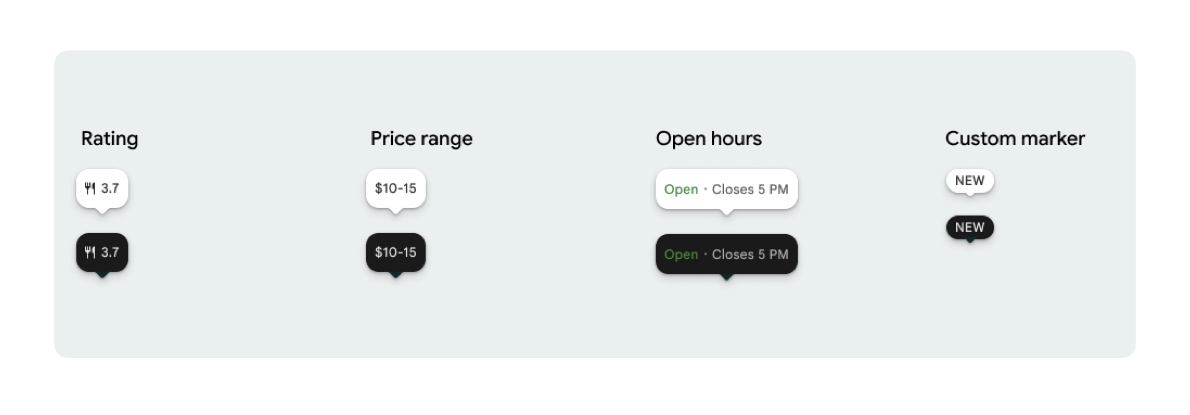
คุณแสดงไอคอนเครื่องหมาย 1 รายการและข้อความเครื่องหมาย (ไม่บังคับ) ต่อ PlaceMarker ได้
ไอคอนที่ใช้ได้มีดังนี้
Type: ประเภทสถานที่None: ไม่มีไอคอน
Rating: คะแนนการจัดประเภทPriceRange: ช่วงราคา (เช่น 100-200 บาท)OpenStatus: ธุรกิจเปิดหรือปิดอยู่Custom: ข้อความที่กำหนดเอง (เช่น "ยอดนิยม")
อ้างอิงสถานที่โดยใช้รหัสสถานที่ (PlaceId) ชื่อทรัพยากร (ResourceName) หรือพิกัดทางภูมิศาสตร์ (Coordinates)
ข้อกำหนดในการแสดงผลและการระบุแหล่งที่มา
เมื่อแสดงเครื่องหมายแผนที่ของ Places UI Kit เครื่องหมายต้องไม่ปรากฏแยกกัน โดยจะต้องโต้ตอบได้และเปิดคอมโพเนนต์รายละเอียดสถานที่หรือ Lightbox ที่เชื่อมโยงเมื่อมีการคลิกหรือแตะ เพื่อให้การสร้างแบรนด์ของ Google การระบุแหล่งที่มาของผู้มีส่วนร่วม และขั้นตอนการรายงานปัญหาเป็นไปตามที่กำหนด
ดูข้อกำหนดในการระบุแหล่งที่มาของรูปภาพและรีวิวสำหรับกรณีที่มีพื้นที่จำกัด
ตัวอย่างเครื่องหมายระบุสถานที่
เรามีฟังก์ชัน @ComposableJetpack Compose เพื่อลดค่าใช้จ่ายของ Wrapper จาก View ไปยัง Compose และหลีกเลี่ยงปัญหาธีมไม่ตรงกัน
การปรับแต่งเครื่องหมายพื้นฐาน
ตัวอย่างโค้ดต่อไปนี้แสดงการปรับแต่งเครื่องหมายสถานที่พื้นฐาน รวมถึงการซ่อนส่วนปลายของบับเบิลคำพูดรูปสามเหลี่ยมสำหรับเครื่องหมายเริ่มต้น
Kotlin
import androidx.compose.runtime.Composable
import com.google.android.libraries.places.compose.PlaceMarker
import com.google.android.libraries.places.compose.marker.MarkerIcon
import com.google.android.libraries.places.compose.marker.MarkerText
import com.google.android.libraries.places.compose.PlaceReference

@Composable
fun DefaultMarker() {
    PlaceMarker(
        reference = PlaceReference.PlaceId("PLACE_ID"),
        icon = MarkerIcon.None,
        beakPresence = false, // remove beak
    )
}

@Composable
fun RatingMarker() {
    PlaceMarker(
        reference = PlaceReference.PlaceId("PLACE_ID"),
        icon = MarkerIcon.None,
        text = MarkerText.Rating
    )
}

@Composable
fun TypeAndRatingMarker() {
    PlaceMarker(
        reference = PlaceReference.PlaceId("PLACE_ID"),
        icon = MarkerIcon.Type,
        text = MarkerText.Rating

    )
}

@Composable
fun PriceRangeMarker() {
    PlaceMarker(
        reference = PlaceReference.ResourceName("places/PLACE_RESOURCE_NAME"),
        icon = MarkerIcon.None,
        text = MarkerText.PriceRange
    )
}

@Composable
fun OpenStatusMarker() {
   PlaceMarker(
       reference = PlaceReference.Coordinates(latitude = 37.7749, longitude = -122.4194),
        icon = MarkerIcon.None,
        text = MarkerText.OpenStatus
   )
}

@Composable
fun CustomTextMarker() {
    PlaceMarker(
        reference = PlaceReference.PlaceId("PLACE_ID"),
        icon = MarkerIcon.None,
        // Custom text accepts a String to display a number (e.g. "3") or text (e.g. "NEW")
        text = MarkerText.Custom("NEW")
    )
}
สร้างฟังก์ชันรอคลิก
คุณสามารถระบุ Callback onClick เพื่อทริกเกอร์การดำเนินการที่กำหนดเองเมื่อมีการแตะตัวทำเครื่องหมายแบบสแตนด์อโลน อย่างไรก็ตาม เมื่อแสดงเครื่องหมายบนแผนที่ (เช่น ภายใน MarkerComposable) แผนที่จะสกัดกั้นเหตุการณ์การแตะ ในกรณีนี้ คุณต้องใช้ตัวแฮนเดิล onClick ของ MarkerComposable แทนตัวแฮนเดิลของเครื่องหมาย
ตัวอย่างโค้ดต่อไปนี้แสดงวิธีใช้ตัวแฮนเดิล onClick ของ MarkerComposable
Kotlin
import android.util.Log
import androidx.compose.runtime.Composable
import com.google.android.libraries.places.compose.PlaceMarker
import com.google.android.libraries.places.compose.marker.MarkerIcon
import com.google.android.libraries.places.compose.PlaceReference


/**
 * PlaceMarker used outside of a map (e.g. in a list, bottom sheet, or custom overlay).
 *
 * There is no host component that provides a default click behavior here, so PlaceMarker's own
 * `onClick` is the only way for a developer to react to a tap. This is why `onClick` must stay
 * on the PlaceMarker API.
 */
@Composable
fun ClickableMarkerWithCustomConfig() {
   PlaceMarker(
       reference = PlaceReference.PlaceId("PLACE_ID"),
       icon = MarkerIcon.Type,

       onClick = { place ->
           openPlaceCard(place.id) // developer might want to open the place card
           Log.i("PlacesMarker", "Marker was tapped by user!")
       }
   )
}

/**
 * PlaceMarker used as the content of a MarkerComposable on a GoogleMap.
 *
 * MarkerComposable does NOT add PlaceMarker to the touch-input hierarchy: it snapshots the
 * composable into a bitmap and hands that bitmap to the Maps renderer as the marker icon. The
 * rendered marker is a map object, not a Compose node, so:
 *
 *   - PlaceMarker's own `onClick` would never be invoked here (no touch events ever reach it).
 *   - The tap is delivered by the Maps SDK to MarkerComposable's `onClick`, which is the only
 *     click entry point on a map.
 *
 * Accordingly, the state-based `PlaceMarker(state = ...)` overload used below deliberately does
 * not expose an `onClick` parameter, so the correct handler is the only one available.
 */
@Composable
fun PlaceMarkerOnMap(markerState: PlaceMarkerState) {
  GoogleMap(
    modifier = Modifier.fillMaxSize(),
    cameraPositionState = rememberCameraPositionState(),
  ) {
    markerState.location?.let { position ->
      MarkerComposable(
        state = rememberUpdatedMarkerState(position = position),
        // this is the click handler for the map use case.
        onClick = {
          markerState.place?.let { place -> openPlaceCard(place.id) }
          true // consume the event
        },
      ) {
        PlaceMarker(state = markerState)
      }
    }
  }
}
จัดการสถานะการโหลดและการเรียกกลับ
ตัวอย่างโค้ดต่อไปนี้แสดงวิธีระบุการเรียกกลับเพื่อจัดการข้อผิดพลาดในการแสดงผลหรือข้อมูลที่ขาดหายไป
Kotlin
import android.util.Log
import androidx.compose.runtime.Composable
import com.google.android.libraries.places.compose.PlaceMarker
import com.google.android.libraries.places.compose.marker.MarkerIcon
import com.google.android.libraries.places.compose.PlaceReference

@Composable
fun StatusHandlingMarker() {
    PlaceMarker(
        reference = PlaceReference.PlaceId("PLACE_ID"),
        icon = MarkerIcon.Type,
        // Triggered when attribute data is successfully fetched and the marker is rendered.
        // Returns a minimal Place object with ID, location (LatLng), and viewport fields set.
        onMarkerLoaded = { place ->
            Log.i("PlacesMarker", "Marker successfully loaded for place ID: ${place.id}")
        },
        // Triggered when data fetching fails or required attribute data is missing for the place.
        // Returns an optional Place object and an Exception describing the root cause.
        onMarkerLoadFailed = { place, exception ->
            Log.e("PlacesMarker", "Failed to load marker for place ID: ${place?.id}", exception)
        }
    )
}
ใช้ PlaceMarkerState เพื่อวางเครื่องหมายบนแผนที่
ระบบจะแสดงออบเจ็กต์สถานที่พร้อมตำแหน่งและวิวพอร์ตเพื่อช่วยให้คุณตัดสินใจได้ว่าจะวางเครื่องหมายไว้ที่ใด
Kotlin
// Step 1: Obtain configured handle in a single 1-line call (PlaceMarker mounted internally)
val markerState = rememberPlaceMarkerState(
  reference = PlaceReference.PlaceId(placeId),
  icon = MarkerIcon.Type
)

// Step 2: Pass PlaceMarkerState.location and PlaceMarker(state = PlaceMarkerState) directly to the map marker
GoogleMap(...) {
  markerState.location?.let { position ->
    MarkerComposable(
      state = rememberMarkerState(position = position),
      onClick = {
        markerState.place?.let { place ->
          // Handle marker click
        }
        true
      }
    ) {
      PlaceMarker(state = markerState) // Render marker UI content directly on map canvas
    }
  }
}
ปรับขนาดตัวทำเครื่องหมายเป็นขนาดที่กำหนดเอง
Kotlin
// Off the map: scale with a one-line modifier.
// Modifier.scale is a draw-time transform, so the bubble, beak, icon and text all scale together.
@Composable
fun ScaledMarker() {
  PlaceMarker(
    reference = PlaceReference.PlaceId(placeId),
    icon = MarkerIcon.Type,
    text = MarkerText.Rating,
    modifier = Modifier.scale(2.1f),
  )
}

// On the map: scale by overriding LocalDensity.
// MarkerComposable snapshots its content into a marker bitmap sized to the measured layout bounds.
// Modifier.scale does not change those bounds, so the marker would be clipped and blurry. Scaling
// the density re-measures every dp and sp inside the marker, so the bitmap, the layout bounds and
// the map hit target all grow with it.
@Composable
fun ScaledMarkerOnMap(markerState: PlaceMarkerState) {
  val density = LocalDensity.current
  val scaledDensity = remember(density) {
    Density(density = density.density * 2.1f, fontScale = density.fontScale * 2.1f)
  }
  GoogleMap(...) {
    markerState.location?.let { position ->
      MarkerComposable(
        state = rememberUpdatedMarkerState(position = position),
        anchor = Offset(0.5f, 1.0f),
      ) {
        CompositionLocalProvider(LocalDensity provides scaledDensity) {
          PlaceMarker(state = markerState)
        }
      }
    }
  }
}