

장소 마커 구성요소
장소 마커 구성요소를 사용하면 지도에 주요 장소 정보를 직접 표시하는 맞춤설정 가능한 지도 주석을 만들 수 있습니다. 장소의 평점, 장소 유형, 영업 여부, 가격대 또는 맞춤 텍스트 (예: AI 생성 라벨 또는 일정 번호)와 같은 콘텐츠를 표시할 수 있습니다. 이를 통해 사용자는 세부적인 장소 카드를 탭하지 않고도 더 많은 정보를 제공하는 지도 탐색 환경을 이용할 수 있습니다.
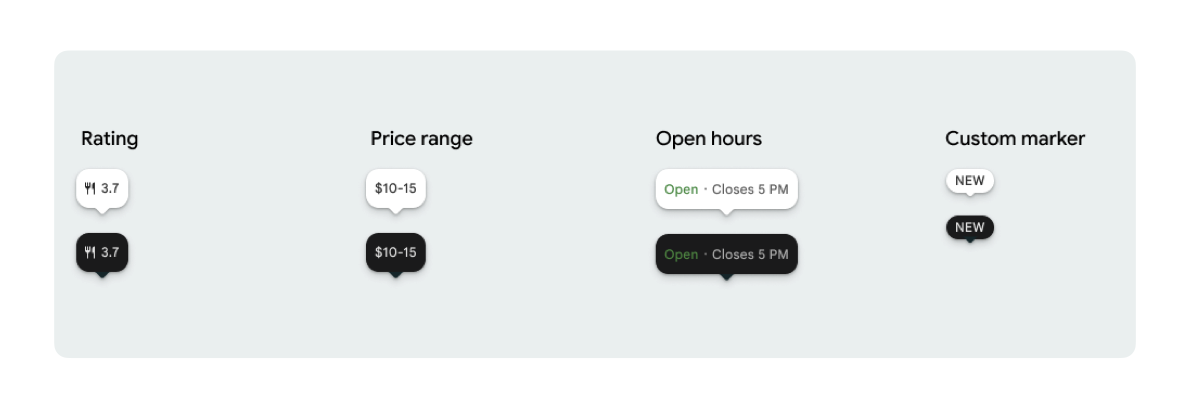
PlaceMarker당 하나의 마커 아이콘과 선택적 마커 텍스트를 표시할 수 있습니다.
사용 가능한 아이콘은 다음과 같습니다.
Type: 장소 유형입니다.None: 아이콘이 없습니다.
Rating: 평가 점수입니다.PriceRange: 가격대 (예: $10~20)OpenStatus: 비즈니스가 영업 중인지 폐업했는지 여부입니다.Custom: 맞춤 텍스트 (예: '인기')
장소 ID (PlaceId), 리소스 이름 (ResourceName) 또는 지리 좌표 (Coordinates)를 사용하여 장소를 참조합니다.
표시 및 저작자 표시 요구사항
장소 UI 키트 지도 마커가 표시될 때 마커가 단독으로 표시되어서는 안 됩니다. 클릭하거나 탭하면 연결된 장소 세부정보 구성요소 또는 라이트박스가 열려 필수 Google 브랜딩, 참여자 저작자 표시, 문제 신고 흐름을 제공해야 합니다.
공간이 제한된 시나리오의 경우 사진 및 리뷰 저작자 표시 요구사항을 참고하세요.
장소 마커 예
뷰-Compose 래퍼 오버헤드를 없애고 테마 불일치 문제를 방지하기 위해 Jetpack Compose @Composable 함수가 제공됩니다.
기본 마커 맞춤설정
다음 코드 예는 기본 마커의 삼각형 말풍선 부리를 숨기는 등 기본 장소 마커 맞춤설정을 보여줍니다.
Kotlin
import androidx.compose.runtime.Composable
import com.google.android.libraries.places.compose.PlaceMarker
import com.google.android.libraries.places.compose.marker.MarkerIcon
import com.google.android.libraries.places.compose.marker.MarkerText
import com.google.android.libraries.places.compose.PlaceReference

@Composable
fun DefaultMarker() {
    PlaceMarker(
        reference = PlaceReference.PlaceId("PLACE_ID"),
        icon = MarkerIcon.None,
        beakPresence = false, // remove beak
    )
}

@Composable
fun RatingMarker() {
    PlaceMarker(
        reference = PlaceReference.PlaceId("PLACE_ID"),
        icon = MarkerIcon.None,
        text = MarkerText.Rating
    )
}

@Composable
fun TypeAndRatingMarker() {
    PlaceMarker(
        reference = PlaceReference.PlaceId("PLACE_ID"),
        icon = MarkerIcon.Type,
        text = MarkerText.Rating

    )
}

@Composable
fun PriceRangeMarker() {
    PlaceMarker(
        reference = PlaceReference.ResourceName("places/PLACE_RESOURCE_NAME"),
        icon = MarkerIcon.None,
        text = MarkerText.PriceRange
    )
}

@Composable
fun OpenStatusMarker() {
   PlaceMarker(
       reference = PlaceReference.Coordinates(latitude = 37.7749, longitude = -122.4194),
        icon = MarkerIcon.None,
        text = MarkerText.OpenStatus
   )
}

@Composable
fun CustomTextMarker() {
    PlaceMarker(
        reference = PlaceReference.PlaceId("PLACE_ID"),
        icon = MarkerIcon.None,
        // Custom text accepts a String to display a number (e.g. "3") or text (e.g. "NEW")
        text = MarkerText.Custom("NEW")
    )
}
클릭 리스너 만들기
독립형 마커를 탭할 때 맞춤 작업을 트리거하는 onClick 콜백을 제공할 수 있습니다. 하지만 마커가 지도에 렌더링되면 (예: MarkerComposable 내) 탭 이벤트가 지도에 의해 차단됩니다. 이 경우 마커 대신 MarkerComposable의 onClick 핸들러를 사용해야 합니다.
다음 코드 예는 MarkerComposable의 onClick 핸들러를 사용하는 방법을 보여줍니다.
Kotlin
import android.util.Log
import androidx.compose.runtime.Composable
import com.google.android.libraries.places.compose.PlaceMarker
import com.google.android.libraries.places.compose.marker.MarkerIcon
import com.google.android.libraries.places.compose.PlaceReference


/**
 * PlaceMarker used outside of a map (e.g. in a list, bottom sheet, or custom overlay).
 *
 * There is no host component that provides a default click behavior here, so PlaceMarker's own
 * `onClick` is the only way for a developer to react to a tap. This is why `onClick` must stay
 * on the PlaceMarker API.
 */
@Composable
fun ClickableMarkerWithCustomConfig() {
   PlaceMarker(
       reference = PlaceReference.PlaceId("PLACE_ID"),
       icon = MarkerIcon.Type,

       onClick = { place ->
           openPlaceCard(place.id) // developer might want to open the place card
           Log.i("PlacesMarker", "Marker was tapped by user!")
       }
   )
}

/**
 * PlaceMarker used as the content of a MarkerComposable on a GoogleMap.
 *
 * MarkerComposable does NOT add PlaceMarker to the touch-input hierarchy: it snapshots the
 * composable into a bitmap and hands that bitmap to the Maps renderer as the marker icon. The
 * rendered marker is a map object, not a Compose node, so:
 *
 *   - PlaceMarker's own `onClick` would never be invoked here (no touch events ever reach it).
 *   - The tap is delivered by the Maps SDK to MarkerComposable's `onClick`, which is the only
 *     click entry point on a map.
 *
 * Accordingly, the state-based `PlaceMarker(state = ...)` overload used below deliberately does
 * not expose an `onClick` parameter, so the correct handler is the only one available.
 */
@Composable
fun PlaceMarkerOnMap(markerState: PlaceMarkerState) {
  GoogleMap(
    modifier = Modifier.fillMaxSize(),
    cameraPositionState = rememberCameraPositionState(),
  ) {
    markerState.location?.let { position ->
      MarkerComposable(
        state = rememberUpdatedMarkerState(position = position),
        // this is the click handler for the map use case.
        onClick = {
          markerState.place?.let { place -> openPlaceCard(place.id) }
          true // consume the event
        },
      ) {
        PlaceMarker(state = markerState)
      }
    }
  }
}
로드 상태 및 콜백 처리
다음 코드 예는 렌더링 또는 누락된 데이터 오류를 처리하는 콜백을 제공하는 방법을 보여줍니다.
Kotlin
import android.util.Log
import androidx.compose.runtime.Composable
import com.google.android.libraries.places.compose.PlaceMarker
import com.google.android.libraries.places.compose.marker.MarkerIcon
import com.google.android.libraries.places.compose.PlaceReference

@Composable
fun StatusHandlingMarker() {
    PlaceMarker(
        reference = PlaceReference.PlaceId("PLACE_ID"),
        icon = MarkerIcon.Type,
        // Triggered when attribute data is successfully fetched and the marker is rendered.
        // Returns a minimal Place object with ID, location (LatLng), and viewport fields set.
        onMarkerLoaded = { place ->
            Log.i("PlacesMarker", "Marker successfully loaded for place ID: ${place.id}")
        },
        // Triggered when data fetching fails or required attribute data is missing for the place.
        // Returns an optional Place object and an Exception describing the root cause.
        onMarkerLoadFailed = { place, exception ->
            Log.e("PlacesMarker", "Failed to load marker for place ID: ${place?.id}", exception)
        }
    )
}
PlaceMarkerState를 사용하여 지도에 마커 배치
장소 객체는 위치와 뷰포트와 함께 반환되므로 마커를 배치할 위치를 결정하는 데 도움이 됩니다.
Kotlin
// Step 1: Obtain configured handle in a single 1-line call (PlaceMarker mounted internally)
val markerState = rememberPlaceMarkerState(
  reference = PlaceReference.PlaceId(placeId),
  icon = MarkerIcon.Type
)

// Step 2: Pass PlaceMarkerState.location and PlaceMarker(state = PlaceMarkerState) directly to the map marker
GoogleMap(...) {
  markerState.location?.let { position ->
    MarkerComposable(
      state = rememberMarkerState(position = position),
      onClick = {
        markerState.place?.let { place ->
          // Handle marker click
        }
        true
      }
    ) {
      PlaceMarker(state = markerState) // Render marker UI content directly on map canvas
    }
  }
}
마커를 맞춤 크기로 조정
Kotlin
// Off the map: scale with a one-line modifier.
// Modifier.scale is a draw-time transform, so the bubble, beak, icon and text all scale together.
@Composable
fun ScaledMarker() {
  PlaceMarker(
    reference = PlaceReference.PlaceId(placeId),
    icon = MarkerIcon.Type,
    text = MarkerText.Rating,
    modifier = Modifier.scale(2.1f),
  )
}

// On the map: scale by overriding LocalDensity.
// MarkerComposable snapshots its content into a marker bitmap sized to the measured layout bounds.
// Modifier.scale does not change those bounds, so the marker would be clipped and blurry. Scaling
// the density re-measures every dp and sp inside the marker, so the bitmap, the layout bounds and
// the map hit target all grow with it.
@Composable
fun ScaledMarkerOnMap(markerState: PlaceMarkerState) {
  val density = LocalDensity.current
  val scaledDensity = remember(density) {
    Density(density = density.density * 2.1f, fontScale = density.fontScale * 2.1f)
  }
  GoogleMap(...) {
    markerState.location?.let { position ->
      MarkerComposable(
        state = rememberUpdatedMarkerState(position = position),
        anchor = Offset(0.5f, 1.0f),
      ) {
        CompositionLocalProvider(LocalDensity provides scaledDensity) {
          PlaceMarker(state = markerState)
        }
      }
    }
  }
}