

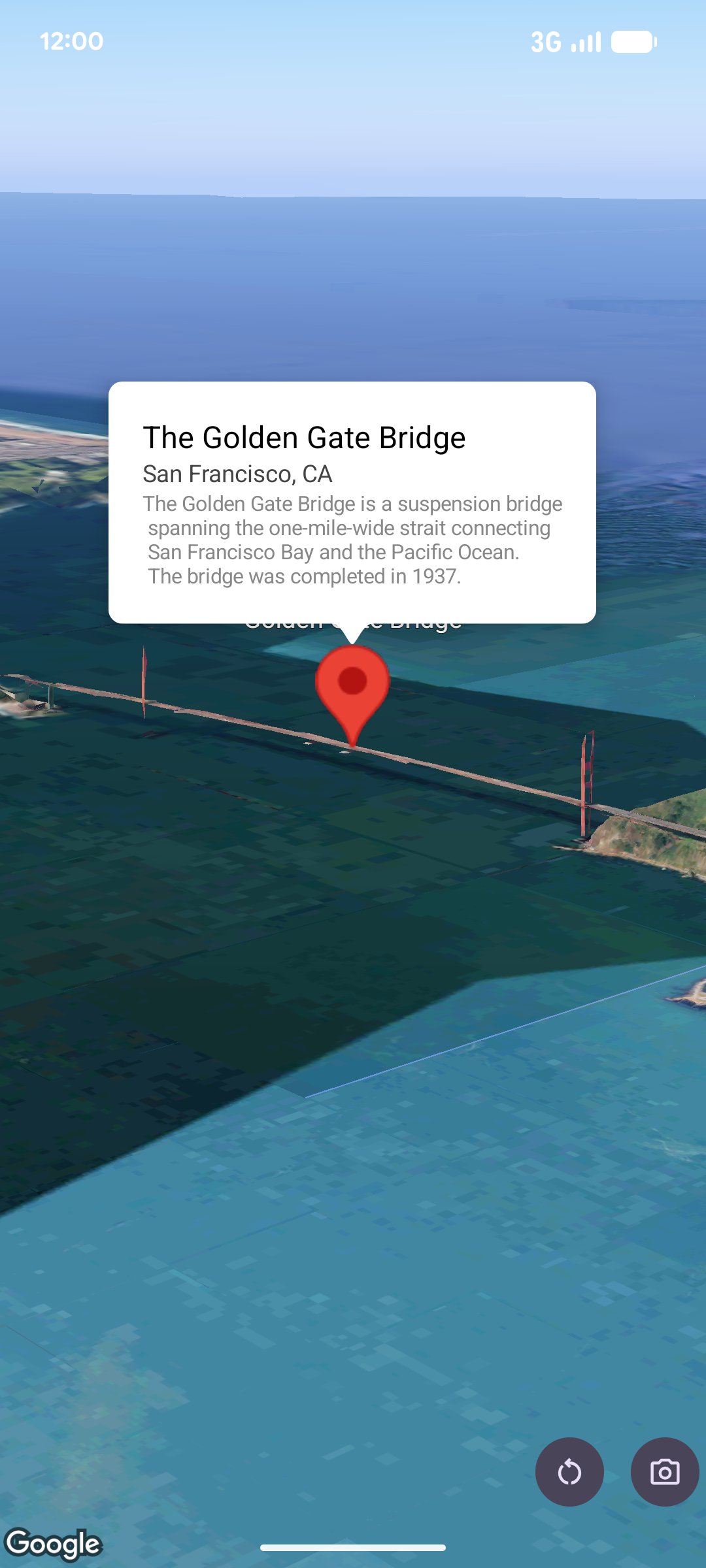
تعرض النافذة المنبثقة المحتوى (عادةً ما يكون نصًا أو صورًا) في نافذة فقاعة معلومات فوق الخريطة، في موقع جغرافي محدّد. يحتوي العنصر المنبثق على مساحة للمحتوى وجزء سفلي مدبّب. يتم ربط طرف الساق بموقع جغرافي محدّد على الخريطة.
عادةً ما يتم ربط النافذة المنبثقة بعلامة، ولكن يمكنك أيضًا ربطها بإحداثية LatLng معيّنة.
إضافة نافذة منبثقة
لإضافة نافذة منبثقة، أنشئ عنصر Popover واضبط خياراته، بما في ذلك الموضع ووضع الارتفاع. الموضع هو عنصر LatLng يتضمّن خط العرض وخط الطول والارتفاع، ويحدّد مكان عرض النافذة المنبثقة. في حال التثبيت على علامة، سيتم استخدام موضع العلامة بدلاً من ذلك. يمكنك أيضًا التحكّم في طريقة تفسير الارتفاع من خلال ضبط وضع الارتفاع.
يجب أن يكون محتوى النافذة المنبثقة مضمّنًا في AndroidView. يمكن التنقّل في النوافذ المنبثقة بشكل تلقائي، ولها حد أقصى محدد مسبقًا للارتفاع.
تثبيت نافذة منبثقة على علامة
يمكنك تثبيت النوافذ المنبثقة على العلامات. عند إضافة نافذة منبثقة مرتبطة بعلامة،
عليك ربط النافذة المنبثقة بكائن Marker.
class MapManager(private val map: MapView) {

    /**
     * Adds a popover anchored to a marker.
     * @param context The Context required to instantiate UI views.
     */
    fun addPopoverToMarker(context: Context) {
        // 1. Create a marker
        val markerOptions = markerOptions {
            position = latLngAltitude {
                latitude = 37.422
                longitude = -122.084
                altitude = 0.0
            }
        }

        val marker = map.addMarker(markerOptions) ?: return

        // 2. Create the custom view using the passed-in context
        val textView = TextView(context).apply {
            text = context.getString(R.string.popover_hello)
            setPadding(16, 16, 16, 16)
            setBackgroundColor(Color.WHITE)
            setTextColor(Color.BLACK)
        }

        // 3. Configure and display the popover
        val options = popoverOptions {
            content = textView
            positionAnchor = marker
            altitudeMode = AltitudeMode.RELATIVE_TO_GROUND
        }

        val popover = map.addPopover(options)
        popover.show()
    }
}
إضافة نافذة منبثقة تم ضبطها
يضيف المثال التالي نافذة منبثقة يتم إغلاقها تلقائيًا عندما ينقر المستخدم خارجها، ولا يتم تحريك الشاشة تلقائيًا إلى النوافذ المنبثقة التي تم فتحها حديثًا:
/**
 * Adds a configured popover (auto-close enabled, auto-pan disabled).
 * @param context The Context used to inflate the UI and retrieve string resources.
 */
fun addConfiguredPopover(context: Context) {
    // 1. Initialize the view with the explicit context
    val textView = TextView(context).apply {
        text = context.getString(com.example.snippets.common.R.string.popover_info)
        setPadding(12, 12, 12, 12)
        setBackgroundColor(Color.WHITE)
        setTextColor(Color.BLACK)
    }

    // 2. Configure popover behavior
    val options = popoverOptions {
        content = textView
        // Setting a fixed coordinate anchor
        positionAnchor = latLngAltitude {
            latitude = 0.0
            longitude = 0.0
            altitude = 0.0
        }
        autoCloseEnabled = true // Closes automatically when the map is tapped elsewhere
        autoPanEnabled = false  // Map camera remains stationary when popover appears
    }

    // 3. Add to the map instance
    map.addPopover(options)
}