
 Использование нативной рекламы позволяет персонализировать объявления, что приводит к улучшению пользовательского опыта. Улучшенный пользовательский опыт может повысить вовлеченность и увеличить общую прибыль.
Чтобы максимально эффективно использовать нативную рекламу, важно оформить макеты объявлений так, чтобы они органично вписывались в ваше приложение. Для начала мы создали нативные шаблоны.
Нативные шаблоны — это готовые шаблоны для ваших нативных объявлений, разработанные для быстрой реализации и легкой модификации. С помощью нативных шаблонов вы можете реализовать свое первое нативное объявление всего за несколько минут и быстро настроить внешний вид без большого количества кода. Вы можете разместить эти шаблоны где угодно, например, в TableView, используемом в новостной ленте, в диалоговом окне или в любом другом месте вашего приложения.
В этом руководстве показано, как загрузить, включить и использовать нативные шаблоны в ваших iOS-приложениях. Предполагается, что вы уже успешно использовали SDK для загрузки нативной рекламы.
Размеры шаблонов
Доступны два размера шаблонов: малый и средний. Каждый шаблон представлен классом. Классы называются GADTSmallTemplateView и GADTMediumTemplateView . Оба класса наследуют GADTTemplateView . Оба шаблона имеют фиксированное соотношение сторон, которое будет масштабироваться до ширины родительских представлений только в том случае, если вы вызовете addHorizontalConstraintsToSuperviewWidth . Если вы не вызовете addHorizontalConstraintsToSuperviewWidth , каждый шаблон будет отображаться в размере по умолчанию.
GADTSmallTemplateView
Этот небольшой шаблон идеально подходит для ячеек UICollectionView или UITableView . Например, его можно использовать для рекламы в ленте или в любом другом месте, где требуется тонкое прямоугольное рекламное окно. Размер шаблона по умолчанию составляет 91 пункт в высоту и 355 пунктов в ширину.

GADTMediumTemplateView
Средний шаблон предназначен для отображения от половины до трех четвертей страницы. Он хорошо подходит для целевых страниц или заставок, но также может быть включен в UITableViews . Размер шаблона по умолчанию составляет 370 пунктов в высоту и 355 пунктов в ширину.

Все наши шаблоны поддерживают автоматическую компоновку, поэтому смело экспериментируйте с размещением элементов. Конечно, вы также можете изменить исходный код и файлы xib в соответствии со своими требованиями.
Установка шаблонов нативной рекламы
Для установки нативных шаблонов просто скачайте ZIP-архив и перетащите его в свой проект Xcode. Убедитесь, что вы установили флажок «Копировать элементы при необходимости» .
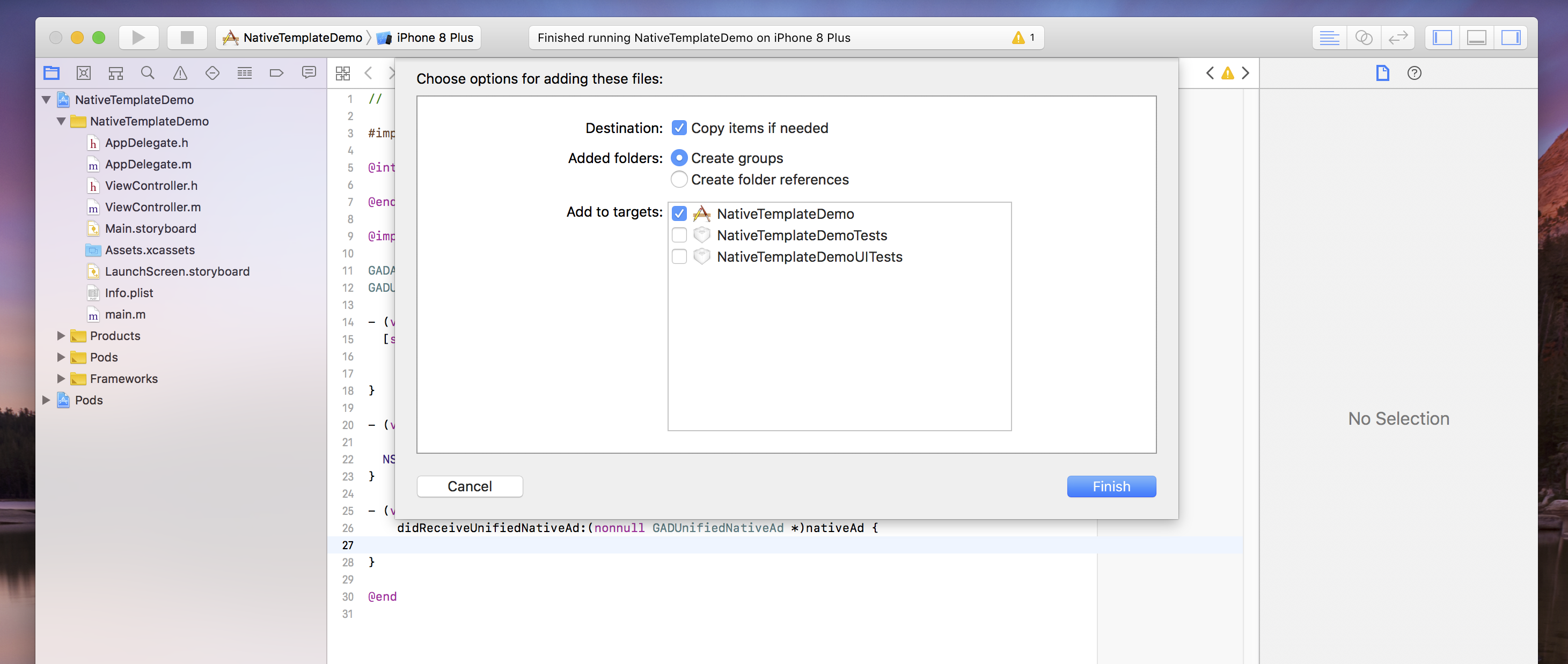
Использование шаблонов нативной рекламы
После добавления папки в проект и включения соответствующего класса в файл, следуйте этому руководству, чтобы использовать шаблон. Обратите внимание, что изменить свойства шрифта и стиля можно только с помощью словаря стилей — в настоящее время мы переопределяем любые стили, заданные в самом файле xib.
Objective-C
/// Step 1: Import the templates that you need.
#import "NativeTemplates/GADTSmallTemplateView.h"
#import "NativeTemplates/GADTTemplateView.h"
...

// STEP 2: Initialize your template view object.
GADTSmallTemplateView *templateView =
    [[NSBundle mainBundle] loadNibNamed:@"GADTSmallTemplateView" owner:nil options:nil]
      .firstObject;

// STEP 3: Template views are just GADNativeAdViews.
_nativeAdView = templateView;
nativeAd.delegate = self;

// STEP 4: Add your template as a subview of whichever view you'd like.
// This must be done before calling addHorizontalConstraintsToSuperviewWidth.
// Please note: Our template objects are subclasses of GADNativeAdView so
// you can insert them into whatever type of view you’d like, and don’t need to
// create your own.
[self.view addSubview:templateView];

// STEP 5 (Optional): Create your styles dictionary. Set your styles dictionary
// on the template property. A default dictionary is created for you if you do
// not set this. Note - templates do not currently respect style changes in the
// xib.

NSString *myBlueColor = @"#5C84F0";
NSDictionary *styles = @{
    GADTNativeTemplateStyleKeyCallToActionFont : [UIFont systemFontOfSize:15.0],
    GADTNativeTemplateStyleKeyCallToActionFontColor : UIColor.whiteColor,
    GADTNativeTemplateStyleKeyCallToActionBackgroundColor :
        [GADTTemplateView colorFromHexString:myBlueColor],
    GADTNativeTemplateStyleKeySecondaryFont : [UIFont systemFontOfSize:15.0],
    GADTNativeTemplateStyleKeySecondaryFontColor : UIColor.grayColor,
    GADTNativeTemplateStyleKeySecondaryBackgroundColor : UIColor.whiteColor,
    GADTNativeTemplateStyleKeyPrimaryFont : [UIFont systemFontOfSize:15.0],
    GADTNativeTemplateStyleKeyPrimaryFontColor : UIColor.blackColor,
    GADTNativeTemplateStyleKeyPrimaryBackgroundColor : UIColor.whiteColor,
    GADTNativeTemplateStyleKeyTertiaryFont : [UIFont systemFontOfSize:15.0],
    GADTNativeTemplateStyleKeyTertiaryFontColor : UIColor.grayColor,
    GADTNativeTemplateStyleKeyTertiaryBackgroundColor : UIColor.whiteColor,
    GADTNativeTemplateStyleKeyMainBackgroundColor : UIColor.whiteColor,
    GADTNativeTemplateStyleKeyCornerRadius : [NSNumber numberWithFloat:7.0],
};

templateView.styles = styles;

// STEP 6: Set the ad for your template to render.
templateView.nativeAd = nativeAd;

// STEP 7 (Optional): If you'd like your template view to span the width of your
// superview call this method.
[templateView addHorizontalConstraintsToSuperviewWidth];
[templateView addVerticalCenterConstraintToSuperview];
Ключи словаря стилей
Самый быстрый способ настроить шаблоны — создать словарь со следующими ключами:
Objective-C
/// Call to action font. Expects a UIFont.
GADTNativeTemplateStyleKeyCallToActionFont

/// Call to action font color. Expects a UIColor.
GADTNativeTemplateStyleKeyCallToActionFontColor;

/// Call to action background color. Expects a UIColor.
GADTNativeTemplateStyleKeyCallToActionBackgroundColor;

/// The font, font color and background color for the first row of text in the
/// template.

/// All templates have a primary text area which is populated by the native ad's
/// headline.

/// Primary text font. Expects a UIFont.
GADTNativeTemplateStyleKeyPrimaryFont;

/// Primary text font color. Expects a UIFont.
GADTNativeTemplateStyleKeyPrimaryFontColor;

/// Primary text background color. Expects a UIColor.
GADTNativeTemplateStyleKeyPrimaryBackgroundColor;

/// The font, font color and background color for the second row of text in the
/// template.

/// All templates have a secondary text area which is populated either by the
/// body of the ad, or by the rating of the app.

/// Secondary text font. Expects a UIFont.
GADTNativeTemplateStyleKeySecondaryFont;

/// Secondary text font color. Expects a UIColor.
GADTNativeTemplateStyleKeySecondaryFontColor;

/// Secondary text background color. Expects a UIColor.
GADTNativeTemplateStyleKeySecondaryBackgroundColor;

/// The font, font color and background color for the third row of text in the
/// template. The third row is used to display store name or the default
/// tertiary text.

/// Tertiary text font. Expects a UIFont.
GADTNativeTemplateStyleKeyTertiaryFont;

/// Tertiary text font color. Expects a UIColor.
GADTNativeTemplateStyleKeyTertiaryFontColor;

/// Tertiary text background color. Expects a UIColor.
GADTNativeTemplateStyleKeyTertiaryBackgroundColor;

/// The background color for the bulk of the ad. Expects a UIColor.
GADTNativeTemplateStyleKeyMainBackgroundColor;

/// The corner rounding radius for the icon view and call to action. Expects an
/// NSNumber.
GADTNativeTemplateStyleKeyCornerRadius;
Часто задаваемые вопросы
- Почему при попытке создать экземпляр шаблонного объекта возникает исключение?
- Это может произойти, если вы изменили размер представления в файле xib, но не изменили размер фрейма, созданного в методе "setup" подкласса.
- Как я могу дополнительно настроить эти шаблоны?
- Эти шаблоны представляют собой просто файлы xib с соответствующими объектами представления, как и любые другие файлы xib и пользовательские классы представления, к которым вы, возможно, привыкли в разработке под iOS. Если вы предпочитаете создавать нативную рекламу с нуля, ознакомьтесь с нашим руководством по расширенным нативным решениям .
- Почему мои стили не обновляются, когда я устанавливаю их в файле xib?
- В настоящее время мы переопределяем все стили xib-файлов с помощью словаря стилей по умолчанию в
GADTTemplateView.m.
Способствовать
Мы создали Native Templates, чтобы помочь вам быстро разрабатывать нативную рекламу. Мы будем рады, если вы внесёте свой вклад в наш репозиторий GitHub , добавив новые шаблоны или функции. Отправьте нам запрос на слияние, и мы его рассмотрим.