

Google Workspace Model Context Protocol (MCP) sunucuları, yapay zeka ajanı e-posta gönderme, takvim etkinliğini değiştirme, dosya güncelleme veya çöp kutusuna taşıma ya da veri ve meta veri okuma gibi işlemleri gerçekleştirmeden önce kullanıcı verilerini korumak için sunucu tarafından yönetilen insan müdahalesi gerektiren onayları kullanır. Bu işlemler, kullanıcı ve yönetici politikalarına da tabidir. Sunucular, bu onayları MCP form modu sorgulaması kullanarak ister.
Örneğin, Gmail iletisi göndermek için onay iletişim kutusu aşağıdaki gibi görünebilir:
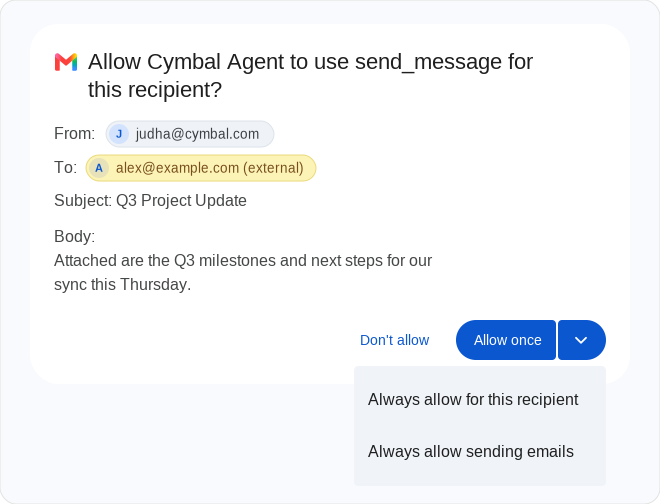
Bu kılavuzda, /mcp/v1 uç noktasına nasıl bağlanacağınız, en iyi kullanıcı deneyimi için onay iletişim kutularını nasıl tasarlayacağınız ve durum bilgisi olmayan form alma protokolünü bir MCP ana makinesinde, MCP istemcisinde veya temsilci düzeneğinde nasıl uygulayacağınız açıklanmaktadır.
Başlamadan önce
MCP form elicitation'ı uygulamadan veya yapılandırmadan önce ön koşulları tamamlayın, MCP ana makinenizin veya istemcinizin özel elicitation desteğine ihtiyacı olup olmadığını belirleyin ve sunucu uç noktalarını inceleyin.
Ön koşullar
Özel bir MCP ana makinesinde veya istemcisinde form oluşturma özelliğini uygulamadan önce aşağıdaki kurulum şartlarını tamamlayın:
- API'leri ve MCP sunucularını aynı Google Cloud projesinde etkinleştirin: OAuth 2.0 istemci kimliğinizi, hedef Google Workspace API'lerini ve MCP sunucusu uç noktalarını etkinleştirdiğiniz Google Cloud projesinde oluşturun. OAuth istemcisini oluştururken Bu istemciyi yapay zeka destekli bir temsilci için kullan'ı seçin. Talimatların tamamı için Google Workspace MCP sunucularını yapılandırma başlıklı makaleyi inceleyin.
- Hedef araçlarınız için gerekli OAuth 2.0 kapsamlarını isteyin:
tools/callile bir araç çağırmak, ilgili araç için gereken kapsamı içeren bir OAuth 2.0Bearererişim jetonu gerektirir.tools/list, kullanılabilir araçları jeton kapsamlarından bağımsız olarak döndürür. Her aracın gerekli OAuth kapsamları için sunucunun MCP referansına genel bakış sayfasını kontrol edin.
Form elicitation uygulamanız gerekip gerekmediğini kontrol etme
Temsilcinizin tüm Google Workspace araçlarına ve sonuçlarına erişebilmesi için MCP form elicitation ile /mcp/v1 uç noktasına bağlanmanızı öneririz. Kod yazmanız gerekip gerekmediği, MCP ana makinenizin ve MCP istemcinizin nasıl oluşturulduğuna bağlıdır:
- Önceden oluşturulmuş bir MCP ana makinesini yapılandırma: MCP form elicitation'ı destekleyen Google Antigravity veya Claude Desktop gibi önceden oluşturulmuş bir MCP ana makine uygulaması bağlıyorsanız form elicitation kodu yazmanız gerekmez:
/mcp/v1uç noktasına bağlanın. Kurulum adımları için Google Workspace MCP sunucularını yapılandırma başlıklı makaleyi inceleyin.- Kullanıcılardan aynı işlem için iki kez onay istenmemesi amacıyla, barındırıcının yerleşik yerel araç onay ayarını
/mcp/v1üzerindeki Google Workspace MCP sunucuları için Her zaman izin ver olarak ayarlayın. - Önceden oluşturulmuş MCP ana makineniz henüz form oluşturmayı desteklemiyorsa sınırlı
/mcp/v1selfyedek uç noktasına bağlanabilirsiniz. Bu uç nokta, form oluşturma olmadan kullanışlı olan araçları gösterir ancak belirli çağrılar için yine de onay gerekebilir.
- MCP istemci SDK'sını veya temsilci çerçevesini MCP ana makinenize entegre etme: Protokol katmanında form istemeyi zaten işleyen Agent Development Kit (ADK) gibi bir MCP istemci kitaplığı veya temsilci çerçevesi kullanıyorsanız isteme işleyicisini MCP ana makinenizin kullanıcı arayüzüne veya CLI yüzeyine bağlamanız gerekir.
/mcp/v1üzerinde en iyi kullanıcı deneyimi için bu kılavuzdaki onay kullanıcı arayüzü önerilerini uygulayın. - Özel bir MCP istemcisi ve ana makinesi oluşturma: Kendi MCP istemcinizi ve ana makine entegrasyonunuzu oluşturuyorsanız
/mcp/v1'e bağlanmak için hem durum bilgisiz form alma protokolünü hem de bu kılavuzdaki onay kullanıcı arayüzü önerilerini uygulayın.
Sunucu uç noktaları
Genel kullanıma sunulan Google Workspace MCP sunucuları ve Evrensel Arama MCP sunucusu, birincil /mcp/v1 uç noktasını ve sınırlı bir /mcp/v1self yedek uç noktasını sunar:
| Uç nokta | Sunucu URL'leri | Form doldurma şartı | Mevcut araçlar |
|---|---|---|---|
/mcp/v1 |
|
Önerilen birincil uç nokta. mode: "form" ile kullanın.
|
Varsayılan politika kapsamında her zaman kullanıcı onayı gerektiren araçlar da dahil olmak üzere sunucu için tüm araçları ve tam sonuç kümelerini gösterir. |
/mcp/v1self |
|
Yedek uç nokta. Politikaya ve hedef kaynaklara bağlı olarak belirli çağrılar için form oluşturma gerekebilir. |
Varsayılan politika kapsamında her zaman onay gerektiren araçları atlar ve yalnızca form oluşturmadan kullanışlı olan araçları (ör. update_doc) gösterir. list_threads gibi listeleme ve arama yöntemleri, tam erişim istemek yerine yalnızca onay olmadan erişilebilen sonuçların alt kümesini döndürür.
|
Mümkün olduğunda form tabanlı bilgi isteme ile /mcp/v1 kullanın ve /mcp/v1self'i form tabanlı bilgi isteme desteği ekleyemediğiniz MCP ana makineleri için ayırın. Bir istemci, form toplama desteğini beyan etmeden her iki uç noktada da kullanıcı onayı gerektiren bir şekilde bir aracı çağırırsa sunucu çağrıyı engeller ve MissingRequiredClientCapability hatası döndürür.
Her hizmet için /mcp/v1 ve /mcp/v1self üzerinde hangi araçların kullanılabildiğini görmek için sunucunun araç referansına genel bakış sayfasını inceleyin:
- Gmail MCP referansı
- Drive MCP referansı
- Dokümanlar MCP referansı
- E-Tablolar MCP referansı
- Slaytlar MCP referansı
- Takvim MCP referansı
- Chat MCP referansı
- Evrensel Arama MCP referansı
Form doldurmanın işleyiş şekli
Google Workspace MCP sunucuları, 2026-07-28 MCP Elicitation spesifikasyonuna dayalı, durum bilgisi olmayan, tek bağlantılı bir istek ve yeniden deneme akışı kullanır.
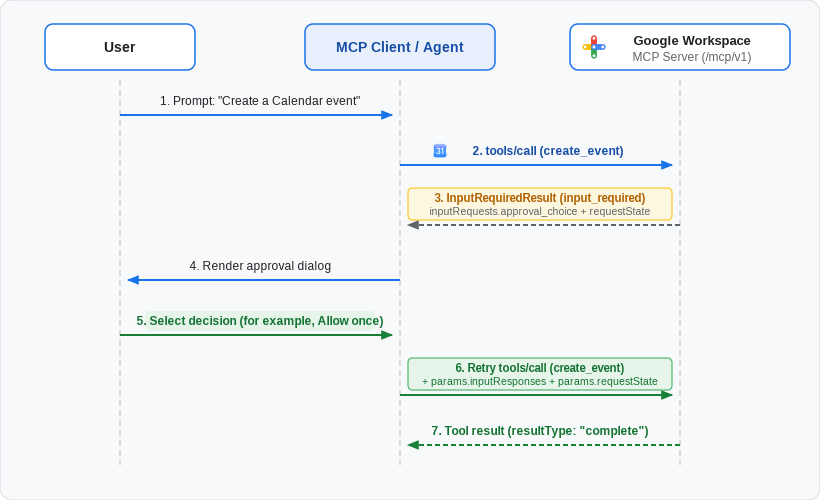
Form elicitation yaşam döngüsü şu adımları izler:
- Kullanıcı istemi: Kullanıcı, temsilciden takvim etkinliği oluşturma gibi bir işlem yapmasını ister.
- İlk
tools/callisteği: MCP istemcisi,create_eventgibi bir araç için/mcp/v1uç noktasına birtools/callisteği gönderir veparams._metaiçindeelicitationözelliğini bildirir. InputRequiredResultİşlem Gerekli: İstenen işlem için kullanıcı onayı gerektiğinde sunucu, aracı çalıştırmadan önce yürütmeyi duraklatır. Sunucu,resultType: "input_required"içeren birresultnesnesi,mode: "form"içeren birelicitation/createisteği barındıran ve"approval_choice"ile anahtarlanmış birinputRequestsharitası ve opak birrequestStatedizesi döndürür.- Onay iletişim kutusu: MCP istemcisi; hedef Google Workspace ürününü ve aracını, Markdown onay mesajını, karar sorusunu ve
enumileenumNamesarasından izin verilen seçenekleri gösteren bir onay iletişim kutusu oluşturur. - Kullanıcı kararı: Kullanıcı, Bir kez izin ver veya İzin verme gibi bir onay seçeneği belirler.
inputResponsesverequestStateiletools/callişlemini yeniden deneyin: MCP istemcisi, aynınameveargumentsaracının yanı sıra kullanıcının"approval_choice"için seçtiği tercihi içeren üst düzeyparams.requestStateveparams.inputResponsesalanlarıyla ikinci birtools/callisteği gönderir.- Araç yürütme sonucu: Sunucu,
requestStateöğesinin ilk çağrıdaki tam araç bağımsız değişkenlerine bağlı olduğunu doğrular, kullanıcının kararını değerlendirir, araç çağrısını yürütür veya sonlandırır veresultType: "complete"ile son birresultdöndürür.
Onay istendiğinde
Bir araç çağrısının elicitation/create sorgulaması tetikleyip tetiklemeyeceği, Google Workspace MCP sunucusu tarafından sistem, kullanıcı ve yönetici yönetim politikalarına göre dinamik olarak belirlenir. Politika değerlendirmesinde aşağıdaki faktörler dikkate alınabilir:
- İşlem türü: Verileri bir kitleyle paylaşan veya paylaşılan kaynakları değiştiren yazma işlemleri, kullanıcı veya yönetici politikası tarafından izin verilmediği sürece varsayılan olarak kullanıcı onayı gerektirir. Özel dosya oluşturma gibi kendi kendine yazma işlemleri ise varsayılan olarak onay olmadan yürütülür. Çöp kutusuna taşıma işlemleri her zaman kalıcı onay olmadan her çağrı için onay gerektirir. Okuma veya meta veri işlemleri de kullanıcı ya da yönetici politikasına bağlı olarak onay gerektirebilir.
- İçerik sahipliği ve görünürlük: Diğer kullanıcılara ait olan veya kullanıcının kuruluşu dışında paylaşılan dosyalara erişmek ya da bu dosyaları değiştirmek için onay gerekebilir.
- Kuruluş dışı alıcılar: Kullanıcının alanı dışına mesaj göndermek, dosya paylaşmak veya katılımcı davet etmek için genellikle açık onay gerekir.
- Kullanıcı ve yönetici tercihleri: Önceki işlemlerden kaydedilen onay tercihleri veya alan genelindeki yönetici kuralları, belirli araçlar için onay gerektirebilir veya onayı atlayabilir.
Politika değerlendirmesi her çağrıda sunucu tarafında gerçekleştiğinden istemciniz, herhangi bir tools/call çağrısında InputRequiredResult yanıtını işlemeye hazır olmalıdır. Araç hassasiyet kurallarını veya önbellek onay kararlarını hiçbir zaman istemciye sabit kodlamayın.
Onay seçenekleri referansı
requestedSchema.properties.approval_choice içinde sunucu, mevcut istek için kullanılabilir seçenekleri temsil eden paralel enum ve enumNames dizilerini döndürür. Google Workspace MCP sunucularında aşağıdaki enum değerleri desteklenir:
enum değer |
İngilizce varsayılan enumNames etiketi |
Yürütmeye izin verir | Sunulma zamanı ve davranış |
|---|---|---|---|
ALLOW_ONCE |
Bir kereliğine izin ver | Evet | Her onay isteminde sunulur. Kalıcı bir kural kaydetmeden mevcut araç çağrısını bir kez çalıştırır. |
DENY_ONCE |
İzin verme | Hayır |
Her onay isteminde sunulur. Kalıcı bir kural kaydetmeden mevcut araç çağrısını UserDeniedAction hatasıyla sonlandırır.
|
ALLOW_TOOL_ALWAYS |
Bu araca her zaman izin ver | Evet | Kullanıcı ve yönetici politikaları, araç genelinde kalıcı onaya izin verdiğinde sunulur. Mevcut çağrıyı çalıştırır ve aynı temsilciden aynı araca yapılacak gelecekteki çağrıları önceden onaylar. |
ALLOW_RESOURCE_ALWAYS |
Bu dosya/klasör/Drive/e-posta/etkinlik/alan/sohbet/grup sohbeti/görev/öğe için her zaman izin verilir | Evet | Aynı türden en fazla 100 kaynağı değiştirirken veya bu kaynaklara erişirken sunulur. Çağrı birden fazla kaynağı hedeflediğinde Bu dosyalar için her zaman izin verilir gibi çoğul ifadeler kullanır. Mevcut çağrıyı çalıştırır ve aynı aracıdan aynı kaynak kimliklerine gelen gelecekteki çağrıları önceden onaylar. |
ALLOW_AUDIENCE_ALWAYS |
Bu alıcılar için her zaman izin verilir | Evet | En fazla 100 alıcıyı hedefleyen gönderme, paylaşma ve davet etme işlemleri için sunulur. Mevcut aramayı çalıştırır ve aynı temsilciden aynı alıcı grubuna yapılacak gelecekteki aramaları önceden onaylar. |
ALLOW_OWNER_ALWAYS |
Bu sahip/sahipler için her zaman izin ver | Evet | En fazla 3 farklı sahibe ait öğelere dokunan okuma veya temellendirme istemlerinde sunulur. Mevcut çağrıyı çalıştırır ve aynı temsilciden gelen gelecekteki çağrıları bu kullanıcılara ait öğeler için önceden onaylar. |
Her bir InputRequiredResult, yalnızca ilgili araç çağrısı için geçerli olan seçeneklerin alt kümesini içerir:
- Yıkıcı ve çöp kutusuna taşıma işlemleri: Kaynakları kalıcı olarak silen veya çöp kutusuna taşıyan işlemler ya da her çağrıda onay gerektiren bir yönetici politikası tarafından yönetilen işlemler yalnızca
ALLOW_ONCEveDENY_ONCEseçeneklerini sunar. - Kapsamlı işlemler: Kalıcı onaylara izin verildiğinde sunucu
ALLOW_ONCE, geçerli dar kapsam (ör.ALLOW_AUDIENCE_ALWAYSveyaALLOW_RESOURCE_ALWAYS),ALLOW_TOOL_ALWAYSveDENY_ONCEdeğerlerini döndürür.
Düğme değerlerini sabit kodlamak yerine her zaman geçerli istek için enum ve enumNames içinde döndürülen tam seçenekleri oluşturun.
En iyi kullanıcı deneyimi için önerilen uygulamalar
Form oluşturmayı destekleyen standart MCP istemcileri, /mcp/v1 ile kullanıma hazır olarak çalışır. Ancak genel form oluşturucular, tek seçimli kararları genellikle ayrı bir Gönder düğmesiyle eşleştirilmiş bir radyo grubu veya açılır menü olarak gösterir. Bu da fazladan tıklama gerektirir ve hedef Google Workspace uygulaması bağlamını gizler.
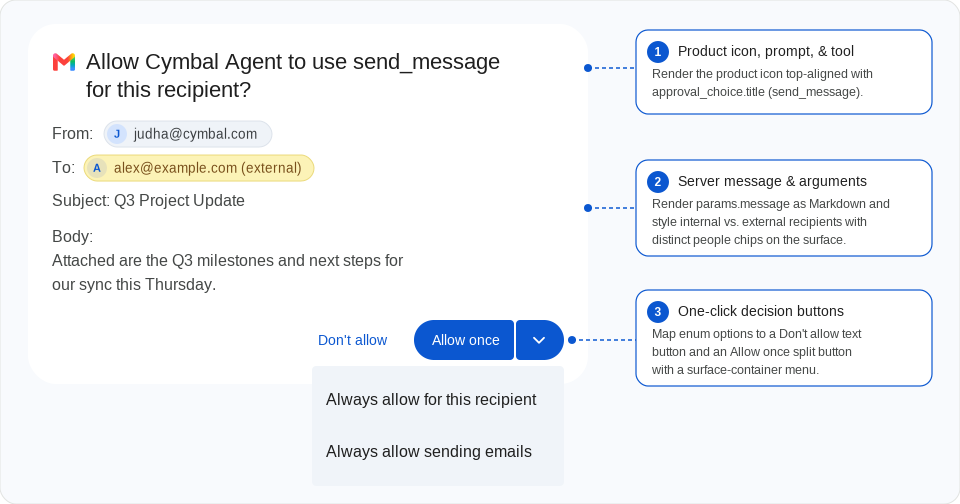
Form doldurma konusunda en iyi kullanıcı deneyimini sunmak için MCP istemcinizde aşağıdaki beş öneriyi uygulayın. 1 ila 3 numaralı öneriler, aşağıdaki onay iletişim kutusu resmindeki numaralı açıklama metinlerine karşılık gelir:
1. Ürün adlarını, simgelerini ve araçlarını gösterme
Kullanıcılar, temsilcinin hangi Google Workspace ürününü ve aracını çağırmak istediğini hemen görebilmelidir:
- MCP sunucusunun başlatma işleminden elde edilen
serverInfometa verilerini veyaserver/discoverya dacalendarmcp.googleapis.comgibi istek ana makine adını Google Workspace ürün adı ve simgesiyle eşleyin. InputRequiredResultüzerindekititle,iconsveisConfirmationgibi_metasunum ipuçlarını isteğe bağlı geliştirmeler olarak değerlendirin. Üretim Google Workspace MCP sunucuları henüz bu_metaalanlarını yayınlamadığından kullanıcı arayüzünüz bu alanlara bağlı olmamalıdır.- Kullanıcıların
create_draftvecreate_eventgibi işlemler arasındaki farkı anlayabilmesi içinparams.nameparametresindeki hedef aracın adını gösterin.
2. Sunucu mesajlarını ve enumNames oluşturma
İstemci sunum katmanınızı basit tutun ve sunucu tarafından sağlanan onay içeriğini doğrudan oluşturun:
params.messageöğesini Markdown olarak oluşturun veapproval_choice.titleöğesini gösterin: Google Workspace MCP sunucuları, işlem ayrıntılarınıinputRequests.approval_choice.params.messageiçinde Markdown olarak biçimlendirir verequestedSchema.properties.approval_choice.titleiçinde yerelleştirilmiş bir onay sorusu sağlar. Ham Markdown simgelerini görüntülemek veya her araç için özel bağımsız değişken biçimlendirme mantığı yazmak yerinemessageifadesini doğrudan güvenli bir Markdown oluşturucuyla oluşturun vetitleifadesini işlem düğmelerinin üzerinde net bir şekilde gösterin.enumdeğerlerinienumNamesetiketleriyle eşleştirin:requestedSchema.properties.approval_choicedeğerini dinamik olarak inceleyin.enumiçindeki her tanımlayıcıyı,enumNamesiçindeki aynı dizinde bulunan, kullanıcıların okuyabileceği etiketle eşleştirin.oneOfkullanan diğer MCP sunucularıyla etkileşim kuruyorsanız JSON şemasıoneOfgirişlerini kullanın.
3. Tek tıklamayla çalışan düğmelerle karar vermeyi kolaylaştırın
requestedSchema tek bir enum özelliği içeriyorsa ayrı bir Gönder tıklaması gerektiren radyo düğmesi listesi veya açılır menü oluşturmaktan kaçının:
Allow onceveDon't allowgibi iki seçenek: Yan yana iki düğme gösterilir. Bu düğmelerden birini tıkladığınızda yeniden deneme isteği hemen gönderilir.- Birden fazla izin verme seçeneği: Sunucu
ALLOW_ONCE,ALLOW_AUDIENCE_ALWAYSveyaALLOW_TOOL_ALWAYSgibi bir ya da daha fazla kalıcı izin kapsamı veDENY_ONCEdöndürdüğünde, varsayılan olarak Bir kez izin ver seçeneğini içeren birincil bir bölünmüş düğme oluşturun. Bu düğmede, ek izin verme seçenekleri için bir açılır menü ve ayrı bir İzin verme düğmesi bulunmalıdır.
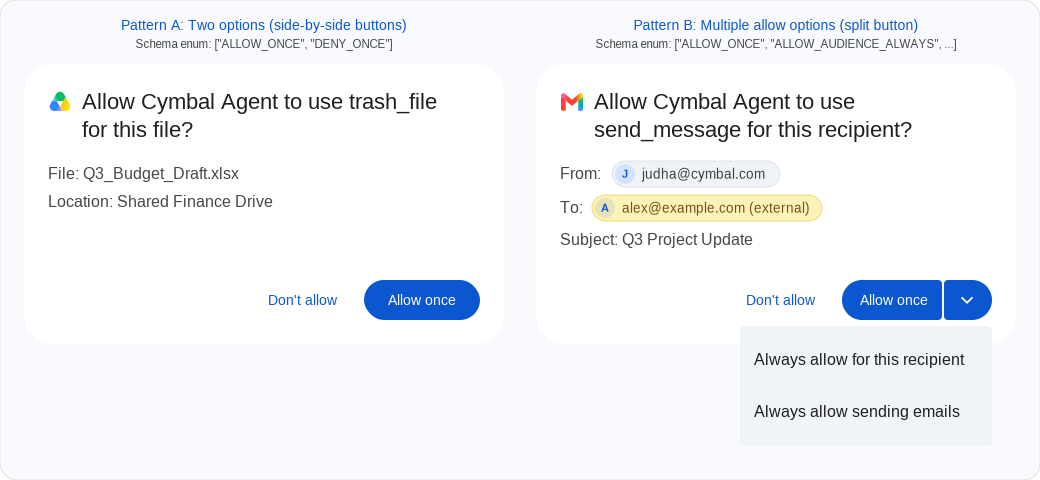
A modelinde, yıkıcı bir Drive işlemi yalnızca ALLOW_ONCE ve DENY_ONCE döndürür. İstemci, bunları İzin verme ve Bir kez izin ver için yan yana iki düğme olarak gösterir. B modelinde Gmail işlemi ALLOW_ONCE, ALLOW_AUDIENCE_ALWAYS, ALLOW_TOOL_ALWAYS ve DENY_ONCE döndürür. İstemci, bunları İzin verme düğmesi ve menüsünde kalıcı izin seçeneklerini gösteren Bir kez izin ver bölünmüş düğmesi olarak gösterir.
4. /mcp/v1 cihazında yinelenen istemleri önleme
Birçok MCP ana makinesi, harici bir araç yürütmeden önce yerleşik bir yerel onay istemi içerir. Form tabanlı bilgi toplama etkinleştirilmiş Google Workspace MCP sunucuları çağrılırken yerel ön yürütme istemleri, sunucu kendi politikaya duyarlı bilgi toplama sorgusunu zorunlu kıldığı için gereksiz bir çift istem deneyimi oluşturur.
- Form toplama ile önceden oluşturulmuş bir MCP ana makinesi yapılandırıyorsanız: Ana makinenin
/mcp/v1üzerindeki Google Workspace MCP sunucuları için yerel araç onay ayarını Her zaman izin verilir olarak ayarlayın ve sunucu tarafından başlatılan toplama iletişim kutusunu kullanın. Barındırıcınız form oluşturmayı desteklemiyorsa ve/mcp/v1selfile bağlantı kuruyorsa sunucu tarafı onayı tetiklemeyen çağrılar için istemci tarafı istemler istiyorsanız yerel araç onaylarını etkin durumda bırakın. - MCP ana makinesi oluşturuyorsanız:
*mcp.googleapis.comvepeople.googleapis.comiçin form çıkarma etkinleştirildiğinde ana makinenizin genel arama öncesi onay iletişim kutusunu gizleyin (ör.gmailmcp.googleapis.com,calendarmcp.googleapis.com,drivemcp.googleapis.comveworkspacemcp.googleapis.com). Yalnızca sunucuresultType: "input_required"ileInputRequiredResultdöndürdüğünde kullanıcıdan istemde bulunun.
5. Araçlar ve retler için temsilci davranışını yönlendirme
Akıl yürütme modelleri, insan müdahalesi gerektiren onay akışlarını iki şekilde yanlış yorumlayabilir:
- Yazma araçlarından önceden kaçınma: Bir model,
send_messagegibi bir yazma aracını çağırmanın kullanıcı incelemesi olmadan hemen yürütüldüğünü varsayarsa kullanıcı e-posta göndermek istese bile model,create_draftgibi bir taslak aracına geri dönebilir. - Reddedildikten sonra alternatif yazma araçlarıyla yeniden deneme: Kullanıcı bir onay iletişim kutusunda İzin verme'yi tıklarsa ve sunucu
UserDeniedActionhata sonucu döndürürse model, reddi geçici bir araç hatası olarak değerlendirebilir ve başka bir yazma aracı kullanarak aynı hedefi gerçekleştirmeye çalışabilir. Bu da istenmeyen ikinci bir onay istemini tetikler.
Her iki sorunu da önlemek için temsilcinizin sistem istemine aşağıdaki talimatları ekleyin:
İstem
When calling Google Workspace MCP tools:
1. Select the tool that directly matches the user's intent (for example,
   use send_message when asked to send an email). Sensitive tools
   automatically pause for user confirmation through MCP form elicitation
   before executing.
2. If a tool call fails because the user denied, declined, or canceled the
   approval request, stop immediately and acknowledge the user's decision.
   Do not retry the same action or call an alternative write tool unless
   the user explicitly asks you to do so in a new message.
Taşıma ve durum bilgisiz protokol şartları
Google Workspace MCP sunucuları, durum bilgisi olmayan Streamable HTTP üzerinden çalışır. Özel bir MCP istemcisi oluştururken her istekte aşağıdaki kablo gereksinimlerine uyun:
- HTTP üstbilgileri:
/mcp/v1adresine gönderilen tümPOSTisteklerine aşağıdaki üstbilgileri ekleyin:Authorization: Bearer ACCESS_TOKENContent-Type: application/jsonAccept: application/json, text/event-streamMCP-Protocol-Version: 2026-07-28Accept-Language: BCP_47_LANGUAGE_TAGkullanarak onay mesajlarını, soruları veenumNamesetiketlerini kullanıcının tercih ettiği dile (ör.es-419, es;q=0.9, en;q=0.8) yerelleştirebilirsiniz. Atlanırsa metin varsayılan olaraken-USolur.
- Yanıt içerik türleri: Sunucuya ve istek türüne bağlı olarak HTTP yanıt gövdesi,
Content-Type: application/jsonile standart JSON olarak veya JSON-RPC yüklerinindata: {...}satırlarında göründüğüContent-Type: text/event-streamile sunucu tarafından gönderilen etkinlikler (SSE) olarak biçimlendirilebilir. HTTP aktarım ayrıştırıcınız her iki biçimi de kabul etmelidir. - Durumsuz keşif: Google Workspace MCP sunucuları, durum bilgisi olan
initializeoturumlarını sürdürmez. Başlangıçta sunucu meta verilerini ve özelliklerini almak için"method": "server/discover"ve"params": {}ile bir JSON-RPC isteği gönderin. Bu istek, sunucu meta verileriniresult._meta["io.modelcontextprotocol/serverInfo"]içinde döndürür.isConfirmation,titleveiconsgibi özel onay_metaipuçları henüz üretimInputRequiredResultyanıtlarında yayınlanmadığından_metasunum alanlarını her zaman isteğe bağlı olarak değerlendirin veserverInfoveya sunucu ana makine adına geri dönün. - İstek başına
_metaözellikleri: Aktarım durum bilgisi içermediğinden hertools/listvetools/callisteğindeparamsiçine_metaekleyin ve aşağıdaki anahtarları kullanın:"io.modelcontextprotocol/protocolVersion": "2026-07-28""io.modelcontextprotocol/clientInfo":{"name": "YOUR_APP_NAME","version": "VERSION"}"io.modelcontextprotocol/clientCapabilities":{"elicitation": {"form": {}}}
Hata işleme ve parametre bağlama
Bir araç çağrısı engellendiğinde veya yeniden deneme doğrulanamadığında sunucu, hata kategorisine bağlı olarak araç düzeyinde bir hata sonucu ya da üst düzey bir JSON-RPC hata nesnesi döndürür:
UserDeniedActionveAdminPolicyBlock: Bir kullanıcı onay istemini reddettiğinde veya bir yönetici politikası işlemi engellediğinde sunucu,"resultType": "complete","isError": trueveresult.contentiçinde yerelleştirilmiş bir hata mesajı içeren bir JSON-RPCresultdöndürür. Hizmet ve ortam için etkinleştirildiğinde sunucu,result._meta["google.com/error"]içinde yapılandırılmış hata meta verilerini de içerir.result._meta["google.com/error"], hizmet ve ortama göre kısıtlandığından istemciniz,result._meta["google.com/error"]olmadığında hata mesajınıresult.contentüzerinden okumaya geri dönmelidir:UserDeniedAction: KullanıcıDENY_ONCEseçeneğini belirlediğinde, onay formunu reddettiğinde veya iptal ettiğinde döndürülür. Varsayılan İngilizce mesaj şöyledir:"Action canceled. The user declined the confirmation request."AdminPolicyBlock: Bir kuruluş yöneticisi politikası, temsilcinin işlemi gerçekleştirmesini yasakladığında döndürülür. Varsayılan İngilizce mesaj"Action could not be completed. Your administrator has blocked third-party agents from performing this action."şeklindedir.
JSON
{ "jsonrpc": "2.0", "id": 3, "result": { "resultType": "complete", "isError": true, "content": [ { "type": "text", "text": "Action canceled. The user declined the confirmation request." } ], "_meta": { "google.com/error": { "code": 400, "message": "Action canceled. The user declined the confirmation request.", "status": "FAILED_PRECONDITION", "details": [ { "@type": "type.googleapis.com/google.rpc.ErrorInfo", "reason": "UserDeniedAction", "domain": "mcp.googleapis.com" } ] } } } }MissingRequiredClientCapability: Bir istemci,_meta["io.modelcontextprotocol/clientCapabilities"]içinde form oluşturma desteğini beyan etmeden/mcp/v1veya/mcp/v1selfüzerinde kullanıcı onayı gerektirecek şekilde bir araç çağırdığında döndürülür. Sunucu bu hatayı,-32021koduna sahip üst düzey bir JSON-RPCerrornesnesine veerror.data.requiredCapabilitiesiçinde gerekli özellik nesnesine çevirir:JSON
{
  "jsonrpc": "2.0",
  "id": 2,
  "error": {
    "code": -32021,
    "message": "Action could not be completed. This action requires user confirmation, which this client does not support. Use a client that supports form elicitation to perform this action.",
    "data": {
      "requiredCapabilities": {
        "elicitation": {
          "form": {}
        }
      }
    }
  }
}
Parametre bağlama zorunluluğu:
requestStateiçindekirequestBindingjetonu, ilk onay sorgulamasını ilk çağrıda gönderilen tam araca (arguments) kriptografik olarak bağlar. İstemci, yeniden deneme çağrısındaparams.argumentsiçindeki herhangi bir alanı değiştirirse veya hatalı biçimlendirilmiş ya da ilişkisiz birparams.requestStateiletir ise sunucu, geçersiz onayı yok sayar ve yeni birInputRequiredResultsorgulaması döndürür ya da istemciyeinputResponsesolmadan yeniden deneme talimatı veren bir geçersiz parametre veya başarısız ön koşul hatası döndürür.
Örnek uygulama
Aşağıdaki uçtan uca açıklamada, bir MCP istemcisinin Takvim create_event aracını nasıl çağırdığı, sunucunun onay istemini bir tarayıcı kullanıcı arayüzünde veya terminal CLI'sında nasıl oluşturduğu ve kullanıcının kararını TypeScript ve Python'da nasıl gönderdiği gösterilmektedir. Ardından, kodlama temsilcileri için yeniden kullanılabilir bir temsilci becerisi gösterilmektedir.
Müşteri onayı yüzeyleri
Tarayıcı tabanlı bir MCP istemcisinde TypeScript uygulaması, Takvim simgesini, sunucu ana makine adını, araç adını, sunucudan oluşturulan Markdown message önizlemesini, onay sorusunu, İzin verme düğmesini ve Bir kez izin ver bölünmüş düğmesini gösteren görsel bir onay kartı oluşturur:
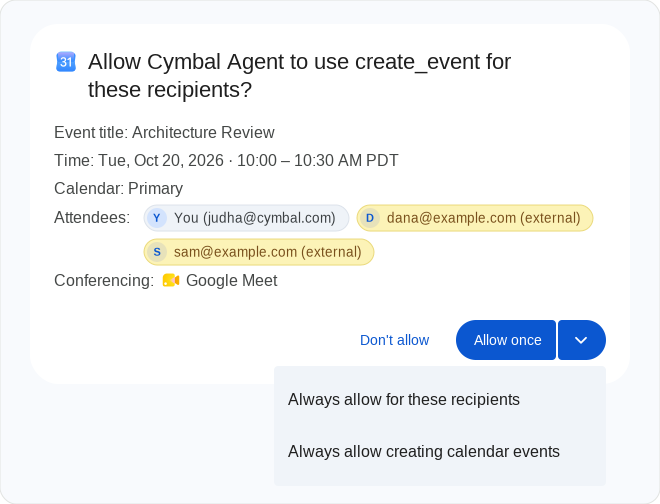
Terminal tabanlı bir MCP istemcisinde Python CLI uygulaması, aynı InputRequiredResult yükünü etkileşimli numaralı bir istem olarak oluşturur:
KSA
=== Google Calendar (create_event) ===
Architecture Review
Tue, Oct 20 · 10:00 - 10:30 AM PDT · 🟢 No calendar conflicts
You, dana@example.com, sam@example.com
Conferencing: Google Meet

Allow Cymbal Agent to use create_event for these recipients?
  [1] Allow once (ALLOW_ONCE)
  [2] Always allow for these recipients (ALLOW_AUDIENCE_ALWAYS)
  [3] Always allow this tool (ALLOW_TOOL_ALWAYS)
  [4] Don't allow (DENY_ONCE)
Enter choice (1-4, or c to cancel):
İlk çağrı ve bilgi toplama yanıtı
İstemci, create_event aracını kullanarak takvim etkinliğini oluşturmak için bir tools/call isteği göndererek başlar:
JSON
{
  "jsonrpc": "2.0",
  "id": 2,
  "method": "tools/call",
  "params": {
    "name": "create_event",
    "arguments": {
      "calendarId": "primary",
      "summary": "Architecture Review",
      "startTime": "2026-10-20T10:00:00",
      "endTime": "2026-10-20T10:30:00",
      "timeZone": "America/Los_Angeles",
      "attendees": [
        {
          "email": "dana@example.com"
        },
        {
          "email": "sam@example.com"
        }
      ],
      "addGoogleMeetUrl": true
    },
    "_meta": {
      "io.modelcontextprotocol/protocolVersion": "2026-07-28",
      "io.modelcontextprotocol/clientInfo": {
        "name": "Cymbal Agent",
        "version": "1.0.0"
      },
      "io.modelcontextprotocol/clientCapabilities": {
        "elicitation": {
          "form": {}
        }
      }
    }
  }
}
Onay gerektiğinde sunucu InputRequiredResult ile yanıt verir:
JSON
{
  "jsonrpc": "2.0",
  "id": 2,
  "result": {
    "resultType": "input_required",
    "inputRequests": {
      "approval_choice": {
        "method": "elicitation/create",
        "params": {
          "mode": "form",
          "message": "**Architecture Review**  \nTue, Oct 20 · 10:00 - 10:30 AM PDT · 🟢 No calendar conflicts  \nYou, dana@example.com, sam@example.com  \n**Conferencing:** Google Meet",
          "requestedSchema": {
            "type": "object",
            "required": ["approval_choice"],
            "properties": {
              "approval_choice": {
                "type": "string",
                "title": "Allow Cymbal Agent to use create_event for these recipients?",
                "enum": [
                  "ALLOW_ONCE",
                  "ALLOW_AUDIENCE_ALWAYS",
                  "ALLOW_TOOL_ALWAYS",
                  "DENY_ONCE"
                ],
                "enumNames": [
                  "Allow once",
                  "Always allow for these recipients",
                  "Always allow this tool",
                  "Don't allow"
                ]
              }
            }
          }
        }
      }
    },
    "requestState": "{\"elicitationId\":\"...\",\"requestBinding\":\"...\"}"
  }
}
InputRequiredResult yanıtı aşağıdaki anahtar alanları içerir:
result.resultType: Sunucu, kullanıcı girişi için yürütmeyi duraklattığında"input_required", araç yürütmeyi tamamladığında ise"complete"olarak ayarlanır.result.inputRequests: İstek tanımlayıcıya göre anahtarlanmış bir harita"approval_choice". Her girişte"method": "elicitation/create"ve"mode": "form"içeren birparamsnesnesi bulunur._metasunum ipuçları:isConfirmation,titleveiconsgibi isteğe bağlı alanlar henüz üretimInputRequiredResultyanıtlarında yayınlanmıyor._metaalanlarını her zaman isteğe bağlı olarak değerlendirin ve ürün adı ile simgesiniserverInfoüzerinden veya yoksa sunucu ana makine adından alın.inputRequests.approval_choice.params.message: Sunucu tarafından oluşturulan işlemin Markdown biçimli önizlemesi veya araç ayrı bir önizleme kartı oluşturmuyorsa onay sorusu.inputRequests.approval_choice.params.requestedSchema:properties.approval_choicetanımı aşağıdaki alanları içeren bir JSON şeması nesnesi:title: Yerelleştirilmiş onay sorusu (ör."Allow Cymbal Agent to use create_event for these recipients?"). İstekte_meta["io.modelcontextprotocol/clientInfo"].namesağladığınızda sunucu, uygulamanızın adını bu soruya dahil eder.enum:ApprovalChoicetanımlayıcılarının sıralı bir dizisi (ör.ALLOW_ONCE,ALLOW_AUDIENCE_ALWAYS,ALLOW_TOOL_ALWAYSveDENY_ONCE).enumNames:enumiçindeki her girişe karşılık gelen, kullanıcılar tarafından okunabilen yerelleştirilmiş etiketlerin paralel dizisi. Örneğin,Allow once,Always allow for these recipients,Always allow this toolveDon't allow.
result.requestState: SunucununelicitationIdve şifrelemerequestBindingjetonunu içeren opak bir JSON kodlu dize. Yeniden deneme çağrısında bu dizeyiparams.requestStateiçinde değiştirmeden tekrarlamanız gerekir.
Yeniden deneme, ret ve iptal yükleri
Kullanıcı bir izin verme seçeneği belirledikten sonra, tamamen aynı name ve arguments ile ikinci bir tools/call isteği gönderin ve requestState ile inputResponses değerlerini params içinde üst düzey alanlar olarak iletin:
JSON
{
  "jsonrpc": "2.0",
  "id": 3,
  "method": "tools/call",
  "params": {
    "name": "create_event",
    "arguments": {
      "calendarId": "primary",
      "summary": "Architecture Review",
      "startTime": "2026-10-20T10:00:00",
      "endTime": "2026-10-20T10:30:00",
      "timeZone": "America/Los_Angeles",
      "attendees": [
        {
          "email": "dana@example.com"
        },
        {
          "email": "sam@example.com"
        }
      ],
      "addGoogleMeetUrl": true
    },
    "requestState": "{\"elicitationId\":\"...\",\"requestBinding\":\"...\"}",
    "inputResponses": {
      "approval_choice": {
        "action": "accept",
        "content": {
          "approval_choice": "ALLOW_ONCE"
        }
      }
    },
    "_meta": {
      "io.modelcontextprotocol/protocolVersion": "2026-07-28",
      "io.modelcontextprotocol/clientInfo": {
        "name": "Cymbal Agent",
        "version": "1.0.0"
      },
      "io.modelcontextprotocol/clientCapabilities": {
        "elicitation": {
          "form": {}
        }
      }
    }
  }
}
MCP Elicitation spesifikasyonu, form değeri gönderme ile iletişim kutusunu kapatma arasında ayrım yapar. params.inputResponses içinde olumsuz bir kullanıcı kararını iki şekilde temsil edebilirsiniz:
DENY_ONCEseçimini gönderme: KullanıcıDENY_ONCEile ilgili İzin verme düğmesini tıkladığında"action": "accept"değerini"content": {"approval_choice": "DENY_ONCE"}ile gönderin:JSON
{
  "jsonrpc": "2.0",
  "id": 3,
  "method": "tools/call",
  "params": {
    "name": "create_event",
    "arguments": {
      "calendarId": "primary",
      "summary": "Architecture Review",
      "startTime": "2026-10-20T10:00:00",
      "endTime": "2026-10-20T10:30:00",
      "timeZone": "America/Los_Angeles",
      "attendees": [
        {
          "email": "dana@example.com"
        },
        {
          "email": "sam@example.com"
        }
      ],
      "addGoogleMeetUrl": true
    },
    "requestState": "{\"elicitationId\":\"...\",\"requestBinding\":\"...\"}",
    "inputResponses": {
      "approval_choice": {
        "action": "accept",
        "content": {
          "approval_choice": "DENY_ONCE"
        }
      }
    },
    "_meta": {
      "io.modelcontextprotocol/protocolVersion": "2026-07-28",
      "io.modelcontextprotocol/clientInfo": {
        "name": "Cymbal Agent",
        "version": "1.0.0"
      },
      "io.modelcontextprotocol/clientCapabilities": {
        "elicitation": {
          "form": {}
        }
      }
    }
  }
}
İletişim kutusunu reddetme veya iptal etme: Kullanıcı, izin verme seçeneğini belirlemeden iletişim kutusunu kapatır veya iptal ederse
"action": "decline"ya da"action": "cancel"değerini gönderin vecontentalanını atlayın:JSON
"inputResponses": {
  "approval_choice": {
    "action": "cancel"
  }
}
Her iki durumda da sunucu, yanıtı DENY_ONCE olarak değerlendirir, aracın yürütülmesini sonlandırır ve araç hatası sonucu döndürür.
TypeScript web istemcisi
Aşağıdaki TypeScript örneği, Markdown message, onay sorusu ve izin verilen seçenekleri doğrudan InputRequiredResult yükünden çıkarır, ürün başlığını isteğe bağlı _meta ipuçlarından veya sunucu ana makine adından çözer ve kullanıcının kararıyla tools/call yanıtını verir:
TypeScript
const PROTOCOL_VERSION = "2026-07-28";
const CLIENT_INFO = { name: "Cymbal Agent", version: "1.0.0" };
const MAX_ELICITATION_ROUNDS = 3;

const HOST_TITLES: Record<string, string> = {
  "gmailmcp.googleapis.com": "Gmail",
  "calendarmcp.googleapis.com": "Google Calendar",
  "drivemcp.googleapis.com": "Google Drive",
  "docsmcp.googleapis.com": "Google Docs",
  "sheetsmcp.googleapis.com": "Google Sheets",
  "slidesmcp.googleapis.com": "Google Slides",
  "chatmcp.googleapis.com": "Google Chat",
  "people.googleapis.com": "Google Contacts",
  "tasksmcp.googleapis.com": "Google Tasks",
  "workspacemcp.googleapis.com": "Google Workspace",
};

interface ElicitationOption {
  value: string;
  label: string;
}

export interface ElicitationCardModel {
  requestKey: string;
  serverTitle: string;
  serverIconUrl?: string;
  toolName: string;
  markdownMessage: string;
  questionTitle: string;
  decisionFieldKey: string;
  denyOption?: ElicitationOption;
  primaryAllowOption?: ElicitationOption;
  secondaryAllowOptions: ElicitationOption[];
}

function buildBaseMeta(): Record<string, unknown> {
  return {
    "io.modelcontextprotocol/protocolVersion": PROTOCOL_VERSION,
    "io.modelcontextprotocol/clientInfo": CLIENT_INFO,
    "io.modelcontextprotocol/clientCapabilities": {
      elicitation: { form: {} },
    },
  };
}

/**
 * Extracts a UI view model directly from an InputRequiredResult response.
 * Render card.markdownMessage with a safe Markdown renderer in your UI.
 */
export function extractCardModel(
  rpcResult: Record<string, any>,
  toolName: string,
  serverHost = "workspacemcp.googleapis.com",
): ElicitationCardModel | null {
  const inputRequests: Record<string, any> = rpcResult.inputRequests ?? {};
  const requestEntry = Object.entries(inputRequests).find(
    ([, req]: [string, any]) =>
      req?.method === "elicitation/create" && req?.params?.mode === "form",
  );
  if (!requestEntry) {
    return null;
  }
  const [requestKey, elicitationReq] = requestEntry;

  const reqMeta = elicitationReq.params?._meta ?? {};
  const resultMeta = rpcResult._meta ?? {};
  const serverInfo = resultMeta["io.modelcontextprotocol/serverInfo"] ?? {};
  const icons: Array<{ src: string; mimeType?: string }> =
    reqMeta.icons ?? resultMeta.icons ?? serverInfo.icons ?? [];
  const preferredIcon =
    icons.find((icon) => icon.mimeType === "image/svg+xml") ?? icons[0];

  const properties: Record<string, any> =
    elicitationReq.params?.requestedSchema?.properties ?? {};
  const firstProperty = Object.entries(properties)[0];
  if (!firstProperty) {
    return null;
  }
  const [decisionFieldKey, fieldSchema] = firstProperty as [
    string,
    Record<string, any>,
  ];

  let options: ElicitationOption[] = [];
  if (Array.isArray(fieldSchema.enum)) {
    const enumNames: string[] = Array.isArray(fieldSchema.enumNames)
      ? fieldSchema.enumNames
      : [];
    options = fieldSchema.enum.map((val: string, idx: number) => ({
      value: val,
      label: enumNames[idx] ?? val,
    }));
  } else if (Array.isArray(fieldSchema.oneOf)) {
    options = fieldSchema.oneOf.map((opt: any) => ({
      value: opt.const,
      label: opt.title ?? opt.const,
    }));
  }

  const denyOption = options.find((opt) => opt.value.startsWith("DENY"));
  const allowOptions = options.filter(
    (opt) => !opt.value.startsWith("DENY"),
  );

  return {
    requestKey,
    serverTitle:
      reqMeta.title ??
      resultMeta.title ??
      serverInfo.title ??
      serverInfo.name ??
      HOST_TITLES[serverHost] ??
      "Google Workspace",
    serverIconUrl: preferredIcon?.src,
    toolName,
    markdownMessage:
      elicitationReq.params?.message ?? "Confirm this action.",
    questionTitle: fieldSchema.title ?? "Confirm this action?",
    decisionFieldKey,
    denyOption,
    primaryAllowOption: allowOptions[0],
    secondaryAllowOptions: allowOptions.slice(1),
  };
}

/**
 * Executes tools/call and replays with requestState and inputResponses
 * when the server returns an InputRequiredResult.
 */
export async function handleToolCallWithElicitation(
  sendRpc: (payload: Record<string, unknown>) => Promise<Record<string, any>>,
  promptUserInUi: (card: ElicitationCardModel) => Promise<string | null>,
  toolName: string,
  toolArgs: Record<string, unknown>,
  serverHost = "calendarmcp.googleapis.com",
): Promise<Record<string, any>> {
  let requestId = 1;
  let response = await sendRpc({
    jsonrpc: "2.0",
    id: requestId,
    method: "tools/call",
    params: {
      name: toolName,
      arguments: structuredClone(toolArgs),
      _meta: buildBaseMeta(),
    },
  });

  for (let round = 0; round < MAX_ELICITATION_ROUNDS; round++) {
    const result = response.result ?? {};
    if (result.resultType !== "input_required") {
      return response;
    }

    const card = extractCardModel(result, toolName, serverHost);
    if (!card) {
      return response;
    }

    const selectedValue = await promptUserInUi(card);
    const userResponse = selectedValue
      ? {
          action: "accept",
          content: { [card.decisionFieldKey]: selectedValue },
        }
      : { action: "cancel" };

    requestId += 1;
    response = await sendRpc({
      jsonrpc: "2.0",
      id: requestId,
      method: "tools/call",
      params: {
        name: toolName,
        arguments: structuredClone(toolArgs),
        ...(result.requestState !== undefined
          ? { requestState: result.requestState }
          : {}),
        inputResponses: {
          [card.requestKey]: userResponse,
        },
        _meta: buildBaseMeta(),
      },
    });
  }

  return response;
}
Python CLI istemcisi
Python
import copy
import re
from typing import Any

PROTOCOL_VERSION = "2026-07-28"
CLIENT_INFO = {"name": "Cymbal CLI Agent", "version": "1.0.0"}
MAX_ELICITATION_ROUNDS = 3
HOST_TITLES = {
    "gmailmcp.googleapis.com": "Gmail",
    "calendarmcp.googleapis.com": "Google Calendar",
    "drivemcp.googleapis.com": "Google Drive",
    "docsmcp.googleapis.com": "Google Docs",
    "sheetsmcp.googleapis.com": "Google Sheets",
    "slidesmcp.googleapis.com": "Google Slides",
    "chatmcp.googleapis.com": "Google Chat",
    "people.googleapis.com": "Google Contacts",
    "tasksmcp.googleapis.com": "Google Tasks",
    "workspacemcp.googleapis.com": "Google Workspace",
}

def build_base_meta() -> dict[str, Any]:
  """Returns the required per-request _meta block for /mcp/v1 calls."""
  return {
      "io.modelcontextprotocol/protocolVersion": PROTOCOL_VERSION,
      "io.modelcontextprotocol/clientInfo": CLIENT_INFO,
      "io.modelcontextprotocol/clientCapabilities": {
          "elicitation": {"form": {}}
      },
  }

def strip_markdown(text: str) -> str:
  """Minimal example that strips basic Markdown for terminal display."""
  text = re.sub(r"\[([^\]]+)\]\(([^)]+)\)", r"\1 (\2)", text)
  text = re.sub(r"\*\*(.*?)\*\*", r"\1", text)
  return re.sub(r"`([^`]+)`", r"\1", text)

def extract_decision_options(
    requested_schema: dict[str, Any],
) -> tuple[str | None, str, list[dict[str, str]]]:
  """Extracts the property key, question title, and options from schema."""
  properties = requested_schema.get("properties", {})
  first_entry = next(iter(properties.items()), None)
  if first_entry is None:
    return None, "Confirm this action?", []

  field_key, field_schema = first_entry
  question_title = field_schema.get("title", "Confirm this action?")

  if "enum" in field_schema:
    enum_values = field_schema.get("enum", [])
    enum_names = field_schema.get("enumNames", [])
    options = [
        {
            "value": val,
            "label": enum_names[idx] if idx < len(enum_names) else val,
        }
        for idx, val in enumerate(enum_values)
    ]
  elif "oneOf" in field_schema:
    options = [
        {
            "value": item["const"],
            "label": item.get("title", item["const"]),
        }
        for item in field_schema["oneOf"]
    ]
  else:
    options = []
  return field_key, question_title, options

def prompt_user_in_cli(
    elicitation_req: dict[str, Any],
    result_meta: dict[str, Any],
    tool_name: str,
    server_host: str = "calendarmcp.googleapis.com",
) -> dict[str, Any]:
  """Renders a CLI approval prompt and returns the inputResponses entry."""
  params = elicitation_req.get("params", {})
  req_meta = params.get("_meta", {})
  server_info = result_meta.get(
      "io.modelcontextprotocol/serverInfo", {}
  )
  server_title = (
      req_meta.get("title")
      or result_meta.get("title")
      or server_info.get("title")
      or server_info.get("name")
      or HOST_TITLES.get(server_host, "Google Workspace MCP")
  )
  message = strip_markdown(params.get("message", "Confirm this action."))
  field_key, question_title, options = extract_decision_options(
      params.get("requestedSchema", {})
  )
  if not field_key or not options:
    return {"action": "cancel"}

  print(f"\n=== {server_title} ({tool_name}) ===")
  print(message)
  print(f"\n{strip_markdown(question_title)}")
  for idx, opt in enumerate(options, start=1):
    print(f"  [{idx}] {opt['label']} ({opt['value']})")

  choice = input(
      f"Enter choice (1-{len(options)}, or c to cancel): "
  ).strip()
  try:
    selected_idx = int(choice) - 1
    if 0 <= selected_idx < len(options):
      selected_value = options[selected_idx]["value"]
      return {
          "action": "accept",
          "content": {field_key: selected_value},
      }
  except ValueError:
    pass

  return {"action": "cancel"}

def handle_tool_call_with_elicitation(
    send_rpc_fn: Any, tool_name: str, tool_args: dict[str, Any]
) -> dict[str, Any]:
  """Executes tools/call and retries with inputResponses when elicited."""
  base_params = {
      "name": tool_name,
      "arguments": copy.deepcopy(tool_args),
      "_meta": build_base_meta(),
  }
  request_id = 1
  response = send_rpc_fn(
      {
          "jsonrpc": "2.0",
          "id": request_id,
          "method": "tools/call",
          "params": copy.deepcopy(base_params),
      }
  )

  for _ in range(MAX_ELICITATION_ROUNDS):
    result = response.get("result", {})
    if result.get("resultType") != "input_required":
      return response

    input_requests = result.get("inputRequests", {})
    if not isinstance(input_requests, dict) or not input_requests:
      return response

    result_meta = result.get("_meta", {})
    input_responses: dict[str, Any] = {}
    for req_key, req in input_requests.items():
      if (
          isinstance(req, dict)
          and req.get("method") == "elicitation/create"
          and req.get("params", {}).get("mode") == "form"
      ):
        input_responses[req_key] = prompt_user_in_cli(
            req, result_meta, tool_name
        )

    if not input_responses:
      return response

    request_id += 1
    retry_params = copy.deepcopy(base_params)
    request_state = result.get("requestState")
    if request_state is not None:
      retry_params["requestState"] = request_state
    retry_params["inputResponses"] = input_responses
    response = send_rpc_fn(
        {
            "jsonrpc": "2.0",
            "id": request_id,
            "method": "tools/call",
            "params": retry_params,
        }
    )

  return response
Temsilci becerisi
Ajan düzeneğiniz için form oluşturma özelliğini uygulamak üzere kodlama temsilcinize beceri veya istem olarak aşağıdakileri kullanın:
İstem
---
name: google-workspace-mcp-elicitation
metadata:
  version: "1.0.0"
  category: GoogleWorkspace
description: >-
  Implements Model Context Protocol (MCP) form elicitation
  (`elicitation/create`) for Human-in-the-Loop (HITL) approvals with Google
  Workspace MCP servers (Gmail, Calendar, Drive, Docs, Sheets, Slides, Chat,
  Contacts). Use when adding HITL confirmation prompts to an agent, handling
  Stateless HTTP (`2026-07-28`) Multi Round-Trip Requests
  (`resultType: "input_required"`), mapping elicitation schemas or `_meta`
  hints to UI controls, or troubleshooting Workspace MCP `401`/`403`/`405`
  and capability errors. Don't use for general OAuth 2.0 app setup unrelated
  to MCP or for authoring custom MCP servers.
---

# Implementing Google Workspace MCP Form Elicitation (HITL)

Use this guide to support **Model Context Protocol (MCP) Form Elicitation**
for Human-in-the-Loop (HITL) confirmations when integrating **Google
Workspace MCP servers** into an AI agent.

Rather than duplicating the MCP specification, this guide references the
canonical specs and focuses on **Google Workspace server nuances**, **mapping
protocol message fields to UI**, **upcoming Google Workspace `_meta`
extensions**, and **practical integration boundaries**:

- [MCP Elicitation Specification][mcp-elicitation]
- [MCP Multi Round-Trip Requests (MRTR) Specification][mcp-mrtr]
- [MCP Lifecycle & Initialization][mcp-life]
- [MCP Icons Utility Specification][mcp-icon]

---

## 1. Prerequisites, Nuances & Architectural Boundaries

### Prerequisites (Assumed Configured)

This skill focuses on **handling elicitation requests and mapping them to
UI**. It assumes the host application already has Google Workspace MCP
connectivity and OAuth 2.0 configured. If not yet set up, follow the
[Google Workspace MCP Server Configuration Guide][ws-mcp-setup] to configure:

1. **Google Cloud Project & Service Enablement**: A Google Cloud project with
   the target Google Workspace APIs and MCP endpoints enabled.
2. **OAuth 2.0 Bearer Authentication**: An OAuth 2.0 flow issuing user access
   tokens with the required service scopes, passed as
   `Authorization: Bearer {access_token}` on MCP HTTP `POST` requests. When
   using standard 3-legged OAuth 2.0, the OAuth client configuration must
   have the **"Used by an agent"** checkbox enabled.

Canonical MCP server URLs and default OAuth 2.0 scopes by service:

- **Gmail** (`https://gmailmcp.googleapis.com/mcp/v1`):
  - `https://www.googleapis.com/auth/gmail.modify`
  - `https://www.googleapis.com/auth/gmail.settings.basic`
- **Google Calendar** (`https://calendarmcp.googleapis.com/mcp/v1`):
  - `https://www.googleapis.com/auth/calendar.events`
  - `https://www.googleapis.com/auth/calendar.readonly`
- **Google Drive** (`https://drivemcp.googleapis.com/mcp/v1`):
  - `https://www.googleapis.com/auth/drive`
- **Google Docs** (`https://docsmcp.googleapis.com/mcp/v1`):
  - `https://www.googleapis.com/auth/documents`
- **Google Sheets** (`https://sheetsmcp.googleapis.com/mcp/v1`):
  - `https://www.googleapis.com/auth/spreadsheets`
- **Google Slides** (`https://slidesmcp.googleapis.com/mcp/v1`):
  - `https://www.googleapis.com/auth/presentations`
- **Google Chat** (`https://chatmcp.googleapis.com/mcp/v1`):
  - `https://www.googleapis.com/auth/chat.messages`
- **Google Contacts (preview)** (`https://people.googleapis.com/mcp/v1`):
  - `https://www.googleapis.com/auth/contacts`
- **Google Tasks** (`https://tasksmcp.googleapis.com/mcp/v1`):
  - `https://www.googleapis.com/auth/tasks`
- **Universal Search** (`https://workspacemcp.googleapis.com/mcp/v1`):
  - `https://www.googleapis.com/auth/gmail.readonly`
  - `https://www.googleapis.com/auth/drive.readonly`
  - `https://www.googleapis.com/auth/calendar.readonly`
  - `https://www.googleapis.com/auth/chat.messages.readonly`
  - `https://www.googleapis.com/auth/chat.spaces.readonly`
  - `https://www.googleapis.com/auth/chat.memberships.readonly`

### Key Nuances for Google Workspace MCP Servers

- **Markdown Messages**: Google Workspace MCP servers format `params.message`
  as **GitHub-Flavored Markdown** (headings, bold labels, bulleted lists of
  parameters, links). Render `params.message` with a Markdown renderer rather
  than plain text.
- **Selective Server-Side Gate (Writes & Sensitive/Shared Reads)**: Workspace
  form elicitation selectively gates sensitive operations on the server, such
  as **high-impact write operations** (for example, sending an email,
  scheduling a meeting with external attendees, modifying a shared document)
  as well as **reads of sensitive or externally shared data**, rather than
  triggering on every tool call or validating general agent intent. Because
  these sensitive actions already trigger a server-side `elicitation/create`
  prompt, enabling unconditional client-side pre-tool approvals (such as
  `needsApproval: true` on all tools) can double-prompt the user. Factor this
  server-side gate into your risk assessment when deciding whether to
  auto-approve tool calls, gate specific tools, or require pre-execution
  approval across the board.

### Architectural Boundaries: Do Not Fight the Framework

Pausing an in-flight tool call, presenting a prompt to a user, and resuming
execution cuts across the host application's language, agent framework, MCP
SDK, and UI surface. **Do not fight the host framework or re-implement MCP
from scratch**. Reuse what the framework and SDK already provide to the
fullest extent possible:

- **Reuse Built-In Framework & MCP SDK Elicitation Support First**: Before
  writing protocol or transport code, inspect the host application's agent
  framework and MCP client library for existing MCP tool adapters, capability
  negotiation, elicitation callbacks, and HITL interrupt/checkpoint
  mechanisms. Wire elicitation through those built-in extension points rather
  than replacing the SDK with a hand-rolled JSON-RPC client or custom
  tool-calling loop.
- **Stateless HTTP (`2026-07-28`) MRTR & Adapting Stateful Implementations**:
  Google Workspace MCP servers use Stateless HTTP (`2026-07-28`)
  [Multi Round-Trip Requests (MRTR)][mcp-mrtr] (`POST`-only, where `GET`
  returns `405`) to deliver `elicitation/create` prompts inside `tools/call`
  responses via `result.resultType === "input_required"`
  (`result.requestState`, `result.inputRequests`) and resume when
  `tools/call` is replayed with `params.requestState` and
  `params.inputResponses`. Supporting older stateful transports is not
  required for Google Workspace, but existing elicitation support in an SDK
  or host application might assume stateful server-initiated streams
  (`2025-11-25`). Verify how the existing client handles elicitation: if it
  already implements Stateless HTTP MRTR, use it directly. If it only listens
  for stateful server-to-client stream requests (or strips MRTR fields during
  typed deserialization), adapt the transport layer so `input_required`
  responses route through the SDK's registered elicitation handler and replay
  `tools/call` with `requestState` and `inputResponses`.
- **Elicitation Rendering Is a Presentation-Layer Concern**: Keep protocol
  and transport handling decoupled from UI rendering. Pass the structured
  elicitation request (`message`, `requestedSchema`, and `_meta`) to the host
  application's presentation layer rather than embedding UI markup inside
  agent or transport code, and render it using the application's native UI
  paradigm rather than assuming HTML.
- **Suspension & Resumption Principles**: Regardless of how the host
  application is deployed, suspending and resuming an elicitation must
  satisfy three behaviors:
  1. *Yield Cleanly Waiting for User Input*: Pause the in-flight tool
     execution while waiting for the user's decision, using the host
     runtime's native mechanism (such as awaiting an async callback/channel
     in-memory or yielding via the framework's checkpoint/interrupt
     primitive).
  2. *Preserve Correlation & Continuation Context*: Retain the correlation ID
     (`requestId`), opaque server `requestState`, and original tool call
     context (`name`, `arguments`, and any prior `inputResponses`) across the
     pause, in memory if the session stays alive or in durable storage if the
     process or turn can terminate before the user responds.
  3. *Accumulate Multi-Round-Trip Responses*: When replaying `tools/call`
     with `requestState` and `inputResponses`, keep accumulating responses
     across rounds if the server returns subsequent `input_required` stages
     until the tool returns a final `CallToolResult`.

---

## 2. Phase 1: Core Form Elicitation Support (Priority)

Start by supporting standard [MCP Form Elicitation][mcp-elicitation]
end-to-end using your framework's and MCP SDK's built-in primitives so any
schema renders and resolves cleanly on the host UI surface.

### Step 1: Enable Elicitation & Register Handler

1. Register an `elicitation/create` handler through your agent framework or
   MCP client SDK, and ensure the client advertises the `elicitation`
   capability during initialization (and in per-request capability metadata
   when using Stateless HTTP discovery):

   ```json
 {
   "capabilities": {
     "elicitation": {}
   }
 }
 ```

2. Verify that your client handles Stateless HTTP (`2026-07-28`)
   [MRTR][mcp-mrtr] (`result.resultType === "input_required"`). If the SDK
   does not yet handle `input_required` natively, adapt the transport so each
   entry in `result.inputRequests` (preserving `_meta` hints) is passed to
   your registered elicitation handler and `tools/call` is replayed with
   `params.requestState` and `params.inputResponses`.

### Step 2: Render Prompt on the Host UI Surface & Collect User Input

1. **Map Protocol Fields to the Host UI Surface**:
   - Render `params.message` using a **Markdown renderer appropriate for the
     host surface** (for example, GFM component in a web UI, formatted text
     widgets in a chat card, or terminal Markdown in a CLI/TUI).
   - Present input controls for `params.requestedSchema.properties` covering
     all [MCP Elicitation supported schema types][mcp-schema-types]
     (`string`, `number`, `integer`, `boolean`, and `enum` / `oneOf`).
2. **Collect the User's Decision**: Format the user's response per the
   [MCP Elicitation response specification][mcp-elicitation]:
   - **Submit Form / Select Option**:
     `{ "action": "accept", "content": { ... } }` *(Note: When the schema
     presents explicit `ALLOW_*` and `DENY_*` enum options, selecting a
     `DENY_*` option is still submitted with `action: "accept"` and the
     selected enum value in `content`.)*
   - **Decline**: `{ "action": "decline" }`
   - **Cancel / Dismiss**: `{ "action": "cancel" }`

### Step 3: Return the Elicitation Result

Return the `{ action, content }` result from your elicitation handler (or
pass it to your framework's resume mechanism) so the MCP client completes the
tool call and returns the final `CallToolResult` to the agent.

---

## 3. Phase 2: Optional UX Enhancements & Custom `_meta` Extensions

Once generic form elicitation works, you can optionally enhance the UX for
single-enum prompts and Google Workspace `_meta` extensions on your target UI
surface. Always treat `_meta` fields as optional (`undefined`-safe) so the UI
degrades cleanly to the Phase 1 form.

> [!NOTE]
> Google Workspace MCP servers define custom `_meta` presentation attributes
> (`isConfirmation`, `title`, `icons`, `learn_more_url`), but do not yet emit
> them in production responses. **Enhancement A** works today for `<= 4` enum
 options using standard schema fields, whereas **Enhancements B and C** rely
> on upcoming `_meta` attributes. **Only implement Enhancements B and C if
> explicitly directed to by the user.**

### Enhancement A: Single-Enum Auto-Submitting Action Buttons / Quick Choices

Most HITL confirmations ask a single multiple-choice question (where
`requestedSchema.properties` has **1 property** defining `enum` or `oneOf`).

- **When to Apply**: Present a single-enum schema as direct auto-submitting
  action buttons (or single-step quick choices in a TUI/CLI) **if and only
  if**:
  1. The single enum has **`<= 4` options**, **or**
  2. The prompt is explicitly flagged as a HITL confirmation
     (`params._meta?.isConfirmation === true`). Otherwise (for example, a
     generic single-enum prompt with `> 4` options), fall back to the
     standard Phase 1 selection form/menu.
- **Option Labels, Hierarchy & Submission**: Use `enumNames[i]` or
  `oneOf[i].title` (falling back to a human-readable format of the enum
  value) as the option label, assign visual emphasis in enum order
  (`1st option -> primary`, `2nd option -> secondary`,
  `3rd+ option -> tertiary`), and immediately submit
  `{ "action": "accept", "content": { "{field_name}": "{selected_value}" } }`
  when chosen, even when the user selects a `DENY_*` option.
- **Hide or De-Emphasize Redundant Decline/Cancel Controls**: Because HITL
  schemas already include explicit `DENY_*` enum options (which are
  functionally equivalent to declining/canceling on the server), presenting
  separate generic `Decline` and `Cancel` buttons alongside `Allow` and
  `Deny` enum choices is redundant. In this single-enum action view, omit a
  separate `Decline` control and map `{ "action": "cancel" }` only to a
  de-emphasized dismiss affordance appropriate to the surface (such as a
  corner close `x` icon / `Escape` key in a GUI, or a `[c] Cancel` key in a
  TUI).

### Enhancement B: Dynamic Button Stacking (Only If Explicitly Requested)

- **When to Apply**: On surfaces that support grouped/split buttons (or
  grouped action menus), stack related options **if and only if**
  `params._meta?.isConfirmation === true`. Never stack options based on enum
  names alone when `isConfirmation` is not `true`.
- **Do Not Assume a Fixed Enum Set (`ALLOW_*` / `DENY_*` Convention)**: The
  exact approval enum values are not a fixed list and might change over time
  (for example, `ALLOW_ONCE`, `ALLOW_SESSION`, `ALWAYS_ALLOW`, `DENY_ONCE`),
  following the `ALLOW_*` and `DENY_*` convention.
  1. **Group by Action Prefix (`ALLOW` vs. `DENY`)**: Group options
     dynamically by their action token/prefix, normalizing leading modifiers
     like `ALWAYS_` or `ONCE_` so all `ALLOW` variants (such as `ALLOW_ONCE`,
     `ALLOW_SESSION`, `ALWAYS_ALLOW`) stack into one group and `DENY`
     variants (such as `DENY_ONCE`) group into another.
  2. **Intra-Group Order**: Within each group, use the **first option in the
     schema's enum order** as the primary action, and place remaining options
     in that group (if any) into its secondary/split menu in enum order
     (rendering a standalone button/action when a group has only one option).
  3. **Inter-Group Hierarchy**: Order groups by their first appearance in the
     enum and assign visual emphasis accordingly (`1st group -> primary`,
     `2nd group -> secondary`, `3rd+ group -> tertiary`).

### Enhancement C: Custom `_meta` & `serverInfo` Hints (Only If Requested)

When present in the elicitation request's `params._meta` or the MCP server's
`Implementation` metadata (`serverInfo` from [MCP initialization][mcp-life]
or discovery), map these optional presentation fields to the confirmation
prompt (adapting to what the host UI surface supports):

- **Title (`params._meta?.title`)**: Use `params._meta.title` if non-empty.
  Otherwise fall back to `"{server_name} confirmation"`.
- **Service Icon (`params._meta?.icons` / `serverInfo?.icons`)**: Check
  `params._meta?.icons?.[0]?.src` first, then fall back to
  `serverInfo?.icons?.[0]?.src` (per the [MCP Icons specification][mcp-icon]).
  On graphical/card surfaces, render the icon only when a URL is present and
  hide it on load error.
- **Learn More Link (`params._meta?.learn_more_url`)**: If present, display a
  subtle "Learn more" link or URL reference in the prompt footer pointing to
  `learn_more_url`.

---

## 4. Verification & Troubleshooting

### Verification: Triggering Conditions & Expected Behavior

Because Google Workspace MCP servers apply **context-aware server-side
policies**, **not every tool call or write operation triggers an
elicitation**:

- **Absence of an Elicitation Is Often Expected**: Operations confined to the
  user's own private resources (for example, creating a Calendar event with
  no attendees, or editing a private unshared Google Doc) might execute
  immediately without an elicitation prompt. Do **not** treat a tool call
  succeeding without an elicitation as a bug in your client implementation.
- **Scenarios That Reliably Trigger Elicitation**: To test your elicitation
  flow end-to-end, use prompts that cross external or shared-resource
  boundaries, such as:
  - **Google Calendar**: Creating or updating an event **with an external
    participant** (such as `dana@example.com`), or deleting an event with
    attendees.
  - **Gmail**: Sending an email to a recipient, deleting a draft, or creating
    a mail filter.
  - **Google Docs / Drive**: Updating **a shared document** or reading
    sensitive/externally shared content.
- **End-to-End Validation Checklist**: Run a test prompt against one of the
  scenarios above, verify each item below, and if any step fails, diagnose
  the failure using the troubleshooting list below, apply the fix, and re-run
  the check until all items pass:
  - [ ] `params.message` renders as formatted Markdown on the target UI
    surface.
  - [ ] Approving (`accept`) replays `tools/call` with `requestState` and
    `inputResponses` and returns the completed tool output.
  - [ ] Declining (`decline`) or canceling (`cancel`) resolves cleanly
    without hanging the agent turn.

### Troubleshooting Definitive Errors (`40x` & Protocol Failures)

- **Server refuses to execute `tools/call` stating elicitation is not
  supported**:
  - *Root cause*: Definitive signal that the client did not advertise
    `elicitation` capability correctly.
  - *Resolution*: Ensure `capabilities: { elicitation: {} }` is sent during
    initialization (and in per-request client capability metadata if using
    Stateless HTTP discovery), and verify that your 3-legged OAuth 2.0 client
    has **"Used by an agent"** enabled.
- **`tools/call` returns `resultType: "input_required"` as raw tool output
  (no prompt shown)**:
  - *Root cause*: Definitive signal that the server triggered an elicitation,
    but the MCP client did not handle the Stateless HTTP (`2026-07-28`)
    [MRTR][mcp-mrtr] response (or stripped MRTR fields during typed
    deserialization).
  - *Resolution*: Verify your MCP client library supports Stateless HTTP MRTR
    (`2026-07-28`) and preserves `resultType`, `requestState`,
    `inputRequests`, and `_meta`, or handle `input_required` and replay
    `tools/call` with `requestState` and `inputResponses`.
- **`401 Unauthorized`**:
  - *Root cause*: Missing, expired, or invalid OAuth 2.0 access token.
  - *Resolution*: Verify `Authorization: Bearer {access_token}` is attached
    to every MCP HTTP `POST` request and refresh expired tokens.
- **`403 Forbidden` (Standard JSON error body)**:
  - *Root cause*: OAuth token is missing required Google Workspace scopes for
    the target server/tool, or the user lacks resource permission.
  - *Resolution*: Compare granted token scopes against the default OAuth 2.0
    scopes in Section 1 and re-consent.
- **`403 Forbidden` (Response body contains `{"result":{"tools":[...]}}`
  schema dump)**:
  - *Root cause*: Google Cloud project has not enabled the target Workspace
    MCP service (or is not allowlisted). Because unauthenticated `tools/list`
    discovery is permitted on the endpoint, the server returns the full
    `tools/list` schema payload in the HTTP `403` error body while keeping
    the `403` status code.
  - *Resolution*: Enable the corresponding MCP service on the OAuth client's
    Google Cloud project per the [Workspace MCP setup guide][ws-mcp-setup].
    Summarize this error in logs to avoid dumping 50KB+ of tool schemas.
- **`405 Method Not Allowed`**:
  - *Root cause*: MCP client or SDK sent an HTTP `GET` request (probing for
    legacy SSE) instead of `POST`.
  - *Resolution*: Google Workspace MCP endpoints are Stateless HTTP
    `POST`-only. Configure the transport for `POST`-only or short-circuit
    `GET` probes locally with `405`.

[mcp-elicitation]:
  https://modelcontextprotocol.io/specification/latest/client/elicitation
[mcp-mrtr]:
  https://modelcontextprotocol.io/specification/latest/basic/patterns/mrtr
[mcp-life]:
  https://modelcontextprotocol.io/specification/latest/basic/lifecycle
[mcp-icon]:
  https://modelcontextprotocol.io/specification/latest/basic/utilities/icons
[mcp-schema-types]:
  https://modelcontextprotocol.io/specification/latest/client/elicitation#supported-schema-types
[ws-mcp-setup]:
  https://developers.google.com/workspace/guides/configure-mcp-servers