

Server Model Context Protocol (MCP) Google Workspace menggunakan persetujuan human in the loop yang didorong oleh server untuk melindungi data pengguna sebelum agen AI melakukan tindakan, seperti mengirim email, mengubah acara kalender, memperbarui atau membuang file, atau membaca data dan metadata. Tindakan ini juga diatur oleh kebijakan pengguna dan administrator. Server meminta persetujuan ini menggunakan pemerolehan mode formulir MCP.
Misalnya, dialog persetujuan untuk mengirim pesan Gmail mungkin terlihat seperti ini:
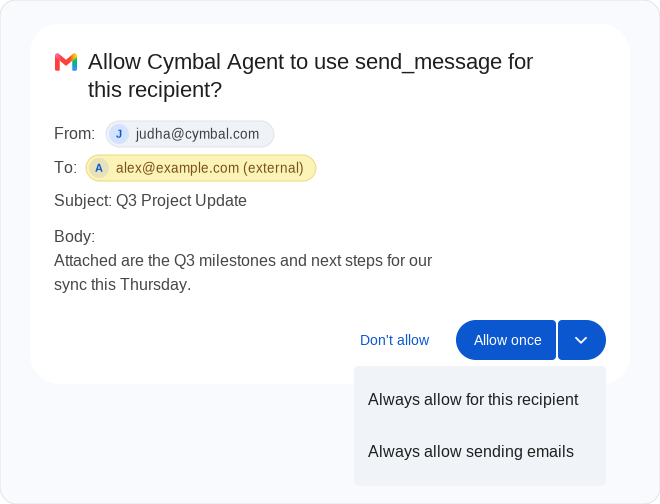
Panduan ini menjelaskan cara terhubung ke endpoint /mcp/v1, mendesain dialog
persetujuan untuk pengalaman pengguna terbaik, dan menerapkan protokol elisitasi formulir
stateless di host MCP, klien MCP, atau harness
agen.
Sebelum memulai
Sebelum menerapkan atau mengonfigurasi elisitasi formulir MCP, selesaikan prasyarat, tentukan apakah host atau klien MCP Anda memerlukan dukungan elisitasi kustom, dan tinjau endpoint server.
Prasyarat
Sebelum menerapkan elisitasi formulir di host atau klien MCP kustom, selesaikan persyaratan penyiapan berikut:
- Aktifkan API dan server MCP di project Google Cloud yang sama: Buat client ID OAuth 2.0 Anda di project Google Cloud yang sama tempat Anda mengaktifkan Google Workspace API target dan endpoint server MCP. Pilih Use this client for an AI-powered agent saat membuat klien OAuth. Untuk mengetahui petunjuk lengkapnya, lihat Mengonfigurasi server MCP Google Workspace.
- Minta cakupan OAuth 2.0 yang diperlukan untuk alat target Anda: Memanggil alat dengan
tools/callmemerlukan token aksesBearerOAuth 2.0 yang menyertakan cakupan yang diperlukan untuk alat tersebut, meskipuntools/listmenampilkan alat yang tersedia secara independen dari cakupan token. Periksa halaman ringkasan referensi MCP server untuk mengetahui cakupan OAuth yang diperlukan setiap alat.
Memeriksa apakah Anda perlu menerapkan elisitasi formulir
Sebaiknya hubungkan ke endpoint /mcp/v1 dengan elisitasi formulir MCP agar
agen Anda dapat mengakses kumpulan lengkap alat dan
hasil Google Workspace. Perlu tidaknya Anda menulis kode bergantung pada cara
host MCP dan klien MCP Anda dibangun:
- Mengonfigurasi host MCP bawaan: Jika Anda menghubungkan aplikasi host MCP bawaan seperti Google Antigravity atau Claude Desktop yang mendukung elisitasi formulir MCP, Anda tidak perlu menulis kode elisitasi formulir:
- Hubungkan ke endpoint
/mcp/v1. Untuk mengetahui langkah-langkah penyiapan, lihat Mengonfigurasi server MCP Google Workspace. - Tetapkan setelan konfirmasi alat lokal bawaan host ke Selalu
izinkan untuk server MCP Google Workspace di
/mcp/v1agar pengguna tidak diminta dua kali untuk tindakan yang sama. - Jika host MCP bawaan Anda belum mendukung elisitasi formulir, Anda dapat
terhubung ke endpoint penggantian
/mcp/v1selfyang terbatas, yang mengekspos alat yang berguna tanpa elisitasi formulir, meskipun panggilan tertentu mungkin masih memerlukan persetujuan.
- Hubungkan ke endpoint
- Mengintegrasikan SDK klien MCP atau framework agen ke dalam host MCP Anda: Jika
Anda menggunakan library klien MCP atau framework agen seperti Agent Development
Kit (ADK) yang sudah menangani elisitasi formulir di lapisan protokol, Anda
tetap perlu menghubungkan pengendali elisitasinya ke UI atau platform CLI
host MCP Anda. Terapkan rekomendasi UI persetujuan dalam
panduan ini untuk pengalaman pengguna terbaik di
/mcp/v1. - Membangun klien dan host MCP kustom: Jika Anda membangun integrasi klien dan host MCP sendiri, terapkan protokol elisitasi formulir stateless dan rekomendasi UI persetujuan dalam panduan ini untuk terhubung ke
/mcp/v1.
Endpoint server
Server MCP Google Workspace dan server MCP Penelusuran Universal yang tersedia secara umum menawarkan endpoint /mcp/v1 utama dan endpoint penggantian /mcp/v1self terbatas:
| Endpoint | URL Server | Persyaratan elisitasi formulir | Alat yang tersedia |
|---|---|---|---|
/mcp/v1 |
|
Endpoint utama yang direkomendasikan. Gunakan dengan elisitasi mode: "form".
|
Mengekspos semua alat dan set hasil lengkap untuk server, termasuk alat yang selalu memerlukan persetujuan pengguna berdasarkan kebijakan default. |
/mcp/v1self |
|
Endpoint penggantian. Panggilan tertentu mungkin masih memerlukan pengumpulan formulir, bergantung pada kebijakan dan resource target. |
Menghilangkan alat yang selalu memerlukan persetujuan berdasarkan kebijakan default, dan
hanya menampilkan alat yang berguna tanpa elisitasi formulir, seperti
update_doc. Metode daftar dan penelusuran seperti
list_threads hanya menampilkan subset hasil yang dapat diakses
tanpa persetujuan, bukan meminta akses penuh.
|
Gunakan /mcp/v1 dengan pengumpulan formulir jika memungkinkan, dan cadangkan /mcp/v1self
untuk host MCP yang tidak dapat Anda tambahi dukungan pengumpulan formulir. Jika klien memanggil
alat dengan cara yang memerlukan persetujuan pengguna di salah satu endpoint tanpa mendeklarasikan
dukungan elisitasi formulir, server akan memblokir panggilan dan menampilkan
error MissingRequiredClientCapability.
Untuk melihat alat yang tersedia di /mcp/v1 dan /mcp/v1self untuk setiap
layanan, lihat halaman ringkasan referensi alat server:
- Referensi MCP Gmail
- Referensi MCP Drive
- Referensi MCP Dokumen
- Referensi MCP Spreadsheet
- Referensi MCP Slide
- Referensi MCP Kalender
- Referensi MCP Chat
- Referensi MCP Penelusuran Universal
Cara kerja pengumpulan formulir
Server MCP Google Workspace menggunakan alur permintaan dan percobaan ulang stateless dengan koneksi tunggal berdasarkan spesifikasi MCP Elicitation 28-07-2026.
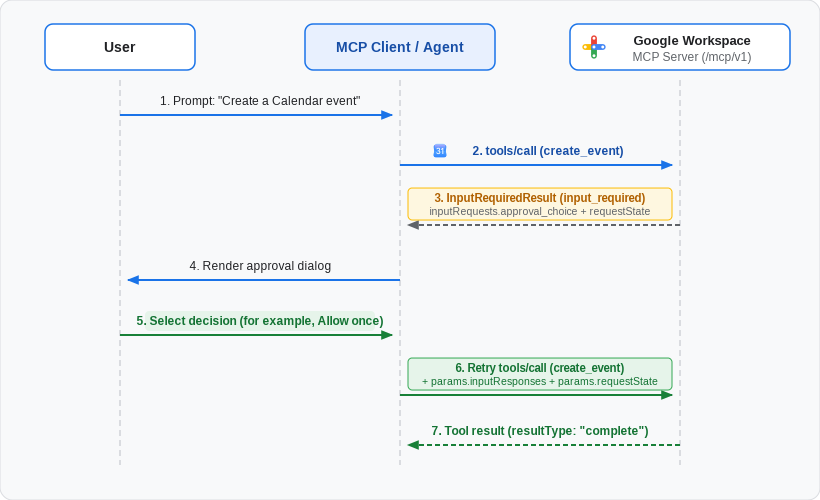
Siklus proses elisitasi formulir mengikuti langkah-langkah berikut:
- Perintah pengguna: Pengguna meminta agen untuk melakukan tindakan, seperti membuat acara Kalender.
- Permintaan
tools/callawal: Klien MCP mengirimkan permintaantools/callke endpoint/mcp/v1untuk alat seperticreate_eventdan mendeklarasikan kemampuanelicitationdiparams._meta. - Respons
InputRequiredResult: Jika tindakan yang diminta memerlukan persetujuan pengguna, server akan menjeda eksekusi sebelum menjalankan alat. Server menampilkan objekresultdenganresultType: "input_required", petainputRequestsyang diberi kunci oleh"approval_choice"yang berisi permintaanelicitation/createdenganmode: "form", dan stringrequestStateburam. - Dialog persetujuan: Klien MCP merender dialog persetujuan yang menampilkan
produk dan alat Google Workspace target, pesan konfirmasi Markdown, pertanyaan keputusan, dan pilihan yang diizinkan dari
enumdanenumNames. - Keputusan pengguna: Pengguna memilih opsi persetujuan, seperti Izinkan sekali atau Jangan izinkan.
- Coba lagi
tools/calldenganinputResponsesdanrequestState: Klien MCP mengirimkan permintaantools/callkedua dengan alatnamedanargumentsyang sama, ditambah kolomparams.requestStatedanparams.inputResponsestingkat atas yang berisi pilihan yang dipilih pengguna untuk"approval_choice". - Hasil eksekusi alat: Server memverifikasi bahwa
requestStateterikat ke argumen alat yang tepat dari panggilan awal, mengevaluasi keputusan pengguna, mengeksekusi atau mengakhiri panggilan alat, dan menampilkanresultakhir denganresultType: "complete".
Saat persetujuan diminta
Apakah panggilan alat memicu verifikasi elicitation/create ditentukan
secara dinamis oleh server MCP Google Workspace berdasarkan kebijakan tata kelola sistem, pengguna,
dan administrator. Evaluasi kebijakan dapat mempertimbangkan
faktor-faktor berikut:
- Jenis tindakan: Tindakan tulis yang membagikan data kepada audiens atau mengubah resource bersama memerlukan konfirmasi pengguna secara default, kecuali jika diizinkan oleh kebijakan pengguna atau administrator, sedangkan penulisan mandiri seperti membuat file pribadi dijalankan tanpa konfirmasi secara default. Tindakan pemindahan ke sampah selalu memerlukan konfirmasi per panggilan tanpa persetujuan persisten, dan tindakan baca atau metadata juga dapat memerlukan konfirmasi, bergantung pada kebijakan pengguna atau administrator.
- Kepemilikan dan visibilitas konten: Mengakses atau mengubah file yang dimiliki oleh pengguna lain atau dibagikan di luar organisasi pengguna dapat memerlukan persetujuan.
- Penerima eksternal: Mengirim pesan, berbagi file, atau mengundang peserta di luar domain pengguna biasanya memerlukan konfirmasi eksplisit.
- Preferensi pengguna dan administrator: Preferensi persetujuan yang disimpan dari transaksi sebelumnya atau aturan administrator di seluruh domain dapat mewajibkan atau mengabaikan konfirmasi untuk alat tertentu.
Karena evaluasi kebijakan terjadi di sisi server pada setiap panggilan, klien Anda harus siap menangani respons InputRequiredResult pada setiap pemanggilan tools/call. Jangan pernah melakukan hardcode pada aturan sensitivitas alat atau meng-cache keputusan persetujuan di
klien.
Referensi pilihan persetujuan
Di requestedSchema.properties.approval_choice, server menampilkan array enum dan enumNames paralel yang mewakili pilihan yang tersedia untuk permintaan saat ini. Di seluruh server MCP Google Workspace, nilai enum berikut didukung:
Nilai enum |
Label enumNames default dalam bahasa Inggris |
Mengizinkan eksekusi | Waktu penawaran dan perilaku |
|---|---|---|---|
ALLOW_ONCE |
Izinkan sekali | Ya | Ditawarkan di setiap dialog persetujuan. Menjalankan panggilan alat saat ini satu kali tanpa mencatat aturan persisten. |
DENY_ONCE |
Jangan izinkan | Tidak |
Ditawarkan di setiap dialog persetujuan. Mengakhiri panggilan alat saat ini dengan error UserDeniedAction tanpa mencatat aturan persisten.
|
ALLOW_TOOL_ALWAYS |
Selalu izinkan alat ini | Ya | Ditawarkan jika kebijakan pengguna dan administrator mengizinkan persetujuan persisten di seluruh alat. Menjalankan panggilan saat ini dan menyetujui terlebih dahulu panggilan mendatang ke alat yang sama dari agen yang sama. |
ALLOW_RESOURCE_ALWAYS |
Selalu izinkan untuk file/folder/drive/email/acara/ruang/ chat/chat grup/tugas/item ini | Ya | Ditawarkan saat mengubah atau mengakses hingga 100 resource dengan jenis yang sama. Menggunakan kata-kata jamak seperti Selalu izinkan untuk file ini saat panggilan menargetkan beberapa resource. Menjalankan panggilan saat ini dan menyetujui terlebih dahulu panggilan mendatang dari agen yang sama pada ID resource yang sama. |
ALLOW_AUDIENCE_ALWAYS |
Selalu izinkan untuk penerima ini | Ya | Ditawarkan untuk tindakan kirim, bagikan, dan undang yang menargetkan hingga 100 penerima. Menjalankan panggilan saat ini dan menyetujui terlebih dahulu panggilan mendatang dari agen yang sama ke kumpulan penerima yang sama. |
ALLOW_OWNER_ALWAYS |
Selalu izinkan untuk pemilik ini | Ya | Ditawarkan pada perintah baca atau grounding yang menyentuh item dari maksimal 3 pemilik berbeda. Menjalankan panggilan saat ini dan menyetujui terlebih dahulu panggilan mendatang dari agen yang sama untuk item yang dimiliki oleh pengguna tersebut. |
Setiap InputRequiredResult hanya menyertakan subset pilihan yang
berlaku untuk panggilan alat tertentu tersebut:
- Tindakan destruktif dan pemindahan ke sampah: Tindakan yang menghapus atau memindahkan resource ke sampah secara permanen, atau tindakan yang diatur oleh kebijakan administrator yang memerlukan konfirmasi pada setiap panggilan, hanya menawarkan
ALLOW_ONCEdanDENY_ONCE. - Tindakan tercakup: Jika persetujuan persisten diizinkan, server
akan menampilkan
ALLOW_ONCE, cakupan sempit yang berlaku sepertiALLOW_AUDIENCE_ALWAYSatauALLOW_RESOURCE_ALWAYS,ALLOW_TOOL_ALWAYS, danDENY_ONCE.
Selalu render opsi persis yang ditampilkan di enum dan enumNames untuk
permintaan saat ini, bukan nilai tombol hardcode.
Praktik yang direkomendasikan untuk pengalaman pengguna terbaik
Klien MCP standar yang mendukung pengumpulan formulir dapat langsung berfungsi dengan
/mcp/v1. Namun, perender formulir generik sering kali menampilkan keputusan pilihan tunggal
sebagai grup tombol pilihan atau menu drop-down yang dipasangkan dengan tombol Kirim
terpisah, yang memerlukan klik tambahan dan menyembunyikan konteks aplikasi
Google Workspace target.
Untuk pengalaman pengguna elisitasi formulir terbaik, terapkan lima rekomendasi berikut di klien MCP Anda. Rekomendasi 1 hingga 3 sesuai dengan teks bernomor dalam ilustrasi dialog persetujuan berikut:
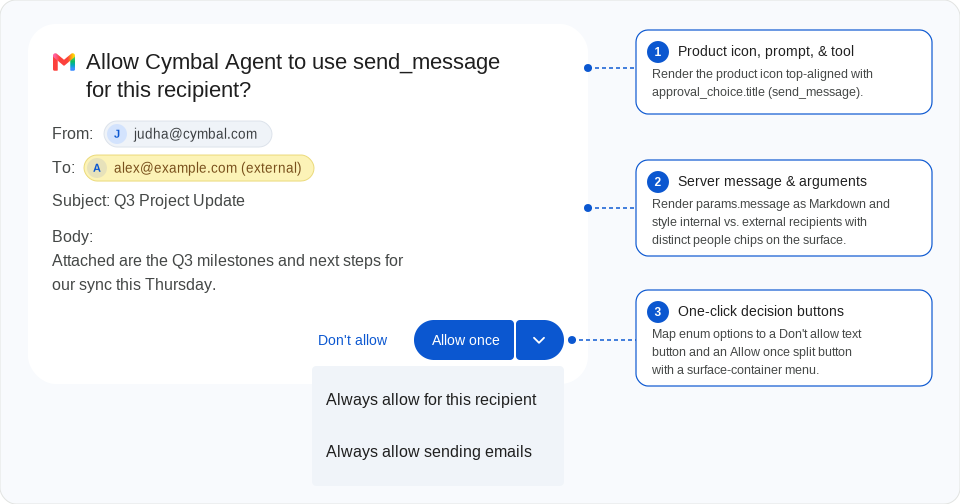
1. Menampilkan nama, ikon, dan alat produk
Pengguna akan langsung melihat produk dan alat Google Workspace yang ingin dipanggil oleh agen:
- Petakan metadata
serverInfoserver MCP dari inisialisasi atauserver/discover, atau nama host permintaan seperticalendarmcp.googleapis.com, ke nama dan ikon produk Google Workspace. - Perlakukan petunjuk presentasi
_metadiInputRequiredResultsepertititle,icons, danisConfirmationsebagai peningkatan opsional. Server MCP Google Workspace produksi belum memunculkan kolom_metaini, jadi UI Anda tidak boleh bergantung pada kolom tersebut. - Tampilkan nama alat target dari
params.nameagar pengguna dapat membedakan antara operasi seperticreate_draftdancreate_event.
2. Merender pesan server dan enumNames
Buat lapisan presentasi klien Anda tetap sederhana dan render konten persetujuan yang disediakan server secara langsung:
- Render
params.messagesebagai Markdown dan tampilkanapproval_choice.title: Server MCP Google Workspace sudah memformat detail tindakan sebagai Markdown diinputRequests.approval_choice.params.messagedan memberikan pertanyaan konfirmasi yang dilokalkan direquestedSchema.properties.approval_choice.title. Rendermessagesecara langsung dengan perender Markdown yang aman, bukan menampilkan simbol Markdown mentah atau menulis logika pemformatan argumen kustom per alat, dan tampilkantitledengan jelas di atas tombol tindakan. - Pasangkan nilai
enumdengan labelenumNames: PeriksarequestedSchema.properties.approval_choicesecara dinamis. Pasangkan setiap ID dienumdengan label yang dapat dibaca manusia pada indeks yang sama dienumNames, dan gunakan entrioneOfSkema JSON sebagai pengganti jika berinteraksi dengan server MCP lain yang menggunakanoneOf.
3. Menyederhanakan keputusan dengan tombol sekali klik
Jika requestedSchema berisi satu properti enum, hindari merender daftar tombol pilihan atau menu drop-down yang memerlukan klik Kirim terpisah:
- Dua opsi seperti
Allow oncedanDon't allow: Merender dua tombol secara berdampingan. Mengklik salah satu tombol akan langsung mengirimkan permintaan percobaan ulang. - Beberapa opsi izinkan: Jika server menampilkan
ALLOW_ONCE, satu atau beberapa cakupan izinkan persisten sepertiALLOW_AUDIENCE_ALWAYSatauALLOW_TOOL_ALWAYS, danDENY_ONCE, render tombol terpisah utama yang ditetapkan secara default ke Izinkan sekali dengan menu tanda sisipan untuk opsi izinkan tambahan, yang dipasangkan dengan tombol Jangan izinkan terpisah.
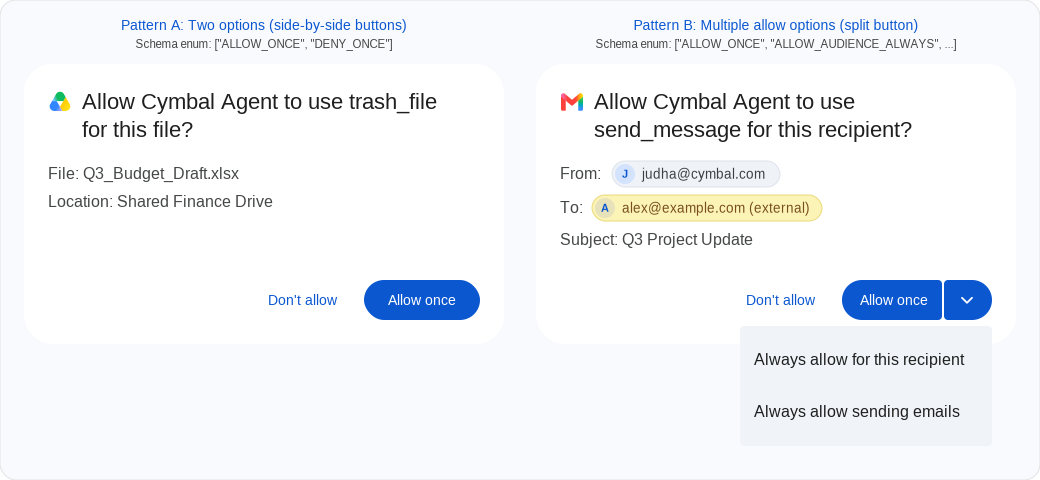
Dalam Pola A, tindakan Drive yang destruktif hanya menampilkan
ALLOW_ONCE dan DENY_ONCE, yang dirender klien sebagai dua tombol berdampingan
untuk Jangan izinkan dan Izinkan sekali. Dalam Pola B, tindakan Gmail menampilkan ALLOW_ONCE, ALLOW_AUDIENCE_ALWAYS,
ALLOW_TOOL_ALWAYS, dan DENY_ONCE, yang dirender klien sebagai tombol Jangan
izinkan bersama tombol terpisah Izinkan sekali yang menunya menampilkan
pilihan izinkan persisten.
4. Menghindari perintah duplikat di /mcp/v1
Banyak host MCP menyertakan perintah konfirmasi lokal bawaan sebelum menjalankan alat eksternal apa pun. Saat memanggil server MCP Google Workspace dengan elisitasi formulir diaktifkan, perintah pra-eksekusi lokal akan menciptakan pengalaman perintah ganda yang redundan karena server menerapkan tantangan elisitasi yang sesuai dengan kebijakannya sendiri.
- Jika Anda mengonfigurasi host MCP bawaan dengan elisitasi formulir: Tetapkan
setelan konfirmasi alat lokal host untuk server MCP Google Workspace
di
/mcp/v1ke Selalu izinkan, dan andalkan dialog elisitasi yang dimulai server. Jika host Anda tidak mendukung pengumpulan formulir dan terhubung ke/mcp/v1self, tetap aktifkan konfirmasi alat lokal jika Anda menginginkan perintah sisi klien untuk panggilan yang tidak memicu persetujuan sisi server. - Jika Anda membangun host MCP: Sembunyikan dialog konfirmasi pra-panggilan umum host Anda saat elisitasi formulir diaktifkan untuk
*mcp.googleapis.comdanpeople.googleapis.com, sepertigmailmcp.googleapis.com,calendarmcp.googleapis.com,drivemcp.googleapis.com, danworkspacemcp.googleapis.com. Hanya minta pengguna saat server menampilkanInputRequiredResultdenganresultType: "input_required".
5. Memandu perilaku agen untuk alat dan penolakan
Model penalaran dapat salah menafsirkan alur persetujuan human-in-the-loop dengan dua cara:
- Menghindari alat tulis secara preventif: Jika model mengasumsikan bahwa memanggil
alat tulis seperti
send_messageakan segera dieksekusi tanpa peninjauan pengguna, model mungkin akan beralih ke alat draf seperticreate_draftmeskipun pengguna meminta untuk mengirim email. - Mencoba lagi dengan alat tulis alternatif setelah penolakan: Jika pengguna mengklik
Jangan izinkan pada dialog persetujuan dan server menampilkan
hasil error
UserDeniedAction, model mungkin memperlakukan penolakan tersebut sebagai kegagalan alat sementara dan mencoba mencapai tujuan yang sama menggunakan alat tulis lain, sehingga memicu perintah persetujuan kedua yang tidak diinginkan.
Untuk mencegah kedua masalah tersebut, sertakan petunjuk berikut dalam perintah sistem agen Anda:
Perintah
When calling Google Workspace MCP tools:
1. Select the tool that directly matches the user's intent (for example,
   use send_message when asked to send an email). Sensitive tools
   automatically pause for user confirmation through MCP form elicitation
   before executing.
2. If a tool call fails because the user denied, declined, or canceled the
   approval request, stop immediately and acknowledge the user's decision.
   Do not retry the same action or call an alternative write tool unless
   the user explicitly asks you to do so in a new message.
Persyaratan protokol transport dan stateless
Server MCP Google Workspace beroperasi melalui Streamable HTTP stateless. Saat membuat klien MCP kustom, ikuti persyaratan wire berikut pada setiap permintaan:
- Header HTTP: Sertakan header berikut pada semua permintaan
POSTke/mcp/v1:Authorization: Bearer ACCESS_TOKENContent-Type: application/jsonAccept: application/json, text/event-streamMCP-Protocol-Version: 2026-07-28Accept-Language: BCP_47_LANGUAGE_TAGuntuk melokalkan pesan konfirmasi, pertanyaan, dan labelenumNameske dalam bahasa pilihan pengguna, seperties-419, es;q=0.9, en;q=0.8. Jika dihilangkan, teks akan ditetapkan secara default keen-US.
- Jenis konten respons: Bergantung pada server dan jenis permintaan, isi respons HTTP dapat diformat sebagai JSON standar dengan
Content-Type: application/jsonatau sebagai Server-Sent Events (SSE) denganContent-Type: text/event-streamtempat payload JSON-RPC muncul di barisdata: {...}. Parser transpor HTTP Anda harus menerima kedua format tersebut. - Penemuan stateless: Server MCP Google Workspace tidak
mempertahankan sesi
initializestateful. Untuk mengambil metadata dan kemampuan server saat memulai, kirim permintaan JSON-RPC dengan"method": "server/discover"dan"params": {}, yang menampilkan metadata server diresult._meta["io.modelcontextprotocol/serverInfo"]. Petunjuk_metakonfirmasi kustom sepertiisConfirmation,title, daniconsbelum ditampilkan dalam responsInputRequiredResultproduksi, jadi selalu perlakukan kolom presentasi_metasebagai opsional dan gunakanserverInfoatau nama host server sebagai pengganti. - Kemampuan
_metaper permintaan: Karena transport bersifat stateless, sertakan_metadi dalamparamspada setiap permintaantools/listdantools/calldengan kunci berikut:"io.modelcontextprotocol/protocolVersion": "2026-07-28""io.modelcontextprotocol/clientInfo":{"name": "YOUR_APP_NAME","version": "VERSION"}"io.modelcontextprotocol/clientCapabilities":{"elicitation": {"form": {}}}
Penanganan error dan binding parameter
Jika panggilan alat diblokir atau percobaan ulang gagal divalidasi, server akan menampilkan hasil error tingkat alat atau objek error JSON-RPC tingkat atas, bergantung pada kategori kegagalan:
UserDeniedActiondanAdminPolicyBlock: Jika pengguna menolak permintaan persetujuan atau kebijakan administrator memblokir tindakan, server akan menampilkan JSON-RPCresultdengan"resultType": "complete","isError": true, dan pesan error yang dilokalkan diresult.content. Jika diaktifkan untuk layanan dan lingkungan, server juga menyertakan metadata error terstruktur diresult._meta["google.com/error"]. Karenaresult._meta["google.com/error"]dibatasi per layanan dan lingkungan, klien Anda harus beralih untuk membaca pesan error dariresult.contentjikaresult._meta["google.com/error"]tidak ada:UserDeniedAction: Ditampilkan saat pengguna memilihDENY_ONCE, menolak, atau membatalkan formulir persetujuan. Pesan bahasa Inggris defaultnya adalah"Action canceled. The user declined the confirmation request."AdminPolicyBlock: Ditampilkan saat kebijakan administrator organisasi melarang agen melakukan operasi. Pesan bahasa Inggris defaultnya adalah"Action could not be completed. Your administrator has blocked third-party agents from performing this action."
JSON
{ "jsonrpc": "2.0", "id": 3, "result": { "resultType": "complete", "isError": true, "content": [ { "type": "text", "text": "Action canceled. The user declined the confirmation request." } ], "_meta": { "google.com/error": { "code": 400, "message": "Action canceled. The user declined the confirmation request.", "status": "FAILED_PRECONDITION", "details": [ { "@type": "type.googleapis.com/google.rpc.ErrorInfo", "reason": "UserDeniedAction", "domain": "mcp.googleapis.com" } ] } } } }MissingRequiredClientCapability: Ditampilkan saat klien memanggil alat dengan cara yang memerlukan konfirmasi pengguna di/mcp/v1atau/mcp/v1selftanpa mendeklarasikan dukungan elisitasi formulir di_meta["io.modelcontextprotocol/clientCapabilities"]. Server menerjemahkan error ini menjadi objekerrorJSON-RPC tingkat atas dengan kode-32021dan objek kemampuan yang diperlukan dierror.data.requiredCapabilities:JSON
{
  "jsonrpc": "2.0",
  "id": 2,
  "error": {
    "code": -32021,
    "message": "Action could not be completed. This action requires user confirmation, which this client does not support. Use a client that supports form elicitation to perform this action.",
    "data": {
      "requiredCapabilities": {
        "elicitation": {
          "form": {}
        }
      }
    }
  }
}
Penegakan parameter-binding: Token
requestBindingdi dalamrequestStatesecara kriptografis mengikat tantangan persetujuan awal ke alatargumentsyang tepat yang dikirim pada panggilan pertama. Jika klien mengubah kolom apa pun diparams.argumentspada panggilan percobaan ulang, atau meneruskanparams.requestStateyang salah format atau tidak terikat, server akan mengabaikan persetujuan yang tidak valid dan menampilkan tantanganInputRequiredResultbaru, atau menampilkan error parameter tidak valid atau prasyarat gagal yang menginstruksikan klien untuk mencoba lagi tanpainputResponses.
Contoh penerapan
Panduan menyeluruh berikut menunjukkan cara klien MCP memanggil alat create_event Kalender, merender perintah persetujuan server di UI browser atau CLI terminal, dan mengirimkan keputusan pengguna di TypeScript dan Python, diikuti dengan kemampuan agen yang dapat digunakan kembali untuk agen coding.
Platform persetujuan klien
Di klien MCP berbasis browser, implementasi TypeScript merender kartu
persetujuan visual yang menampilkan ikon Kalender, nama host server, nama
alat, pratinjau message Markdown yang dirender dari server, pertanyaan
konfirmasi, tombol Jangan izinkan, dan tombol terpisah Izinkan sekali:
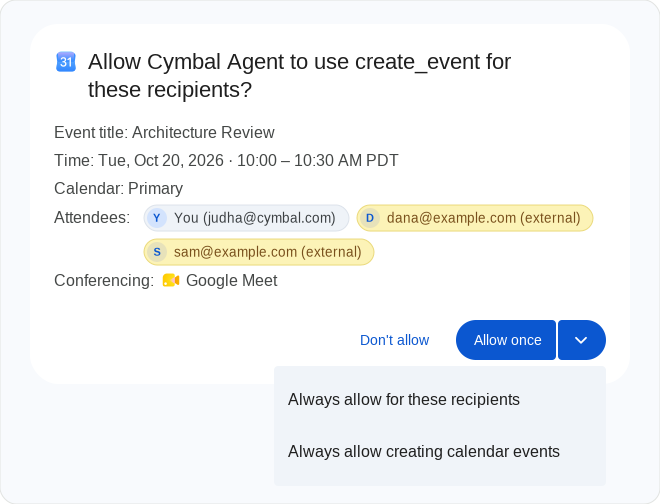
Di klien MCP berbasis terminal, implementasi CLI Python merender payload InputRequiredResult yang sama sebagai perintah bernomor interaktif:
CLI
=== Google Calendar (create_event) ===
Architecture Review
Tue, Oct 20 · 10:00 - 10:30 AM PDT · 🟢 No calendar conflicts
You, dana@example.com, sam@example.com
Conferencing: Google Meet

Allow Cymbal Agent to use create_event for these recipients?
  [1] Allow once (ALLOW_ONCE)
  [2] Always allow for these recipients (ALLOW_AUDIENCE_ALWAYS)
  [3] Always allow this tool (ALLOW_TOOL_ALWAYS)
  [4] Don't allow (DENY_ONCE)
Enter choice (1-4, or c to cancel):
Panggilan awal dan respons elisitasi
Klien memulai dengan mengirimkan permintaan tools/call untuk membuat
acara Kalender menggunakan alat create_event:
JSON
{
  "jsonrpc": "2.0",
  "id": 2,
  "method": "tools/call",
  "params": {
    "name": "create_event",
    "arguments": {
      "calendarId": "primary",
      "summary": "Architecture Review",
      "startTime": "2026-10-20T10:00:00",
      "endTime": "2026-10-20T10:30:00",
      "timeZone": "America/Los_Angeles",
      "attendees": [
        {
          "email": "dana@example.com"
        },
        {
          "email": "sam@example.com"
        }
      ],
      "addGoogleMeetUrl": true
    },
    "_meta": {
      "io.modelcontextprotocol/protocolVersion": "2026-07-28",
      "io.modelcontextprotocol/clientInfo": {
        "name": "Cymbal Agent",
        "version": "1.0.0"
      },
      "io.modelcontextprotocol/clientCapabilities": {
        "elicitation": {
          "form": {}
        }
      }
    }
  }
}
Jika persetujuan diperlukan, server akan merespons dengan InputRequiredResult:
JSON
{
  "jsonrpc": "2.0",
  "id": 2,
  "result": {
    "resultType": "input_required",
    "inputRequests": {
      "approval_choice": {
        "method": "elicitation/create",
        "params": {
          "mode": "form",
          "message": "**Architecture Review**  \nTue, Oct 20 · 10:00 - 10:30 AM PDT · 🟢 No calendar conflicts  \nYou, dana@example.com, sam@example.com  \n**Conferencing:** Google Meet",
          "requestedSchema": {
            "type": "object",
            "required": ["approval_choice"],
            "properties": {
              "approval_choice": {
                "type": "string",
                "title": "Allow Cymbal Agent to use create_event for these recipients?",
                "enum": [
                  "ALLOW_ONCE",
                  "ALLOW_AUDIENCE_ALWAYS",
                  "ALLOW_TOOL_ALWAYS",
                  "DENY_ONCE"
                ],
                "enumNames": [
                  "Allow once",
                  "Always allow for these recipients",
                  "Always allow this tool",
                  "Don't allow"
                ]
              }
            }
          }
        }
      }
    },
    "requestState": "{\"elicitationId\":\"...\",\"requestBinding\":\"...\"}"
  }
}
Respons InputRequiredResult mencakup kolom kunci berikut:
result.resultType: Ditetapkan ke"input_required"saat server menjeda eksekusi untuk input pengguna, dan"complete"saat alat selesai dieksekusi.result.inputRequests: Peta yang diberi kunci oleh ID permintaan"approval_choice". Setiap entri memiliki"method": "elicitation/create"dan objekparamsdengan"mode": "form".- Petunjuk presentasi
_meta: Kolom opsional sepertiisConfirmation,title, daniconsbelum ditampilkan dalam responsInputRequiredResultproduksi. Selalu perlakukan kolom_metasebagai opsional dan selesaikan nama produk dan ikon dariserverInfoatau nama host server jika tidak ada. inputRequests.approval_choice.params.message: Pratinjau tindakan berformat Markdown yang dihasilkan oleh server, atau pertanyaan konfirmasi jika alat tidak menghasilkan kartu pratinjau terpisah.inputRequests.approval_choice.params.requestedSchema: Objek Skema JSON yang definisiproperties.approval_choice-nya berisi kolom berikut:title: Pertanyaan konfirmasi yang dilokalkan, seperti"Allow Cymbal Agent to use create_event for these recipients?". Saat Anda memberikan_meta["io.modelcontextprotocol/clientInfo"].namepada permintaan, server akan menyertakan nama aplikasi Anda ke dalam pertanyaan ini.enum: Array IDApprovalChoiceyang diurutkan, sepertiALLOW_ONCE,ALLOW_AUDIENCE_ALWAYS,ALLOW_TOOL_ALWAYS, danDENY_ONCE.enumNames: Array paralel label yang dilokalkan dan dapat dibaca manusia, yang sesuai dengan setiap entri dienum, sepertiAllow once,Always allow for these recipients,Always allow this tool, danDon't allow.
result.requestState: String berenkode JSON buram yang berisielicitationIdserver dan tokenrequestBindingkriptografis. Anda harus menggemakan string ini tanpa perubahan diparams.requestStatepada panggilan percobaan ulang.
Payload percobaan ulang, penolakan, dan pembatalan
Setelah pengguna memilih opsi izinkan, kirim permintaan tools/call kedua dengan
name dan arguments yang sama persis, lalu teruskan requestState dan
inputResponses sebagai kolom tingkat teratas di dalam params:
JSON
{
  "jsonrpc": "2.0",
  "id": 3,
  "method": "tools/call",
  "params": {
    "name": "create_event",
    "arguments": {
      "calendarId": "primary",
      "summary": "Architecture Review",
      "startTime": "2026-10-20T10:00:00",
      "endTime": "2026-10-20T10:30:00",
      "timeZone": "America/Los_Angeles",
      "attendees": [
        {
          "email": "dana@example.com"
        },
        {
          "email": "sam@example.com"
        }
      ],
      "addGoogleMeetUrl": true
    },
    "requestState": "{\"elicitationId\":\"...\",\"requestBinding\":\"...\"}",
    "inputResponses": {
      "approval_choice": {
        "action": "accept",
        "content": {
          "approval_choice": "ALLOW_ONCE"
        }
      }
    },
    "_meta": {
      "io.modelcontextprotocol/protocolVersion": "2026-07-28",
      "io.modelcontextprotocol/clientInfo": {
        "name": "Cymbal Agent",
        "version": "1.0.0"
      },
      "io.modelcontextprotocol/clientCapabilities": {
        "elicitation": {
          "form": {}
        }
      }
    }
  }
}
Spesifikasi MCP Elicitation membedakan antara mengirimkan nilai formulir
dan menutup dialog. Anda dapat merepresentasikan keputusan negatif pengguna di
params.inputResponses dengan dua cara:
Mengirimkan pilihan
DENY_ONCE: Saat pengguna mengklik tombol Jangan izinkan yang sesuai denganDENY_ONCE, kirim"action": "accept"dengan"content": {"approval_choice": "DENY_ONCE"}:JSON
{
  "jsonrpc": "2.0",
  "id": 3,
  "method": "tools/call",
  "params": {
    "name": "create_event",
    "arguments": {
      "calendarId": "primary",
      "summary": "Architecture Review",
      "startTime": "2026-10-20T10:00:00",
      "endTime": "2026-10-20T10:30:00",
      "timeZone": "America/Los_Angeles",
      "attendees": [
        {
          "email": "dana@example.com"
        },
        {
          "email": "sam@example.com"
        }
      ],
      "addGoogleMeetUrl": true
    },
    "requestState": "{\"elicitationId\":\"...\",\"requestBinding\":\"...\"}",
    "inputResponses": {
      "approval_choice": {
        "action": "accept",
        "content": {
          "approval_choice": "DENY_ONCE"
        }
      }
    },
    "_meta": {
      "io.modelcontextprotocol/protocolVersion": "2026-07-28",
      "io.modelcontextprotocol/clientInfo": {
        "name": "Cymbal Agent",
        "version": "1.0.0"
      },
      "io.modelcontextprotocol/clientCapabilities": {
        "elicitation": {
          "form": {}
        }
      }
    }
  }
}
Menolak atau membatalkan dialog: Jika pengguna menutup atau membatalkan dialog tanpa memilih opsi izinkan, kirim
"action": "decline"atau"action": "cancel"dan hapus kolomcontent:JSON
"inputResponses": {
  "approval_choice": {
    "action": "cancel"
  }
}
Dalam kedua kasus tersebut, server memperlakukan respons sebagai DENY_ONCE, mengakhiri eksekusi alat, dan menampilkan hasil error alat.
Klien web TypeScript
Contoh TypeScript berikut mengekstrak message Markdown, pertanyaan konfirmasi, dan opsi yang diizinkan langsung dari payload InputRequiredResult, me-resolve judul produk dari petunjuk _meta opsional atau nama host server, dan memutar ulang tools/call dengan keputusan pengguna:
TypeScript
const PROTOCOL_VERSION = "2026-07-28";
const CLIENT_INFO = { name: "Cymbal Agent", version: "1.0.0" };
const MAX_ELICITATION_ROUNDS = 3;

const HOST_TITLES: Record<string, string> = {
  "gmailmcp.googleapis.com": "Gmail",
  "calendarmcp.googleapis.com": "Google Calendar",
  "drivemcp.googleapis.com": "Google Drive",
  "docsmcp.googleapis.com": "Google Docs",
  "sheetsmcp.googleapis.com": "Google Sheets",
  "slidesmcp.googleapis.com": "Google Slides",
  "chatmcp.googleapis.com": "Google Chat",
  "people.googleapis.com": "Google Contacts",
  "tasksmcp.googleapis.com": "Google Tasks",
  "workspacemcp.googleapis.com": "Google Workspace",
};

interface ElicitationOption {
  value: string;
  label: string;
}

export interface ElicitationCardModel {
  requestKey: string;
  serverTitle: string;
  serverIconUrl?: string;
  toolName: string;
  markdownMessage: string;
  questionTitle: string;
  decisionFieldKey: string;
  denyOption?: ElicitationOption;
  primaryAllowOption?: ElicitationOption;
  secondaryAllowOptions: ElicitationOption[];
}

function buildBaseMeta(): Record<string, unknown> {
  return {
    "io.modelcontextprotocol/protocolVersion": PROTOCOL_VERSION,
    "io.modelcontextprotocol/clientInfo": CLIENT_INFO,
    "io.modelcontextprotocol/clientCapabilities": {
      elicitation: { form: {} },
    },
  };
}

/**
 * Extracts a UI view model directly from an InputRequiredResult response.
 * Render card.markdownMessage with a safe Markdown renderer in your UI.
 */
export function extractCardModel(
  rpcResult: Record<string, any>,
  toolName: string,
  serverHost = "workspacemcp.googleapis.com",
): ElicitationCardModel | null {
  const inputRequests: Record<string, any> = rpcResult.inputRequests ?? {};
  const requestEntry = Object.entries(inputRequests).find(
    ([, req]: [string, any]) =>
      req?.method === "elicitation/create" && req?.params?.mode === "form",
  );
  if (!requestEntry) {
    return null;
  }
  const [requestKey, elicitationReq] = requestEntry;

  const reqMeta = elicitationReq.params?._meta ?? {};
  const resultMeta = rpcResult._meta ?? {};
  const serverInfo = resultMeta["io.modelcontextprotocol/serverInfo"] ?? {};
  const icons: Array<{ src: string; mimeType?: string }> =
    reqMeta.icons ?? resultMeta.icons ?? serverInfo.icons ?? [];
  const preferredIcon =
    icons.find((icon) => icon.mimeType === "image/svg+xml") ?? icons[0];

  const properties: Record<string, any> =
    elicitationReq.params?.requestedSchema?.properties ?? {};
  const firstProperty = Object.entries(properties)[0];
  if (!firstProperty) {
    return null;
  }
  const [decisionFieldKey, fieldSchema] = firstProperty as [
    string,
    Record<string, any>,
  ];

  let options: ElicitationOption[] = [];
  if (Array.isArray(fieldSchema.enum)) {
    const enumNames: string[] = Array.isArray(fieldSchema.enumNames)
      ? fieldSchema.enumNames
      : [];
    options = fieldSchema.enum.map((val: string, idx: number) => ({
      value: val,
      label: enumNames[idx] ?? val,
    }));
  } else if (Array.isArray(fieldSchema.oneOf)) {
    options = fieldSchema.oneOf.map((opt: any) => ({
      value: opt.const,
      label: opt.title ?? opt.const,
    }));
  }

  const denyOption = options.find((opt) => opt.value.startsWith("DENY"));
  const allowOptions = options.filter(
    (opt) => !opt.value.startsWith("DENY"),
  );

  return {
    requestKey,
    serverTitle:
      reqMeta.title ??
      resultMeta.title ??
      serverInfo.title ??
      serverInfo.name ??
      HOST_TITLES[serverHost] ??
      "Google Workspace",
    serverIconUrl: preferredIcon?.src,
    toolName,
    markdownMessage:
      elicitationReq.params?.message ?? "Confirm this action.",
    questionTitle: fieldSchema.title ?? "Confirm this action?",
    decisionFieldKey,
    denyOption,
    primaryAllowOption: allowOptions[0],
    secondaryAllowOptions: allowOptions.slice(1),
  };
}

/**
 * Executes tools/call and replays with requestState and inputResponses
 * when the server returns an InputRequiredResult.
 */
export async function handleToolCallWithElicitation(
  sendRpc: (payload: Record<string, unknown>) => Promise<Record<string, any>>,
  promptUserInUi: (card: ElicitationCardModel) => Promise<string | null>,
  toolName: string,
  toolArgs: Record<string, unknown>,
  serverHost = "calendarmcp.googleapis.com",
): Promise<Record<string, any>> {
  let requestId = 1;
  let response = await sendRpc({
    jsonrpc: "2.0",
    id: requestId,
    method: "tools/call",
    params: {
      name: toolName,
      arguments: structuredClone(toolArgs),
      _meta: buildBaseMeta(),
    },
  });

  for (let round = 0; round < MAX_ELICITATION_ROUNDS; round++) {
    const result = response.result ?? {};
    if (result.resultType !== "input_required") {
      return response;
    }

    const card = extractCardModel(result, toolName, serverHost);
    if (!card) {
      return response;
    }

    const selectedValue = await promptUserInUi(card);
    const userResponse = selectedValue
      ? {
          action: "accept",
          content: { [card.decisionFieldKey]: selectedValue },
        }
      : { action: "cancel" };

    requestId += 1;
    response = await sendRpc({
      jsonrpc: "2.0",
      id: requestId,
      method: "tools/call",
      params: {
        name: toolName,
        arguments: structuredClone(toolArgs),
        ...(result.requestState !== undefined
          ? { requestState: result.requestState }
          : {}),
        inputResponses: {
          [card.requestKey]: userResponse,
        },
        _meta: buildBaseMeta(),
      },
    });
  }

  return response;
}
Klien CLI Python
Python
import copy
import re
from typing import Any

PROTOCOL_VERSION = "2026-07-28"
CLIENT_INFO = {"name": "Cymbal CLI Agent", "version": "1.0.0"}
MAX_ELICITATION_ROUNDS = 3
HOST_TITLES = {
    "gmailmcp.googleapis.com": "Gmail",
    "calendarmcp.googleapis.com": "Google Calendar",
    "drivemcp.googleapis.com": "Google Drive",
    "docsmcp.googleapis.com": "Google Docs",
    "sheetsmcp.googleapis.com": "Google Sheets",
    "slidesmcp.googleapis.com": "Google Slides",
    "chatmcp.googleapis.com": "Google Chat",
    "people.googleapis.com": "Google Contacts",
    "tasksmcp.googleapis.com": "Google Tasks",
    "workspacemcp.googleapis.com": "Google Workspace",
}

def build_base_meta() -> dict[str, Any]:
  """Returns the required per-request _meta block for /mcp/v1 calls."""
  return {
      "io.modelcontextprotocol/protocolVersion": PROTOCOL_VERSION,
      "io.modelcontextprotocol/clientInfo": CLIENT_INFO,
      "io.modelcontextprotocol/clientCapabilities": {
          "elicitation": {"form": {}}
      },
  }

def strip_markdown(text: str) -> str:
  """Minimal example that strips basic Markdown for terminal display."""
  text = re.sub(r"\[([^\]]+)\]\(([^)]+)\)", r"\1 (\2)", text)
  text = re.sub(r"\*\*(.*?)\*\*", r"\1", text)
  return re.sub(r"`([^`]+)`", r"\1", text)

def extract_decision_options(
    requested_schema: dict[str, Any],
) -> tuple[str | None, str, list[dict[str, str]]]:
  """Extracts the property key, question title, and options from schema."""
  properties = requested_schema.get("properties", {})
  first_entry = next(iter(properties.items()), None)
  if first_entry is None:
    return None, "Confirm this action?", []

  field_key, field_schema = first_entry
  question_title = field_schema.get("title", "Confirm this action?")

  if "enum" in field_schema:
    enum_values = field_schema.get("enum", [])
    enum_names = field_schema.get("enumNames", [])
    options = [
        {
            "value": val,
            "label": enum_names[idx] if idx < len(enum_names) else val,
        }
        for idx, val in enumerate(enum_values)
    ]
  elif "oneOf" in field_schema:
    options = [
        {
            "value": item["const"],
            "label": item.get("title", item["const"]),
        }
        for item in field_schema["oneOf"]
    ]
  else:
    options = []
  return field_key, question_title, options

def prompt_user_in_cli(
    elicitation_req: dict[str, Any],
    result_meta: dict[str, Any],
    tool_name: str,
    server_host: str = "calendarmcp.googleapis.com",
) -> dict[str, Any]:
  """Renders a CLI approval prompt and returns the inputResponses entry."""
  params = elicitation_req.get("params", {})
  req_meta = params.get("_meta", {})
  server_info = result_meta.get(
      "io.modelcontextprotocol/serverInfo", {}
  )
  server_title = (
      req_meta.get("title")
      or result_meta.get("title")
      or server_info.get("title")
      or server_info.get("name")
      or HOST_TITLES.get(server_host, "Google Workspace MCP")
  )
  message = strip_markdown(params.get("message", "Confirm this action."))
  field_key, question_title, options = extract_decision_options(
      params.get("requestedSchema", {})
  )
  if not field_key or not options:
    return {"action": "cancel"}

  print(f"\n=== {server_title} ({tool_name}) ===")
  print(message)
  print(f"\n{strip_markdown(question_title)}")
  for idx, opt in enumerate(options, start=1):
    print(f"  [{idx}] {opt['label']} ({opt['value']})")

  choice = input(
      f"Enter choice (1-{len(options)}, or c to cancel): "
  ).strip()
  try:
    selected_idx = int(choice) - 1
    if 0 <= selected_idx < len(options):
      selected_value = options[selected_idx]["value"]
      return {
          "action": "accept",
          "content": {field_key: selected_value},
      }
  except ValueError:
    pass

  return {"action": "cancel"}

def handle_tool_call_with_elicitation(
    send_rpc_fn: Any, tool_name: str, tool_args: dict[str, Any]
) -> dict[str, Any]:
  """Executes tools/call and retries with inputResponses when elicited."""
  base_params = {
      "name": tool_name,
      "arguments": copy.deepcopy(tool_args),
      "_meta": build_base_meta(),
  }
  request_id = 1
  response = send_rpc_fn(
      {
          "jsonrpc": "2.0",
          "id": request_id,
          "method": "tools/call",
          "params": copy.deepcopy(base_params),
      }
  )

  for _ in range(MAX_ELICITATION_ROUNDS):
    result = response.get("result", {})
    if result.get("resultType") != "input_required":
      return response

    input_requests = result.get("inputRequests", {})
    if not isinstance(input_requests, dict) or not input_requests:
      return response

    result_meta = result.get("_meta", {})
    input_responses: dict[str, Any] = {}
    for req_key, req in input_requests.items():
      if (
          isinstance(req, dict)
          and req.get("method") == "elicitation/create"
          and req.get("params", {}).get("mode") == "form"
      ):
        input_responses[req_key] = prompt_user_in_cli(
            req, result_meta, tool_name
        )

    if not input_responses:
      return response

    request_id += 1
    retry_params = copy.deepcopy(base_params)
    request_state = result.get("requestState")
    if request_state is not None:
      retry_params["requestState"] = request_state
    retry_params["inputResponses"] = input_responses
    response = send_rpc_fn(
        {
            "jsonrpc": "2.0",
            "id": request_id,
            "method": "tools/call",
            "params": retry_params,
        }
    )

  return response
Keahlian agen
Gunakan yang berikut sebagai keahlian atau perintah untuk agen coding Anda guna menerapkan pengumpulan formulir untuk infrastruktur pengelola agen Anda:
Perintah
---
name: google-workspace-mcp-elicitation
metadata:
  version: "1.0.0"
  category: GoogleWorkspace
description: >-
  Implements Model Context Protocol (MCP) form elicitation
  (`elicitation/create`) for Human-in-the-Loop (HITL) approvals with Google
  Workspace MCP servers (Gmail, Calendar, Drive, Docs, Sheets, Slides, Chat,
  Contacts). Use when adding HITL confirmation prompts to an agent, handling
  Stateless HTTP (`2026-07-28`) Multi Round-Trip Requests
  (`resultType: "input_required"`), mapping elicitation schemas or `_meta`
  hints to UI controls, or troubleshooting Workspace MCP `401`/`403`/`405`
  and capability errors. Don't use for general OAuth 2.0 app setup unrelated
  to MCP or for authoring custom MCP servers.
---

# Implementing Google Workspace MCP Form Elicitation (HITL)

Use this guide to support **Model Context Protocol (MCP) Form Elicitation**
for Human-in-the-Loop (HITL) confirmations when integrating **Google
Workspace MCP servers** into an AI agent.

Rather than duplicating the MCP specification, this guide references the
canonical specs and focuses on **Google Workspace server nuances**, **mapping
protocol message fields to UI**, **upcoming Google Workspace `_meta`
extensions**, and **practical integration boundaries**:

- [MCP Elicitation Specification][mcp-elicitation]
- [MCP Multi Round-Trip Requests (MRTR) Specification][mcp-mrtr]
- [MCP Lifecycle & Initialization][mcp-life]
- [MCP Icons Utility Specification][mcp-icon]

---

## 1. Prerequisites, Nuances & Architectural Boundaries

### Prerequisites (Assumed Configured)

This skill focuses on **handling elicitation requests and mapping them to
UI**. It assumes the host application already has Google Workspace MCP
connectivity and OAuth 2.0 configured. If not yet set up, follow the
[Google Workspace MCP Server Configuration Guide][ws-mcp-setup] to configure:

1. **Google Cloud Project & Service Enablement**: A Google Cloud project with
   the target Google Workspace APIs and MCP endpoints enabled.
2. **OAuth 2.0 Bearer Authentication**: An OAuth 2.0 flow issuing user access
   tokens with the required service scopes, passed as
   `Authorization: Bearer {access_token}` on MCP HTTP `POST` requests. When
   using standard 3-legged OAuth 2.0, the OAuth client configuration must
   have the **"Used by an agent"** checkbox enabled.

Canonical MCP server URLs and default OAuth 2.0 scopes by service:

- **Gmail** (`https://gmailmcp.googleapis.com/mcp/v1`):
  - `https://www.googleapis.com/auth/gmail.modify`
  - `https://www.googleapis.com/auth/gmail.settings.basic`
- **Google Calendar** (`https://calendarmcp.googleapis.com/mcp/v1`):
  - `https://www.googleapis.com/auth/calendar.events`
  - `https://www.googleapis.com/auth/calendar.readonly`
- **Google Drive** (`https://drivemcp.googleapis.com/mcp/v1`):
  - `https://www.googleapis.com/auth/drive`
- **Google Docs** (`https://docsmcp.googleapis.com/mcp/v1`):
  - `https://www.googleapis.com/auth/documents`
- **Google Sheets** (`https://sheetsmcp.googleapis.com/mcp/v1`):
  - `https://www.googleapis.com/auth/spreadsheets`
- **Google Slides** (`https://slidesmcp.googleapis.com/mcp/v1`):
  - `https://www.googleapis.com/auth/presentations`
- **Google Chat** (`https://chatmcp.googleapis.com/mcp/v1`):
  - `https://www.googleapis.com/auth/chat.messages`
- **Google Contacts (preview)** (`https://people.googleapis.com/mcp/v1`):
  - `https://www.googleapis.com/auth/contacts`
- **Google Tasks** (`https://tasksmcp.googleapis.com/mcp/v1`):
  - `https://www.googleapis.com/auth/tasks`
- **Universal Search** (`https://workspacemcp.googleapis.com/mcp/v1`):
  - `https://www.googleapis.com/auth/gmail.readonly`
  - `https://www.googleapis.com/auth/drive.readonly`
  - `https://www.googleapis.com/auth/calendar.readonly`
  - `https://www.googleapis.com/auth/chat.messages.readonly`
  - `https://www.googleapis.com/auth/chat.spaces.readonly`
  - `https://www.googleapis.com/auth/chat.memberships.readonly`

### Key Nuances for Google Workspace MCP Servers

- **Markdown Messages**: Google Workspace MCP servers format `params.message`
  as **GitHub-Flavored Markdown** (headings, bold labels, bulleted lists of
  parameters, links). Render `params.message` with a Markdown renderer rather
  than plain text.
- **Selective Server-Side Gate (Writes & Sensitive/Shared Reads)**: Workspace
  form elicitation selectively gates sensitive operations on the server, such
  as **high-impact write operations** (for example, sending an email,
  scheduling a meeting with external attendees, modifying a shared document)
  as well as **reads of sensitive or externally shared data**, rather than
  triggering on every tool call or validating general agent intent. Because
  these sensitive actions already trigger a server-side `elicitation/create`
  prompt, enabling unconditional client-side pre-tool approvals (such as
  `needsApproval: true` on all tools) can double-prompt the user. Factor this
  server-side gate into your risk assessment when deciding whether to
  auto-approve tool calls, gate specific tools, or require pre-execution
  approval across the board.

### Architectural Boundaries: Do Not Fight the Framework

Pausing an in-flight tool call, presenting a prompt to a user, and resuming
execution cuts across the host application's language, agent framework, MCP
SDK, and UI surface. **Do not fight the host framework or re-implement MCP
from scratch**. Reuse what the framework and SDK already provide to the
fullest extent possible:

- **Reuse Built-In Framework & MCP SDK Elicitation Support First**: Before
  writing protocol or transport code, inspect the host application's agent
  framework and MCP client library for existing MCP tool adapters, capability
  negotiation, elicitation callbacks, and HITL interrupt/checkpoint
  mechanisms. Wire elicitation through those built-in extension points rather
  than replacing the SDK with a hand-rolled JSON-RPC client or custom
  tool-calling loop.
- **Stateless HTTP (`2026-07-28`) MRTR & Adapting Stateful Implementations**:
  Google Workspace MCP servers use Stateless HTTP (`2026-07-28`)
  [Multi Round-Trip Requests (MRTR)][mcp-mrtr] (`POST`-only, where `GET`
  returns `405`) to deliver `elicitation/create` prompts inside `tools/call`
  responses via `result.resultType === "input_required"`
  (`result.requestState`, `result.inputRequests`) and resume when
  `tools/call` is replayed with `params.requestState` and
  `params.inputResponses`. Supporting older stateful transports is not
  required for Google Workspace, but existing elicitation support in an SDK
  or host application might assume stateful server-initiated streams
  (`2025-11-25`). Verify how the existing client handles elicitation: if it
  already implements Stateless HTTP MRTR, use it directly. If it only listens
  for stateful server-to-client stream requests (or strips MRTR fields during
  typed deserialization), adapt the transport layer so `input_required`
  responses route through the SDK's registered elicitation handler and replay
  `tools/call` with `requestState` and `inputResponses`.
- **Elicitation Rendering Is a Presentation-Layer Concern**: Keep protocol
  and transport handling decoupled from UI rendering. Pass the structured
  elicitation request (`message`, `requestedSchema`, and `_meta`) to the host
  application's presentation layer rather than embedding UI markup inside
  agent or transport code, and render it using the application's native UI
  paradigm rather than assuming HTML.
- **Suspension & Resumption Principles**: Regardless of how the host
  application is deployed, suspending and resuming an elicitation must
  satisfy three behaviors:
  1. *Yield Cleanly Waiting for User Input*: Pause the in-flight tool
     execution while waiting for the user's decision, using the host
     runtime's native mechanism (such as awaiting an async callback/channel
     in-memory or yielding via the framework's checkpoint/interrupt
     primitive).
  2. *Preserve Correlation & Continuation Context*: Retain the correlation ID
     (`requestId`), opaque server `requestState`, and original tool call
     context (`name`, `arguments`, and any prior `inputResponses`) across the
     pause, in memory if the session stays alive or in durable storage if the
     process or turn can terminate before the user responds.
  3. *Accumulate Multi-Round-Trip Responses*: When replaying `tools/call`
     with `requestState` and `inputResponses`, keep accumulating responses
     across rounds if the server returns subsequent `input_required` stages
     until the tool returns a final `CallToolResult`.

---

## 2. Phase 1: Core Form Elicitation Support (Priority)

Start by supporting standard [MCP Form Elicitation][mcp-elicitation]
end-to-end using your framework's and MCP SDK's built-in primitives so any
schema renders and resolves cleanly on the host UI surface.

### Step 1: Enable Elicitation & Register Handler

1. Register an `elicitation/create` handler through your agent framework or
   MCP client SDK, and ensure the client advertises the `elicitation`
   capability during initialization (and in per-request capability metadata
   when using Stateless HTTP discovery):

   ```json
 {
   "capabilities": {
     "elicitation": {}
   }
 }
 ```

2. Verify that your client handles Stateless HTTP (`2026-07-28`)
   [MRTR][mcp-mrtr] (`result.resultType === "input_required"`). If the SDK
   does not yet handle `input_required` natively, adapt the transport so each
   entry in `result.inputRequests` (preserving `_meta` hints) is passed to
   your registered elicitation handler and `tools/call` is replayed with
   `params.requestState` and `params.inputResponses`.

### Step 2: Render Prompt on the Host UI Surface & Collect User Input

1. **Map Protocol Fields to the Host UI Surface**:
   - Render `params.message` using a **Markdown renderer appropriate for the
     host surface** (for example, GFM component in a web UI, formatted text
     widgets in a chat card, or terminal Markdown in a CLI/TUI).
   - Present input controls for `params.requestedSchema.properties` covering
     all [MCP Elicitation supported schema types][mcp-schema-types]
     (`string`, `number`, `integer`, `boolean`, and `enum` / `oneOf`).
2. **Collect the User's Decision**: Format the user's response per the
   [MCP Elicitation response specification][mcp-elicitation]:
   - **Submit Form / Select Option**:
     `{ "action": "accept", "content": { ... } }` *(Note: When the schema
     presents explicit `ALLOW_*` and `DENY_*` enum options, selecting a
     `DENY_*` option is still submitted with `action: "accept"` and the
     selected enum value in `content`.)*
   - **Decline**: `{ "action": "decline" }`
   - **Cancel / Dismiss**: `{ "action": "cancel" }`

### Step 3: Return the Elicitation Result

Return the `{ action, content }` result from your elicitation handler (or
pass it to your framework's resume mechanism) so the MCP client completes the
tool call and returns the final `CallToolResult` to the agent.

---

## 3. Phase 2: Optional UX Enhancements & Custom `_meta` Extensions

Once generic form elicitation works, you can optionally enhance the UX for
single-enum prompts and Google Workspace `_meta` extensions on your target UI
surface. Always treat `_meta` fields as optional (`undefined`-safe) so the UI
degrades cleanly to the Phase 1 form.

> [!NOTE]
> Google Workspace MCP servers define custom `_meta` presentation attributes
> (`isConfirmation`, `title`, `icons`, `learn_more_url`), but do not yet emit
> them in production responses. **Enhancement A** works today for `<= 4` enum
 options using standard schema fields, whereas **Enhancements B and C** rely
> on upcoming `_meta` attributes. **Only implement Enhancements B and C if
> explicitly directed to by the user.**

### Enhancement A: Single-Enum Auto-Submitting Action Buttons / Quick Choices

Most HITL confirmations ask a single multiple-choice question (where
`requestedSchema.properties` has **1 property** defining `enum` or `oneOf`).

- **When to Apply**: Present a single-enum schema as direct auto-submitting
  action buttons (or single-step quick choices in a TUI/CLI) **if and only
  if**:
  1. The single enum has **`<= 4` options**, **or**
  2. The prompt is explicitly flagged as a HITL confirmation
     (`params._meta?.isConfirmation === true`). Otherwise (for example, a
     generic single-enum prompt with `> 4` options), fall back to the
     standard Phase 1 selection form/menu.
- **Option Labels, Hierarchy & Submission**: Use `enumNames[i]` or
  `oneOf[i].title` (falling back to a human-readable format of the enum
  value) as the option label, assign visual emphasis in enum order
  (`1st option -> primary`, `2nd option -> secondary`,
  `3rd+ option -> tertiary`), and immediately submit
  `{ "action": "accept", "content": { "{field_name}": "{selected_value}" } }`
  when chosen, even when the user selects a `DENY_*` option.
- **Hide or De-Emphasize Redundant Decline/Cancel Controls**: Because HITL
  schemas already include explicit `DENY_*` enum options (which are
  functionally equivalent to declining/canceling on the server), presenting
  separate generic `Decline` and `Cancel` buttons alongside `Allow` and
  `Deny` enum choices is redundant. In this single-enum action view, omit a
  separate `Decline` control and map `{ "action": "cancel" }` only to a
  de-emphasized dismiss affordance appropriate to the surface (such as a
  corner close `x` icon / `Escape` key in a GUI, or a `[c] Cancel` key in a
  TUI).

### Enhancement B: Dynamic Button Stacking (Only If Explicitly Requested)

- **When to Apply**: On surfaces that support grouped/split buttons (or
  grouped action menus), stack related options **if and only if**
  `params._meta?.isConfirmation === true`. Never stack options based on enum
  names alone when `isConfirmation` is not `true`.
- **Do Not Assume a Fixed Enum Set (`ALLOW_*` / `DENY_*` Convention)**: The
  exact approval enum values are not a fixed list and might change over time
  (for example, `ALLOW_ONCE`, `ALLOW_SESSION`, `ALWAYS_ALLOW`, `DENY_ONCE`),
  following the `ALLOW_*` and `DENY_*` convention.
  1. **Group by Action Prefix (`ALLOW` vs. `DENY`)**: Group options
     dynamically by their action token/prefix, normalizing leading modifiers
     like `ALWAYS_` or `ONCE_` so all `ALLOW` variants (such as `ALLOW_ONCE`,
     `ALLOW_SESSION`, `ALWAYS_ALLOW`) stack into one group and `DENY`
     variants (such as `DENY_ONCE`) group into another.
  2. **Intra-Group Order**: Within each group, use the **first option in the
     schema's enum order** as the primary action, and place remaining options
     in that group (if any) into its secondary/split menu in enum order
     (rendering a standalone button/action when a group has only one option).
  3. **Inter-Group Hierarchy**: Order groups by their first appearance in the
     enum and assign visual emphasis accordingly (`1st group -> primary`,
     `2nd group -> secondary`, `3rd+ group -> tertiary`).

### Enhancement C: Custom `_meta` & `serverInfo` Hints (Only If Requested)

When present in the elicitation request's `params._meta` or the MCP server's
`Implementation` metadata (`serverInfo` from [MCP initialization][mcp-life]
or discovery), map these optional presentation fields to the confirmation
prompt (adapting to what the host UI surface supports):

- **Title (`params._meta?.title`)**: Use `params._meta.title` if non-empty.
  Otherwise fall back to `"{server_name} confirmation"`.
- **Service Icon (`params._meta?.icons` / `serverInfo?.icons`)**: Check
  `params._meta?.icons?.[0]?.src` first, then fall back to
  `serverInfo?.icons?.[0]?.src` (per the [MCP Icons specification][mcp-icon]).
  On graphical/card surfaces, render the icon only when a URL is present and
  hide it on load error.
- **Learn More Link (`params._meta?.learn_more_url`)**: If present, display a
  subtle "Learn more" link or URL reference in the prompt footer pointing to
  `learn_more_url`.

---

## 4. Verification & Troubleshooting

### Verification: Triggering Conditions & Expected Behavior

Because Google Workspace MCP servers apply **context-aware server-side
policies**, **not every tool call or write operation triggers an
elicitation**:

- **Absence of an Elicitation Is Often Expected**: Operations confined to the
  user's own private resources (for example, creating a Calendar event with
  no attendees, or editing a private unshared Google Doc) might execute
  immediately without an elicitation prompt. Do **not** treat a tool call
  succeeding without an elicitation as a bug in your client implementation.
- **Scenarios That Reliably Trigger Elicitation**: To test your elicitation
  flow end-to-end, use prompts that cross external or shared-resource
  boundaries, such as:
  - **Google Calendar**: Creating or updating an event **with an external
    participant** (such as `dana@example.com`), or deleting an event with
    attendees.
  - **Gmail**: Sending an email to a recipient, deleting a draft, or creating
    a mail filter.
  - **Google Docs / Drive**: Updating **a shared document** or reading
    sensitive/externally shared content.
- **End-to-End Validation Checklist**: Run a test prompt against one of the
  scenarios above, verify each item below, and if any step fails, diagnose
  the failure using the troubleshooting list below, apply the fix, and re-run
  the check until all items pass:
  - [ ] `params.message` renders as formatted Markdown on the target UI
    surface.
  - [ ] Approving (`accept`) replays `tools/call` with `requestState` and
    `inputResponses` and returns the completed tool output.
  - [ ] Declining (`decline`) or canceling (`cancel`) resolves cleanly
    without hanging the agent turn.

### Troubleshooting Definitive Errors (`40x` & Protocol Failures)

- **Server refuses to execute `tools/call` stating elicitation is not
  supported**:
  - *Root cause*: Definitive signal that the client did not advertise
    `elicitation` capability correctly.
  - *Resolution*: Ensure `capabilities: { elicitation: {} }` is sent during
    initialization (and in per-request client capability metadata if using
    Stateless HTTP discovery), and verify that your 3-legged OAuth 2.0 client
    has **"Used by an agent"** enabled.
- **`tools/call` returns `resultType: "input_required"` as raw tool output
  (no prompt shown)**:
  - *Root cause*: Definitive signal that the server triggered an elicitation,
    but the MCP client did not handle the Stateless HTTP (`2026-07-28`)
    [MRTR][mcp-mrtr] response (or stripped MRTR fields during typed
    deserialization).
  - *Resolution*: Verify your MCP client library supports Stateless HTTP MRTR
    (`2026-07-28`) and preserves `resultType`, `requestState`,
    `inputRequests`, and `_meta`, or handle `input_required` and replay
    `tools/call` with `requestState` and `inputResponses`.
- **`401 Unauthorized`**:
  - *Root cause*: Missing, expired, or invalid OAuth 2.0 access token.
  - *Resolution*: Verify `Authorization: Bearer {access_token}` is attached
    to every MCP HTTP `POST` request and refresh expired tokens.
- **`403 Forbidden` (Standard JSON error body)**:
  - *Root cause*: OAuth token is missing required Google Workspace scopes for
    the target server/tool, or the user lacks resource permission.
  - *Resolution*: Compare granted token scopes against the default OAuth 2.0
    scopes in Section 1 and re-consent.
- **`403 Forbidden` (Response body contains `{"result":{"tools":[...]}}`
  schema dump)**:
  - *Root cause*: Google Cloud project has not enabled the target Workspace
    MCP service (or is not allowlisted). Because unauthenticated `tools/list`
    discovery is permitted on the endpoint, the server returns the full
    `tools/list` schema payload in the HTTP `403` error body while keeping
    the `403` status code.
  - *Resolution*: Enable the corresponding MCP service on the OAuth client's
    Google Cloud project per the [Workspace MCP setup guide][ws-mcp-setup].
    Summarize this error in logs to avoid dumping 50KB+ of tool schemas.
- **`405 Method Not Allowed`**:
  - *Root cause*: MCP client or SDK sent an HTTP `GET` request (probing for
    legacy SSE) instead of `POST`.
  - *Resolution*: Google Workspace MCP endpoints are Stateless HTTP
    `POST`-only. Configure the transport for `POST`-only or short-circuit
    `GET` probes locally with `405`.

[mcp-elicitation]:
  https://modelcontextprotocol.io/specification/latest/client/elicitation
[mcp-mrtr]:
  https://modelcontextprotocol.io/specification/latest/basic/patterns/mrtr
[mcp-life]:
  https://modelcontextprotocol.io/specification/latest/basic/lifecycle
[mcp-icon]:
  https://modelcontextprotocol.io/specification/latest/basic/utilities/icons
[mcp-schema-types]:
  https://modelcontextprotocol.io/specification/latest/client/elicitation#supported-schema-types
[ws-mcp-setup]:
  https://developers.google.com/workspace/guides/configure-mcp-servers