
Google Workspace Model Context Protocol (MCP) servers use server-driven human-in-the-loop approvals to protect user data before an AI agent performs actions, such as sending an email, modifying a calendar event, updating or trashing a file, or reading data and metadata. These actions are also governed by user and administrator policies. The servers request these approvals using MCP form mode elicitation.
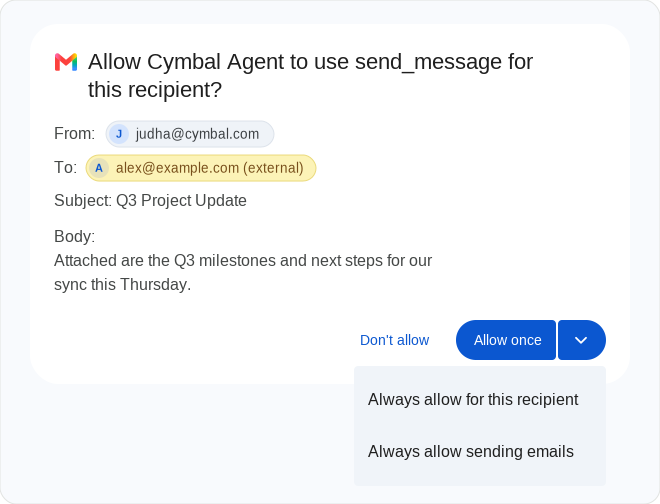
For example, an approval dialog for sending a Gmail message might look like this:
This guide explains how to connect to the /mcp/v1 endpoint, design approval
dialogs for the best user experience, and implement the stateless form
elicitation protocol in an MCP host, MCP client, or agent
harness.
Before you begin
Before implementing or configuring MCP form elicitation, complete the prerequisites, determine whether your MCP host or client needs custom elicitation support, and review the server endpoints.
Prerequisites
Before implementing form elicitation in a custom MCP host or client, complete the following setup requirements:
- Enable APIs and MCP servers in the same Google Cloud project: Create your OAuth 2.0 client ID in the same Google Cloud project where you enable the target Google Workspace APIs and MCP server endpoints. Select Use this client for an AI-powered agent when creating the OAuth client. For complete instructions, see Configure Google Workspace MCP servers.
- Request the required OAuth 2.0 scopes for your target tools: Calling a
tool with
tools/callrequires an OAuth 2.0Beareraccess token that includes the scope required for that tool, even thoughtools/listreturns available tools independently of token scopes. Check the server's MCP reference overview page for each tool's required OAuth scopes.
Check if you need to implement form elicitation
We recommend connecting to the /mcp/v1 endpoint with MCP form elicitation so
your agent can access the full set of Google Workspace tools and
results. Whether you need to write code depends on how your
MCP host and MCP client are built:
- Configuring a prebuilt MCP host: If you are connecting a prebuilt MCP
host application such as Google Antigravity or Claude Desktop that supports
MCP form elicitation, you don't need to write form elicitation code:
- Connect to the
/mcp/v1endpoint. For setup steps, see Configure Google Workspace MCP servers. - Set the host's built-in local tool confirmation setting to Always
allow for Google Workspace MCP servers on
/mcp/v1so users aren't prompted twice for the same action. - If your prebuilt MCP host doesn't support form elicitation yet, you can
connect to the limited
/mcp/v1selffallback endpoint, which exposes tools that are useful without form elicitation, although specific calls can still require approval.
- Connect to the
- Integrating an MCP client SDK or agent framework into your MCP host: If
you use an MCP client library or agent framework such as Agent Development
Kit (ADK) that already handles form elicitation at the protocol layer, you
still need to wire its elicitation handler into your MCP host's UI or CLI
surface. Implement the approval UI recommendations in
this guide for the best user experience on
/mcp/v1. - Building a custom MCP client and host: If you are building your own MCP
client and host integration, implement both the stateless form elicitation
protocol and the approval UI recommendations in this
guide to connect to
/mcp/v1.
Server endpoints
General Availability Google Workspace MCP servers and the Universal
Search MCP server offer the primary /mcp/v1 endpoint and a limited
/mcp/v1self fallback endpoint:
| Endpoint | Server URLs | Form elicitation requirement | Available tools |
|---|---|---|---|
/mcp/v1 |
|
Recommended primary endpoint. Use with mode: "form"
elicitation.
|
Exposes all tools and full result sets for the server, including tools that always require user approval under default policy. |
/mcp/v1self |
|
Fallback endpoint. Specific calls might still require form elicitation depending on policy and target resources. |
Omits tools that always require approval under default policy, and
exposes only tools that are useful without form elicitation, such as
update_doc. List and search methods such as
list_threads return only the subset of results accessible
without approval rather than prompting for full access.
|
Use /mcp/v1 with form elicitation whenever possible, and reserve /mcp/v1self
for MCP hosts where you can't add form elicitation support. If a client calls a
tool in a way that requires user approval on either endpoint without declaring
form elicitation support, the server blocks the call and returns a
MissingRequiredClientCapability error.
To see which tools are available on /mcp/v1 and /mcp/v1self for each
service, check the server's tool reference overview page:
- Gmail MCP reference
- Drive MCP reference
- Docs MCP reference
- Sheets MCP reference
- Slides MCP reference
- Calendar MCP reference
- Chat MCP reference
- Universal Search MCP reference
How form elicitation works
Google Workspace MCP servers use a stateless, single-connection request and retry flow based on the 2026-07-28 MCP Elicitation specification.
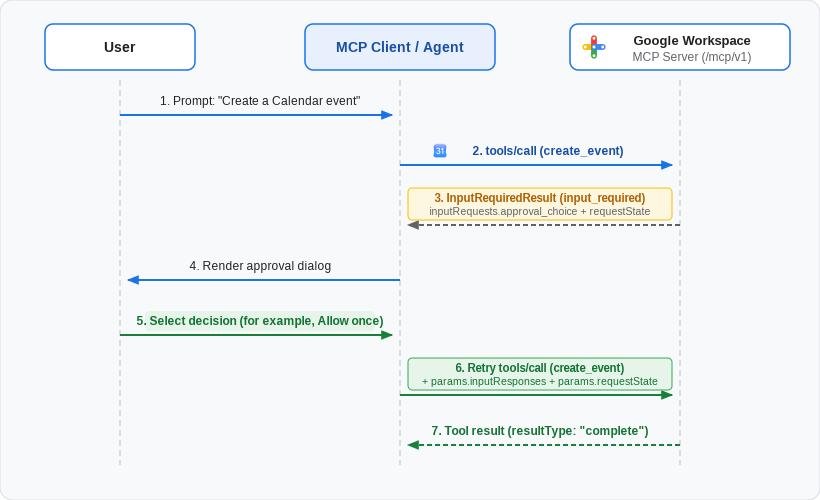
The form elicitation lifecycle follows these steps:
- User prompt: The user asks the agent to perform an action, such as creating a Calendar event.
- Initial
tools/callrequest: The MCP client sends atools/callrequest to the/mcp/v1endpoint for a tool such ascreate_eventand declareselicitationcapability inparams._meta. InputRequiredResultresponse: When the requested action requires user approval, the server pauses execution before running the tool. The server returns aresultobject withresultType: "input_required", aninputRequestsmap keyed by"approval_choice"containing anelicitation/createrequest withmode: "form", and an opaquerequestStatestring.- Approval dialog: The MCP client renders an approval dialog showing the
target Google Workspace product and tool, the Markdown confirmation
message, the decision question, and the allowed choices from
enumandenumNames. - User decision: The user selects an approval option, such as Allow once or Don't allow.
- Retry
tools/callwithinputResponsesandrequestState: The MCP client sends a secondtools/callrequest with the identical toolnameandarguments, plus top-levelparams.requestStateandparams.inputResponsesfields containing the user's selected choice for"approval_choice". - Tool execution result: The server verifies that
requestStateis bound to the exact tool arguments from the initial call, evaluates the user's decision, executes or ends the tool call, and returns a finalresultwithresultType: "complete".
When approvals are requested
Whether a tool call triggers an elicitation/create challenge is determined
dynamically by the Google Workspace MCP server based on system, user,
and administrator governance policies. Policy evaluation can consider the
following factors:
- Action type: Write actions that share data with an audience or modify shared resources require user confirmation by default unless permitted by user or administrator policy, whereas self-writes such as creating a private file execute without confirmation by default. Trashing actions always require per-call confirmation without persistent approval, and read or metadata actions can also require confirmation depending on user or administrator policy.
- Content ownership and visibility: Accessing or modifying files owned by other users or shared outside the user's organization can require approval.
- External recipients: Sending messages, sharing files, or inviting attendees outside the user's domain typically requires explicit confirmation.
- User and administrator preferences: Saved approval preferences from previous transactions or domain-wide administrator rules can require or bypass confirmation for specific tools.
Because policy evaluation happens server-side on every call, your client must be
prepared to handle an InputRequiredResult response on any tools/call
invocation. Never hardcode tool sensitivity rules or cache approval decisions on
the client.
Approval choices reference
In requestedSchema.properties.approval_choice, the server returns parallel
enum and enumNames arrays representing the choices available for the
current request. Across Google Workspace MCP servers, the following
enum values are supported:
enum value |
Default enumNames label in English |
Allows execution | When offered and behavior |
|---|---|---|---|
ALLOW_ONCE |
Allow once | Yes | Offered on every approval prompt. Runs the current tool call once without recording a persistent rule. |
DENY_ONCE |
Don't allow | No |
Offered on every approval prompt. Ends the current tool call with a
UserDeniedAction error without recording a persistent rule.
|
ALLOW_TOOL_ALWAYS |
Always allow this tool | Yes | Offered when user and administrator policies permit tool-wide persistent approval. Runs the current call and pre-approves future calls to the same tool from the same agent. |
ALLOW_RESOURCE_ALWAYS |
Always allow for this file / folder / drive / email / event / space / chat / group chat / task / item | Yes | Offered when modifying or accessing up to 100 resources of the same type. Uses plural wording such as Always allow for these files when the call targets multiple resources. Runs the current call and pre-approves future calls from the same agent on the same resource IDs. |
ALLOW_AUDIENCE_ALWAYS |
Always allow for this recipient / these recipients | Yes | Offered for send, share, and invite actions targeting up to 100 recipients. Runs the current call and pre-approves future calls from the same agent to the same recipient set. |
ALLOW_OWNER_ALWAYS |
Always allow for this owner / these owners | Yes | Offered on read or grounding prompts touching items from up to 3 distinct owners. Runs the current call and pre-approves future calls from the same agent for items owned by those users. |
Any individual InputRequiredResult includes only the subset of choices that
apply to that specific tool call:
- Destructive and trashing actions: Actions that permanently delete or
trash resources, or actions governed by an administrator policy that
requires confirmation on every call, offer only
ALLOW_ONCEandDENY_ONCE. - Scoped actions: When persistent approvals are permitted, the server
returns
ALLOW_ONCE, the applicable narrow scope such asALLOW_AUDIENCE_ALWAYSorALLOW_RESOURCE_ALWAYS,ALLOW_TOOL_ALWAYS, andDENY_ONCE.
Always render the exact options returned in enum and enumNames for the
current request rather than hardcoding button values.
Recommended practices for the best user experience
Standard MCP clients that support form elicitation work out of the box with
/mcp/v1. However, generic form renderers often display single-select
decisions as a radio group or drop-down menu paired with a separate Submit
button, which requires extra clicks and hides the target
Google Workspace app context.
For the best form elicitation user experience, implement the following five recommendations in your MCP client. Recommendations 1 through 3 correspond to the numbered callouts in the following approval dialog illustration:
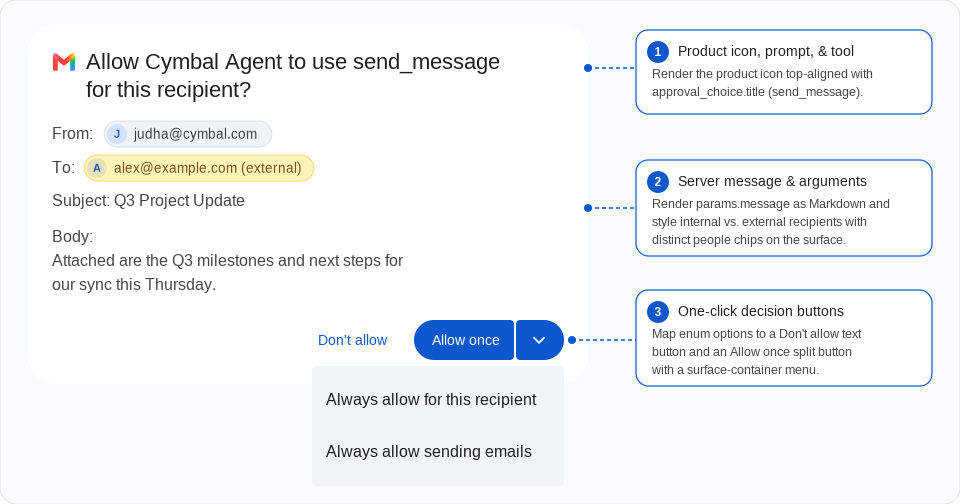
1. Display product names, icons, and tools
Users should immediately see which Google Workspace product and tool the agent wants to call:
- Map the MCP server's
serverInfometadata from initialization orserver/discover, or the request hostname such ascalendarmcp.googleapis.com, to the Google Workspace product name and icon. - Treat
_metapresentation hints onInputRequiredResultsuch astitle,icons, andisConfirmationas optional enhancements. Production Google Workspace MCP servers don't emit these_metafields yet, so your UI shouldn't depend on them. - Display the target tool name from
params.nameso users can distinguish between operations such ascreate_draftandcreate_event.
2. Render server messages and enumNames
Keep your client presentation layer simple and render the server-provided approval content directly:
- Render
params.messageas Markdown and displayapproval_choice.title: Google Workspace MCP servers already format action details as Markdown ininputRequests.approval_choice.params.messageand provide a localized confirmation question inrequestedSchema.properties.approval_choice.title. Rendermessagedirectly with a safe Markdown renderer rather than displaying raw Markdown symbols or writing custom per-tool argument formatting logic, and displaytitleclearly above the action buttons. - Pair
enumvalues withenumNameslabels: InspectrequestedSchema.properties.approval_choicedynamically. Pair each identifier inenumwith the human-readable label at the same index inenumNames, and fall back to JSON SchemaoneOfentries if interacting with other MCP servers that useoneOf.
3. Simplify decisions with one-click buttons
When requestedSchema contains a single enum property, avoid rendering a radio
button list or drop-down menu that requires a separate Submit click:
- Two options such as
Allow onceandDon't allow: Render two side-by-side buttons. Clicking either button immediately submits the retry request. - Multiple allow options: When the server returns
ALLOW_ONCE, one or more persistent allow scopes such asALLOW_AUDIENCE_ALWAYSorALLOW_TOOL_ALWAYS, andDENY_ONCE, render a primary split button defaulting to Allow once with a caret menu for the additional allow options, paired with a separate Don't allow button.
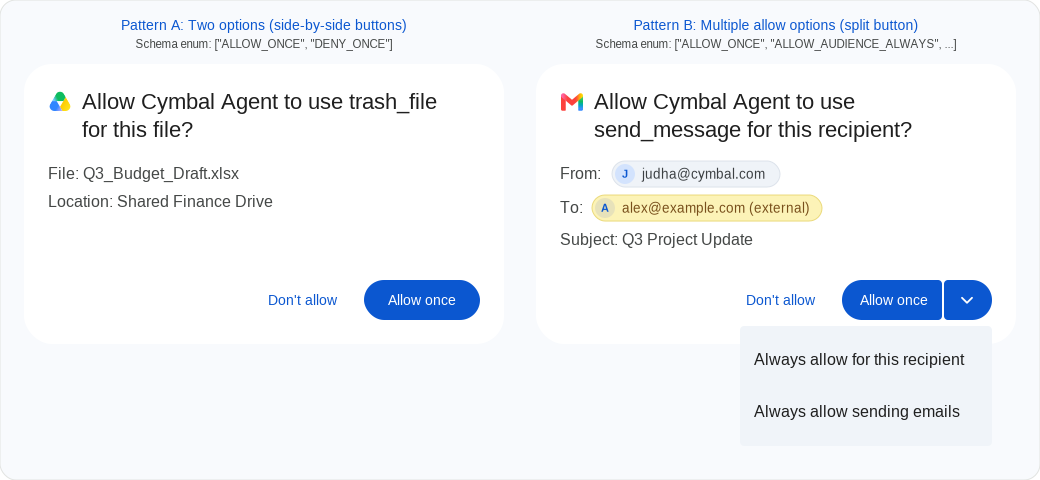
In Pattern A, a destructive Drive action returns only
ALLOW_ONCE and DENY_ONCE, which the client renders as two side-by-side
buttons for Don't allow and Allow once. In Pattern B, a
Gmail action returns ALLOW_ONCE, ALLOW_AUDIENCE_ALWAYS,
ALLOW_TOOL_ALWAYS, and DENY_ONCE, which the client renders as a Don't
allow button alongside an Allow once split button whose menu exposes the
persistent allow choices.
4. Avoid duplicate prompts on /mcp/v1
Many MCP hosts include a built-in local confirmation prompt before executing any external tool. When calling Google Workspace MCP servers with form elicitation enabled, local pre-execution prompts create a redundant double-prompt experience because the server enforces its own policy-aware elicitation challenge.
- If you are configuring a prebuilt MCP host with form elicitation: Set
the host's local tool confirmation setting for Google Workspace MCP
servers on
/mcp/v1to Always allow, and rely on the server-initiated elicitation dialog. If your host doesn't support form elicitation and connects to/mcp/v1self, keep local tool confirmations enabled if you want client-side prompts for calls that don't trigger server-side approval. - If you are building an MCP host: Suppress your host's generic pre-call
confirmation dialog when form elicitation is enabled for
*mcp.googleapis.comandpeople.googleapis.com, such asgmailmcp.googleapis.com,calendarmcp.googleapis.com,drivemcp.googleapis.com, andworkspacemcp.googleapis.com. Only prompt the user when the server returns anInputRequiredResultwithresultType: "input_required".
5. Guide agent behavior for tools and denials
Reasoning models can misinterpret human-in-the-loop approval flows in two ways:
- Pre-emptively avoiding write tools: If a model assumes that calling a
write tool such as
send_messageexecutes immediately without user review, the model might fall back to a draft tool such ascreate_drafteven when the user asked to send an email. - Retrying with alternative write tools after a denial: If the user clicks
Don't allow on an approval dialog and the server returns a
UserDeniedActionerror result, the model might treat the denial as a transient tool failure and attempt to accomplish the same goal using another write tool, triggering an unwanted second approval prompt.
To prevent both issues, include the following instructions in your agent's system prompt:
Prompt
When calling Google Workspace MCP tools:
1. Select the tool that directly matches the user's intent (for example,
   use send_message when asked to send an email). Sensitive tools
   automatically pause for user confirmation through MCP form elicitation
   before executing.
2. If a tool call fails because the user denied, declined, or canceled the
   approval request, stop immediately and acknowledge the user's decision.
   Do not retry the same action or call an alternative write tool unless
   the user explicitly asks you to do so in a new message.
Transport and stateless protocol requirements
Google Workspace MCP servers operate over stateless Streamable HTTP. When building a custom MCP client, follow these wire requirements on every request:
- HTTP headers: Include the following headers on all
POSTrequests to/mcp/v1:Authorization: Bearer ACCESS_TOKENContent-Type: application/jsonAccept: application/json, text/event-streamMCP-Protocol-Version: 2026-07-28Accept-Language: BCP_47_LANGUAGE_TAGto localize confirmation messages, questions, andenumNameslabels into the user's preferred language, such ases-419, es;q=0.9, en;q=0.8. If omitted, text defaults toen-US.
- Response content types: Depending on the server and request type, the
HTTP response body can be formatted as standard JSON with
Content-Type: application/jsonor as Server-Sent Events (SSE) withContent-Type: text/event-streamwhere JSON-RPC payloads appear ondata: {...}lines. Your HTTP transport parser must accept both formats. - Stateless discovery: Google Workspace MCP servers don't
maintain stateful
initializesessions. To fetch server metadata and capabilities at startup, send a JSON-RPC request with"method": "server/discover"and"params": {}, which returns server metadata inresult._meta["io.modelcontextprotocol/serverInfo"]. Custom confirmation_metahints such asisConfirmation,title, andiconsaren't emitted in productionInputRequiredResultresponses yet, so always treat_metapresentation fields as optional and fall back toserverInfoor the server hostname. - Per-request
_metacapabilities: Because the transport is stateless, include_metainsideparamson everytools/listandtools/callrequest with the following keys:"io.modelcontextprotocol/protocolVersion": "2026-07-28""io.modelcontextprotocol/clientInfo":{"name": "YOUR_APP_NAME","version": "VERSION"}"io.modelcontextprotocol/clientCapabilities":{"elicitation": {"form": {}}}
Error handling and parameter binding
When a tool call is blocked or a retry fails validation, the server returns either a tool-level error result or a top-level JSON-RPC error object depending on the failure category:
UserDeniedActionandAdminPolicyBlock: When a user declines an approval prompt or an administrator policy blocks the action, the server returns a JSON-RPCresultwith"resultType": "complete","isError": true, and a localized error message inresult.content. When enabled for the service and environment, the server also includes structured error metadata inresult._meta["google.com/error"]. Becauseresult._meta["google.com/error"]is gated per service and environment, your client must fall back to reading the error message fromresult.contentwhenresult._meta["google.com/error"]is absent:UserDeniedAction: Returned when the user selectsDENY_ONCE, declines, or cancels the approval form. The default English message is"Action canceled. The user declined the confirmation request."AdminPolicyBlock: Returned when an organization administrator policy prohibits the agent from performing the operation. The default English message is"Action could not be completed. Your administrator has blocked third-party agents from performing this action."
JSON
{ "jsonrpc": "2.0", "id": 3, "result": { "resultType": "complete", "isError": true, "content": [ { "type": "text", "text": "Action canceled. The user declined the confirmation request." } ], "_meta": { "google.com/error": { "code": 400, "message": "Action canceled. The user declined the confirmation request.", "status": "FAILED_PRECONDITION", "details": [ { "@type": "type.googleapis.com/google.rpc.ErrorInfo", "reason": "UserDeniedAction", "domain": "mcp.googleapis.com" } ] } } } }MissingRequiredClientCapability: Returned when a client calls a tool in a way that requires user confirmation on either/mcp/v1or/mcp/v1selfwithout declaring form elicitation support in_meta["io.modelcontextprotocol/clientCapabilities"]. The server translates this error into a top-level JSON-RPCerrorobject with code-32021and the required capability object inerror.data.requiredCapabilities:JSON
{
  "jsonrpc": "2.0",
  "id": 2,
  "error": {
    "code": -32021,
    "message": "Action could not be completed. This action requires user confirmation, which this client does not support. Use a client that supports form elicitation to perform this action.",
    "data": {
      "requiredCapabilities": {
        "elicitation": {
          "form": {}
        }
      }
    }
  }
}
Parameter-binding enforcement: The
requestBindingtoken insiderequestStatecryptographically binds the initial approval challenge to the exact toolargumentssent on the first call. If the client modifies any field inparams.argumentson the retry call, or passes a malformed or unboundparams.requestState, the server either ignores the invalid approval and returns a newInputRequiredResultchallenge, or returns an invalid-parameter or failed-precondition error instructing the client to retry withoutinputResponses.
Example implementation
The following end-to-end walkthrough demonstrates how an MCP client calls the
Calendar create_event tool, renders the server's approval
prompt in a browser UI or terminal CLI, and submits the user's decision in
TypeScript and Python, followed by a reusable agent skill for
coding agents.
Client approval surfaces
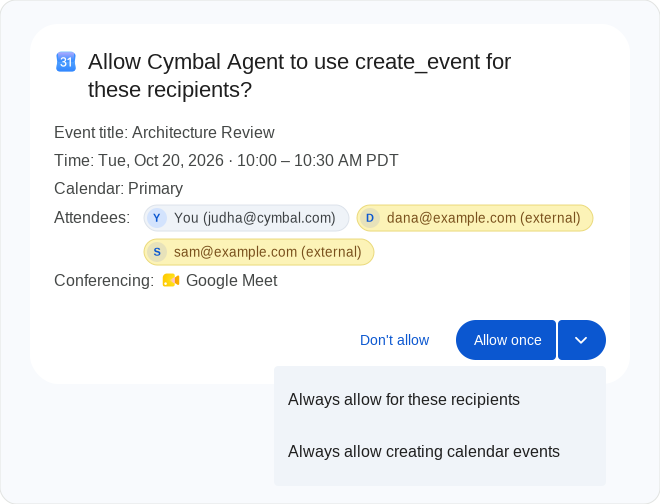
In a browser-based MCP client, the TypeScript implementation renders a visual
approval card showing the Calendar icon, server hostname, tool
name, rendered Markdown message preview from the server, confirmation
question, a Don't allow button, and an Allow once split button:
In a terminal-based MCP client, the Python CLI implementation renders the same
InputRequiredResult payload as an interactive numbered prompt:
CLI
=== Google Calendar (create_event) ===
Architecture Review
Tue, Oct 20 · 10:00 - 10:30 AM PDT · 🟢 No calendar conflicts
You, dana@example.com, sam@example.com
Conferencing: Google Meet

Allow Cymbal Agent to use create_event for these recipients?
  [1] Allow once (ALLOW_ONCE)
  [2] Always allow for these recipients (ALLOW_AUDIENCE_ALWAYS)
  [3] Always allow this tool (ALLOW_TOOL_ALWAYS)
  [4] Don't allow (DENY_ONCE)
Enter choice (1-4, or c to cancel):
Initial call and elicitation response
The client starts by sending a tools/call request to create the
Calendar event using the create_event tool:
JSON
{
  "jsonrpc": "2.0",
  "id": 2,
  "method": "tools/call",
  "params": {
    "name": "create_event",
    "arguments": {
      "calendarId": "primary",
      "summary": "Architecture Review",
      "startTime": "2026-10-20T10:00:00",
      "endTime": "2026-10-20T10:30:00",
      "timeZone": "America/Los_Angeles",
      "attendees": [
        {
          "email": "dana@example.com"
        },
        {
          "email": "sam@example.com"
        }
      ],
      "addGoogleMeetUrl": true
    },
    "_meta": {
      "io.modelcontextprotocol/protocolVersion": "2026-07-28",
      "io.modelcontextprotocol/clientInfo": {
        "name": "Cymbal Agent",
        "version": "1.0.0"
      },
      "io.modelcontextprotocol/clientCapabilities": {
        "elicitation": {
          "form": {}
        }
      }
    }
  }
}
When approval is required, the server responds with an InputRequiredResult:
JSON
{
  "jsonrpc": "2.0",
  "id": 2,
  "result": {
    "resultType": "input_required",
    "inputRequests": {
      "approval_choice": {
        "method": "elicitation/create",
        "params": {
          "mode": "form",
          "message": "**Architecture Review**  \nTue, Oct 20 · 10:00 - 10:30 AM PDT · 🟢 No calendar conflicts  \nYou, dana@example.com, sam@example.com  \n**Conferencing:** Google Meet",
          "requestedSchema": {
            "type": "object",
            "required": ["approval_choice"],
            "properties": {
              "approval_choice": {
                "type": "string",
                "title": "Allow Cymbal Agent to use create_event for these recipients?",
                "enum": [
                  "ALLOW_ONCE",
                  "ALLOW_AUDIENCE_ALWAYS",
                  "ALLOW_TOOL_ALWAYS",
                  "DENY_ONCE"
                ],
                "enumNames": [
                  "Allow once",
                  "Always allow for these recipients",
                  "Always allow this tool",
                  "Don't allow"
                ]
              }
            }
          }
        }
      }
    },
    "requestState": "{\"elicitationId\":\"...\",\"requestBinding\":\"...\"}"
  }
}
The InputRequiredResult response includes the following key fields:
result.resultType: Set to"input_required"when the server pauses execution for user input, and"complete"when the tool finishes executing.result.inputRequests: A map keyed by the request identifier"approval_choice". Each entry has"method": "elicitation/create"and aparamsobject with"mode": "form"._metapresentation hints: Optional fields such asisConfirmation,title, andiconsaren't emitted in productionInputRequiredResultresponses yet. Always treat_metafields as optional and resolve the product name and icon fromserverInfoor the server hostname when absent.inputRequests.approval_choice.params.message: A Markdown-formatted preview of the action generated by the server, or the confirmation question if the tool doesn't generate a separate preview card.inputRequests.approval_choice.params.requestedSchema: A JSON Schema object whoseproperties.approval_choicedefinition contains the following fields:title: The localized confirmation question, such as"Allow Cymbal Agent to use create_event for these recipients?". When you provide_meta["io.modelcontextprotocol/clientInfo"].nameon the request, the server incorporates your application's name into this question.enum: An ordered array ofApprovalChoiceidentifiers, such asALLOW_ONCE,ALLOW_AUDIENCE_ALWAYS,ALLOW_TOOL_ALWAYS, andDENY_ONCE.enumNames: A parallel array of localized human-readable labels corresponding to each entry inenum, such asAllow once,Always allow for these recipients,Always allow this tool, andDon't allow.
result.requestState: An opaque JSON-encoded string containing the server'selicitationIdand cryptographicrequestBindingtoken. You must echo this string unchanged inparams.requestStateon the retry call.
Retry, denial, and cancellation payloads
After the user selects an allow option, send a second tools/call request with
the exact same name and arguments, and pass requestState and
inputResponses as top-level fields inside params:
JSON
{
  "jsonrpc": "2.0",
  "id": 3,
  "method": "tools/call",
  "params": {
    "name": "create_event",
    "arguments": {
      "calendarId": "primary",
      "summary": "Architecture Review",
      "startTime": "2026-10-20T10:00:00",
      "endTime": "2026-10-20T10:30:00",
      "timeZone": "America/Los_Angeles",
      "attendees": [
        {
          "email": "dana@example.com"
        },
        {
          "email": "sam@example.com"
        }
      ],
      "addGoogleMeetUrl": true
    },
    "requestState": "{\"elicitationId\":\"...\",\"requestBinding\":\"...\"}",
    "inputResponses": {
      "approval_choice": {
        "action": "accept",
        "content": {
          "approval_choice": "ALLOW_ONCE"
        }
      }
    },
    "_meta": {
      "io.modelcontextprotocol/protocolVersion": "2026-07-28",
      "io.modelcontextprotocol/clientInfo": {
        "name": "Cymbal Agent",
        "version": "1.0.0"
      },
      "io.modelcontextprotocol/clientCapabilities": {
        "elicitation": {
          "form": {}
        }
      }
    }
  }
}
The MCP Elicitation specification distinguishes between submitting a form value
and dismissing the dialog. You can represent a negative user decision in
params.inputResponses in two ways:
Submitting the
DENY_ONCEchoice: When the user clicks the Don't allow button corresponding toDENY_ONCE, send"action": "accept"with"content": {"approval_choice": "DENY_ONCE"}:JSON
{
  "jsonrpc": "2.0",
  "id": 3,
  "method": "tools/call",
  "params": {
    "name": "create_event",
    "arguments": {
      "calendarId": "primary",
      "summary": "Architecture Review",
      "startTime": "2026-10-20T10:00:00",
      "endTime": "2026-10-20T10:30:00",
      "timeZone": "America/Los_Angeles",
      "attendees": [
        {
          "email": "dana@example.com"
        },
        {
          "email": "sam@example.com"
        }
      ],
      "addGoogleMeetUrl": true
    },
    "requestState": "{\"elicitationId\":\"...\",\"requestBinding\":\"...\"}",
    "inputResponses": {
      "approval_choice": {
        "action": "accept",
        "content": {
          "approval_choice": "DENY_ONCE"
        }
      }
    },
    "_meta": {
      "io.modelcontextprotocol/protocolVersion": "2026-07-28",
      "io.modelcontextprotocol/clientInfo": {
        "name": "Cymbal Agent",
        "version": "1.0.0"
      },
      "io.modelcontextprotocol/clientCapabilities": {
        "elicitation": {
          "form": {}
        }
      }
    }
  }
}
Declining or canceling the dialog: If the user closes or cancels the dialog without selecting an allow option, send
"action": "decline"or"action": "cancel"and omit thecontentfield:JSON
"inputResponses": {
  "approval_choice": {
    "action": "cancel"
  }
}
In both cases, the server treats the response as DENY_ONCE, ends the tool
execution, and returns a tool error result.
TypeScript web client
The following TypeScript example extracts the Markdown message, confirmation
question, and allowed options directly from the InputRequiredResult payload,
resolves the product title from optional _meta hints or the server hostname,
and replays tools/call with the user's decision:
TypeScript
const PROTOCOL_VERSION = "2026-07-28";
const CLIENT_INFO = { name: "Cymbal Agent", version: "1.0.0" };
const MAX_ELICITATION_ROUNDS = 3;

const HOST_TITLES: Record<string, string> = {
  "gmailmcp.googleapis.com": "Gmail",
  "calendarmcp.googleapis.com": "Google Calendar",
  "drivemcp.googleapis.com": "Google Drive",
  "docsmcp.googleapis.com": "Google Docs",
  "sheetsmcp.googleapis.com": "Google Sheets",
  "slidesmcp.googleapis.com": "Google Slides",
  "chatmcp.googleapis.com": "Google Chat",
  "people.googleapis.com": "Google Contacts",
  "tasksmcp.googleapis.com": "Google Tasks",
  "workspacemcp.googleapis.com": "Google Workspace",
};

interface ElicitationOption {
  value: string;
  label: string;
}

export interface ElicitationCardModel {
  requestKey: string;
  serverTitle: string;
  serverIconUrl?: string;
  toolName: string;
  markdownMessage: string;
  questionTitle: string;
  decisionFieldKey: string;
  denyOption?: ElicitationOption;
  primaryAllowOption?: ElicitationOption;
  secondaryAllowOptions: ElicitationOption[];
}

function buildBaseMeta(): Record<string, unknown> {
  return {
    "io.modelcontextprotocol/protocolVersion": PROTOCOL_VERSION,
    "io.modelcontextprotocol/clientInfo": CLIENT_INFO,
    "io.modelcontextprotocol/clientCapabilities": {
      elicitation: { form: {} },
    },
  };
}

/**
 * Extracts a UI view model directly from an InputRequiredResult response.
 * Render card.markdownMessage with a safe Markdown renderer in your UI.
 */
export function extractCardModel(
  rpcResult: Record<string, any>,
  toolName: string,
  serverHost = "workspacemcp.googleapis.com",
): ElicitationCardModel | null {
  const inputRequests: Record<string, any> = rpcResult.inputRequests ?? {};
  const requestEntry = Object.entries(inputRequests).find(
    ([, req]: [string, any]) =>
      req?.method === "elicitation/create" && req?.params?.mode === "form",
  );
  if (!requestEntry) {
    return null;
  }
  const [requestKey, elicitationReq] = requestEntry;

  const reqMeta = elicitationReq.params?._meta ?? {};
  const resultMeta = rpcResult._meta ?? {};
  const serverInfo = resultMeta["io.modelcontextprotocol/serverInfo"] ?? {};
  const icons: Array<{ src: string; mimeType?: string }> =
    reqMeta.icons ?? resultMeta.icons ?? serverInfo.icons ?? [];
  const preferredIcon =
    icons.find((icon) => icon.mimeType === "image/svg+xml") ?? icons[0];

  const properties: Record<string, any> =
    elicitationReq.params?.requestedSchema?.properties ?? {};
  const firstProperty = Object.entries(properties)[0];
  if (!firstProperty) {
    return null;
  }
  const [decisionFieldKey, fieldSchema] = firstProperty as [
    string,
    Record<string, any>,
  ];

  let options: ElicitationOption[] = [];
  if (Array.isArray(fieldSchema.enum)) {
    const enumNames: string[] = Array.isArray(fieldSchema.enumNames)
      ? fieldSchema.enumNames
      : [];
    options = fieldSchema.enum.map((val: string, idx: number) => ({
      value: val,
      label: enumNames[idx] ?? val,
    }));
  } else if (Array.isArray(fieldSchema.oneOf)) {
    options = fieldSchema.oneOf.map((opt: any) => ({
      value: opt.const,
      label: opt.title ?? opt.const,
    }));
  }

  const denyOption = options.find((opt) => opt.value.startsWith("DENY"));
  const allowOptions = options.filter(
    (opt) => !opt.value.startsWith("DENY"),
  );

  return {
    requestKey,
    serverTitle:
      reqMeta.title ??
      resultMeta.title ??
      serverInfo.title ??
      serverInfo.name ??
      HOST_TITLES[serverHost] ??
      "Google Workspace",
    serverIconUrl: preferredIcon?.src,
    toolName,
    markdownMessage:
      elicitationReq.params?.message ?? "Confirm this action.",
    questionTitle: fieldSchema.title ?? "Confirm this action?",
    decisionFieldKey,
    denyOption,
    primaryAllowOption: allowOptions[0],
    secondaryAllowOptions: allowOptions.slice(1),
  };
}

/**
 * Executes tools/call and replays with requestState and inputResponses
 * when the server returns an InputRequiredResult.
 */
export async function handleToolCallWithElicitation(
  sendRpc: (payload: Record<string, unknown>) => Promise<Record<string, any>>,
  promptUserInUi: (card: ElicitationCardModel) => Promise<string | null>,
  toolName: string,
  toolArgs: Record<string, unknown>,
  serverHost = "calendarmcp.googleapis.com",
): Promise<Record<string, any>> {
  let requestId = 1;
  let response = await sendRpc({
    jsonrpc: "2.0",
    id: requestId,
    method: "tools/call",
    params: {
      name: toolName,
      arguments: structuredClone(toolArgs),
      _meta: buildBaseMeta(),
    },
  });

  for (let round = 0; round < MAX_ELICITATION_ROUNDS; round++) {
    const result = response.result ?? {};
    if (result.resultType !== "input_required") {
      return response;
    }

    const card = extractCardModel(result, toolName, serverHost);
    if (!card) {
      return response;
    }

    const selectedValue = await promptUserInUi(card);
    const userResponse = selectedValue
      ? {
          action: "accept",
          content: { [card.decisionFieldKey]: selectedValue },
        }
      : { action: "cancel" };

    requestId += 1;
    response = await sendRpc({
      jsonrpc: "2.0",
      id: requestId,
      method: "tools/call",
      params: {
        name: toolName,
        arguments: structuredClone(toolArgs),
        ...(result.requestState !== undefined
          ? { requestState: result.requestState }
          : {}),
        inputResponses: {
          [card.requestKey]: userResponse,
        },
        _meta: buildBaseMeta(),
      },
    });
  }

  return response;
}
Python CLI client
Python
import copy
import re
from typing import Any

PROTOCOL_VERSION = "2026-07-28"
CLIENT_INFO = {"name": "Cymbal CLI Agent", "version": "1.0.0"}
MAX_ELICITATION_ROUNDS = 3
HOST_TITLES = {
    "gmailmcp.googleapis.com": "Gmail",
    "calendarmcp.googleapis.com": "Google Calendar",
    "drivemcp.googleapis.com": "Google Drive",
    "docsmcp.googleapis.com": "Google Docs",
    "sheetsmcp.googleapis.com": "Google Sheets",
    "slidesmcp.googleapis.com": "Google Slides",
    "chatmcp.googleapis.com": "Google Chat",
    "people.googleapis.com": "Google Contacts",
    "tasksmcp.googleapis.com": "Google Tasks",
    "workspacemcp.googleapis.com": "Google Workspace",
}

def build_base_meta() -> dict[str, Any]:
  """Returns the required per-request _meta block for /mcp/v1 calls."""
  return {
      "io.modelcontextprotocol/protocolVersion": PROTOCOL_VERSION,
      "io.modelcontextprotocol/clientInfo": CLIENT_INFO,
      "io.modelcontextprotocol/clientCapabilities": {
          "elicitation": {"form": {}}
      },
  }

def strip_markdown(text: str) -> str:
  """Minimal example that strips basic Markdown for terminal display."""
  text = re.sub(r"\[([^\]]+)\]\(([^)]+)\)", r"\1 (\2)", text)
  text = re.sub(r"\*\*(.*?)\*\*", r"\1", text)
  return re.sub(r"`([^`]+)`", r"\1", text)

def extract_decision_options(
    requested_schema: dict[str, Any],
) -> tuple[str | None, str, list[dict[str, str]]]:
  """Extracts the property key, question title, and options from schema."""
  properties = requested_schema.get("properties", {})
  first_entry = next(iter(properties.items()), None)
  if first_entry is None:
    return None, "Confirm this action?", []

  field_key, field_schema = first_entry
  question_title = field_schema.get("title", "Confirm this action?")

  if "enum" in field_schema:
    enum_values = field_schema.get("enum", [])
    enum_names = field_schema.get("enumNames", [])
    options = [
        {
            "value": val,
            "label": enum_names[idx] if idx < len(enum_names) else val,
        }
        for idx, val in enumerate(enum_values)
    ]
  elif "oneOf" in field_schema:
    options = [
        {
            "value": item["const"],
            "label": item.get("title", item["const"]),
        }
        for item in field_schema["oneOf"]
    ]
  else:
    options = []
  return field_key, question_title, options

def prompt_user_in_cli(
    elicitation_req: dict[str, Any],
    result_meta: dict[str, Any],
    tool_name: str,
    server_host: str = "calendarmcp.googleapis.com",
) -> dict[str, Any]:
  """Renders a CLI approval prompt and returns the inputResponses entry."""
  params = elicitation_req.get("params", {})
  req_meta = params.get("_meta", {})
  server_info = result_meta.get(
      "io.modelcontextprotocol/serverInfo", {}
  )
  server_title = (
      req_meta.get("title")
      or result_meta.get("title")
      or server_info.get("title")
      or server_info.get("name")
      or HOST_TITLES.get(server_host, "Google Workspace MCP")
  )
  message = strip_markdown(params.get("message", "Confirm this action."))
  field_key, question_title, options = extract_decision_options(
      params.get("requestedSchema", {})
  )
  if not field_key or not options:
    return {"action": "cancel"}

  print(f"\n=== {server_title} ({tool_name}) ===")
  print(message)
  print(f"\n{strip_markdown(question_title)}")
  for idx, opt in enumerate(options, start=1):
    print(f"  [{idx}] {opt['label']} ({opt['value']})")

  choice = input(
      f"Enter choice (1-{len(options)}, or c to cancel): "
  ).strip()
  try:
    selected_idx = int(choice) - 1
    if 0 <= selected_idx < len(options):
      selected_value = options[selected_idx]["value"]
      return {
          "action": "accept",
          "content": {field_key: selected_value},
      }
  except ValueError:
    pass

  return {"action": "cancel"}

def handle_tool_call_with_elicitation(
    send_rpc_fn: Any, tool_name: str, tool_args: dict[str, Any]
) -> dict[str, Any]:
  """Executes tools/call and retries with inputResponses when elicited."""
  base_params = {
      "name": tool_name,
      "arguments": copy.deepcopy(tool_args),
      "_meta": build_base_meta(),
  }
  request_id = 1
  response = send_rpc_fn(
      {
          "jsonrpc": "2.0",
          "id": request_id,
          "method": "tools/call",
          "params": copy.deepcopy(base_params),
      }
  )

  for _ in range(MAX_ELICITATION_ROUNDS):
    result = response.get("result", {})
    if result.get("resultType") != "input_required":
      return response

    input_requests = result.get("inputRequests", {})
    if not isinstance(input_requests, dict) or not input_requests:
      return response

    result_meta = result.get("_meta", {})
    input_responses: dict[str, Any] = {}
    for req_key, req in input_requests.items():
      if (
          isinstance(req, dict)
          and req.get("method") == "elicitation/create"
          and req.get("params", {}).get("mode") == "form"
      ):
        input_responses[req_key] = prompt_user_in_cli(
            req, result_meta, tool_name
        )

    if not input_responses:
      return response

    request_id += 1
    retry_params = copy.deepcopy(base_params)
    request_state = result.get("requestState")
    if request_state is not None:
      retry_params["requestState"] = request_state
    retry_params["inputResponses"] = input_responses
    response = send_rpc_fn(
        {
            "jsonrpc": "2.0",
            "id": request_id,
            "method": "tools/call",
            "params": retry_params,
        }
    )

  return response
Agent skill
Use the following as a skill or prompt for your coding agent to implement form elicitation for your agent harness:
Prompt
---
name: google-workspace-mcp-elicitation
metadata:
  version: "1.0.0"
  category: GoogleWorkspace
description: >-
  Implements Model Context Protocol (MCP) form elicitation
  (`elicitation/create`) for Human-in-the-Loop (HITL) approvals with Google
  Workspace MCP servers (Gmail, Calendar, Drive, Docs, Sheets, Slides, Chat,
  Contacts). Use when adding HITL confirmation prompts to an agent, handling
  Stateless HTTP (`2026-07-28`) Multi Round-Trip Requests
  (`resultType: "input_required"`), mapping elicitation schemas or `_meta`
  hints to UI controls, or troubleshooting Workspace MCP `401`/`403`/`405`
  and capability errors. Don't use for general OAuth 2.0 app setup unrelated
  to MCP or for authoring custom MCP servers.
---

# Implementing Google Workspace MCP Form Elicitation (HITL)

Use this guide to support **Model Context Protocol (MCP) Form Elicitation**
for Human-in-the-Loop (HITL) confirmations when integrating **Google
Workspace MCP servers** into an AI agent.

Rather than duplicating the MCP specification, this guide references the
canonical specs and focuses on **Google Workspace server nuances**, **mapping
protocol message fields to UI**, **upcoming Google Workspace `_meta`
extensions**, and **practical integration boundaries**:

- [MCP Elicitation Specification][mcp-elicitation]
- [MCP Multi Round-Trip Requests (MRTR) Specification][mcp-mrtr]
- [MCP Lifecycle & Initialization][mcp-life]
- [MCP Icons Utility Specification][mcp-icon]

---

## 1. Prerequisites, Nuances & Architectural Boundaries

### Prerequisites (Assumed Configured)

This skill focuses on **handling elicitation requests and mapping them to
UI**. It assumes the host application already has Google Workspace MCP
connectivity and OAuth 2.0 configured. If not yet set up, follow the
[Google Workspace MCP Server Configuration Guide][ws-mcp-setup] to configure:

1. **Google Cloud Project & Service Enablement**: A Google Cloud project with
   the target Google Workspace APIs and MCP endpoints enabled.
2. **OAuth 2.0 Bearer Authentication**: An OAuth 2.0 flow issuing user access
   tokens with the required service scopes, passed as
   `Authorization: Bearer {access_token}` on MCP HTTP `POST` requests. When
   using standard 3-legged OAuth 2.0, the OAuth client configuration must
   have the **"Used by an agent"** checkbox enabled.

Canonical MCP server URLs and default OAuth 2.0 scopes by service:

- **Gmail** (`https://gmailmcp.googleapis.com/mcp/v1`):
  - `https://www.googleapis.com/auth/gmail.modify`
  - `https://www.googleapis.com/auth/gmail.settings.basic`
- **Google Calendar** (`https://calendarmcp.googleapis.com/mcp/v1`):
  - `https://www.googleapis.com/auth/calendar.events`
  - `https://www.googleapis.com/auth/calendar.readonly`
- **Google Drive** (`https://drivemcp.googleapis.com/mcp/v1`):
  - `https://www.googleapis.com/auth/drive`
- **Google Docs** (`https://docsmcp.googleapis.com/mcp/v1`):
  - `https://www.googleapis.com/auth/documents`
- **Google Sheets** (`https://sheetsmcp.googleapis.com/mcp/v1`):
  - `https://www.googleapis.com/auth/spreadsheets`
- **Google Slides** (`https://slidesmcp.googleapis.com/mcp/v1`):
  - `https://www.googleapis.com/auth/presentations`
- **Google Chat** (`https://chatmcp.googleapis.com/mcp/v1`):
  - `https://www.googleapis.com/auth/chat.messages`
- **Google Contacts (preview)** (`https://people.googleapis.com/mcp/v1`):
  - `https://www.googleapis.com/auth/contacts`
- **Google Tasks** (`https://tasksmcp.googleapis.com/mcp/v1`):
  - `https://www.googleapis.com/auth/tasks`
- **Universal Search** (`https://workspacemcp.googleapis.com/mcp/v1`):
  - `https://www.googleapis.com/auth/gmail.readonly`
  - `https://www.googleapis.com/auth/drive.readonly`
  - `https://www.googleapis.com/auth/calendar.readonly`
  - `https://www.googleapis.com/auth/chat.messages.readonly`
  - `https://www.googleapis.com/auth/chat.spaces.readonly`
  - `https://www.googleapis.com/auth/chat.memberships.readonly`

### Key Nuances for Google Workspace MCP Servers

- **Markdown Messages**: Google Workspace MCP servers format `params.message`
  as **GitHub-Flavored Markdown** (headings, bold labels, bulleted lists of
  parameters, links). Render `params.message` with a Markdown renderer rather
  than plain text.
- **Selective Server-Side Gate (Writes & Sensitive/Shared Reads)**: Workspace
  form elicitation selectively gates sensitive operations on the server, such
  as **high-impact write operations** (for example, sending an email,
  scheduling a meeting with external attendees, modifying a shared document)
  as well as **reads of sensitive or externally shared data**, rather than
  triggering on every tool call or validating general agent intent. Because
  these sensitive actions already trigger a server-side `elicitation/create`
  prompt, enabling unconditional client-side pre-tool approvals (such as
  `needsApproval: true` on all tools) can double-prompt the user. Factor this
  server-side gate into your risk assessment when deciding whether to
  auto-approve tool calls, gate specific tools, or require pre-execution
  approval across the board.

### Architectural Boundaries: Do Not Fight the Framework

Pausing an in-flight tool call, presenting a prompt to a user, and resuming
execution cuts across the host application's language, agent framework, MCP
SDK, and UI surface. **Do not fight the host framework or re-implement MCP
from scratch**. Reuse what the framework and SDK already provide to the
fullest extent possible:

- **Reuse Built-In Framework & MCP SDK Elicitation Support First**: Before
  writing protocol or transport code, inspect the host application's agent
  framework and MCP client library for existing MCP tool adapters, capability
  negotiation, elicitation callbacks, and HITL interrupt/checkpoint
  mechanisms. Wire elicitation through those built-in extension points rather
  than replacing the SDK with a hand-rolled JSON-RPC client or custom
  tool-calling loop.
- **Stateless HTTP (`2026-07-28`) MRTR & Adapting Stateful Implementations**:
  Google Workspace MCP servers use Stateless HTTP (`2026-07-28`)
  [Multi Round-Trip Requests (MRTR)][mcp-mrtr] (`POST`-only, where `GET`
  returns `405`) to deliver `elicitation/create` prompts inside `tools/call`
  responses via `result.resultType === "input_required"`
  (`result.requestState`, `result.inputRequests`) and resume when
  `tools/call` is replayed with `params.requestState` and
  `params.inputResponses`. Supporting older stateful transports is not
  required for Google Workspace, but existing elicitation support in an SDK
  or host application might assume stateful server-initiated streams
  (`2025-11-25`). Verify how the existing client handles elicitation: if it
  already implements Stateless HTTP MRTR, use it directly. If it only listens
  for stateful server-to-client stream requests (or strips MRTR fields during
  typed deserialization), adapt the transport layer so `input_required`
  responses route through the SDK's registered elicitation handler and replay
  `tools/call` with `requestState` and `inputResponses`.
- **Elicitation Rendering Is a Presentation-Layer Concern**: Keep protocol
  and transport handling decoupled from UI rendering. Pass the structured
  elicitation request (`message`, `requestedSchema`, and `_meta`) to the host
  application's presentation layer rather than embedding UI markup inside
  agent or transport code, and render it using the application's native UI
  paradigm rather than assuming HTML.
- **Suspension & Resumption Principles**: Regardless of how the host
  application is deployed, suspending and resuming an elicitation must
  satisfy three behaviors:
  1. *Yield Cleanly Waiting for User Input*: Pause the in-flight tool
     execution while waiting for the user's decision, using the host
     runtime's native mechanism (such as awaiting an async callback/channel
     in-memory or yielding via the framework's checkpoint/interrupt
     primitive).
  2. *Preserve Correlation & Continuation Context*: Retain the correlation ID
     (`requestId`), opaque server `requestState`, and original tool call
     context (`name`, `arguments`, and any prior `inputResponses`) across the
     pause, in memory if the session stays alive or in durable storage if the
     process or turn can terminate before the user responds.
  3. *Accumulate Multi-Round-Trip Responses*: When replaying `tools/call`
     with `requestState` and `inputResponses`, keep accumulating responses
     across rounds if the server returns subsequent `input_required` stages
     until the tool returns a final `CallToolResult`.

---

## 2. Phase 1: Core Form Elicitation Support (Priority)

Start by supporting standard [MCP Form Elicitation][mcp-elicitation]
end-to-end using your framework's and MCP SDK's built-in primitives so any
schema renders and resolves cleanly on the host UI surface.

### Step 1: Enable Elicitation & Register Handler

1. Register an `elicitation/create` handler through your agent framework or
   MCP client SDK, and ensure the client advertises the `elicitation`
   capability during initialization (and in per-request capability metadata
   when using Stateless HTTP discovery):

   ```json
 {
   "capabilities": {
     "elicitation": {}
   }
 }
 ```

2. Verify that your client handles Stateless HTTP (`2026-07-28`)
   [MRTR][mcp-mrtr] (`result.resultType === "input_required"`). If the SDK
   does not yet handle `input_required` natively, adapt the transport so each
   entry in `result.inputRequests` (preserving `_meta` hints) is passed to
   your registered elicitation handler and `tools/call` is replayed with
   `params.requestState` and `params.inputResponses`.

### Step 2: Render Prompt on the Host UI Surface & Collect User Input

1. **Map Protocol Fields to the Host UI Surface**:
   - Render `params.message` using a **Markdown renderer appropriate for the
     host surface** (for example, GFM component in a web UI, formatted text
     widgets in a chat card, or terminal Markdown in a CLI/TUI).
   - Present input controls for `params.requestedSchema.properties` covering
     all [MCP Elicitation supported schema types][mcp-schema-types]
     (`string`, `number`, `integer`, `boolean`, and `enum` / `oneOf`).
2. **Collect the User's Decision**: Format the user's response per the
   [MCP Elicitation response specification][mcp-elicitation]:
   - **Submit Form / Select Option**:
     `{ "action": "accept", "content": { ... } }` *(Note: When the schema
     presents explicit `ALLOW_*` and `DENY_*` enum options, selecting a
     `DENY_*` option is still submitted with `action: "accept"` and the
     selected enum value in `content`.)*
   - **Decline**: `{ "action": "decline" }`
   - **Cancel / Dismiss**: `{ "action": "cancel" }`

### Step 3: Return the Elicitation Result

Return the `{ action, content }` result from your elicitation handler (or
pass it to your framework's resume mechanism) so the MCP client completes the
tool call and returns the final `CallToolResult` to the agent.

---

## 3. Phase 2: Optional UX Enhancements & Custom `_meta` Extensions

Once generic form elicitation works, you can optionally enhance the UX for
single-enum prompts and Google Workspace `_meta` extensions on your target UI
surface. Always treat `_meta` fields as optional (`undefined`-safe) so the UI
degrades cleanly to the Phase 1 form.

> [!NOTE]
> Google Workspace MCP servers define custom `_meta` presentation attributes
> (`isConfirmation`, `title`, `icons`, `learn_more_url`), but do not yet emit
> them in production responses. **Enhancement A** works today for `<= 4` enum
 options using standard schema fields, whereas **Enhancements B and C** rely
> on upcoming `_meta` attributes. **Only implement Enhancements B and C if
> explicitly directed to by the user.**

### Enhancement A: Single-Enum Auto-Submitting Action Buttons / Quick Choices

Most HITL confirmations ask a single multiple-choice question (where
`requestedSchema.properties` has **1 property** defining `enum` or `oneOf`).

- **When to Apply**: Present a single-enum schema as direct auto-submitting
  action buttons (or single-step quick choices in a TUI/CLI) **if and only
  if**:
  1. The single enum has **`<= 4` options**, **or**
  2. The prompt is explicitly flagged as a HITL confirmation
     (`params._meta?.isConfirmation === true`). Otherwise (for example, a
     generic single-enum prompt with `> 4` options), fall back to the
     standard Phase 1 selection form/menu.
- **Option Labels, Hierarchy & Submission**: Use `enumNames[i]` or
  `oneOf[i].title` (falling back to a human-readable format of the enum
  value) as the option label, assign visual emphasis in enum order
  (`1st option -> primary`, `2nd option -> secondary`,
  `3rd+ option -> tertiary`), and immediately submit
  `{ "action": "accept", "content": { "{field_name}": "{selected_value}" } }`
  when chosen, even when the user selects a `DENY_*` option.
- **Hide or De-Emphasize Redundant Decline/Cancel Controls**: Because HITL
  schemas already include explicit `DENY_*` enum options (which are
  functionally equivalent to declining/canceling on the server), presenting
  separate generic `Decline` and `Cancel` buttons alongside `Allow` and
  `Deny` enum choices is redundant. In this single-enum action view, omit a
  separate `Decline` control and map `{ "action": "cancel" }` only to a
  de-emphasized dismiss affordance appropriate to the surface (such as a
  corner close `x` icon / `Escape` key in a GUI, or a `[c] Cancel` key in a
  TUI).

### Enhancement B: Dynamic Button Stacking (Only If Explicitly Requested)

- **When to Apply**: On surfaces that support grouped/split buttons (or
  grouped action menus), stack related options **if and only if**
  `params._meta?.isConfirmation === true`. Never stack options based on enum
  names alone when `isConfirmation` is not `true`.
- **Do Not Assume a Fixed Enum Set (`ALLOW_*` / `DENY_*` Convention)**: The
  exact approval enum values are not a fixed list and might change over time
  (for example, `ALLOW_ONCE`, `ALLOW_SESSION`, `ALWAYS_ALLOW`, `DENY_ONCE`),
  following the `ALLOW_*` and `DENY_*` convention.
  1. **Group by Action Prefix (`ALLOW` vs. `DENY`)**: Group options
     dynamically by their action token/prefix, normalizing leading modifiers
     like `ALWAYS_` or `ONCE_` so all `ALLOW` variants (such as `ALLOW_ONCE`,
     `ALLOW_SESSION`, `ALWAYS_ALLOW`) stack into one group and `DENY`
     variants (such as `DENY_ONCE`) group into another.
  2. **Intra-Group Order**: Within each group, use the **first option in the
     schema's enum order** as the primary action, and place remaining options
     in that group (if any) into its secondary/split menu in enum order
     (rendering a standalone button/action when a group has only one option).
  3. **Inter-Group Hierarchy**: Order groups by their first appearance in the
     enum and assign visual emphasis accordingly (`1st group -> primary`,
     `2nd group -> secondary`, `3rd+ group -> tertiary`).

### Enhancement C: Custom `_meta` & `serverInfo` Hints (Only If Requested)

When present in the elicitation request's `params._meta` or the MCP server's
`Implementation` metadata (`serverInfo` from [MCP initialization][mcp-life]
or discovery), map these optional presentation fields to the confirmation
prompt (adapting to what the host UI surface supports):

- **Title (`params._meta?.title`)**: Use `params._meta.title` if non-empty.
  Otherwise fall back to `"{server_name} confirmation"`.
- **Service Icon (`params._meta?.icons` / `serverInfo?.icons`)**: Check
  `params._meta?.icons?.[0]?.src` first, then fall back to
  `serverInfo?.icons?.[0]?.src` (per the [MCP Icons specification][mcp-icon]).
  On graphical/card surfaces, render the icon only when a URL is present and
  hide it on load error.
- **Learn More Link (`params._meta?.learn_more_url`)**: If present, display a
  subtle "Learn more" link or URL reference in the prompt footer pointing to
  `learn_more_url`.

---

## 4. Verification & Troubleshooting

### Verification: Triggering Conditions & Expected Behavior

Because Google Workspace MCP servers apply **context-aware server-side
policies**, **not every tool call or write operation triggers an
elicitation**:

- **Absence of an Elicitation Is Often Expected**: Operations confined to the
  user's own private resources (for example, creating a Calendar event with
  no attendees, or editing a private unshared Google Doc) might execute
  immediately without an elicitation prompt. Do **not** treat a tool call
  succeeding without an elicitation as a bug in your client implementation.
- **Scenarios That Reliably Trigger Elicitation**: To test your elicitation
  flow end-to-end, use prompts that cross external or shared-resource
  boundaries, such as:
  - **Google Calendar**: Creating or updating an event **with an external
    participant** (such as `dana@example.com`), or deleting an event with
    attendees.
  - **Gmail**: Sending an email to a recipient, deleting a draft, or creating
    a mail filter.
  - **Google Docs / Drive**: Updating **a shared document** or reading
    sensitive/externally shared content.
- **End-to-End Validation Checklist**: Run a test prompt against one of the
  scenarios above, verify each item below, and if any step fails, diagnose
  the failure using the troubleshooting list below, apply the fix, and re-run
  the check until all items pass:
  - [ ] `params.message` renders as formatted Markdown on the target UI
    surface.
  - [ ] Approving (`accept`) replays `tools/call` with `requestState` and
    `inputResponses` and returns the completed tool output.
  - [ ] Declining (`decline`) or canceling (`cancel`) resolves cleanly
    without hanging the agent turn.

### Troubleshooting Definitive Errors (`40x` & Protocol Failures)

- **Server refuses to execute `tools/call` stating elicitation is not
  supported**:
  - *Root cause*: Definitive signal that the client did not advertise
    `elicitation` capability correctly.
  - *Resolution*: Ensure `capabilities: { elicitation: {} }` is sent during
    initialization (and in per-request client capability metadata if using
    Stateless HTTP discovery), and verify that your 3-legged OAuth 2.0 client
    has **"Used by an agent"** enabled.
- **`tools/call` returns `resultType: "input_required"` as raw tool output
  (no prompt shown)**:
  - *Root cause*: Definitive signal that the server triggered an elicitation,
    but the MCP client did not handle the Stateless HTTP (`2026-07-28`)
    [MRTR][mcp-mrtr] response (or stripped MRTR fields during typed
    deserialization).
  - *Resolution*: Verify your MCP client library supports Stateless HTTP MRTR
    (`2026-07-28`) and preserves `resultType`, `requestState`,
    `inputRequests`, and `_meta`, or handle `input_required` and replay
    `tools/call` with `requestState` and `inputResponses`.
- **`401 Unauthorized`**:
  - *Root cause*: Missing, expired, or invalid OAuth 2.0 access token.
  - *Resolution*: Verify `Authorization: Bearer {access_token}` is attached
    to every MCP HTTP `POST` request and refresh expired tokens.
- **`403 Forbidden` (Standard JSON error body)**:
  - *Root cause*: OAuth token is missing required Google Workspace scopes for
    the target server/tool, or the user lacks resource permission.
  - *Resolution*: Compare granted token scopes against the default OAuth 2.0
    scopes in Section 1 and re-consent.
- **`403 Forbidden` (Response body contains `{"result":{"tools":[...]}}`
  schema dump)**:
  - *Root cause*: Google Cloud project has not enabled the target Workspace
    MCP service (or is not allowlisted). Because unauthenticated `tools/list`
    discovery is permitted on the endpoint, the server returns the full
    `tools/list` schema payload in the HTTP `403` error body while keeping
    the `403` status code.
  - *Resolution*: Enable the corresponding MCP service on the OAuth client's
    Google Cloud project per the [Workspace MCP setup guide][ws-mcp-setup].
    Summarize this error in logs to avoid dumping 50KB+ of tool schemas.
- **`405 Method Not Allowed`**:
  - *Root cause*: MCP client or SDK sent an HTTP `GET` request (probing for
    legacy SSE) instead of `POST`.
  - *Resolution*: Google Workspace MCP endpoints are Stateless HTTP
    `POST`-only. Configure the transport for `POST`-only or short-circuit
    `GET` probes locally with `405`.

[mcp-elicitation]:
  https://modelcontextprotocol.io/specification/latest/client/elicitation
[mcp-mrtr]:
  https://modelcontextprotocol.io/specification/latest/basic/patterns/mrtr
[mcp-life]:
  https://modelcontextprotocol.io/specification/latest/basic/lifecycle
[mcp-icon]:
  https://modelcontextprotocol.io/specification/latest/basic/utilities/icons
[mcp-schema-types]:
  https://modelcontextprotocol.io/specification/latest/client/elicitation#supported-schema-types
[ws-mcp-setup]:
  https://developers.google.com/workspace/guides/configure-mcp-servers